
Domain registration requirements are the rules you must follow to secure a web address. It’s not just about picking a catchy name and paying a fee. At its core, you need to prove you're eligible to use the domain and can be contacted, all while meeting the specific rules for that domain extension.
Think of it like applying for a business license. The domain registry needs your valid details, accurate contact information, and proof you meet local Australian rules. If you miss any of these, your registration will fail.
For Australian small businesses, this typically involves three layers:
- Technical name rules — The basics like the 1–63 character length limit and what characters are allowed (letters, numbers, hyphens).
- WHOIS contact and eligibility data — Your registrant type (e.g., Sole Trader, Company), a verifiable Australian connection, and the details that may appear in the public WHOIS database.
- Registry policy for your chosen TLD — This is crucial, especially if you're registering a domain in the .au family (like .com.au or .org.au).
Think of the technical rules as the building code, WHOIS as your official business address on record, and registry policy as the local council regulations. You need all three sorted before your website can go live.
Table of Contents
- What You'll Need to Prepare
- Documentation That Actually Matters
- Practical Notes Worth Knowing
- Quick Checklist Before You Register
- Technical and Name Rules Every Domain Must Follow
- WHOIS Contact Information and Eligibility Documents
- Payment, Renewal, and Transfer Basics for Australian Domains
- TLD-Specific Policies With a Focus on .au
- Prohibited Terms, Reserved Names, and Common Misconceptions
- Practical Checklist And Next Steps For Australian Businesses
- Frequently Asked Questions About Domain Registration in Australia

Performance you can feel, backed by clients who depend on it. Read how our support and uptime create long‑term customer success.Power Your Business with Better Hosting
What You'll Need to Prepare
Before you start the registration process, gathering your information will make it much smoother. Here’s what you need:
- Choose a compliant name — Your domain name must not start or end with a hyphen and should avoid reserved words that the registry has locked down.
- Gather your identity documents — Have your ABN or ACN handy if you're a company. If you're a sole trader, your registered business name is key. For protecting intellectual property, you'll need your trademark number.
- Prepare accurate WHOIS details — This includes the registrant name, organisation, postal address, email, and phone number. These must be correct and verifiable.
Let's make this practical. Imagine you're a florist in Perth with the ABN 12 345 678 901 and the registered business name "Perth Petals". You want to register perthpetals.com.au. This is a valid choice because your business name and ABN directly relate to the domain name, fulfilling a key requirement for .com.au. However, if you tried to register a premium or reserved name, it would be blocked, even if it followed the technical rules.
Documentation That Actually Matters
Not all documents are created equal. Here’s what you’ll need depending on your business structure:
- ABN/ACN — The primary identifier to verify eligibility for commercial domains like
.com.auand.net.au. - Registered business name — Essential for sole traders and partnerships to link the domain to their trading identity.
- Trademark number — Used if you're claiming eligibility based on protecting your registered intellectual property.
For step-by-step guidance focused on Australian requirements, learn more about Domain Name Ownership in Australia — it provides specifics without the technical jargon.
Host your website with our 5-star rated, cPanel website hosting plans.
Super fast servers, with security included and hosted in your choice of Australian Data Center.
View cPanel Plans
Practical Notes Worth Knowing
This is where many businesses run into trouble. Domain registries enforce these rules strictly. A local Australian provider like UpTime Web Hosting will validate your details against these rules during the registration process, but cannot override an eligibility decision made by the registry.
A few things to keep in mind:
- Use a local provider like UpTime Web Hosting. You’ll see GST-inclusive pricing upfront and your domain will be checked against .au rules before you pay.
- Verification happens during signup — If you select the wrong registrant type (e.g., 'Company' when you're a 'Sole Trader'), your domain could be suspended.
- Accuracy is crucial — Rushing through the registration form and entering incorrect WHOIS details will cause problems later on, especially during renewals or transfers.
Quick Checklist Before You Register
- Confirm your domain name has a close and substantial connection to your business or legal name.
- Verify your ABN, ACN, or trademark is current and active.
- Enter accurate WHOIS contact information — double-check every detail.
- Choose the correct .au extension for your entity type (e.g.,
.com.aufor a business,.org.aufor a non-profit).

Getting this right from the start saves you time, money, and the frustration of fixing issues after the fact. If you're unsure about any requirements, that's exactly what a local support team is for.
Technical and Name Rules Every Domain Must Follow

Every domain registry sets ground rules for the names you can choose. For a single domain label (the part between www. and .com.au), you're looking at a range of 1 to 63 characters. You can use letters, numbers, and hyphens.
However, hyphens cannot be at the very start or end of the label. For example, a name like sydneybakery.com.au is clean and perfectly valid. But -sydneybakery-.com.au would be rejected because of the leading and trailing hyphens.
What about accented characters? Internationalised Domain Names (IDNs) let you register names with non-standard characters, like résumé.au. Behind the scenes, registries convert these into an ASCII format called Punycode. This can sometimes cause issues with email setup and SSL certificates, so while IDNs work, they add a layer of complexity.
You might also wonder about registering a name like mail.com.au or www.com.au. While technically possible, it’s a bad idea for a primary business domain. It can create significant confusion when you try to set up subdomains for your email (mail.yourdomain.com.au) or other services. It's like naming your entire building "Mailroom"—it's confusing and impractical.
Registries also maintain reserved lists for infrastructure terms, geographic names, or words restricted by policy, such as specific government or financial terms. Working with a local provider like UpTime Web Hosting is beneficial here, as their system checks your chosen name against registry rules before you pay. This helps you avoid trying to register a name that is blocked at the source.
Quoteable summary: A valid domain follows the 1–63 character rule, uses letters, numbers, and hyphens correctly, respects IDN conversion rules, and avoids registry-reserved names.
Practical Examples and Quick Checks
- Valid:
my-brisbane-cafe.com.au(uses hyphens correctly) - Invalid:
_mycoolshop.com.au(underscores are not allowed) - Invalid:
my--shop.com.au(some registries restrict consecutive hyphens) - Check your name against the auDA reserved list to ensure it isn't prohibited.
For more information, you can read our knowledge base article on Requirements for Registering an .org.au Domain Name.
Register your new domain name at competitive market prices including free domain add-ons like privacy, DNS Hosting, Custom Nameservers and Forwarding.
Always the best price and no nasty renewal price hikes.
Register A Domain Name
WHOIS Contact Information and Eligibility Documents

WHOIS data isn't just a form you fill in and forget. It's the public record that connects a domain name to its owner. The typical fields include registrant name, organisation, postal address, email, and phone number. These must be accurate, as the registry may use them to resolve disputes or contact you.
For Australian domains, there's an extra layer: you must declare a "registrant type." Common types include Company, Registered Business, Sole Trader, Partnership, and Trademark Holder. Each type maps to specific documentary evidence you may need to provide.
Registrant Types and Required Documents for .au Domains
Here's a quick reference to help you determine your category and what you'll need:
| Registrant Type | Required Identifier | Typical Use Case |
|---|---|---|
| Company | ACN or company registration details | For a registered Pty Ltd company. |
| Registered Business | ABN | For a business linking the domain to its trading activities. |
| Sole Trader | ABN | For an individual operator running a business. |
| Partnership | ABN | For a business run by multiple partners. |
| Trademark Holder | Trademark registration number | For protecting intellectual property rights. |
| Association or Non-Profit | Incorporation or club registration details | For community groups and charities registering a .org.au domain. |
Choosing the wrong registrant type is a common mistake that can lead to your domain being suspended.
Let's look at a practical example. A sole trader in Melbourne wants to register mycatering.com.au. She enters her ABN 45 123 456 789 and selects "Sole Trader" as the registrant type. Because her ABN is active and correctly identifies her as a sole trader, the .com.au registration proceeds smoothly.
Steps to Prepare Your WHOIS and Eligibility Proof
- Confirm your legal entity (e.g., Sole Trader, Company) and which .au category it fits.
- Gather the exact ABN, ACN, or trademark number you'll need.
- Use a verifiable Australian postal address and a monitored email address for your WHOIS contact.
- Double-check that the registrant name matches your official documents exactly.
One tip worth remembering — keep your WHOIS email address active. Registries send important verification and renewal notices to this contact. For more detailed guidance on ABNs, check out UpTime Web Hosting's knowledge base article: Why Do I Need An ABN To Register a .AU Domain Name.
If you're unsure which registrant type fits your business, the Australian support team at UpTime Web Hosting can help you select the correct category during signup to avoid any issues.
Payment, Renewal, and Transfer Basics for Australian Domains
When you register a .au domain, you can choose a registration period from 1 to 5 years. Choosing a longer term upfront can lock in pricing and reduce administrative overhead.
For example, you could register a .com.au for two years. This means you will need to renew it in 24 months. With a local provider like UpTime Web Hosting, this cost will be displayed in AUD and be GST-inclusive.
Auto-renew is an optional safety net that ensures your domain doesn't expire accidentally. If a payment fails and the domain expires, most .au names enter a 30-day grace period. During this time, you can renew the domain without extra penalty. After the grace period, the domain enters a "redemption" phase where recovery is more expensive, or it may be deleted and become available for others to register.
Let's walk through a practical example:
- You register
myshop.com.aufor 2 years. - After 24 months, you renew it for another term.
- If you miss the renewal payment, the domain lapses and enters a 30-day grace period where you can still renew it at the standard price.
- After those 30 days, you risk redemption fees or losing the domain entirely.
How Transfers Work and What to Expect
To move a domain to a new registrar, you'll need an auth/EPP code from your current provider. Once the transfer is initiated, there's typically a 60-day administrative lock that prevents you from transferring it again immediately. Transferring a domain doesn't change its expiry date; the remaining time on your registration simply carries over.
Keep renewals on time to avoid losing critical services such as email and hosting when a domain lapses.
Australian registrars like UpTime Web Hosting display GST-inclusive pricing, so the price you see is the price you pay. This transparency is vital for small businesses forecasting their annual digital costs in AUD.
Practical Checklist to Manage Lifecycle Costs and Risk
- Enable auto-renew and ensure your payment method is current.
- Mark the expiry date in your calendar with reminders at 30 and 7 days out.
- Keep your WHOIS contact email up to date so renewal notices reach you.
- Obtain the auth/EPP code from your current registrar if you plan to transfer your domain.
To learn more, read our guide on How To Renew A Domain Name With UpTime Web Hosting.
Experience Microsoft 365 Business Standard for free for 30 days.
Up to 25 users with full access to email, OneDrive and Teams. Includes full versions of desktop apps of Outlook, Word, Excel, PowerPoint and more.
Try Microsoft 365
TLD-Specific Policies With a Focus on .au
When picking a domain for your Australian business, the extension you choose signals who you are. A local electrician with an ABN will typically use .com.au, while a community sports club would register .org.au. Each TLD has its own rules that determine your eligibility.
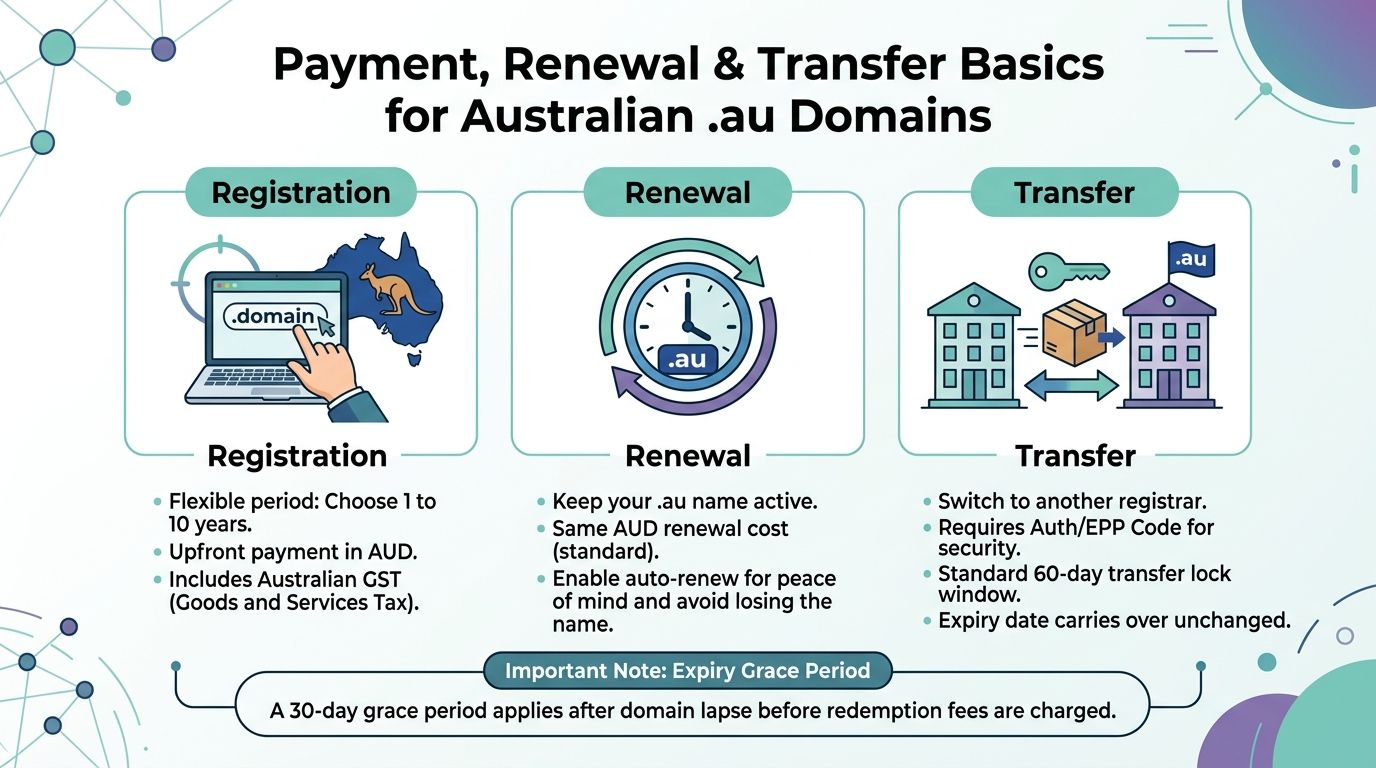
The infographic above shows the lifecycle of an Australian .au domain, covering GST-inclusive AUD pricing, a 1 to 5 year registration window, a 30-day grace period, and the 60-day transfer lock. The practical takeaway? Choose a sensible registration term and enable auto-renew to avoid the headaches of an expired domain.
Comparison of Common TLDs for Australian Businesses
Here’s a side-by-side look at the most common TLDs to help you choose the right one:
| TLD | Eligibility | Typical Use | Key Requirement |
|---|---|---|---|
| .com.au | Australian entities with ABN/ACN | Commercial businesses | ABN/ACN or registered business name |
| .net.au | Australian entities with ABN/ACN | Originally for network providers, now for commercial use | ABN/ACN and relevant business activity |
| .org.au | Non-profits and associations | Charities, clubs, community groups | Incorporation or association registration number |
| .edu.au | Accredited educational bodies | Schools, TAFEs, universities | Proof of accreditation from education authorities |
| .gov.au | Australian government agencies | Federal, state, local government | Government authorisation |
| .au (direct) | Australian presence required | Short, brand-focused names | Australian presence (e.g., ABN/ACN); priority rules applied in 2022 |
Think of yourname.com.au as a full postal address—it's descriptive and specific. A direct .au (yourname.au) is like a shorter street name—cleaner and easier to remember, but subject to stricter allocation rules.
The .au family isn't open like the global .com — eligibility acts as an access gate that protects local naming and prevents misuse.
Direct .au Specifics
Direct .au domain names became available in 2022, with a priority allocation period for existing .com.au holders. Now, for general registration, you still need to demonstrate an Australian presence and provide an appropriate identifier (like an ABN). In practice, if you hold yourname.com.au, you will often have the strongest claim to yourname.au.
Practical Steps for Businesses
- Match your entity type (sole trader, company, non-profit) to the correct TLD.
- Use
.com.aufor commercial operations,.org.aufor community groups, and.aufor concise branding if you're eligible. - Use a local registrar like UpTime Web Hosting to validate your eligibility and see GST-inclusive pricing upfront.
Prohibited Terms, Reserved Names, and Common Misconceptions
Many domain names look available but hit a policy wall during registration. If you're hoping to register a name that closely matches a well-known brand, be cautious. Such registrations are often blocked to prevent impersonation, and the registry will reject them unless you hold the trademark.
Then there are geographic names. Names of Australian states, territories, and their capital cities are generally reserved by auDA (the .au domain administrator). Certain words tied to regulated industries—like bank, insurance, or university—also require formal authorisation before you can register them in a .au domain.
A common misconception is that registering a domain gives you trademark ownership. It only gives you control of that web address. Someone else could still hold the trademark and challenge your right to the domain.
"Think of domain checks as a safety inspection before you move in." It saves you from costly reversals down the track and keeps your reputation intact.
Warning Signs to Double-Check
Before you get attached to a name, watch for these red flags:
- Trademark similarity — If your name closely matches a registered trademark, you may face a legal challenge.
- Geographic reservation — Check auDA's reserved lists before attempting to register a name of a major city or state.
- Sensitive industry words — Terms like "bank" or "university" almost always need formal backing.
- WHOIS mismatch — If your ABN or trading name doesn't match your WHOIS details, your registration can be suspended.
Practical Examples
Here’s how these rules play out:
- Example 1: A new fintech startup trying to register
aussiebank.com.auwould be rejected. The word "bank" is restricted and requires regulatory approval from APRA. - Example 2: A tourism operator attempting to register
sydney.auwould find it's a reserved name and not available for general registration. - Example 3: If you own
yourname.com.auand want to registeryourname.au, it's often straightforward, provided your eligibility is current and no one else has a priority claim.
Steps to Avoid Problems
- Search Australian trademark databases and auDA's reserved lists before you commit to a name.
- Ensure your ABN, ACN, or trading name matches your WHOIS details exactly.
- Avoid industry-restricted words unless you have the required documentation.
UpTime Web Hosting can help spot these red flags during the registration process. For more on WHOIS privacy for .au domains, check out this guide on Domain Privacy on AU domain names.
Practical Checklist And Next Steps For Australian Businesses
Before you register your domain, a final check can save you from future headaches.
Gather Your Evidence
Have your documents ready to prove your eligibility:
- An active ABN or ACN.
- Your registered business or trading name documents.
- A trademark number if you are claiming eligibility based on intellectual property.
- A verifiable Australian postal address and a monitored email address for your WHOIS record.
Decide on the Extension
Choose the domain extension that fits your entity. Use .com.au for commercial businesses, .org.au for non-profits, or the shorter .au for concise branding if you are eligible. Check for reserved names or sensitive terms that could block your registration.
Prepare WHOIS and Registrant Type
Getting these details right is critical:
- Select the correct registrant type (e.g., Company, Sole Trader, Association).
- Enter your WHOIS details exactly as they appear on your official documents.
- Use a business email address that you check regularly.
Choose Your Term and Billing
Select a registration period of 1 to 5 years. Enable auto-renew and keep a current payment method on file to avoid the 30-day grace period risk if a payment fails.
Before You Click Register
Run through these final checks:
- Perform a final name check with a local registrar like UpTime Web Hosting to validate your .au eligibility.
- Confirm GST-inclusive pricing in AUD.
- Consider any bundled hosting or email options that could simplify your setup.
After-Registration Hygiene
Once the domain is yours, secure it:
- Verify the WHOIS record immediately and correct any errors.
- Set up your DNS records with your Australian provider to point to your website and email services.
- Note the renewal date in your calendar with reminders.
- Keep digital copies of your eligibility documents (ABN/ACN) with your domain records.
Pro tip: Keep your WHOIS email active. Registries send critical verification, renewal, and recovery notices to this address.
Next Steps
For local support, bundled web hosting, and business email, register through UpTime Web Hosting. They offer transparent, GST-inclusive pricing and 24/7 Australian support to help validate your .au eligibility during signup.
Frequently Asked Questions About Domain Registration in Australia
What Documents Do I Need to Register a .au Domain?
To register a .au domain, you need to prove a verifiable connection to Australia. For companies, this is your ACN. For sole traders and other businesses, it's your ABN. If you're registering under a trading name, it must exactly match what's on your official records. For example, a Melbourne café with ABN 45 123 456 789 wanting mycafe.com.au must ensure their registrant name matches the legal entity name associated with that ABN. For detailed information, UpTime Web Hosting's knowledge base has a helpful guide on ABN requirements for .au registrations.
How Long Does the Registration Process Take?
Most .au registrations are completed within minutes once payment is processed and the automated eligibility checks are passed. However, some applications may be flagged for a manual review, which can take 1–3 business days. This might happen if there's a potential mismatch in your details.
Run an availability check right before registering. Domain availability and pricing can change quickly.
Can a Non-Australian Business Register a .au Domain?
Generally, no. The .au domain space requires a verifiable Australian presence. A non-Australian entity usually needs to have a registered Australian trademark to be eligible for a .com.au or .net.au domain name that is an exact match of the words in the trademark. This is a strict rule designed to keep the .au namespace local.
What Happens If My Registration Details Are Wrong?
Incorrect WHOIS data can lead to your domain being suspended or even cancelled. If a domain expires, you have a 30-day grace period to renew it. After that, it enters a more expensive "redemption" period or may be deleted. An expired domain is a security risk, so it's crucial to act fast. If you need help correcting WHOIS details, a local provider like UpTime Web Hosting can assist.
For local registration, hands-on support and GST‑inclusive pricing, visit UpTime Web Hosting at https://uptimewebhosting.com.au.