A Web Application Firewall, or WAF, is a security shield that inspects and filters the traffic going to your website before it reaches your code. With 512,000 DDoS attacks recorded globally in the fourth quarter of 2024 alone, and the global WAF market projected to grow from USD 9.90 billion in 2026 to USD 32.53 billion by 2033, it's become an essential defence for any Australian business with an online presence.
If you run a WordPress site, a cPanel-hosted store, an online booking form, or a members portal, you're already exposed to web traffic you didn't ask for. Some of it is normal. Some of it is bots, login abuse, injection attempts, or traffic designed to slow your site down until customers give up and leave.
That's why small businesses often ask the same question in plain English. What is a web application firewall, and do I need one? The short answer is yes, if your website is public-facing and matters to your business. A WAF sits in front of your site like a trained security guard, checking requests and blocking suspicious ones before they can do damage.
For many Australian business owners, the confusing part isn't the idea. It's the practical decision-making. How does a WAF differ from the firewall your host already mentions? What attacks does it stop? Is it enough for a WordPress site? And how do you know it's working, instead of just being another tick-box feature in a hosting plan?
Table of Contents
- Your Website's First Line of Cyber Defence
- How a Web Application Firewall Works
- Common Attacks a WAF Protects Against
- Types of WAFs and Deployment Models
- WAF Rules From Basic Signatures to AI
- WAF Best Practices for Australian Businesses
- Your WAF Checklist for Choosing and Configuration

Performance you can feel, backed by clients who depend on it. Read how our support and uptime create long‑term customer success.Power Your Business with Better Hosting
Your Website's First Line of Cyber Defence
You log in first thing Monday morning and notice something's off. Your contact form has stopped working, your checkout feels sluggish, and there are strange login attempts in your admin area. Nothing looks dramatic on the homepage, but you know something's happening behind the scenes.
That's the point where many business owners realise website security isn't just about backups and passwords. It's also about controlling what reaches the site in the first place. A Web Application Firewall does exactly that. It sits between the visitor and your website, inspects incoming requests, and blocks the ones that look malicious.
For a small Australian business, that matters more than ever. The global WAF market is projected to rise from USD 9.90 billion in 2026 to USD 32.53 billion by 2033, with a projected 18.6% CAGR, and that growth is tied to a 137% recent increase in denial-of-service attacks targeting web applications and APIs according to Coherent Market Insights research on the WAF market.
Why this matters for a business site
A basic brochure site can still be attacked through its login page. A local online shop can be targeted through checkout fields. A booking system can be abused by bots. If your website accepts input from people, forms, search bars, logins, comments, uploads, or payment details, it has an application layer that attackers can probe.
Practical rule: If your website helps you make money, collect leads, take bookings, or serve customers, it needs protection at the application layer, not just general server security.
A lot of owners start with broad advice first, and that's sensible. If you want a wider security baseline, this guide to Website security best practices is a useful companion read because it places a WAF inside the bigger picture of updates, access control, and ongoing monitoring.
For a more direct look at hardening a public-facing site, it also helps to review practical steps for protecting your website from common threats.
The simple definition that sticks
The easiest way to think about a WAF is this. Your normal firewall protects the property boundary. Your WAF protects the front desk, reception, and forms people fill in once they've walked through the gate.
That's why it's often the first serious cyber defence a small business notices when it starts taking its website seriously.
How a Web Application Firewall Works
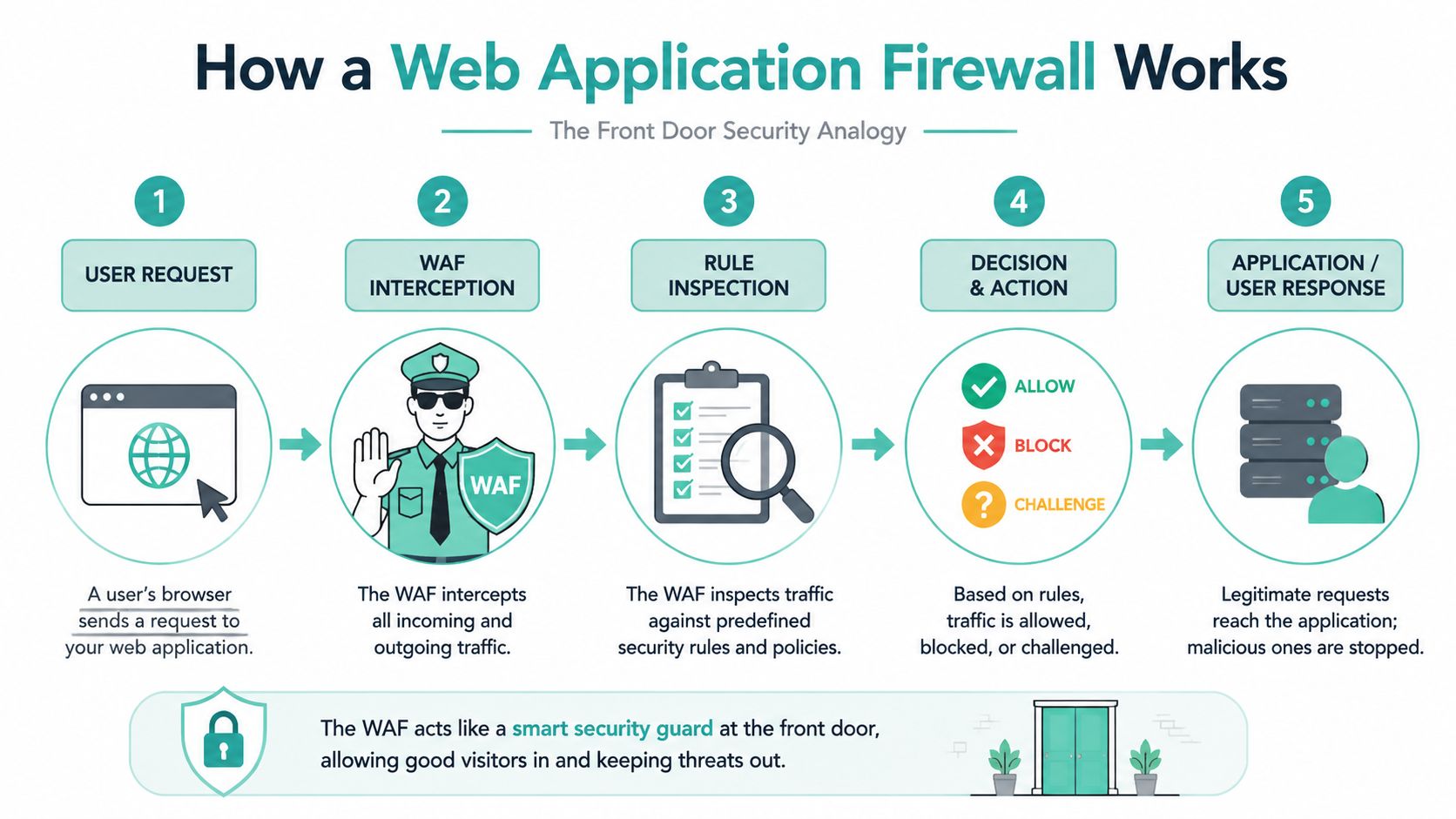
A WAF works by inspecting web traffic at Layer 7, which is the application layer. That means it doesn't just see that traffic exists. It looks at what the traffic is trying to do in the context of a website request, such as a login, a search, a checkout submission, or an API call.
The front door analogy
Think of your website like a shopfront. A network firewall is the roller door and building alarm. Useful, but broad. A WAF is the trained guard at the customer entrance checking what each person is carrying and whether their behaviour matches the rules.
A normal visitor loads a product page. Fine. A bot sends repeated suspicious requests to your login page or passes strange code into a form field. The WAF inspects that request before your application processes it. It can allow it, block it, or challenge it.
That's why a WAF is valuable for websites built on WordPress, WooCommerce, cPanel-hosted applications, customer portals, and payment pages. It's looking at the traffic your site receives, not just the existence of a connection.
Two ways a WAF decides what to allow
WAFs usually work with two broad security models. According to Palo Alto Networks' explanation of WAF security models, a blocklist model blocks known bad requests and allows the rest, while an allowlist model blocks everything by default and only permits explicitly approved traffic.
Here's the practical difference:
- Blocklist model: Good for many business websites that need flexibility. It stops known attack patterns, suspicious payloads, and requests from unwanted sources while still allowing regular visitors through.
- Allowlist model: Better when the application is tightly controlled, such as a restricted portal or specialised workflow. It's stricter, which can improve control, but it needs more planning.
- Custom rules: A WAF can also be configured to block a certain header, stop traffic from selected IPs, or restrict traffic by region when that fits the business need.
A WAF isn't just a yes-or-no filter. It's a policy engine for your website's front door.
If you use cPanel hosting, a practical example of this in action is shown in this cPGuard Web Application Firewall knowledge base article.html), which outlines how WAF protection is applied in a hosting environment familiar to many Australian small businesses.
Host your website with our 5-star rated, cPanel website hosting plans.
Super fast servers, with security included and hosted in your choice of Australian Data Center.
View cPanel Plans
Common Attacks a WAF Protects Against
The phrase OWASP Top Ten gets mentioned a lot in security conversations, and for good reason. It's a widely recognised way of describing the most important web application risks. Modern WAFs are engineered with out-of-the-box protection against the OWASP Top Ten vulnerabilities and can support compliance efforts such as PCI DSS, as described in the NSFOCUS WAF datasheet.
For a small business owner, the best way to understand that is through plain examples.
SQL injection in plain language
A SQL injection attack is an attempt to trick a website into treating user input like a database command. If you've got a login form, search field, or quote request form, an attacker may try to submit text that isn't normal customer input at all. They're hoping the site passes it through unsafely.
A WAF looks for patterns associated with that kind of malicious input. If the request matches known attack behaviour, the WAF can block it before the application processes it.
A simple way to picture it is this. Your receptionist asks for a name and phone number. Instead of answering normally, someone hands over a note telling the filing cabinet to dump all customer records. A WAF spots that the request is not a real customer action.
Cross-site scripting and malicious bots
Cross-site scripting, often shortened to XSS, happens when an attacker tries to inject browser-executed script into an input area such as a comment box, search parameter, or feedback field. If successful, that script can affect other visitors who load the page later.
A WAF helps by detecting suspicious script patterns in incoming requests and stopping them before they're stored or reflected back to users.
Then there are malicious bots. These aren't always dramatic attacks. Sometimes they scrape prices, hammer login forms, abuse search tools, or overload key pages. If you're interested in how anti-bot systems are assessed in scraping-heavy environments, this technical piece on benchmarking Imperva for scraping gives useful context on how bot defences are tested in practice.
The practical benefit of a WAF isn't just “better security”. It's fewer bad requests reaching the parts of your website that matter most.
For businesses worried about traffic floods as well as application-layer abuse, it's worth understanding the hosting side too. This overview of DDoS protected web hosting shows how broader traffic protection and WAF-style inspection fit together.
Types of WAFs and Deployment Models
Not every WAF looks the same. The core job is similar, but the way it's deployed changes how much control, maintenance, and complexity sits on your side.
The main deployment choices
For most businesses, WAFs fall into three practical models: hardware appliance, host-based software, and cloud-based service.
| Model Type | Best For | Management | Cost |
|---|---|---|---|
| Hardware appliance | Large organisations with strict internal control needs | Managed internally, usually by experienced IT or security staff | Higher upfront and operational cost |
| Host-based software | Businesses with custom server control and in-house technical capability | Managed on the server or application host | Variable, with more admin overhead |
| Cloud-based WAF | Small and medium businesses, WordPress sites, eCommerce stores, and growing online services | Usually the easiest to manage, especially when provider-managed | Often the most practical and predictable option |
A cloud-based WAF is often the best fit for Australian SMBs because it doesn't require buying dedicated hardware or becoming a WAF specialist yourself. It's easier to roll out, easier to update, and easier to scale if your traffic changes.
Which model suits a small Australian business
If you run a cPanel account, a WordPress site, or a business website supported by a hosting provider, a managed or cloud-based setup is usually the cleanest option. You want protection that stays current without your team needing to tune every rule manually.
That doesn't mean cloud protection is magic. Attackers actively study how these systems behave. If you want to understand that cat-and-mouse dynamic from the offensive side, this technical article on circumventing AWS WAF protections is a useful reminder that deployment alone isn't the same as proof of security.
A good decision lens for small business owners is simple:
- Choose cloud-based if you want speed, ease, and lower admin load.
- Choose host-based if your developer needs close control over a custom environment.
- Choose appliance-based only if your organisation already has the internal capability to manage it properly.
For businesses that want the hosting side handled with less operational friction, it helps to understand what managed web hosting in Australia typically includes around updates, support, and security responsibility.
WAF Rules From Basic Signatures to AI
Not all WAF rules are equally smart. Some are very good at catching known attack patterns. Others are designed to recognise unusual behaviour that doesn't exactly match an existing signature.

Signature-based rules
A traditional WAF often starts with signature-based detection. That works a bit like antivirus. If a request looks like a known SQL injection pattern, a known XSS payload, or another recognised exploit style, it gets flagged or blocked.
That's still useful. For many websites, signature rules stop plenty of routine attack traffic. But they're not enough on their own for every modern application, especially where APIs, dynamic services, and cloud-native workloads are involved.
Behavioural analysis and machine learning
Newer approaches matter. Some WAFs now use behavioural analysis and machine learning to work out what normal traffic looks like for a specific application. Instead of only asking “Have I seen this exact attack before?”, they also ask “Is this request behaving oddly for this website?”
That matters in Australia because Traceable notes that 73% of Australian organisations now run cloud-native apps, and cites a 2025 Cisco report saying 68% of Australian breaches stem from application-layer attacks unmitigated by older signature-based WAFs. For a small business, the takeaway is straightforward. If your site relies on modern plugins, APIs, third-party integrations, mobile app connections, or rapidly changing functionality, older rules alone may miss important threats.
Older WAF logic asks whether a request looks known-bad. Smarter WAF logic also asks whether the request looks wrong for your application.
That doesn't mean every business needs an enterprise-grade AI stack tomorrow. It does mean you should ask whether your WAF can adapt to changing traffic patterns, API abuse, and newer attack methods. If you're reviewing broader hardening measures for a growing site, this guide to exploit prevention for small business is a sensible next read.
Register your new domain name at competitive market prices including free domain add-ons like privacy, DNS Hosting, Custom Nameservers and Forwarding.
Always the best price and no nasty renewal price hikes.
Register A Domain Name
WAF Best Practices for Australian Businesses
A WAF can help a lot. It can also annoy your customers if it's switched on badly. That's where many businesses get caught. They buy protection, enable strict rules too quickly, and then wonder why valid users are being blocked during login, checkout, or form submission.
Start in monitor mode
Best practice is to begin in transparent monitor logging mode for 2–4 weeks before enforcing blocking rules, so your team can see what normal traffic looks like and reduce false positives. Teams should then tune WAF rules quarterly based on application changes, according to SentinelOne's guidance on WAF deployment and tuning.
That advice matters for small Australian businesses because your website probably changes more often than you think. You add a new payment plugin, change a booking workflow, launch a campaign landing page, or connect a new service. Each change can alter normal traffic patterns.
A sensible process looks like this:
- Observe first: Let the WAF log and inspect traffic before it starts blocking aggressively.
- Review the logs: Check whether legitimate customer actions are triggering alerts.
- Allowlist normal behaviour: Where needed, create exceptions for safe traffic patterns.
- Retune regularly: Revisit rules after site updates, plugin changes, and feature launches.
Ask how the WAF is validated
The most overlooked question isn't “Do you have a WAF?” It's “How do you know it's working against real attacks?”
That's especially important because the WAF itself can create a false sense of safety. A provider may say the feature exists, but that doesn't tell you how well it performs in your environment. For Australian businesses, validation matters just as much as deployment.
One useful prompt is to ask your developer, host, or IT partner these practical questions:
- How is the WAF tested? Ask whether they validate it using safe attack simulations or controlled checks.
- How are false positives handled? You want a clear process, not guesswork.
- Who reviews the logs? If nobody looks at alerts, the WAF becomes a silent box.
- How fast are rules updated? Especially after plugin issues, zero-day concerns, or changes to your site.
- Does it cover APIs and modern app traffic? This is essential if your website connects to other systems.
A WAF that's never tested is like a smoke alarm with flat batteries. It might still be on the ceiling, but that's not the same as protection.
Another practical point is integration. WAF logs are more useful when they're reviewed alongside the rest of your security signals, rather than sitting alone in a dashboard nobody checks.
Your WAF Checklist for Choosing and Configuration
If you want to ask smart questions before choosing a WAF, keep the checklist simple. You don't need to sound like a security engineer. You just need to be clear about what the business needs and how the protection will be managed.
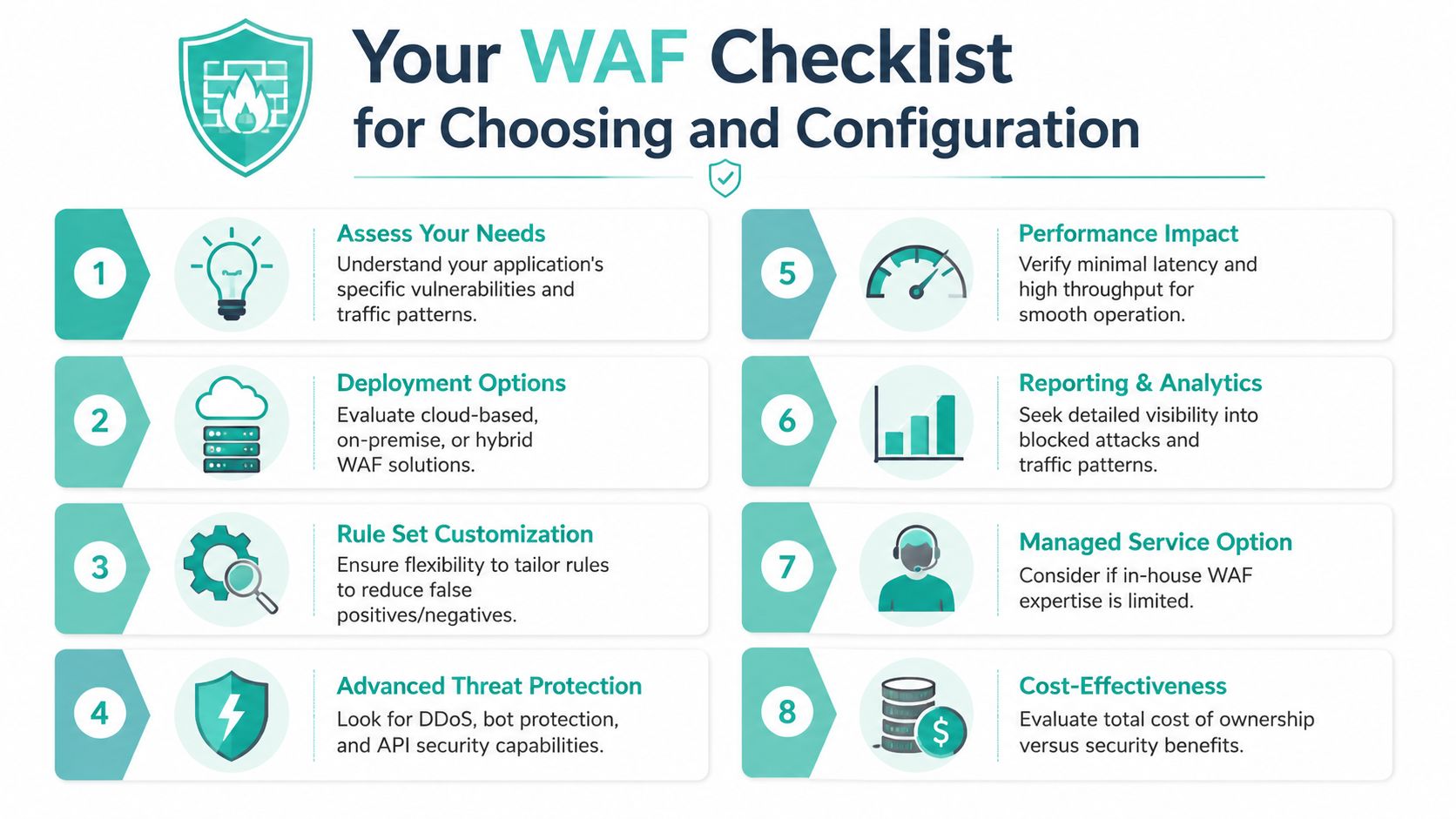
Ask your hosting provider, web developer, or IT partner:
- Does it protect public-facing pages? That includes logins, forms, checkout pages, dashboards, and APIs.
- Are rules updated automatically? A stale ruleset won't help much against changing threats.
- Will it start in monitor mode? That reduces the risk of blocking real customers too early.
- How are false positives reviewed? You want a documented tuning process.
- Does it cover OWASP Top Ten style attacks? That's the baseline many businesses need.
- Can it handle bots and abusive traffic? Not every bad request is a classic exploit.
- Is there visibility into what was blocked? Logs and reporting matter when something goes wrong.
- Who owns the tuning work? Your team, your developer, or the provider.
- Does it suit WordPress or cPanel hosting? The best answer is one that fits your actual setup, not a generic enterprise feature list.
- How is the WAF validated? That single question often tells you whether the protection is real or just marketed well.
If you've been searching for what is web application firewall, that's the practical answer. It's the system that stands in front of your website, checks incoming traffic, and blocks dangerous requests before they reach the application. For an Australian small business, the value isn't abstract. It's fewer attacks reaching your site, fewer service interruptions, and more confidence that customers can use your website safely.
If you want local hosting that already prioritises security, performance, and Australian support, take a look at UpTime Web Hosting. It's a practical option for businesses running WordPress, cPanel, email, and online services that need dependable infrastructure without the runaround.