
A .com.au domain is restricted to registrants with an Australian presence and commercial entity status, generally evidenced by an ABN, ACN or Australian trade mark number, and registration is completed through an auDA-accredited registrar such as UpTime Web Hosting.
You've picked a business name, started planning your website and decided you'd like matching business email. Then the registration form asks for legal details, and you're suddenly unsure whether to enter your own name, your trading name or your company's name.
Getting those details right matters more than rushing through checkout. Your domain needs to belong to the right entity, qualify under the Australian rules and remain under your control after launch.
Table of Contents
- Why Your Australian Business Needs a com au Domain
- What a com au Domain Is and How It Differs from Other au Namespaces
- Who Can Register a com au Domain Under auDA Rules
- How to Register Your com au Domain Step by Step
- Choosing a Registrar and Hosting Provider for Your com au Domain
- Renewals, Transfers and Protecting Your com au Domain
- Your Next Step to Register a com au Domain

Performance you can feel, backed by clients who depend on it. Read how our support and uptime create long‑term customer success.Power Your Business with Better Hosting
Why Your Australian Business Needs a com au Domain
Suppose you're starting a plumbing business. Your website will explain your services, your email will carry your business name, and customers will use both to decide whether to contact you.
A .com.au domain gives those activities an Australian commercial address. It's particularly relevant when your customers are Australian households or businesses rather than an international audience.
The local connection isn't just something you write on your contact page. It's part of the registration requirements, although that doesn't mean every website using the extension is trustworthy.
Practical rule: Treat .com.au as evidence of an Australian commercial connection, not a guarantee about the business behind a website.
Choose an address you can confidently use
Think beyond how the name looks in a browser. You'll say it over the phone, print it on invoices and give it to customers who may not know how you spell your business name.
Compare a short, recognisable name with an abbreviation you'd need to explain every time. If you're constantly correcting the spelling, reconsider the choice before ordering signage or stationery.
Your domain also belongs within a broader approach to online visibility. For background on how people discover businesses through AI-powered search, understanding AI search with MyMentions provides useful context. Don't confuse choosing an Australian address with a promise of search rankings or recommendations.
Make the administrative decisions early
Before paying, decide who will hold the registration and who will manage it. Those aren't necessarily the same person.
- Business control: Keep the registration in the eligible business entity's name, rather than casually using a developer's details.
- Account access: Decide which trusted person can approve renewals and changes.
- Budget responsibility: Compare registration, renewal and hosting costs separately.
- Ongoing management: Plan for transfers, contact updates and security, not just launch day.
These decisions give you a clearer starting point when the registration form asks for evidence.
What a com au Domain Is and How It Differs from Other au Namespaces
You're setting up a website for an Australian business and see several endings available. Understanding what each one represents helps you choose an address that fits your organisation.
.au is Australia's country-code top-level domain, introduced on 5 March 1986. Its namespaces work like different sections of an address system: com.au is used for commercial activity, while other endings serve particular groups or purposes. auDA's history of .au and Australia's digital identity explains the development of .au.
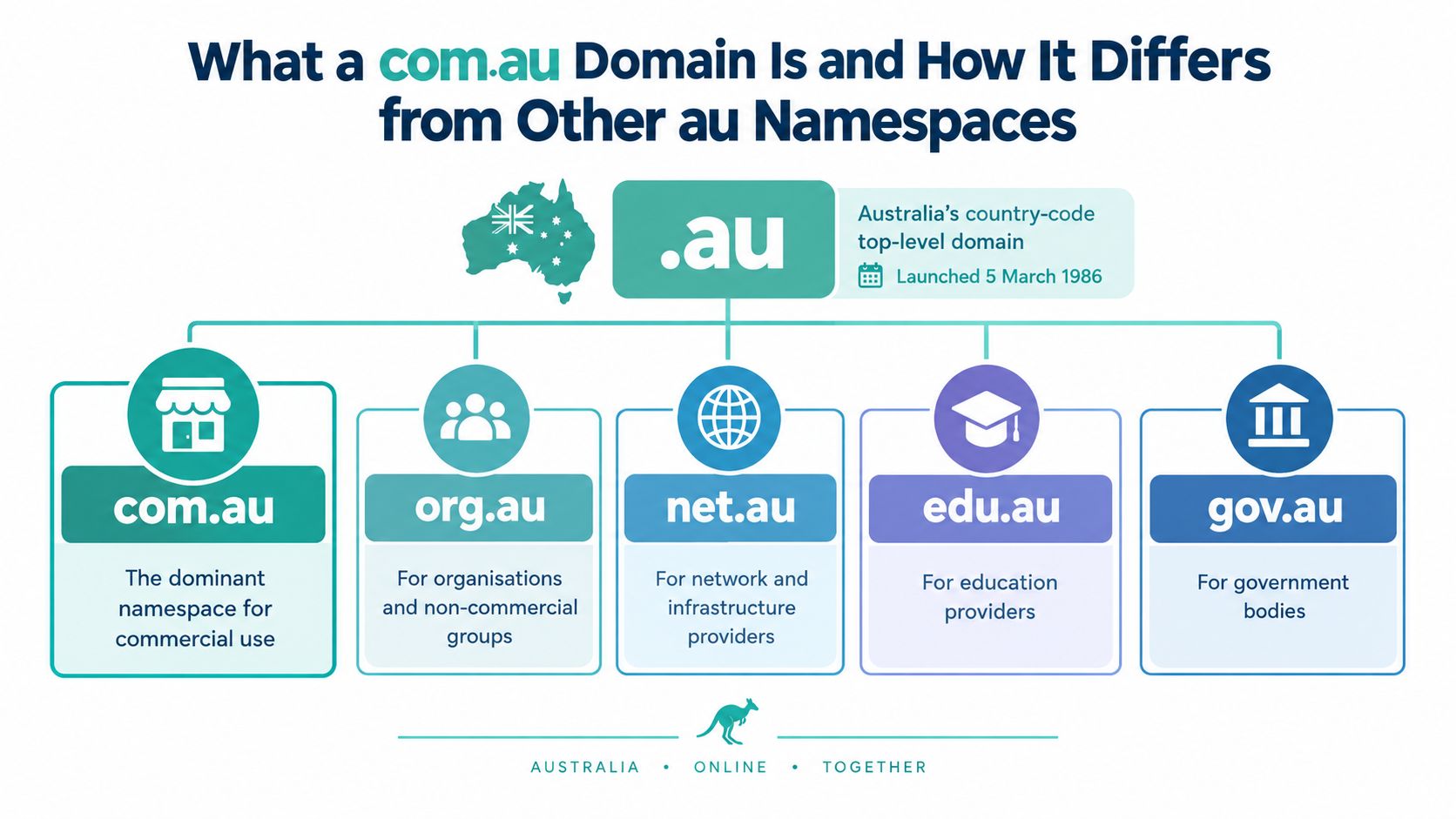
Where com.au fits
The namespaces are useful signposts, not interchangeable labels. A business comparing domain options can use this guide to see their general purposes:
| Namespace | General purpose |
|---|---|
| com.au | Australian commercial activity |
| net.au | Network-related entities |
| org.au | Organisations |
| edu.au | Education providers |
| gov.au | Government bodies |
| id.au | Individuals |
| .au direct | A shorter address directly under .au |
These descriptions are a starting point. The rules for who can register a name, and which names they can register, depend on the namespace.
How .au direct differs
A .au direct address leaves out the middle component. For example, example.com.au and example.au are separate domain names, not two spellings of one registration. Registering one does not automatically give you rights to the other.
For a small business, the choice affects how customers see and remember the website address. Consider whether you want the established commercial ending or the shorter format, then check availability and applicable rules before committing to either.
The guide to Australia's .au direct domain option explains how the shorter format compares with the commercial namespace. Choose the address you intend to use consistently on business cards, invoices and other customer-facing materials.
Host your website with our 5-star rated, cPanel website hosting plans.
Super fast servers, with security included and hosted in your choice of Australian Data Center.
View cPanel Plans
Who Can Register a com au Domain Under auDA Rules
Having an ABN is a common starting point, but it isn't the whole eligibility test. You need to distinguish who can hold the registration from which name that applicant can register.
auDA's .com.au eligibility guidance describes the Australian presence and commercial-entity requirements, including qualifying companies, sole traders, partnerships, foreign companies licensed to trade in Australia, and Australian trade mark owners or applicants. A physical Australian business address isn't necessarily required when the relevant commercial-presence requirement is satisfied.
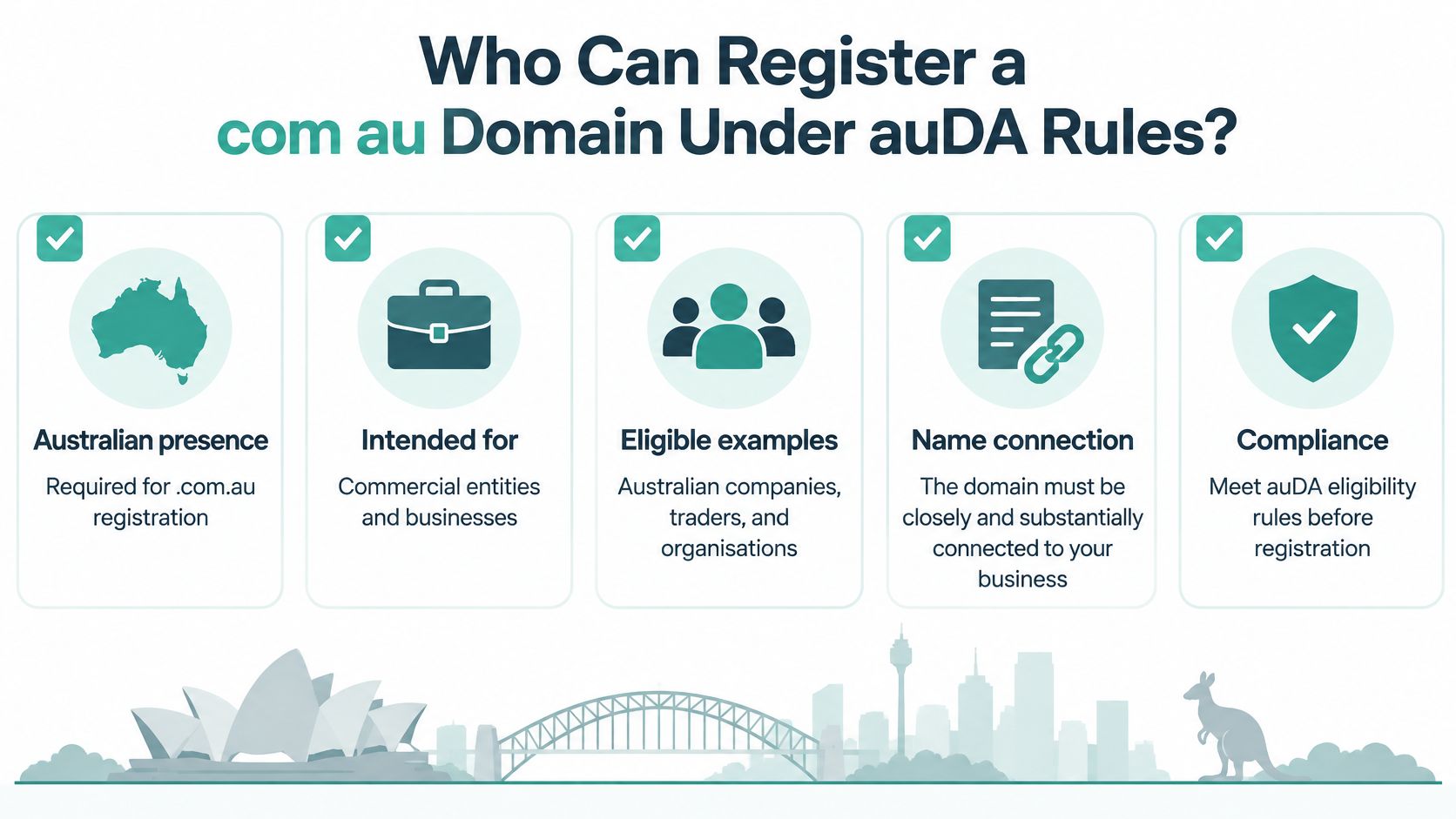
Eligibility and allocation are separate questions
Eligibility asks whether the applicant qualifies to hold a .com.au domain. Allocation asks whether the chosen domain has the required connection to that applicant.
Being eligible doesn't mean you can register any available name. Availability and entitlement are different checks.
An Australian sole trader with an active ABN could generally apply for smithplumbing.com.au if the name connects to their plumbing business. Other eligible categories include incorporated Australian associations and Australian commercial statutory bodies, as described in auDA's eligibility and allocation policy.
A domain based on a product or service may need a different explanation from one matching a registered business name. Don't assume the business's exact legal name is the only possible choice, but be ready to explain the connection.
Common situations that need care
- Registered company: Use the company's details, rather than a director's personal details because that person is completing checkout.
- Partnership: Confirm which entity and supporting identifier should appear before submitting the application.
- Foreign company: Check the evidence of authorisation to trade in Australia instead of relying only on an overseas registration.
- Trade mark applicant: Ask the registrar to assess the application evidence and applicable name restrictions before registering, rather than assuming pending status permits any name.
- Recently registered business: Confirm the registration details are verifiable and consistent with your application.
An inactive ABN deserves attention before checkout. Ask whether you remain eligible under another valid basis or need to resolve the business records first.
Likewise, moving from sole trader to company or changing a business name should trigger a registration review. Don't assume updating an invoice address also updates the domain's registrant.
For a practical preparation reference, use the domain registration requirements knowledge-base article. Gather the applicant's legal name, relevant identifier and evidence connecting the chosen domain to the business before you apply.
How to Register Your com au Domain Step by Step
Start with a name you can comfortably give a customer over the phone. Keep a shortlist in case your preferred choice isn't available or doesn't satisfy the allocation requirements.
Then complete the registration in the eligible entity's name. auDA's domain product guide explains the Australian-presence evidence generally used for .com.au, including ABN, ACN or Australian trade mark details; inconsistent records can cause validation, transfer or compliance problems.
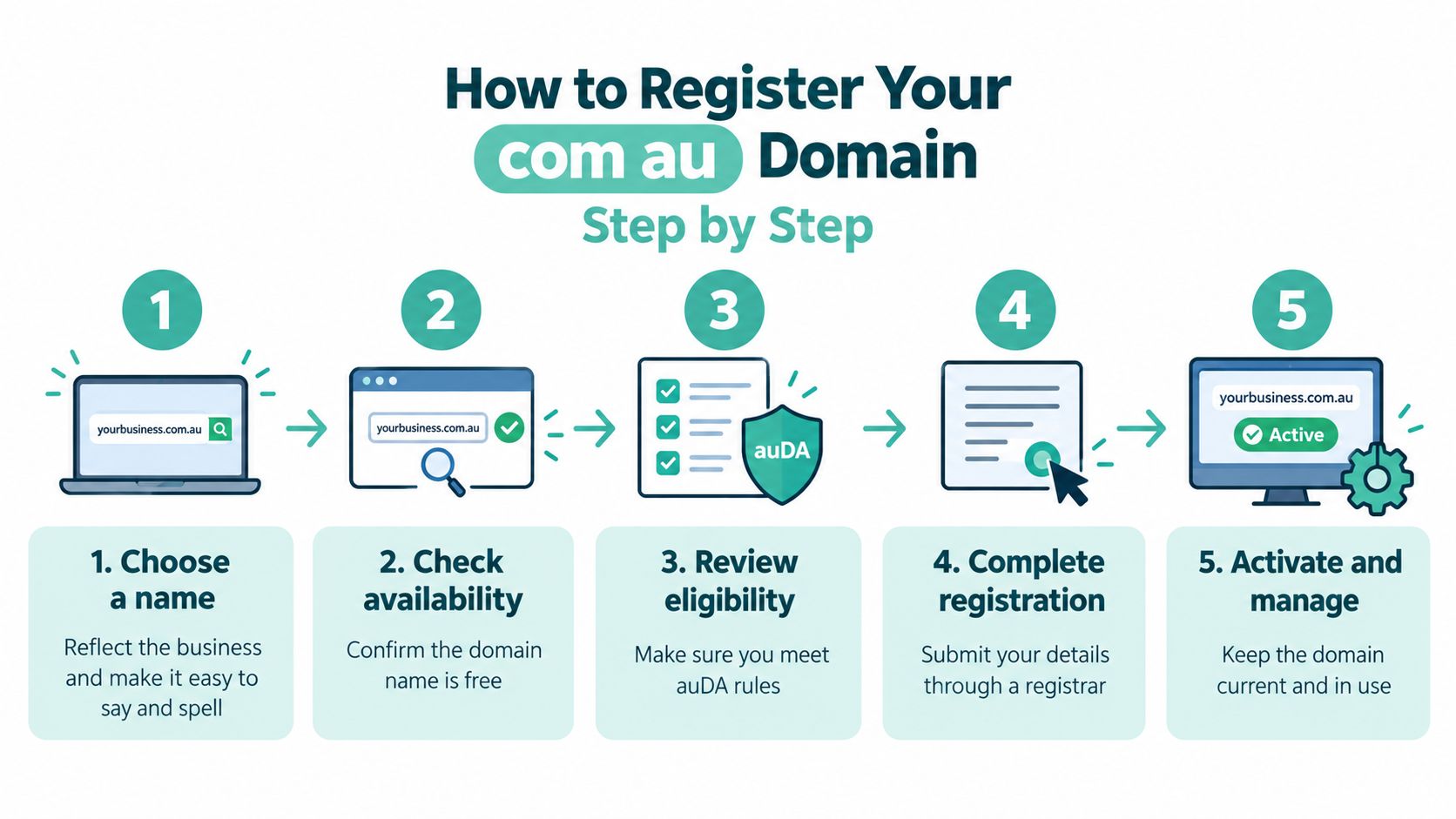
Work through the application carefully
- Choose your preferred name. Check spelling, readability and its connection to your business. A name that looks clever on screen may be awkward to explain aloud.
- Check availability through the provider's search tool. An available result is the start of the process, not confirmation that your eligibility has been approved.
- Review the applicant details. Match the registrant's legal name to the relevant business or trade mark records. Keep the trading name separate where the form requires it.
- Submit the required evidence and select a term. Review the registration charge, renewal information, GST treatment and any optional extras before checkout.
- Save the confirmation and arrange activation. Keep the invoice and account details somewhere the business can access, then organise the website and email connections.
Don't let a web designer complete the legal fields from memory. Give them approved details, or complete the registration yourself and arrange technical access separately.
Connect the domain without confusing it with hosting
The domain is your address; hosting is where your website runs. Registering the address doesn't, by itself, build the website or finish your business email setup.
Ask the provider to help connect the services you've chosen. The DNS propagation knowledge-base article explains what to expect when DNS changes are being recognised.
Before calling the job finished, check these practical outcomes:
- Website access: Confirm the intended site opens at your chosen address.
- Business email: Test sending and receiving through the service you've purchased.
- Account ownership: Make sure the business retains access to the management account.
- Billing records: Record the domain and hosting renewal obligations separately.
Keeping domain registration and hosting with one provider can simplify administration. It doesn't remove the need to check each service's renewal status.
Choosing a Registrar and Hosting Provider for Your com au Domain
A useful provider comparison starts with operational questions, not an introductory offer. Who handles the registration, how do you reach support, and what will you pay when the initial term ends?
Check whether you're dealing directly with an auDA-accredited registrar or through a reseller, and ask who manages validation or transfer problems. Also ask whether advertised features apply to your intended hosting plan, rather than assuming every service includes the same tools.
What to Look For in an Australian Domain and Hosting Provider
| Criteria | Why It Matters | What UpTime Web Hosting Offers |
|---|---|---|
| Australian service and locations | Helps you assess support arrangements and hosting location | Australian provider with servers in Sydney, Melbourne, Brisbane and Perth |
| Hosting platform | Your application must match the environment | cPanel, WordPress and ASP.NET Windows hosting |
| Related services | Can reduce the number of accounts you manage | Domains, email, Sitejet website builder and managed VPS |
| Website protection | Helps you compare practical safeguards | Free SSL, malware scanning and DDoS-protected firewalls |
| Performance tools | Relevant when selecting a suitable hosting plan | CloudLinux, LiteSpeed and AccelerateWP |
| Recovery arrangements | Important when planning for website problems | Encrypted off-site nightly backups and continuous monitoring |
| Billing clarity | Makes ongoing costs easier to assess | GST-inclusive pricing, no contracts and loyalty reward points |
| Support access | Determines how you get help when something needs attention | Local phone support, tickets and call-backs |
These are service features to compare, not a reason to skip the plan details. Ask which protections, tools and backup arrangements apply to the particular package you're considering.
Match the hosting to the actual website
For a straightforward small-business site, focus on manageable website tools, business email and accessible support. If you don't want to build in WordPress, ask whether the Sitejet website builder suits your editing needs.
For a WordPress website, discuss plugin requirements, maintenance responsibilities and which performance tools are included. For an ASP.NET application, confirm Windows hosting compatibility and any MSSQL requirements before ordering.
A managed VPS is another option when your application needs a different level of control or management. It shouldn't be the default just because the technical specifications look impressive.
- Ask about renewals: Compare the ongoing amount and billing term, not only the checkout total.
- Clarify responsibility: Find out who manages the website, email, backups and domain changes.
- Check recovery: Ask how you request a restore and what the selected plan covers.
- Confirm support scope: Establish whether help includes application troubleshooting or only the hosting environment.
Use the Australian domain registrar selection guide to frame those questions. Choose the combination that fits your website and your ability to manage it.
Register your new domain name at competitive market prices including free domain add-ons like privacy, DNS Hosting, Custom Nameservers and Forwarding.
Always the best price and no nasty renewal price hikes.
Register A Domain Name
Renewals, Transfers and Protecting Your com au Domain
A renewal email deserves the same scrutiny as an unexpected supplier invoice. Don't pay just because the notice includes your business name, domain or an Australian-looking sender address.
The ACCC's warning about domain name renewals explains that offers may come from suppliers other than your current provider, that businesses can choose whether to deal with them, and that some solicitations didn't provide registration services. Its scam warnings also highlight impersonation using stolen logos, a .com.au address and stolen ABN details.
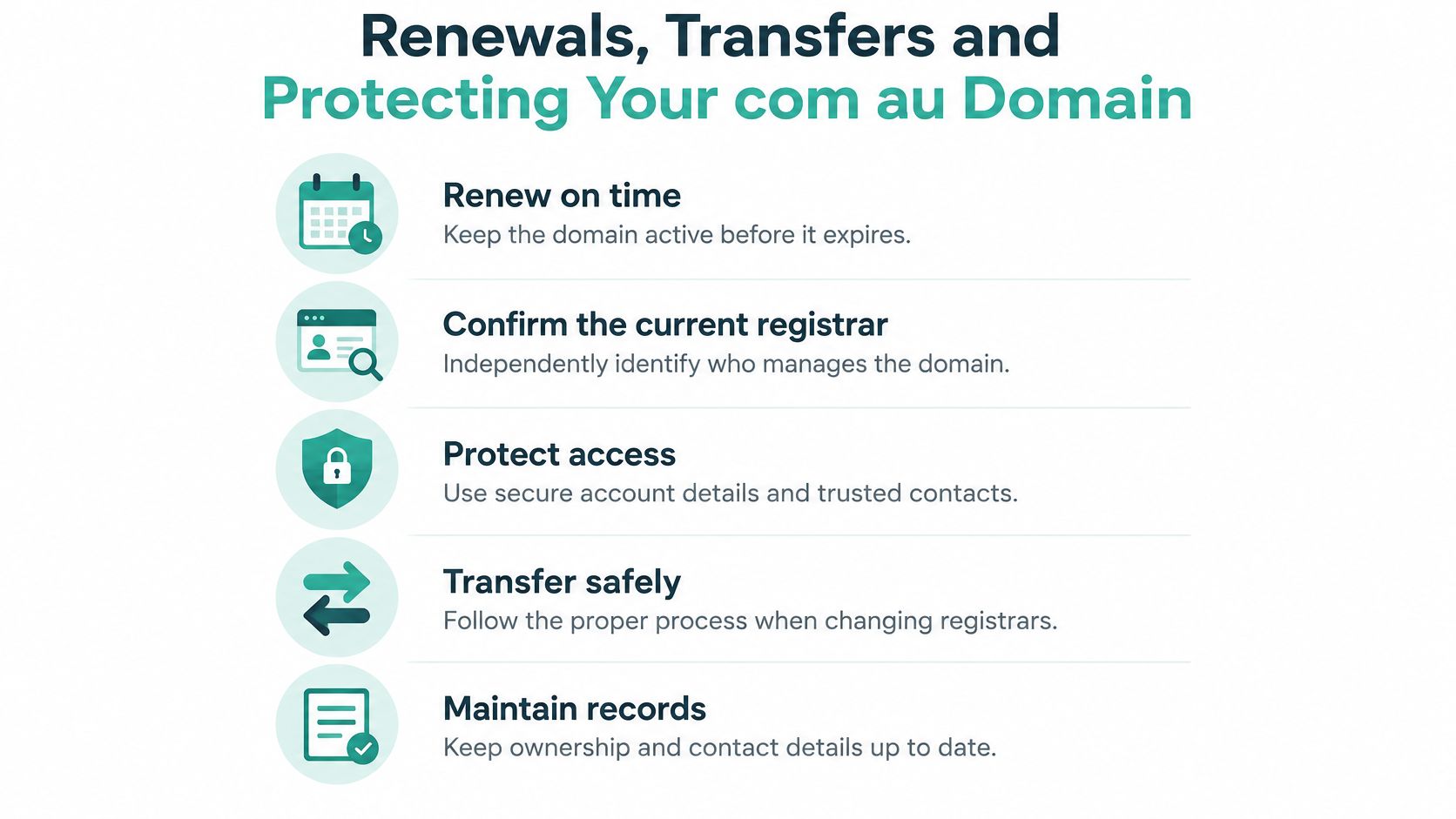
Verify the notice before paying
- Identify your current provider independently. Use your saved account details and previous records, not the contact information in the unexpected message.
- Open the official account yourself. Check the domain's expiry and whether a renewal is due.
- Compare the offer. Verify the domain, renewal term, price and whether the sender is proposing a different service.
- Preserve suspicious material. Keep invoices, the original email and its headers before reporting suspected deception to your provider and the relevant Australian authority.
A familiar logo and matching business details aren't proof that the sender is authorised to collect your renewal payment.
The domain renewal knowledge-base guide provides a practical reference for the legitimate process.
Transfer deliberately and protect DNS
When changing registrars, ask about the AUTH/EPP code, sometimes called the domain password, and provide it only through the intended provider's legitimate process. Confirm registrant details and discuss existing website and email settings before authorising changes.
For DNS protection, ask whether your registrar and DNS provider support DNSSEC. Australian DNS security guidance for domain owners recommends implementing it where possible on principal domains and, where practical, secondary domains.
DNSSEC uses cryptographic signatures to authenticate DNS data, helping defend against spoofing and cache poisoning. It doesn't encrypt web traffic or replace HTTPS, which protects the subsequent connection.
Ask the provider about DS-record publication, testing, signature expiry and key rollover. These are management responsibilities, not settings to enable and then forget.
Your Next Step to Register a com au Domain
Before opening checkout, put your chosen name beside the legal details you intend to submit. You should be able to identify the eligible applicant, explain the business connection and show consistent supporting records without guessing.
That small preparation step also helps when someone else assists with the website. Your developer can handle technical work without becoming the domain's registrant or the only person who knows how to access the account.
Prepare your registration handover
- Name choice: Keep your preferred address and a suitable alternative ready.
- Evidence: Gather the legal name and applicable business or trade mark details.
- Service selection: Decide whether you need hosting and email alongside registration.
- Management: Nominate the person responsible for account access, renewals and provider contact.
Check availability, then ask for help if the business structure or allocation basis is unclear. If you're transferring an existing domain, request a transfer review rather than starting an unrelated new registration.
Use the knowledge-base articles linked above for preparation and the support team for questions specific to your records. Getting the application right is worthwhile, but retaining control of the address is the longer-term job.
UpTime Web Hosting offers .com.au registration alongside Australian hosting, business email and website security features. Visit UpTime Web Hosting to check your preferred name or discuss a transfer, and ask the team to help confirm your eligibility details before you proceed.