
Protect your site, and decide what gets through.
UpTime uses stillorigin to sit in front of your website and turn away bots and attacks before they ever reach you. Network protection is included with your hosting. Website protection is the optional upgrade that gives your site a stronger shield, and your own page to see traffic and choose what gets through.
Powered by

Every website gets unwanted visitors.
Not all traffic comes from people. Bots visit websites all day. Some are useful, like search engines. Others try to guess passwords, look for weak spots, copy your content for AI models, or send so many requests that a site slows down or stops responding.
When that happens, it's your real visitors and customers who miss out.
You pay $0.00 today.
Auto-renews on 24 Dec 2026 at $4.95.
Price is in Australian dollars, including GST.
For new plans only, not applicable for upgrades.
Try Website protection free for one month. After that it continues as a monthly upgrade, and you can cancel at any time.
How stillorigin protects you
1
UpTime puts stillorigin in front of the server your website lives on.
2
Visitors pass through stillorigin on their way to your site.
3
Bad traffic is stopped there, before it reaches you.
4
Fine tune with optional Website Protection.
Think of it as a security guard at the front door. Real visitors walk straight in. Bots and troublemakers are turned away before they get inside.
UpTime sets stillorigin up and looks after it. There's nothing to install on your website, and your padlock in the address bar keeps working as it does now.
What you get
Your site stays up for the people who matter
When bots flood a website, stillorigin limits how much any one source can send and turns away repeat offenders, so your real visitors can still get through.
Your site stays up for the people who matter
When bots flood a website, stillorigin limits how much any one source can send and turns away repeat offenders, so your real visitors can still get through.
Your site stays up for the people who matter
When bots flood a website, stillorigin limits how much any one source can send and turns away repeat offenders, so your real visitors can still get through.
Extra protection for WordPress and other everyday apps
Website protection adds extra rules made for WordPress, and for other well-known apps such as WooCommerce, Drupal, Joomla and more.
Your own page, if you add Website protection
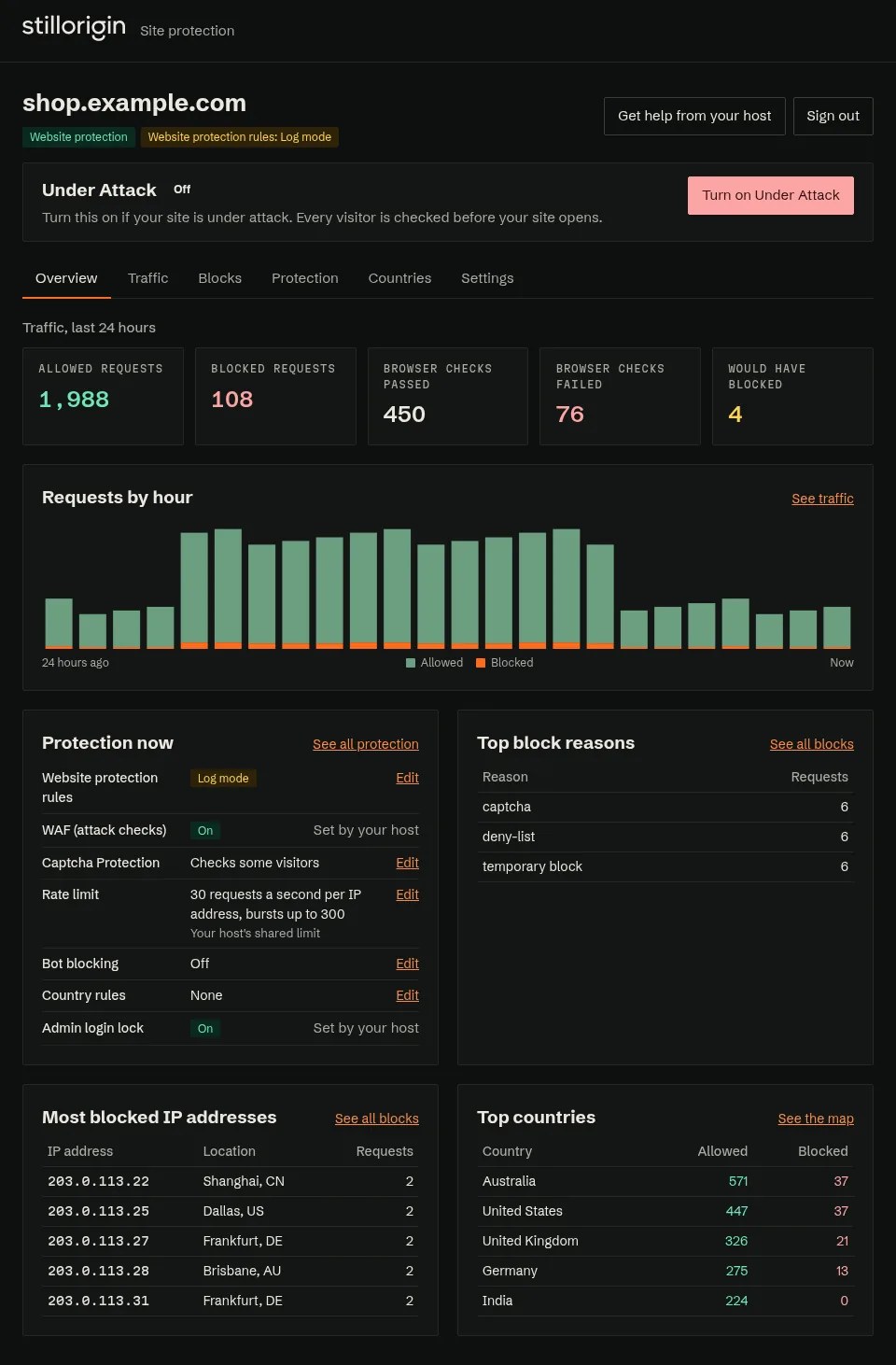
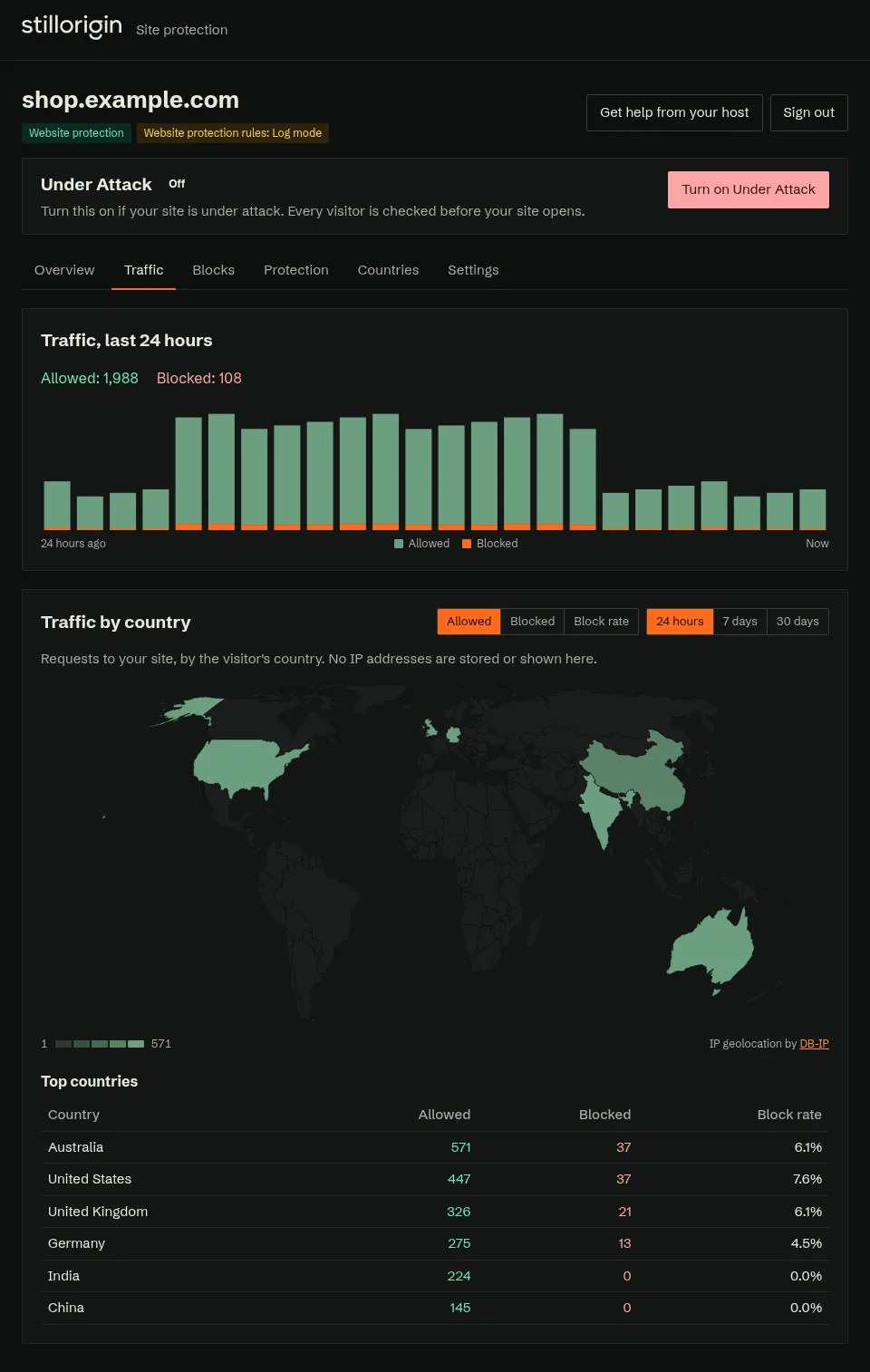
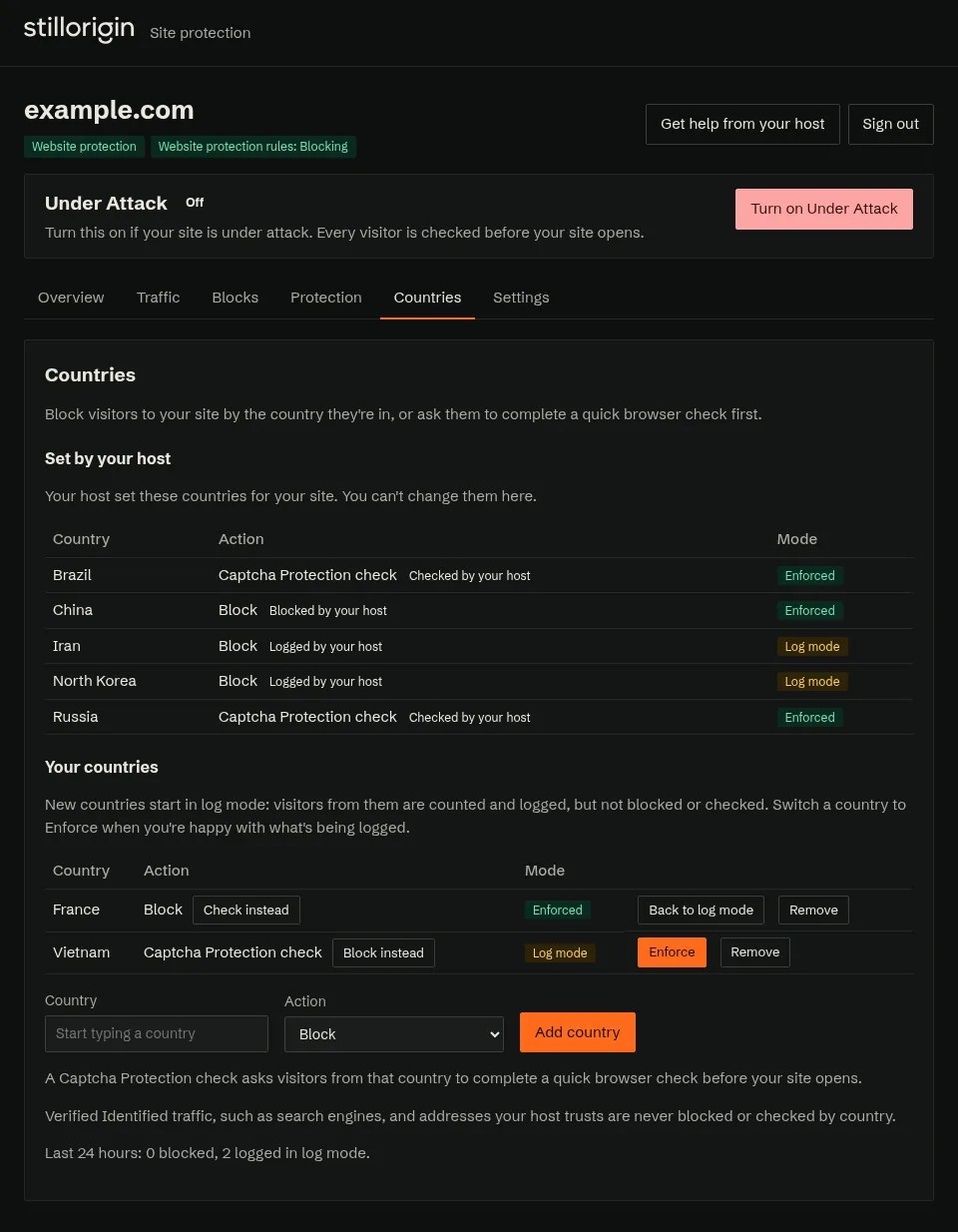
You don't need a stillorigin account. From your UpTime client area or cPanel, you can open a stillorigin page for your site: see your traffic, block countries or AI crawlers, slow down scrapers, and turn on a tighter check if your site is under attack.
What's included, and what you can add
Network protection
Included with your hosting
Network protection comes with every UpTime hosting plan, at no extra cost. stillorigin sits in front of your website, stops floods and known bad addresses, and keeps the junk off your server.
Website protection
Optional upgrade, one month free
Website protection is the optional upgrade, with a one-month free trial. You keep everything in Network protection, and you get a closer look at each request, a quick check for suspicious visitors, extra rules for apps such as WordPress, and your own stillorigin page to see traffic and choose what gets through.
| Network protection Included | Website protection Optional upgrade | |
|---|---|---|
| stillorigin in front of your website | ✓ | ✓ |
| Stops floods and known bad addresses | ✓ | ✓ |
| Search engines can still find your site | ✓ | ✓ |
| Nothing to install, and your padlock keeps working | ✓ | ✓ |
| Checks for common attacks on your pages | — | ✓ |
| Quick, automatic check for suspicious visitors | — | ✓ |
| Extra protection for WordPress and other apps | — | ✓ |
| Slow down scrapers on search, filter and shop links | — | ✓ |
| Block countries or AI crawlers, and switch on Under Attack | — | ✓ |
| Your own stillorigin protection page | — | ✓ |
Website protection includes everything in Network protection. It adds to what you already have; it doesn't replace it.
How to add it, and how to open your page
1
Order Website protection. You'll get a one-month free trial, then a monthly upgrade you can cancel at any time. There's nothing to install, and you don't need a stillorigin account.
You pay $0.00 today.
Auto-renews on 24 Dec 2026 at $4.95.
Price is in Australian dollars, including GST.
For new plans only, not applicable for upgrades.
2
Open your protection page once Website protection is on:
- In your UpTime client area, click Manage protection.
- In cPanel, open Manage protection under Security.
Either path opens your stillorigin page for that site.
The link is a secure one-time login with no username or password requied.
3
On your page you can:
- See how much traffic was allowed or blocked, and where it came from
- Block visitors from a country, or show them a quick check first
- Slow down, check or block scrapers on the addresses they hit most, such as search, sorting, filter and add-to-cart links
- Block AI crawlers and other services
- Turn on Under Attack if your site is being flooded, so every visitor is checked before the page opens
Common questions
Do I need to do anything?
Usually not. UpTime sets stillorigin up and looks after it. If you manage your own domain name settings (DNS), we may ask you to update a record so your traffic goes through stillorigin. If we look after your DNS, you don't need to do a thing. You don't need a stillorigin account.
Is Network protection already included?
Yes. Network protection is included with your UpTime hosting, at no extra cost. Website protection is the optional upgrade, and it's what unlocks your stillorigin protection page.
How do I open my protection page?
From your UpTime client area, click Manage protection. Or in cPanel, open Manage protection under Security. The page is for one website at a time, once that site has Website protection.
Will it slow my website down?
It's designed not to. Traffic makes one short extra stop on the way to your site, and real visitors pass straight through. By keeping bad traffic off your server, stillorigin helps your site stay responsive for the people who matter.
Will my visitors notice?
Most won't notice anything. If a visit needs a check, they see a stillorigin page that checks their browser automatically. People get through in a few seconds, with no puzzle to solve, and can then keep browsing. Shoppers can check out as usual.
What if a real person gets blocked?
Anyone can check their internet address at stillorigin.app/check. If it's on the stillorigin naughty list, they can ask for it to be removed from the listed address itself. For anything else, contact UpTime support.
Do I need a stillorigin account?
No. stillorigin is set up by UpTime. Your protection page opens from your UpTime client area or from cPanel.
Who do I contact for help?
UpTime. We set up and manage stillorigin for your website, so we're the best people to help. stillorigin doesn't offer support to website owners. Open a support ticket.
Give your website the extra layer of protection.
Try Website protection free for one month, powered by stillorigin. You'll get the stronger checks and your own protection page, on top of the Network protection already included with your hosting. Cancel at any time.
You pay $0.00 today.
Auto-renews on 24 Dec 2026 at $4.95.
Price is in Australian dollars, including GST.
For new plans only, not applicable for upgrades.