At its core, cloud backup is a service that copies and stores your business's data on a secure, remote server over the internet. Think of it as a digital insurance policy, ensuring you can restore your files and systems after a disaster, cyberattack, or simple hardware failure.
What Is Cloud Backup and Why Does It Matter?
Imagine your business’s most critical information—client records, financial data, and project files—tucked away in a secure digital vault, far from your physical office. This vault is always accessible, ready to get your operations back up and running at a moment's notice. That's the essence of cloud backup.
Unlike consumer-grade services, a dedicated cloud backup solution is built for one thing: business continuity. It’s not just about stashing files away; it's about structured, reliable recovery. The service automates the process of copying your data to a network of secure data centres, shielding it from local threats like fire, theft, or even a server giving up the ghost.
More Than Just Cloud Storage
It’s easy to mix up cloud backup with cloud storage services like Dropbox or Google Drive. While they both live in the cloud, their jobs are completely different. Cloud storage is all about file syncing and collaboration, making your files available across multiple devices. The catch? If you delete a file from your laptop, it’s often gone from the cloud, too.
Cloud backup, on the other hand, is a one-way street designed purely for protection. It creates historical versions of your data, letting you rewind and restore files from a specific point in time—before they were corrupted or accidentally deleted. This is absolutely fundamental for recovering from ransomware attacks where your files have been encrypted and held hostage. For example, if you're running a website, you need more than simple file syncing; you need a complete recovery point, which is why knowing how to properly backup a WordPress site is so critical.
The Foundation for Business Resilience
Our growing reliance on digital information has made data protection a non-negotiable for Australian businesses. This shift is clearly reflected in the market's explosive growth. In 2024, Australia's cloud backup sector generated USD 93.0 million in revenue and is projected to skyrocket to USD 415.2 million by 2030. That's a massive move towards securing business data, a trend you can explore in more detail in the full Grand View Research report.
This growth tells a simple story: downtime is expensive. Without a solid recovery plan, a single incident can halt your operations, damage your reputation, and lead to serious financial losses. A proper cloud backup strategy is your first and best line of defence, giving you a reliable path back to business as usual.
A robust cloud backup strategy isn't just an IT task; it's a core business function. It ensures that no matter what happens—from a fried hard drive to a sophisticated cyberattack—your organisation can recover, adapt, and keep serving its customers.
To make these distinctions crystal clear, let's break down the most common data protection methods side-by-side.
Cloud Backup vs Cloud Storage vs Local Backup
Here's a quick comparison to help you understand where each method fits in your data protection strategy.
| Feature | Cloud Backup | Cloud Storage | Local Backup |
|---|---|---|---|
| Primary Use Case | Disaster recovery and data restoration. | File syncing, sharing, and collaboration. | Quick, on-site data recovery. |
| Data Recovery | Point-in-time recovery for entire systems or individual files. | Limited to the most recent version of synced files. | Full restoration, but vulnerable to local disasters. |
| Automation | Fully automated on a set schedule (e.g., nightly, hourly). | Manual or continuous syncing of specific folders. | Often requires manual initiation or scheduling. |
| Vulnerability | Protected from local disasters and physical theft. | Not designed for disaster recovery; file deletion is often synced. | Vulnerable to fire, flood, theft, and ransomware. |
As you can see, while all three have their place, only cloud backup is purpose-built to get your business back on its feet after a major disruption.

Performance you can feel, backed by clients who depend on it. Read how our support and uptime create long‑term customer success.Power Your Business with Better Hosting
How Different Types of Cloud Backup Work
Knowing you need a cloud backup is the easy part. The real question is, which type of backup is right for your business? Not all backup methods are built the same, and the best choice hinges on what you need to protect and, crucially, how fast you need it back if things go wrong.
Let's break down the most common approaches.
This map helps visualise where cloud backup fits into the bigger picture. It works hand-in-hand with local backups and cloud storage, but each plays a distinct role in creating a truly resilient system.
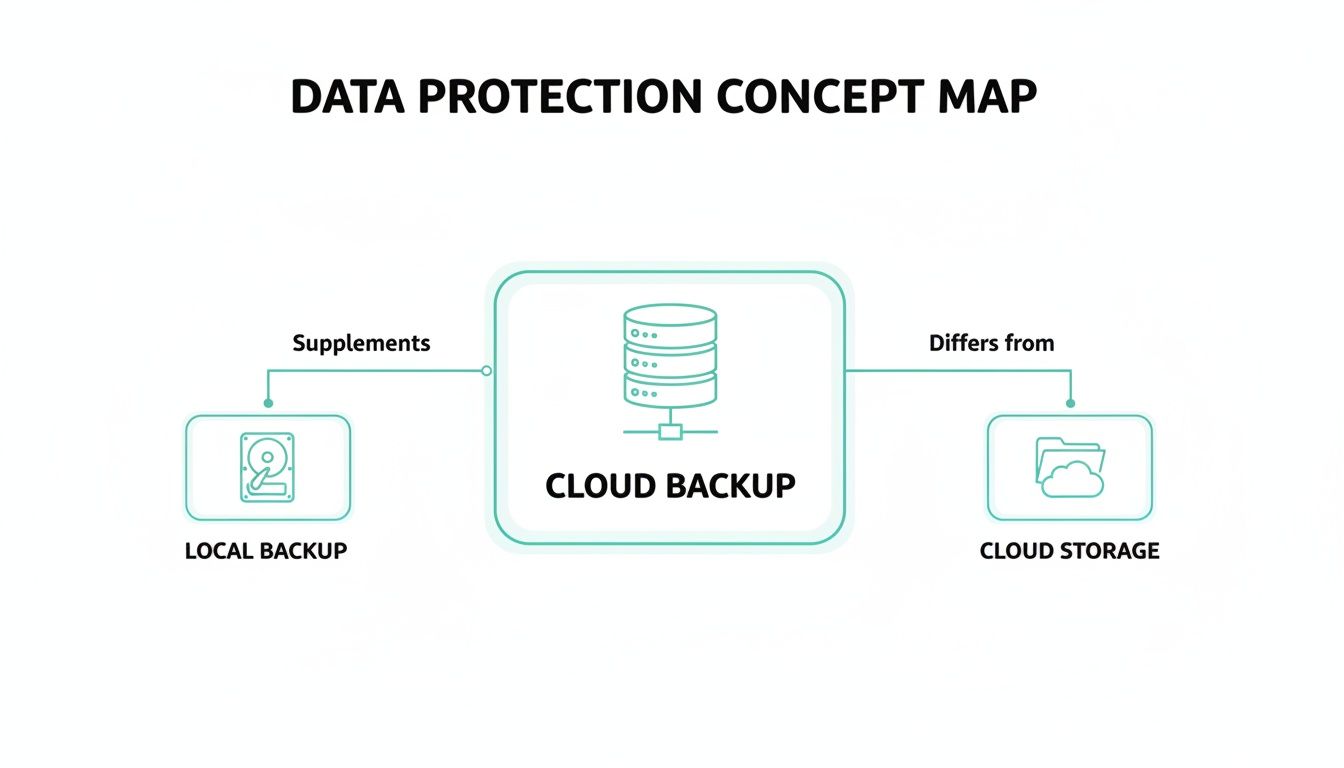
The key takeaway is that while all three handle your data, only a dedicated cloud backup service is properly optimised for structured, secure, and reliable disaster recovery.
File-Level Backup: The Selective Approach
The most straightforward method is file-level backup. Think of it as hand-picking the specific files and folders that are most important to your business and copying just those to the cloud. It’s perfect for protecting targeted, high-value data without the overhead of backing up your entire system.
A graphic design studio, for instance, might only back up its 'Client Projects' folder, which holds all their mission-critical Adobe Illustrator and Photoshop files. In the same way, an accounting firm could focus solely on backing up its financial records and client tax documents. This approach is efficient, uses less storage, and makes restoring a single, accidentally deleted file incredibly quick.
Image-Level Backup: The Digital Photocopy
When you need the whole shebang protected, you step up to image-level backup. This method takes a complete "digital photocopy" of an entire server or computer. It doesn’t just copy your files; it captures everything—the operating system, applications, settings, and all your data rolled into one complete package.
This is the gold standard for disaster recovery. If a server completely dies, you're not just restoring files; you're restoring the entire working environment. Instead of spending days reinstalling Windows Server, reconfiguring applications, and then copying data back, you restore the entire image to new hardware. You're back online in hours, not days. It’s a game-changer for minimising downtime after a catastrophic failure.
Image-level backups are your ultimate safety net. They provide the fastest path from a catastrophic system failure back to a fully operational state, forming the core of any serious business continuity plan.
Snapshots and Continuous Data Protection
In more dynamic environments, especially those running virtual machines (VMs), a couple of other methods come into play.
Snapshots: These are point-in-time copies of a VM's state. They're incredibly useful for developers who need to test a software update and want a quick way to roll back if something goes sideways. While they're not a substitute for a proper backup, they are a fantastic tool for immediate, short-term recovery. For a technical deep-dive, VMware’s knowledge base explains how snapshots function in virtual environments.
Continuous Data Protection (CDP): This is the most intensive form of backup you can get. Instead of running on a schedule, CDP saves changes almost instantly as they happen. If your system crashes at 2:15 PM, you can restore it to its exact state at 2:14 PM, virtually eliminating any data loss. For businesses processing a high volume of transactions, like an e-commerce store, CDP is invaluable for protecting revenue and customer trust.
Choosing the right cloud backup means matching the technology to your business needs. For many small Australian businesses, a hybrid strategy often works best—using file-level backups for specific data and image-level backups for critical servers. Services like Backblaze offer flexible options that can be tailored to fit these exact requirements, ensuring you have the right protection in place when you need it most.
Mastering Security and Encryption for Your Data
When you hand over your business’s most valuable asset—its data—to a third party, you need absolute confidence in their security. Choosing a cloud backup provider isn't just about storage space; it's about understanding how they protect your information. This isn't a minor technical detail; it's a fundamental business requirement to keep your data confidential, intact, and accessible only to you.
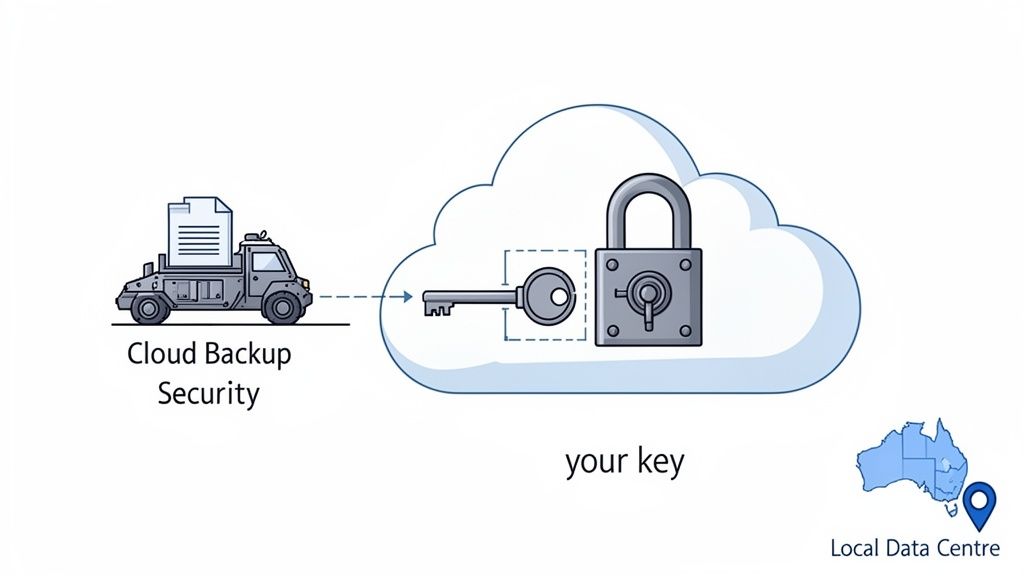
Think of the security process in two stages. First, there's protecting your data in-transit. This is like sending sensitive documents across the country in a locked, armoured truck. As your data travels from your server to the cloud, it’s scrambled using encryption, making it completely unreadable to anyone who might try to intercept it.
The second stage is protecting it at-rest—like storing those documents in a secure bank vault once they arrive. This means your data is also encrypted while it sits on the provider's servers, safe from any unauthorised access. This two-pronged approach is what we call end-to-end encryption, and it’s the gold standard for any secure cloud service.
The Importance of Private Encryption Keys
Now, a critical part of this is who holds the key to that encryption. The most secure setup is when you, and only you, control the private encryption key. If the provider holds the key, it introduces a potential weakness. A compromised provider could mean compromised data.
When you control the key, not even the provider’s own staff can see what’s in your backups. This is often called zero-knowledge encryption, and it gives you the ultimate control and peace of mind that your data remains completely private.
Data Sovereignty and Australian Data Centres
For Australian businesses, where your data is stored is just as important as how it's stored. Data sovereignty is the idea that your data is subject to the laws and regulations of the country where it physically lives.
By choosing a cloud backup provider that uses Australian data centres, you ensure your information remains under Australian jurisdiction. This simplifies compliance with local regulations like the Privacy Act and provides an essential layer of legal protection.
Keeping your data on Aussie soil is non-negotiable for many organisations, particularly those in government, healthcare, and finance. It prevents your sensitive information from being caught up in foreign laws or subject to overseas access requests.
Your Security Non-Negotiables Checklist
When you're sizing up a cloud backup provider, their security posture should be at the top of your list. Here are the essential security features you should be looking for—no excuses.
- Multi-Factor Authentication (MFA): This adds a crucial second layer of security to your account, usually by requiring a code from your phone before granting access. It’s a simple step that stops most unauthorised login attempts cold.
- ISO 27001 Certification: This is an internationally recognised standard for information security. It’s proof that the provider has implemented rigorous, audited processes to manage and protect data.
- Australian Data Centres: This confirms your data will be stored locally, respecting data sovereignty principles and Australian privacy laws.
- End-to-End Encryption: This guarantees your data is protected both while it's travelling to the cloud and while it's stored on their servers.
Treat this as your minimum standard. Any provider that ticks all these boxes takes your security seriously. For a deeper dive into how these elements fit into a wider strategy, you can find more insights on comprehensive IT security and protection right here.
Host your website with our 5-star rated, cPanel website hosting plans.
Super fast servers, with security included and hosted in your choice of Australian Data Center.
View cPanel Plans
Setting Your Recovery Goals with RPO and RTO
When you start planning a cloud backup strategy, two questions cut through all the technical noise: How much data can your business truly afford to lose? And how long can you actually stay offline before it starts to hurt?
Answering these isn't just for the IT department; it's a core business decision. The answers you give will shape your entire recovery plan, and they’re defined by two simple but powerful metrics: RPO and RTO.

Getting a handle on these concepts transforms your backup from a vague 'just in case' plan into a precise, measurable business tool. They're the numbers that dictate which backup method you choose, how often you run it, and what it’s going to cost.
Defining Your Recovery Point Objective (RPO)
Your Recovery Point Objective (RPO) is all about your tolerance for data loss. It sets the absolute maximum amount of data—measured in time—that you're willing to part with after something goes wrong.
Think of it like an undo button. An RPO of one hour means that if your system fails, the backup you restore from will be no more than an hour old. In other words, you accept losing up to one hour of work, whether that's new orders, customer emails, or file updates. For a deeper dive into figuring this out, check out this guide on defining your Recovery Point Objective (RPO).
Defining Your Recovery Time Objective (RTO)
While RPO is about your data, your Recovery Time Objective (RTO) is all about your downtime. It’s the clock on the wall, measuring the maximum amount of time your business can afford to have a critical system offline. Put simply, it answers the question, "How fast do we need to be up and running again?"
An RTO of four hours means from the moment disaster strikes, your team has a four-hour window to get everything restored and operational. This goal directly impacts your choice of technology and recovery processes. A very short RTO often demands high-speed infrastructure and automated, one-click restoration tools.
RPO and RTO are the foundation of your disaster recovery plan. RPO determines your backup frequency, while RTO dictates the speed and method of your restoration. Getting them right ensures your cloud backup strategy aligns perfectly with your business needs and budget.
Practical Scenarios for Australian Businesses
Of course, these goals aren't one-size-fits-all. They hinge entirely on how vital a particular system is to your day-to-day operations. A bustling e-commerce store taking orders every minute needs much tighter RPO/RTO targets than an internal file server the marketing team uses once a week.
Setting these targets is a crucial first step in building effective corporate backups and recovery plans that actually work when you need them to.
To give you a clearer picture, here’s how different types of Australian businesses might approach setting their RPO and RTO targets.
Example RPO and RTO Targets for Australian Businesses
| Business Type | Example Scenario | Suggested RPO | Suggested RTO |
|---|---|---|---|
| Online Retail Store | A busy Shopify site processing hundreds of customer orders per hour. | 15 Minutes | 1 Hour |
| Accounting Firm | Client financial data and tax records are updated throughout the business day. | 1 Hour | 4 Hours |
| Creative Agency | A server storing large design files and project assets. | 24 Hours | 8 Hours |
| Local Medical Clinic | Patient appointment and record systems are critical during office hours. | 30 Minutes | 2 Hours |
As the table shows, a lower RPO or RTO (meaning less data loss and faster recovery) usually calls for more frequent backups and more advanced recovery tools, which naturally increases costs.
The goal is to strike the right balance between bulletproof protection and your budget, making sure your most critical systems always have the tightest safety net.
Navigating Australian Compliance and Data Laws
For any Aussie business, looking after customer data isn't just a good idea—it's the law. When you pick a cloud backup solution, you're not just buying a piece of tech; you're bringing on a partner to help you stay compliant. Getting your head around the local legal landscape is mission-critical to make sure your data strategy is both solid and above board.
The bedrock of data protection in Australia is the Privacy Act 1988. This piece of legislation lays down the rules for how businesses must handle personal information. A reliable cloud backup system is a massive part of meeting your duties under the Act, as it shows you're taking sensible steps to shield data from misuse, loss, and anyone getting access who shouldn't.
The Notifiable Data Breaches Scheme
Tucked inside the Privacy Act is the Notifiable Data Breaches (NDB) scheme, and it's a big deal. The scheme says that if your business suffers a data breach that's likely to cause serious harm, you have to tell the people affected and the Office of the Australian Information Commissioner (OAIC).
This is where your cloud backup strategy really proves its worth. Being able to restore your data quickly and cleanly can be the difference between a small internal headache and a public, reputation-damaging breach. Imagine a ransomware attack locks up your main server. If you can restore everything from a clean, off-site backup, you get back in business without paying a ransom and might even avoid the whole incident becoming a notifiable breach in the first place.
Industry-Specific Data Retention Rules
On top of the Privacy Act, many industries have their own unique rules for keeping and protecting data. Sectors with heavy compliance needs are driving serious growth in Australia's data backup market, which is projected to grow at a steady CAGR of 6.14% between 2025 and 2031. Healthcare, with its incredibly strict requirements for patient data, is a huge part of this trend.
Key Compliance Considerations for Your Cloud Backup:
- Finance: Financial services firms have to follow APRA standards, which often demand very long retention periods for transaction records.
- Healthcare: Medical records need to be stored securely for specific timeframes under health records laws, with tight controls on who can see them.
- Legal: Law firms have a duty to keep client information confidential and must protect sensitive case files from being lost or seen by the wrong people.
Asking the Right Questions About Data Sovereignty
This brings us to a crucial point: data sovereignty. Choosing a provider with local data centres is one of the most important things you can do to meet your compliance obligations. Keeping your data on Australian soil means it's governed by Australian laws, plain and simple. It's vital to understand why it’s important to host your website in Australia, because the exact same logic applies to your backups.
While our focus is rightly on Australian laws, it’s also smart to be aware of global standards, like EU data sovereignty considerations, as these often shape how international cloud services operate. A provider who gets these principles is better positioned to support your compliance needs, ensuring your backup strategy is a true asset to your legal responsibilities.
How to Choose the Right Cloud Backup Provider
Picking a partner to protect your business's data is a big decision, one with long-term consequences. The right provider is like an extension of your team, but the wrong one can be a source of constant risk and frustration. This is especially true here in Australia, where data protection is a growing focus. With total IT spending expected to rocket past AUD 172 billion in 2026, Aussie businesses are smartly turning their attention to cloud security and cost efficiency. For a deeper dive into these spending trends, you can review the full analysis of Australia's IT landscape.
To make a good choice, you need a solid framework for sizing up potential cloud backup providers. It’s not just about the price—it's about the real value and security they bring to the table.
Security and Reliability Guarantees
Security has to be your first checkpoint. You need to confirm the provider offers end-to-end encryption, which means your data is scrambled and unreadable both while it’s travelling over the internet (in transit) and when it's sitting on their servers (at rest).
Just as critical is where that data is stored. For Australian businesses, local data centres are a must for data sovereignty, ensuring your information stays under Australian law. You can see how server locations impact performance and compliance to get a better sense of why this matters so much.
Next, you need to dig into their reliability. A provider’s Service Level Agreement (SLA) isn’t just marketing fluff; it’s their contractual promise of uptime. You should be looking for a guaranteed uptime of 99.9% or higher. Think of that number as your insurance policy—it’s the guarantee that your backup service, and more importantly your data, will actually be there when you desperately need it.
Cost Transparency and Hidden Fees
A low sticker price can be very misleading if the fine print is loaded with hidden charges. One of the most common traps in the cloud industry is egress fees—that's what they charge you to retrieve your own data. Imagine getting hit with a massive, unexpected bill just for restoring your systems after a disaster. It happens.
A provider you can trust will have a transparent, all-inclusive pricing model. You should know exactly what you’re paying for storage and what it will cost to pull everything back down in a full restoration. Ask them straight up: "Are there any fees for data retrieval?" The answer you want to hear is a simple "no."
A great cloud backup provider sells a predictable outcome, not just gigabytes of storage. Their pricing should be straightforward, with no surprises, reflecting a partnership built on trust and transparency from day one.
The Value of Local Australian Support
When your systems are down and every minute feels like an hour, the absolute last thing you want is to be stuck on hold with an overseas call centre. Having access to a local, 24/7 Australian support team who actually understands your business context is priceless.
- Local Expertise: A team on the ground gets the specific challenges and compliance hoops Australian businesses have to jump through.
- Faster Resolutions: When you need help, you get it in your own time zone—not hours later.
- Clear Communication: No language barriers or awkward communication gaps means problems get solved faster and more effectively.
Look for providers that offer a few different ways to get in touch, like phone, email, and a proper ticketing system. And make sure to check customer reviews, paying close attention to what people say about the quality of their support. This human element is often what makes the difference between a minor hiccup and a major disaster.
Register your new domain name at competitive market prices including free domain add-ons like privacy, DNS Hosting, Custom Nameservers and Forwarding.
Always the best price and no nasty renewal price hikes.
Register A Domain Name
Your Cloud Backup Questions Answered
Even with the best strategy in place, a few questions always seem to pop up just before you pull the trigger on a cloud backup provider. We get it. To help clear things up, here are answers to some of the most common queries we hear from Australian business owners.
How Much Does Cloud Backup Cost?
Cloud backup pricing isn't one-size-fits-all; it can vary quite a bit. The final figure usually comes down to three things: how much data you’re backing up, how long you need to store it (your retention period), and the specific features you need.
The most important thing is to find a provider who is upfront about their pricing. You need to watch out for hidden costs, especially "egress fees"—charges for simply pulling your own data back out. A good partner will help you find a plan that meets your RPO and RTO targets without breaking the bank.
Can I Access My Backed-Up Files From Anywhere?
Absolutely. In fact, that’s one of the biggest advantages of a modern cloud backup solution. Any decent provider will give you a secure web portal or management console. From there, you can check on your backups, tweak settings, and most critically, kick off a restore from anywhere with an internet connection.
This is a game-changer for disaster recovery. If your office is out of action because of a fire or flood, you can start the recovery process from another location, getting your business back on its feet much, much faster.
What Happens if My Internet Fails During a Backup?
Professional cloud backup tools are built to handle real-world problems like a dodgy internet connection. A dropout won't corrupt your data. If your connection drops in the middle of a transfer, the software is smart enough to simply pause the backup.
Once your internet is stable again, it picks up right where it left off. You won't have to start the whole thing from scratch, which saves a massive amount of time and bandwidth.
A big worry for many is whether cloud backup is truly secure enough for sensitive business data. With the right provider, the answer is a resounding yes. In fact, modern solutions often deliver security that’s far superior to keeping tapes or drives on-site. For a closer look at proactive security, it's worth exploring guides on securing backups with threat detection from industry leaders.
Ready to secure your business with a reliable, local partner? UpTime Web Hosting includes encrypted, off-site nightly backups with all our hosting plans, managed right here by our Australian team. Protect your data with a provider who puts your security first. Explore our secure hosting solutions today.