You open your inbox on a Monday morning and there it is again, an alert about a WordPress plugin flaw, a customer asking if your site is safe, and a hosting login full of notices nobody has time to triage. For many Australian small businesses, that's what security feels like, too many moving parts, not enough hands, and a nagging sense that one missed update could become a bigger problem.
Vulnerability scanning is the routine that helps bring order to that mess. It checks your systems, websites, servers, and cloud settings for known weaknesses, then turns the results into a report you can act on before someone else finds the gap first. The important part isn't the scan itself, it's what you do with the output.
Table of Contents
- A Realistic Picture of What Vulnerability Scanning Does
- How a Vulnerability Scan Works Step by Step
- The Main Types of Vulnerability Scans and When to Use Each
- How Vulnerability Scanning Differs From Penetration Testing
- Real Benefits and Honest Limitations of Vulnerability Scanning
- Practical Best Practices and a Realistic Scan Frequency for SMBs
- How UpTime Web Hosting Supports Vulnerability Scanning
- Next Steps Resources and Your 30 Day Action Plan

Performance you can feel, backed by clients who depend on it. Read how our support and uptime create long‑term customer success.Power Your Business with Better Hosting
A Realistic Picture of What Vulnerability Scanning Does
A café owner in Melbourne updates a WordPress plugin on Friday, then wakes up Saturday to a warning email from the plugin vendor. The customer who runs the online bookings page wants to know if their details are exposed, and the owner's hosting inbox already has three more alerts from different tools. That's the point where vulnerability scanning stops being a technical term and becomes a practical question, what's at risk, and what needs fixing first?
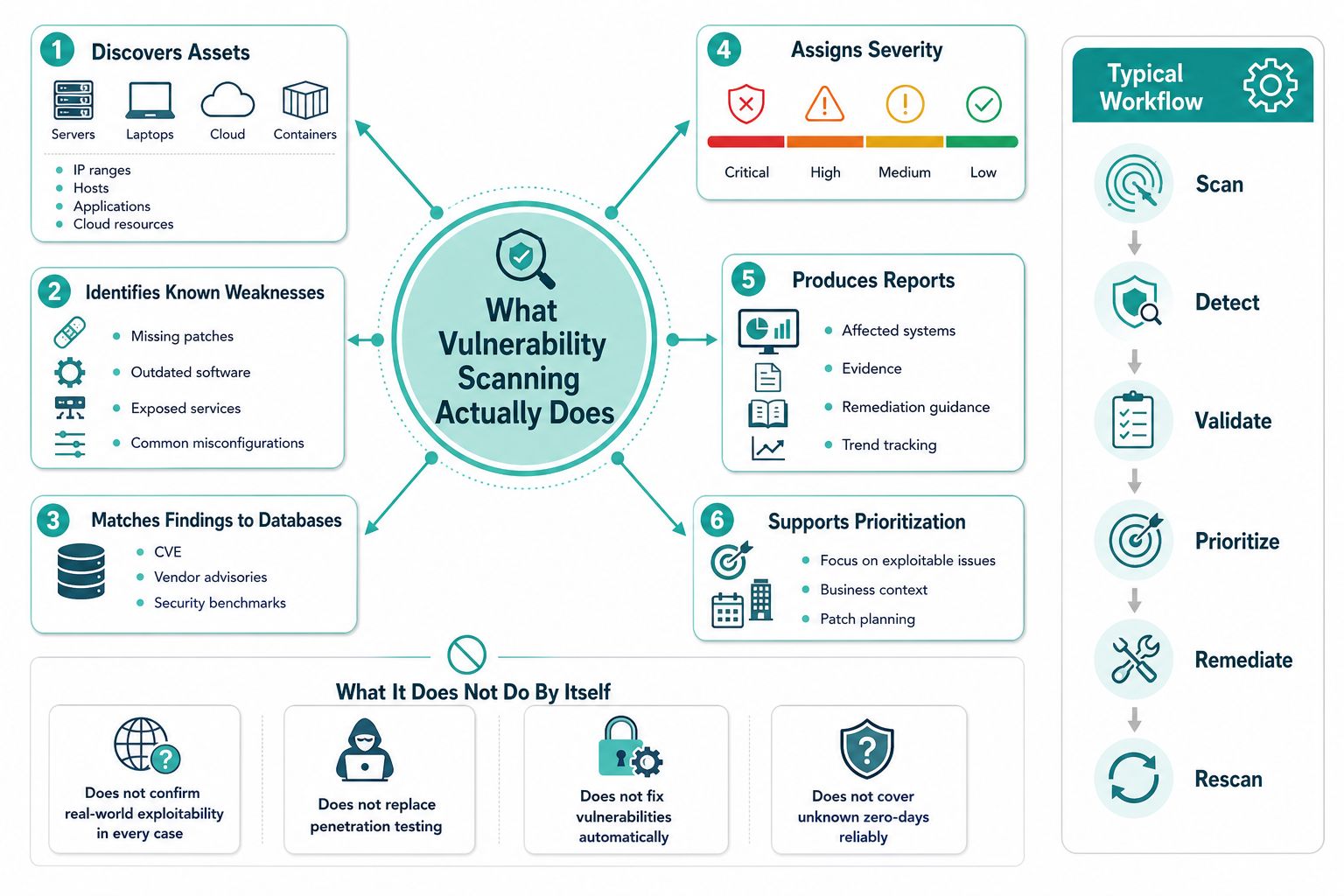
At its simplest, vulnerability scanning is a structured check for known weaknesses in systems you own or manage. It looks for missing patches, exposed services, insecure settings, and other conditions that attackers commonly probe. The goal isn't to “hack” anything, it's to give you a clearer map of what needs attention before a problem becomes public.
What it tells you, and what it doesn't
For SMBs, the useful categories are usually straightforward. A network scan checks internet-facing or internal services. A web application scan looks at the site layer, including content management systems and plugins. A host scan checks the machine itself, which matters when a server or endpoint has details that a remote probe can't see.
Practical rule: if you can't name the assets you're scanning, you're not ready to trust the results.
That's why scanning is best thought of as a discovery and prioritisation habit, not a one-off audit. It helps you answer three questions, what exists, what looks weak, and which items deserve attention first. If you're also handling sensitive data for a community group or charity, resources like safeguards for church funds show how security routines translate into practical stewardship, even when the environment isn't complex.
A useful hosting setup matters here too. If you want a plain-English overview of the baseline protections a small business should expect from its web host, the page on cyber security for small business gives a good local reference point for the kinds of controls that sit around a scan routine.
How a Vulnerability Scan Works Step by Step
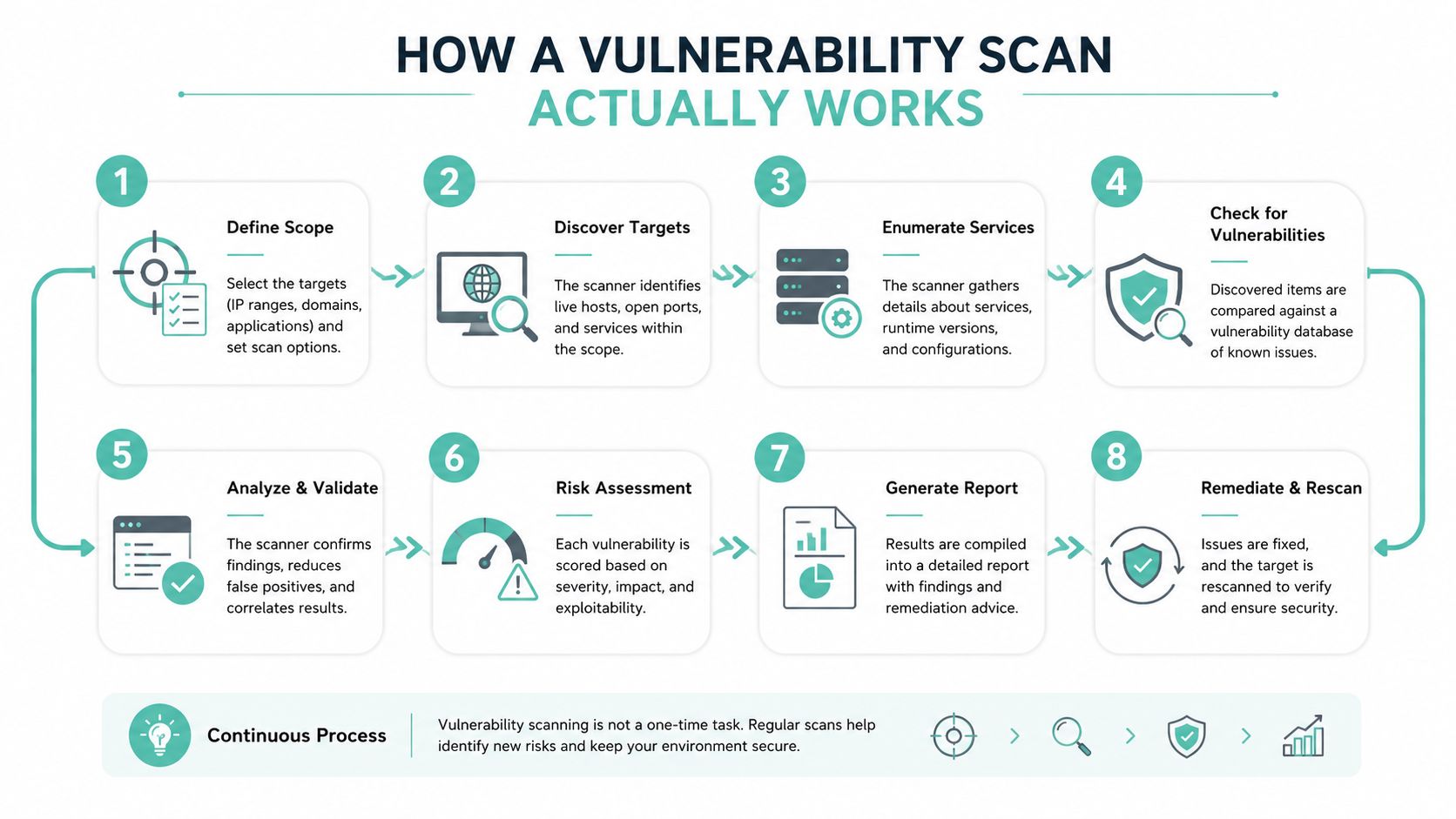
A vulnerability scan works a bit like a building inspector walking through a property with a checklist, except the checklist is for software, services, and exposed settings. The scanner does not guess from the street. It checks what is reachable, compares it with known weaknesses, and builds a picture of where attention is needed.
From discovery to report
The first job is asset inventory. Before a scanner can judge anything, it has to see what exists, whether that is a website, a server, a remote access service, or another exposed component. From there it probes ports and services to find out what is open and what responds.
Once the scanner has a clear picture of the target, it fingerprints the software and compares the result with known vulnerability records, including the Common Vulnerabilities and Exposures, or CVE, list. It also uses CVSS, the Common Vulnerability Scoring System, to rank severity. That score is useful for sorting, but it does not replace business context. A low-scoring issue on a public-facing login page can matter more than a higher-scoring issue on a system few people can reach.
A good report names the weakness, the affected asset, and the action needed. A bad report only gives you noise.
The output should help you decide what to fix first. That is the difference between a useful scan and a report that just fills a folder.
Why credentialed scans matter
A credentialed scan goes further than an unauthenticated one because it can inspect local package inventories, registry keys, patch levels, and configuration state. In plain English, it sees inside the machine instead of relying only on banners and open ports from the outside. For Australian environments, that deeper view is often what exposes missing patches and weak settings on servers and endpoints.
False positives can still appear. A false positive is a finding that looks real in the report but does not reflect actual exposure in your environment. Scanners depend on signatures, plugins, and vulnerability feeds, so the quality of that input matters as much as the tool itself.
For a managed-environment example, the cPGuard Virus Scanner knowledge base article shows how scanning often sits inside a broader protection workflow, rather than acting as a standalone switch you turn on once and forget.
Host your website with our 5-star rated, cPanel website hosting plans.
Super fast servers, with security included and hosted in your choice of Australian Data Center.
View cPanel Plans
The Main Types of Vulnerability Scans and When to Use Each
No single scan type covers every asset well. That's the part many business owners miss, then they wonder why a clean report still leaves them exposed somewhere else. The right choice depends on whether you're protecting a website, a server, a cloud tenancy, or a database.
Matching the scan to the asset
A network scan is broad and useful for seeing exposed services, open ports, and obvious perimeter issues. A web application scan is the better fit for WordPress, ASP.NET sites, and customer portals because it looks at the application layer instead of just the server underneath. A host-based scan goes deeper again, checking operating system state, installed packages, and local settings.
Authenticated and unauthenticated scans deserve separate treatment. Authenticated scans see much more. Unauthenticated scans are still valuable when you want to test what outsiders can see on perimeter-facing systems. In practice, credentialed coverage for servers and endpoints, paired with unauthenticated checks for internet-facing assets, gives a more realistic picture.
| Asset or stack | Recommended scan type | Likely strengths | Watch-outs |
|---|---|---|---|
| WordPress site | Web application scan, unauthenticated perimeter check | Finds plugin issues, exposed admin surfaces, and common web weaknesses | Won't fully assess server-level settings without credentials |
| Windows server running ASP.NET | Host-based scan, authenticated scan | Sees patch state, services, and local configuration | Needs reliable credentials and careful scheduling |
| Microsoft 365 tenancy | Cloud configuration review, identity and access checks | Surfaces risky settings and access drift | Needs asset inventory and configuration review, not just port scanning |
| Internal office network | Network scan, host scan | Good for exposed services and unmanaged devices | Misses systems that are offline or unreachable |
| Database server | Authenticated host or database-focused scan | Better visibility into permissions and engine version issues | Network-only checks can miss internal misconfiguration |
A cloud scan matters because modern environments don't sit neatly behind one firewall anymore. SaaS usage, container workloads, and third-party managed services need configuration review and continuous monitoring, not only IP-based probing. That's especially relevant if your provider, developer, or MSP manages parts of the stack you can't log into directly.
How Vulnerability Scanning Differs From Penetration Testing
People often use these terms as if they mean the same thing, but they don't. A vulnerability scan is broad, automated, repeatable, and designed to keep checking. A penetration test is narrow, manual, and designed to prove whether a specific path can be exploited.
Different jobs, different value
Scanning is the day-to-day discipline. It helps you keep track of known weaknesses across your whole environment. Penetration testing is more like a targeted challenge, where a specialist tries to chain weaknesses together and show how far they can go within a defined scope.
For an Australian SMB, the practical split is simple. Use scanning regularly, especially on internet-facing assets and systems that change often. Use penetration testing when you're launching something sensitive, such as a customer portal, or after a major redesign where you need an external view of how the pieces fit together.
Short version: scanning tells you where the gaps are, penetration testing shows how a real attacker might use one of them.
That difference matters because a scan can be automated and rescheduled, while a test needs time, expertise, and a clearly defined target. A business that only buys a pen test and skips routine scanning usually gets a snapshot, then goes back to blind spots within weeks. A business that only scans and never tests can miss the way multiple “small” issues chain together.
If you're talking to a provider, ask whether they're offering continuous visibility, a periodic manual assessment, or both. The answer will tell you whether you're buying operational hygiene or a point-in-time assurance exercise.
Real Benefits and Honest Limitations of Vulnerability Scanning
The reason routine scanning matters is simple, the threat surface keeps changing. Edgescan reported a record 48,185 CVEs published in 2025 on its stats page, and its 2023 report found that over 33% of discovered vulnerabilities were critical or high severity, with a mean time to remediation for critical issues of 65 days across the full stack, showing how quickly discovery can become a backlog if nobody owns the response Edgescan stats report. That's the backdrop Australian SMBs are operating in.
In Australia, the scale of cybercrime makes the business case even clearer. The ACSC's 2023–24 reporting says there were 87,400 cybercrime reports, and the average self-reported cost of cybercrime for small businesses rose to AUD 49,600 [AU-ACSC-2024]. Those aren't reasons to panic, but they are strong reasons to keep a scan routine in place.
The upside
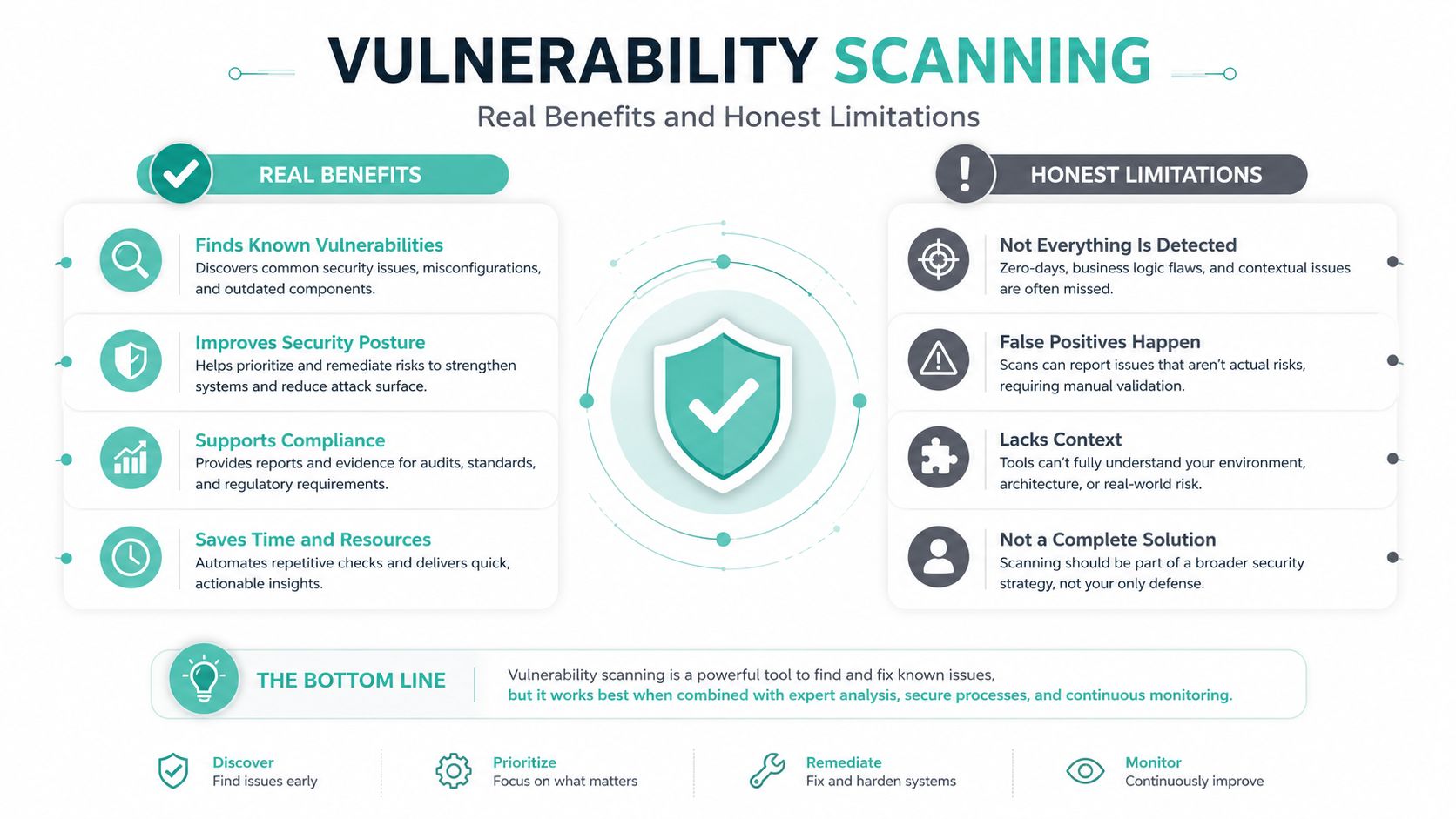
Scanning gives you visibility, repeatability, and evidence. It shows whether a patch landed, whether a new plugin introduced risk, and whether a host has drifted from its hardening baseline. It also gives you something auditable, which matters when you need to explain what was checked and when.
The limits
Scanning only sees what it knows about. It can miss assets that are offline, hidden behind poor inventory, or managed by a third party you don't control directly. It can also flood a one-person IT team with alerts, which is why prioritisation is the core work.
The NCSC notes that vulnerability scanning is only one part of a broader vulnerability management programme, and IBM describes scans as the first stage of the vulnerability management lifecycle NCSC guidance on vulnerability scanning tools and services. That distinction matters because detection doesn't reduce risk on its own. Someone still has to choose what to fix, what to defer, and what control to put in place while a patch waits.
Register your new domain name at competitive market prices including free domain add-ons like privacy, DNS Hosting, Custom Nameservers and Forwarding.
Always the best price and no nasty renewal price hikes.
Register A Domain Name
Practical Best Practices and a Realistic Scan Frequency for SMBs
The scan schedule that works for a national enterprise can overwhelm a five-person business. The trick is to make the routine fit the team you have, not the team you wish you had. A practical cadence protects internet-facing assets often, checks internal systems thoroughly enough to matter, and leaves a paper trail you can hand to a host, developer, or MSP.
A workable cadence
Use weekly unauthenticated scans for internet-facing assets such as websites, public login pages, and exposed services. Use monthly authenticated scans for servers and endpoints so you can see patch state and local configuration. Run scans after major changes, such as a plugin install, a major WordPress update, or a server rebuild, because change is where surprises show up.
For businesses that handle customer data, an annual external penetration test is a sensible complement to routine scanning, especially if the site processes forms, payments, or sensitive client information. That gives you a manual check on how the environment behaves from the outside, not just what the scanner can infer.
How to decide what gets fixed first
Use a simple order. First, look for findings with strong severity and active exploitation indicators. Then check whether the affected system is internet-facing or contains sensitive data. After that, consider business impact, maintenance windows, and whether a compensating control can lower risk while you wait for a patch.
Best practice: if you can't patch immediately, document the reason and apply a compensating control the same day.
Compensating controls can include tighter access restrictions, segmentation, or temporary monitoring changes. They're not a substitute for fixing the root problem, but they're better than leaving the issue unaddressed.
The practical discipline is rescan, verify, then close. If a fix is applied, scan again to confirm the condition is gone. That is the difference between a busy inbox and an auditable security routine.
| Cadence | What to scan | Why it matters |
|---|---|---|
| Weekly | Internet-facing assets | Catches new exposure quickly |
| Monthly | Servers and endpoints with credentials | Reveals patch and configuration drift |
| After change | WordPress, plugins, server updates | Confirms the change didn't introduce a weakness |
| Annually | External penetration testing | Checks how the site looks to an outsider |
If your hosting setup is part of the problem, the checklist on Compromised Account Login Prevention is a useful reminder that scanning works best when login hygiene and access control are already in place.
How UpTime Web Hosting Supports Vulnerability Scanning
A scan routine works better when the hosting layer is not creating extra noise. UpTime Web Hosting gives you free SSL, malware scanning, DDoS-protected firewalls, CloudLinux, LiteSpeed, AccelerateWP, 24/7 monitoring, and encrypted off-site nightly backups in the background, so the environment around the scan already has a stronger baseline for resilience. That does not replace your own remediation work, but it does mean you are scanning against a steadier platform instead of chasing avoidable hosting problems at the same time.

What to ask any host
Ask how often they scan the platform and what happens when they find an issue. Ask whether reports are shared with customers, and whether patching notices are written in plain English or hidden inside generic alerts. Ask where support is based, who answers urgent security questions, and whether the host helps you separate issues that belong to them from issues that belong to you.
That split matters because a hosting provider can harden the platform, monitor services, and maintain infrastructure, but it usually cannot fix your plugin choices, weak passwords, or poor admin habits for you. If the provider offers managed services, the scope should be explicit about what is covered. For UpTime, the relevant web application firewall details are outlined in the cPGuard Web Application Firewall knowledge base article.html), which is the kind of documentation you want before you rely on a security control.
What belongs with the host, and what stays with you
Platform patching, infrastructure monitoring, and backup integrity sit close to the host. Website maintenance, plugin hygiene, access control, and remediation of scan findings sit with the site owner or the person they have delegated to. If you are a one-person IT team, that boundary should be documented from day one.
UpTime Web Hosting also offers vulnerability assessment as part of its IT Security and Protection services, and its WordPress maintenance work includes vulnerability scanning to identify and resolve known weaknesses before they are exploited. That is useful if you want the scanning routine tied to the same provider that already hosts the site.
Experience Microsoft 365 Business Standard for free for 30 days.
Up to 25 users with full access to email, OneDrive and Teams. Includes full versions of desktop apps of Outlook, Word, Excel, PowerPoint and more.
Try Microsoft 365
Next Steps Resources and Your 30 Day Action Plan
Start with one scan today. Run an unauthenticated check on your public-facing site, then schedule a recurring authenticated scan for your servers and endpoints before the week is out. Put one person's name beside remediation, even if that person is only coordinating the work rather than doing it all.
Your 30 day plan
- This week: inventory the assets you care about most and run the first scan.
- Within 7 days: decide which findings need patching, which need mitigation, and which need a formal exception.
- Within 14 days: set a recurring cadence in your calendar for rescans and ownership reviews.
- Within 30 days: document the process so you can show what was checked, what was fixed, and what was deferred.
For Australian guidance, keep the ACSC Essential Eight close by, along with the Notifiable Data Breaches scheme if your business handles personal information. The ACSC's small business resources are also worth bookmarking, especially if you're building your first basic cyber routine.
If you want a practical reference for keeping the rest of the website's hygiene in line with your scan cadence, the website security checklist is a good companion resource. It helps you connect scanning with the everyday controls that keep a small business site stable and auditable.
If you want hosting, website protection, and practical security support from an Australian team that understands small business constraints, visit UpTime Web Hosting and see how its hosting, monitoring, backups, and security services can support a real scanning routine. It's a sensible place to start if you want less guesswork and more control over what's happening on your site each week.