Think of your main website as your house, sitting on its own plot of land at a specific street address. A subdomain is like building a separate, fully-functional granny flat or workshop on that same property. It's a simple prefix, like shop. or blog., added to your main domain name (for instance, shop.yourbusiness.com.au) that carves out a distinct section of your website.
Understanding The Basics Of A Subdomain
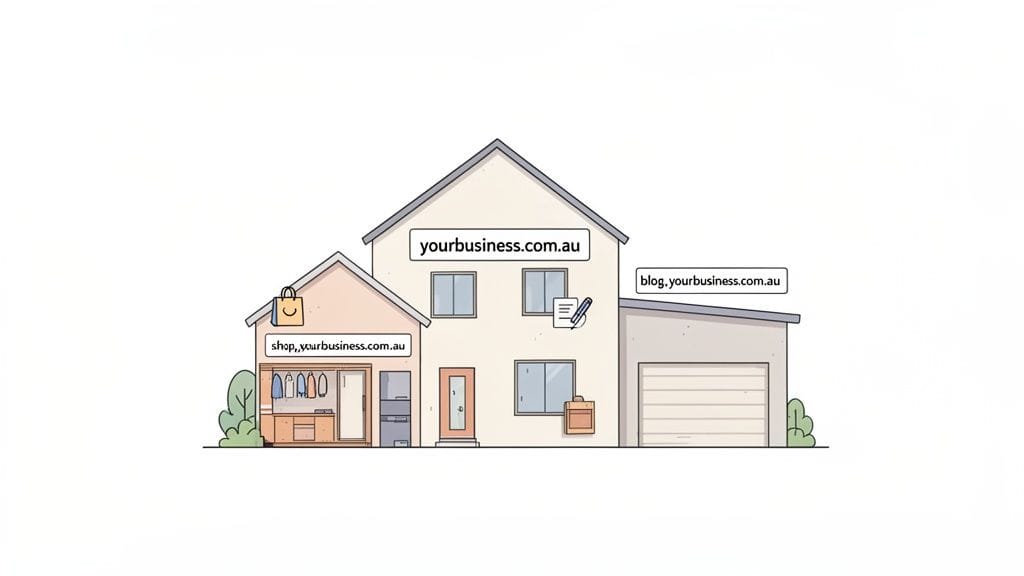
Before you can really get to grips with subdomains, you need a solid handle on what a website domain is in the first place. Your main domain is the heart of your online brand, and a subdomain simply gives you the power to organise and expand that brand without having to buy a bunch of new domain names.
This setup lets you build dedicated areas for different functions. It clearly signals to your visitors that while the content is part of your brand, it serves a very specific purpose. For Australian businesses, it's an incredibly smart and cost-effective way to scale your online presence as you grow. A practical example is how Australia Post uses auspost.com.au for its main site but has shop.auspost.com.au for its online retail store, keeping the two operations distinct but connected.
Subdomains vs Subdirectories: A Quick Comparison
It's really common for people to mix up subdomains and subdirectories, but they work in completely different ways. A subdirectory is just a folder inside your main website (like yourbusiness.com.au/blog), whereas a subdomain acts more like a separate, connected site.
A subdomain creates a distinct partition for your website, perfect for organising complex sections like an online store or a customer support portal. This separation can simplify management and even improve security by isolating different website functions.
To make it crystal clear for Aussie business owners, here’s a simple breakdown of the differences:
| Feature | Subdomain | Subdirectory |
|---|---|---|
| URL Structure | shop.yourbusiness.com.au | yourbusiness.com.au/shop |
| Analogy | A separate granny flat on your property | A specific room inside your house |
| Best For | Distinctly separate content (e.g., a store, a help desk) | Tightly related content (e.g., a company blog, a careers page) |
| Technical Setup | Requires a DNS record (easy in cPanel) | Just creating a folder on your server |
| Primary Use | To organise major, functionally different site sections | To categorise content within your primary website |
Getting this distinction right is the first step to building a well-organised website that’s easy for your customers to use. Subdomains aren't just a technical quirk; they're a strategic tool for structuring your digital footprint as your business expands. If you're just starting out, getting your head around registering a domain name in Australia will give you a great foundation.

Performance you can feel, backed by clients who depend on it. Read how our support and uptime create long‑term customer success.Power Your Business with Better Hosting
How Subdomains Technically Work
So, how does this all work behind the scenes? Let's peek under the hood, but don't worry, we'll skip the heavy technical jargon. The easiest way to picture it is to think of the internet's Domain Name System (DNS) as a massive, incredibly well-organised address book for every website on the planet.
When you create a subdomain like shop.yourbusiness.com.au, you’re essentially adding a new, specific entry into this global address book. This new entry acts like a digital signpost, telling web browsers exactly where to find the content for that part of your website.
Directing Traffic with DNS Records
This digital signpost is technically known as a DNS record. While there are a few different types, the two you'll most likely come across are:
- A Record: This points your subdomain straight to a server's unique number, its IP address. Think of it as a precise GPS coordinate for your website's server.
- CNAME Record (Canonical Name): Instead of an IP address, this record points your subdomain to another domain name. It’s a bit like saying, "for the
shopaddress, just follow the same directions you'd use to get to our main office."
By creating one of these records, you're giving the internet clear instructions. It ensures that when a customer types shop.yourbusiness.com.au into their browser, they land on your online store, not your main homepage or your blog.
If your main domain is your business’s head office address, a subdomain is like giving a specific department its own PO Box. Mail addressed to the "Accounts Department PO Box" goes directly there without getting stuck at the main reception, keeping everything organised and running smoothly.
Simplifying the Process with cPanel
Manually tinkering with DNS records can sound a bit daunting, but modern web hosting control panels have made it incredibly straightforward. For instance, all UpTime Web Hosting plans come with cPanel as standard, which automates the entire process for you.
Instead of wrestling with technical settings, you simply head to the 'Domains' section, type in the subdomain you want (like 'blog' or 'support'), and click a button. Behind the scenes, cPanel instantly creates the right DNS records and file directories. This ease of use is a huge plus for Australian business owners who'd rather focus on their business than on complex configurations.
One of the best things about this system is its flexibility. A subdomain doesn't even have to be on the same server as your main website. This means you could host a resource-intensive part of your site, like a large eCommerce store or a software platform, on a more powerful, separate server, so it never slows down your main site.
After you set up these records, it can take a little while for the changes to spread across the internet. If you're curious about this process, you can learn more about what DNS propagation is and how it all works.
Practical Uses for Subdomains in Australia
Alright, so we've covered the what and the how. Now for the fun part: putting subdomains to work. For Australian businesses, they're not just a technical curiosity; they’re incredibly practical tools for organising your digital world and growing your brand without having to buy a new domain for every single project.
Think of it as giving different parts of your business their own dedicated address. You could spin up shop.yourbusiness.com.au to run an e-commerce platform like Shopify, or create blog.yourbusiness.com.au as a separate home for your content marketing. Each one acts as a purpose-built digital space, all living comfortably under your main brand umbrella. An Australian business like Canva uses www.canva.com for its main design tool but about.canva.com for its corporate information and newsroom.
Organising Your Digital Operations
Subdomains are brilliant for carving out distinct, functional areas on your website. This tidy separation not only makes life easier for your customers but also helps your internal teams by keeping different operations from tripping over each other.
Here are a few common ways businesses use them:
- Customer Support Portal: Using
support.yourbusiness.com.aufor your help desk or knowledge base keeps all your customer service resources in one easy-to-find spot. A good Australian example is Telstra, which usessupport.telstra.com.aufor its help articles. - E-commerce Store: A dedicated
shop.yourbusiness.com.aucan be hosted on a specialised platform, ensuring your main site’s performance isn't bogged down by lots of transactions. - Content Hub: A
blog.yourbusiness.com.augives your marketing team the freedom to manage content on a separate system, like WordPress, without messing with the main corporate website.
This flow shows exactly how a request for a subdomain gets routed to the right server through the DNS.
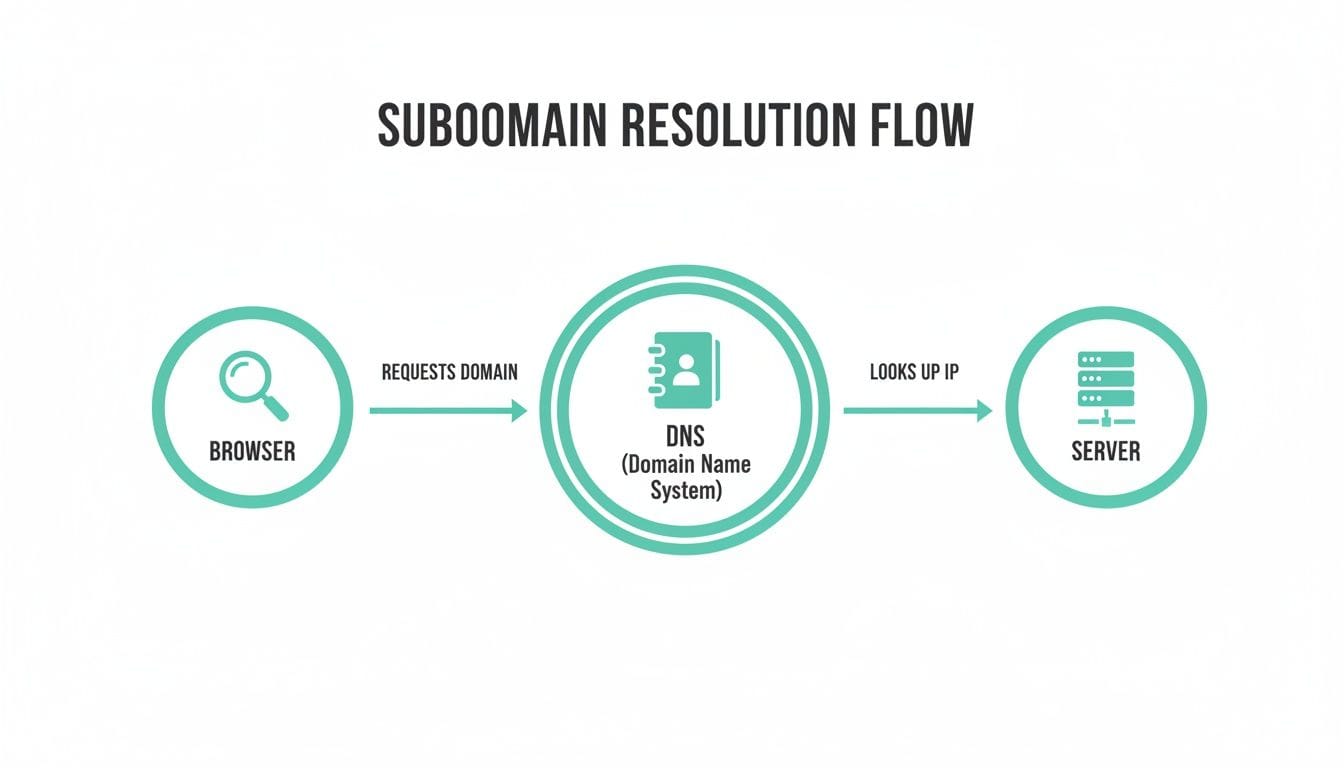
As you can see, it's a slick process for directing traffic to the right part of your online infrastructure.
Advanced Strategies for Growth
Beyond just keeping things organised, subdomains open the door to some powerful growth strategies. For instance, Aussie businesses can use them to create a more localised experience, like setting up perth.yourbrand.com.au to serve up region-specific deals and information.
This approach is backed by a strong managed DNS market, which is the engine that makes subdomains perform well. In fact, Australia's managed DNS market hit USD 349.7 million in 2024 and is tipped to climb to USD 1,029.7 million by 2030, thanks to features like GeoDNS that deliver faster loading for regional users. You can see the full report on the growing managed DNS market from Grand View Research.
For web developers and agencies, subdomains are an absolute game-changer for creating staging environments. A subdomain like
staging.clientproject.com.augives you a safe, private sandbox to test updates and new features before you push them live.
This is a non-negotiable practice for maintaining a professional and stable website for your clients. Here at UpTime, our hosting plans make managing these environments a breeze. You can even read our guide on creating a staging site for your WordPress website—it's a process you can easily handle right inside cPanel.
Host your website with our 5-star rated, cPanel website hosting plans.
Super fast servers, with security included and hosted in your choice of Australian Data Center.
View cPanel Plans
Subdomain or Subdirectory for SEO
It's one of the oldest debates in the world of search engine optimisation: should your shiny new blog live at blog.yourdomain.com.au (a subdomain) or yourdomain.com.au/blog (a subdirectory)? This question has caused countless headaches for business owners, so let's cut through the noise and get to what really matters for your Australian business.
For a long time, the answer was simple: subdirectories were the way to go. The thinking was that they kept all your hard-earned "SEO authority" or link equity neatly under one roof, helping your main domain rank higher.
But times have changed. Google's algorithms have become a lot more sophisticated. These days, they're perfectly capable of understanding that a branded subdomain is part of the main website, especially when there are clear links between them and a consistent brand identity.
Choosing the Right Structure
So, what's the verdict? The truth is, it's not about which one is always "better," but which one makes the most sense for what you're trying to achieve.
A subdirectory is often the perfect choice for content that's closely tied to your main business, like a company blog that directly supports your products or services. All the SEO value your blog posts earn flows straight to your core pages, giving their authority a nice boost.
On the other hand, a subdomain is the clear winner in a few specific situations. You might want to use a subdomain if you are:
- Launching a Distinct Content Hub: If you're creating content for a completely different audience or targeting a separate set of keywords (like a dedicated news portal or resource centre), a subdomain helps keep things separate and organised.
- Creating a Unique Tool or App: A free tool, like
calculator.yourbrand.com.au, is a classic use case. It has its own distinct purpose and branding, so a subdomain makes perfect sense. - Dealing with Big Technical Differences: Sometimes, a section of your site needs a completely different content management system (CMS) or server setup. A subdomain makes managing these technical splits much cleaner and easier.
To help you visualise the differences, here’s a quick comparison.
Subdomain vs. Subdirectory At a Glance
This table breaks down the key differences between subdomains and subdirectories to help you decide which path is right for your site's architecture.
| Feature | Subdomain (e.g., blog.yourdomain.com.au) | Subdirectory (e.g., yourdomain.com.au/blog) |
|---|---|---|
| Primary Use Case | Content that is distinct from the main site (e.g., support portals, separate tools, international sites). | Tightly integrated content that supports the main site (e.g., company blogs, case studies). |
| Technical Setup | Acts as a separate website. Requires a DNS CNAME or A record to be configured. | Is a folder within the main website. No extra DNS configuration is needed. |
| SEO Authority | Seen by search engines as a separate, though related, entity. Authority is not automatically shared. | All authority and link equity directly contribute to the main root domain. |
| Best For | Targeting different audiences, creating unique brand identities, or overcoming technical limitations. | Strengthening the main domain's authority and ranking for core business keywords. |
Ultimately, choosing between a domain vs subdomain will fundamentally shape how search engines see your website's structure and authority.
Performance Is Key for Both
No matter which path you take, one thing is non-negotiable for good SEO: site speed. A slow-loading website will damage your rankings, regardless of how perfectly you've structured your URLs.
The old wisdom of "subdirectories are always better for SEO" isn't a hard-and-fast rule anymore. Google is smart enough to connect the dots, making the choice more about your content strategy than trying to game the system.
Thankfully, with modern hosting, you don't have to sacrifice performance for either setup. Here at UpTime, our powerful features like LiteSpeed caching and AccelerateWP are active across your entire account. This means both your main site and any subdomains you create get a serious speed boost, giving your search engine optimisation strategy the solid, high-performance foundation it needs to succeed.
How to Create a Subdomain in cPanel
Alright, you’ve got the theory down. Now, let’s get our hands dirty and actually create a subdomain. Don’t worry, this isn’t some highly technical task that requires you to mess with confusing settings. If you’re an UpTime customer, our cPanel setup makes it a job of a few quick clicks.
We'll walk you through the process right from your UpTime dashboard.
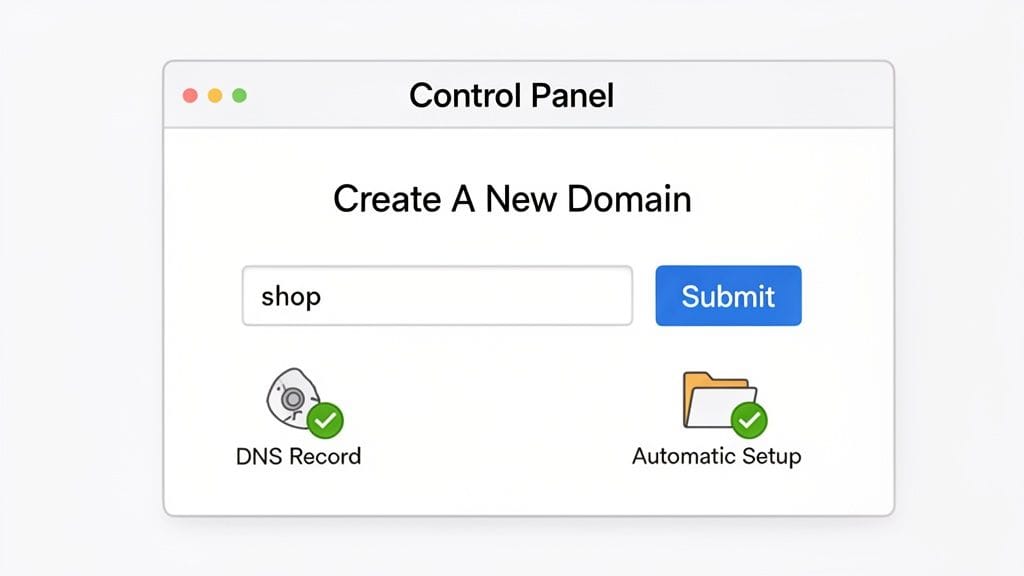
A Simple Step-by-Step Guide
The best part about using a control panel like cPanel is that it does all the heavy lifting. Forget about manually creating A or CNAME records in your DNS—the system handles all of that behind the scenes.
Here’s how simple it really is:
- Log in to your cPanel: First, access your UpTime Web Hosting account and head over to the cPanel dashboard.
- Find the Domains Tool: Look for the "Domains" section on the main dashboard and give it a click.
- Create a New Domain: You should see a big blue button that says "Create A New Domain." Click that to get started.
- Enter Your Subdomain: In the text field, just type the name you’ve chosen for your subdomain (like
shop,blog, orsupport) followed by your main domain. For instance,shop.yourbusiness.com.au. - Click Submit: Once you've typed in the name, just hit the "Submit" button.
And that’s it. In the background, our Australian hosting platform automatically sets up the folder for your new subdomain’s files and sorts out all the DNS stuff. Your new site section is now ready for you to start uploading files or installing an application like WordPress.
Security and Hosting Perks with UpTime
For Australian businesses, subdomains are a smart way to organise a website without having to register new domain names. Whether you’re in Sydney, Melbourne, Brisbane, or Perth, you can use a subdomain like blog.yourbusiness.com.au to separate your content logically. This is especially handy for UpTime customers on our uncapped add-on domain plans, making it easy to run things like a WordPress multisite or different ASP.NET apps under a single .com.au roof.
Security should never be an afterthought. With UpTime, every single subdomain you create can be secured with a free SSL certificate instantly. This encrypts the connection between your visitors and your site, which is vital for building trust and protecting any information they share.
This is all part of making our hosting powerful but also genuinely easy to use. If you want to see everything that’s included, take a look at our web hosting services with cPanel. We want to make managing every part of your website—including figuring out what is a subdomain and how to use it—as straightforward as possible.
Best Practices for Managing Your Subdomains
Just because creating subdomains is straightforward doesn’t mean managing them is. In fact, how you handle them is what separates a sharp, organised online presence from a messy and insecure one.
Following a few key practices will ensure your subdomains are a powerful asset for your business, not a liability that weakens your brand.
First things first: security. You have to treat every subdomain with the same level of care as your main website. Think of each one as another potential doorway into your digital property, so it must be properly locked and secured. This always starts with installing an SSL certificate on every single subdomain.
With UpTime, every subdomain you create can be secured with a free and automatic SSL certificate. This simple step encrypts visitor data, builds trust, and is a non-negotiable part of modern web security.
Maintain a Professional and Cohesive Brand
Once security is sorted, your next focus should be on creating a seamless experience for your visitors. A jumbled collection of subdomains, each with different designs and navigation, will only confuse people and water down your brand.
- Use Clear and Memorable Names: Go for short, intuitive names like
shop.yourbrand.com.auorsupport.yourbrand.com.au. This tells visitors exactly what to expect before they even click. - Maintain Consistent Branding: Make sure your logo, colour scheme, and fonts are the same across your main domain and all your subdomains. This consistency reinforces that every page is part of the one trusted brand they know.
- Keep Software Updated: If you’ve installed software like WordPress or Magento on a subdomain, it's on you to keep it updated. Outdated software is one of the most common backdoors for security breaches.
Leverage Integrated Security and Backups
Juggling multiple subdomains might feel like a lot of extra work, but the right hosting partner can automate most of the heavy lifting for you. This is where integrated security features become a massive help for busy Australian business owners.
At UpTime, our security tools are designed to protect your entire digital footprint. That includes automated malware scanning that keeps an eye on all your files and nightly backups that create secure, off-site copies of your main site and all its subdomains.
This means if something ever does go wrong, you can quickly restore a specific subdomain without the headache. To get a better handle on this, check out our guide on Why you need malware protection, as the principles apply to every part of your online world.
Register your new domain name at competitive market prices including free domain add-ons like privacy, DNS Hosting, Custom Nameservers and Forwarding.
Always the best price and no nasty renewal price hikes.
Register A Domain Name
Common Questions About Subdomains
As you get your head around subdomains, a few questions almost always pop up. Let's run through some of the most common ones we hear from Australian business owners to give you clear, practical answers so you can move forward with confidence.
How Many Subdomains Can I Create?
This is a great question, and the answer is usually a pleasant surprise. With most UpTime Web Hosting plans, the number of subdomains you can create is actually uncapped.
This gives you incredible flexibility. You can organise your website by creating separate, dedicated areas for a blog, an online store, a support portal, or even a private testing environment without ever worrying about hitting an arbitrary limit.
Does Creating a Subdomain Cost Extra?
Nope, creating a subdomain won’t cost you anything extra. The ability to create them is a standard feature included with your domain name and hosting plan.
Because you own the main domain, you can create as many subdomains under it as your plan allows, all without any additional registration fees.
The real value of a subdomain lies in its ability to let you expand your digital presence without the extra cost of buying new domain names. It's a smart, budget-friendly way to scale your website as your business grows.
Can I Have Email Addresses on a Subdomain?
You certainly can. It’s easy to set up unique email addresses for any subdomain, like contact@support.yourbusiness.com.au or orders@shop.yourbusiness.com.au.
This is a fantastic way to organise your communications and make sure incoming mail lands in the right inbox. You can manage these addresses just like any other email account through your cPanel dashboard. For a detailed walkthrough, check out our guide on how to create an email account.
How Do I Remove a Subdomain I No Longer Need?
Removing a subdomain is just as straightforward as creating one. Inside cPanel, you just need to head to the 'Domains' tool, find the subdomain you want to get rid of, and click the 'Remove' button.
cPanel takes care of the rest, deleting its associated files and DNS records for you. It’s a simple way to keep your hosting account tidy and organised.
Ready to put this knowledge into action? UpTime Web Hosting offers fast, secure, and 100% Australian hosting that makes managing your domains and subdomains effortless. Explore our powerful cPanel hosting plans and get started today at https://uptimewebhosting.com.au.