
An MX record, short for Mail eXchanger record, is a special instruction in your domain's settings that tells the internet where to send your emails. Think of it as the digital postcode for your business email. If that postcode is missing or incorrect, emails sent to you simply won't arrive.
Your Email’s Digital Postcode: Understanding MX Records
If you run an Australian business, your email is the lifeblood of your operations. It handles everything from new customer enquiries to day-to-day support. Making sure those messages land in your inbox every single time comes down to one crucial piece of the puzzle: the MX record.
It helps to think of it like sending a parcel with Australia Post. You need a street address, suburb, and postcode on the package for it to get to the right place. In the digital world, an email address like sales@yourbusiness.com.au is the recipient, but the internet still needs a "postcode" to know which server is set up to handle mail for the yourbusiness.com.au domain.
An MX record does one simple but vital job: it points incoming mail to the correct email server. A misconfigured record is like giving every potential customer the wrong PO Box—your inbox will stay empty, and you'll have no idea what opportunities you've missed.
For this system to work properly, every MX record relies on two key pieces of information.
Key Components of an MX Record
An MX record is made up of a couple of simple but essential parts. These work together to direct your email traffic, and understanding them is the first step toward mastering your business email setup.
Here's a quick breakdown of what makes an MX record tick.
Key Components of an MX Record
| Component | What It Does | Simple Analogy |
|---|---|---|
| Priority | A number that tells sending servers which mail server to try first. The lowest number gets the highest priority. | A delivery driver's list of preferred drop-off points, starting with location #1 as the main depot. |
| Destination | The hostname of the mail server that will receive the email (e.g., mail.yourbusiness.com.au). | The specific building and street address where the parcel should be delivered. |
These records are all part of your domain's DNS (Domain Name System), which is basically the internet's phone book. When you update your MX records, the changes need to spread across servers worldwide in a process known as propagation. If you're curious about the specifics, you can learn more in our guide on what DNS propagation is and why it matters.

Performance you can feel, backed by clients who depend on it. Read how our support and uptime create long‑term customer success.Power Your Business with Better Hosting
How MX Records Route Your Email Behind the Scenes
Ever wonder what actually happens when someone hits ‘send’ on an email to your business? Their email server doesn't just guess where to send it. Instead, it acts like a digital postman and first checks the public phonebook of the internet—the DNS—to ask a simple question: "Where does email for this domain go?"
The answer it gets back is your MX (Mail Exchanger) records. Think of these records as a specific set of delivery instructions, telling the sending server exactly which mail server to hand the message off to. This whole lookup and handover process is lightning-fast and happens billions of times a day, forming the invisible backbone of email everywhere.
This simple visual shows how it all comes together in three quick steps.
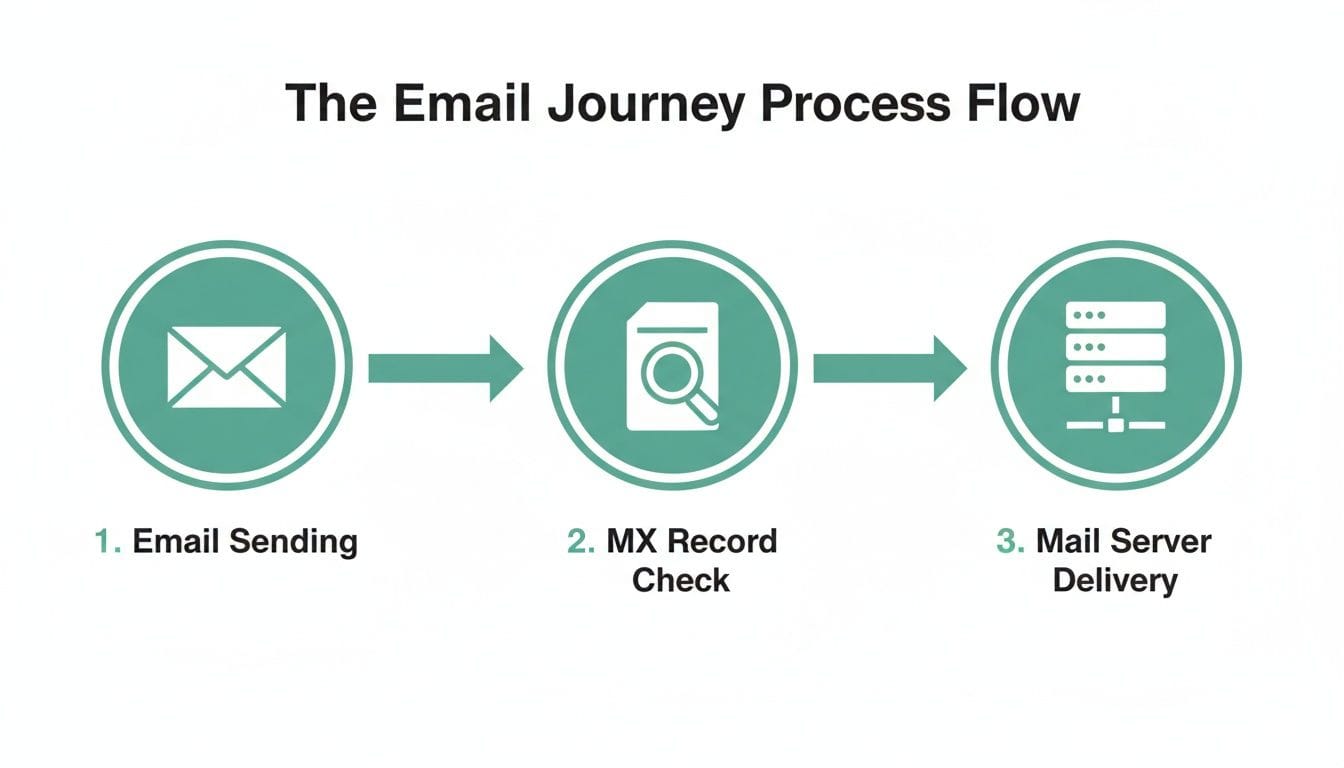
As you can see, the MX record is the crucial go-between, making sure your message lands on the right doorstep. It’s a beautifully simple system that just works.
The Role of Priority and Redundancy
The secret sauce of an MX record is its Priority number. Sending servers are programmed to always try the mail server with the lowest priority number first. This creates a clear pecking order, which is absolutely vital for building a reliable email setup.
A typical configuration for an Australian business might look something like this:
- Primary Server:
mail.yourbusiness.com.auwith a Priority of 10. - Backup Server:
backup.yourbusiness.com.auwith a Priority of 20.
With this setup, every email is directed to the primary server first. But what if that server is down for maintenance or having a bad day? No problem. The sending server will see it’s unavailable and automatically try the next one on the list—the backup server with priority 20. This gives you built-in redundancy, a core principle that keeps your business emails flowing even when things go wrong.
The idea of a priority system isn't new; it's been fundamental to how email works since its early specifications back in 1982. This redundancy is a game-changer for Aussie small businesses that can't afford to have their communication grind to a halt. You can read more about how MX records were foundational to email and its architecture.
Understanding Time to Live (TTL)
Another important piece of the puzzle is the Time to Live (TTL). This is a value, measured in seconds, that tells other servers around the world how long they should "remember" your MX record information before they need to check again for any changes.
Most of the time, a TTL of 3600 seconds (one hour) is perfectly fine. However, if you're planning on moving to a new email provider, you'll want to be strategic. The best practice is to lower this TTL value to 300 (five minutes) at least 24 hours before you make the switch.
Doing this ensures that once you update your MX records to point to the new provider, servers globally will pick up the changes much faster. It's the key to a smooth transition without any lost mail.
Why Correct MX Setup Matters for Australian Businesses
For any Australian business, getting your email right isn't just a small technical detail—it's fundamental. If your MX records are misconfigured, it's like having a faulty post box. Your emails simply won't arrive, cutting you off from customers, suppliers, and potential clients. This can lead to some very real and damaging problems for your bottom line.
Think about what a single bounced email could mean. It might be a new sales lead that never lands in your inbox, a crucial invoice that goes unpaid, or a support request from a frustrated customer you never get to help. Each missed message can chip away at your professional reputation and directly result in lost revenue. In a competitive market, you just can't afford to seem unreliable.
Staying Connected in a Digital Australia
The need for dependable email is even more critical when you consider just how connected Australians are. With a 97.4% internet penetration rate, almost the entire country is online. On average, Australians spend a staggering 6 hours and 8 minutes online every single day, making digital communication the absolute default. You can dive deeper into these trends in this report on Australian digital behaviour.
This constant connectivity means your customers expect instant, flawless communication. If their email to your business bounces back, they won’t sit around wondering what went wrong. They’ll simply find a competitor whose channels actually work.
For businesses, understanding how MX records function is the first step towards Mastering Email Deliverability Strategies and ensuring your messages always reach their intended recipients. It’s the foundation upon which customer trust is built.
The Advantage of Local Infrastructure
To meet these high expectations, your business needs an email setup that is both fast and resilient. This is where choosing the right hosting partner makes all the difference. Using a provider with locally-based infrastructure, like UpTime Web Hosting, is a game-changer for Australian businesses.
Our servers are located right here in Australia. This means the physical distance your email data has to travel is much, much shorter. When your MX records point correctly to our local servers, you get some serious advantages:
- Superior Speed: Emails are processed and delivered faster, creating a much smoother experience for both you and your customers.
- Enhanced Reliability: With infrastructure built and optimised for the Australian network, you dramatically reduce the risk of frustrating delays or delivery failures.
Ultimately, a correct MX setup isn’t just about ticking a technical box. It’s about making sure your business stays accessible, professional, and trustworthy in the eyes of every single person you interact with online.
Host your website with our 5-star rated, cPanel website hosting plans.
Super fast servers, with security included and hosted in your choice of Australian Data Center.
View cPanel Plans
How to Check and Manage Your MX Records in cPanel
Alright, you've got the theory down. Now it's time to roll up your sleeves and see how it all works in practice. Managing your domain's MX records is surprisingly straightforward, especially if you're an UpTime Web Hosting customer using our web hosting services with cPanel. This is where you get to take direct control of your email flow, whether you're using our mail service or connecting to a third-party provider.
All your domain's DNS settings, including those crucial MX records, live inside a cPanel tool called the Zone Editor. Think of it as the central switchboard for your domain's internet address book. From here, you can view, add, change, and remove records with just a few clicks.
Locating Your MX Records in the Zone Editor
First things first, log into your cPanel account. Head to the 'Domains' section, where you'll spot the Zone Editor. Once you click in, you'll see a list of your domains. Find the one you want to work on and hit the 'Manage' button next to it.
This opens up a full list of all the DNS records for that domain. To cut through the noise and get straight to what you need, just use the filter option and select 'MX'. Easy.
The image below gives you a simple idea of what this looks like, showing the MX records for a domain.
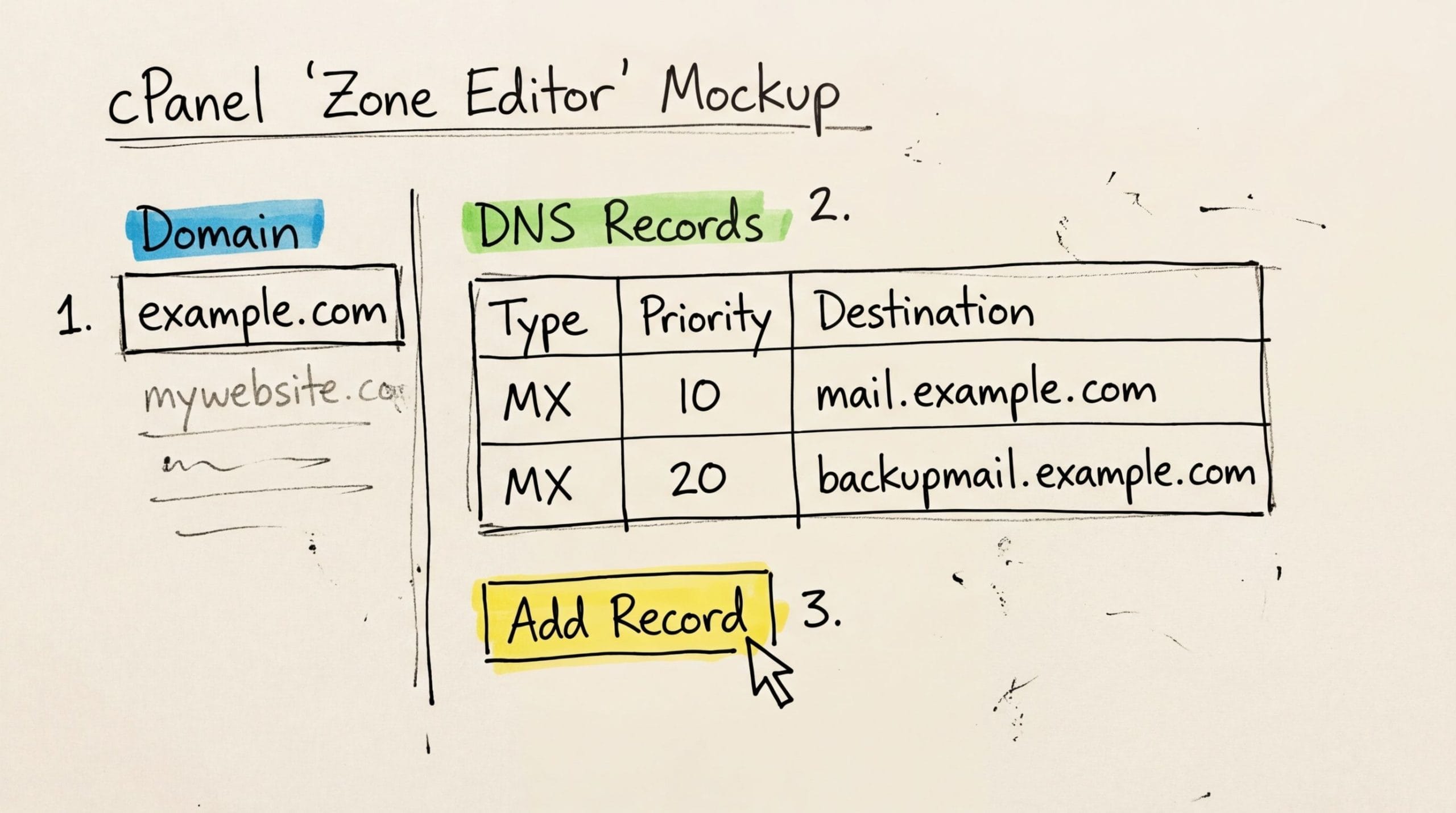
You can immediately see the priority and destination for your domain's email, giving you a crystal-clear picture of your current setup.
Common MX Management Tasks
Once you're in the Zone Editor, making changes is simple. Here are a few of the most common things you might need to do:
- Verifying Default Settings: If you're using our email hosting, your main MX record should point to your domain name (like
yourdomain.com.au) with a priority of 0. This is a quick check to confirm that mail is flowing to our servers correctly. - Adding Records for a Third-Party Service: Switching to Google Workspace or Microsoft 365? They'll give you a specific set of MX records to use. For example, the primary Google Workspace MX record is
aspmx.l.google.comwith priority 1. You'll just click '+ Add Record' and pop in the priority and destination values they provide. - Editing or Deleting Old Records: This is a big one. When you switch email providers, it's vital to remove the old MX records to avoid confusing the internet's mail carriers. Just click 'Edit' or 'Delete' next to any outdated record.
For anyone setting up a custom domain for email for the first time, the provider's guide will almost certainly walk you through these exact steps. And for our customers, we have detailed, step-by-step instructions for managing records in our knowledge base, which is an excellent resource.
Key Takeaway: Always make sure you have only one set of MX records active for a single email service. Having records for both Microsoft 365 and your old provider at the same time is a recipe for disaster. It will cause emails to get lost, delivered to the wrong place, or bounce back entirely. Clean, accurate records are the bedrock of reliable email.
Troubleshooting Common MX Record Problems
When your inbox suddenly goes quiet and emails stop arriving, a misconfigured MX record is often the sneaky culprit. These small text records pack a big punch, and a tiny error can bring your communication to a halt.
The good news? Most of these problems are surprisingly simple to find and fix. Let's walk through the most common pitfalls so you can get your email flowing again.
Simple Typos and Priority Mix-ups
One of the most frequent mistakes we see is a simple typo. A single misplaced letter in your mail server’s address, like mail.yourbusiness.com.au, can send all your incoming emails into a digital black hole. It’s always worth double-checking every character.
Another common issue pops up with incorrect priority settings. Imagine you have two MX records, both set to a priority of 10. When a mail server tries to deliver an email, it doesn't know which one to choose first. This confusion can lead to totally unpredictable delivery—some emails get through, while others bounce right back.
The fix is to create a clear pecking order. Set your primary server to a low number like 10, and your backup server to a higher one, like 20.
Forgotten Records and The Waiting Game
When you switch to a new email provider, it's easy to forget one crucial step: removing the old MX records. If you leave them active, some of your new emails could be sent to the old, decommissioned servers, where they'll simply get lost.
MX record configuration errors are a major risk for Australian businesses, causing emails to be delayed, go missing, or land in spam. When migrating email providers, a common mistake is leaving old records in place. Best practice is to lower the TTL to 300 seconds (5 minutes) at least 24 hours before you switch to minimise disruption. You can discover more insights on how MX records affect email delivery.
Finally, you have to be patient. After you’ve updated your MX records, the changes need to spread across the internet. This process is called DNS propagation, and it can sometimes take a few hours. If your email isn't working immediately after an update, give it a little time before you dive back into troubleshooting.
Common MX Record Errors and How to Fix Them
To make things easier, we've put together a quick-reference table for the most common issues you might run into.
| Problem | Symptom | Solution |
|---|---|---|
| Typo in Value | No emails are being received at all. Senders get bounce-back errors. | Carefully check the mail server name in your MX record for spelling mistakes and correct it. |
| Incorrect Priority | Email delivery is inconsistent. Some emails arrive, others are delayed or bounced. | Assign unique, sequential priority numbers (e.g., 10 for primary, 20 for backup). |
| Old MX Records | Emails are being sent to your old provider and are bouncing. | Delete any MX records that point to old, unused email servers. |
| Missing MX Record | Senders receive an "undeliverable" or "domain not found" error. | Add the correct MX record for your email provider to your DNS settings. |
| Propagation Delay | You've fixed the records, but email still isn't working. | Wait! DNS propagation can take up to 48 hours, but usually just a few. Check again in an hour. |
By working through these common problems one by one, you can usually get to the bottom of any MX record issue.
If you’ve checked everything and are still stumped, other factors could be at play. Our knowledge base has a fantastic guide to help you troubleshoot not receiving emails that covers other potential causes beyond just MX records.
Beyond MX Records to Secure Your Email
Getting your MX record right ensures your emails arrive, but in today's world, that’s only half the battle. To make sure your messages are actually trusted and don't get banished to the spam folder, you need to go a step further.
Think of it like this: a correct MX record gets your email to the right front door. But three other critical DNS records act as your email’s security detail, telling the recipient’s server that the message is legit and can be trusted. These are SPF (Sender Policy Framework), DKIM (DomainKeys Identified Mail), and DMARC (Domain-based Message Authentication, Reporting, and Conformance).
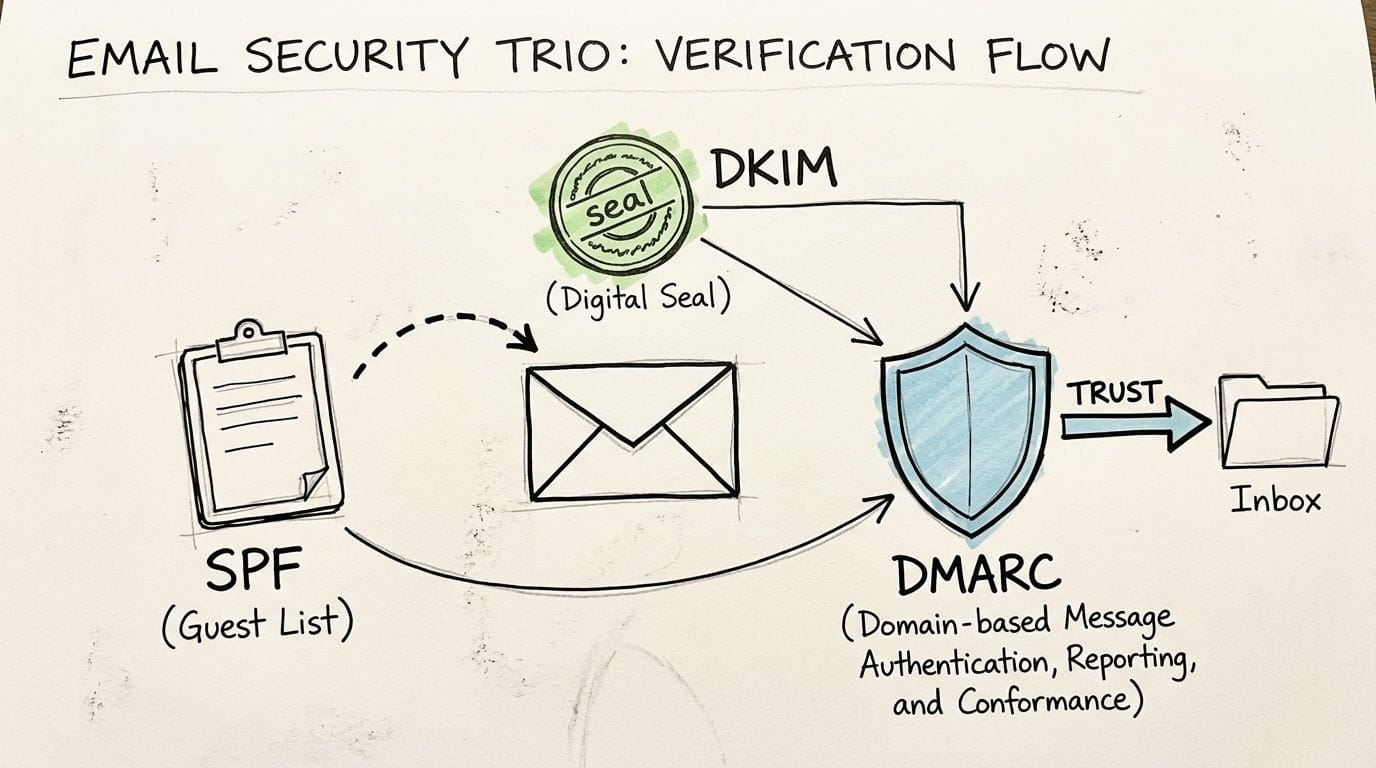
Building Your Domain's Reputation
Each of these records has a unique job, but they all work together to verify your identity and protect your Australian business from being impersonated by scammers.
- SPF is your approved senders list. It’s a public record listing all the servers and services authorised to send emails on behalf of your domain. If a message arrives from a server that isn't on the list, it’s immediately flagged as suspicious.
- DKIM is like a digital wax seal. It adds a unique, encrypted signature to every email you send. This allows the receiving server to check that the email's content hasn't been secretly altered on its journey.
DMARC is the final, crucial piece. It tells other mail servers what to do if an email fails the SPF or DKIM checks. Should they quarantine it, reject it outright, or just monitor it? It’s like giving your security guard clear instructions on how to handle uninvited guests.
Together, this security trio dramatically reduces the chance of your emails landing in spam. More importantly, they protect your brand’s reputation by making it incredibly difficult for cybercriminals to spoof your domain in phishing attacks. Putting them in place is a best practice that shows your customers and partners you take their security seriously.
For a detailed walkthrough, check out our guide on implementing SPF, DKIM, and DMARC in cPanel.
Register your new domain name at competitive market prices including free domain add-ons like privacy, DNS Hosting, Custom Nameservers and Forwarding.
Always the best price and no nasty renewal price hikes.
Register A Domain Name
Frequently Asked Questions About MX Records
Now that we’ve covered the essentials of what an MX record is, you might still have a few questions floating around. That's completely normal.
This final section tackles the most common queries we get from Australian business owners just like you. Think of it as a quick-reference guide to solve those lingering email setup puzzles.
How Many MX Records Should I Have?
While you can get by with a single MX record, it’s like driving without a spare tyre. It works until it doesn’t. We always recommend having at least two: a primary record with the lowest priority number (like 10) and a backup record with a higher one (like 20).
This simple setup is your safety net. If your main mail server is down for maintenance or hits a snag, sending servers will automatically try the backup. It's a straightforward way to keep your email flowing and avoid missed messages or business interruptions.
Can I Point MX Records to Different Email Providers?
This is a big one: you should never point your MX records to two different email services at the same time. For instance, you can't have one record for Microsoft 365 and another for Google Workspace.
Trying this creates a kind of "split-brain" situation for your email. Sending servers won't know which service is the right one to deliver to. The result? Completely unpredictable and unreliable email delivery. Some emails might sneak through, but many will bounce back or just vanish into the void.
Key Takeaway: All your active MX records must point to the mail servers of a single email provider. This is the only way to guarantee a consistent, reliable path for every single incoming email.
How Long Do MX Record Changes Take to Work?
When you update an MX record, the change isn't instant. It has to spread across the internet in a process called DNS propagation.
While this can technically take up to 48 hours to be fully recognised everywhere on the globe, it's usually much, much faster. In most cases, you'll see the changes kick in within just a few hours. The key is to have a bit of patience and let the system do its thing before you start troubleshooting.
For long-term peace of mind, it’s smart to periodically check on your email's overall health, which can flag issues that go beyond just your MX records. You can learn more in our guide on how to check the health of your email deliverability.
Ready to put this knowledge into practice with a reliable local provider? UpTime Web Hosting offers fast, secure, and 100% Australian web and email hosting to keep your business connected. Explore our hosting solutions at https://uptimewebhosting.com.au.