

Setting up a company email is one of those foundational steps that really sets a business apart. It involves picking a domain, choosing the right plan, creating the actual mailboxes, and then getting everything synced up on your devices. An address like you@yourcompany.com.au just instantly signals that you're a serious, credible operation, not just a casual project using a free Gmail or Hotmail account.
Why a Professional Email Is a Must-Have Asset
Think about it: your email address is often the very first impression a potential customer has of your brand. Long before they visit your website or see what you sell, they see your email. When that address is tied to your own domain name, it immediately builds a foundation of trust and professionalism. It shows you mean business.
Imagine a local Melbourne startup trying to pitch a major corporate client. An email coming from startupsolutions@gmail.com might plant a seed of doubt. Is this a real company? How big are they? But an email from contact@startupsolutions.com.au? That looks established, secure, and professional. It makes a much stronger first impression.
Build Brand Credibility Instantly
A custom email address is a subtle but incredibly powerful marketing tool. It reinforces your brand with every single message you send out, helping to build brand recognition and cut through the noise of generic email providers.
Here are a few key benefits you get right away:
- Enhanced Trust and Authority: People are far more likely to trust and open emails from a branded address. This simple change dramatically reduces the chance of your important messages getting flagged as spam.
- Improved Security: Business-grade email hosting nearly always comes with better security features, which is crucial for protecting sensitive company information from online threats.
- Centralised Control: You own and manage all the email accounts. If an employee moves on, you keep full control over their business communications and contacts. No lost leads, no loose ends.
Fuel Your Marketing and Growth
Beyond just day-to-day messages, a professional email is the engine for effective marketing. It's not just for direct communication; it’s also the key to powerful marketing efforts, with AI even revolutionizing email marketing with personalization.
For Australian businesses, email marketing delivers an almost unbelievable $42-$44 return for every $1 spent, making it the highest-performing channel out there. In fact, 74% of Aussie firms now have a documented email strategy, and they're seeing significantly higher returns because of it.
When you set up company email on your own domain, you're not just getting an address—you're investing in a core business asset that pays back dividends in credibility, security, and growth.

Performance you can feel, backed by clients who depend on it. Read how our support and uptime create long‑term customer success.Power Your Business with Better Hosting
Choosing Your Domain and Hosting
Right, before you can start firing off emails from your shiny new professional address, you need to lay the groundwork. This means getting two key things sorted: your domain name and an email hosting plan.
Finding the Perfect Domain Name
Think of your domain as your business's street address online—it's the yourcompany.com.au part. It’s the first thing customers see, and getting it right is a huge part of building a recognisable brand.
For any business operating in Australia, grabbing a .com.au domain is pretty much a no-brainer. It instantly tells people you’re a local, legitimate operation, which goes a long way in building trust. When you're picking a name, keep it simple: short, easy to remember, and as close to your actual business name as possible to avoid any confusion. For example, if your business is called "Sydney plumbing pros," a domain like sydneyplumbingpros.com.au is a perfect choice. If you're still weighing up your options, our guide on finding the best domain name registrar in Australia is a great place to start.
Selecting the Right Email Hosting Plan
Once you've secured your domain, you need an engine to actually run your email. That's where email hosting comes in. At UpTime Web Hosting, we offer specialised email hosting plans that give you the right mix of features for what your business needs today—and where it's heading tomorrow.
It’s about more than just hitting 'send' and 'receive'. A decent email hosting plan should have you covered on a few non-negotiables.
When you're comparing plans, it can feel a bit overwhelming. To cut through the noise, here's a quick table breaking down what you should actually be looking for.
Key Features in an Email Hosting Plan
| Feature | Why It Matters for Your Business | UpTime Hosting Advantage |
|---|---|---|
| Generous Mailbox Storage | You don't want your team constantly deleting emails to free up space. Enough storage means you can archive important conversations and attachments without hitting a limit. | Our plans start with generous storage allocations, ensuring your mailboxes can grow with your business without interruption. |
| Spam & Virus Filtering | Phishing scams and malware are a constant threat. Built-in security filters are your first line of defence, protecting your data and your team from malicious attacks. | We include robust, multi-layered security protocols on all email plans to automatically block threats before they reach your inbox. |
| Guaranteed Uptime | Email is a critical business tool. If it goes down, communication stops. High reliability ensures you're always connected and accessible to your clients. | We pride ourselves on rock-solid infrastructure, guaranteeing excellent uptime so your email just works. |
| Easy Administration | You need a simple way to create new accounts, set passwords, and manage forwarders without needing a technical degree. | Our user-friendly cPanel dashboard puts you in complete control, making email management straightforward and efficient. |
Getting these basics right from the start saves a lot of headaches down the track.
As you can see, even entry-level plans should pack in plenty of storage and solid security features, making them perfect for new or small businesses.
A really popular and efficient way to handle this is by bundling your email with your cPanel web hosting. This approach streamlines everything, letting you manage your website, domains, and all your email accounts from one central dashboard. It’s not just simpler; it’s often much more cost-effective than juggling separate services.
A professional email address is a key part of becoming a digitally capable business. In Australia, digitally engaged businesses are 50% more likely to grow revenue and 8x more likely to create jobs.
This one small step really is a giant leap for your business's professionalism. When you consider that research shows advanced digital setups can boost productivity by a whopping 86%, it’s clear that getting your email right isn’t just an IT task—it’s a smart business move.
You can dive deeper into these trends with insights on Australian small business e-commerce adoption rates on rockingweb.com.au. By choosing the right hosting and email combination from day one, you're setting a strong foundation for future growth.
Creating Email Accounts Inside cPanel
Right, you've got your domain and hosting sorted. Now for the fun part: getting those first professional email addresses up and running. If your hosting plan comes with cPanel, you're in luck because this process is incredibly straightforward. You don't need to be a tech wizard to set up company email for yourself or your team.
For anyone new to it, cPanel is a super popular control panel that makes managing your website and server much less intimidating. For countless Australian businesses, it’s the go-to hub for handling everything from files to databases and, of course, email. The beauty of it is the visual, click-based interface—you can create and manage mailboxes without touching a single line of code.
Your First Steps in the Email Accounts Tool
First things first, you’ll need to log into your cPanel account. Your hosting provider (like us at UpTime Web Hosting) will have sent you these login details when you first signed up. Once you're in, have a look around for a section called 'Email'. It's usually pretty prominent, right near the top.
In that section, you'll spot an icon for 'Email Accounts'. That's where you're headed. Clicking this will take you to the main email management screen where you can see any existing accounts and, more importantly, add new ones. Having everything in one place like this is one of the biggest perks of using a comprehensive solution like our cPanel hosting for Australian businesses.
Here’s a sneak peek at what the account creation screen looks like. As you can see, it lays out all the fields nice and clearly.
The whole interface is designed to be simple, walking you through the process step-by-step.
Setting Up a New Mailbox
On this screen, look for a big blue button, usually labelled '+Create'. Give that a click, and it'll open up the form where you'll define the new email address.
Here's a quick rundown of what you'll need to fill in:
- Username: This is the bit that comes before the '@' symbol. For example, if you want to create
info@yourcompany.com.au, you'd just type ininfo. You might also create addresses for team members (likejane.smith) or departments (sales,support). - Password: This one's important—create a strong, secure password. Most cPanel interfaces include a password generator tool, and I highly recommend using it. It'll create complex passwords that are tough for anyone to guess.
- Storage Space: Here you can set a specific limit for the mailbox or just choose 'Unlimited'. It's usually a good idea to set a generous but defined limit (say, 1GB or 5GB) to stop a single account from accidentally eating up all your hosting space.
Pro Tip: When you're just starting out, create the essential general-purpose addresses first. An 'info@' or 'contact@' address is a professional catch-all for general enquiries, while a 'sales@' address helps you start organising customer leads from day one.
Once you’ve filled in these details, just hit the final 'Create' button. And that’s it! Your new professional company email is now active and ready to go. You can repeat this simple process for every person and department in your business, giving your entire organisation a consistent and polished look.
From here, the next step is connecting it to your favourite email apps on your computer and phone.
Host your website with our 5-star rated, cPanel website hosting plans.
Super fast servers, with security included and hosted in your choice of Australian Data Center.
View cPanel Plans
Getting Your DNS Sorted for Reliable Email Delivery
Okay, so you've created your new professional email accounts. Fantastic. But the job isn't quite done yet. The next bit is absolutely critical to making sure your emails actually land in someone's inbox instead of vanishing into the digital void.
This is where your DNS (Domain Name System) settings come into play. It sounds technical, I know, but think of it like officially registering your business address with the post office. It proves your mail is legitimate and tells the internet exactly where it should go.
If you skip this, your emails might get lost or, even worse, flagged as spam. Getting a few key DNS records set up correctly tells big players like Gmail and Outlook that you are who you say you are. It’s all about building trust and protecting your brand's reputation right from the start.
This visual guide shows just how straightforward the process can be inside cPanel, from logging in to creating your new mailbox.
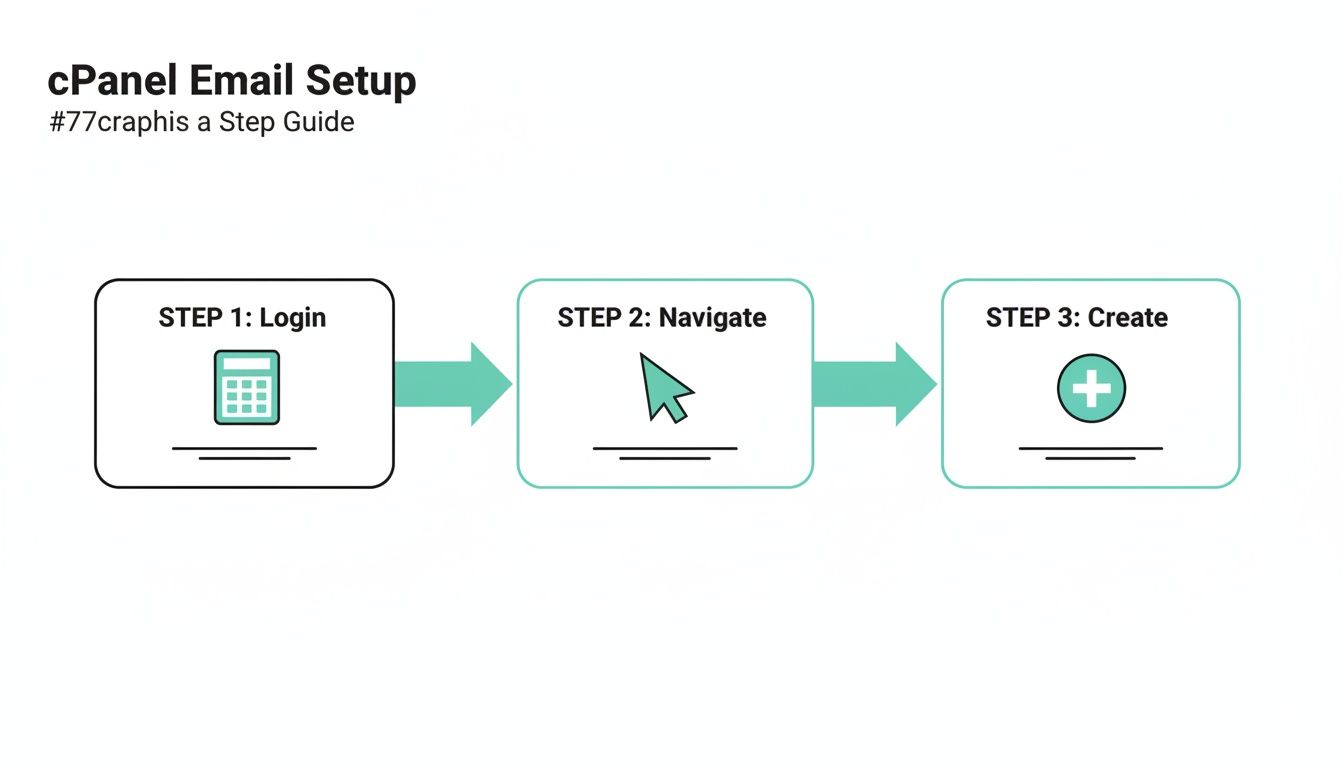
The whole thing is designed to be user-friendly, so you can manage your professional email without needing a degree in IT.
The Must-Have Records for Healthy Email
Think of your DNS records as the digital ID cards for your email. You absolutely need to get a few of them right to ensure your messages are delivered reliably. Don't stress, you don't need to be an expert here; your hosting provider almost always has simple tools or guides to help you update them.
Here’s a breakdown of what they do:
- MX (Mail Exchanger) Record: This one is non-negotiable. It's the record that tells the internet's postal service exactly which server (the "building," so to speak) to deliver your domain's mail to. Without it, incoming emails have nowhere to go.
- SPF (Sender Policy Framework): This record is like a guest list for your email. It lists all the servers that are officially allowed to send email for your domain, which stops scammers from sending dodgy emails that look like they're from you.
- DKIM (DomainKeys Identified Mail): This adds a unique, tamper-proof digital signature to every email you send out. It’s like putting an unbroken wax seal on a letter, proving to the receiving server that the message is authentic and hasn't been messed with along the way.
Getting these records right is one of the most important things you can do for your business communication. If they're wrong, you'll run into serious delivery problems. If you ever have issues, knowing what's happening when a DNS server is not responding can be a massive help in troubleshooting.
Why This Really Matters for Australian Businesses
For businesses here in Australia, email is still the absolute cornerstone of how we communicate. But a recent study of over 1,000 IT leaders showed a surprising number of businesses are dropping the ball on the basics of email management.
According to the Australia Business Email Report 2025, everything from contracts to compliance notices goes through email, yet many companies are still fumbling with manual processes for things like signatures and disclaimers.
Proper DNS configuration is the bedrock of a professional email system. If you want your emails to consistently reach their destination, you have to improve email deliverability. By authenticating your domain with SPF and DKIM, you’re not just sending an email—you're protecting your brand and ensuring your important messages are taken seriously.
Connecting Your Email to Your Favourite Devices
Alright, so your new professional email address is live and kicking. The next job is getting it onto the devices you actually use every day. Whether that's your laptop in the office, your tablet on the couch, or your smartphone when you're out and about, you need your email to be everywhere you are.
The good news? Modern email apps like Microsoft Outlook, Apple Mail, and the built-in apps on Android and iOS have made this a ridiculously simple process. Most of the time, you just punch in your new email address and password, and the app is smart enough to figure out all the server settings for you.
A Quick Word on IMAP vs. POP3
Before you jump in, it’s worth understanding a quick but important concept: the difference between IMAP and POP3. These are just the technical names for the two main ways email apps fetch your messages from the server.
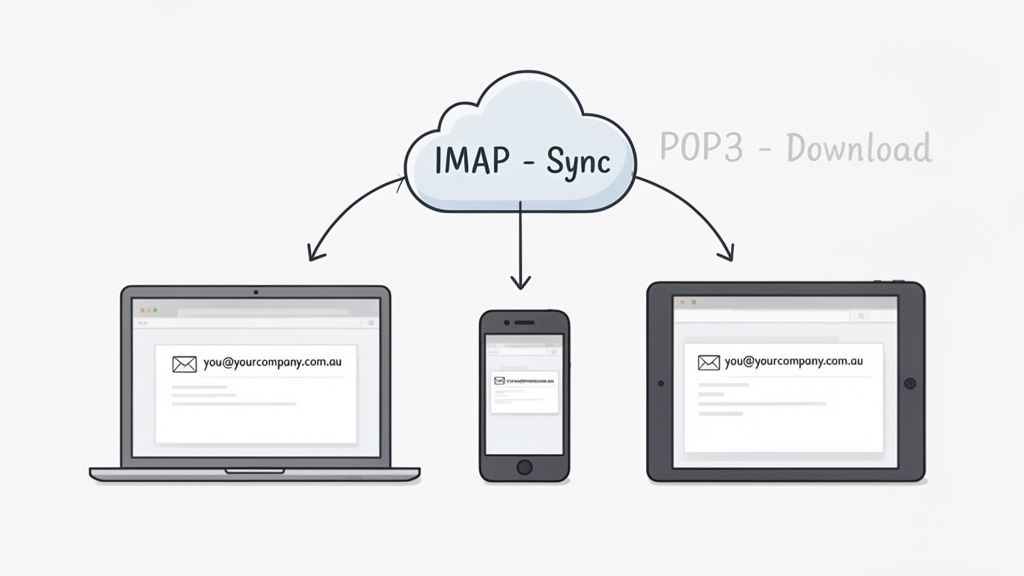
- IMAP (Internet Message Access Protocol): This is the modern standard and the one you'll want to use 99% of the time. IMAP keeps your email synchronised across every single device. If you read, delete, or move a message on your phone, that change happens instantly on your computer, too. It’s perfect for how we all work now.
- POP3 (Post Office Protocol 3): This is an older method that basically downloads your emails to one device and then often deletes them from the server. It’s a real pain if you check email in more than one place because your devices will constantly be out of sync.
For a seamless experience where your inbox looks identical everywhere, always choose IMAP during the setup process. It guarantees all your folders, sent items, and read/unread messages are perfectly mirrored across every device you use.
This sync is the secret sauce to managing your communications efficiently, especially when you set up company email for a modern business.
Setting Up Your Desktop Email Client
For most businesses, Microsoft Outlook is still the command centre for daily communications on a desktop. Adding your shiny new account is a straightforward process that usually takes just a couple of minutes.
For a practical example, here's how it generally works in Outlook:
- Open Outlook and go to File > Add Account.
- Enter your new email address, like
info@yourcompany.com.au, and click Connect. - Enter your password when prompted.
- Outlook will automatically detect the IMAP server settings and finish the setup.
The process is very much the same for other popular clients like Apple Mail or Thunderbird. For a detailed, step-by-step walkthrough, our guide explains exactly how to add a new mailbox in Outlook.
Common Questions About Company Email
When you're setting up a company email for the first time, a few questions always seem to come up. Let's run through the most common queries we hear from Aussie businesses.
Can I Migrate My Old Emails From Gmail or Another Provider?
Yes, absolutely. In fact, it's a critical step to make sure your switch is seamless and you don't lose any of your important communication history. Most quality hosting providers will give you tools or support to help move your emails from services like Gmail or another host.
One of the easiest ways is to use a desktop email client like Outlook or Apple Mail. You just connect both your old and new accounts using IMAP, then simply drag and drop the folders you want to move across. For larger or more complicated moves, it's always a good idea to check your host's help articles for a specific guide, like our own email migration resources.
What Is a Professional Email Signature?
Think of your email signature as your digital business card. It’s a simple but powerful way to reinforce your brand with every single message you send. You'll find a signature editor in the settings menu of pretty much any email client.
A solid signature should always include:
- Your full name and title
- Company name and website
- A contact phone number
For example:
Jane Doe
Sales Manager
Sydney Plumbing Pros
sydneyplumbingpros.com.au
02 1234 5678
Popping your company logo in there is also a great touch. It just helps present a more consistent and trustworthy image to your clients and partners.
How Can I Protect My Email From Spam and Phishing?
Security should always be front and centre. Your first line of defence is a robust, server-level spam filter, which is something we include with all our email plans. This automatically blocks the vast majority of junk mail before it even hits your inbox.
The next layer of protection is getting your DNS records right. Enabling SPF, DKIM, and DMARC (which we covered earlier) authenticates your outgoing mail. This is vital for protecting your brand's reputation and making sure your emails actually land where they're supposed to.
Finally, there's the human element. It's so important to encourage your team to use strong, unique passwords and to be wary of clicking suspicious links or opening attachments in unexpected emails. It's this combination of technical safeguards and user awareness that offers the best defence against the most common email threats out there.
Ready to create a professional, secure, and reliable email system for your business? At UpTime Web Hosting, we offer fast, Australian-based email hosting with all the features you need to get started. Explore our email hosting plans today!