Your site probably feels “mostly fine” until traffic picks up, WooCommerce starts doing real work, or a plugin update turns a quick page into a slow one. In cPanel hosting, that usually shows up as admin pages dragging, checkout requests stalling, or PHP workers backing up while the front end looks random rather than consistently fast.
That's where PHP performance tuning matters. Not the vague version that tells you to “optimise your stack”, but the practical version that works on Australian hosting, with local visitors, LiteSpeed, and the kind of WordPress, Laravel, and custom PHP sites SMEs run. The biggest gains usually come from a short list of changes done in the right order, then monitored properly.
Table of Contents
- The Foundation Measurement and Modern PHP
- The Quickest Win Mastering OPcache
- Tuning Your Engine PHP-FPM and LiteSpeed
- Optimising Your Application Code
- Tackling the Database Bottleneck
- Leveraging Advanced Caching Layers
- Monitoring and Australian Hosting Tips

Performance you can feel, backed by clients who depend on it. Read how our support and uptime create long‑term customer success.Power Your Business with Better Hosting
The Foundation Measurement and Modern PHP
Start with a baseline
The fastest way to waste time in php performance tuning is to change five settings at once and hope for the best. Good tuning starts with a baseline. You need to know whether the delay comes from PHP execution, database queries, file I/O, external APIs, or a plugin doing too much work on every request.
For application profiling, Xdebug with KCacheGrind is still one of the clearest ways to see where request time goes. Run a slow page, inspect the call graph, and look for the usual suspects: repeated database access, expensive loops, autoload churn, image processing inside requests, or code that hits the filesystem far too often.
A quick baseline checklist helps:
- Profile one real slow page: Use Xdebug output and open it in KCacheGrind rather than profiling only a blank test route.
- Test logged-in and logged-out paths: WordPress admin, cart, checkout, and account pages behave very differently from a cached homepage.
- Separate PHP time from database time: If MySQL or MariaDB is the issue, tweaking PHP-FPM won't rescue the request.
- Record before-and-after notes: Keep the request path, PHP version, enabled cache layers, and observed bottleneck in a simple doc.
Practical rule: measure one bottleneck, change one thing, test again.
Upgrade PHP before tuning around it
If you're still on PHP 7.4, you're carrying avoidable overhead before you touch OPcache, PHP-FPM, or code quality. Upgrading from PHP 7.4 to PHP 8.2 or 8.3 typically results in a 20–30% performance improvement in request throughput, and Zend notes that these upgrades pair well with cleaner query patterns such as native SQL where appropriate for local services hosted in Australian data centres like Sydney and Brisbane (Zend on PHP performance).
That matters more than people think. A lot of older tuning advice was written around keeping dated stacks alive. Modern PHP gives you a better runtime, better engine behaviour, and a better base for every later optimisation.
For WordPress owners on shared or cPanel hosting, the PHP version selector is often the easiest high-impact change you can make. If you're unsure what version your site can run cleanly, this guide on changing your WordPress PHP version is a practical place to start.
A modern upgrade also exposes bad code faster. Deprecated functions, old plugins, and brittle themes tend to show themselves during testing, which is useful. It's better to catch those in staging than to spend hours tuning an old runtime around avoidable application issues.
Upgrade PHP before tuning around it
Use this order when you're dealing with a sluggish PHP site:
| Priority | Action | Why it comes first |
|---|---|---|
| First | Upgrade to PHP 8.2 or newer | Improves the runtime before any fine-tuning |
| Second | Profile a real request | Shows whether the delay is code, DB, or I/O |
| Third | Enable core caching | Removes repeated work from each request |
That order keeps the work honest. It also stops the common mistake of spending an afternoon micro-optimising code that sits behind an old PHP version and no meaningful cache strategy.
The Quickest Win Mastering OPcache
A common Sydney or Melbourne hosting support job goes like this. The site owner says the server feels slow, CPU usage spikes for no obvious reason, and the admin area drags even though traffic is normal. On a lot of PHP sites, especially WordPress on cPanel, OPcache is either off, undersized, or left on default settings that don't suit the app.
Why OPcache pays off fast
OPcache keeps compiled PHP bytecode in memory so PHP does not need to parse and compile the same files on every request. That cuts repeated work inside each request cycle and usually lowers CPU use straight away.
For Australian SMEs on local shared, VPS, or reseller hosting, this matters because the quickest wins are often on the server side, not in a plugin cleanup session that takes half a day. If the site is running on LiteSpeed in a Sydney or Melbourne data centre, OPcache is one of the first settings worth checking because it improves the baseline for every uncached or logged-in request.
Here's the core idea visually:
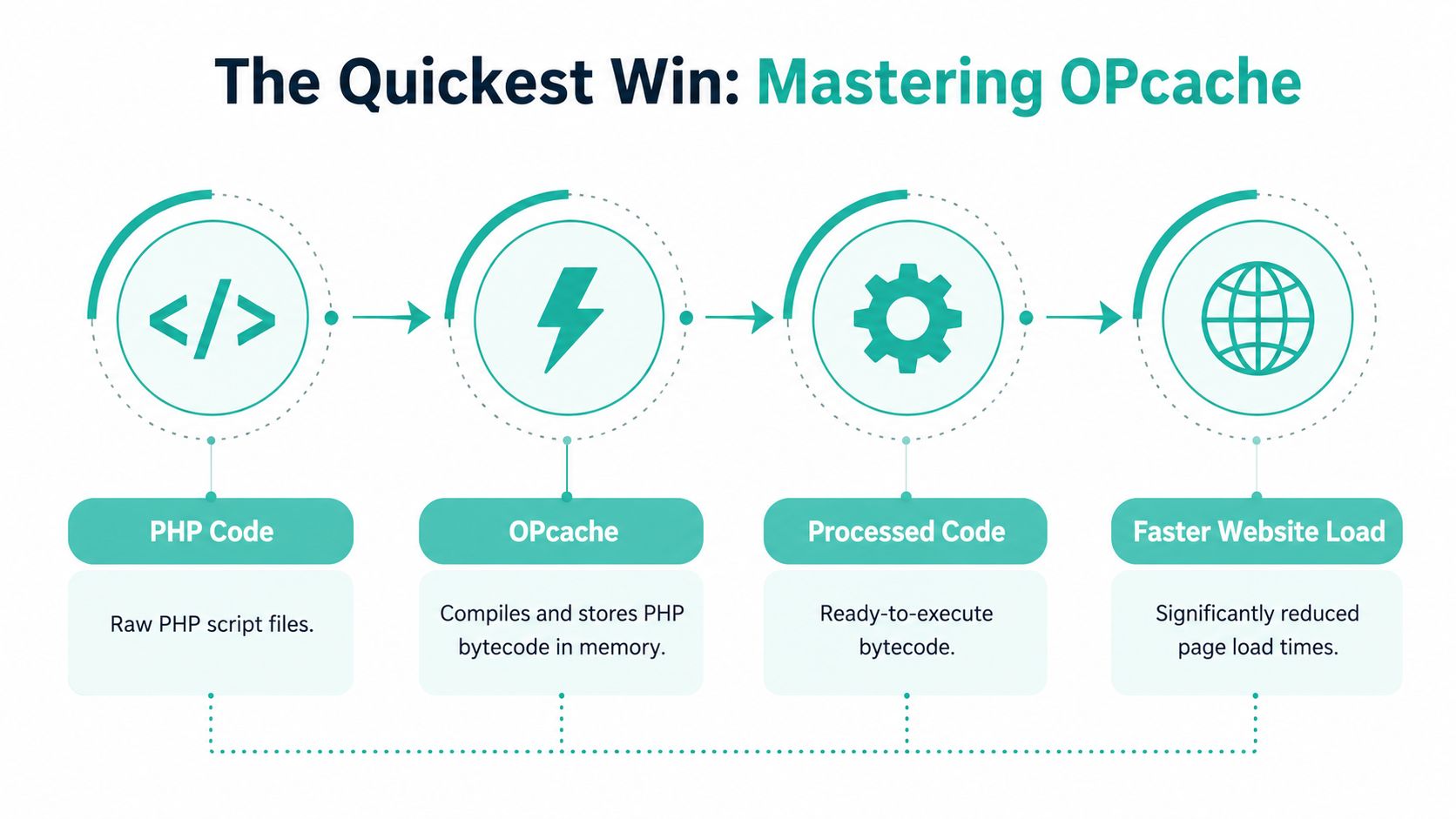
It is not magic. If a slow database, remote API calls, or overloaded PHP workers are the bottleneck, OPcache will not fix that. What it does well is remove waste that many PHP sites repeat on every request.
A practical cPanel starting point
For a typical business site on cPanel with LiteSpeed, start with a conservative production setup in php.ini or the relevant multi-PHP INI editor:
opcache.enable=1
opcache.memory_consumption=256
opcache.interned_strings_buffer=32
opcache.max_accelerated_files=20000
opcache.validate_timestamps=1
opcache.revalidate_freq=2
This is a sensible starting point for plugin-heavy WordPress installs, brochure sites with builders, and medium-sized PHP apps. It is not a final answer for every server.
On development or staging, keep timestamp validation on so code changes are picked up without manual resets. On production, teams with a controlled deployment process often relax validation more aggressively and reload PHP during deploys. That trades convenience for lower filesystem checks.
The hosting-side steps are covered clearly in this LiteSpeed and OPcache cPanel guide for WordPress performance.
Use these checks after enabling it:
- Confirm it's active: Check
phpinfo()or an OPcache status page. - Watch memory use: If free memory stays very low, raise
opcache.memory_consumption. - Review cached script count: Set
opcache.max_accelerated_filesabove your real PHP file count. - Restart the PHP handler after changes: On some cPanel setups, settings do not apply cleanly until PHP is reloaded.
- Check for restarts: Frequent OPcache restarts usually point to poor sizing, not bad luck.
What usually goes wrong
The most common mistake is undersizing the cache on larger WordPress, Magento, or Laravel installs. The site still works, but the cache churns, scripts drop out, and performance becomes inconsistent during busy periods.
That pattern shows up often on local business sites with years of plugin growth. A WooCommerce store with page builders, payment extensions, and marketing add-ons can burn through OPcache space much faster than the owner expects. The fix is usually boring and effective. Measure memory usage, increase the pool, and make sure the file limit matches the application size.
A second mistake is copying development settings into production. If validate_timestamps is checked too often on a stable live site, PHP does extra filesystem work every few seconds. On fast local infrastructure this may look minor at first, but under load it adds up.
If OPcache is enabled and the site still feels uneven, check cache memory, restart frequency, and script capacity before blaming PHP itself.
On UpTime Web Hosting stacks, this is one of the easier wins to apply because LiteSpeed, cPanel, and WordPress-friendly tooling make it straightforward to test changes and confirm the result. For many Australian sites, especially those serving mostly local visitors, good OPcache settings improve the baseline response time before you touch PHP-FPM, object caching, or database work.
Host your website with our 5-star rated, cPanel website hosting plans.
Super fast servers, with security included and hosted in your choice of Australian Data Center.
View cPanel Plans
Tuning Your Engine PHP-FPM and LiteSpeed
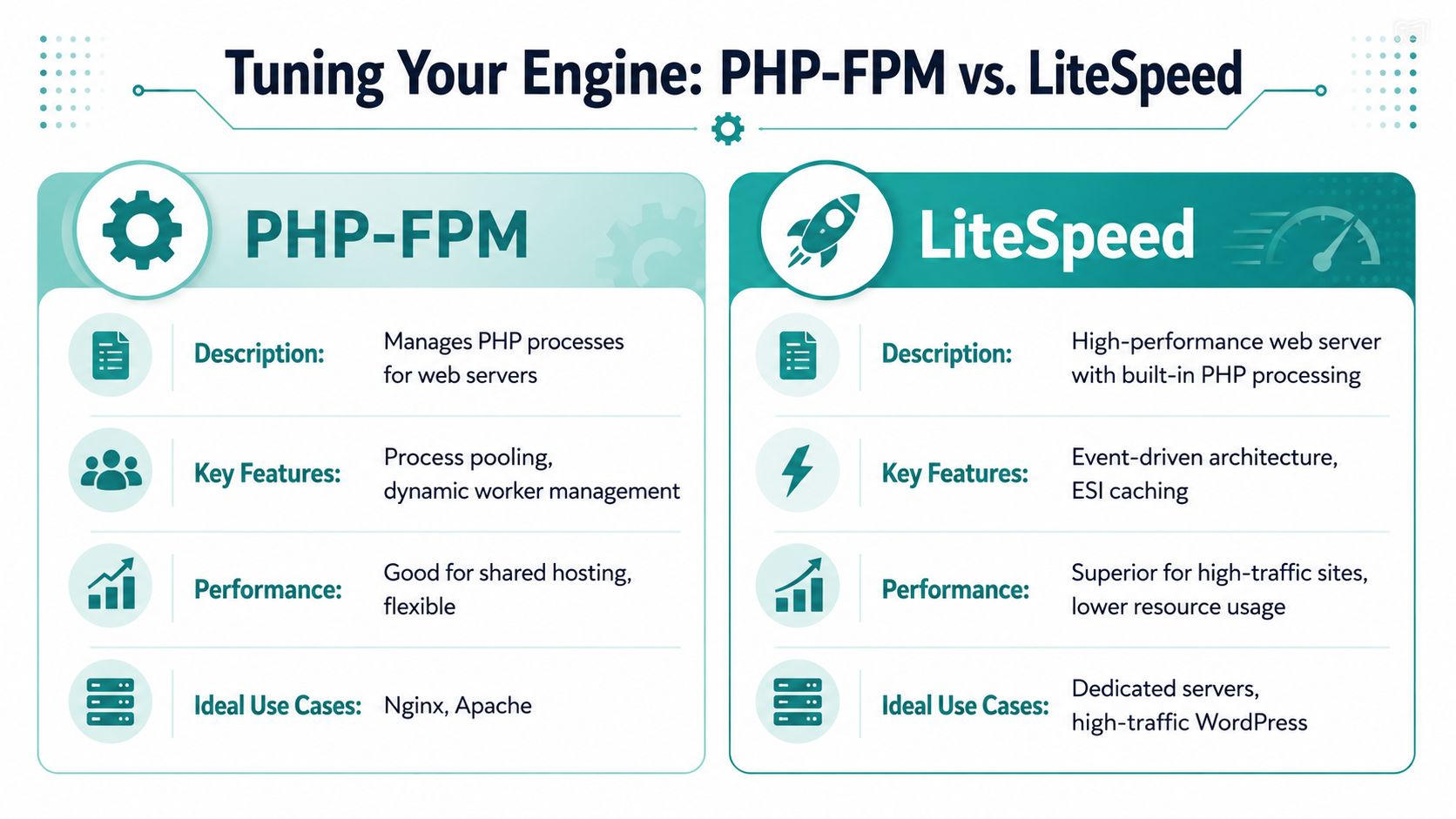
The next layer is the request engine. PHP-FPM decides how PHP workers are created, reused, and kept ready for traffic. On paper, that sounds like back-end housekeeping. In practice, it changes how your site behaves when office-hour traffic arrives, when a marketing campaign lands, or when WooCommerce starts chewing through logged-in requests.
Choose the process manager for your traffic pattern
Most guides tell you to leave pm.dynamic alone. That's understandable because it's flexible. But flexibility isn't always the same thing as best latency.
While most guides default to pm.dynamic, performance data shows pm.static can deliver 15-20% better latency for Australian SMEs with consistent traffic patterns. However, an estimated 80% of local hosting blogs still recommend the dynamic manager without providing benchmarks for the static alternative (discussion and benchmark context on Reddit).
That lines up with what many local business sites do. They don't have wildly unpredictable global traffic. They often have stable Australian daytime demand, especially for brochure sites, service firms, member portals, and stores with repeat local traffic.
A simple view:
| PM mode | Best fit | Trade-off |
|---|---|---|
static | Consistent traffic | Uses memory predictably, keeps workers ready |
dynamic | Mixed traffic patterns | More flexible, but can introduce worker spawn overhead |
ondemand | Low-traffic sites | Saves memory, can feel slower on cold requests |
How LiteSpeed changes the picture
The web server matters because PHP-FPM doesn't work in isolation. LiteSpeed handles connections differently from a more conventional Apache plus PHP-FPM setup, and on WordPress it often reduces pressure before requests even reach PHP thanks to stronger caching behaviour.
That's why PHP-FPM tuning should match the server in front of it. If LiteSpeed is already serving cached pages well, PHP workers are mainly reserved for logged-in requests, carts, checkouts, APIs, and dynamic endpoints. That usually means you can tune more deliberately around the traffic that hits PHP.
If you want a technical overview of the server layer itself, this page on LiteSpeed Web Server hosting gives the local hosting context without the usual generic advice.
A simple decision guide
For Australian business sites, this is the decision path I'd use:
- Use
pm.staticwhen traffic is steady, memory is predictable, and response consistency matters more than squeezing every idle megabyte. - Use
pm.dynamicwhen the site has obvious swings through the day or multiple tenants with uneven activity. - Use
ondemandfor very quiet projects, dev sites, and low-priority installs where conserving memory matters more than immediate first-hit speed.
Field note: if your site slows down at the same time every weekday, process management is often part of the story.
Don't tune PHP-FPM in the dark. Check worker pressure, request queueing, and whether children are being exhausted. If workers are always busy, adding another plugin cache layer won't solve the root issue.
Optimising Your Application Code
Server tuning buys breathing room. Application code decides whether you keep it.
On a busy SME site in Sydney or Melbourne, the slowest requests are often the ones that trigger too much work inside the app itself. I see it all the time on cPanel hosting. A page loads one record, then asks for related data inside a loop, reformats the same values repeatedly, and fires a stack of plugin callbacks before the response is sent. LiteSpeed and a well-tuned PHP stack help, but they cannot rescue inefficient request logic.
Find expensive code before rewriting anything
Start with a profile, not a hunch.
Most PHP slowdowns come from request paths that do too much work. Common examples include repeated database lookups, large arrays pushed through multiple transforms, file reads in hot paths, and expensive helper functions called far more often than expected.
Xdebug and KCacheGrind are useful because they show total time across the full request. That is the number that matters in production. A function that looks cheap in isolation can become one of the top offenders if it runs hundreds of times per page load.
Use one profiling run to answer these questions:
- Which function used the most total time
- Which code path ran more often than expected
- Which work should happen before the request, after the request, or in cache
On local business sites, that third question is often the winner. Prebuilding menus, report fragments, product metadata, or pricing maps usually delivers more than micro-optimising syntax.
Common PHP patterns that waste time
A few patterns show up repeatedly in WordPress themes, plugins, Laravel apps, and older custom codebases.
// Slow pattern
foreach ($orders as $order) {
    $customer = getCustomerById($order->customer_id);
    echo $customer->name;
}
That pattern usually hides repeated database access or repeated object hydration. Pull the related data once, index it properly, and render from memory.
// Better pattern
$customerIds = array_column($orders, 'customer_id');
$customers = getCustomersByIds($customerIds);

foreach ($orders as $order) {
    echo $customers[$order->customer_id]->name;
}
Other common trouble spots deserve a quick audit:
- Repeated file access: reading config, templates, or JSON files inside frequently hit code paths adds avoidable I/O.
- Heavy string handling in loops: regex, formatting, and repeated concatenation add up fast on larger datasets.
- Too many plugin hooks: on CMS sites, small callback overhead multiplied across every request becomes real latency.
- Repeated remote calls: payment, shipping, CRM, and API lookups should be cached, queued, or deferred where possible.
For broader site-level tuning beyond PHP internals, this guide on how to improve website speed for Australian business sites is a useful companion because it ties code, assets, and caching together.
JIT has a place, but not on every site
PHP 8 introduced JIT, and it helps in a narrower set of workloads than many guides suggest. It is most useful for CPU-heavy jobs such as data processing, image manipulation, calculations, and long-running workers. Ordinary web requests usually spend more time waiting on the database, the filesystem, external APIs, template rendering, or WordPress/plugin overhead.
A sensible starting point looks like this:
opcache.jit=1205
opcache.jit_buffer_size=64M
Treat that as a test configuration, not a default rule. As noted by Accesto's PHP performance tuning guide, JIT gains depend heavily on the workload. On many brochure sites, WooCommerce stores, and member portals, cleaner queries and less application work per request beat JIT tuning every time.
The trade-off is memory. On smaller hosting plans and tightly allocated VPS instances, oversized JIT buffers can waste RAM that would be better used by OPcache, PHP workers, or MariaDB. For many Australian SME sites running behind LiteSpeed, the practical order is simple. Fix repeated work first. Use OPcache well. Test JIT only if the profiler shows real CPU pressure.
Tackling the Database Bottleneck
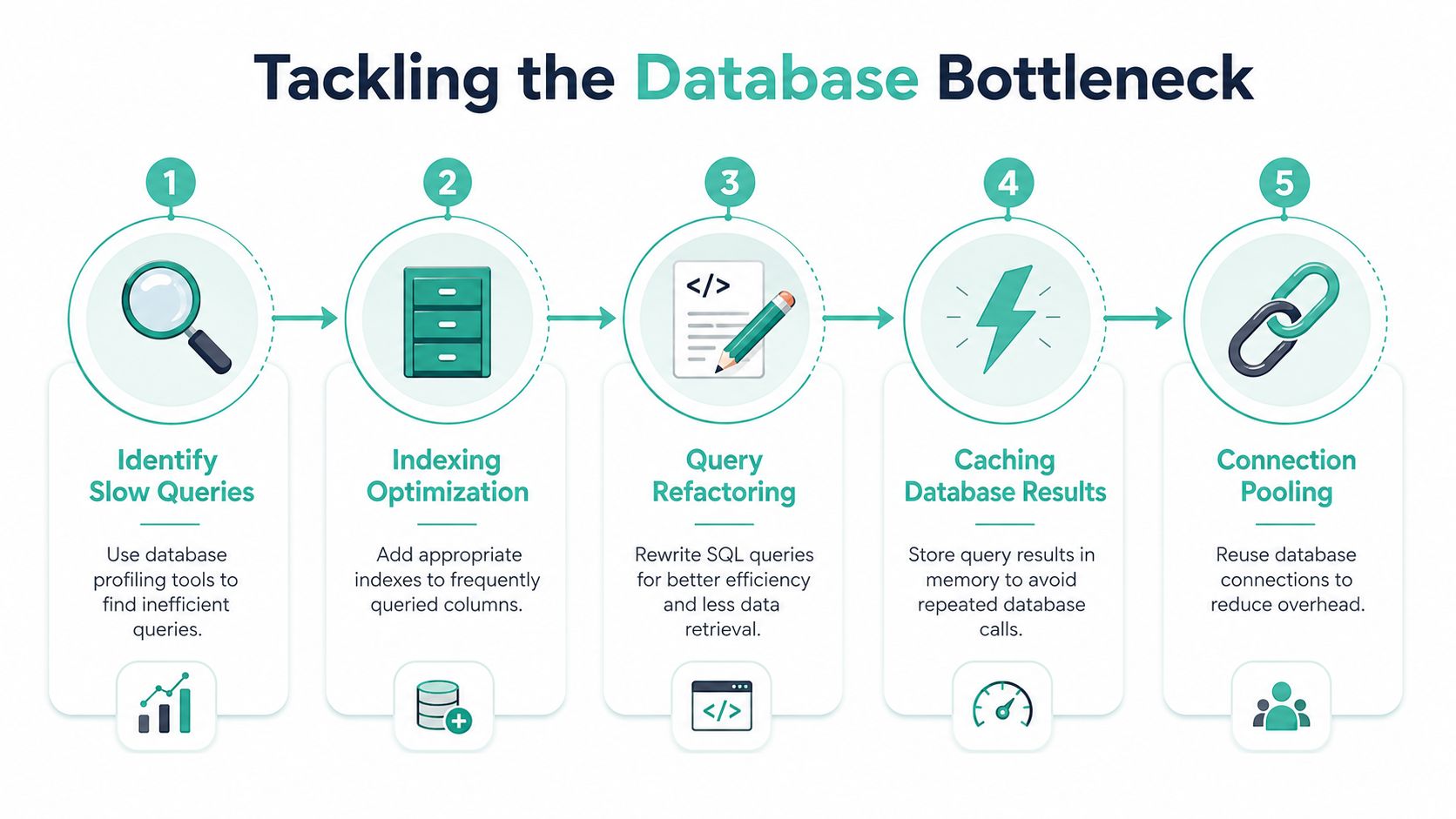
A lot of “slow PHP” complaints are really slow database conversations. The application asks for data in the worst possible shape, then PHP gets blamed because the page waits.
The N plus 1 problem in real sites
A familiar example looks harmless. You load a list of orders, then inside the render loop you fetch the customer, the latest payment, and the shipping record for each row. The page works. It also turns one request into a pile of follow-up queries.
That's the classic N plus 1 problem. One initial query becomes many additional queries because related data isn't loaded efficiently. In Laravel, Symfony, and custom PDO code, this shows up in list screens, dashboards, reporting pages, and account areas.
The page doesn't feel slow because PHP is bad. It feels slow because the request keeps waiting for the database to answer the same kind of question over and over.
Fix the query shape before blaming PHP
The first fix is usually eager loading or a deliberate join strategy. Pull related records together earlier so the render loop works with ready data rather than opening a new conversation with the database on each pass.
Use this pattern:
- Log the query count: If a single page triggers repeated related lookups, treat that as a code smell.
- Fetch relationships upfront: In frameworks, eager loading is usually cleaner than sprinkling lookups across templates.
- Index the columns you filter and join on: An index on the right column often matters more than another round of PHP tuning.
- Cache expensive result sets: If a report doesn't need fresh data on every hit, stop rebuilding it for every user.
A practical before-and-after can be dramatic in feel even without quoting numbers. Admin pages load cleanly, search filters stop hanging, and checkout steps become more consistent because the app stops doing needless round trips.
Register your new domain name at competitive market prices including free domain add-ons like privacy, DNS Hosting, Custom Nameservers and Forwarding.
Always the best price and no nasty renewal price hikes.
Register A Domain Name
Leveraging Advanced Caching Layers
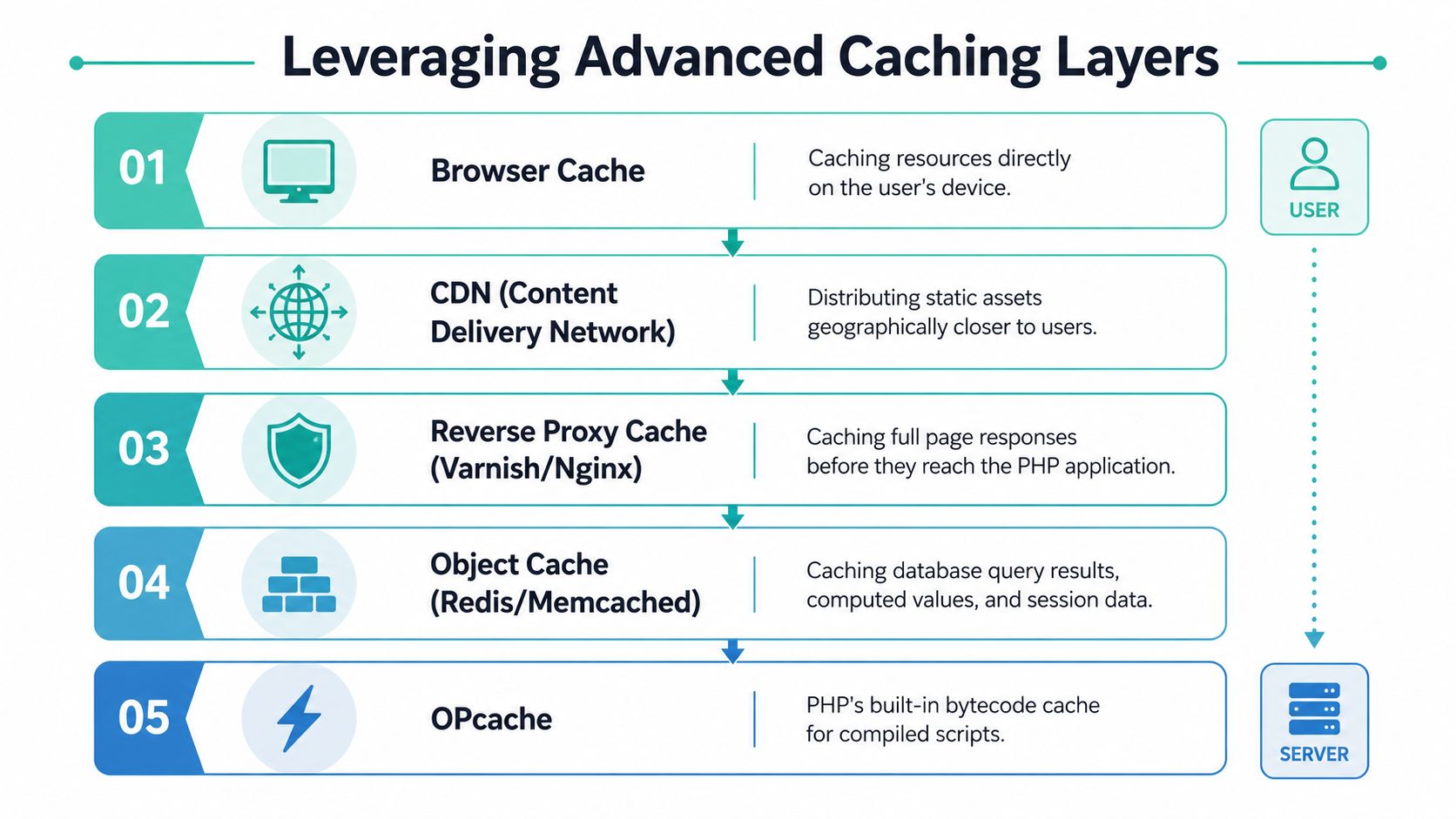
OPcache is essential, but it isn't the whole caching story. Fast PHP sites usually rely on several cache layers doing different jobs, each removing a different class of repeated work.
Think in layers not single tools
A single cache plugin won't fix every path. You want layered behaviour:
- Browser cache keeps static assets on the visitor's device.
- CDN caching shortens delivery for images, CSS, JavaScript, and other static content across Australia.
- Full-page caching serves prebuilt HTML without invoking PHP for eligible pages.
- Object caching stores repeated query results, computed values, and transient application data.
- OPcache keeps compiled PHP bytecode ready in memory.
That stack matters because different requests need different treatment. A public homepage might be served from full-page cache. A logged-in account page may bypass page cache but still benefit from object cache and OPcache. An API endpoint may bypass almost everything except low-level runtime improvements.
A practical stack for WordPress and PHP apps
For WordPress on LiteSpeed, full-page caching often carries the front end, while object caching helps with repeated database work behind logged-in sessions and dynamic fragments. On custom PHP apps, page cache is less universal, so object cache and good query design do more of the heavy lifting.
A workable pattern looks like this:
| Layer | Best use | Typical outcome |
|---|---|---|
| Full-page cache | Public content | Fewer PHP executions |
| Object cache | Repeated query results and app state | Less database chatter |
| CDN | Static assets across regions | Lower latency for files |
| OPcache | Every PHP request | Less compile overhead |
The key is not to stack tools blindly. If page cache is already strong, spend time on object caching for dynamic routes. If dynamic pages remain expensive, check whether the app is recalculating the same data on every request instead of storing it briefly.
Monitoring and Australian Hosting Tips
A PHP site can feel fast on launch day and still drift into trouble six weeks later. New plugins, theme updates, seasonal traffic, and a few extra admin workflows are often enough to push response times back up, especially on busy WordPress installs and older custom apps.

What to keep watching after launch
The goal is simple. Catch regressions before customers feel them.
For most SMEs, that means a short monthly review inside the tools you already have through cPanel, LiteSpeed, your app logs, and your database monitor. You do not need a full observability platform to spot the common failures.
- Re-test revenue pages monthly: Check product pages, cart, checkout, quote forms, booking flows, and any staff dashboard that matters to day-to-day work.
- Check OPcache status: Confirm it is still enabled, has enough memory headroom, and is not restarting too often after deployments or plugin changes.
- Review recent plugin and theme updates: One extension can change query volume, bypass cache rules, or increase PHP worker pressure.
- Separate logged-in testing from public-page testing: Member areas, WooCommerce accounts, CRMs, and admin panels often perform very differently from cached front-end pages.
- Watch PHP and web server errors together: Slow requests, memory exhaustion, 503s, and worker saturation usually show up in logs before they show up in support tickets.
I also recommend keeping a small before-and-after record for any change that touches PHP version, LiteSpeed Cache rules, database indexes, or major plugins. That habit saves time when a client says the site "got slow last week" and nobody remembers what changed.
A lot of Australian businesses miss the infrastructure side while focusing only on code. If you're weighing broader platform decisions around resilience, compliance, and environment design, Choosing cloud services for Australian businesses is a useful read because it frames the trade-offs in local operational terms.
Why local infrastructure changes real performance
Sydney and Melbourne hosting gives you an immediate advantage for Australian traffic. The gain is most obvious on uncached requests, logged-in sessions, checkout flows, and API calls where every extra round trip adds delay.
That is why server location, network path, and web stack choice belong in the same conversation as PHP tuning. If your customers are here, low latency hosting in Australia affects real user experience just as much as code-level fixes.
On platforms built around LiteSpeed, cPanel, and tools such as AccelerateWP, you can usually get strong results without turning the stack into a science project. Use current PHP, keep OPcache healthy, watch worker limits, and monitor the pages that make money. For Australian SMEs, that mix delivers more value than chasing micro-optimisations copied from generic US-focused guides.
If you want local hosting that's already tuned for fast PHP sites, UpTime Web Hosting is built for Australian businesses and developers who care about performance, stability, and support that understands cPanel, LiteSpeed, WordPress, and real-world traffic patterns.