A lot of Australian business owners are dealing with the same frustrating pattern. Your website looks fine on your laptop. Your developer says the server is “fast”. But customers still tell you pages feel slow, carts stall, or the admin area drags in the middle of the day.
That gap often comes down to latency.
If your site is hosted too far from your customers, or on infrastructure that adds delay before a page even starts loading, people feel it straight away. They might not know the technical reason. They just know your site felt clunky, and they moved on.
For Australian businesses, this matters more than many global hosting guides admit. Geography, routing, local support hours, and data sovereignty all change the decision. A setup that works well for a U.S. audience can feel ordinary, or downright painful, for visitors in Sydney, Melbourne, Brisbane, Perth, and regional Australia.
Your Website Speed Problem Is A Latency Problem
A customer in Melbourne clicks your product page. The browser asks your server for the page, images, stylesheets, scripts, cart data, and maybe a stock check from your database. If that server sits on the other side of the world, every request has to take the long way round before anything useful appears on screen.
That delay is latency. The simplest way to think about it is digital travel time.
Many small business owners focus on visible things first. A large image. Too many plugins. A cheap theme. Those can matter. But if the first trip between the visitor and the server is long and inconsistent, the whole experience starts behind.
Why this hurts more than it seems
Slow websites don't just annoy people. They undermine trust.
If your pages hesitate, visitors start asking silent questions:
- Is this business still active
- Will checkout work
- Should I put my card details into this site
- Will support be just as slow
That’s why latency is not only a technical issue. It’s a sales issue and a credibility issue.
A visitor who leaves before engaging becomes a bounce. If you’re working on content, landing pages, or store design, it’s worth pairing that work with guidance on how to reduce bounce rate so speed and user intent are addressed together.
Low latency doesn’t make a weak website brilliant. But high latency can make a good website feel broken.
For Australian websites, the fix usually starts with one practical question. Where is your server, really? Not where the brand is based. Not where the sales office is. Where the website operates.
That single detail shapes how quickly your site responds before any design tweak or plugin cleanup gets a chance to help.

Performance you can feel, backed by clients who depend on it. Read how our support and uptime create long‑term customer success.Power Your Business with Better Hosting
What Is Latency And Why It Matters For Australian Websites
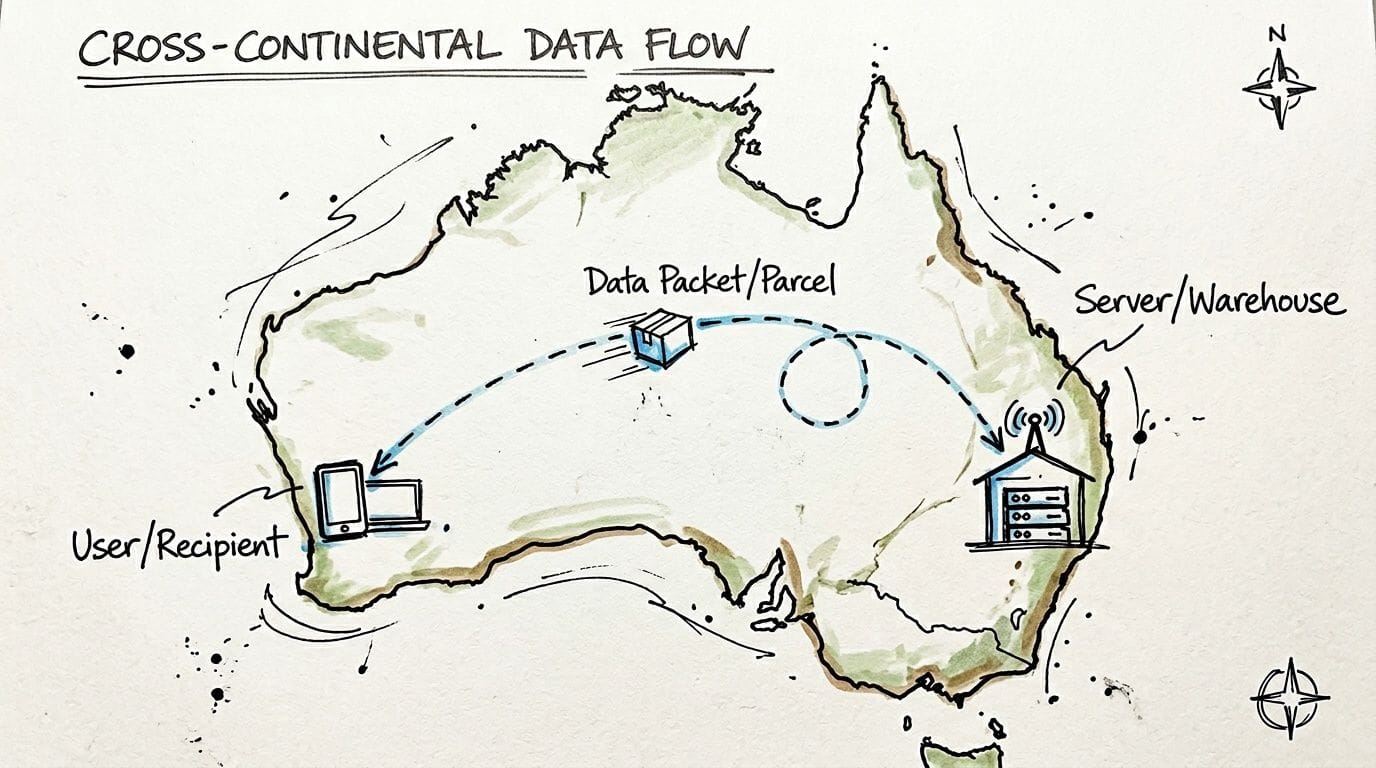
Think of your website server as a warehouse and your visitor’s browser as a customer waiting at home for a parcel.
When someone opens your site, the browser sends a request. The server packs up the data and sends it back. If the warehouse is close, the parcel arrives quickly. If it’s in another country, the trip takes longer, passes through more checkpoints, and is more likely to get delayed.
That’s latency.
Ping, round trip time, and jitter in plain English
You’ll often hear three terms.
| Term | Plain meaning | Why you care |
|---|---|---|
| Ping | A quick test message sent to the server | Shows how long one interaction takes |
| Round trip time | The full there-and-back journey | Reflects the delay before data returns |
| Jitter | Variability in delay | Causes a site to feel inconsistent |
If ping is the travel time for one small parcel, round trip time is the whole delivery cycle. Jitter is what happens when one parcel arrives on time and the next gets stuck in traffic.
That inconsistency is what makes a website feel unreliable. One page loads fine. The next drags. The cart updates slowly. The customer clicks again because they think nothing happened.
Why Australia feels the difference more sharply
Australia is physically distant from many of the global hosting locations pushed by international brands. That distance shows up in user experience.
According to BoostedHost’s comparison of local and global hosting options, local low latency hosting in Australia delivers average ping times of 10 to 30ms for Australian users, compared with 180 to 250ms from U.S. servers. The same source notes that 53% of users abandon sites loading over 3 seconds, and a 1-second delay can cut conversions by 7%.
Those numbers make the business case clear. Hosting close to your audience changes how your site feels before a visitor reads a headline or sees a product image.
The practical business impact
Low latency helps in three places that matter to small businesses.
- Search visibility: Faster delivery supports better page experience signals, including the kind of responsiveness that affects Core Web Vitals.
- Engagement: Visitors stay calmer when pages react quickly. They browse more pages and hesitate less.
- Sales flow: Product filters, cart updates, and checkout steps feel more trustworthy when every click returns fast.
Practical rule: If most of your customers are in Australia, your server should usually be in Australia too.
Low latency hosting Australia isn’t a niche technical preference. It’s the baseline for a local audience. If your website serves Australian buyers, the fastest way to remove avoidable delay is to stop sending every request on an overseas road trip.
Understanding The Technical Causes Of High Latency
Latency doesn’t come from one place. It’s usually a stack of small delays that add up. One happens on the network. Another happens inside the server. Another comes from the website code itself.
When owners hear “your site is slow”, they often assume they need a redesign. Sometimes they don’t. They need to find where the waiting starts.
Distance is the first delay
The biggest cause is physical distance.
Data still has to travel through real infrastructure. Fibre, exchange points, routers, and carrier networks all sit in actual places. If your customer is in Adelaide and your server is overseas, every request has to cover a long path before the browser receives the first byte.
A local setup shortens that path. According to AccuWeb’s overview of Australian VPS hosting, Australian hosting in Tier III data centres achieves average latencies of 10 to 30 ms for local users and can reduce round-trip times by up to 50% for Australian traffic.
That’s the road trip factor. Shorter trip, fewer chances for delays.
Network congestion and peering shape the route
Two servers can look similar on paper and still feel different in practice.
That happens because not all traffic takes the same route. Some networks peer better with local Australian ISPs. Some have cleaner paths during busy hours. Some bounce traffic through extra hops before it reaches the user.
A useful analogy is driving across Sydney. The distance from A to B might be fixed, but the route you take changes the experience. A direct motorway run feels very different from a trip through five congested suburbs and three sets of lights.
Signs of network-related latency include:
- Inconsistent speed: The site feels fine early, then drags later.
- Regional complaints: Customers in one city report slowness while others don’t.
- Slow first response: Pages wait before they begin loading.
Server hardware affects response time before delivery starts
Even with a short network path, the server still has to do work. It has to process PHP, query the database, read files from storage, and generate the page.
Hardware makes the difference.
The same AccuWeb source says NVMe SSD I/O speeds are 5x faster than traditional SSDs, enabling sub-100ms database queries. That’s a major difference for database-heavy sites like WooCommerce stores, booking systems, and membership platforms.
Imagine a warehouse picker. A slow storage system walks aisle by aisle looking for stock. NVMe grabs what it needs far faster, so the parcel gets packed sooner.
If you’re running cPanel hosting, clean caching rules can also help the server avoid repeat work. This guide to LiteSpeed Cache settings for cPanel is a useful reference if you want to understand how server-level caching reduces unnecessary processing.
Code and database inefficiency add invisible drag
Sometimes the server location is fine and the hardware is decent, but the site still feels sluggish. That’s often a software problem.
Common causes include:
- Heavy themes that load too many scripts
- Plugin overload that duplicates features
- Poor database queries that ask for more data than needed
- Unoptimised images that delay rendering
- External scripts such as chat widgets or tracking tools that block loading
If the network is the road, code is the packing process. A short drive doesn’t help if the warehouse is disorganised.
This is why diagnosing latency properly matters. You’re not trying to make one speed score prettier. You’re trying to remove delays at every stage between the click and the content.
Host your website with our 5-star rated, cPanel website hosting plans.
Super fast servers, with security included and hosted in your choice of Australian Data Center.
View cPanel Plans
Australia's Unique Network Landscape And Data Sovereignty
Australia isn’t just another dot on a global hosting map. It has its own network reality.
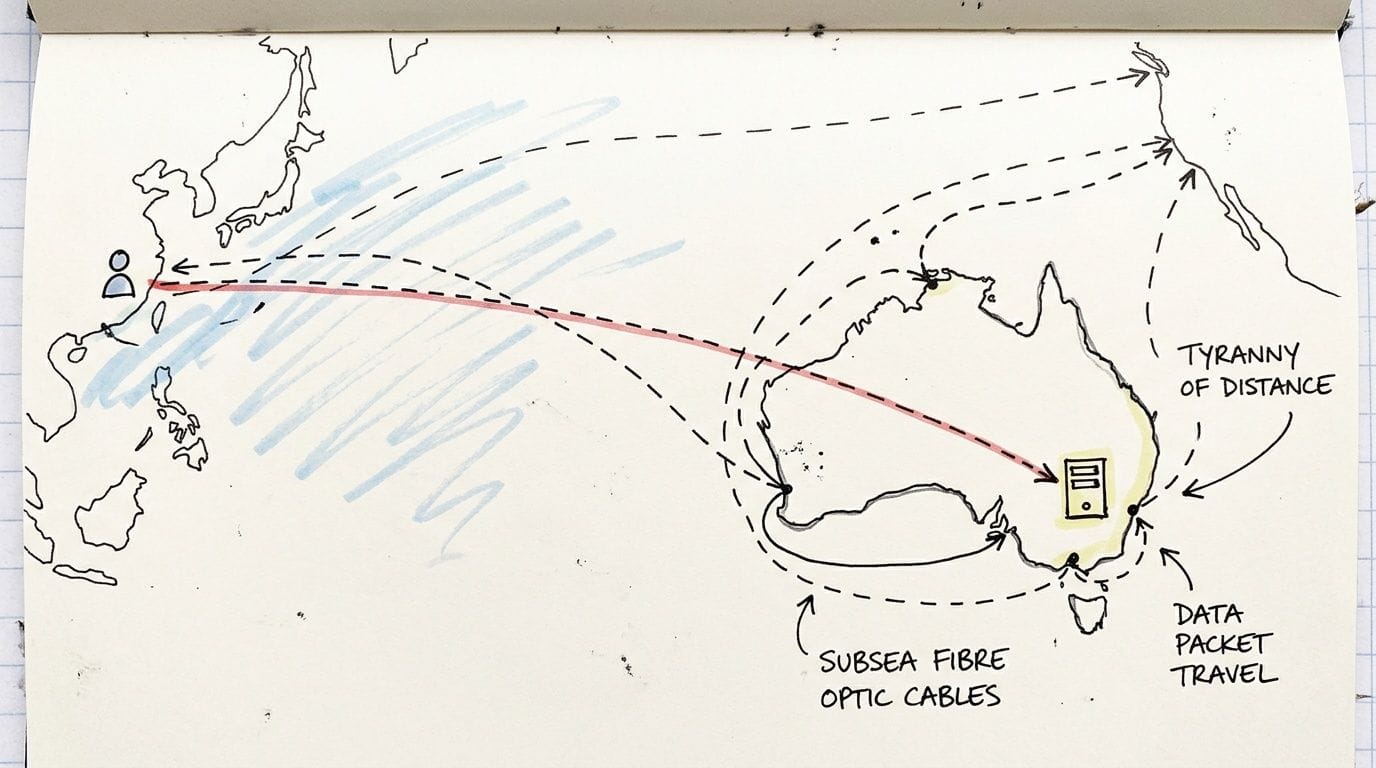
A lot of overseas advice assumes the world is tightly packed, with short distances between major data centres and broad overlap between audience location and server location. Australian businesses don’t get that luxury. Our customers are spread across a large continent, and many global hosting platforms still steer local traffic through infrastructure outside Australia.
Distance inside Australia still matters
A Sydney-hosted site will usually serve Australian users far better than a U.S.-hosted one. But local geography still matters inside the country.
Traffic often performs best when it stays on strong domestic routes and reaches major Australian points of presence efficiently. Sydney, Melbourne, Brisbane, and Perth all matter because they sit closer to the actual users and networks your customers rely on.
For a Perth visitor, a Sydney server may still be a local Australian solution with reasonable routing. A Los Angeles server is a different story. That trip sends the request offshore, across long-haul infrastructure, then back again before the page can even begin.
Subsea paths and offshore shortcuts create hidden delay
Many “global” hosting plans sound local because the company sells into Australia, bills in Australian dollars, or uses an Australian support number. That doesn’t mean the infrastructure is local.
If the server sits offshore, your traffic may cross subsea fibre links before reaching the application. That adds complexity, more hops, and more opportunities for inconsistent delivery.
A practical question to ask is simple: where is the workload processed, and where is the data stored?
That second part matters as much as speed when your business handles sensitive records.
Data sovereignty is not just for large enterprise
Australian small businesses in healthcare, finance, legal, and professional services often assume data sovereignty is only a concern for banks and government agencies. It isn’t.
If your website, customer portal, CRM-connected form, or booking system stores sensitive information, where that data lives matters. That’s especially true for Windows and database-driven applications built on ASP.NET and MSSQL.
According to Skynettechnologies on cloud hosting service providers in Australia, for Australian businesses using Windows/ASP.NET and MSSQL, storing sensitive data on offshore servers can risk non-compliance under APRA CPS 234 and upcoming Privacy Act amendments, making local Tier III data centres in Australia a necessity.
That’s not just an IT preference. It affects risk exposure, governance, and procurement decisions.
For a deeper local explanation, this article on data sovereignty and why it’s important to host your website in Australia is a good starting point.
When local hosting becomes the safer default
Here’s when Australian hosting usually stops being optional and becomes the sensible baseline:
- You serve mostly Australian customers: Local delivery should match local demand.
- You collect sensitive information: Forms, bookings, and account data may create compliance obligations.
- You run Microsoft workloads: ASP.NET and MSSQL setups often carry stronger data handling requirements.
- You need local accountability: Support and escalation are easier when the infrastructure and team understand Australian conditions.
A server location is a performance choice, a support choice, and sometimes a compliance choice.
That’s the part global providers often underplay. They talk about “worldwide reach” when the primary concern for many Australian businesses is local reliability. If your customers are here, your staff are here, and your obligations are here, hosting here usually makes the whole setup simpler.
Actionable Strategies To Optimise Your Website For Low Latency
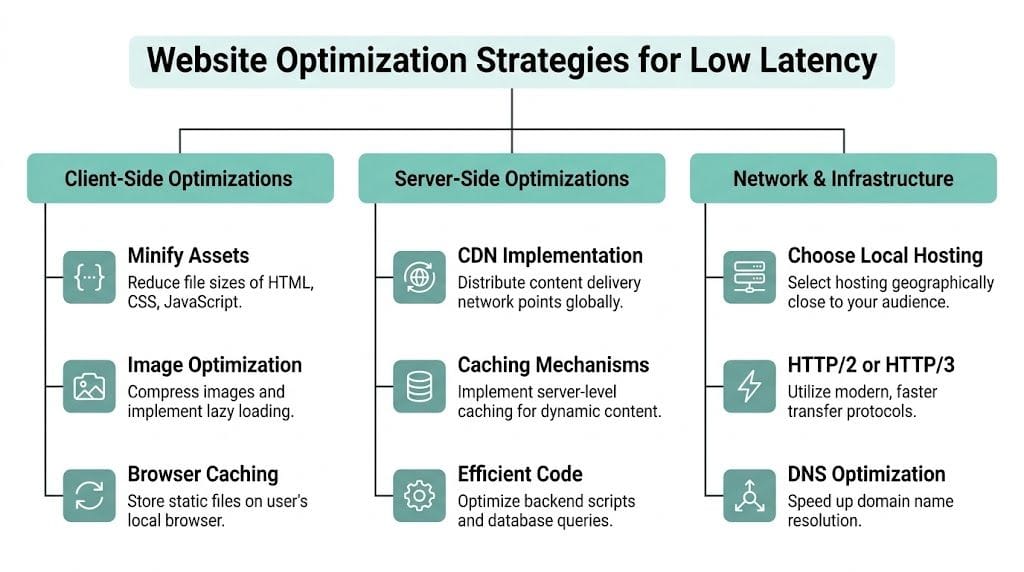
Once you understand where latency comes from, the next step is choosing the fixes that make the biggest difference first.
Many owners waste time chasing tiny front-end tweaks while leaving the major bottleneck untouched. A cleaner path works better. Start with infrastructure, then improve delivery, then refine the application layer.
Start with local hosting
If most of your audience is in Australia, move the server close to them. This is the most impactful decision in low latency hosting Australia.
A local server cuts travel distance before you touch themes, plugins, or page builders. It also gives your CDN, caching layer, and database a much better starting point.
If your audience is mostly in one region, keep that in mind too. A national audience often does well on a major east coast location with strong Australian routing. A niche regional audience may benefit from a setup designed around where those customers are.
Choose a modern server stack
Not all hosting environments respond the same way under load.
According to HOSTKEY’s Australia VPS page, pairing Intel Xeon or AMD EPYC processors with NVMe storage, LiteSpeed, and CloudLinux can deliver 99.9-99.982% uptime, while benchmarks show this kind of stack can cut response times by 3x versus older hardware, lead to 20-50% faster WordPress queries, and improve Australian Lighthouse scores by 15-25 points.
You don’t need to memorise every component. You just need to know what each one does.
| Component | What it helps with | Why it matters |
|---|---|---|
| Xeon or EPYC CPU | Processing requests quickly | Faster page generation |
| NVMe storage | Reading and writing data quickly | Better database and file access |
| LiteSpeed | Efficient web serving and caching | Lower server overhead |
| CloudLinux | Resource isolation and stability | Prevents one noisy account affecting others |
That combination is especially useful for WordPress, WooCommerce, learning platforms, membership sites, and agency-hosted client sites.
Use caching properly
Caching reduces repeated work. Instead of rebuilding the same page on every request, the server can serve a prepared version much faster.
Different layers of caching help in different ways:
- Browser caching: Stores static files on the visitor’s device.
- Server-side caching: Reduces repeated dynamic processing.
- Object caching: Speeds up database-heavy sites.
- Page caching: Helps high-traffic pages return quickly.
If your host supports LiteSpeed and AccelerateWP, you’re working with tools built to make this easier, especially for WordPress.
Don’t treat caching as a plugin checkbox. Good caching is part of the hosting environment, not just a WordPress add-on.
For Australian site owners wanting a broader performance framework, this general web performance blog is a useful companion read because it helps connect speed concepts to practical implementation.
Add a CDN for static delivery
A content delivery network stores copies of static assets closer to users. Images, stylesheets, scripts, and fonts can then load from nearby edge locations instead of always travelling back to the origin server.
That doesn’t replace local hosting. It complements it.
A CDN is most helpful when:
- Your site uses many images
- You serve visitors across multiple Australian cities
- You have traffic outside Australia as well
- Your theme loads many front-end assets
For most small business sites, the ideal pattern is simple. Keep the origin server in Australia, then let the CDN handle static asset distribution.
Reduce DNS delay
DNS is the step where the browser looks up where your website lives before it can request the page.
If DNS resolution is slow, visitors wait before the website even starts loading. That makes the whole experience feel laggy, even if the server itself is solid.
Look for:
- Fast DNS infrastructure
- Reliable uptime
- Clean record management
- Minimal unnecessary lookups
This can be easy to overlook because users never see it directly. They just feel the pause.
Trim front-end weight
Even on strong hosting, bloated pages still waste time.
A practical clean-up usually includes:
- Compressing images before upload
- Using modern formats where supported
- Removing unused plugins
- Minifying CSS and JavaScript
- Delaying non-essential third-party scripts
Many businesses discover they’re paying for a performance problem created by marketing tags, popup tools, sliders, and duplicate builders.
Tune dynamic apps and databases
Database-backed websites often feel slow because each page triggers a chain of queries and processing steps.
For WordPress, that usually means reviewing plugins, query load, and cache hit rates. For Windows and MSSQL sites, it means paying closer attention to how the application fetches, sorts, and writes data.
If you’re running forms, dashboards, booking systems, or custom portals, focus on:
- Efficient database queries
- Well-indexed tables
- Reduced plugin or module overlap
- Application-level caching where appropriate
A local server won’t fix messy query logic, but it gives your application a faster baseline.
Match the setup to Australian users
Performance advice often gets generic because many hosting articles target every country at once. That’s not helpful when your customers are mainly Australian.
This local guide to website speed optimisation for Australian users is worth reviewing if you want the tuning decisions to reflect Australian network conditions rather than overseas assumptions.
The biggest win is usually boring and practical. Put the site near the audience. Use capable hardware. Cache smartly. Keep the site lean. That combination solves far more latency problems than flashy “speed hacks”.
Your Buyer's Checklist For Low Latency Hosting
Choosing hosting gets easier when you stop reading marketing slogans and start asking direct questions.
A provider can promise “blazing fast speeds” all day. That phrase means nothing unless you know where the servers are, what stack they use, how they protect uptime, and who supports the service when something goes wrong.

Questions that reveal the real setup
Take this checklist into any sales chat or support ticket.
- Where is my website hosted: Ask for the server location, not the company headquarters.
- Which Australian cities are available: This helps you judge proximity and routing options.
- What storage does the plan use: You’re looking for NVMe, not vague “fast SSD” wording.
- What web server is included: LiteSpeed matters if performance and caching are priorities.
- Is resource isolation included: CloudLinux or an equivalent helps stop neighbour accounts from affecting yours.
- What uptime commitment is offered: Ask for a written SLA, not a broad claim.
- Is DDoS protection included: You want this built into the hosting environment.
- How are backups handled: Ask where backups are stored, how often they run, and how restores work.
- Where is support based: Local support understands local conditions and business hours better.
- Can the environment support my application type: Especially important for WordPress, WooCommerce, ASP.NET, and MSSQL.
What good answers usually sound like
Not every business needs the same hosting product. But strong answers share common traits.
| Question | Strong answer signals |
|---|---|
| Server location | Clear Australian data centre location |
| Performance stack | NVMe, LiteSpeed, current CPUs, caching support |
| Security | DDoS protection, firewalls, malware scanning |
| Backups | Encrypted off-site backups with clear restore process |
| Support | Australian-based help with real escalation paths |
If the response is vague, overloaded with buzzwords, or avoids specifics, keep digging.
Ask the provider to explain their setup in plain language. If they can’t, support later may be just as frustrating.
Match the checklist to your site type
A brochure site and a database-heavy application don’t ask the same things from hosting.
For example:
- WordPress site owners should focus on caching, PHP performance, and plugin impact.
- eCommerce stores should ask about checkout stability, database responsiveness, and security layers.
- Agencies should look for account isolation, backup controls, and support reliability.
- Windows hosting users should confirm local support for ASP.NET and MSSQL workloads.
If you’re evaluating VPS options specifically, this guide to best VPS hosting in Australia gives a useful local benchmark for what to compare.
Buying hosting gets much easier when you stop shopping by price alone. The cheaper plan can cost more in lost leads, admin headaches, and support delays if the underlying infrastructure isn’t built for Australian traffic.
Register your new domain name at competitive market prices including free domain add-ons like privacy, DNS Hosting, Custom Nameservers and Forwarding.
Always the best price and no nasty renewal price hikes.
Register A Domain Name
Making The Right Choice For A Faster Australian Website
A faster website doesn’t happen by accident. It comes from a few sensible choices made early.
For Australian businesses, the first choice is proximity. Keep the server close to your customers. That removes avoidable delay before any page optimisation starts.
The second choice is the stack. Modern processors, NVMe storage, LiteSpeed, caching, and stable account isolation give the website a better chance of staying responsive when traffic rises or plugins get busy.
The third choice is support and operations. Good hosting includes security controls, backups, monitoring, and a team that can help when something breaks. A technically solid platform loses value quickly if support is slow or disconnected from Australian business needs.
Low latency hosting Australia isn’t about chasing a perfect score in a testing tool. It’s about making your website feel reliable to real people. A contact form that submits quickly. A product page that loads without hesitation. A dashboard that doesn’t lag every time staff log in. Those moments shape trust.
If your current hosting still feels like a compromise, it may help to review whether a more scalable setup would suit your site better. This overview of the benefit of cloud hosting explains why many Australian websites move toward more flexible infrastructure as they grow.
A good local setup gives you three things at once. Better responsiveness, clearer accountability, and fewer hidden trade-offs. That’s what most small businesses need.
If you want a hosting partner built for Australian traffic, UpTime Web Hosting offers local infrastructure, WordPress and Windows hosting, VPS options, Australian support, and performance-focused features designed to keep your website fast, secure, and dependable for local customers.