
You're probably staring at hosting plans that list different storage amounts and wondering which one is enough for your business. One plan looks small, another looks oversized, and then there's the one that says something like “uncapped” and somehow makes the decision even less clear.
That confusion is normal. Storage sounds simple until you realise it covers more than just your website. Your pages, images, emails, and backups all live somewhere, and if you choose too little, you'll run into annoying limits at exactly the wrong time.
The good news is you don't need to be technical to work it out. You just need a practical way to think about what you're storing, what's likely to grow, and what gives you enough breathing room for an Australian small business site.
Table of Contents
- Choosing Your Hosting Plan Storage Needs
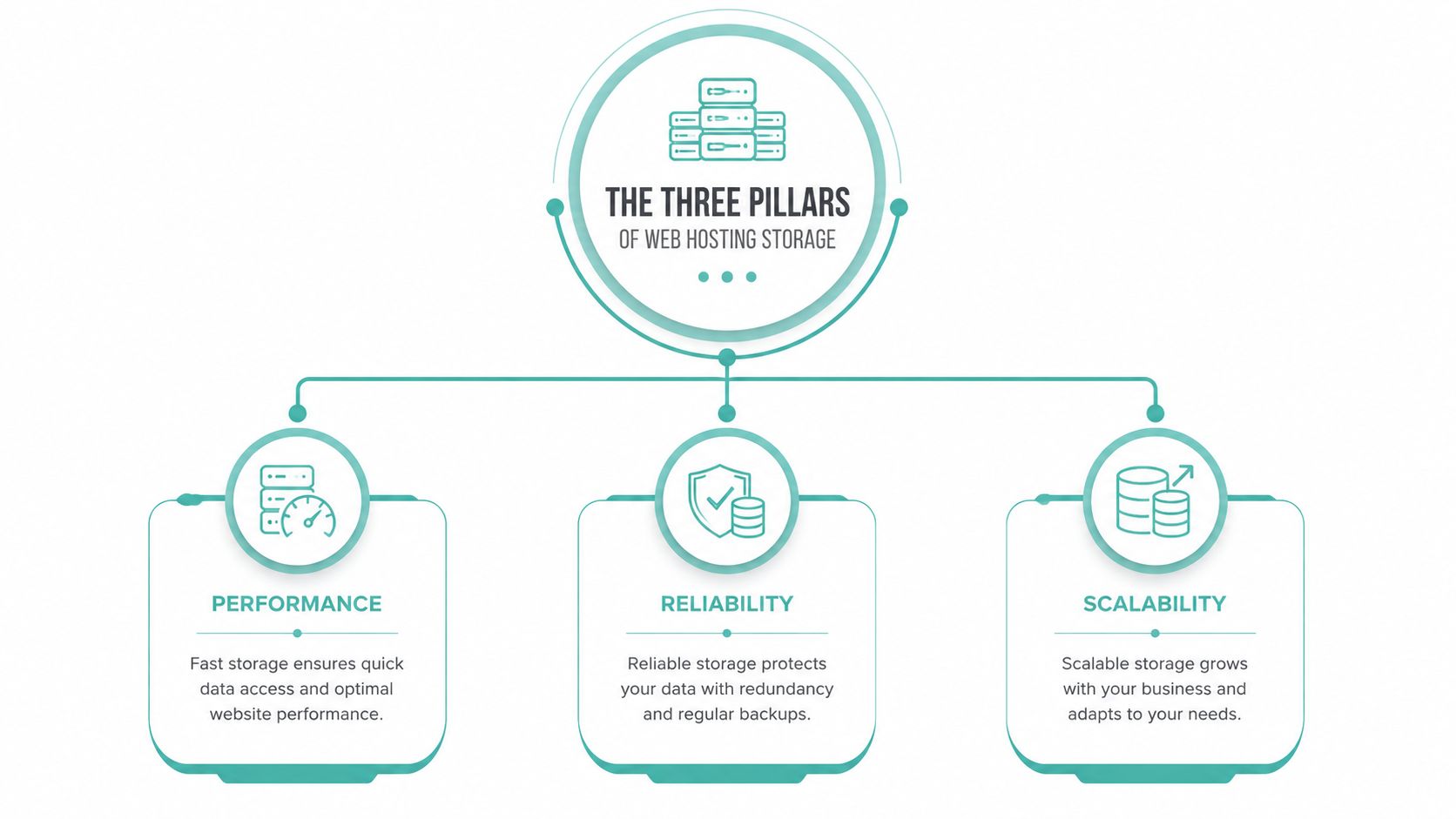
- The Three Pillars of Web Hosting Storage
- How to Estimate Your Website Storage Needs
- Real-World Examples for Australian Businesses
- Monitoring and Optimising Your Storage Usage
- Making the Right Storage Choice with Confidence

Performance you can feel, backed by clients who depend on it. Read how our support and uptime create long‑term customer success.Power Your Business with Better Hosting
Choosing Your Hosting Plan Storage Needs
You don't buy storage for the sake of it. You buy enough storage so your site, email, and backups can run without turning into a maintenance headache.

A lot of small business owners compare hosting plans by price first, then look at storage and wonder, “How much storage do I need for a normal business website?” The answer depends less on the label on the plan and more on what your business stores every day. A simple service website with a few contact forms won't use space the same way an online store, a media-heavy blog, or a business with lots of staff email accounts will.
If you're looking at shared web hosting plans for Australian businesses, think in three buckets:
- Website files. Your WordPress core files, theme, plugins, images, PDFs, and any downloadable content.
- Email accounts. Every sent and received message, plus attachments sitting in inboxes, sent folders, and archived mail.
- Backups. Copies of your website and mail that help you recover if something breaks, gets deleted, or is compromised.
Practical rule: If you only estimate your website and ignore email or backups, you'll almost always underestimate your real storage needs.
Many people often get tripped up. They think, “My website is only a few pages, so I won't need much.” That might be true for the site itself. But if your team uses hosting email daily and keeps attachments for years, email can easily become the bigger storage user.
A better way to choose a plan is to treat storage like business capacity. You want enough for what you use now, enough for what you'll add soon, and enough spare room that you're not cleaning house every second week.
The Three Pillars of Web Hosting Storage
Think of hosting storage as a digital filing cabinet. Instead of one big empty box, you've got separate drawers that fill up for different reasons.
Think of storage as a filing cabinet
The first drawer holds your website files. This includes the visible parts of your site, such as pages, blog posts, images, logos, PDFs, and product photos. It also includes the less visible parts, like WordPress files, themes, plugins, and the database that stores content and settings. If you upload media often, this drawer gets fuller over time, even if your website still looks “small” from the outside.
The second drawer is email. If your hosting includes business email, every mailbox takes up space. That means inboxes, sent mail, drafts, spam folders, deleted items that haven't been cleared, and file attachments. A business owner with one lightly used mailbox may barely notice this. A team that sends quotes, photos, invoices, and signed documents by email will.
The third drawer is backups. These are copies of your site and related data kept so you can restore things if there's a problem. Backups matter because mistakes happen. Plugins break sites, updates go wrong, malware appears, and staff sometimes delete the wrong file or mailbox item. That's why many site owners look for hosting that includes off-site backups for website protection.
Backups don't create visible content for your business, but they protect everything you've already built.
Why these drawers keep growing
Website storage grows in uneven bursts. You might barely add anything for months, then upload a fresh gallery, a new downloadable brochure, staff headshots, or seasonal landing pages. That's why people who ask how much storage do I need often get confused. Their site feels stable, but their file library changes in waves.
Email accumulates imperceptibly. Nobody notices a mailbox getting crowded until storage warnings show up or mail stops flowing properly. Attachments are usually the culprit. Photos, spreadsheets, signed PDFs, and long conversation threads can pile up faster than expected.
Backups grow because they reflect what already exists. If your website and email use more space, your backup footprint usually follows. This doesn't mean you should avoid backups. It means you should include them in your thinking from the start.
Here's the simplest takeaway:
- Website files are what you publish
- Email is what you communicate
- Backups are what protect both
Once you separate storage this way, the decision gets much easier. You're no longer guessing at a random plan size. You're estimating three practical business needs.
Host your website with our 5-star rated, cPanel website hosting plans.
Super fast servers, with security included and hosted in your choice of Australian Data Center.
View cPanel Plans
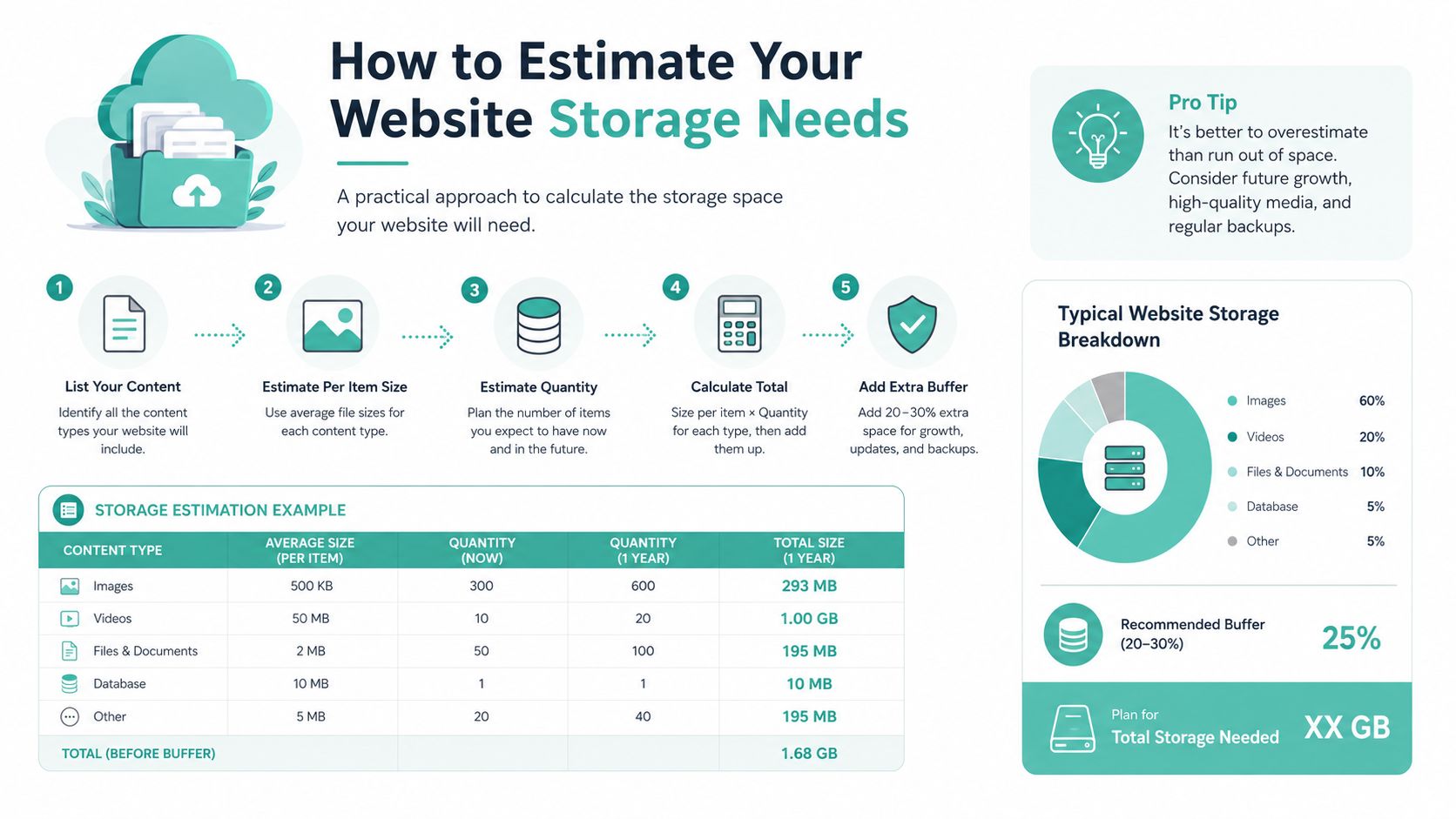
How to Estimate Your Website Storage Needs
Most small business owners start with the website itself, and that's the right place to begin. If you can get a rough handle on your site files, the rest of the storage picture becomes easier to judge.
Start with the type of site you run
A basic HTML site usually stays lean. It has page files, a stylesheet, a logo, and maybe a handful of images or documents. A WordPress site is different. It includes the core system, a theme, plugins, uploads, and a database. Even before you start adding blog posts or product images, there's more going on behind the scenes.
That doesn't mean WordPress is a bad choice. It just means you should expect more moving parts and more stored files. If you're already hosting on Linux and want to check your current usage instead of guessing, this guide to finding disk space usage on Linux hosting gives you a practical place to look.
The files that quietly take over
The biggest storage surprise is usually media. Not text. Not the homepage. It's the image uploads, PDF brochures, menus, spec sheets, portfolio galleries, and staff documents added over time.
A few common examples:
- A cafe site might upload menus, event posters, and venue photos.
- A builder's website often carries before-and-after galleries and downloadable capability statements.
- A consultant's site may look simple, but if they host lead magnets, reports, and slide decks, storage still climbs.
Video can become a problem quickly if you upload it directly into hosting. For most business websites, it's smarter to host video on a dedicated platform and embed it on your pages. That keeps your hosting storage focused on the files your site needs to serve.
Quick check: If your website relies on lots of original photography or downloadable documents, media is probably your main storage driver.
A simple way to estimate without overthinking it
Use this approach:
- List your core site components. Pages, blog posts, galleries, PDFs, forms, and downloads.
- Identify your biggest file types. Images and documents usually matter more than text.
- Think about upload habits. Do you add new content weekly, monthly, or only occasionally?
- Leave room for routine growth. A plan should fit what's coming next, not just what exists today.
If you want a plain-language rule of thumb, ask yourself three questions:
- Is my site mostly text-based? Then storage needs are usually modest.
- Do I upload lots of images? Then storage climbs steadily.
- Do I run downloads or product-heavy content? Then allow more breathing room.
This is why the phrase how much storage do I need doesn't have one universal answer. A ten-page accounting website and a ten-page interior design website can have completely different storage footprints because one is mostly text and the other is packed with image galleries.
The goal isn't to calculate a perfect figure down to the last megabyte. The goal is to spot what's most likely to fill your digital filing cabinet first.
Real-World Examples for Australian Businesses
Abstract advice only gets you so far. It's easier to judge storage when you look at businesses that feel familiar.
A local tradie with a brochure site
A plumber in Newcastle or an electrician in Geelong often runs a straightforward site. There's a homepage, service pages, a contact form, a suburb list, a gallery, and maybe a downloadable capability statement. The website itself is usually manageable because the content stays fairly stable.
Email can matter more than expected here. Quotes, invoices, photos of job sites, supplier correspondence, and attachment-heavy messages all add up. Backups are still important, especially if the website brings in leads and the business can't afford downtime after a failed update.
A sensible choice for this kind of business is an entry-level or standard hosting plan with enough room for modest growth, especially if the gallery and email use are likely to expand.
A travel blogger with lots of photos
A travel blogger in Australia might have a site that looks simple on the front end but stores a large media library behind the scenes. Blog posts themselves don't use much room. The issue is all the destination photos, edited versions, featured images, and downloadable itineraries.
Email may stay relatively light if the blogger uses one or two mailboxes. Backups, however, become more important because the media library is part of the business asset. Rebuilding a large image archive after a problem would be painful.
This is the sort of site where storage pressure usually comes from creative habits rather than technical complexity. A hosting plan with generous storage is the safer fit, and if the blog also sells travel guides or digital products, the requirement grows again.
A small online shop using WooCommerce
An online store has more parts to store and maintain. Product images, category images, theme files, plugins, customer-generated records, and transactional emails all contribute. If the store owner adds new products regularly, the storage curve keeps rising.
If you run WooCommerce, it also helps to understand what WooCommerce hosting includes and why it matters. A store doesn't just need space. It needs a hosting environment that can handle a dynamic website with ongoing updates, orders, and plugins.
Email use can be moderate to heavy, depending on whether the same hosting account handles support, supplier communications, and order-related correspondence. Backups are essential because every catalogue update and store change matters.
A freelance designer hosting client sites
A freelance web designer or developer often thinks differently about storage. Instead of one business site, they may host several small client sites, staging copies, design assets, and support mailboxes under one account or across related services.
This kind of user doesn't always have one giant website. They have multiple smaller projects that add up. A handful of brochure sites, each with themes, plugins, logos, forms, and backups, can consume more storage overall than one busy business site.
A larger plan usually makes more sense here because flexibility matters. Designers also benefit from not having to reshuffle files every time they onboard a new client or keep a temporary staging copy live for revisions.
| Business Type | Est. Website Storage | Est. Email Storage (per year) | Total Recommended Storage | Recommended UpTime Plan |
|---|---|---|---|---|
| Local tradesperson | Low to moderate | Moderate | Moderate with room to grow | Shared hosting starter or business-level plan |
| Travel blogger | Moderate to high | Low to moderate | High, mainly for media and backups | Shared hosting plan with generous storage |
| Small WooCommerce store | Moderate to high | Moderate | High, with extra room for ongoing catalogue growth | Business or WooCommerce-suited hosting plan |
| Freelance designer | Moderate across multiple sites | Moderate | High because several small sites add up quickly | Larger shared plan or managed VPS depending on workload |
A useful way to read this table is to focus on growth pattern, not just current size. The tradie site grows slowly. The travel blog grows through media. The store grows through products and operations. The designer grows by adding more websites.
That's the practical framework most Australian SMBs need. Not a magic number. Just an honest look at what kind of business files you create and how often you add more.
Monitoring and Optimising Your Storage Usage
Choosing a plan well is helpful. Checking your usage regularly is what keeps things tidy.
How to check your usage in cPanel
If your hosting uses cPanel, start with the built-in resource and disk tools rather than guessing. That gives you a clearer picture of whether website files, mailboxes, or something else is taking up the most space. This help article on managing hosting plan resources is a handy reference if you want to understand what your account is using.

A simple routine works well:
- Log into cPanel and open the disk or resource usage area.
- Check which folders or services are largest. Look for uploads, mail, backups, or old site copies.
- Compare usage over time. If one area keeps climbing, that tells you where to focus.
- Clean with intent. Don't delete randomly. Work out what's active, what's duplicated, and what's safe to remove.
Storage problems often accumulate gradually. You don't wake up one day and suddenly have a bloated account. It happens through old themes left installed, oversized image uploads, stale backups, and mailboxes nobody's cleaned in ages.
Simple ways to keep storage under control
You don't need advanced server knowledge to reduce storage usage. A few habits make a real difference.
- Compress images before upload. Large images are one of the most common causes of unnecessary storage use. This guide to web performance and image sizing explains why properly sized images help both page speed and storage efficiency.
- Delete what you don't use. Unused themes, plugins, draft media, old staging copies, and duplicate downloads often sit around for no reason.
- Tidy up email regularly. Clear spam, empty deleted items, and archive old attachments that don't need to live inside hosting forever.
- Review backup habits. Keep enough restore points to feel safe, but don't hoard unnecessary copies if they're no longer useful.
A full mailbox and an overstuffed uploads folder can slow down your admin work long before they become a hard limit problem.
If you're still asking how much storage do I need after reading this far, that's usually a sign you don't need a complicated formula. You need visibility. Once you can see what's using space, the right plan and the right clean-up habits become much easier to choose.
Register your new domain name at competitive market prices including free domain add-ons like privacy, DNS Hosting, Custom Nameservers and Forwarding.
Always the best price and no nasty renewal price hikes.
Register A Domain Name
Making the Right Storage Choice with Confidence
The best storage decision isn't about finding one perfect number. It's about understanding what your business stores and choosing a plan that gives you enough room to operate comfortably.
Keep the three pillars in mind. Website files hold what customers see. Email holds day-to-day communication. Backups protect both. When you estimate each one, the question “how much storage do I need” becomes far less confusing.
For most Australian small businesses, the smart move is to choose a plan with breathing room rather than aiming for the smallest option that might technically work today. That reduces admin stress and gives your website space to grow as you add new content, staff, products, or client projects.
You'll also make life easier if you pick hosting that includes practical features such as local support, cPanel access, business email, backups, and generous resources, rather than forcing everything into a tightly limited account.
If you want a simpler way to choose, explore UpTime Web Hosting. Their Australian-based hosting plans make it easier to grow without second-guessing storage, and their local support team can help you match your website, email, and backup needs to the right setup.