Your store is live, orders are coming through, and the basics seem fine until a busy period hits. Pages drag, checkout hangs, and support replies arrive hours later from a team on the other side of the world. For many Australian small businesses, that's the moment web hosting stops being a background utility and starts affecting revenue.
That's where the question what is WooCommerce hosting matters. It isn't just “hosting for a WordPress site with a shop plugin added on”. It's a hosting environment built around the realities of online selling: payment gateways, stock changes, cart sessions, backups, security, and support that can help when something breaks at the worst possible time.
Table of Contents
- Why Your Online Store Needs More Than Just Web Hosting
- Comparing WooCommerce Hosting to Other Options
- The Technical Foundations of a Great WooCommerce Host
- Essential Features of Managed WooCommerce Plans
- How to Choose the Right WooCommerce Host in Australia
- Getting Started Your Setup and Migration Roadmap
- Frequently Asked Questions About WooCommerce Hosting

Performance you can feel, backed by clients who depend on it. Read how our support and uptime create long‑term customer success.Power Your Business with Better Hosting
Why Your Online Store Needs More Than Just Web Hosting
A common Australian retail problem looks like this: the homepage loads well enough on a quiet Tuesday, but product pages slow down once people start browsing, adding to cart, and checking out at the same time. It often shows up during EOFY promotions, weekend email campaigns, or the first day of a sale. What seemed like an ordinary website suddenly behaves like a strained booking system.
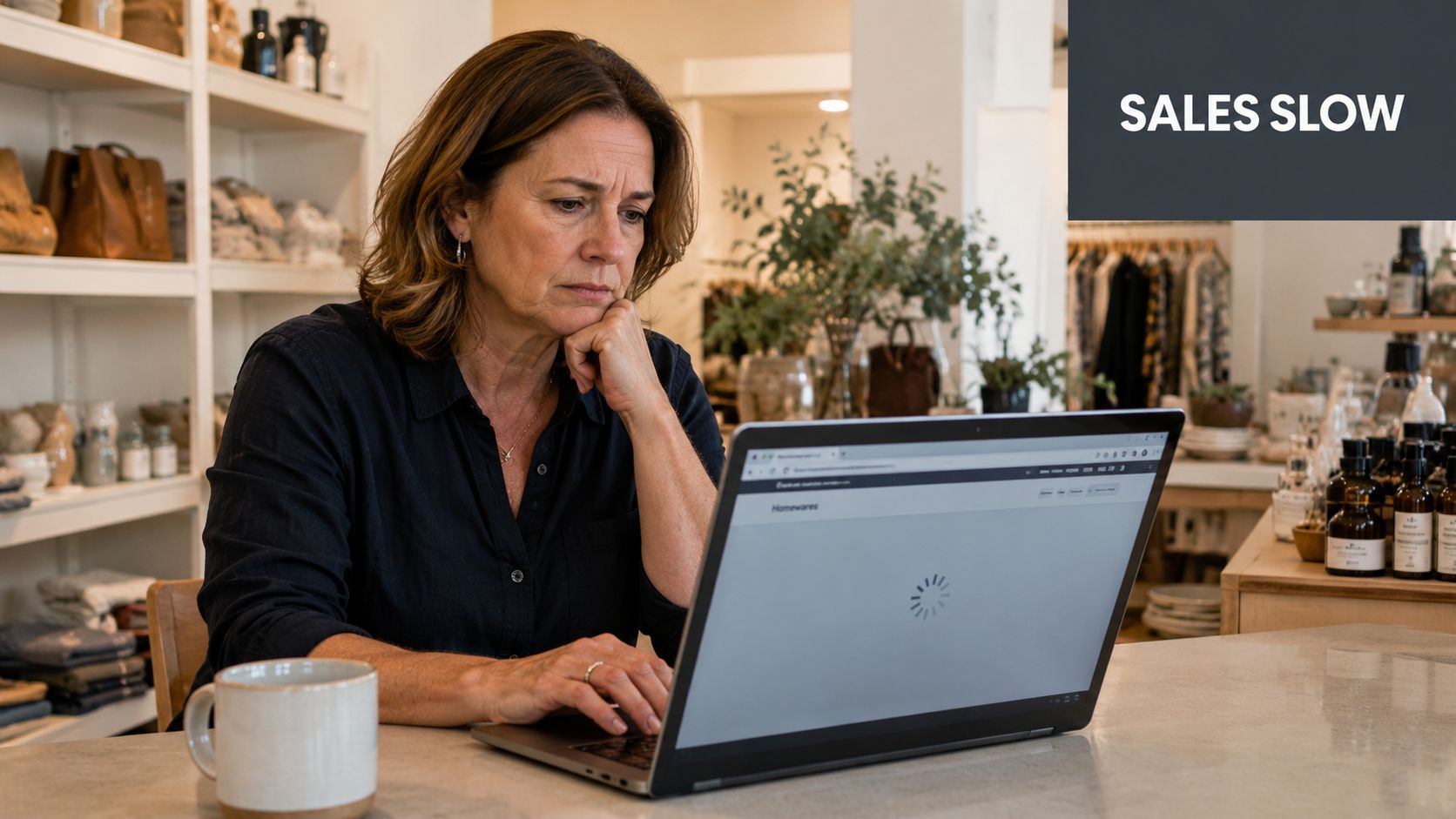
That's because a WooCommerce store does more work than a brochure site. It has to manage logged-in users, carts, shipping calculations, payment requests, order emails, plugin interactions, and admin tasks without falling over. Basic hosting can run WordPress. It often struggles when WordPress becomes a store.
According to BuiltWith trends data for WooCommerce Checkout in Australia, there are 87,345 active websites in Australia currently using WooCommerce Checkout as of 2026. That scale tells you something important. This isn't a niche setup used by a handful of technical operators. It's a major part of the local eCommerce market, and those stores need hosting built for transactions, not just page views.
A store needs reliability, not just space on a server
WooCommerce hosting is a hosting environment tuned for online stores. In practical terms, that means stronger server resources, tighter security controls, store-aware support, and tools that help you recover quickly if an update, plugin conflict, or traffic spike causes trouble.
If you want a good outside perspective on how serious eCommerce builds are approached, HDM's ecommerce expertise is worth a look. It's useful because it frames WooCommerce as an operational platform, not just a theme and plugin combination.
Practical rule: If your website processes payments, it shouldn't be treated like a standard content site.
Security matters too. A slow store is frustrating. An exposed store is expensive. Basic protections such as SSL, malware scanning, and recovery planning should be considered standard, and a practical primer on how to protect your website helps if you're reviewing your current setup.
What this means for a small business owner
You don't need to become a server administrator. You do need hosting that fits how a store behaves.
A local gift shop, trades supplier, or specialty retailer usually doesn't notice hosting quality when everything works. They notice it when checkout stalls, stock updates fail, or the site crawls under campaign traffic. WooCommerce hosting exists to reduce those moments and keep the business side of the store running smoothly.
Comparing WooCommerce Hosting to Other Options
Most confusion starts because hosting plans sound similar on paper. They all mention WordPress, storage, SSL, and support. The difference is in how they behave once your site starts acting like a shop.
The vehicle analogy that actually helps
Shared hosting is like a bus. It gets you there cheaply, but you share space and timing with everyone else.
Managed WordPress hosting is like a well-serviced sedan. It's smoother, cleaner, and easier to drive for a normal website.
Managed WooCommerce hosting is more like a delivery van. It's built for carrying stock, making frequent stops, and staying stable under commercial use. That doesn't make it the right choice for every site. It does make it the right fit for a store.
If you want a broader sense of what providers and plan types tend to prioritise, this roundup of best WordPress hosting sites is a useful reference point before narrowing down to WooCommerce-specific requirements.
Hosting Type Comparison at a Glance
| Feature | Shared Hosting | Managed WordPress Hosting | Managed WooCommerce Hosting |
|---|---|---|---|
| Server resources | Shared widely across many sites | Better tuned for WordPress | Tuned for store activity and heavier database use |
| Performance under shopping activity | Often inconsistent | Usually good for content sites | Better suited to carts, checkout, and order processing |
| Security focus | Basic | Stronger WordPress protection | Store-focused security with payment and plugin considerations |
| Support style | General hosting help | WordPress-oriented help | Help that understands themes, plugins, checkout and store issues |
| Backups and recovery | Varies a lot | Usually included | Expected as part of the service |
| Best fit | Low-traffic websites and simple projects | Business websites, blogs, content-heavy WordPress sites | Serious online stores |
Where each option works and where it doesn't
Shared hosting can be fine for a brand-new business validating an idea with a very small catalogue. The problem starts when the store adds more plugins, product variations, coupon campaigns, or real order volume. At that point, one noisy account on the same server can affect everyone else.
Managed WordPress hosting is better, but it's still often optimised for publishing rather than selling. A blog post going viral is one kind of load. Hundreds of shoppers updating carts and checking out is another.
For a clearer primer on the difference between WooCommerce itself and the hosting behind it, this overview of what WooCommerce is can help frame the discussion.
A store can look small on the front end and still be demanding on the back end. Checkout, payment callbacks, stock sync, and transactional email all add load that generic plans don't always handle well.
Cost is the main trade-off. Managed WooCommerce hosting usually costs more than entry-level shared hosting. That's justified when the store earns revenue and downtime, lag, or failed checkouts carry a real business cost.
Host your website with our 5-star rated, cPanel website hosting plans.
Super fast servers, with security included and hosted in your choice of Australian Data Center.
View cPanel Plans
The Technical Foundations of a Great WooCommerce Host
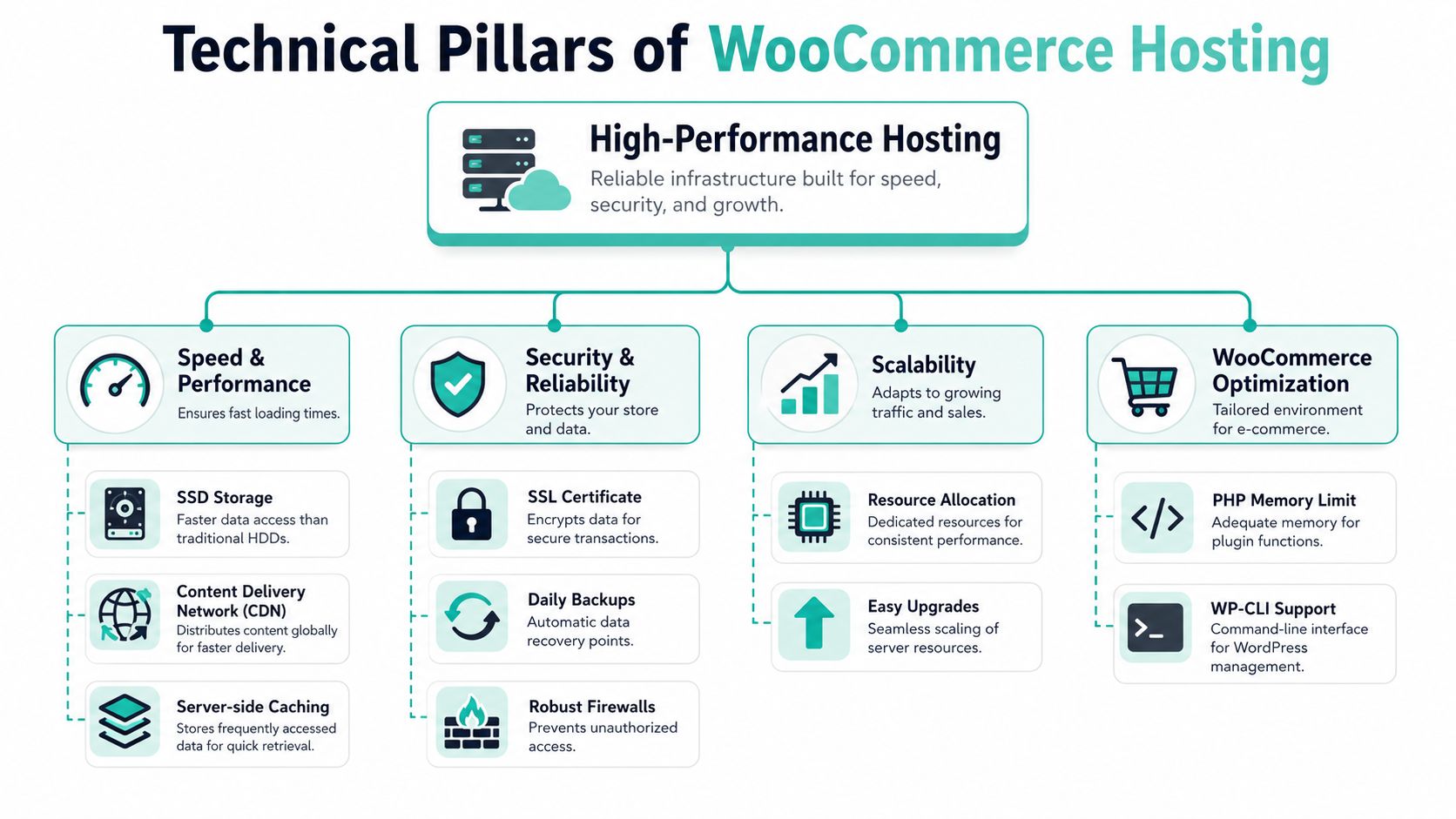
A good WooCommerce host should meet a short list of technical requirements before you even look at the extras. If it misses the basics, the rest doesn't matter.
Start with the non-negotiables
According to the official WooCommerce server requirements, WooCommerce hosting requires a server with PHP version 8.3+, MySQL 8.0+ or MariaDB 10.6+, and a WordPress memory limit of at least 256MB to support security, performance, and compatibility.
That matters because outdated server software creates two problems at once. First, you increase security risk. Second, you make the store less responsive when plugins, checkout functions, and database queries are working hard.
WooCommerce hosting also needs support for specific PHP features and libraries used by payment gateways and extensions. If the environment is too stripped back, odd problems appear. A gateway might fail imperceptibly. A sync tool might stop connecting. An import might time out.
What good foundations look like in practice
A practical checklist looks like this:
- Current PHP and database versions: These help keep WooCommerce, themes, and extensions compatible.
- At least 256MB WordPress memory limit: Stores need more headroom than a basic site.
- Free SSL certificate: Customers need to see a secure checkout from the first visit.
- Automated backups: You need a clean recovery point if an update breaks orders or layout.
- Fast web server stack: LiteSpeed is a common example because it supports efficient caching and fast delivery for WordPress workloads.
If you're reviewing host infrastructure, a plain-English article on LiteSpeed web server is worth reading because it explains why web server choice affects speed before you even add caching plugins.
Good WooCommerce hosting reduces friction in ordinary tasks. Product edits save properly, admin pages stay responsive, checkout completes cleanly, and plugin updates don't feel like a gamble.
Performance should also be measured properly. A host can claim speed, but store owners should look at practical indicators such as checkout responsiveness, uncached product page behaviour, and admin performance. This guide to eCommerce performance metrics is useful for understanding what to monitor without getting lost in technical noise.
Don't ignore the business effect of technical debt
A store running on old software often develops habits around its weaknesses. Owners delay plugin updates. Developers avoid changing anything before campaigns. Staff accept a slow admin area as normal.
That's usually a sign the hosting environment is carrying technical debt. A solid WooCommerce host gives the store a current, stable base so the business can keep moving without constant caution.
Essential Features of Managed WooCommerce Plans
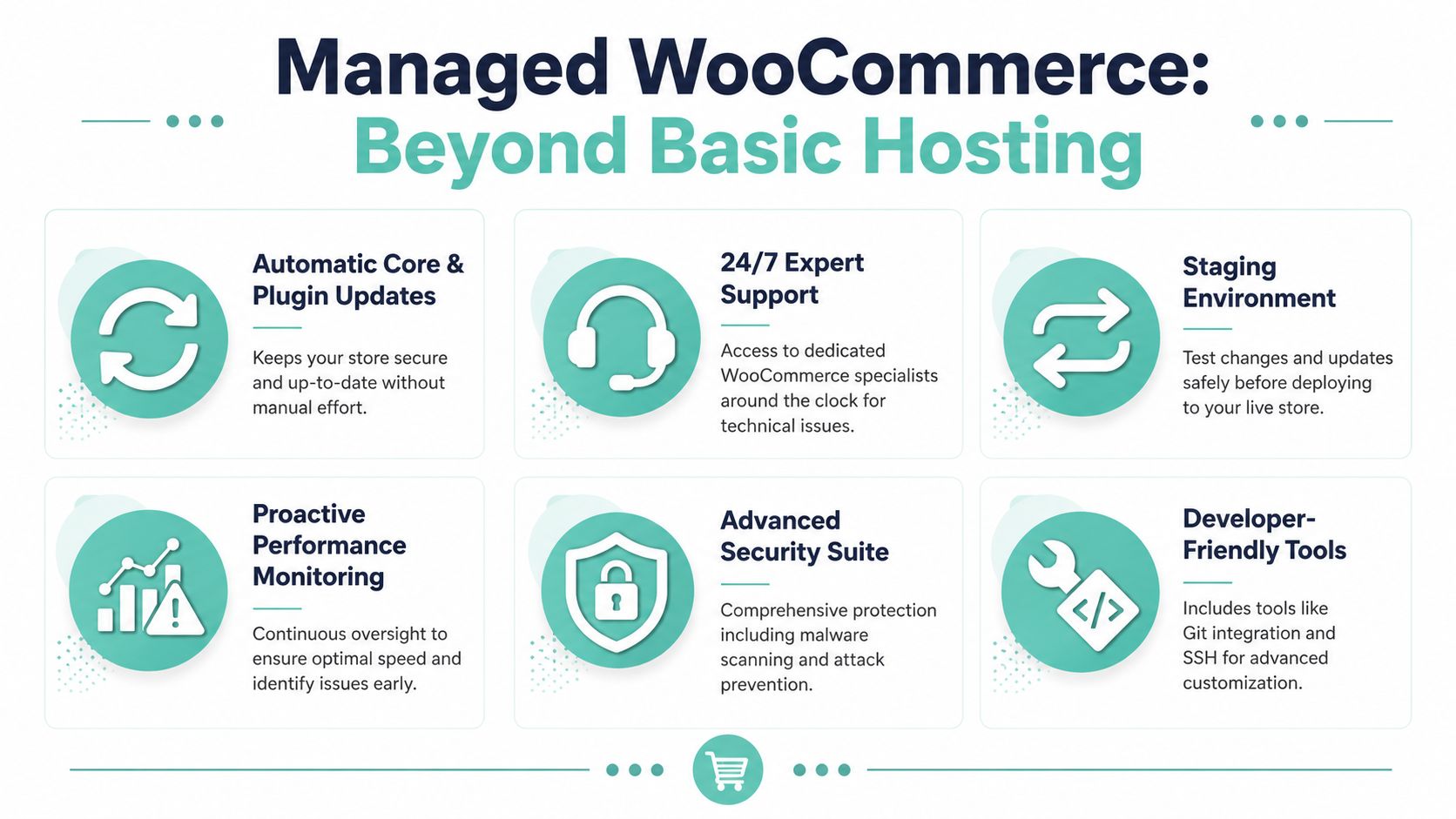
A managed WooCommerce plan should remove routine store risk, not just give you cPanel access and leave the rest to you.
What managed hosting should take off your plate
For Australian stores, free SSL certificates and automated malware scanning should already be included. They support safer payments, reduce avoidable security exposure, and save you from bolting on basic protection later.
What matters after that is day-to-day store management. A good managed plan gives you tools and support that reduce mistakes during updates, promotions, and plugin changes.
Examples include:
- Staging environments: Test a payment gateway, shipping rule, theme edit, or plugin update before it reaches live customers.
- Server-level caching: Improve speed without depending on several caching plugins that can conflict with WooCommerce behaviour.
- Proactive monitoring: The host checks for outages, failed services, and performance issues before your team notices a sales drop.
- Store-aware support: Support staff should understand carts, checkout sessions, payment plugins, and the difference between a WordPress problem and a WooCommerce problem.
- Automatic backups with easy restores: If an update breaks checkout on a Friday afternoon, a recent backup and a clear restore process matter more than a long help article.
Store owners often assume managed WordPress hosting and managed WooCommerce hosting are interchangeable. They overlap, but a store has more moving parts, more customer sessions, and less tolerance for breakage during trading hours. This guide to managed WordPress hosting in Australia is useful background, but WooCommerce plans should go further on store stability and support.
The hidden value is risk reduction
The best managed features usually save you from public problems.
A staging site is the clearest example. Installing a shipping extension straight onto the live store can break rates, cart totals, or checkout logic without warning. Testing first gives you a safer way to catch the problem while customers are still buying normally.
Support quality has the same practical value. Basic hosting support may confirm the server is up. WooCommerce-aware support is more likely to check session handling, plugin conflicts, database load, and checkout-specific faults that hurt revenue.
Managed hosting reduces the number of times your store fails in front of customers.
Scaling also deserves a closer look. Some plans advertise auto-scaling, but small business owners should ask plain questions. What triggers extra capacity? How quickly is it applied? Are there usage caps, surprise charges, or limits during major sales periods? For Australian retailers running EOFY, Click Frenzy, or Christmas campaigns, those details matter more than the marketing label.
How to Choose the Right WooCommerce Host in Australia
For an Australian business, host selection should start with location, support, and clarity. Fancy features come after that.
Prioritise local performance first
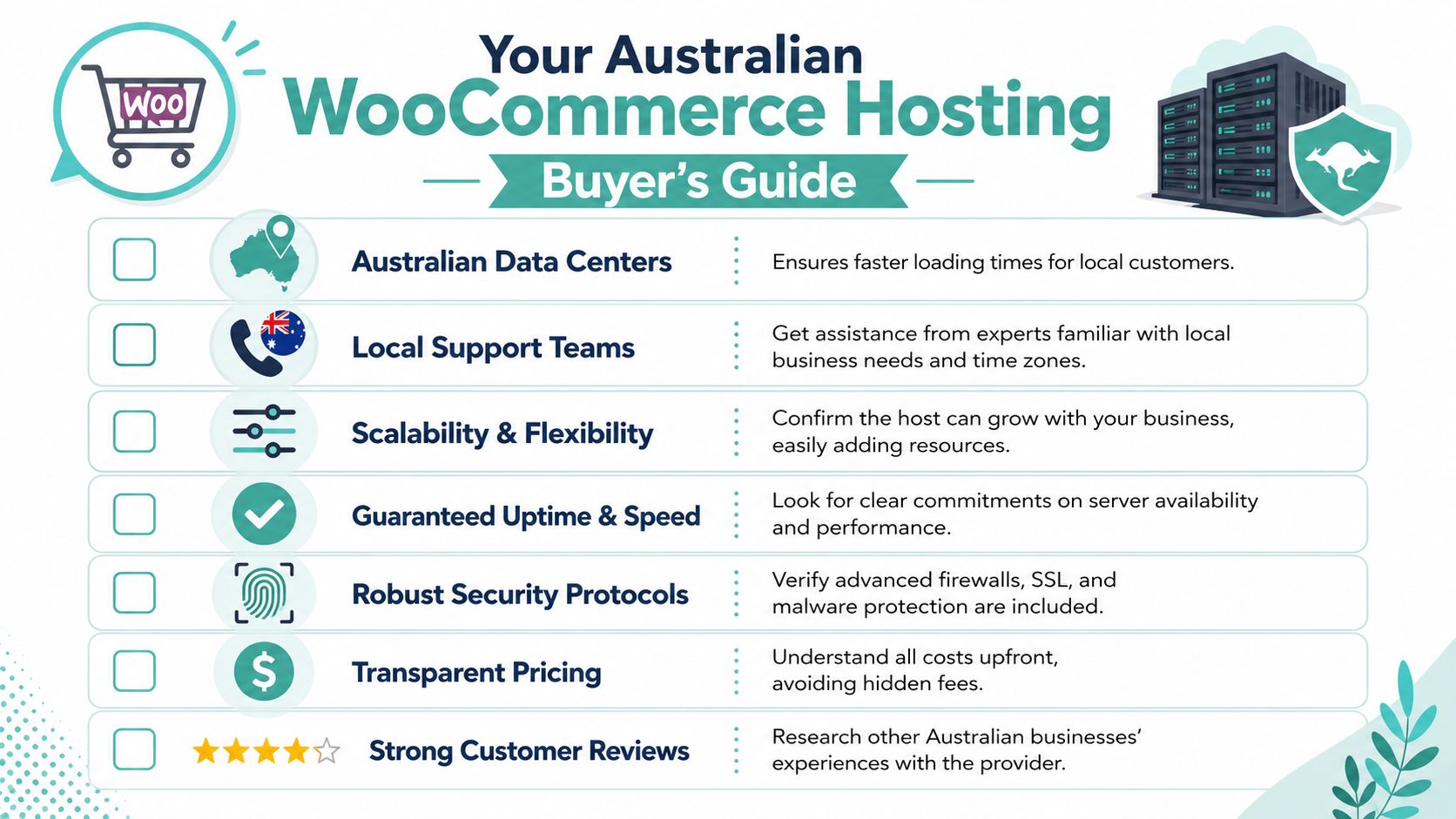
For Australian stores, local data centres are critical. Discussion collected in this Australian WooCommerce hosting thread on Reddit points to 200–400ms higher latency for Sydney and Melbourne customers when stores are hosted outside Australia.
That delay may sound small in isolation. At checkout, it adds friction. A product page can feel “a bit slow” and still function. A slow cart or payment step creates hesitation immediately.
If most of your customers are in Australia, the host should have infrastructure in Australian locations such as Sydney, Melbourne, Brisbane, or Perth. That's the simple part of the decision.
Questions worth asking before you commit
The better questions are operational:
- Where is the store hosted? Ask for the actual country and city, not “global network” language.
- What support hours match Australian business hours? If there's a phone number, test it.
- Is pricing GST-inclusive and clear? Small businesses don't need surprise billing.
- What does uptime commitment look like? The standard benchmark for serious hosting in this market is 99.9% uptime, as noted in this Australian hosting guide.
- What security is included by default? SSL, malware scanning, and backups shouldn't be expensive add-ons.
Local support isn't a nice extra
Australian businesses often underestimate support quality until something fails just before a promotion, after hours, or during a campaign send. Time zone alignment helps, but local context helps too. A support team that understands local peak periods, tax-time promotions, and the urgency of an online store outage is easier to work with than a generic queue reading from scripts.
If your customers are in Australia, your infrastructure and support should behave like they are too.
There's also a broader platform question behind hosting choice. In the Australian market, WooCommerce continues to hold a strong position in open-source eCommerce, and commentary in this WooCommerce vs Shopify analysis highlights why many local businesses prefer WooCommerce when they want design flexibility, SEO control, and local hosting options.
Register your new domain name at competitive market prices including free domain add-ons like privacy, DNS Hosting, Custom Nameservers and Forwarding.
Always the best price and no nasty renewal price hikes.
Register A Domain Name
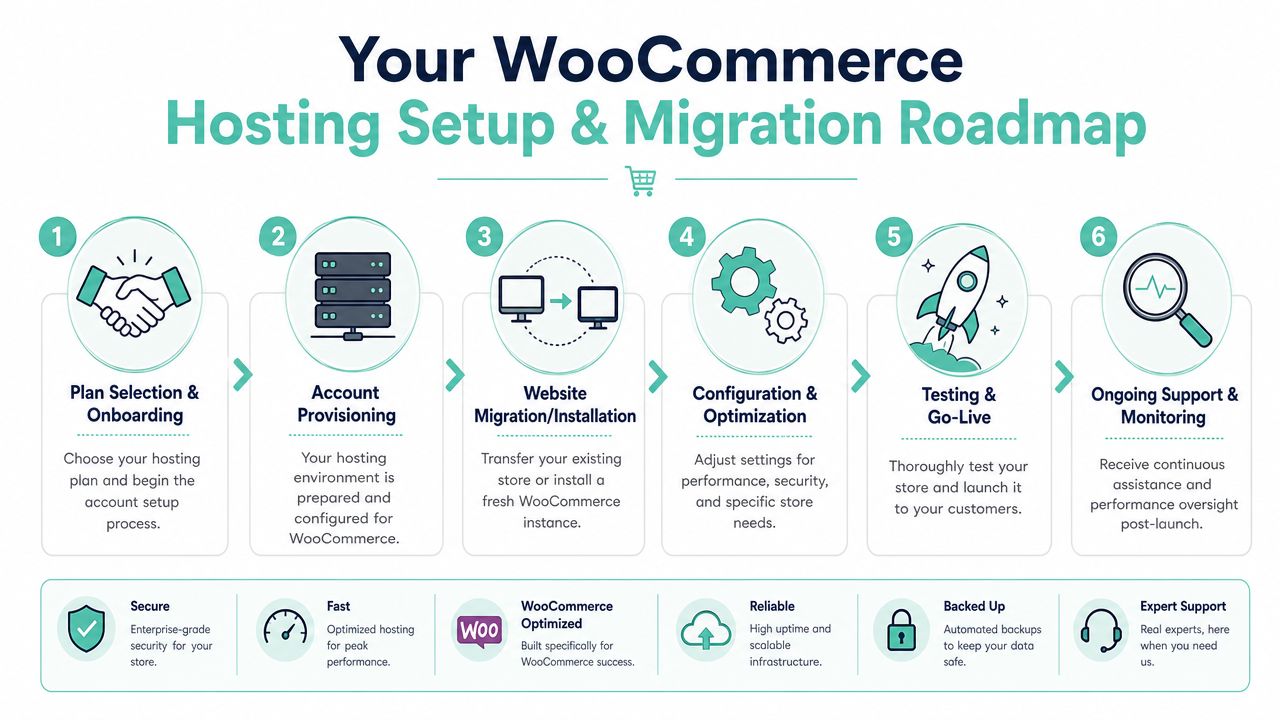
Getting Started Your Setup and Migration Roadmap
Starting fresh or moving an existing WooCommerce store is less daunting when you treat it like a checklist instead of a leap.
For a new store
If you're launching from scratch, start by choosing a plan that matches your catalogue size, plugin load, and expected activity. Don't choose purely on storage. For WooCommerce, CPU, memory, and store-ready support matter more than a headline storage figure.
A typical rollout looks like this:
- Choose the environment: Confirm it's suitable for WooCommerce, not just WordPress in general.
- Install WordPress and WooCommerce: Most quality hosts make this straightforward.
- Add theme and core plugins: Keep the stack lean at the beginning.
- Configure checkout, shipping, and email: Test every customer-facing action.
- Run launch checks: Place a test order, review mobile checkout, and confirm order emails work.
For an existing store
Migration needs more discipline because you already have products, customers, orders, and live revenue. The safest approach is to move the store into a staging or temporary environment first, review it carefully, then switch across once you know the essentials work.
A practical pre-launch checklist should include:
- Product pages: Confirm prices, images, variations, and stock display properly.
- Checkout flow: Test cart, shipping, taxes, payment, and confirmation emails.
- Customer accounts: Make sure login and account pages work as expected.
- Plugins: Verify subscriptions, invoices, shipping tools, and marketing add-ons.
- Backups: Ensure there's a fresh backup before final cutover.
If you want a clearer picture of what the process usually involves, this guide on how to migrate a website to a new host is a good starting point.
A clean migration is mostly about preparation. Problems usually come from skipped checks, not from the move itself.
Once the store is live on the new host, monitor it closely for the first few days. Watch orders, transactional emails, and admin performance. Those are often the earliest signs of whether the environment is better.
Frequently Asked Questions About WooCommerce Hosting
Can't I just start on cheap shared hosting
You can, if the store is very small and you accept the limits. For a side project with a tiny catalogue and light traffic, it may be enough initially.
The risk is that stores grow unevenly. You might add more products, install a new gateway, run a promotion, or start seeing more concurrent shoppers before you think of yourself as a “big” store. Shared hosting often falls behind at that stage, and the symptoms show up in the cart and checkout first.
What should I look for in support
Look for support that understands WooCommerce behaviour, not just server status. If checkout fails, you need someone who knows the difference between a server outage and a plugin conflict affecting orders.
Local availability matters too. A host that provides Australian-based assistance during the hours you trade is easier to work with when something urgent happens.
Is migration hard
Migration is rarely difficult when it's planned properly. It becomes difficult when people rush it, skip testing, or treat a store like a static site.
A proper migration includes a current backup, a test copy of the site, checkout testing, plugin checks, and post-move monitoring. With that process in place, moving to a better WooCommerce host is usually a manageable project rather than a major disruption.
What is WooCommerce hosting in one sentence
It's hosting designed specifically for online stores running WooCommerce, with the performance, security, support, and tooling needed to keep shopping and checkout working reliably.
What should a good plan include
At minimum, look for current server software, enough memory for WooCommerce, SSL, malware scanning, backups, and support that knows WordPress and eCommerce. After that, features such as staging, caching, and performance monitoring make daily management much easier.
If you're ready to move from “a website that happens to sell” to a store built for speed, security, and local support, UpTime Web Hosting is worth a close look. With Australian-based infrastructure, transparent pricing, strong security defaults, and support that understands local business needs, it's a practical option for SMBs that want WooCommerce hosting without the usual guesswork.