It's Friday afternoon. You update a plugin on your business website, the contact form stops sending enquiries, and then the site goes blank. Your developer suspects the hosting, your host suspects the plugin, and you're left wondering who's supposed to fix it before customers give up.
WordPress managed hosting should reduce that uncertainty, but only if you know what the provider manages and what still belongs to you. The most important distinction isn't between expensive and cheap hosting. It's between work someone has agreed to do and work everyone assumes someone else is doing.
Table of Contents
- What Managed WordPress Hosting Is and Who Needs It
- Managed Versus Shared, VPS and Self-Managed Hosting
- Performance Features That Shorten Load Times
- Security and Backup Standards to Demand
- Plugin Risk and Privacy Duties Stay With You
- Confirm the Plan Against This Checklist Before You Buy

Performance you can feel, backed by clients who depend on it. Read how our support and uptime create long‑term customer success.Power Your Business with Better Hosting
What Managed WordPress Hosting Is and Who Needs It
Managed WordPress hosting means the provider runs a server configured for WordPress and takes on specific maintenance tasks. Plans may include caching, SSL management, malware scanning, firewall protection, monitoring, off-site backups and WordPress-aware support. Check what the contract covers: plugin troubleshooting, in particular, may remain your responsibility.

The arrangement is like a serviced apartment. The building manager maintains the hot-water system and checks the locks; you choose the furniture. For a website, the provider looks after agreed hosting tasks, while you choose the theme, plugins and content.
Where the responsibilities usually sit
Host side
- Server operation: Maintain the hosting environment, server software and agreed security controls.
- Platform services: Run included caching, monitoring, certificate and backup systems.
- Agreed maintenance: Apply the WordPress updates specified in the plan.
Site owner side
- Website choices: Select themes, plugins, content and business integrations.
- Business testing: Check that enquiries, payments and bookings work as intended.
- Accountability: Assign application maintenance, control access and meet privacy obligations.
WordPress powers 58.3% of CMS-identifiable websites and 39.6% of all measured websites, according to W3Techs' WordPress usage figures. Its broad use means ongoing administration is part of running many websites, not a task that disappears once hosting is set up.
Which businesses need the help
A WordPress site connects the core application with its theme, plugins, database and business integrations, such as payment or booking tools. A problem in one part can interrupt the whole site while the server itself stays online. That is why responsibility for third-party plugins needs an explicit owner: a managed server does not automatically mean the host will diagnose every plugin conflict.
A small business taking enquiries or orders may value dependable maintenance. An agency with ten or more client sites may need repeatable processes, while a business collecting customer details through forms should know who handles application security. A simple brochure site with no payments may not justify the extra cost if its owner can maintain it.
Use this checklist to assess whether managed hosting fits:
- Transactions: You take bookings or payments.
- Complexity: You use more than five plugins.
- Skills: You have no in-house IT support.
- Downtime: An outage would cost more than the hosting premium.
If two or more apply, managed hosting may be worth investigating. This is a buying guide, not a technical threshold. One plugin that handles payments or customer data can matter more than several simple plugins.
Before choosing a plan, assign someone to check plugin updates and test the site after changes. Then ask the provider: Who applies updates, where do backups live, and who answers at night?
Managed Versus Shared, VPS and Self-Managed Hosting
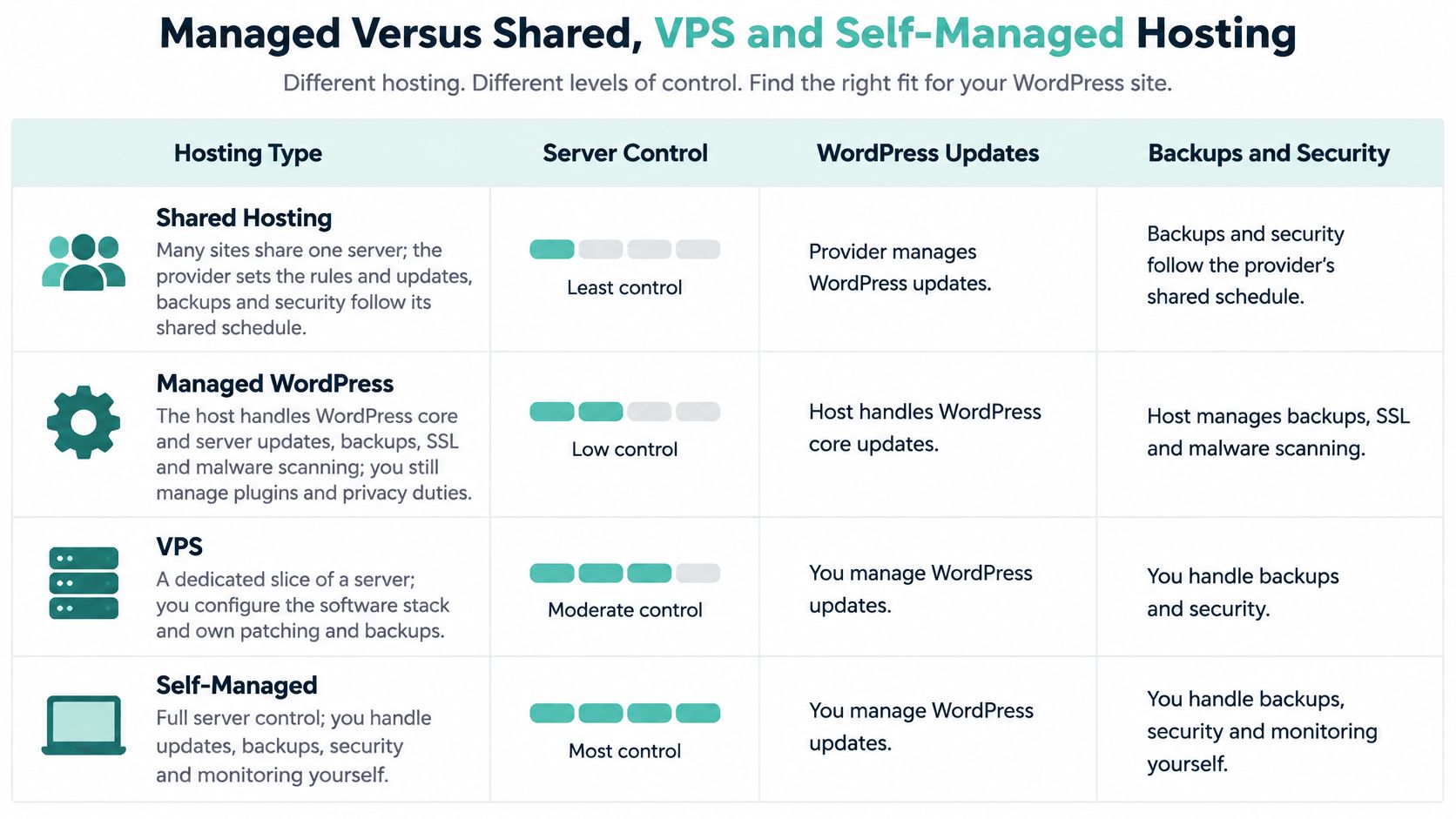
Use this comparison as a reference for who does the work. Shared and VPS describe how resources are allocated; managed describes a service responsibility. They aren't mutually exclusive categories, so the contract matters more than the label.
Hosting types compared by who does the work
| Hosting type | Who handles WordPress updates | Security and backups | Typical fit |
|---|---|---|---|
| Shared hosting | You | Basic backups, shared-server risk, limited tuning | Low-traffic brochure sites with few changes |
| Managed WordPress hosting | Host applies core updates, with supervised plugin and theme updates where contracted | Malware scanning, firewall, managed off-site backups, WordPress support | Business sites with forms, bookings or customer data |
| Managed VPS | You, with the host covering the server layer | Host manages operating-system and server security; backups depend on the plan | Agencies and developers running several sites |
| Self-managed VPS or dedicated server | You, across the full stack | Entirely your responsibility | Technical teams with in-house systems administration skills |
More control means more work
Shared hosting puts multiple accounts on a server whose configuration the provider controls. You'll generally handle WordPress maintenance yourself unless a separate service covers it. A busy neighbouring account can affect performance where resource controls don't adequately contain it.
Managed WordPress hosting retains a relatively simple customer experience while adding WordPress-specific services. The valuable difference is whether staff troubleshoot the application, not merely confirm that the server is running. Ask whether a broken contact form is included support or a referral to your developer.
The comparison below provides a visual overview, but individual service agreements can draw the boundaries differently.
A managed VPS gives you a dedicated allocation of server resources. The host may maintain the operating system and server security while your developer handles WordPress, its extensions and business functionality. It can suit an agency that wants configuration flexibility without administering the underlying server.
With a self-managed VPS or dedicated server, your team handles the entire software stack. That freedom is useful when someone has the skills and availability to maintain it. A control panel makes administration easier, but it doesn't take responsibility for decisions.
Practical rule: If nobody can name who patches a vulnerable plugin at 9pm on Sunday, managed WordPress hosting with explicit plugin coverage is the safer default.
For terminology you can share with a colleague, use this web-hosting definition guide. Then compare proposals by included work, restoration targets and support hours, rather than the monthly headline price alone.
A cheaper plan may be appropriate if your developer already provides maintenance. Paying twice for overlapping services won't help, but leaving a gap between them can.
Host your website with our 5-star rated, cPanel website hosting plans.
Super fast servers, with security included and hosted in your choice of Australian Data Center.
View cPanel Plans
Performance Features That Shorten Load Times
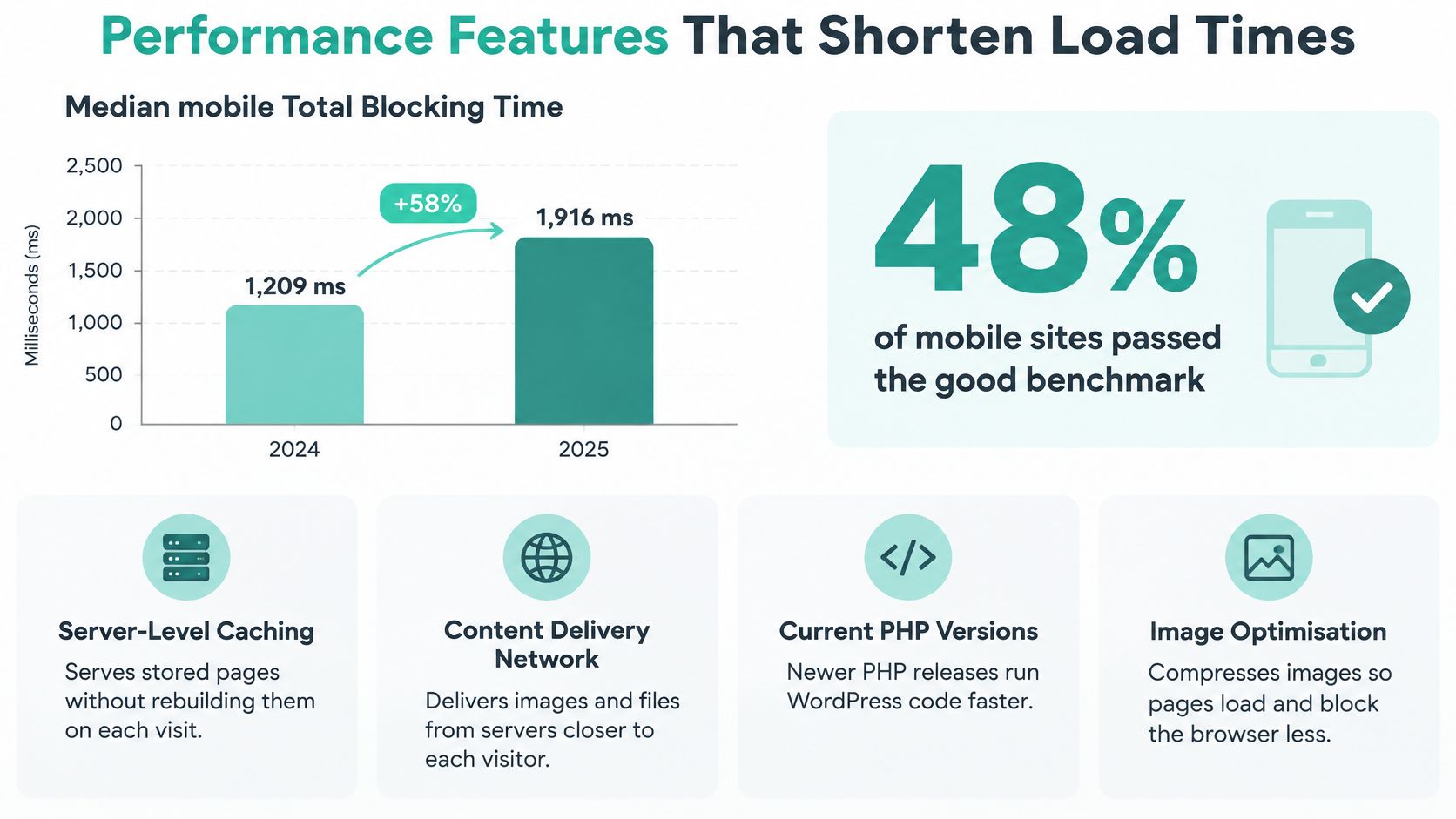
Mobile performance deserves separate attention. The 2025 Web Almanac performance analysis reported median mobile Total Blocking Time of 1,916 milliseconds, up 58% from 1,209 milliseconds in 2024, while 48% of mobile websites achieved good Core Web Vitals compared with 56% on desktop. These are broader web measurements, not Australian-only results or a promised hosting improvement.
For an Australian business owner, the useful lesson is to separate server delay from work happening in the visitor's browser. A better server can respond sooner, but it can't make an overloaded page lightweight by itself.
What the hosting environment can improve
An Australian-region data centre can shorten network round trips for domestic customers. Consider Sydney, Melbourne, Brisbane and Perth against where your visitors are, rather than automatically choosing the city where your office sits.
LiteSpeed or equivalent web-serving technology handles requests, while PHP workers execute WordPress code. Think of workers as staff preparing orders: if every worker is occupied, new requests wait. Ask about available capacity and what happens when your allocation is exhausted.
Caching reduces repeated preparation:
- Full-page caching: Serves a prepared page to anonymous visitors instead of rebuilding it for every request.
- Persistent object caching: Reuses database results, which can help database-heavy sites.
- Content delivery network: Distributes suitable files closer to visitors across different locations.
For example, a public services page can often use full-page caching. A customer's basket or private account page needs different handling because its contents depend on that customer.
CloudLinux provides account-level resource controls that help contain noisy neighbours. AccelerateWP adds WordPress-focused caching and optimisation tools, but their benefit still depends on configuration and the site's workload. The WordPress LiteSpeed hosting guide is a useful starting point for discussing that setup.
What still needs website work
Oversized images, excessive JavaScript and inefficient plugins need attention within the site. Use appropriately sized images, consider WebP or AVIF, and defer non-critical scripts where testing confirms that functionality remains intact.
A fast cached homepage doesn't prove that checkout, bookings or the WordPress dashboard will be fast.
Test from Sydney, Melbourne, Brisbane and Perth, not just overseas testing locations. After major plugin or theme changes, record TTFB, the wait for the server's first response; LCP, when the main visible content appears; and INP, how responsively the page reacts to interaction.
Give those results to whoever owns performance maintenance. Ask them to investigate worker exhaustion, cache-hit behaviour and slow database queries alongside browser-side problems, rather than recommending a larger plan by default.
Security and Backup Standards to Demand
The Australian Cyber Security Centre received more than 84,700 cybercrime reports in FY2024–25, approximately one every six minutes, and the average self-reported cost per small-business report was AUD 56,600, a 14% annual increase, according to the ASD cyber threat factsheet for businesses and organisations. Those figures cover reported cybercrime broadly, not WordPress hosting incidents specifically.
Treat managed hosting as an operational security control, not a guarantee that compromise is impossible. Ask the provider to document which safeguards it operates and which require a separate maintenance arrangement.
Demand protection and recoverability
Your requirements should include:
- Maintained software: Automatic or supervised core, plugin and theme updates, with an agreed testing process.
- Threat detection: Vulnerability monitoring and malware scanning.
- Access protection: Enforced HTTPS, controlled administrator access and account isolation.
- Recoverability: Tested, versioned off-site backups and a documented restoration process.
The backup trap is straightforward. If an attacker controls your hosting account and the only backup sits inside that account, they may be able to delete or encrypt both.
Off-site should therefore mean more than a different folder. Ask whether the backup uses separate access controls and whether compromised website credentials can reach it. This off-site backup explainer can help you frame that conversation.
Turn recovery promises into written targets
A recovery point describes how much recent information you might lose. If the available clean copy is from last night, later enquiries or orders may need reconciliation.
A recovery time describes how long restoration should take. Neither target should remain an assumption, particularly when your business depends on online transactions.
Backup and recovery checks to ask any provider
| Check | Good answer | Why it matters |
|---|---|---|
| Backup encryption | Encrypted at rest and in transit | Reduces exposure if backup data is stolen |
| Storage location | Off-site, separate from the live account | Helps prevent a live-account compromise reaching backups |
| Retention | Multiple dated versions, with the retention period stated | Allows recovery from before an infection |
| Recovery time | Written target in hours | Establishes the expected outage window |
| Recovery point | Written target, such as last night's backup | Defines potential recent-data loss |
| After-hours restore | Documented request route | Gives you a process outside business hours |
| Staged updates | Changes tested on staging before going live | Helps identify plugin conflicts before customers encounter them |
For example, suppose your developer confirms that a compromise began after the previous night's backup. The agreed process could restore that dated copy, close the entry point and test the site, with a recovery target measured in hours rather than days. That's a hypothetical operating goal, not a promise that any backup will achieve it.
Recovery check: A successful backup notification proves that a job ran. A test restore provides evidence that you can use the result.
For a booking or retail site, ask how staff will reconcile legitimate activity created after the restored copy. Restoring the website is only part of returning the business to normal.
Plugin Risk and Privacy Duties Stay With You
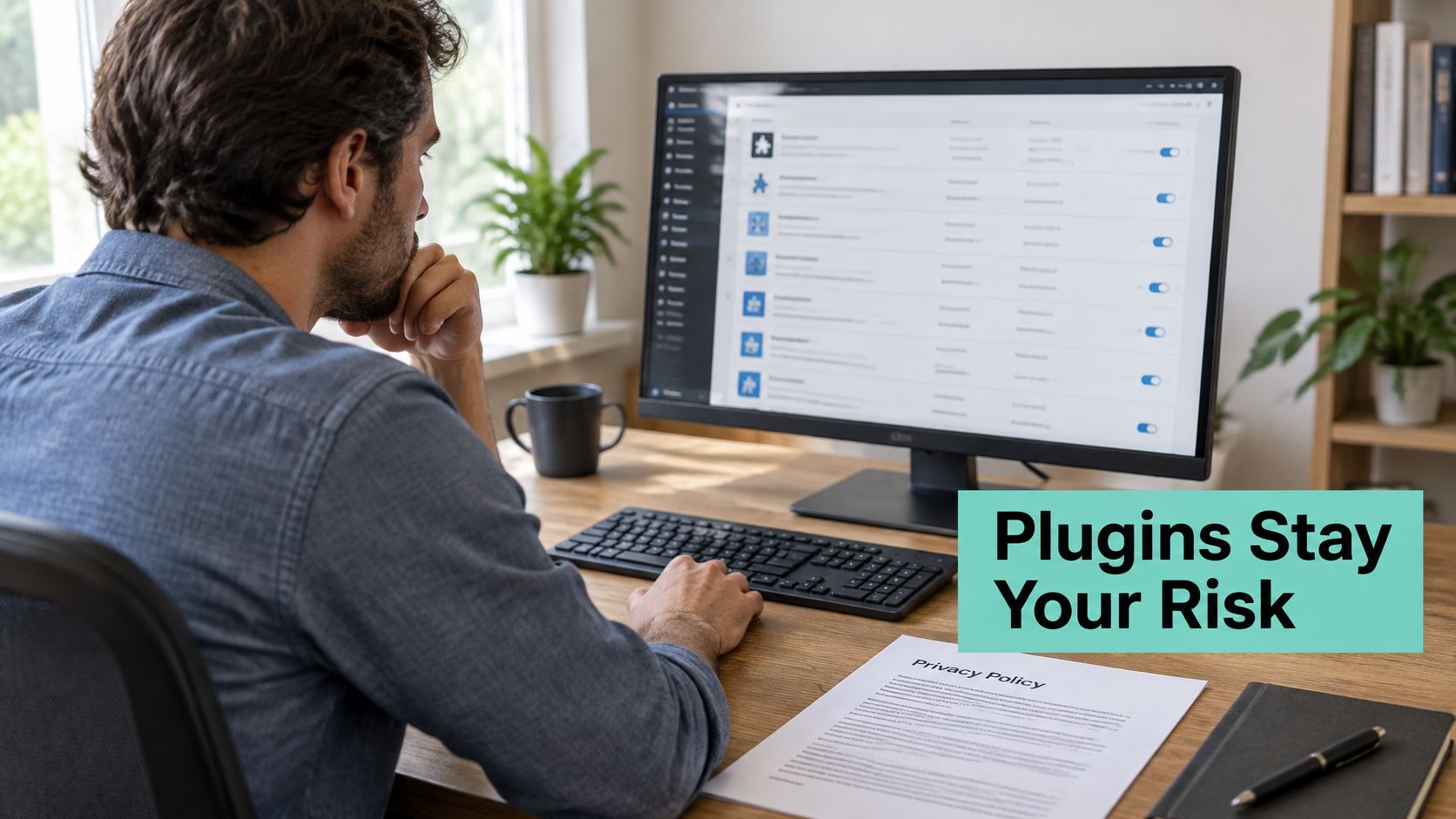
Backups, SSL and malware scanning don't necessarily include plugin-risk management. A provider can maintain the server competently while leaving decisions about a vulnerable booking extension entirely to you.
That gap deserves explicit ownership. In 2025, only 20% of Australian businesses reported employing someone responsible for IT and online security, while 18% regularly audited cybersecurity practices, according to auDA's Digital Lives report. Don't assume your business has assigned the job merely because you pay a hosting invoice.
Assign the plugin decisions
Maintain a plugin inventory recording purpose, access to customer information and business dependency. Agree on risk-based update windows, staging tests, rollback procedures and restore testing.
Write down the split: the host handles contracted infrastructure controls; the developer assesses compatibility and application changes; the owner approves business disruption and privacy decisions. If you need application maintenance, compare the scope of a WordPress maintenance service with your hosting inclusions.
The difficult choice is sometimes immediate patching that might break checkout versus delayed patching that leaves exposure. Nobody should make that trade-off without saying so.
Use a first-24-hours response sequence
This is a proposed response schedule, not permission to wait when active exploitation requires immediate action.
- Hours 0 to 2: Confirm the affected plugin and whether a patch exists. Disable or restrict it when no fix is available, with the developer advising on dependencies.
- Hours 2 to 8: Check whether checkout, forms or bookings depend on it. Decide on immediate or deferred patching and record who approves the trade-off.
- Hours 8 to 24: Test the update on staging, confirm that the latest suitable backup restores, and log the decision, safeguards and responsible person.
Recovery doesn't replace privacy assessment
Businesses covered by the Privacy Act 1988 must take reasonable steps to protect personal information under Australian Privacy Principle 11, as explained in the OAIC's guide to securing personal information. Hosting location alone doesn't establish compliance.
If a vulnerable plugin exposes customer contact records, contain access, preserve relevant logs and assess what happened. Under the Notifiable Data Breaches scheme, covered entities should take all reasonable steps to assess a suspected breach within 30 calendar days, then notify affected individuals and the Commissioner as soon as practicable when an eligible breach is established, following the OAIC's data-breach reporting procedure. Notification depends on likely serious harm and whether remedial action prevented that risk, not merely whether the site was restored.
Keep a knowledge-base runbook for restoring a WordPress backup alongside the privacy-reporting procedure. It should identify who contains the incident, who restores service and who assesses affected information.
Register your new domain name at competitive market prices including free domain add-ons like privacy, DNS Hosting, Custom Nameservers and Forwarding.
Always the best price and no nasty renewal price hikes.
Register A Domain Name
Confirm the Plan Against This Checklist Before You Buy
The right plan is the one that assigns the work your business can't reliably do itself. A feature-rich hosting account can be suitable infrastructure without being a complete website-maintenance service.
UpTime Web Hosting is a 100% Australian provider offering WordPress hosting with servers in Sydney, Melbourne, Brisbane and Perth. Its WordPress hosting features provide a starting point for checking the infrastructure, but plugin-update ownership and incident responsibilities still need written confirmation.
Check inclusions against your actual website
UpTime Web Hosting against the managed WordPress checklist
| Criterion | UpTime Web Hosting | What to verify before buying |
|---|---|---|
| Server location | Sydney, Melbourne, Brisbane, Perth | Choose the city nearest your main customers, then test |
| SSL | Free SSL on plans | Confirm automatic renewal |
| Malware scanning | Included on plans | Ask whether plugin and theme files are covered and how frequently scans run |
| Firewall | DDoS-protected firewalls | Ask whether application-level filtering and incident assistance are included |
| Performance stack | CloudLinux, LiteSpeed, AccelerateWP | Check PHP worker and cache limits on your tier |
| Backups | Encrypted off-site nightly backups | Request the retention period and restore-time target |
| Monitoring | Around-the-clock monitoring | Ask who responds to alerts and within what target |
| Contracts and pricing | No contracts, GST-inclusive pricing, no hidden fees | Confirm renewal pricing and any promotional conditions |
| Support | Australian support through a 1300 phone service, tickets and call-backs | Test response time and confirm after-hours restoration coverage |
| Resource limits | Generous storage, CPU and memory; bandwidth, add-on domains and databases uncapped on popular plans | Confirm allocations, applicable tiers and usage conditions |
The provider describes 24×7 monitoring and a 50% first-invoice discount on many plans. Check eligibility and the ongoing price before purchasing, and remember that monitoring availability doesn't establish a guaranteed human response time.
For another set of comparison questions, MD TECH TEAM's hosting comparison can help you examine plan scope. Apply the same Australian location, privacy and support requirements to any option you consider.
Make the purchase conditional on clear answers
Take these steps before moving a live business site:
- Document dependencies. List your plugins and mark those that process payments, bookings or customer information.
- Request recovery commitments. Obtain backup retention and restoration targets in writing.
- Check the restoration method. Request a test restore or ask the provider to explain how one is performed and verified.
- Compare ongoing costs. Put the renewal price beside the discounted first invoice and account for any separate maintenance service.
- Test support. Call the published 1300 number or raise a ticket with a specific plugin-and-backup question before committing.
Keep the service details, backup guidance and OAIC reporting procedure with your website records. Your final buying question should be practical: If the Friday-afternoon form failure happens again, who investigates, who authorises changes and who confirms customers can contact you?
UpTime Web Hosting offers Australian WordPress hosting with a WordPress-focused performance stack, security controls and encrypted off-site backups. Visit UpTime Web Hosting with your plugin inventory and recovery requirements, and ask which hosting and maintenance arrangement assigns those responsibilities clearly.