
If you're trying to get a business website online, the hosting jargon can feel needlessly complicated. You just want a site that loads properly, keeps customer details safe, gives you a professional email address, and doesn't eat your budget before the site even goes live.
That's where shared web hosting usually enters the picture. For many Australian small businesses, it's the practical starting point. You rent a portion of a server, pay a manageable monthly amount, and use tools like cPanel and WordPress installers to get moving without needing an in-house IT team.
What Is Shared Web Hosting and Why It Matters for Your Business
A simple way to think about shared web hosting is this. You're renting an apartment in a well-managed building instead of buying the whole building.
The building is the physical server. Your website is your apartment. The lifts, power, water, and security systems are the shared infrastructure. You get what you need to live and work there, without paying for the entire property yourself.
That model matters because most small business websites don't need a private server on day one. A local accountant, tradie, florist, consultant, café, or online store with a modest catalogue usually needs reliability, email, backups, and straightforward management more than raw computing power.
In Australia, shared hosting became popular for exactly that reason. It powered the majority of the over 2 million .au domains by 2020 because the entry cost was low, and a 2023 ABS survey found 62% of Australian businesses with websites used shared hosting according to this history of web hosting and Australian adoption.
If you're comparing plans, a useful place to start is reviewing shared server hosting services for Australian websites, then matching the plan to your site's actual needs rather than the most expensive option on the page.
Shared hosting is often the right first move when your priority is getting online quickly, keeping costs controlled, and avoiding technical overhead.
For a small business owner, the business benefit is straightforward. You get a working home for your website, usually with email, SSL, control panel access, and support, without taking on the cost and complexity of VPS or dedicated hosting too early.

Performance you can feel, backed by clients who depend on it. Read how our support and uptime create long‑term customer success.Power Your Business with Better Hosting
Understanding the Technology Behind Shared Hosting
Shared hosting works by dividing one physical server into many separate hosting accounts. Each account gets an allocation of processing power, memory, storage, and bandwidth, while the hosting provider handles the server hardware, operating system, and core maintenance in the background.
For a small business owner, the practical question is simple. Will your site stay fast and stable if other websites are on the same machine too?
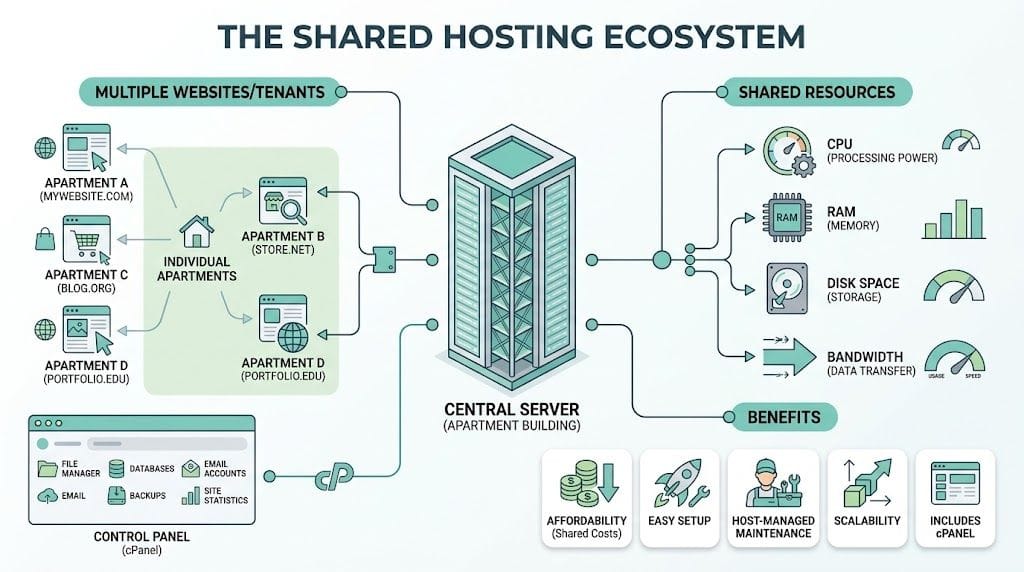
How one server can host many websites
A server has a fixed pool of resources, and the host slices that pool across customer accounts. The main pieces are:
- CPU power to process page requests
- Memory to run your website software and handle visitors
- Disk space to store files, images, databases, and email
- Bandwidth to send your pages and media to visitors
When someone opens your website, the server pulls together the parts needed to show that page. For a basic brochure site, that may just be files and images. For WordPress, the server usually runs PHP, checks the database, and builds the page before sending it to the visitor's browser.
This sharing model stays affordable because many Australian small business sites have uneven traffic patterns. A café may get a spike in the morning. A tradie might get more visits after a Google Ads campaign starts. A local consultant may see traffic mostly during business hours. The server is designed around that reality, because not every site needs peak resources at the same time.
What stops the noisy neighbour problem
Good shared hosting separates accounts with software controls, not just good intentions.
One of the better-known tools is CloudLinux, which sets limits on how much CPU, memory, and other resources each hosting account can use. If one site gets hammered by traffic or runs a bloated plugin, the host can contain the slowdown to that account instead of letting the whole server bog down, as explained in this overview of shared hosting resource limits and throttling.
Noisy neighbour effect: one website on a shared server starts using too many resources, which can affect nearby accounts if the host has poor isolation controls.
That matters a lot if your website brings in leads. If your contact form is slow, your booking page hangs, or your online store stalls during checkout, the problem is no longer technical trivia. It is lost business.
Australian businesses should also pay attention to where this server sits. If your customers are mainly in Sydney, Melbourne, Brisbane, Perth, or regional Australia, a local data centre often helps with response times. It can also make support conversations easier, because an Australian provider is more likely to understand local traffic patterns, GST invoicing requirements, and the usual setup around .au domains.
Why cPanel and caching matter in day-to-day use
You probably are not logging into a command line to manage hosting. You want a control panel that lets you handle the normal jobs without calling a developer every time you need an email account or a backup restore.
That is why cPanel is still common on shared hosting plans. It gives you one dashboard for email, files, databases, domains, SSL, and app installs.
Caching also plays a big part in performance. Without caching, a WordPress page may need to be built from scratch each time someone visits. With the right setup, the server can deliver a ready-made version much faster. For a business website, that can mean quicker page loads, fewer abandoned visits, and a better experience on mobile connections. If you want the practical setup side, this guide to LiteSpeed Cache settings for cPanel hosting walks through the main options.
Here is the simpler way to read the technology:
| Part of shared hosting | What it does | What it means for your business |
|---|---|---|
| Server | Provides the computing resources | You avoid paying for a whole machine you do not need |
| Hosting account | Keeps your site files and settings separate | Your website has its own managed space |
| CloudLinux limits | Caps resource usage per account | Another customer's traffic spike is less likely to slow your site |
| cPanel | Gives you a browser-based control panel | Routine tasks stay manageable without specialist help |
| LiteSpeed and caching | Serve pages more efficiently | Visitors get faster load times, especially on WordPress |
Shared hosting is controlled resource sharing with guardrails. For many Australian small businesses, that is exactly the point. You get enough technology to run a reliable site, while keeping costs sensible and management straightforward.
Essential Features Your Shared Hosting Plan Must Include
A shared hosting plan often looks simple on the surface. You see a low monthly price, some generous sounding limits, and a list of extras. Then six months later, you are chasing slow page loads, sorting out email problems, or discovering that backups are harder to restore than you expected.
For a small business, the better question is not "How much space do I get?" It is "Will this plan help me run my website without headaches?"
A shared hosting plan works a bit like renting a unit in a well-managed apartment building. Your business has its own space, but the quality of the locks, lifts, maintenance, and building rules affects daily life. Hosting features work the same way. The right ones improve speed, reduce risk, and save admin time.
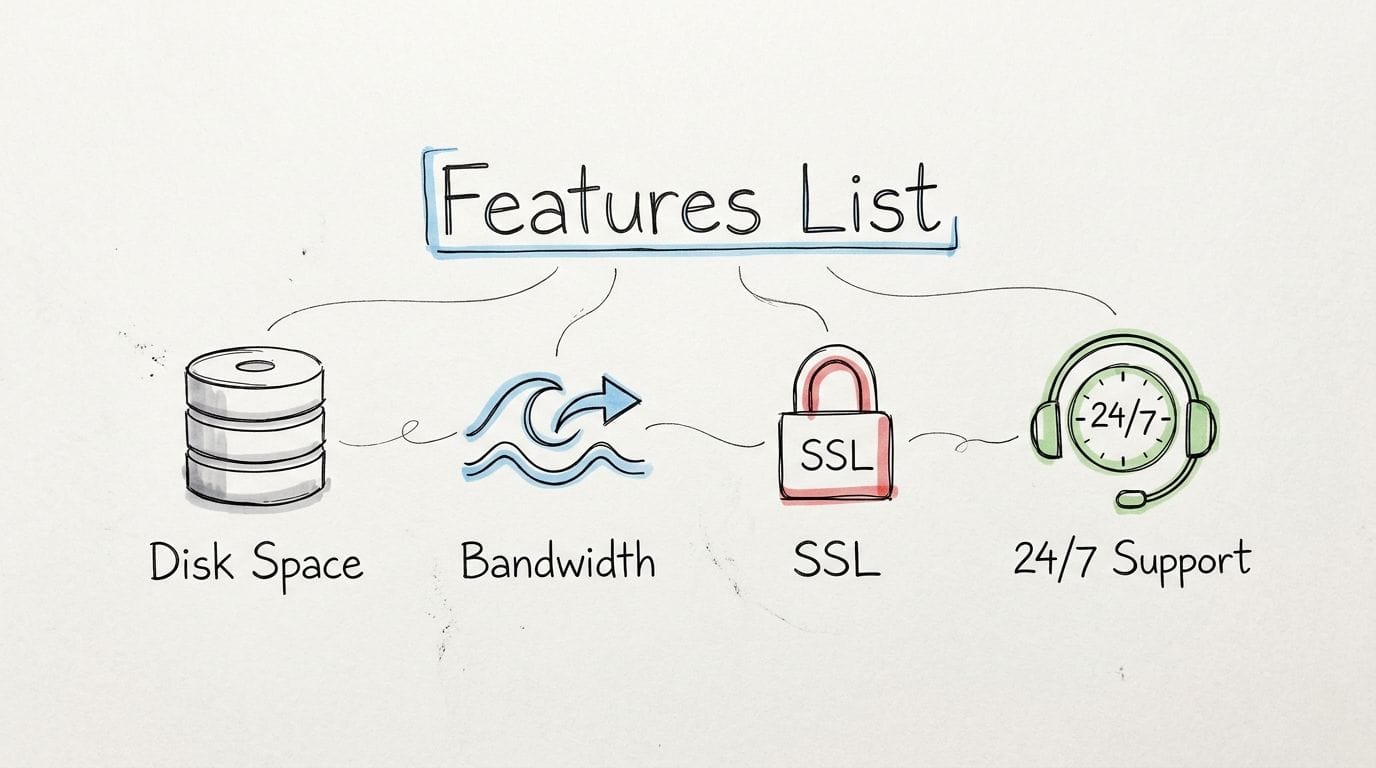
Performance features that affect real visitors
Visitors notice outcomes, not server jargon. They notice whether your service pages load quickly on a mobile connection in Brisbane, whether your booking form submits properly, and whether your online store feels reliable at checkout.
A worthwhile plan should include:
- LiteSpeed support for faster delivery of dynamic pages, especially on WordPress
- Resource controls such as CloudLinux to stop one busy account from consuming more than its fair share
- Current PHP versions with easy switching so your website stays compatible with modern software
- Australian data centre options if most of your customers are local, because shorter distance usually means faster response times
For an Australian business, local hosting can have practical flow-on benefits beyond speed. It can make support conversations easier, keep billing clearer with GST-inclusive pricing, and help you compare plans in a way that matches how your business operates here.
Security features that should be standard
Security is less about one flashy feature and more about layers working together.
If shared hosting is the apartment building, SSL is the locked front door, a firewall is the security gate, malware scanning is the building inspection, and account isolation is the fire wall between units. You want all of them, because each one covers a different kind of problem.
Look for:
- Free SSL certificates so browsers show your site as secure and customer data is encrypted
- Firewall protection to filter malicious traffic before it reaches your site
- Malware scanning to spot suspicious files early
- Account isolation so a problem on another hosting account is less likely to spill into yours
- Spam filtering for email to reduce junk mail and protect day-to-day business communication
Backups matter here too, but they solve a different problem. Security helps prevent trouble. Backups help you recover after trouble.
Backups and recovery are part of risk management
A backup only helps if it is recent, stored separately, and easy to restore.
That sounds obvious. It gets overlooked all the time.
Before you commit to a plan, ask these questions:
- Are backups automatic or do you need to remember to run them yourself?
- Are they stored off-site so they still exist if the server has a major issue?
- Can you restore a full account, or only certain files?
- Can you recover email and databases, not just website files?
- Will support help quickly if something breaks after an update?
For a tradie, consultant, clinic, or retailer, this is business continuity. If a plugin update breaks your homepage on Monday morning, a clean restore can save hours of lost enquiries. If you run an online store, it can save orders, customer records, and a fair bit of stress.
cPanel and one-click tools save time
Good shared hosting should keep routine jobs manageable for an owner or office manager.
cPanel helps because it puts common tasks in one browser-based dashboard. You can create email accounts, install WordPress, check file usage, manage domains, and give a developer access when needed without touching server commands.
Common tasks include:
- Creating business email addresses like hello@yourbusiness.com.au
- Managing files through a web-based file manager
- Installing WordPress with a guided setup process
- Checking storage and account usage before limits become a problem
- Accessing databases for maintenance or troubleshooting
If you want a broader checklist before buying, this guide on factors to consider when choosing web hosting services is a useful reference.
Be careful with unlimited claims
"Unlimited" is often marketing shorthand, not a literal promise.
In practice, shared hosting plans still have boundaries. They may limit CPU usage, memory, inode counts, email sending, file types, or the amount of sustained activity an account can generate before performance controls kick in. A plan can advertise unlimited websites and still require every site on that account to compete for the same pool of resources.
A practical way to assess a plan is to read the limits before you read the headline offer.
| Marketing claim | What to check |
|---|---|
| Unlimited storage | File type restrictions, inode limits, backup exclusions |
| Unlimited bandwidth | Fair use wording, suspension triggers, traffic thresholds |
| Unlimited websites | Whether each site shares the same account resources |
| Unlimited email | Mailbox quotas, sending limits, spam policy rules |
This matters even more for agencies, freelancers, and businesses with several WordPress installs. On paper, one account might look cheap. In day-to-day use, hidden limits can turn it into a bottleneck.
Australian details matter more than many owners expect
For local small businesses, a good hosting plan should fit Australian business admin, not just website specs.
Check whether the provider lists pricing with GST clearly. Check whether support is available during Australian business hours. If you are using a .au domain, make sure the setup and renewal process is straightforward and aligned with current .au registration requirements. If your customers are mainly in Australia, local data centre options are worth extra attention because they affect speed in a way your visitors will feel.
These details do not sound exciting. They do save time.
One factual example of a provider setup
Some Australian providers package the features small businesses usually want in one plan. For example, UpTime Web Hosting offers cPanel shared hosting with free SSL, malware scanning, DDoS-protected firewalls, CloudLinux, LiteSpeed, encrypted off-site nightly backups, and GST-inclusive pricing.
That is the right way to compare hosts. Look past the headline discount and check the practical inclusions that affect maintenance, security, recovery, and daily ease of use.
Host your website with our 5-star rated, cPanel website hosting plans.
Super fast servers, with security included and hosted in your choice of Australian Data Center.
View cPanel Plans
Choosing the Right Hosting for Your Growth Stage
A Brisbane plumber with a five-page website does not need the same hosting setup as a growing online store shipping across Australia. A Melbourne agency managing ten client sites has different pressure points again. The right choice comes from matching hosting to your current stage, your likely next step, and the kind of admin load you want to carry.
A simple transport comparison makes this easier to judge.
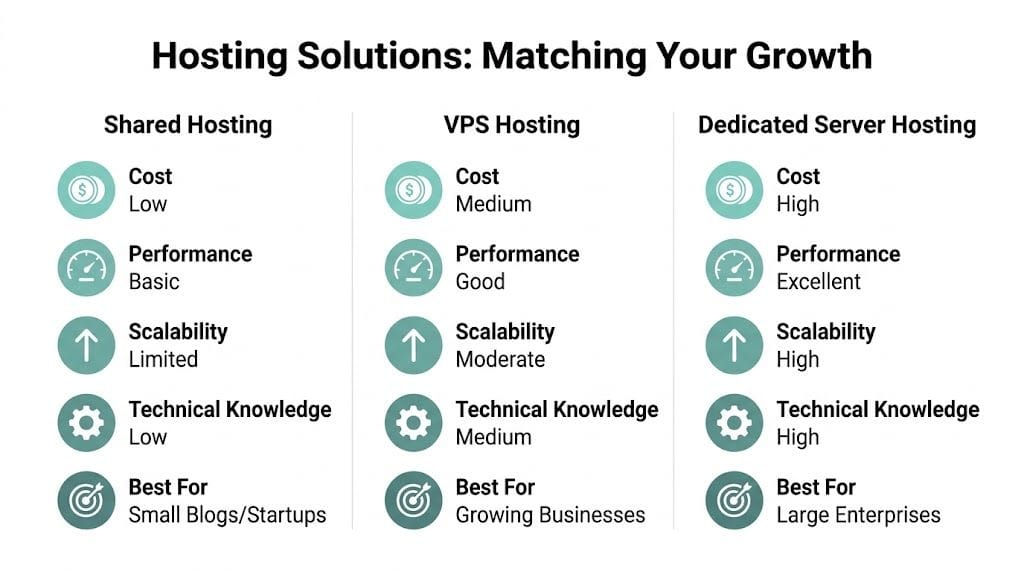
Shared hosting is the bus
Shared hosting works like catching a well-run bus. The route is set up for you, the cost is spread across passengers, and someone else handles the upkeep.
That suits businesses that want a website to work without turning server management into a side job.
Shared hosting is usually a good fit for:
- new business websites with steady rather than heavy traffic
- local service businesses that need fast-loading pages, contact forms, and business email
- blogs, portfolios, and brochure sites using standard themes and plugins
- small Australian businesses that want predictable costs, clear GST invoicing, and local support without paying for capacity they will not use yet
The trade-off is simple. You save money and admin time, but you get less control over the server environment and less headroom for sudden spikes.
VPS is the car you share with fewer people
A VPS sits in the middle ground. You are still on a larger machine with other customers, but your slice of that machine is more clearly allocated.
For a business owner, that usually means fewer resource clashes, more control over settings, and more breathing room as the site gets busier. If your website has started to feel cramped on shared hosting, a VPS is often the next step rather than a giant leap.
A VPS starts to make sense when you need:
- more consistent performance during busy periods
- custom server settings or developer tools
- stronger separation between your site and other accounts
- capacity for larger databases, heavier WordPress plugins, or more complex ecommerce functions
If shared hosting is an apartment building, VPS is a townhouse in the same complex. You still share the broader property, but your own space is more clearly defined.
Dedicated hosting is your own vehicle
A dedicated server gives you the whole machine. No shared resources, no neighbouring accounts competing for attention.
That level of control suits businesses running custom applications, high-traffic stores, internal systems, or workloads with strict performance and compliance demands. It also assumes someone is available to manage that environment properly, either on your team or through a managed service.
For many Australian small businesses, dedicated hosting is too much too early. The extra cost often arrives well before the business gets a real return from it.
Cloud hosting is the flexible hire option
Cloud hosting is built for projects that change shape. If traffic jumps around, seasonal demand is hard to predict, or your team wants room to scale without a full server migration, cloud setups can be a better match.
The benefit is flexibility. The catch is that pricing, setup, and troubleshooting can be less straightforward than shared hosting, especially for owners who just want a stable website and one clear monthly bill.
A practical way to choose
Pick the simplest option that handles your current workload well and leaves a little room for growth.
That rule protects small businesses from two common mistakes. The first is buying far more hosting than the site needs. The second is staying on a plan that has become a bottleneck for speed, sales, or day-to-day updates.
Here is a quick decision guide:
| Hosting type | Best fit | Main upside | Main trade-off |
|---|---|---|---|
| Shared | Early-stage business sites | Lower cost, lower admin | Shared resources |
| VPS | Growing sites and stores | More control and steadier performance | Higher cost, more technical setup |
| Dedicated | Heavy workloads and custom systems | Full server control | Highest cost and management load |
| Cloud | Variable demand and growing projects | Flexible scaling | Can be harder to budget and manage |
If your business is still in the brochure-site or early WordPress stage, shared hosting is often the sensible choice. If your traffic, checkout load, plugin stack, or compliance needs are growing, move up only when the business case is clear.
For Australian businesses, that decision should also factor in local server location, support hours, GST clarity, and whether the provider makes it easy to grow without a messy migration later. This guide to switching to local Australian hosting for better speed and support is useful if most of your customers are here.
Why Choosing Australian Shared Hosting Matters
A Brisbane tradie’s website can look fine in the office, then feel oddly slow to a customer opening it on a phone between jobs. The difference often comes down to where the site is hosted, how support works, and whether the provider fits Australian business requirements from day one.
For local small businesses, shared hosting is not only about getting online cheaply. It is also about choosing a setup that matches your customers, your bookkeeping, and the way Australian businesses handle privacy, domains, and support.

Local data centres help local visitors
Shared hosting works a bit like running your shop from a warehouse that is closer to your customers. The shorter trip usually means a faster arrival. With websites, hosting in Australia can reduce the distance between your server and your visitors, which often helps pages load more quickly for people in Sydney, Melbourne, Brisbane, Perth, and regional areas.
That can make a real difference for businesses that depend on first impressions. A service business wants quote forms to load quickly on mobile. An online store wants product pages and checkout steps to feel responsive. A member portal needs logins and account pages to react without lag.
Server location is only one part of site speed, but it is one of the few decisions you can make upfront that directly affects local delivery.
Australian support is easier to deal with
Support quality matters more on shared hosting because you are relying on the host to manage the server environment well.
An Australian support team is often easier to work with when the questions are practical rather than technical. You might need help understanding a GST line on an invoice, sorting out a .com.au or .au domain issue, or getting an answer during local business hours instead of waiting overnight for a reply from overseas.
That saves time. It also reduces the stop-start frustration that happens when support staff do not understand local domain rules, billing expectations, or the urgency of a business site being down during the Australian workday.
GST clarity makes costs easier to manage
Pricing can look cheaper than it really is when it is listed in a foreign currency or split into base price, tax, and renewal surprises.
Australian hosting plans are often simpler to compare because the price is usually shown in Australian dollars and may include GST clearly on the invoice. For a small business owner, that is not a minor admin detail. It makes budgeting easier, helps with BAS and bookkeeping, and lowers the chance of getting caught by a renewal cost that looked different at signup.
Local hosting can also reduce compliance headaches
For some businesses, hosting in Australia is partly a risk-management decision.
If your website collects contact forms, customer records, health information, booking details, or account data, it is worth checking where the server sits, where backups are stored, and who can access that data operationally. A local provider may make those answers clearer, which is useful when you are reviewing privacy obligations or replying to a client questionnaire about data handling.
The same goes for domain administration. Australian businesses using .au names often need to think about local registration rules and business identity details, so it helps when the host understands that environment instead of treating it like a generic global setup.
For a practical comparison, this guide on switching to local Australian hosting for better speed and support gives more detail on what to check before you choose.
Setting Up Your Website on Shared Hosting
Getting started on shared web hosting is usually much simpler than new site owners expect. Most of the work falls into a few practical tasks, and each one is manageable when the plan includes cPanel, one-click installers, email tools, and support documentation.
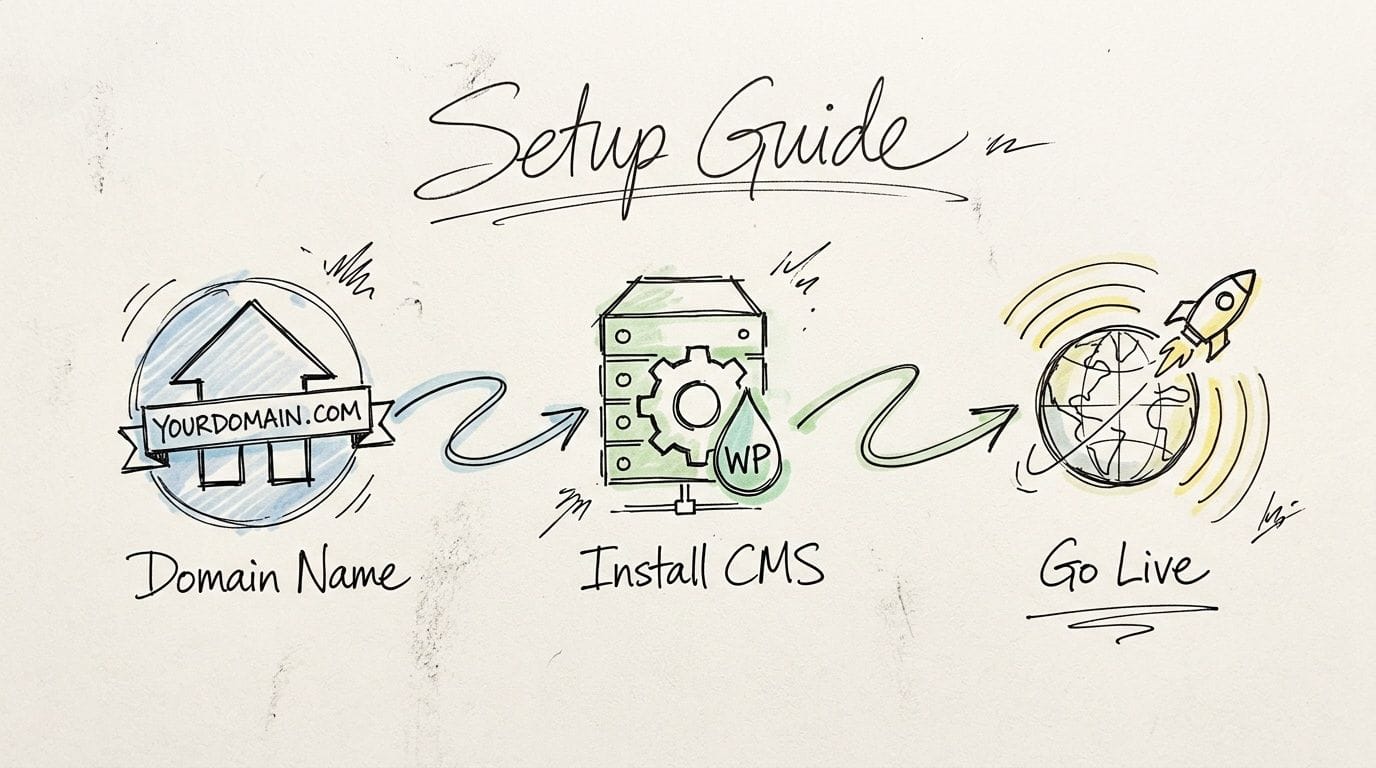
If you're starting from scratch
A first-time site owner usually needs four things in place:
- A domain name that matches the business
- A hosting account with enough resources for the site
- A content system such as WordPress
- A business email address linked to the domain
WordPress is often the easiest starting point because most shared hosting plans let you install it through Softaculous or a similar one-click tool. That avoids manual setup and gets you to the design stage faster.
If you already have a website elsewhere
Migrating an existing website sounds intimidating, but for many standard WordPress or cPanel sites it's mostly an organised handover.
The key checks are:
- Current platform compatibility so the new host supports your site properly
- Email timing because businesses often notice mail issues before website issues
- Backup availability before any migration starts
- Plugin and theme review so you don't carry broken or outdated components into the new account
If you're moving a simple brochure site, the process is usually straightforward. If you're moving a store or a site with many mailboxes, it helps to use the host's migration guidance and knowledge base articles before making changes.
Learn the control panel before you need it
The best time to look around cPanel isn't during a problem. Spend a bit of time learning where these items sit:
- File Manager for basic file access
- Email Accounts for creating and managing mailboxes
- SSL area so you can confirm HTTPS is active
- Backups in case you need a restore
- Softaculous or app installer for WordPress and other tools
That short orientation pays off later. When you need to create a new email address for a staff member or check a site's storage use, you won't be hunting through menus under pressure.
A well-set-up shared hosting account should feel like office admin software, not like engineering software. If everyday tasks feel obscure, the hosting experience will become frustrating fast.
Set up business email early
A professional email address tied to your domain does more than look polished. It helps with trust. Customers are more comfortable replying to accounts that match the business website, and staff email is easier to manage when everyone uses the same domain.
Create the mailboxes you know you'll need first, such as sales, support, accounts, or your own name. Then document who uses what so you don't lose track as the business grows.
Most hosts also maintain knowledge base articles for common jobs like creating mailboxes, installing WordPress, restoring backups, and using cPanel. Those step-by-step articles are worth bookmarking because they reduce support back-and-forth and help you solve routine issues quickly.
Register your new domain name at competitive market prices including free domain add-ons like privacy, DNS Hosting, Custom Nameservers and Forwarding.
Always the best price and no nasty renewal price hikes.
Register A Domain Name
Is Shared Hosting the Right Choice for You?
If your business needs a reliable website, professional email, manageable costs, and simple administration, shared web hosting is often the right place to begin. It gives you a practical balance of affordability and capability without forcing you into server management before you're ready.
It's especially sensible for Australian small businesses that want local support, clear GST-inclusive pricing, and hosting that aligns more closely with Australian visitors and compliance expectations. The key is choosing a plan with the right fundamentals: SSL, backups, security controls, cPanel, and transparent resource rules.
If your site later needs more separation or custom control, you can move up to VPS, dedicated, or cloud options when the business case is real. For now, many owners are better served by starting with the simplest setup that works well. If you're weighing that next step, this overview of the benefit of cloud hosting for growing websites can help you understand what comes after shared hosting.
If you're ready to launch or move your site, UpTime Web Hosting offers Australian hosting, domains, email, and support resources that can help you get started with less guesswork.