
Your site probably doesn’t feel broken. It just feels a bit slow.
A customer in Brisbane taps a product category, waits that little beat too long, then taps back. A lead in Melbourne opens your services page on mobile, scrolls half way, then leaves before the enquiry form finishes loading. If your site is hosted overseas, that delay often starts before the page even begins to render.
That’s why switch to local Australian hosting isn’t just a technical question. It’s a business one. For Australian SMBs, server location affects how fast pages respond, how smoothly carts load, where customer data sits, and how much friction people feel when they interact with your brand.
I’ve seen plenty of small businesses spend money redesigning pages, rewriting copy, and adding plugins when the bigger issue was simpler. Their server was on the other side of the world. Fixing that doesn’t solve every website problem, but it removes one of the most common causes of avoidable drag for Australian users.
Why Your Website Feels Slow to Australian Customers
A customer in Adelaide taps into a product page, waits a fraction too long for the images and price options to load, then loses momentum. That pause often has less to do with your design and more to do with where your server is sitting.
Distance creates delay
Every time someone opens a page, updates a cart, submits a form, or logs in, their device has to send a request to your server and get an answer back. If that server is in the US or Europe, the request is travelling thousands of extra kilometres before your site can respond. More distance usually means more network hops, more chances for congestion, and more visible lag for Australian visitors.
It works a lot like a courier route. A parcel sent across Sydney gets delivered faster than one sent from London because the trip is shorter and the handoff points are fewer. Website data behaves the same way. The longer the trip, the slower each interaction feels.
That delay is rarely dramatic on a single click. It shows up as hesitation. Menus take an extra beat. Product filters feel sticky. Checkout fields lag behind the customer.
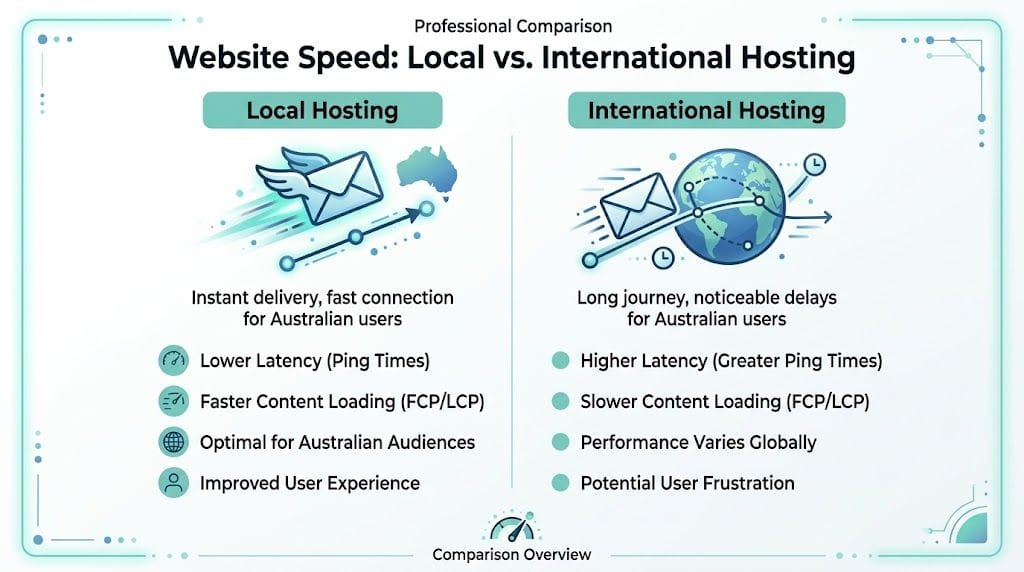
Small delays change how the site feels
Australian business owners often test their site from the office, on a decent connection, after the browser has already cached half the assets. Customers do not experience it that way. They hit your site cold, often on mobile, often while doing something else, and they make very quick decisions about whether the experience feels worth continuing.
Google notes that users are far more likely to leave as page load time rises, based on its mobile site speed research. For an eCommerce store, that matters because speed affects more than convenience. It affects buying intent. If a shopper has to wait at the product page, then wait again at the cart, then wait again at checkout, each delay gives them another chance to abandon the purchase.
That is the part many SMBs miss. Slow hosting does not just make a site feel dated. It chips away at revenue, especially when margins are tight and paid traffic is expensive.
What local hosting fixes first
Local hosting will not clean up a bloated theme or undo years of plugin clutter. It does remove one common source of avoidable delay for Australian traffic. That gives every other speed improvement a better base to work from.
A practical shortlist:
- Server response improves sooner: Australian visitors get the first byte back faster.
- Mobile interactions feel sharper: Taps, menu loads, and cart updates respond with less lag.
- Admin work becomes less frustrating: Product edits, dashboard loads, and content updates often feel quicker from Australia.
- Peak traffic is easier to handle: Local demand spikes during campaigns, lunch hours, and evening browsing put less strain on long international routes.
If you are already working on improving your website's loading speed, hosting location belongs on the same checklist as image compression, caching, and script cleanup. For businesses selling primarily to Australians, that change can be one of the cleanest ways to reduce friction before it starts. For a closer look at the performance side, review low latency hosting in Australia.

Performance you can feel, backed by clients who depend on it. Read how our support and uptime create long‑term customer success.Power Your Business with Better Hosting
From Page Speed to Profit The eCommerce Impact
The biggest mistake I see with online stores is treating speed as a technical metric instead of a sales metric.
For eCommerce, a slow store doesn’t just annoy people. It interrupts buying momentum. A customer adds a product, opens the cart, waits, then starts second-guessing the purchase. At that point, you’re not competing with another store. You’re competing with hesitation.
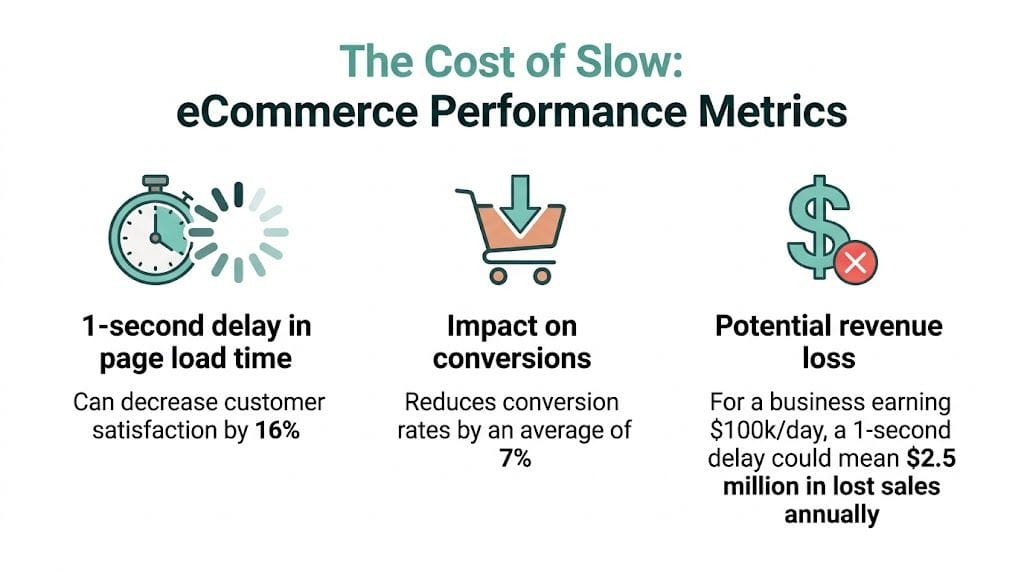
Cart abandonment rises when the server is far away
The benefits of local Australian hosting become very concrete for SMBs selling online.
A 2025 study by the Australian Retailers Association found that sites hosted overseas see 25% to 35% higher cart abandonment rates among Australian shoppers when latency runs over 200ms, according to this summary on local web hosting for Australian businesses. The same source notes that moving to local Sydney or Melbourne servers can reduce abandonment to under 10% and lift conversions by up to 15% for SMB eCommerce stores.
For WordPress and WooCommerce sites, the same reference cites NBN Co Q1 2026 performance benchmarks showing average abandonment dropping from 42% on overseas hosting to 28% on local hosting in that environment.
Those numbers are hard to ignore if your store already has traffic but sales feel softer than they should.
A practical store example
Take a suburban retailer running WooCommerce. Their product pages are fine, and their pricing is competitive, but the cart feels clunky during busy periods. Customers in Perth or Adelaide don’t describe the site as “high latency”. They say things like “it froze”, “it lagged”, or “I’ll come back later”.
That’s usually the key point. Buyers don’t analyse delay. They abandon it.
Slow checkout pages create doubt. Doubt kills purchases faster than most pricing issues.
Local hosting won’t fix poor product-market fit or weak merchandising. It does reduce one common cause of cart friction. That’s why I’d treat server location as part of revenue optimisation, not just infrastructure.
What tends to work for Australian stores
When I review eCommerce hosting setups, these are the changes that usually matter most:
- Move the store closer to buyers: If most orders come from Australia, host in Australia first.
- Pair local hosting with server-side caching: Tools like LiteSpeed can help dynamic pages feel less heavy when the store is busy.
- Reduce plugin drag at the same time: A local server helps, but overloaded WooCommerce stacks still need cleanup.
- Test the cart and checkout on mobile data: Desktop office testing misses the friction.
If you’re assessing the broader setup around product pages, payment flow, and store performance, this guide to selling online in Australia is a useful place to frame the hosting decision in commercial terms.
Staying Compliant With Australian Data Sovereignty
A Brisbane retailer takes online orders all day, stores customer addresses, and follows up abandoned carts by email. On paper, that looks like a straightforward small business setup. In practice, it means the business is collecting personal data at several points in the sale, and server location starts to matter for more than speed.

For an Australian SMB, data sovereignty means customer and business data are stored in Australia and handled under Australian legal conditions. That includes contact form entries, order records, booking details, support messages, account data, and often business email.
The practical issue is control.
If your hosting account, backups, database, or email sit offshore, you add another layer of legal and operational complexity to a normal website setup. Data handling becomes harder to explain to customers, harder to review internally, and harder to assess when something goes wrong. For stores that rely on repeat purchases, that matters because trust affects revenue. A customer who hesitates to share their details or complete checkout is a customer who may not come back.
A local setup will not make a site compliant on its own. You still need proper access controls, software updates, staff processes, and clear privacy handling. What local hosting does is remove one avoidable complication. It keeps your data closer to the business, much like using a local courier instead of sending every parcel through an overseas depot before it reaches the customer.
Where small businesses usually get caught
Problems usually start with defaults, not with a deliberate decision. A business signs up to a well-known global host, accepts the preselected data centre, connects email, installs a form plugin, and only later realises customer information is scattered across systems in other countries.
The common trouble spots are predictable:
- Contact forms: names, phone numbers, email addresses, and message content
- Online stores: customer profiles, delivery addresses, order history, and account records
- Bookings and client portals: service notes, appointment details, and uploaded documents
- Hosted email: inboxes often hold invoices, customer conversations, and personal details
That matters for compliance. It also matters for sales. If a checkout issue, support request, or privacy question drags out because your data sits across offshore providers, the cost is not just admin time. It can show up as delayed orders, higher refund pressure, and weaker customer confidence.
If a customer asks where their data is stored, you should be able to answer in one sentence.
Why local hosting reduces business risk
Australian hosting gives SMBs a simpler operating model. The infrastructure, support context, and data location line up with the market you serve. That makes vendor reviews easier, incident response cleaner, and internal decision-making less fuzzy.
For eCommerce sites, that simplicity has a commercial upside. The fewer unknowns around customer data, the easier it is to maintain confidence at checkout and after the sale. Compliance work rarely feels like conversion optimisation, but for small stores they are connected. Customers buy more readily from businesses that look organised, accountable, and clearly based here.
If you want a practical starting point, this guide to Australian data sovereignty hosting for local businesses covers what to check before you move.
Host your website with our 5-star rated, cPanel website hosting plans.
Super fast servers, with security included and hosted in your choice of Australian Data Center.
View cPanel Plans
Building Customer Trust with a Truly Local Presence
Trust isn’t built by hosting alone, but hosting does shape the experience customers have with your business.
An Australian customer lands on a site with a .com.au domain, local phone number, fast page loads, and support replies that arrive during local business hours. That feels coherent. It feels like a business that’s here, operating in the same market, serving the same customers.

Two very different support experiences
One business owner notices their site is intermittently sluggish on a weekday morning. They lodge a ticket with an offshore provider late in the day, wait through the time-zone gap, and get a generic response asking them to clear cache and retest. The issue drags out because the support team isn’t working in the same rhythm as the business.
Another owner calls a local support line, explains that product pages are slow for Australian customers, and talks to someone who understands the local context immediately. The conversation starts with the audience location, server location, and likely cause, not a script.
That difference changes how confident people feel about their website stack.
Local presence is a brand signal
Customers don’t always ask where a site is hosted, but they notice the clues:
- Fast first impressions: A responsive site feels more established.
- Local contact details: People are more comfortable dealing with an Australian business they can reach.
- Consistent market fit: Pricing, shipping language, support timing, and website behaviour all line up.
- Lower friction when something goes wrong: Problems get solved faster when support understands the local environment.
For small businesses, that brand fit matters. If two stores look similar, the one that feels smoother and easier to trust usually gets the sale.
A local setup doesn’t just say “Australian business”. It helps the site behave like one.
Your Evaluation Checklist for an Australian Host
Once you’ve decided local hosting makes sense, the next job is filtering out vague promises.
A host can say “fast”, “secure”, and “business-ready” all day. What matters is what they provide, where the servers are, how support works, and what happens when something breaks. I’d use a simple scorecard and ask direct questions.
The checklist that matters
| Feature | What to Look For | Why It Matters for Your Business |
|---|---|---|
| Server location | Real Australian data centre options such as Sydney, Melbourne, Brisbane, or Perth | Lets you keep your site closer to Australian customers and avoid default overseas routing |
| Hosting stack | cPanel, WordPress support, or Windows/ASP.NET options if your site needs them | Stops you forcing your site into the wrong environment |
| Performance tools | LiteSpeed, caching support, and website acceleration tools | Helps pages respond faster under normal traffic and busy periods |
| Security controls | DDoS-protected firewalls, malware scanning, SSL, and isolated account environments such as CloudLinux | Reduces common risk points for SMB sites |
| Backups | Encrypted off-site nightly backups with a clear restore process | Gives you a recovery path if updates fail or files are damaged |
| Support access | Australian-based phone, ticket, or call-back support | Makes issue resolution easier during local trading hours |
| Pricing clarity | GST included, no hidden fees, and no confusing upsells | Makes budgeting simpler and avoids nasty surprises |
| Scalability | Room for growth into stronger plans or managed VPS | Lets you stay with one provider as the site becomes more demanding |
Questions worth asking before you buy
Some checks are easy to skip, but they save pain later.
- Ask where your data will sit by default: Don’t assume “Australian company” means Australian server.
- Ask what happens during migration: A provider should explain the process clearly, not make it sound mysterious.
- Ask how backups are restored: Taking backups is one thing. Restoring quickly is what matters.
- Ask who answers support: If support is local, they should say so directly.
One Australian option in this category is UpTime Web Hosting, which offers hosting in Sydney, Melbourne, Brisbane, and Perth, along with cPanel, WordPress, Windows hosting, LiteSpeed, AccelerateWP, malware scanning, DDoS-protected firewalls, and encrypted nightly backups. More broadly, this checklist aligns well with factors to consider when choosing web hosting services.
What doesn’t impress me
I’m cautious when a host leans on unlimited language but stays vague about support, backups, or infrastructure location.
Be wary of:
- Generic “global cloud” wording: It often hides where your site lives.
- Performance claims without stack details: Fast compared to what, and using which tools?
- Support that only means tickets: For a business site, local human support still matters.
- Prices that exclude basic protections: SSL, backups, and malware checks shouldn’t feel like afterthoughts.
Planning Your Migration to a Local Server
Migration sounds risky when you haven’t done it before, but most website moves are manageable if you treat them like a short project instead of a last-minute scramble.
The main fear is downtime. The second fear is losing email or files. Both usually come from poor sequencing, not from the move itself. A clean migration plan avoids panic and makes testing easier.
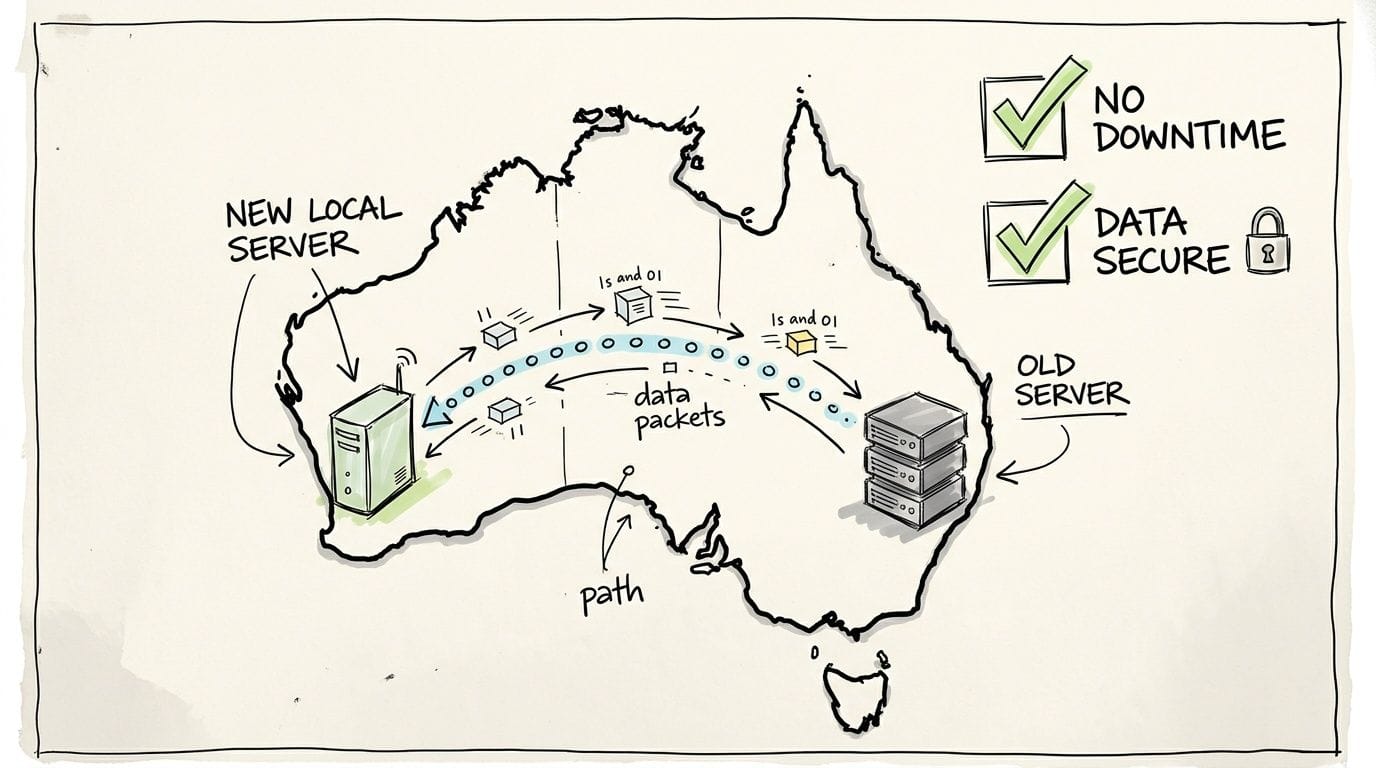
A simple pre-flight checklist
Before anything changes, make sure you can answer three basic questions. What needs to move, when will you move it, and who is responsible for checking the result?
A practical migration sequence looks like this:
Take a full backup
Capture website files, databases, and email-related settings where relevant. Don’t start a move without a rollback point.Audit what the site uses
Check forms, payment tools, booking tools, plugins, cron jobs, and any custom app behaviour. Old sites often run hidden dependencies.Set a quiet migration window
For online stores or lead-gen sites, move during lower activity periods so any hiccups affect fewer users.Build and test on the new server first
Load the site in the new environment, confirm pages render properly, test forms, and review mobile behaviour.
What SMBs often forget
The website isn’t the only moving part.
- Email matters: If your hosting and email are linked, plan both together.
- Forms need testing: Don’t assume enquiries still land where they should.
- Admin logins should be checked early: Owners often discover permission issues after launch.
- Payment and booking flows need a real test: Browse, add to cart, submit, and confirm.
Migrations go wrong when people move the files but forget the business process wrapped around the site.
Use support properly
Local support holds real value. If the host offers migration help, use it. A good support team can flag common issues before they become public problems.
What I’d want from a provider is straightforward communication, confirmation of what’s included, and a clear checklist for pre-move and post-move testing. If you’re preparing that handover, this website migration checklist is the right kind of planning document to work through before switching.
Register your new domain name at competitive market prices including free domain add-ons like privacy, DNS Hosting, Custom Nameservers and Forwarding.
Always the best price and no nasty renewal price hikes.
Register A Domain Name
Frequently Asked Questions About Local Hosting
Is a CDN enough, or do I still need local hosting
A CDN helps deliver cached content closer to visitors, and that’s useful. It doesn’t replace local hosting for Australian businesses that care about server response time, admin responsiveness, or where customer data sits.
The origin server still matters. Local hosting also supports AU-specific search visibility. In Australian local search, server location signals can contribute to 20% to 30% higher rankings for locally hosted domains, and that matters in a market with 95% smartphone penetration, according to this overview of local hosting advantages in Melbourne.
What if my business also serves customers overseas
Then you prioritise your main market first and build outward sensibly.
If Australia is your core market, host here and use a CDN to help international visitors with cached assets. That approach usually gives Australian users the best experience without making the rest of the world unusable. If your audience is split evenly across multiple countries, the right answer depends on where revenue, support demand, and data obligations sit.
If you’re comparing broader infrastructure decisions, these general website hosting considerations are a useful companion read because they frame hosting choice as an operational decision, not just a price comparison.
Is local hosting more expensive
Sometimes the sticker price is a bit higher. That doesn’t automatically make it more expensive in practice.
Cheap offshore hosting often becomes expensive when support is slow, migrations are messy, data handling becomes a compliance concern, or your store loses sales because pages feel sluggish to Australian buyers. I’d look at total operating friction, not just the monthly fee.
For most Australian SMBs, local hosting is easier to justify when your website brings in leads, processes orders, stores customer data, or supports day-to-day operations. At that point, the value sits in speed, support, and lower risk, not just server space.
If your customers are in Australia, your website should behave like it’s in Australia too. UpTime Web Hosting offers local hosting infrastructure, Australian support, and services for WordPress, cPanel, Windows hosting, domains, email, and VPS. If you’re weighing up a move, start by matching your site type, support needs, and data requirements to a local plan that keeps performance and compliance simpler.