Your WordPress site probably didn't become slow overnight. It usually happens in stages. The home page starts dragging during a campaign. The dashboard takes a bit too long to save a post. A plugin update feels riskier than it should. Then you run a sale, send an email blast, or get a nice local media mention, and the whole site feels wobbly at exactly the wrong moment.
That's where many Australian businesses hit the limits of basic shared hosting. The site still works, but it no longer feels dependable. If your website brings in leads, bookings, orders, or support requests, “mostly fine” isn't really fine.
A VPS can be the next sensible step. Not because it sounds more technical, but because it gives WordPress room to breathe. The question isn't whether a VPS is more powerful on paper. It's whether VPS hosting for WordPress will solve the actual business problem in front of you, which is a site that slows down when you need it most.
Table of Contents
- When Your WordPress Site Hits a Wall
- What Is a VPS and How Does It Work
- Shared vs VPS vs Managed WordPress Hosting
- Key Benefits of VPS Hosting for Your WordPress Site
- Choosing the Right VPS Specs for WordPress
- Migrating and Setting Up WordPress on a VPS
- Is a WordPress VPS Right for Your Australian Business

Performance you can feel, backed by clients who depend on it. Read how our support and uptime create long‑term customer success.Power Your Business with Better Hosting
When Your WordPress Site Hits a Wall
A common example looks like this. A business starts with a straightforward WordPress site. It has a few service pages, a contact form, some blog posts, and maybe WooCommerce added later. For a while, shared hosting is fine.
Then the site grows up.
Your agency launches a Google Ads campaign targeting Sydney and Melbourne. More people arrive at once. Product pages start loading unevenly. The admin area feels sticky when staff are updating stock or publishing content. Nothing is technically “down”, but the experience starts costing you enquiries and patience.
That's often the moment when business owners start searching for ways to speed up a slow WordPress site. Some fixes help. Image compression, caching plugins, and theme clean-up all matter. But if the server itself is the bottleneck, optimisation only gets you so far.
Practical rule: If your site is slow during busy periods but acceptable late at night or on quieter days, hosting limits are often part of the problem.
Shared hosting is cheap because many websites live on the same machine and draw from the same general pool of resources. That's fine for low-demand sites. It's a poor fit for a business site that needs stable performance during bursts of traffic.
A VPS is usually the next step because it changes the environment your site runs in. Instead of competing with a crowded server, WordPress gets its own allocated slice of computing power and memory. That doesn't magically fix every slow site, but it removes one of the most common causes of poor performance.
What Is a VPS and How Does It Work
The simple version
A Virtual Private Server, or VPS, is a private hosting environment created inside a larger physical server. The easiest way to understand it is with a housing analogy.
Shared hosting is like living in a large share house. You've got a room, but the kitchen, bathroom, and common areas are shared. If everyone tries to use them at once, life gets messy. Your website can face the same issue when other sites on the same server suddenly use too much CPU, RAM, or disk activity.
A VPS is more like having your own apartment in that same building. The building is still shared at the hardware level, but your space is separated. Your WordPress site gets its own allocated resources and behaves much more like it's running in a private environment.
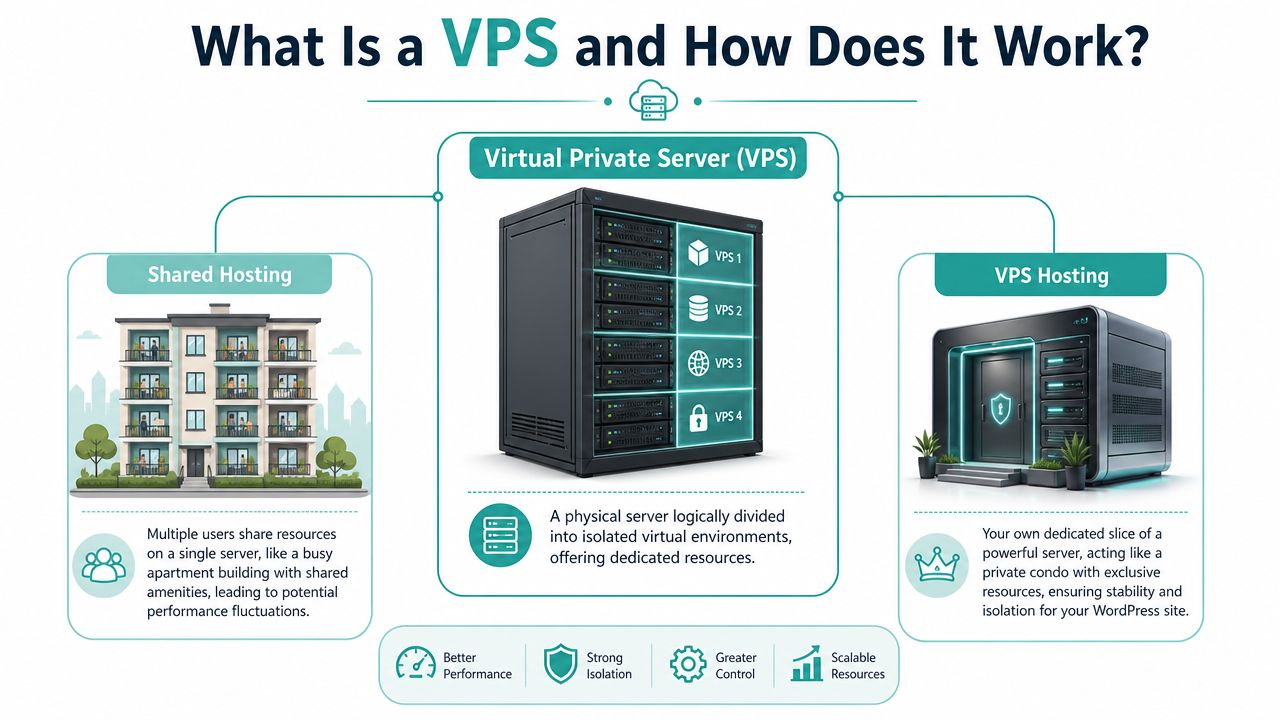
That separation is called resource isolation. In plain English, it means your site's performance is less likely to be affected by someone else's traffic spike, bad script, or resource-heavy process.
What virtualisation and root access mean
Virtualisation is the technology that makes this possible. Software divides one physical server into several isolated virtual machines. Each one acts like an independent server with its own operating system, settings, and resource allocation.
For a WordPress owner, that matters because you gain more control over how the site runs. You can choose parts of the stack, tune performance settings, and use server-level tools that basic shared hosting often restricts.
You'll also hear the term root access. That means full administrator control over the server. If you're technical, that gives you freedom. If you're not, it can sound intimidating.
Here's the practical distinction:
- Shared hosting gives you a managed slice of space with limited control.
- Unmanaged VPS hosting gives you deep control, but you're responsible for more setup and maintenance.
- Managed VPS hosting sits in the middle. You keep the benefits of isolation and flexibility without taking on every server task yourself.
A VPS isn't just “more power”. It's a different operating model. Your site stops being one tenant in a crowded room and starts behaving like it has its own space.
For WordPress, that usually means a more stable base for caching, PHP processing, database work, and day-to-day admin use.
Host your website with our 5-star rated, cPanel website hosting plans.
Super fast servers, with security included and hosted in your choice of Australian Data Center.
View cPanel Plans
Shared vs VPS vs Managed WordPress Hosting
A practical comparison
Most business owners aren't choosing between abstract server types. They're choosing between trade-offs. How much speed do you need, how much management do you want, and how much control matters to your team?
Here's a clean side-by-side view.
| Feature | Shared Hosting | VPS Hosting | Managed WordPress Hosting |
|---|---|---|---|
| Performance | Fine for lighter sites, but can vary when server neighbours get busy | More consistent because resources are isolated | Usually well-optimised for WordPress and handled for you |
| Cost | Lowest entry cost | Mid-range, depends on specs and management level | Usually higher than basic shared hosting |
| Technical skill required | Low | Medium to high if unmanaged | Low to medium |
| Security control | Limited server-level control | High control over server setup and policies | Moderate, provider handles much of the environment |
| Scalability | Limited | Flexible, can scale resources as needs grow | Good, but depends on platform rules and plan limits |
A standard VPS makes sense when you need stronger performance and want more say in the server environment. Managed WordPress hosting makes sense when you want WordPress-specific convenience and don't mind some platform limits. Shared hosting still suits smaller sites that aren't under much pressure.
If you want the VPS model but don't want to manage everything yourself, managed VPS hosting in Australia is the middle ground many growing businesses end up preferring.
Which one suits which business
A local accountant with a basic brochure site may not need a VPS yet. A WooCommerce store, membership site, agency hosting several client installs, or a business running regular campaigns often reaches that point sooner.
Use this quick lens:
- Stay on shared hosting if your site is light, traffic is modest, and the business impact of occasional slowness is low.
- Consider unmanaged VPS if you or your developer want control over the web stack, caching layers, and server tuning.
- Consider managed WordPress or managed VPS if your site matters commercially but you'd rather spend your time on sales, service, and content than server maintenance.
The confusion usually comes from people assuming “managed WordPress” and “VPS” are direct opposites. They aren't. Management is one question. Infrastructure is another. You can have a VPS that's managed for you, or one that's largely self-run.
That's why the better question is this: do you need a more stable hosting foundation for WordPress, and how hands-on do you want to be once you've got it?
Key Benefits of VPS Hosting for Your WordPress Site
The biggest advantage of a VPS isn't that it sounds enterprise-grade. It's that your WordPress site stops fighting for breathing room.
Why performance feels different on a VPS
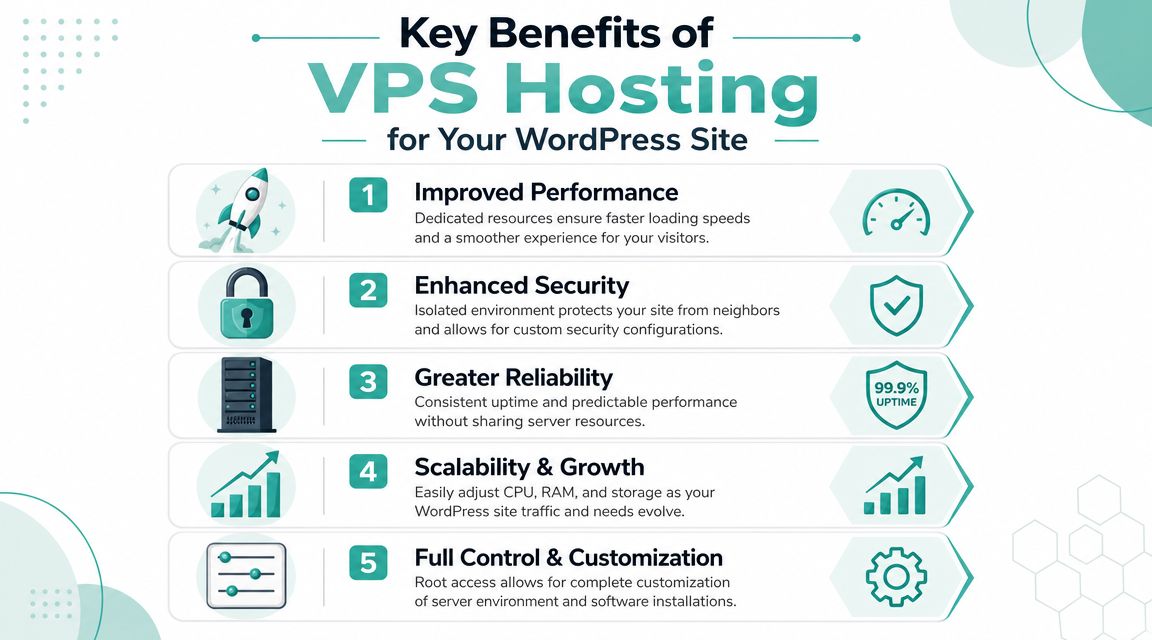
The main performance gain from a VPS comes from resource isolation. Dedicated CPU, RAM, and I/O bandwidth mean your WordPress site's PHP processes and MySQL queries aren't competing with other users. For Australian businesses dealing with traffic spikes, that leads to more consistent Time To First Byte and a steadier experience because performance isn't being pushed around by noisy neighbours, as explained in this WordPress VPS hosting performance guide.
In practical terms, that means:
- Campaign traffic is less disruptive because your site has dedicated headroom for PHP workers and database activity.
- Admin tasks feel smoother when staff are editing products, publishing posts, or updating plugins.
- Caching works better when the server isn't constantly starved of memory or I/O.
If your audience is mostly Australian, server-side delays are often the first thing customers notice. They click, then wait. A VPS helps reduce that bottleneck before you even get to front-end improvements.
Beyond speed alone
Speed gets the attention, but it's not the only reason businesses move.
- Security separation matters. Your site runs in an isolated environment, which reduces exposure to problems caused by other accounts on the same host.
- Scaling is simpler. If your business grows, you can usually increase CPU, RAM, or storage without rebuilding the whole setup.
- Customisation opens up. You can choose the stack and settings that suit WordPress, rather than living with generic defaults.
When a website is part of the sales process, predictable performance is usually more valuable than raw peak speed.
That's why VPS hosting for WordPress often feels like a business upgrade rather than just a technical one. You're buying consistency. For many owners, that's the primary relief.
Choosing the Right VPS Specs for WordPress
A lot of Australian business owners get stuck here. They compare plans, see bigger storage numbers, and assume that means a faster site. In practice, WordPress usually slows down for a different reason first. It runs out of working room.
For most WordPress sites, RAM is the first spec to size properly.
Start with RAM, not storage
RAM is the desk space your server uses to do active work. Storage is the filing cabinet. A bigger filing cabinet does not help much if the desk is already overcrowded.
That distinction matters because WordPress does a lot in memory before a page is delivered. PHP workers process each request. MySQL keeps useful data ready. Caching layers hold repeated information so the server does not rebuild the same page over and over. If RAM is tight, the server starts shuffling work around instead of serving visitors quickly. That is when page loads begin to feel inconsistent, especially during lunch-hour traffic, a local promo send, or a paid campaign aimed at Australian customers.
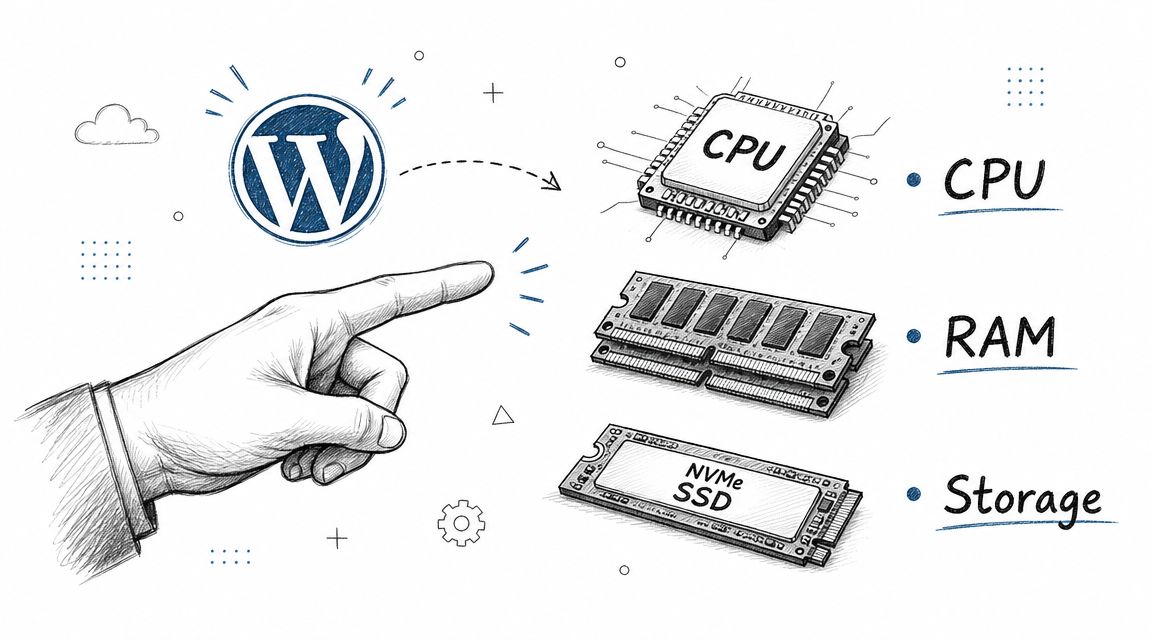
Here's what usually competes for memory on a WordPress VPS:
- PHP workers handling page requests, forms, and checkouts
- Database buffers keeping common queries ready
- Opcode cache storing compiled PHP code in memory
- Object or page cache reducing repeated work
- Plugins and background tasks such as backups, search indexing, or sync jobs
That is why a plan with generous storage but tight RAM can still feel slow.
Then look at CPU
CPU affects how much work the server can process at the same time. If RAM is the desk space, CPU is the number of hands available to do the work.
A brochure site with steady traffic usually needs less CPU than a WooCommerce store, membership site, or booking system. Those sites create more logged-in activity, more database queries, and more uncached requests. If you run campaigns that target Australian audiences in a narrow time window, CPU headroom helps the site stay responsive when a spike arrives all at once rather than gradually through the day.
You do not need to chase the highest core count on day one. You do need enough CPU for your busiest realistic hour.
Storage still matters, just in a different way
Choose SSD or NVMe storage. Faster storage improves database and file access, which helps WordPress admin tasks, backups, plugin updates, and media-heavy sites feel more responsive.
Capacity is usually the easier part to estimate. Count your WordPress files, uploads, database size, staging copies, backups, and expected growth. Many business sites do not need huge disks. They need fast disks and enough room to grow without constant cleanup.
If you are weighing local options, compare Australian VPS hosting providers for WordPress performance and support based on data centre location, RAM, storage type, upgrade path, and whether support is available in your business hours.
Match the plan to the type of site you run
A simple service website and a busy online shop should not be sized the same way.
- Brochure or lead generation site: prioritise enough RAM for WordPress, caching, and a comfortable margin during business-hour peaks.
- WooCommerce or booking site: allow extra RAM and CPU because carts, account areas, and search filters create more live processing.
- Agency, reseller, or multisite setup: plan for combined load. Several moderate sites can strain memory faster than one larger site.
- Content site with campaign bursts: size for traffic spikes from email, radio, social, or paid ads, not for a quiet average week.
If you are unsure, buy for the next stage of growth rather than today's lowest usage. That approach is usually cheaper than losing leads during a promotion because the site slows down when interest finally arrives.
A practical way to choose
Start with your business pattern, not the spec sheet.
Ask:
- How busy does the site get at peak times in Australia?
- Is the site mostly cached pages, or does it rely on live queries and logged-in users?
- Do staff use wp-admin heavily during the day?
- Will you need staging, backups, or room for large media files?
- How quickly can the host add more RAM or CPU if a campaign performs well?
Those questions lead to better choices than comparing storage numbers alone.
For Australian businesses, the best VPS setup is usually the one that gives local visitors quick response times, handles short traffic surges without complaint, and comes with support that matches local expectations. Specs matter because they affect those outcomes. That is the primary buying decision.
Register your new domain name at competitive market prices including free domain add-ons like privacy, DNS Hosting, Custom Nameservers and Forwarding.
Always the best price and no nasty renewal price hikes.
Register A Domain Name
Migrating and Setting Up WordPress on a VPS
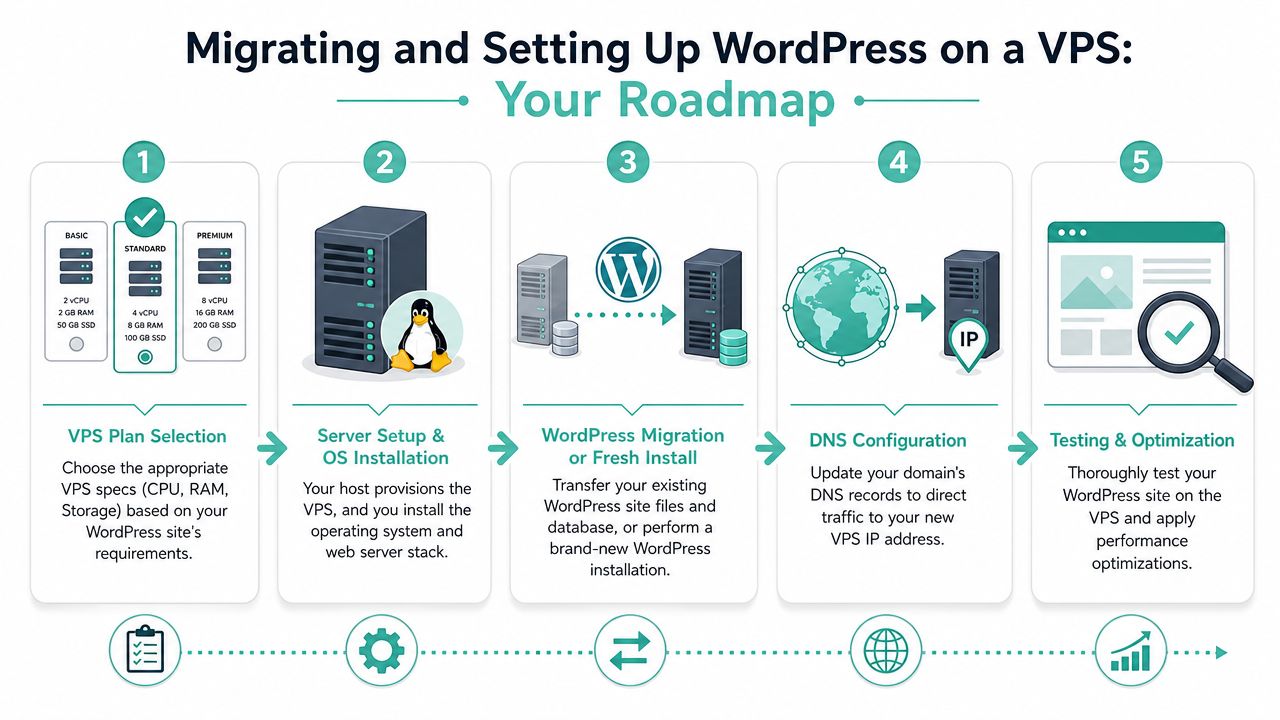
Moving to a VPS sounds harder than it usually is. The process is technical, but it's also predictable. Most migrations follow the same broad path.
What the move usually looks like
The first step is choosing the VPS plan and provisioning the server. That means the hosting environment is created with the operating system and, in many cases, a control panel such as cPanel if you want a more familiar management layer.
After that, the server should be hardened before the site goes live. That usually includes patching the operating system, tightening access, setting up firewalls, enabling backups, and making sure the web stack is ready for WordPress.
Then comes the WordPress move itself. That includes the site files, database, media library, and configuration. If it's a fresh build rather than a migration, this stage is a clean WordPress install with the right stack and caching in place.
If you'd rather not handle that work manually, a WordPress to VPS migration service can reduce the risk of missed steps.
What to check before going live
The final stage is testing. Don't rush this part. Before the domain points to the new VPS, check the things owners most often overlook:
- Forms and transactional email. Make sure enquiry forms, order notices, and password resets still arrive where they should.
- Logins and admin functions. Test plugin updates, media uploads, scheduled tasks, and any custom admin workflows.
- Caching behaviour. Confirm cached pages load correctly and logged-in users aren't seeing stale content they shouldn't.
- Backups and recovery. Verify that backups are running and that recovery is practical, not just theoretically enabled.
A migration is only finished when the restored site, email flows, and backup process have all been tested in the new environment.
Australian businesses should also think about support and recovery before launch day. If your host is local, it's usually easier to get help in your time zone when something needs attention. That matters more than many people realise, especially if your site supports orders or enquiries outside standard office hours.
Is a WordPress VPS Right for Your Australian Business
A WordPress VPS is usually the right move when your website has become operationally important. Not just nice to have, but important enough that slow performance affects sales, leads, customer trust, or internal workflow.
Ask yourself a few plain questions:
- Does your site slow down during campaigns or busy periods?
- Is WordPress central to enquiries, bookings, or online sales?
- Are staff frustrated by a laggy admin area?
- Do you need more control over security, backups, or server settings?
- Do most of your customers live in Australia and expect quick response times?
For Australian businesses, hosting location is about more than speed. With increasing emphasis on data security from the Australian Signals Directorate, a locally hosted VPS can support lower latency for domestic users and provide a clearer path around data sovereignty, security operations, and disaster recovery, as discussed in this guide to local Australian hosting considerations and supported by regional WordPress VPS guidance.
If those questions are landing close to home, the move probably isn't premature. It's a practical response to a site that has outgrown its original setup.
If your WordPress site is slowing down and you want a local option, UpTime Web Hosting offers Australian hosting services including managed VPS, WordPress hosting, local support, and knowledge base resources to help businesses move to a more stable setup without guessing through the process alone.