You've probably been in this spot already. The site is almost ready. The logo looks sharp, the enquiry form works, the bookings are connected, and you're thinking about launch day. Then someone asks a simple question: “Have you got the legal side sorted?”
That's where many Australian small business websites hit a blind spot. Owners spend weeks on design, copy and SEO, then leave privacy, accessibility, terms, cookies and hosting security until the end. Sometimes they skip them entirely because the legal side feels vague, expensive or too technical to act on.
The problem is that website legal requirements in Australia aren't just for banks, government departments or big online stores. A local tradie with a quote form, a clinic taking appointment requests, a consultant running email signups, and a retailer selling direct all have legal exposure if the site handles customer data badly or blocks access for users with disabilities.
The good news is that most of the risk can be reduced with a practical order of operations. Start with what your website collects, what it promises, who can use it, and how the underlying system protects data. If you treat compliance as part of the build, not an afterthought, it becomes much more manageable.
Table of Contents
- Launching Your Website Is Only the Beginning
- The Core Legal Pillars for Your Australian Website
- Essential Legal Documents Your Website Must Have
- A Deeper Dive into Website Accessibility and the DDA
- How Your Web Hosting Supports Legal Compliance
- Your Practical Website Compliance Checklist for 2026
- Next Steps DIY vs Seeking Professional Legal Advice

Performance you can feel, backed by clients who depend on it. Read how our support and uptime create long‑term customer success.Power Your Business with Better Hosting
Launching Your Website Is Only the Beginning
A common small business launch goes like this. The owner buys a domain, hires a designer or uses a builder, adds service pages, connects a contact form, and publishes. The website works, but nobody has checked whether the Privacy Policy reflects the actual data flow, whether the terms cover online payments, or whether a keyboard-only user can even complete the form.
That gap matters more than most owners realise. A website isn't just a digital brochure once it collects names, emails, phone numbers, addresses, health details, payment information, or tracking data. It becomes part of your legal and operational risk profile.

I've seen the same pattern repeatedly with small operators. They're careful about branding, but they don't always check who owns the domain, who controls hosting access, or which plugins are collecting customer data in the background. Before launch, it's worth confirming the basics around domain name ownership in Australia so the business, not a former freelancer or agency, controls a core legal asset.
Practical rule: If your site collects information, takes payments, books appointments, or markets to customers, legal compliance starts on day one, not when the business gets bigger.
A simple example makes this real. A physiotherapy clinic might only think of its website as a booking tool. But if the form asks about symptoms, injuries or treatment history, the site is handling sensitive information. A retailer may only think about product pages, but the checkout process, abandoned cart emails and newsletter signup each trigger different obligations.
What works is a risk-first approach. Check the pages and functions that collect data, make promises, accept money, or can block access. That's where the biggest issues usually sit. Fancy legal wording won't fix a poor process. Clear documents, accessible design and secure systems will.
The Core Legal Pillars for Your Australian Website
The phrase website legal requirements Australia covers several separate duties. If you try to tackle them as one big abstract compliance task, it gets messy fast. It's easier to treat them as a set of pillars that sit under the same website.
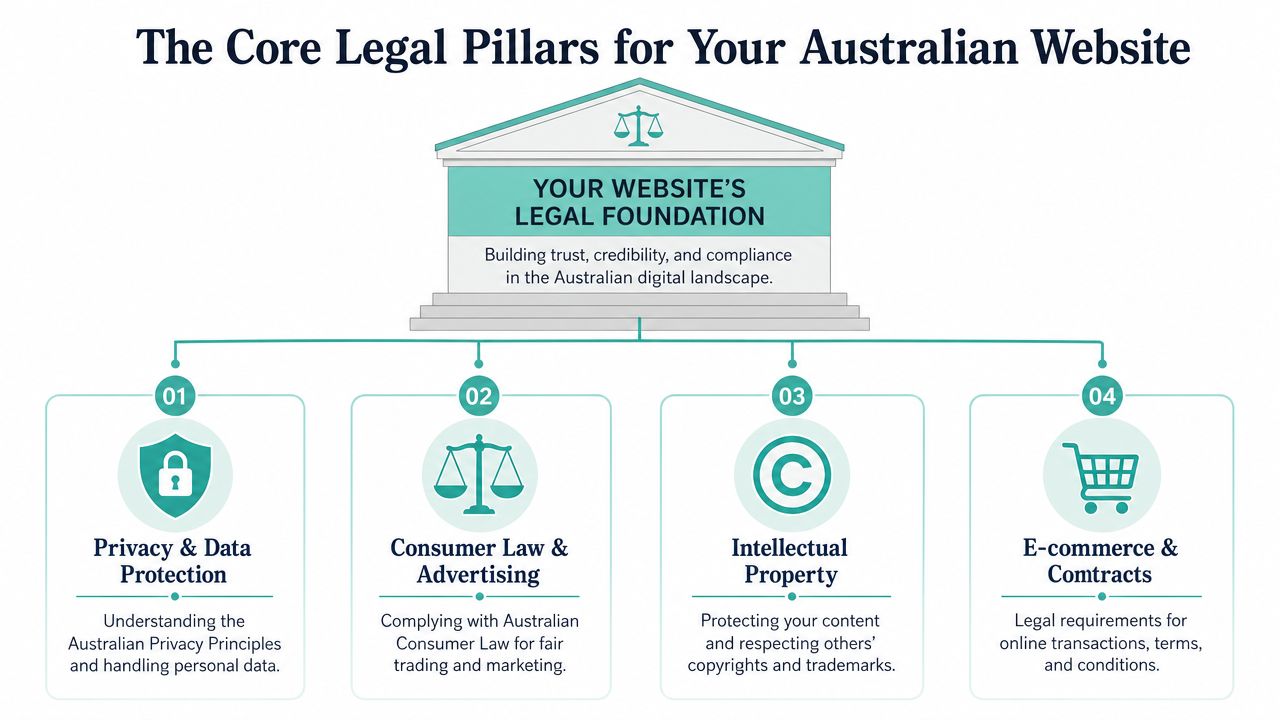
Privacy and personal information
This is the first pillar because it applies to far more websites than owners expect. If your website has a contact form, newsletter signup, account area, checkout, quote request or analytics setup that identifies people, privacy obligations come into play.
Under Australia's Privacy Act 1988, any website collecting personal information must publish a clear Privacy Policy. Failure to comply can lead to fines from the Office of the Australian Information Commissioner (OAIC) of up to $50 million for serious or repeated privacy breaches under the 2022 amendments (Australian Privacy Act website obligations).
For an SME, the practical issue isn't writing a generic policy and forgetting it. The essential task is matching the policy to reality. If your site says you only collect contact details, but your CRM, chat tool, analytics, form builder and email platform are storing more than that, the document is already out of sync.
A good privacy setup usually includes:
- Data mapping: List every form, plugin, app and integration that collects or stores user information.
- Plain-English disclosure: Explain what you collect, why you collect it, who receives it, and how people can contact you.
- Security alignment: Make sure your technical setup supports the promises you've made, especially around storage and protection. Basic cybersecurity and data protection measures matter here.
Consumer law and online promises
Australian websites often create legal exposure through marketing copy, pricing and checkout flow, not just through privacy mistakes. If you make claims about services, turnaround times, inclusions, delivery, refunds or guarantees, those statements need to be accurate and consistent across the site.
This catches out businesses that use patched-together pages. The homepage says “same-day response”, the service page says “within 24 hours”, and the quote form says “we'll reply when available”. If a dispute starts, those inconsistencies don't help you.
Your website is evidence. Customers, regulators and courts don't care whether the incorrect wording came from an old template or a rushed update.
The most reliable fix is to review your customer journey from the buyer's perspective. Read every claim, fee, condition and promise as though you were seeing it for the first time. Anything ambiguous should be tightened.
Accessibility under the DDA
Many SMEs still treat accessibility as a design extra. It isn't. Public-facing websites need to be usable by people with disability, and the operational standard businesses should aim at is no longer something you can safely push aside as “later”.
Accessibility isn't just colour contrast and alt text. It includes keyboard access, heading structure, form labels, link clarity, focus states, readable error messages and whether assistive technology can interpret the page properly.
Intellectual property and website content
This pillar is simpler, but it still causes trouble. Businesses regularly use stock images without checking licence scope, upload supplier content without permission, or copy service text from another website because “everyone says the same thing”.
That approach creates risk on both sides. You need to protect your own copy, branding and media, and you need to avoid using material you don't own or have rights to use.
For small business sites, the practical rules are straightforward:
- Use licensed assets: Keep records for stock images, fonts, themes and plugins.
- Own your original content: Make sure your agreements with designers, developers and copywriters are clear.
- Avoid copying competitors: Rewriting someone else's website too closely can still create problems, even if it's not word-for-word.
Host your website with our 5-star rated, cPanel website hosting plans.
Super fast servers, with security included and hosted in your choice of Australian Data Center.
View cPanel Plans
Essential Legal Documents Your Website Must Have
A legally safer website usually comes down to a handful of visible documents and notices that match how the site works. Most problems don't come from having no document at all. They come from using a template that doesn't fit the business.
If you're building a new site or reviewing an old one, keep a running checklist alongside your launch tasks. The same planning mindset you'd use when learning how to start an online business in Australia applies here. Documents should be treated as operational infrastructure, not last-minute filler for the footer.
Privacy Policy
This is the one document many businesses know they need, yet still get wrong. A proper Privacy Policy should reflect your real collection points and tools. If you use contact forms, analytics, booking software, payment providers, CRM tools, chat widgets or email marketing platforms, the policy needs to account for them.
A useful benchmark for structure and readability is to look at examples that are written in plain language. For instance, Uxia's privacy policy is a practical reference for how a modern policy can be laid out clearly without sounding like unreadable legal boilerplate.
What tends to work well:
- Clear collection categories: Names, email addresses, phone numbers, payment details, enquiry content and similar items are grouped logically.
- Actual use cases: Explain whether data is used for responding to enquiries, providing services, sending updates or processing payments.
- User rights and contact details: People need a clear path to ask questions, request access or raise concerns.
What doesn't work is a broad policy copied from an overseas generator that mentions laws and rights irrelevant to an Australian small business, while ignoring the tools installed on the site.
Terms and Conditions
Terms and Conditions aren't only for large eCommerce stores. They help set the rules for using the site, buying from the business, booking appointments, downloading resources, submitting content, and resolving disputes.
They're especially useful when your website includes:
- Online sales: Product terms, payment timing, shipping, returns and refund handling.
- Bookings or deposits: Cancellation windows, rescheduling and no-show rules.
- Digital content: Access rights, licence terms and prohibited use.
Here's a practical comparison.
| Document | Primary Purpose | When It Is Required |
|---|---|---|
| Privacy Policy | Explains what personal information is collected, used, shared and protected | Required when the website collects personal information |
| Terms and Conditions | Sets the contractual rules for use of the site, purchases, bookings or services | Strongly advisable whenever users transact, book or rely on site terms |
| Disclaimer | Limits misunderstanding around advice, general information, affiliate content or external links | Needed when content could be interpreted as professional advice or endorsement |
| Cookie notice or cookie policy | Tells users about tracking technologies and how consent choices work | Advisable when analytics, marketing tags or similar tracking tools are used |
| Refund or shipping policy | Clarifies fulfilment, returns, delivery issues and process expectations | Needed for online stores and product-based businesses |
Disclaimers and consent notices
Disclaimers matter when your content could be relied on as professional guidance. Accountants, consultants, health businesses, coaches and financial service providers need to be careful here. If a blog article, calculator or downloadable guide could be mistaken for personalized advice, the disclaimer should be close to the content, not buried in the footer.
Cookie notices also deserve more thought than they usually get. In Australia, many SMEs install a banner merely because a plugin recommends it. The better approach is to check what tracking tools you have operating, what those tools do, and whether your notice gives users a meaningful choice rather than a decorative pop-up.
Worth doing properly: If your banner says users can manage cookies, that setting should actually work. A fake choice creates trust issues and can undermine the rest of your compliance posture.
A Deeper Dive into Website Accessibility and the DDA
Accessibility is where a lot of website legal requirements in Australia become murky for SMEs. Owners hear one person mention WCAG 2.1, another mention WCAG 2.2, and someone else says accessibility only really matters for government sites. That confusion leads to delay, and delay is where risk builds.
Why SMEs get caught out
The Disability Discrimination Act 1992 (DDA) legally mandates that public-facing websites in Australia must comply with WCAG 2.2 Level AA accessibility standards. Non-compliance can result in costly settlements ranging from $50,000 to over $500,000 (Australian DDA and WCAG 2.2 guidance).
For a small business owner, the key point isn't just the standard itself. It's that inaccessibility can become a legal issue even when the business didn't intend to exclude anyone. That's a difficult message for SMEs because many accessibility failures are unintentional and created by ordinary build choices such as low-contrast buttons, unlabelled forms, empty links, PDF-only content or booking widgets that don't work from a keyboard.
There's also a practical gap in the market. Many agencies still refer to WCAG 2.1 in proposals and audits, while the safer operational benchmark is now WCAG 2.2 AA. If you're relying on an old audit, it's reasonable to ask whether it still covers your current exposure.
WCAG 2.2 is the safer benchmark
For SMEs, the trade-off isn't “should we do accessibility?” It's “do we act now in stages, or wait until a complaint forces a rushed rebuild?” The staged option is usually cheaper and more manageable.
A sensible interpretation of current Australian risk is this: if your website is public-facing, you should work toward WCAG 2.2 AA and treat older 2.1-only checks as incomplete rather than final.
Low-cost first actions that actually help
You don't need a giant budget to improve the site quickly. Start with the items that affect basic use:
- Keyboard testing: Try your main pages, forms and menus without a mouse.
- Form labels: Make sure every field has a clear, visible label and usable error feedback.
- Contrast and readability: Check buttons, links, headings and placeholder text.
- Alt text and heading structure: Fix decorative clutter and improve page hierarchy.
- Manual review of core journeys: Home, contact, quote request, booking, checkout and login should be reviewed by a human, not just a scanner.
Automated tools can help find obvious faults, but they won't replace manual judgement. That's particularly true for reading order, meaningful link text, form experience and whether the content makes sense to users of assistive technology.
How Your Web Hosting Supports Legal Compliance
Legal compliance doesn't stop at what users can see. The hosting environment underneath the site affects privacy, security, resilience and recoverability. For many Australian SMEs, this is the most overlooked part of the stack because hosting gets chosen on price, not on risk.
Hosting affects your privacy obligations
If your site collects personal information, the way that information is stored and protected matters. That includes the server environment, account isolation, malware controls, backups, certificate management and who has access to the hosting account.
A lot of businesses assume plugin-level security is enough. It usually isn't. WordPress plugins can help, but they sit on top of the hosting environment. If the server setup is weak, unmonitored or poorly maintained, the legal risk remains.
Australian businesses should therefore think carefully about infrastructure choices such as Australian data sovereignty hosting. Server location, control over data handling, and clarity around where data is stored can all affect how comfortable you are with your compliance position.
What secure hosting should include
When I assess hosting from a legal risk perspective, I look for boring but important features. Not marketing slogans. Actual operational protections.
A stronger setup usually includes:
- HTTPS by default: An SSL certificate is the minimum baseline so data is encrypted in transit.
- Nightly backups: Preferably encrypted and stored off-site so recovery is possible after compromise or deletion.
- Malware scanning and firewall controls: These reduce the chance that a known issue sits unnoticed.
- Monitoring and alerting: A website that fails undetected can leave you exposed for too long.
- Access discipline: Separate logins, limited permissions and current contact details for the account owner.
A legal document can say you protect user information. Your hosting environment is where that promise gets tested.
Weak hosting creates avoidable legal risk
Cheap hosting often looks fine until something goes wrong. A plugin vulnerability gets exploited. A form starts sending spam. A site is defaced. A backup turns out to be missing or unusable. The business then discovers that nobody knows who controls the hosting account, where the latest clean copy lives, or how long the site has been exposed.
That's not just a technical headache. It can become a legal and reputational problem very quickly.
What works better is matching the hosting standard to the website's risk level. A brochure site with one basic form still needs security hygiene. A clinic, membership platform or online store needs a more disciplined setup because the consequences of mishandled data are higher.
Register your new domain name at competitive market prices including free domain add-ons like privacy, DNS Hosting, Custom Nameservers and Forwarding.
Always the best price and no nasty renewal price hikes.
Register A Domain Name
Your Practical Website Compliance Checklist for 2026
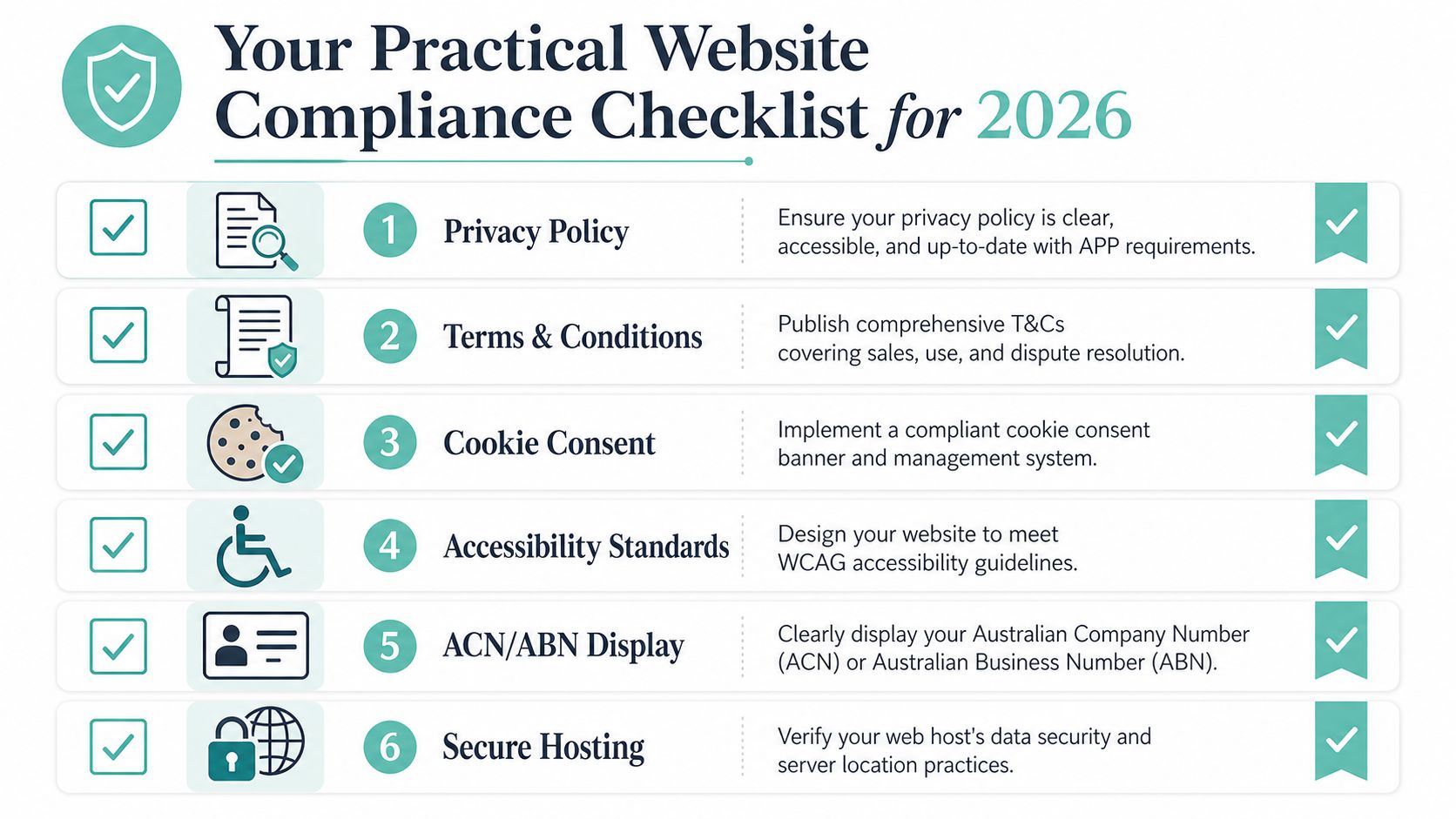
You don't need to solve every website legal issue in one sitting. You do need a practical audit list that forces you to check the things most businesses leave half-done.
The checklist
Use this as a working review, not a one-off launch exercise. It also pairs well with a broader website security checklist if you want to tighten the technical side at the same time.
- Check your Privacy Policy: Make sure it reflects current forms, tools, integrations and actual data use. If the website changed, the policy should have changed too.
- Review your Terms and Conditions: Confirm that payment terms, refunds, booking rules, delivery expectations and acceptable use wording match how the business operates now.
- Test your cookie and tracking notice: If the site runs analytics, ad tags or behavioural tracking, the notice should be visible, understandable and functionally honest.
- Audit accessibility on core pages: Test the homepage, contact page, booking flow, checkout and top service pages for keyboard use, labels, contrast and page structure.
- Display business details clearly: Make it easy for users to identify the business, contact it, and verify who they're dealing with. That includes ACN or ABN display where appropriate for the business model.
- Confirm HTTPS and backup coverage: Every important page should load securely, and the business should know where backups are stored and how recovery works.
- Check account ownership and access: Verify who controls the domain, hosting, CMS admin, email platform and third-party tools. Remove stale access for former staff or suppliers.
A simple way to prioritise the list is to mark each item by consequence:
- High risk: Data collection, checkout, accessibility barriers on core forms, missing ownership access
- Medium risk: Outdated terms, weak business identification, incomplete notices
- Maintenance risk: Formatting, document placement, readability improvements
That order helps SMEs avoid spending a week polishing footer wording while a broken form or inaccessible booking tool remains untouched.
Next Steps DIY vs Seeking Professional Legal Advice
Most Australian SMEs don't need to start with a full legal overhaul. They need to know where DIY is sensible and where it becomes false economy.
When DIY is usually workable
A DIY approach can be reasonable if your website is relatively simple. Think brochure-style site, standard contact form, basic service pages, straightforward enquiry handling and no sensitive personal data beyond ordinary business contact information.
In that situation, a practical path is to:
- audit what the site collects
- create or update the core documents
- improve accessibility on essential pages
- tighten hosting security
- review the site every time tools or workflows change
That approach works best when the owner or team is prepared to read closely, test the site properly and avoid copying generic overseas templates that don't fit Australian use.
When legal advice is worth paying for
Professional advice is usually the better move when the business handles higher-risk data or operates in a more exposed setting. Examples include health information, children's information, complex eCommerce terms, memberships, subscriptions, finance-related content, or any site where a dispute over reliance, cancellation, access or privacy would be costly.
The red flags are usually practical, not theoretical:
- You collect sensitive information
- You sell through customised terms
- You've had a complaint already
- Your site relies heavily on automated tools and third-party integrations
- You don't know whether your documents match your actual processes
If that's your situation, use DIY to get organised, not to replace legal review entirely. Gather your pages, policies, user flows and tool list first. Then a solicitor can advise faster and more accurately because the operational picture is clear.
The best result is usually a hybrid one. Handle the obvious fixes internally, then get legal input on the parts that carry the greatest downside if they're wrong.
If you're tightening your website's compliance position, don't ignore the infrastructure underneath it. UpTime Web Hosting provides Australian hosting, free SSL, nightly off-site backups, malware scanning, DDoS-protected firewalls and local support, which makes it a practical option for businesses that want a more secure foundation for privacy, uptime and day-to-day website management.