Your website is taking orders while you sleep. Your email is fielding enquiries. Your booking form is doing the quiet admin work that keeps cash moving. Then one morning, you open your laptop and none of it works.
For a lot of Australian small businesses, that's the moment the phrase what is disaster recovery stops sounding like IT jargon and starts sounding personal. It's not just about servers or backup files. It's about whether customers can still reach you, whether staff can still do their jobs, and whether you can get through a bad day without turning it into a bad month.
A disaster doesn't have to be dramatic. It can be a hosting outage, deleted data, ransomware, a failed update, a flood in the wrong suburb, or a fire in the wrong building. The common thread is simple. Something critical stops working, and your business needs a reliable way back.
Table of Contents
- When Disaster Strikes Your Digital Front Door
- Backup vs Disaster Recovery vs Business Continuity
- The Core Components of a DR Plan
- Common Disaster Recovery Strategies for SMBs
- How Your Web Host Is Your First Line of Defence
- A Simple DR Plan Checklist for Your Business
- Conclusion Plan for Resilience Not Just Recovery

Performance you can feel, backed by clients who depend on it. Read how our support and uptime create long‑term customer success.Power Your Business with Better Hosting
When Disaster Strikes Your Digital Front Door
It's the busiest trading day you've had in months. Orders are coming through, customers are sending messages, and then your website falls over. Instead of a checkout page, people get an error. Instead of sales, you get silence.

For a small business owner, that moment feels chaotic because every problem arrives at once. Revenue stops. Customers lose confidence. Staff want answers. You're trying to work out whether it's a minor glitch, a hosting problem, a cyber incident, or something larger.
Disaster recovery starts with business reality
Disaster recovery holds significant importance. In plain English, it's the process of getting your important systems, data, and services back after something knocks them out. In Australia, disaster recovery is broader than just IT. The Australian Institute for Disaster Resilience recovery collection describes it using the United Nations definition of restoring or improving livelihoods, health, and economic, physical, social, cultural and environmental assets, systems and activities.
For a small business, your digital setup is part of that picture. Your website is your front door. Your email is your reception desk. Your files, bookings, and customer records are the working memory of the business.
Practical rule: If losing a system would stop sales, stop service delivery, or stop customer communication, it belongs in your disaster recovery plan.
Australia gives this topic extra urgency. Natural disaster costs are projected to rise from $18.2 billion annually to $39 billion per year by 2050 according to the Australian Red Cross discussion on saving billions on disaster recovery. That's a national projection, but small businesses feel the impact in very local ways. Power loss, damaged premises, internet disruption, and supplier delays all flow downhill.
It's rarely just one problem
A digital outage often overlaps with other risks. If customer information is exposed during an incident, you're dealing with both downtime and trust. That's why it helps to understand the basics of protecting business data from breaches before you're under pressure.
Sometimes the first sign of trouble is an error page that looks simple on the surface. If you've ever had to decode a 503 Service Unavailable message, you already know how quickly “the site is down” can turn into “how long can we afford for the site to stay down?”
Backup vs Disaster Recovery vs Business Continuity
These three terms get mixed together all the time. That confusion causes bad planning because a business owner thinks, “We've got backups, so we're covered.” You might be covered for one piece of the problem, but not the whole thing.
A simple way to separate the three
Think about a car.
A backup is your spare key. Helpful, yes. But if the car is damaged, the spare key doesn't solve much.
Disaster recovery is the plan to get the car towed, repaired, and replaced temporarily so you can drive again.
Business continuity is how you still get to work while all that is happening. Maybe that means using a second vehicle, remote work, phone orders, or manual invoicing.
That's why backups matter, but they don't answer the full question of what is disaster recovery. A backup is a resource. Disaster recovery is the playbook for using resources under pressure.
If you're sorting out options for storing copies of business data, this guide on how to choose data backup is a useful companion read because it helps frame the backup decision separately from the recovery decision.
Understanding Your Resilience Strategy
| Concept | Primary Goal | Scope | Car Analogy |
|---|---|---|---|
| Backup | Keep recoverable copies of data | Files, databases, website content, mailboxes | A spare key |
| Disaster Recovery | Restore systems and data after disruption | Servers, websites, applications, access, restoration steps | Towing, repairs, rental car, getting back on the road |
| Business Continuity | Keep the business operating during disruption | People, processes, communications, customer service, workarounds | Still getting to work and earning income while the car is off the road |
A few practical examples make the difference clearer:
- Backup only: You have a copy of your website from last night, but nobody knows how to restore it quickly.
- Disaster recovery: You know where the backup is, who restores it, what order systems come back in, and what the temporary workaround is.
- Business continuity: While restoration happens, staff answer customer calls manually, send invoices another way, and keep core operations moving.
A backup answers “Do we still have the data?” Disaster recovery answers “How do we get operating again?”
If your business relies on hosted email, websites, or shared files, it helps to think in layers. The data copy is one layer. The restore process is another. The fallback work method is a third. A proper business backup approach supports the first layer, but your business still needs the other two.
Host your website with our 5-star rated, cPanel website hosting plans.
Super fast servers, with security included and hosted in your choice of Australian Data Center.
View cPanel Plans
The Core Components of a DR Plan
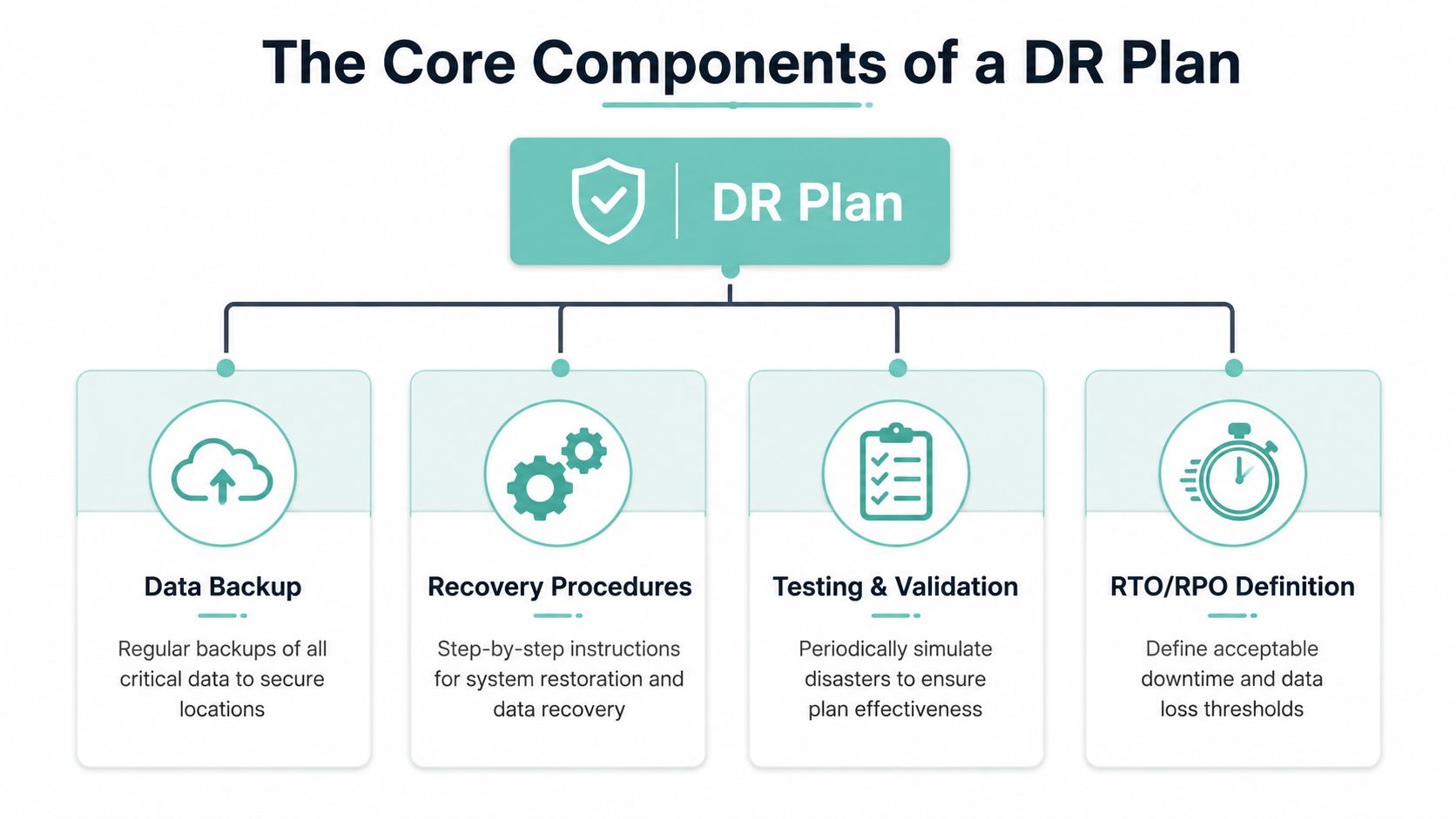
Once you strip away the jargon, a useful DR plan is just a written answer to a few practical questions. What matters most? How fast do you need it back? How much recent data can you afford to lose? Who does what when something breaks?
Start with two questions
The first is Recovery Time Objective (RTO). That means the maximum acceptable downtime. In plain language, how long can this system be unavailable before the business starts hurting badly?
The second is Recovery Point Objective (RPO). That means the maximum acceptable data loss measured in time. In plain language, if you had to restore from backup, how far back could you go and still cope?
For Australian businesses, DR plans should be living documents and reviewed ideally every six months so they continue to meet defined RTO and RPO targets, according to Computer One's disaster recovery and business continuity guidance.
A few examples make this easier:
- Online store: Your checkout may need a short RTO because every hour offline means missed orders.
- Bookkeeping files: Your RPO may need to be tight if re-entering lost work would create serious admin pain.
- Marketing blog: The RTO may be more relaxed because a delay is inconvenient but not business-critical.
The parts that make the plan usable
A DR plan also needs priorities. Not everything has to come back at once.
Recovery tiers
Group your systems by importance:
- Must restore first: Website checkout, phones, email, booking system
- Restore next: Internal files, reporting tools, archived documents
- Restore later: Nice-to-have tools, old test environments, low-value assets
This stops teams wasting time on the wrong systems during an outage.
Recovery sites
You'll often hear people talk about hot, warm, and cold recovery setups.
- Hot: Ready to take over quickly. Fastest, but usually more involved to maintain.
- Warm: Partly prepared. Faster than rebuilding from scratch.
- Cold: Basic fallback location or environment. Cheapest, but slowest to use.
A small business doesn't always need a fully hot setup. Many just need a realistic option that gets core services back in a workable timeframe.
Backups and replication
Backups are your recoverable copies. Replication is keeping another environment updated so recovery can happen faster. They serve different purposes. If you only have one without the other, you may still have a weak point.
Small business shortcut: Don't ask, “Do we have backups?” Ask, “Can we restore the right thing, in the right order, within the time the business can tolerate?”
The easiest plans to maintain are the ones built into normal operations. A managed cloud backup for business service can reduce the manual work, but the key point is still the same. Someone must know what gets restored first, where the clean copy lives, and how to confirm everything is working afterwards.
Common Disaster Recovery Strategies for SMBs
A suburban tradie, a law firm, and an online retailer don't need identical recovery setups. Budget, in-house skills, and the importance of uptime all shape the right choice. For most SMBs, the best plan is the one they'll maintain.
Three common models
Here's the broad picture.
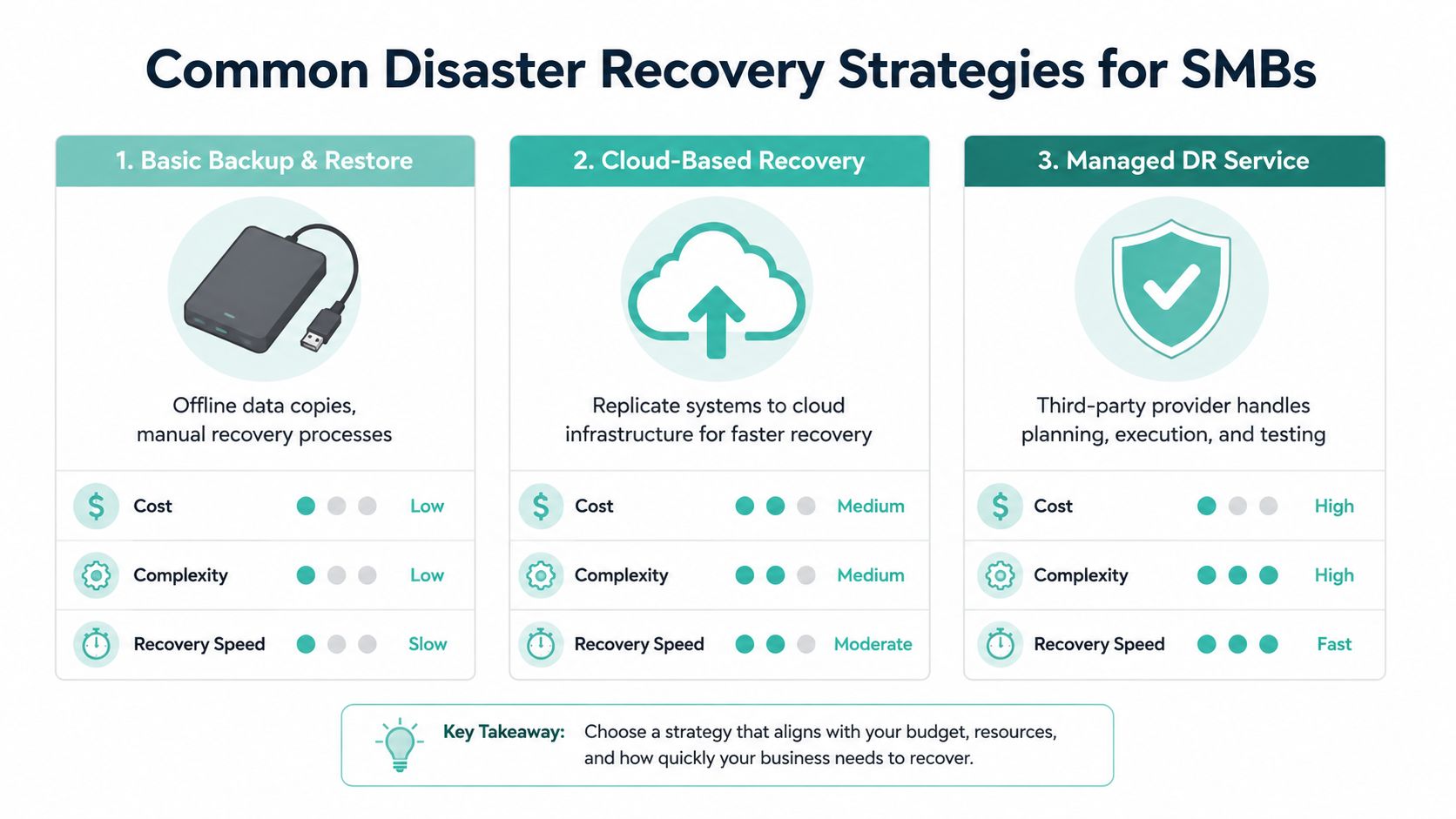
| Strategy | How it works | Best fit | Trade-off |
|---|---|---|---|
| Basic backup and restore | Keep copies of key data and manually recover when needed | Very small businesses with simple systems | Lower cost, slower recovery |
| Cloud-based recovery | Use cloud infrastructure to restore services faster | Businesses that rely heavily on websites, apps, and remote access | Faster recovery, more planning required |
| Managed DR service | A provider handles recovery planning, testing, and execution support | Businesses that need help and want less internal complexity | More support, less DIY control |
Basic backup and restore is often where SMBs start. It's simple, but it puts pressure on the team during an incident because the restoration work is manual.
Cloud-based recovery is a practical middle ground. If your systems already live in hosted platforms, cloud infrastructure can make failover, restoration, and remote access much cleaner.
Managed DR services remove a lot of the burden from business owners. That matters when you don't have an internal IT team and can't afford to figure things out on the fly.
Where the 3-2-1 rule fits
One principle belongs in almost every option. Australia's DR guidance commonly points to the 3-2-1 backup rule. That means three copies of your data, on two different media types, with one copy held securely off-site to reduce the risk from local events such as bushfires or floods, as explained in Kelley Create's disaster recovery backup guidance.
That sounds technical, but the practical version is straightforward:
- Original working copy: The live website, mailbox, database, or file set you use every day.
- Second copy: A separate backup on another system or medium.
- Off-site copy: A version stored in another location so one local event doesn't wipe out everything.
For Australian SMBs, that off-site part matters more than many owners realise. If your shop, office, or local provider is affected by the same event, local-only backups may fail you at the exact moment you need them.
A good disaster recovery hosting option helps smaller businesses move closer to this model without needing enterprise-grade infrastructure of their own.
How Your Web Host Is Your First Line of Defence
A lot of disaster recovery decisions get made long before any incident happens. They get made when you choose where your website, email, backups, and applications will live.

Hosting choices change your recovery options
Cheap hosting can create hidden risk. If backups are weak, monitoring is limited, or support is slow, your recovery plan may look fine on paper and fall apart in practice.
That's why your host is part of your resilience strategy, not just a monthly expense. The right environment can support off-site backups, tighter security controls, faster restores, and quicker fault detection. The wrong one can leave you hunting for answers after the damage is already done.
There's also a bigger mindset shift here. The Australian Government's DRR guidance notes that every $1 invested in Disaster Risk Reduction can save up to $8 in post-disaster recovery and loss in the DFAT overview of disaster risk reduction and resilience. That's a strong case for treating quality hosting and backup services as prevention, not overhead.
Spending a bit more on resilience before an outage is usually cheaper than trying to buy your way out of panic later.
What to look for in practical terms
When a small business asks me what matters most in hosting for recovery, I usually point to a short list:
- Off-site encrypted backups: These support separation between live systems and recoverable copies.
- Monitoring: Early warning matters. A problem caught early is often easier to contain.
- Security layers: Malware scanning, DDoS protection, and controlled access reduce the chance that an incident becomes a full outage.
- Managed environments: A pre-configured server or managed platform can shrink the time needed to get services back.
- Local relevance: Australian hosting can simplify support, expectations, and operational alignment for local businesses.
If you're weighing whether local infrastructure matters, this guide on why businesses switch to local Australian hosting is worth reading because recovery isn't only about where data sits. It's also about support responsiveness, service design, and knowing your provider understands the operating conditions Australian businesses deal with.
Register your new domain name at competitive market prices including free domain add-ons like privacy, DNS Hosting, Custom Nameservers and Forwarding.
Always the best price and no nasty renewal price hikes.
Register A Domain Name
A Simple DR Plan Checklist for Your Business
Most small businesses don't need a glossy binder full of flowcharts. They need a short document that people can follow on a stressful day. Simple beats perfect.
Your starter checklist
Use this as a practical starting point.
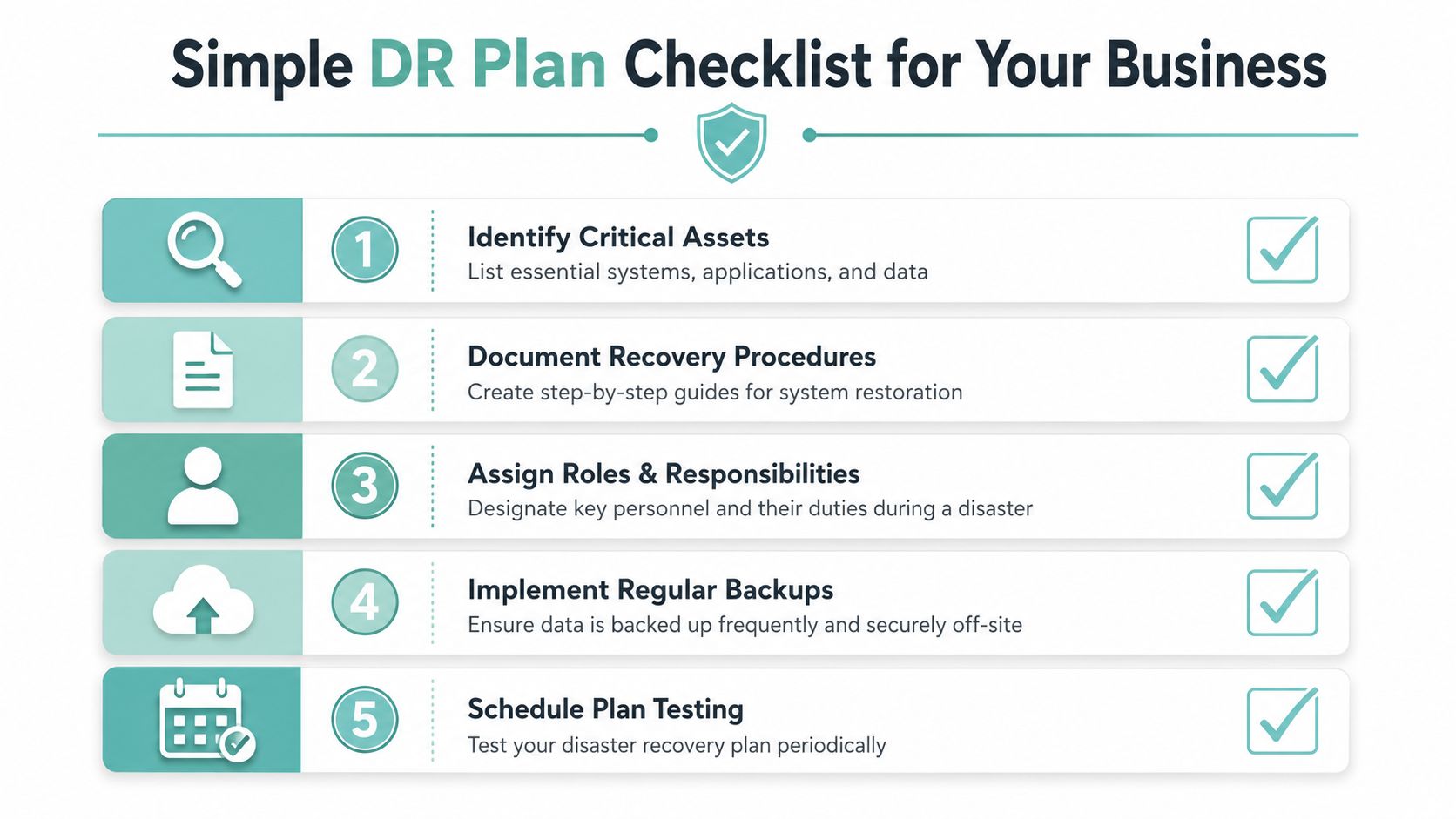
List your crown jewels
Write down the systems you cannot trade without. For many SMBs that means website, email, phones, booking software, payment tools, and customer files.Set your tolerance
Decide what “too long offline” means for each critical system. Also decide how much recent data loss you could tolerate if you had to restore from backup.Create an emergency contact sheet
Include internal decision-makers, your IT support contact, hosting provider, software vendors, and anyone who may need to approve urgent changes.Store access details securely
Make sure authorised people can reach control panels, admin logins, backup tools, and account records even if one staff member is unavailable.Write the restore steps in plain language
Don't rely on memory. Note where backups are, how to request a restore, what gets restored first, and how to confirm systems are healthy afterwards.
Keep the document alive
Two more steps make the checklist useful rather than decorative:
- Schedule a test: Run through a basic recovery scenario. Restore something non-critical first if needed. The point is to prove the process works.
- Set a review date: If staff, software, or providers change, the document must change too.
Australia's broader recovery approach also reminds businesses that recovery isn't only technical. The Australian Disaster Recovery Framework gives a common understanding of governance, doctrine, and coordination across governments and recovery partners. For a small business owner, the takeaway is simple. Recovery works better when roles are clear and decisions aren't being invented in the middle of the event.
The best DR plan for a small business is one somebody can pick up, follow calmly, and use without guessing.
Conclusion Plan for Resilience Not Just Recovery
Disaster recovery is often described as what you do after something goes wrong. That's true, but it's incomplete. For an Australian SMB, the more useful way to think about it is this. Disaster recovery is the result of decisions you make before anything breaks.
That includes how you back up data, how you prioritise systems, how you document restoration steps, and which providers you trust to support your business when conditions get rough. It also means recognising that resilience is broader than technology alone. Community-led recovery, practical support, and clear local coordination all matter in Australia's wider recovery environment.
If you want a broader operational lens, DataLunix's resilience frameworks are a helpful read alongside IT-focused planning because they connect technology recovery with day-to-day business resilience.
A good plan doesn't need to be massive. It needs to be current, tested, and realistic. That's how you turn what is disaster recovery from a nervous question into a calm answer.
If you want an Australian hosting partner that supports resilience with local infrastructure, secure hosting, encrypted off-site backups, and business-friendly support, take a look at UpTime Web Hosting. It's a practical place to start if you want your website, email, and core services better protected before the next disruption hits.