Your website is live. Orders are coming in. Email is working. Then a Sydney storm knocks out power in one location, a ransomware email slips through, or someone deletes the wrong database before close of business. Most small businesses don't lose sleep over the phrase "disaster recovery hosting". They lose sleep over missed sales, angry customers, and not knowing how to get back online.
That's why disaster recovery hosting matters. It's not an enterprise buzzword. It's the practical plan for keeping your business operating when something breaks, gets encrypted, or disappears. If you've already put effort into security basics, these essential website protection strategies are a good companion read because prevention and recovery have to work together. And if you're weighing modern hosting options, this guide to the benefits of cloud hosting helps explain why flexible infrastructure often makes recovery easier.
Table of Contents
- What Is Disaster Recovery Hosting and Why Is It Critical
- Why Australian Businesses Need a DR Plan Now More Than Ever
- Understanding Core Disaster Recovery Concepts
- Common Disaster Scenarios and Recovery Workflows
- Matching DR Solutions to Your Business Needs
- Your Australian DR Hosting Provider Checklist
- Activating Your Business Continuity Plan Today

Performance you can feel, backed by clients who depend on it. Read how our support and uptime create long‑term customer success.Power Your Business with Better Hosting
What Is Disaster Recovery Hosting and Why Is It Critical
Disaster recovery hosting is the setup that lets your business restore websites, email, databases, and applications after a serious disruption. Think of it as a ready-made recovery environment, plus the backups, processes, and testing needed to bring your systems back in a controlled way.
A simple example makes it clearer. An online retailer runs a Boxing Day promotion. The main server fails halfway through the day. If the business only has a single hosting environment, the team is stuck waiting while customers hit error pages. If the business has disaster recovery hosting, it can restore from backup or fail over to an alternate environment and get trading again much faster.
This isn't just about hardware failure either. A cyber-attack can lock files, a plugin update can break a site, or a staff member can overwrite the wrong records. Recovery hosting exists for the moment when prevention wasn't enough.
Practical rule: Backup storage alone isn't disaster recovery. You also need a recovery path, clear responsibilities, and a tested way to switch services back on.
For a small Australian business, the core idea is straightforward:
- Your production system is what customers use every day.
- Your recovery copy is what you fall back to when production is unavailable.
- Your recovery plan tells your team what to restore first, who approves changes, and how customers will be informed.
The biggest misunderstanding I see is this: many owners think nightly backups mean they're covered. They might be covered for data retention. They may not be covered for rapid business continuity. If the backup is corrupted, inaccessible, or stored too close to the same failure point, recovery can still stall.
A good disaster recovery hosting setup answers one plain business question. If your main system stops today, how will you keep operating tomorrow morning?
Why Australian Businesses Need a DR Plan Now More Than Ever
Australia's risk picture has changed. Cyber incidents now sit alongside storms, outages, and infrastructure failures as real business continuity threats. For small businesses, that changes hosting from a simple cost line into an operational decision.
The strongest local warning comes from cybercrime reporting. The Australian Cyber Security Centre figures cited here reported 94,000 cybercrime reports in the 2023–24 financial year, and the average self-reported cost per cybercrime for small businesses was AUD 49,600. For an SME, that isn't an abstract number. That can mean lost revenue, recovery labour, customer disruption, and extended downtime.
If you're hosting customer data, email, bookings, or ecommerce onshore, the discussion often overlaps with Australian data sovereignty hosting. Where your systems and backups live affects compliance, latency, and recovery options.
The local risk is business risk
Australian small businesses often assume disasters are dramatic events like a flood or bushfire. In practice, many outages come from smaller failures with bigger consequences. A local power issue, a network fault, a compromised admin account, or a failed update can take down the same customer-facing systems your business relies on every day.
That matters because customers don't separate "IT downtime" from "poor service". If your booking portal is unavailable, they can't book. If your invoicing system is down, cash flow slows. If your mailbox is inaccessible, enquiries pile up.
The question isn't whether your business is big enough for disaster recovery. It's whether downtime would hurt enough to justify planning for it.
Why hosting decisions now affect recoverability
Australian government-backed infrastructure policy has also pushed the market toward more resilient designs. The Whole-of-Government Hosting Strategy milestone referenced here set a target for 80% of federal government datacentre-hosted workloads to be in public cloud or whole-of-government hosting by 2023. The wider significance is practical. Recoverability is now treated as a service requirement, not an optional add-on.
For small business owners, that shift means a single server in one location no longer looks like a safe default. A more credible setup includes some mix of:
- Geographic separation: Your recovery environment shouldn't sit in the same failure zone as production.
- Recoverable backups: The backup has to be usable, not merely present.
- Failover thinking: You need a plan for where traffic goes when the main system is down.
- Restoration discipline: Someone has to verify that the restored service works.
A DR plan isn't about copying big-enterprise architecture. It's about reducing the chance that one bad afternoon turns into a week-long business interruption.
Host your website with our 5-star rated, cPanel website hosting plans.
Super fast servers, with security included and hosted in your choice of Australian Data Center.
View cPanel Plans
Understanding Core Disaster Recovery Concepts
Most confusion around disaster recovery hosting comes from jargon. Once you translate the terms into business language, the decisions get much easier.
A useful way to think about it is a suburban café. The café uses an online ordering system, EFTPOS, email, and a stock spreadsheet. A power problem, cyber incident, or accidental deletion knocks out those systems. The owner doesn't care about acronyms first. They care about two things. How quickly can the café serve customers again, and how much recent information is gone?
If your business stores files across workstations as well as hosted systems, this 2026 Mac data restoration guide is a practical example of how file recovery differs from full service recovery. And for hosted workloads, a proper cloud backup for business setup is one of the building blocks that supports disaster recovery.
RTO and RPO in plain English
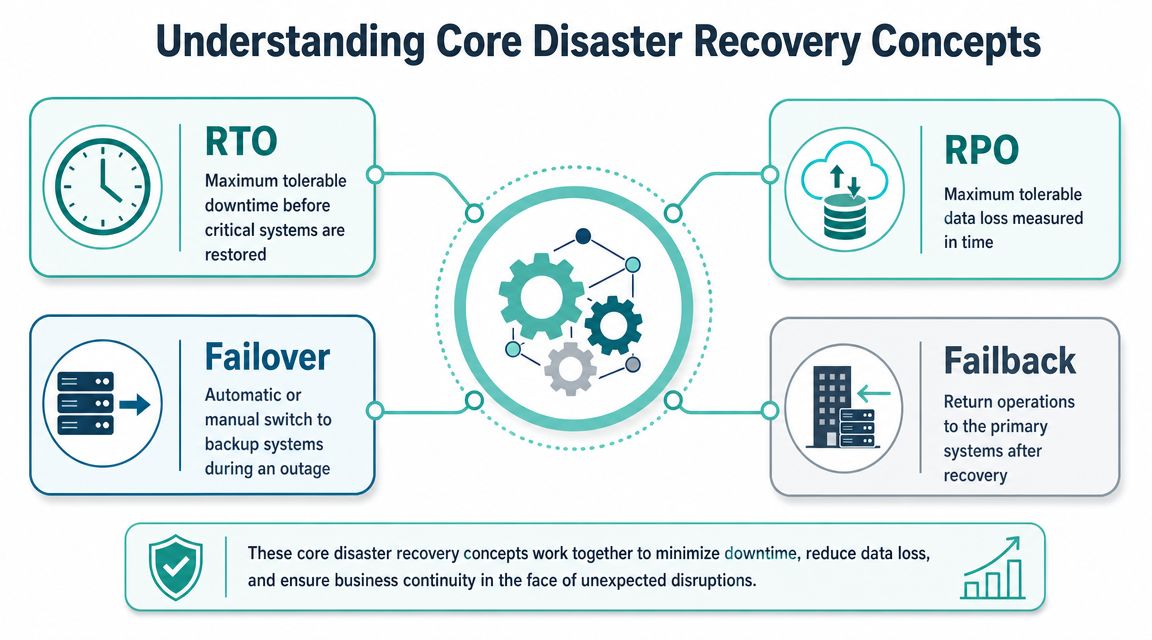
RTO means Recovery Time Objective. That's the maximum downtime your business can tolerate before a system must be restored.
If your café can cope with the stock spreadsheet being unavailable until tomorrow, that workload has a relaxed RTO. If online orders must be running again quickly because lunch trade depends on them, that workload needs a much tighter RTO.
RPO means Recovery Point Objective. That's the maximum amount of data loss you can tolerate, measured in time.
If your database is backed up every night and fails late afternoon, you may lose the day's changes. If your business can accept that, the RPO may be suitable. If losing even recent bookings or orders would cause serious problems, you need more frequent recovery points.
A plain way to separate them:
| Term | Simple question | Café example |
|---|---|---|
| RTO | How long can this stay down? | How long until online ordering must be back |
| RPO | How much recent data can we afford to lose? | How many recent orders can disappear without major damage |
Think of RTO as downtime tolerance, and RPO as data loss tolerance. One measures waiting time. The other measures rewind time.
Failover, failback and backup types
Failover is the switch from your main environment to an alternate one. If a Sydney-hosted website becomes unavailable, failover sends service to the backup environment so customers can still reach the site.
Failback happens later. Once the original environment is fixed, operations move back in a controlled way.
Replication means copying data or systems from one location to another so the recovery environment stays reasonably current. How current it is depends on the design and budget.
The Australian Cyber Security Centre guidance summarised here recommends the 3-2-1 backup strategy. Keep three copies of your data on two different media types, with at least one copy off-site. That matters because attackers often go after backups, and local failures can affect both production and nearby copies.
Backup terms also trip people up:
- Full backup stores a complete copy of the selected data.
- Incremental backup stores only what changed since the last backup.
- Differential backup stores what changed since the last full backup.
You don't need to memorise the terminology. You do need to ask the right question: if something breaks at 4 pm on a Friday, what can be restored, from where, and how clean is that restore point?
Common Disaster Scenarios and Recovery Workflows
A disaster recovery plan becomes real when you walk through the messy situations that happen. Not the polished diagram. The moment when customers are waiting, staff are asking what to do, and someone needs to make a call.
The quality of the response depends on preparation. The guidance on website disaster recovery planning cited here makes the point well: resilience depends on multi-region design, documented runbooks, and regular testing because recovery often succeeds or fails on execution details such as configuration changes and DNS switching, not just on whether a copy of the data exists.
A restore process also needs to be accessible under pressure. That's why it helps to keep a documented guide for tasks like restoring your account from backup, rather than relying on memory.
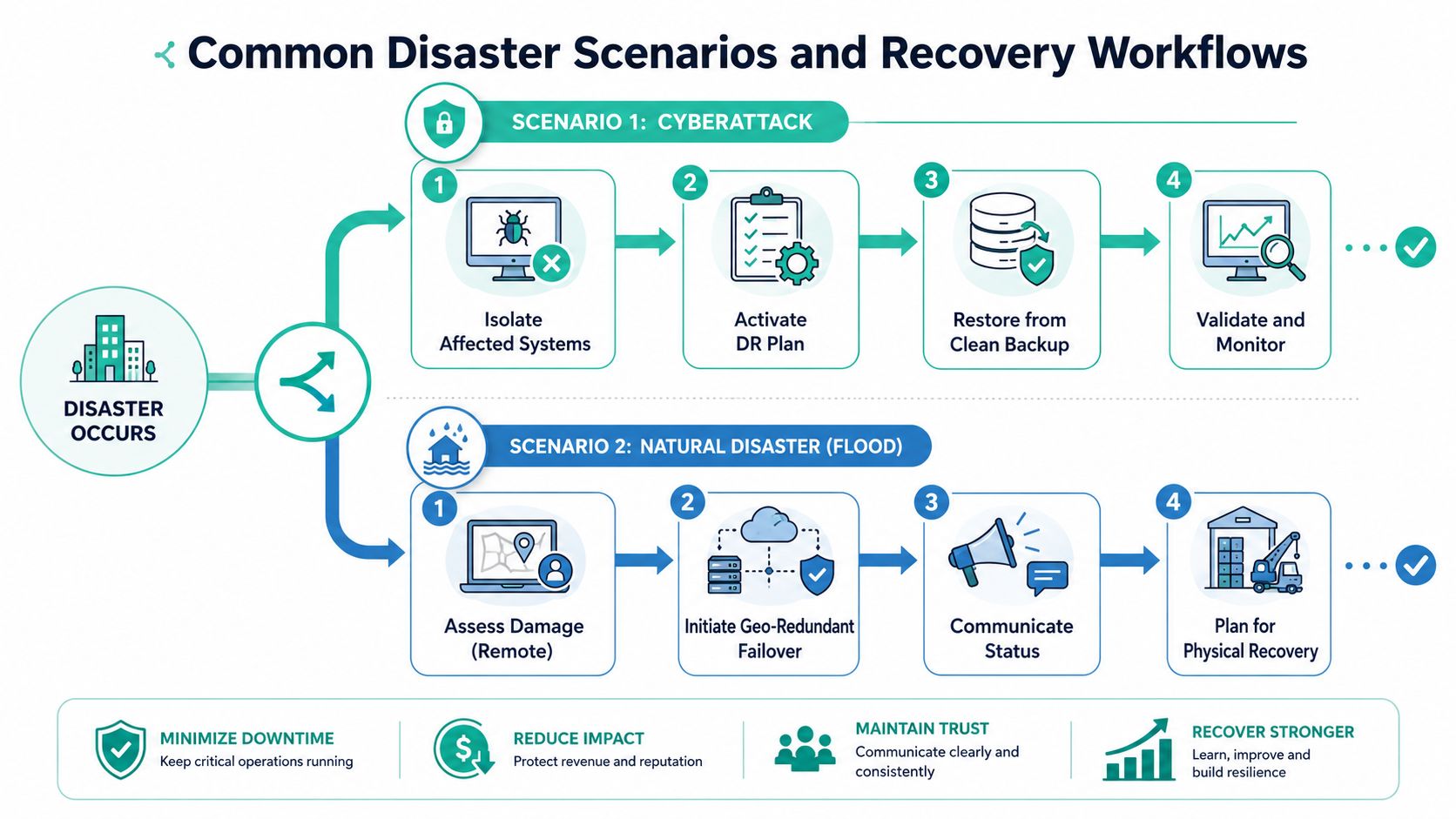
Scenario one ransomware locks your website
A staff member clicks a malicious attachment. Soon the website files and connected data are encrypted. Admin logins stop working. Customers see errors.
A sound workflow looks like this:
- Isolate affected systems. Stop the spread before touching recovery.
- Declare the incident. Someone needs authority to trigger the DR process.
- Identify a clean restore point. Don't restore from a compromised backup.
- Restore to the recovery environment or rebuild cleanly.
- Validate the website. Check forms, payments, logins, and content.
- Monitor closely after recovery. Make sure the threat isn't still present.
The mistake many businesses make is restoring too quickly from the wrong point. If the backup contains the same compromise path, you can bring the problem back with the data.
Scenario two the primary hosting environment fails
A provider issue, hardware fault, or major local outage affects the primary environment. Your website and client portal become unreachable. No attack. Just sudden unavailability.
In that case, the workflow is different:
- Confirm the scope. Is the problem one server, one service, or the whole location?
- Trigger failover if available. Move traffic to the alternate site.
- Apply the runbook. Follow documented switching steps instead of improvising.
- Check dependencies. Website, database, email relay, payment tools, and SSL all need validation.
- Communicate clearly. Staff should know what changed and what remains unavailable.
Recovery often slows down at the final step, when the system is back but key settings, permissions, or integrations don't match production.
That's why testing matters. A replica is only helpful if it can become a working service.
Scenario three someone deletes the wrong data
This one is common and less dramatic. An employee deletes records. A plugin sync wipes product fields. A developer overwrites the wrong table.
Here, you may not need full failover at all. You may need point-in-time restoration for one database or one account. Good disaster recovery hosting supports selective recovery as well as major incident recovery.
A practical response looks like this:
| Situation | Best first response | Why |
|---|---|---|
| Deleted file set | Restore specific files | Faster than full system recovery |
| Corrupted database table | Restore database to a known point | Limits collateral damage |
| Broken site after update | Roll back application files and database | Keeps the recovery focused |
Smaller businesses save money by designing recovery by workload. Not every incident needs a full site switch. Sometimes the fastest path is a clean partial restore with clear validation.
Matching DR Solutions to Your Business Needs
Small businesses often assume the "best" disaster recovery setup is the fastest and most expensive one. Usually it isn't. The better choice is the one that matches business impact.
The independent guidance referenced here recommends setting tiers of RTO and RPO so you don't overengineer every workload. Critical applications may need a fast recovery target. Archived files can tolerate 24+ hour RTOs. That's a sensible approach for Australian SMEs that need resilience without budget blowouts.
If your provider also manages the underlying environment, managed web hosting in Australia can reduce the operational burden on a small internal team.
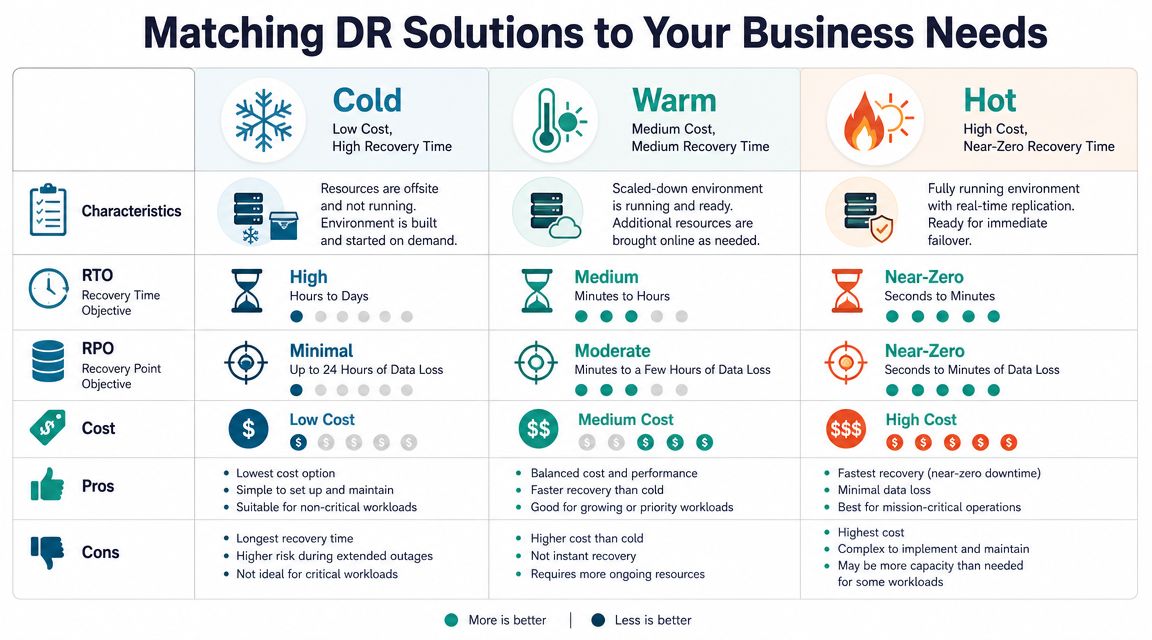
How cold warm and hot recovery differ
The usual shorthand is cold, warm, and hot recovery.
- Cold recovery means backups are available, but systems aren't standing by ready to take over. It's the cheapest option. Recovery takes longer because you need to rebuild or restore before service resumes.
- Warm recovery means a partial environment is prepared in advance. Key systems, copies, or templates are ready, which shortens recovery time.
- Hot recovery means the alternate environment is close to ready or already synchronised for rapid switchover. It's the fastest and usually the most expensive.
A simple way to compare them:
| Recovery tier | Cost profile | Best for |
|---|---|---|
| Cold | Lower cost | Archived content, brochures, internal files |
| Warm | Mid-range | Business websites, portals, line-of-business apps |
| Hot | Higher cost | Revenue-critical systems that can't stay down long |
A practical workload matrix for small business
For many Australian businesses, the right answer is a mix.
A local trades business may decide:
- the website enquiry form needs faster restoration
- general file archives can wait
- old marketing assets don't justify premium failover
An ecommerce business may decide:
- the storefront and payments deserve the tightest recovery target
- the staff intranet can wait
- archived order exports can be restored later
Budget-friendly DR works best when you protect the right things at the right speed. You don't need hot-site style recovery for every folder and app.
If you're unsure where to start, rank systems by what happens when they fail. Lost sales. Delayed service. Compliance risk. Customer frustration. That ranking usually tells you where cold, warm, or hot recovery makes sense.
Register your new domain name at competitive market prices including free domain add-ons like privacy, DNS Hosting, Custom Nameservers and Forwarding.
Always the best price and no nasty renewal price hikes.
Register A Domain Name
Your Australian DR Hosting Provider Checklist
Choosing a disaster recovery hosting provider is partly technical, but mostly practical. You need to know whether their setup will still work when one data centre has issues, a backup restore is urgent, or your team needs help after hours.
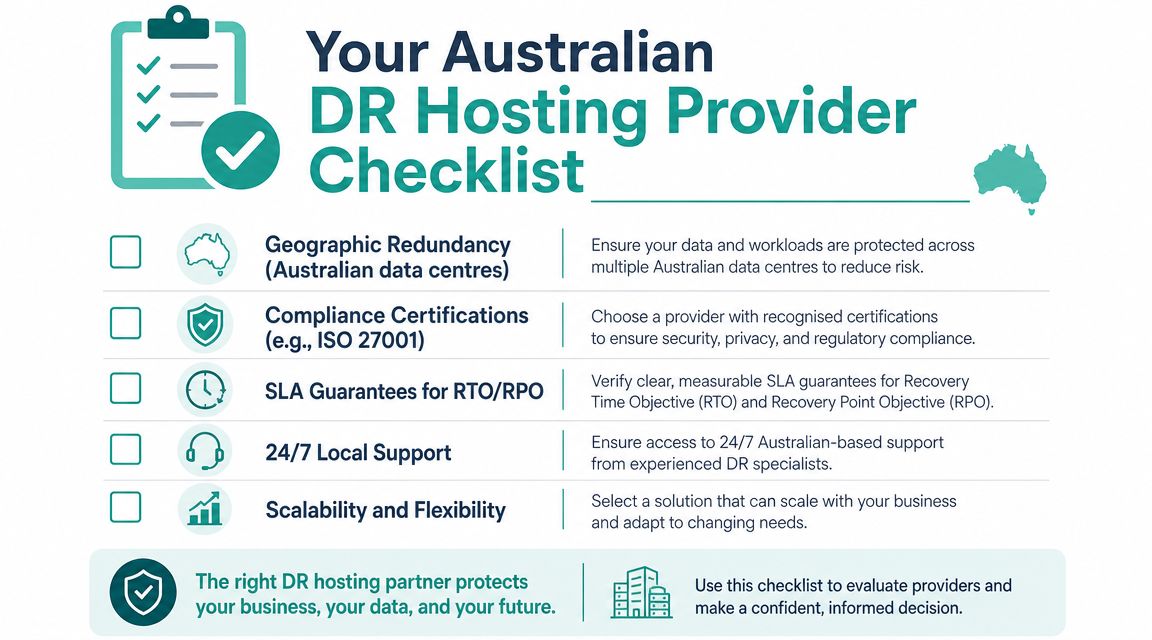
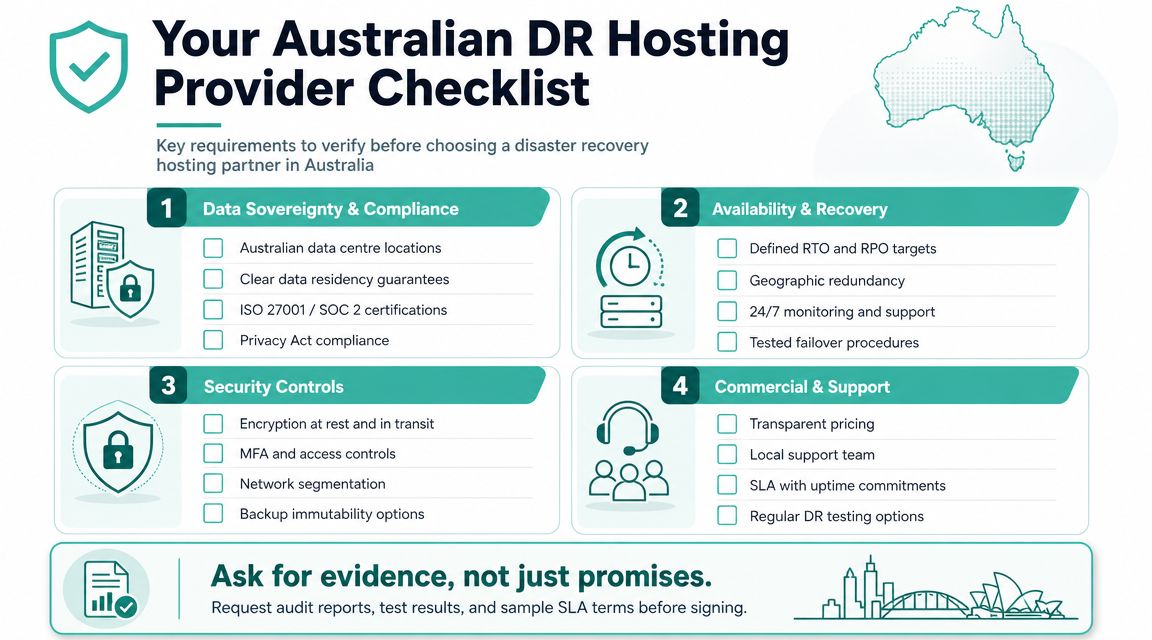
The biggest point to verify is independence. The guidance on disaster recovery colocation cited here states that a recovery site is only effective if it's independent of the primary site, with separate power, cooling, and network carriers. For Australian businesses, that means thinking carefully about distance and shared risk between locations.
Questions worth asking before you sign
Don't ask only whether they "do backups". Ask how recovery works.
- Where are the primary and recovery environments located? Same building is not enough. Same city may not be enough either, depending on the risk you want to avoid.
- Are backups protected from the same compromise path? If an attacker reaches production, can they also tamper with recovery data?
- What is tested, and how often? A provider should be able to describe restore validation, not just storage routines.
- Who handles failover steps under pressure? You want named responsibilities, not vague assurances.
- What support is available when your incident starts after hours? Local support matters when the business owner, web developer, and provider must coordinate quickly.
What a credible answer sounds like
A credible provider usually speaks in concrete operational terms.
They can explain the separation between primary and recovery locations. They can describe backup protection, restoration workflow, and who verifies that the site or service is functioning again. They can tell you whether DNS changes, database checks, and application testing are part of the process.
Good signs include:
- Documented runbooks: Written recovery steps for common incidents.
- Real testing discipline: Not just "we back it up", but "we verify it restores correctly".
- Clear support paths: You know how to get help when the problem starts.
- Australian relevance: They understand local hosting, local expectations, and onshore service considerations.
Poor signs are just as useful. Be cautious if the provider avoids questions about location independence, testing, or who performs the actual recovery work.
Activating Your Business Continuity Plan Today
You don't need a perfect enterprise program to start. You need a short list of decisions and a workable first version.
Start with your business-critical systems. Write down your website, email, files, accounting tools, booking platform, and anything customers directly rely on. Next to each one, answer two plain questions: how long can it be down, and how much recent data can you afford to lose? That gives you your first draft of RTO and RPO without drowning in jargon.
Then audit your current provider. Ask where your backups are stored, whether they're off-site, how restoration works, and what happens if the primary environment becomes unavailable. If the answers are vague, your risk is higher than it looks on the invoice.
Finally, separate workloads into tiers. Your online shop might need a faster recovery option than archived documents. Your client portal may matter more than old media files. That's how small businesses build disaster recovery hosting that is practical, affordable, and aligned with real business impact.
Start with one page. List your systems, your recovery priorities, your provider answers, and your contact steps for an incident. That single page is often the difference between panic and a controlled response.
The goal isn't to eliminate every outage. It's to make sure one incident doesn't take the business with it.
If you're ready to turn this into a practical plan, UpTime Web Hosting offers Australian-based hosting with local support, encrypted off-site nightly backups, and services that can help small businesses build a more resilient foundation for websites, email, and business-critical online systems.