The ACSC recorded 87,400 cybercrime reports in FY2022 to 23, about one every six minutes (Australian off-site backup market context). That number changes the conversation straight away. Off-site backup isn't a tidy IT extra, it's part of keeping an Australian business open when ransomware, flood, fire, or a dead server takes the main system out of play.
Imagine keeping a spare set of house keys with a trusted friend across town instead of in the same drawer as the originals. A local backup helps with speed. A true off-site backup solution helps with survival, because the copy is elsewhere when the office, the NAS, the cloud account, or the whole building is compromised.
Table of Contents
- Why Australian Businesses Need Off-Site Backup Solutions
- Understanding Backup Architectures and the 3-2-1 Rule
- True Off-Site Protection Beyond Geographic Separation
- Comparing On-Site and Off-Site Backup Approaches
- Data Sovereignty and Provider Selection Criteria
- Implementing Your Off-Site Backup Strategy
- Testing Procedures and Common Mistakes to Avoid

Performance you can feel, backed by clients who depend on it. Read how our support and uptime create long‑term customer success.Power Your Business with Better Hosting
Why Australian Businesses Need Off-Site Backup Solutions
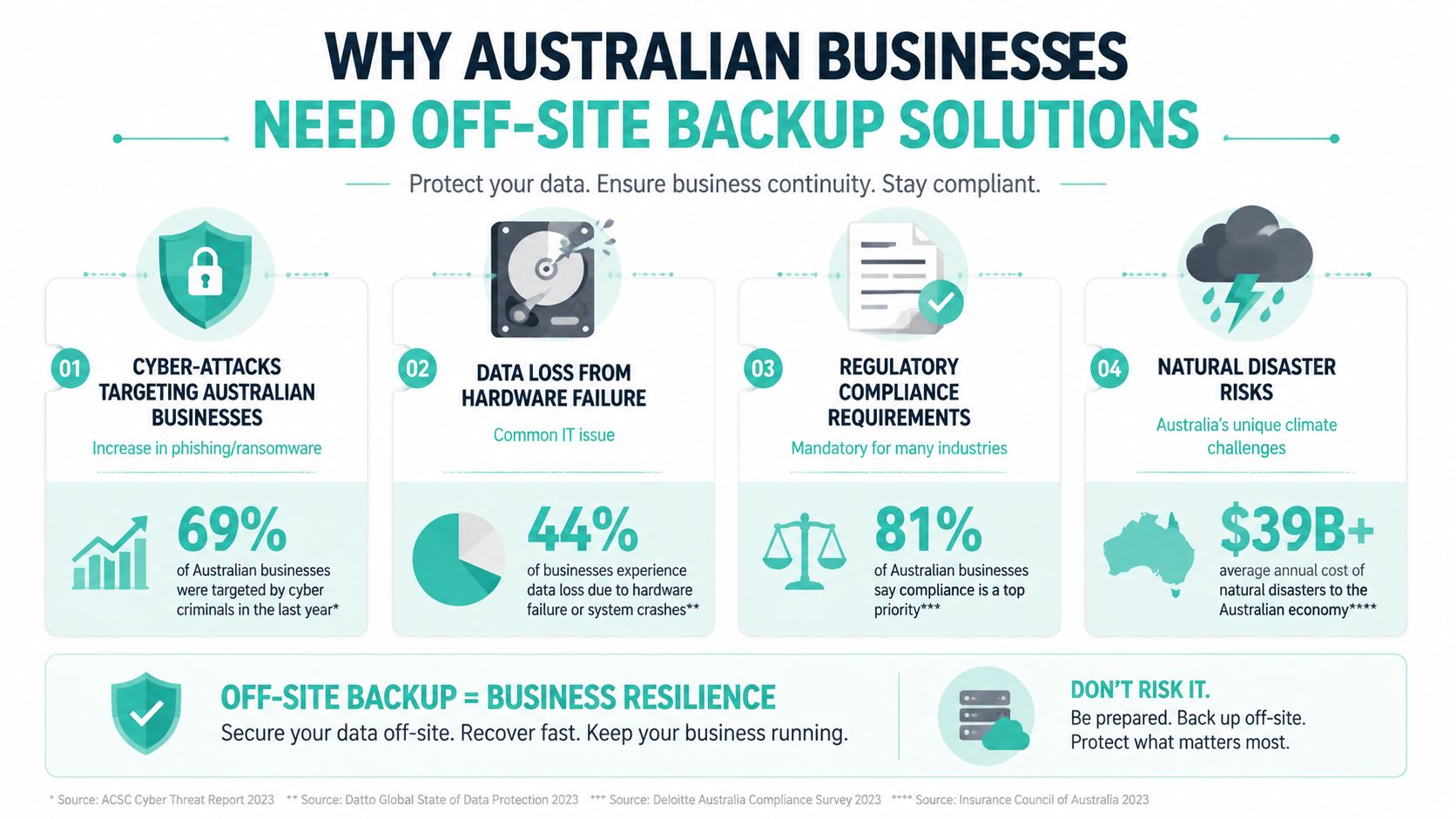
Australia's cyber-risk profile makes off-site backup a business continuity issue, not just a storage issue. The ACSC says the average self-reported cybercrime cost for small business rose to AUD 46,000, up 14% year on year, while medium business losses averaged AUD 97,200 and large business losses AUD 71,600 (Australian off-site backup market context). The same report says ransomware remained the most disruptive cybercrime threat, which is exactly the kind of event that turns a missing backup into a prolonged outage.
What off-site actually means
A genuine off-site copy sits outside the production environment and outside the same control plane. That can be another data centre, a different cloud region, or a managed backup platform with separate administrative access and network isolation. A synced folder is not the same thing, and neither is a second drive sitting in the same rack.
Australian businesses also deal with physical threats that do not care how tidy the server room looks. Bushfire smoke, floodwater, power loss, and region-wide outages can take out an office, a warehouse, or an entire local infrastructure zone. If the backup is in the same place, it fails with the original system.
Practical rule: if you would lose access to the backup when the office is unreachable, the backup is not really off-site.
That distinction matters for SMBs running WordPress, cPanel hosting, managed VPS, or Microsoft 365 style archives. A local copy can bring back yesterday's file quickly, but it will not help if fire takes the switch, the NAS, and the production server at once. UpTime Web Hosting's business continuity guidance fits this approach, because continuity only works when the recovery copy sits somewhere else.
Businesses dealing with decommissioned drives and ageing backup hardware also need to think beyond storage. Resourceful operators often pair backup hygiene with secure data storage e-waste solutions, especially when older devices need to be retired without leaving data behind.
Understanding Backup Architectures and the 3-2-1 Rule
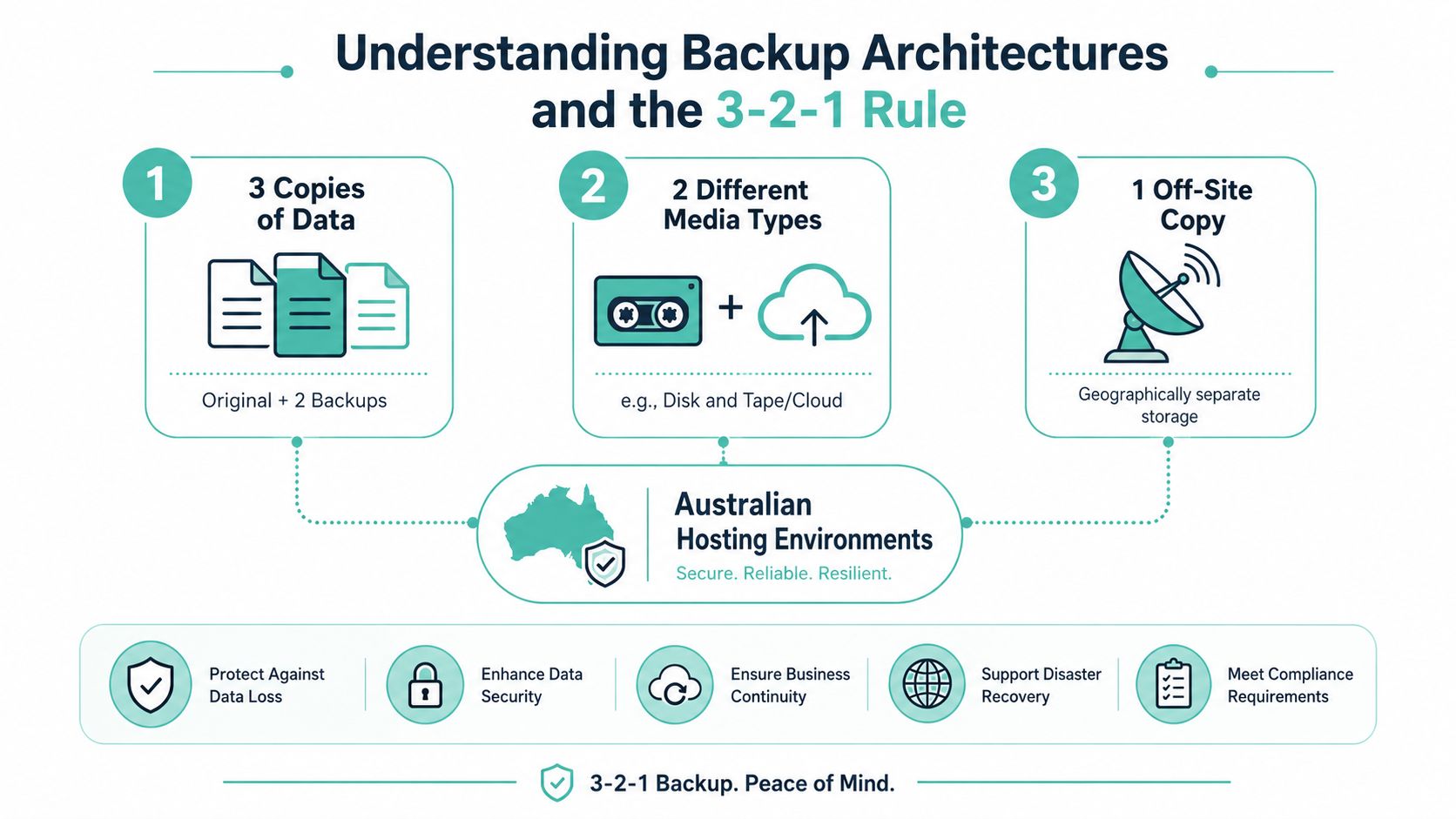
The 3-2-1 rule remains the cleanest baseline for Australian SMBs. Keep 3 copies of important data, store them on 2 different media types, and keep 1 copy off-site (3-2-1 backup rule reference). In practice, that usually means the live system, a fast local backup, and a remote copy that survives site-level failure.
Common architectures in Australian hosting environments
A cPanel site might back up nightly to a local server for quick restores, then replicate to an Australian cloud region for survivability. A WordPress store may use incremental backups to a remote object store, while a managed VPS might send image-level backups to a separate data centre. The shape changes, but the logic stays the same.
Some businesses use cloud-to-cloud backup for SaaS data, especially where email, documents, and collaboration files sit in separate services. Others use dedicated backup appliances that replicate to a remote facility. Managed backup services sit in the middle, handling scheduling, retention, encryption, and restore workflows so the internal team doesn't have to stitch everything together.
Keep the local copy for speed. Keep the off-site copy for the day the site is gone.
Backup is not disaster recovery
Backup captures data. Disaster recovery restores a working service, which may also require infrastructure, DNS, permissions, and application configuration. That's why off-site backup is foundational, but it's not the whole continuity plan.
A practical hybrid pattern is simple. One copy stays close for fast recovery from deletion or corruption. One copy lives off-site for flood, fire, ransomware, or a failed server room. UpTime Web Hosting's business backup overview maps neatly to that approach, because the goal is to restore business data without betting everything on a single location.
Host your website with our 5-star rated, cPanel website hosting plans.
Super fast servers, with security included and hosted in your choice of Australian Data Center.
View cPanel Plans
True Off-Site Protection Beyond Geographic Separation
Many backup marketing strategies only mention a "different location." This approach is insufficient when ransomware poses a significant threat. If an attacker breaches the production network, compromises admin credentials, or gains access to the same cloud account, a remote copy can still be wiped, encrypted, or overwritten.
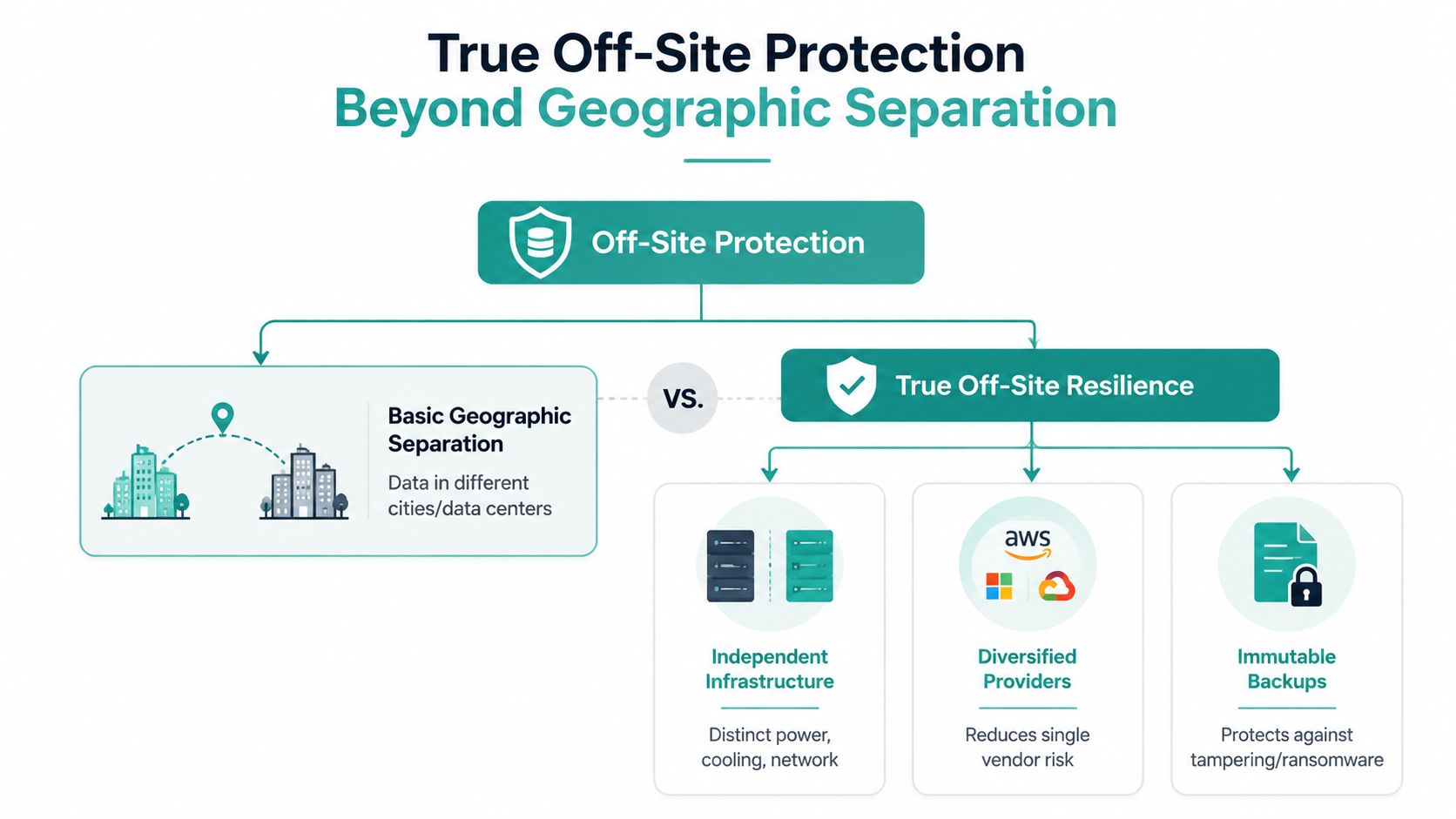
Separation needs three layers
True resilience needs physical separation, network separation, and administrative separation. The backup should sit in an environment the production admin account can't casually rewrite. Separate accounts, immutable storage, and tightly scoped permissions start to matter fast, especially for SMBs that want something they can still recover after a ransomware hit.
Air-gapped or logically isolated backups raise the bar again. If the backup system isn't exposed to the production network, malware has a harder time reaching it. If versioning or immutability prevents deletion for a defined period, a compromised account cannot easily erase the evidence and the recovery point. That matters in Australia, where bushfire, flood, and cyber incidents can hit the same business in different ways, and where latency or regional placement can affect how practical a restore really is.
What off-site means
What off-site means in disaster recovery planning is broader than a second copy in another suburb or another cloud region. The copy needs to be outside the blast radius of production, which means separate control, separate access paths, and a restore process that still works when the main environment is down.
A business can store backups in a second city and still leave them exposed if they sit under the same cloud login as production. That sounds safe until an attacker takes the account and encrypts both sides. Another common mistake is copying to a remote server that is still reachable from the same admin workstation and the same VPN profile. Geographic distance does not help much if the control plane is shared.
What a stronger design looks like
A stronger model keeps the backup in a separate account, with separate credentials and restore privileges. It uses encryption in transit and at rest, versioning, and restoration testing that proves the copy can be pulled back when the primary environment is compromised. The Australian Signals Directorate's guidance on regular backups and offline, tested restore capabilities supports that approach, and it lines up with the recovery reality most SMBs face after a ransomware event (backup and recovery guidance).
The practical trade-off is simple. More separation usually means more administration, more cost, and a little more latency during restore. For many Australian businesses, that is a better deal than finding out the “off-site” copy was only off-site in postcode, not in risk.
Comparing On-Site and Off-Site Backup Approaches
No single backup method wins every time. Local backup is faster, but it's fragile in the face of building-level incidents. Off-site backup is slower to restore, but it's the copy that still exists when the original site is down.
| Backup Strategy Comparison for Australian Businesses | Recovery Speed | Ransomware Resilience | Disaster Tolerance | Typical Cost |
|---|---|---|---|---|
| Local NAS or external drive | Fast | Low if online, better if offline | Low | Lower upfront cost |
| Same-datacentre replication | Fast | Limited if the account is compromised | Limited | Moderate |
| Cross-region cloud backup | Moderate | Better when isolated well | Strong | Subscription-based |
| Fully managed off-site service | Moderate to strong | Strong when access is separated | Strong | Ongoing service cost |
The best fit depends on what breaks your business. A trade business that only needs recent files back quickly may rely on a local copy plus a remote copy. A consultancy with client records and email archives may place more weight on retention, versioning, and restore simplicity.
The hybrid pattern is still the most practical default. Keep one copy nearby for quick recoveries from accidental deletion, software corruption, or a bad update. Keep one copy off-site for the bigger failures, including ransomware, theft, and regional outages.
A cheap backup that can't survive the same failure as production isn't cheap for long.
Managed services can reduce the burden on small teams, especially where no one has time to babysit schedules and logs. UpTime Web Hosting's cloud backup for business overview is relevant here because it reflects the same real-world trade-off, speed on one side, survivability on the other.
Data Sovereignty and Provider Selection Criteria
For Australian businesses, provider choice is not just about features. It is about where the data sits, who can access it, and how quickly it can be restored when production is down. Australia's major cloud availability zones are concentrated in Sydney, Melbourne, and other east-coast metros, so keeping replicas inside Australia can reduce recovery-path complexity while preserving local jurisdictional control (Australian cloud and off-site recovery context).

A provider also needs to fit your compliance position and your recovery targets. If your backups hold customer records, staff files, invoices, or website data, the restore process should line up with your obligations under the Australian Privacy Act and the Notifiable Data Breaches scheme. That means encryption in transit and at rest, clear access controls, and a provider that can explain where the data is stored and who administers it. If you are comparing hosting and backup options with sovereignty in mind, the Australian data sovereignty hosting guide is a sensible place to start.
Australian SMBs also need to think about latency and real recovery time. A backup copy that sits too far from the business can slow restores, especially when internet links are already under pressure during an outage or ransomware event. For many businesses, an intra-AU primary backup with a second geographically separated AU copy is a better fit than sending everything offshore. Geographic distance matters, but administrative separation and network separation matter just as much if you want ransomware resilience.
Retention and versioning can change the bill quickly.
A backup that looks small on day one can become expensive once multiple copies and restore points pile up. Independent off-site guidance often suggests planning for 1.5× to 2× active data size once versioning and retention are included (off-site retention planning guide). That is why provider selection should include a close look at how much history you really need, not just the headline storage price.
Before choosing a provider, check these points:
- Australian location: Confirm the primary backup copy stays in Australia if sovereignty matters.
- Encryption controls: Look for secure transfer and storage, not just one or the other.
- Administrative separation: Make sure backup administration is separated from production access so one compromised account does not control everything.
- Restore process: Ask how recovery works under pressure, not just how backups are created.
- Pricing clarity: GST and retention costs should be visible, not buried in fine print.
- Support path: During an outage, you want a clear escalation route, not a ticket queue black hole.
Register your new domain name at competitive market prices including free domain add-ons like privacy, DNS Hosting, Custom Nameservers and Forwarding.
Always the best price and no nasty renewal price hikes.
Register A Domain Name
Implementing Your Off-Site Backup Strategy
A good backup design starts with a plain inventory. List website files, databases, email archives, shared drives, and client documents. Then decide what needs frequent recovery, what can tolerate older restore points, and what must be isolated from the production environment.
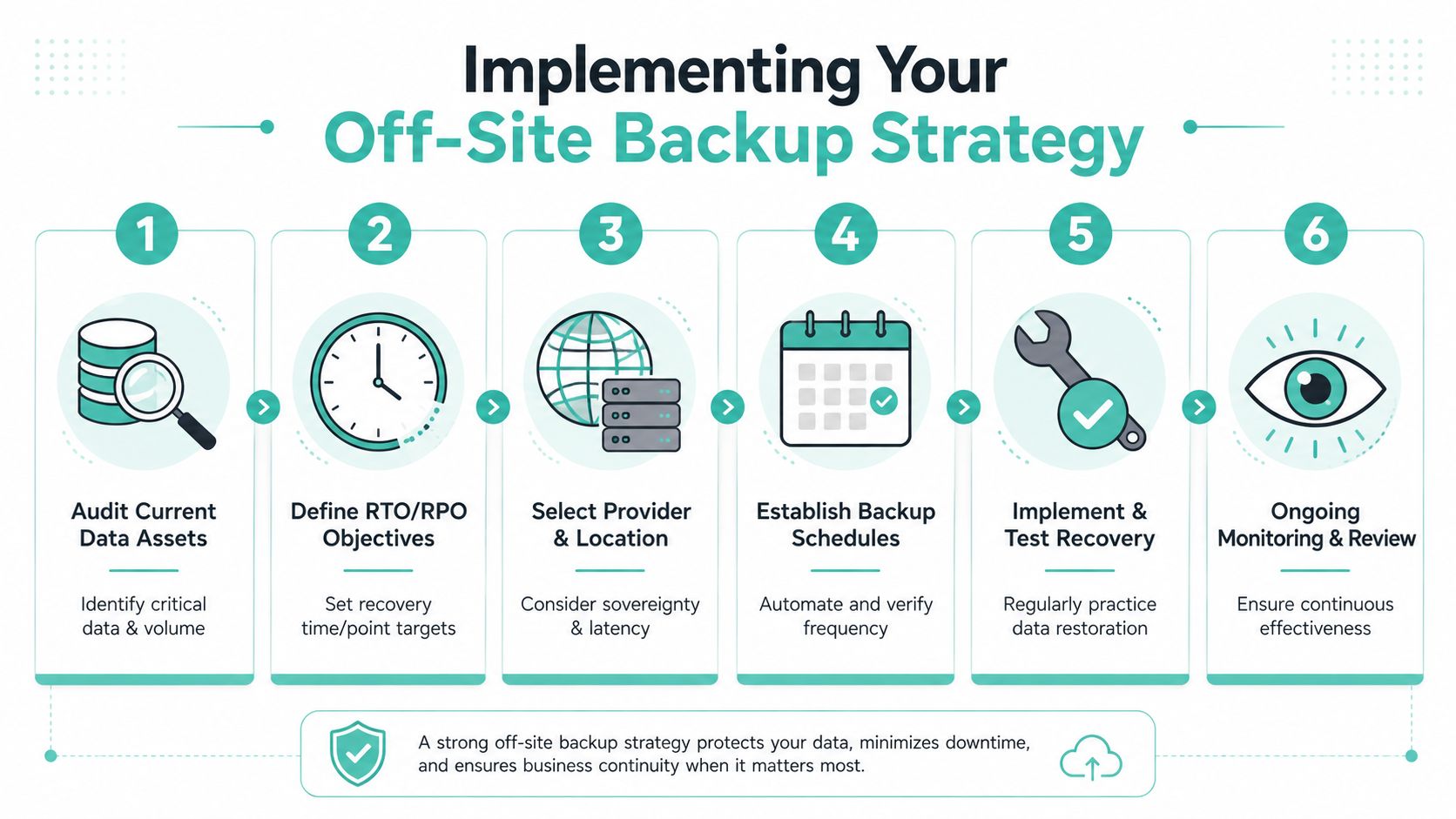
A practical rollout sequence
- Audit the data first. Don't protect things you don't understand. If a database drives billing or bookings, it gets higher priority than a brochure PDF.
- Set the recovery targets. Decide how fresh a restore needs to be and how quickly the business must be back online.
- Choose the location. Keep the primary off-site copy in Australia if latency and sovereignty matter.
- Automate the schedule. Nightly backups suit many SMBs, but the right cadence depends on how fast the data changes.
- Test the restore. A backup that hasn't been restored is only an assumption.
- Review continuously. New apps, new databases, and new staff folders all need to be swept into scope.
Fit the tool to the stack
WordPress sites usually need files plus the database, and both need to be recoverable together. cPanel environments often need scheduled backups with retention controls, while Windows and ASP.NET workloads may benefit from image-based or application-aware approaches. The right tool is the one your team can operate when the office is busy.
UpTime Web Hosting publishes local guidance and provides hosting and backup services that sit naturally in this conversation, especially for SMBs that want Australian infrastructure and straightforward restore paths. The point isn't complexity, it's making recovery doable under pressure.
Testing Procedures and Common Mistakes to Avoid
A backup that never gets restored is a gamble, not a control. I've seen businesses discover, too late, that backups had been failing for weeks because nobody checked the logs. I've also seen teams assume a cloud sync was enough, then find out the production account and the backup account were tied together the day a ransomware event hit.
What proper testing looks like
Monthly recovery tests are a sensible baseline for most SMBs. Start with a partial restore, one mailbox, one website file, one database, then move to a fuller drill when the team is ready. The purpose is to prove that the data is intact, the credentials still work, and the restore steps are documented well enough for someone else to follow.
A simple test log should record what was restored, who did it, how long it took, and what failed. If a critical database was left out of scope, that belongs in the log, not in the blame game. If the restore path depends on one person's memory, the business hasn't really got a recovery plan.
Practical rule: if no one outside the original setup person can restore it, the process is too brittle for a real incident.
The mistakes that hurt most
- Assuming the job is running: Backup software can fail without warning.
- Testing only after a crisis: That's the most expensive time to find a bad restore.
- Sharing the same account: If production access is compromised, the backup may be compromised too.
- Forgetting new systems: New databases and apps often get added without updating the backup scope.
A good test calendar is simple. Check logs often, restore something small every month, and run a broader disaster recovery simulation on a regular cycle that suits the business. That keeps the process alive, and it stops the team from learning under emergency pressure.
If you want an Australian hosting partner that already understands off-site backup, local support, and practical recovery planning, talk to UpTime Web Hosting and compare its hosting, backup, and continuity options with your current setup. Visit UpTime Web Hosting to review the services, check how your sites and data are protected, and start building a backup plan that works when the office can't.