Your WordPress site feels fine in the morning, then someone in Sydney loads a product page, waits, and waits again, and suddenly the whole setup looks broken. The theme gets blamed, then the images, then the plugins, but the issue is usually simpler, the host is too far away, the stack is underbuilt, or both.
That's the part most “wordpress hosting fast” articles miss. Fast in Australia isn't a trophy from a global benchmark table, it's a network path that keeps Sydney, Melbourne, Brisbane, and Perth users close to the origin, then layers caching, CDN routing, PHP efficiency, and sensible server isolation on top. If you want a site that feels quick in the browser, you need to measure the full stack, not just the sales page.
Table of Contents
- What Fast WordPress Hosting Means in Australia
- The Seven Layers Behind Fast WordPress Hosting
- Latency Thresholds and Server Specs That Matter
- Why Australian Data Centres and CDNs Make a Difference
- A Practical Checklist for Choosing a Fast Australian Host
- How UpTime Web Hosting Delivers on These Performance Layers
- Optimisation and Migration Tips for WordPress Sites

Performance you can feel, backed by clients who depend on it. Read how our support and uptime create long‑term customer success.Power Your Business with Better Hosting
What Fast WordPress Hosting Means in Australia
A site owner rings me and says the dashboard is taking four seconds to load. The first question is not “which theme are you using?”, it is “where is the server, and what is the first byte doing?” If the origin is overseas, every click pays a network tax before WordPress even starts rendering.
Fast means the page starts responding quickly. Independent benchmark data shows the average Time to First Byte across 17 hosts was 485 ms, only 3 providers averaged under 400 ms, and the gap between the fastest and slowest host was 298 ms. Edge caching and CDNs made a huge difference too, with 154 ms global TTFB versus 478 ms without a CDN, a 3.1x difference (fast WordPress hosting benchmark data).
What that means on the ground
For Australian traffic, proximity comes first. If the browser in Sydney has to talk to a server in Singapore or the US before a page can even begin loading, time is gone before the WordPress stack has done any real work. That is why local infrastructure matters before you start worrying about sliders, image compression, or the latest plugin stack.
A host that sits close to your main audience can cut the early wait sharply. A Sydney-origin site with sensible caching and a CDN will usually feel much snappier to visitors in Melbourne, Brisbane, and Perth than a similar site served from the other side of the world, even if both sites use the same theme and plugins. That difference shows up in the browser as a faster first byte, quicker HTML delivery, and fewer complaints about the site “feeling stuck” before anything appears.
Practical rule: if a host cannot keep the first byte short for Australian users, everything built on top of it feels slow.
A better mental model is a stack of small wins, not one magic feature. TTFB, DNS, TLS, caching, PHP workers, and CDN delivery all matter, and each one trims a different slice of waiting time. A plain-English explanation of the hosting model itself is on WordPress hosting meaning, and it helps separate real infrastructure from sales talk.
The Seven Layers Behind Fast WordPress Hosting
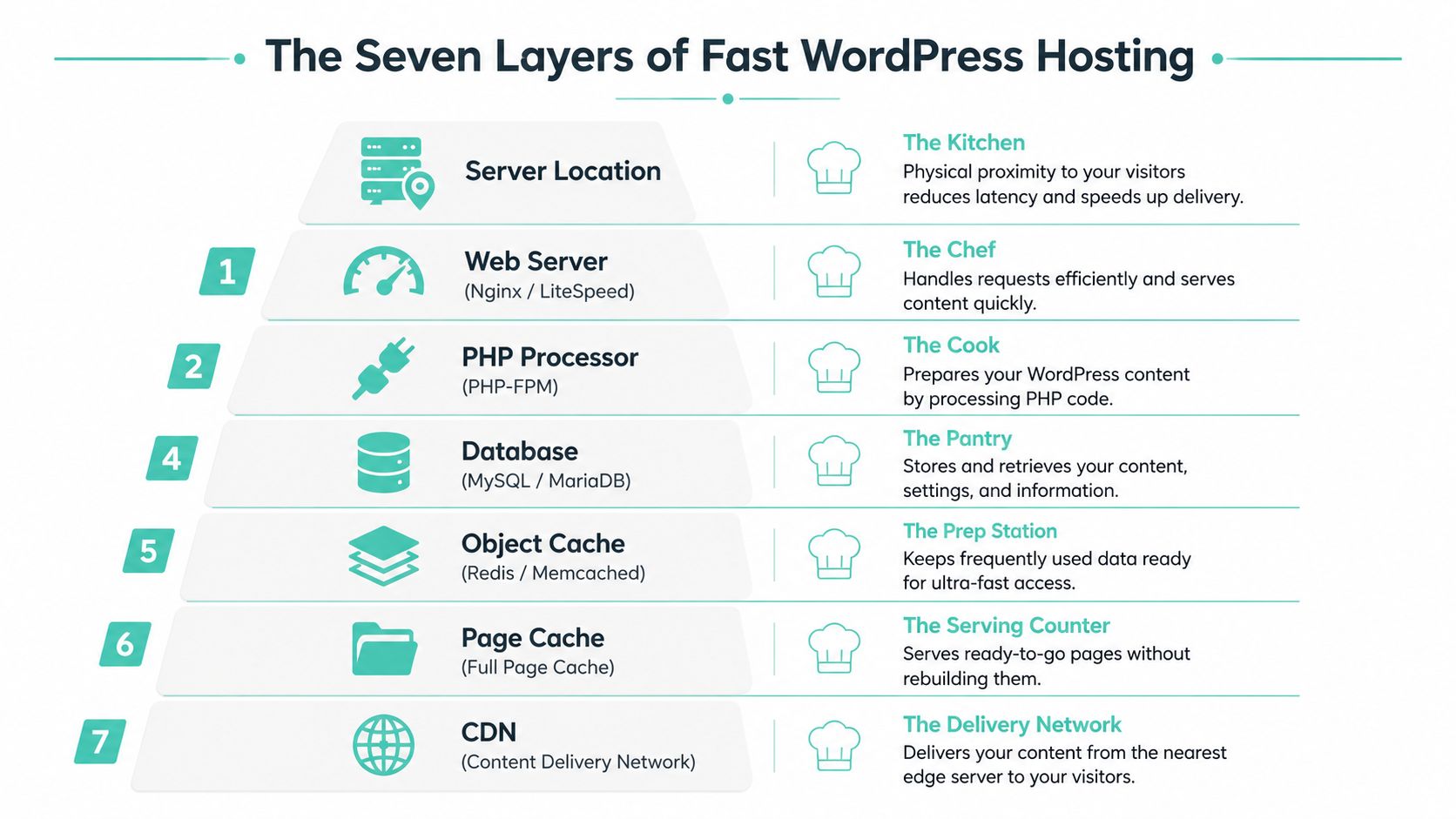
A fast WordPress site is a kitchen with good ingredients, a skilled chef, a smart prep station, and a delivery driver who doesn't get stuck in traffic. If one layer is weak, the whole meal arrives late. That's why I stop trusting hosts that only talk about storage or only talk about caching, because speed lives in the whole chain.
Server location and web server
The server location is the kitchen. For Australian visitors, a Sydney, Melbourne, Brisbane, or Perth origin keeps the trip short before anything else happens. The web server is the chef, and on WordPress, LiteSpeed or Nginx usually does a better job of serving busy sites than a generic, untuned setup. See the LiteSpeed web server guide for the operational side of that choice.
PHP, caching, CDN, TLS, and protection
PHP is the recipe execution. A newer PHP stack can do the same work with less delay, which matters when a site has plugins, forms, and WooCommerce logic piled on top. Caching is the prep station, it stores the expensive parts so the server doesn't rebuild every page from scratch.
The CDN is the delivery network. It pushes static assets and, when configured well, some edge logic closer to the visitor. TLS is the secure handshake, fast enough to be invisible when tuned properly, slow enough to be annoying when it isn't. Backups and DDoS protection are the insurance policy, not because they make a page render faster directly, but because a secure and recoverable site stays online when trouble starts.
A host can look fast in a sales demo and still feel sluggish once the real workload begins. The layer that usually exposes the truth is caching under traffic, not idle page loading.
If a provider is strong at storage but weak at delivery, the site still feels slow. If it has a solid CDN but poor PHP concurrency, the origin chokes when plugins or campaign traffic kick in. That balance is the whole game.
Host your website with our 5-star rated, cPanel website hosting plans.
Super fast servers, with security included and hosted in your choice of Australian Data Center.
View cPanel Plans
Latency Thresholds and Server Specs That Matter
A lot of hosting pages hide behind vague language like “ultra-fast” and “optimised”. That is useless. For Australian WordPress sites, the hard limits come from network numbers first, then compute.
The latency ceiling
A host is only worth considering if origin TTFB is under 200 ms, DNS lookup is under 20 ms, TLS negotiation is under 50 ms, and CDN edge response is under 30 ms (infrastructure hosting guide). Once those thresholds are met, gains usually come from concurrency, object caching, and cleaner request handling, not from arguing about which server brand sounds premium.
If you want a provider built around that model, start with a low-latency hosting setup for Australia.
| Fast WordPress Hosting Spec Targets for Australian Sites | Small Site | Growing or WooCommerce Site |
|---|---|---|
| Server capacity | 2 vCPU and 4 GB RAM | 4 to 8 vCPU and 8 to 16 GB RAM |
| Storage | NVMe SSD | NVMe SSD |
| PHP workers | A sensible starter allocation | 10 to 20 PHP workers |
| Object cache | Redis or Memcached | Redis or Memcached |
| Web server | LiteSpeed or Nginx | LiteSpeed or Nginx |
| PHP version | PHP 8.0+ | PHP 8.0+ |
That spec sheet is the minimum I would want to see before I put a real business site on a host. PHP 8.0 and newer generally handles WordPress work more efficiently than older runtimes, so I care more about current PHP, worker headroom, and request handling than glossy bandwidth claims (server specifications guide).
Idle speed versus real load
Idle benchmarks show how a host behaves when nothing is happening. Stress tests show whether it holds together when a shop runs a sale, a booking form goes viral, or a campaign lands in inboxes. WPBeginner's published tests show why you need both views, because one host can look tidy on page load and still behave differently under pressure (WPBeginner fastest hosting tests).
For sizing and workload planning, I also pay attention to whether the host can handle traffic spikes and heavier database activity, not just static homepage checks. If a provider will not talk about worker counts, memory headroom, or database isolation, it is not ready for a business site that earns money.
Why Australian Data Centres and CDNs Make a Difference
Most overseas comparison posts treat hosting like a global horse race. That is the wrong lens for Australia. Our traffic sits in a few metro centres, so routing quality and where the origin lives matter more than a flashy score from overseas testing.
A request from Sydney to a Sydney origin takes a short path. Send that same request to Singapore or the US, and it crosses a longer route before WordPress even starts building the page. That is why a local data centre can feel much quicker even when the raw server specs look similar on paper. For Australian claims, Sydney is a real endpoint, not a generic global average, and benchmark guidance specifically includes Sydney in APAC testing (WordPress hosting performance guide).
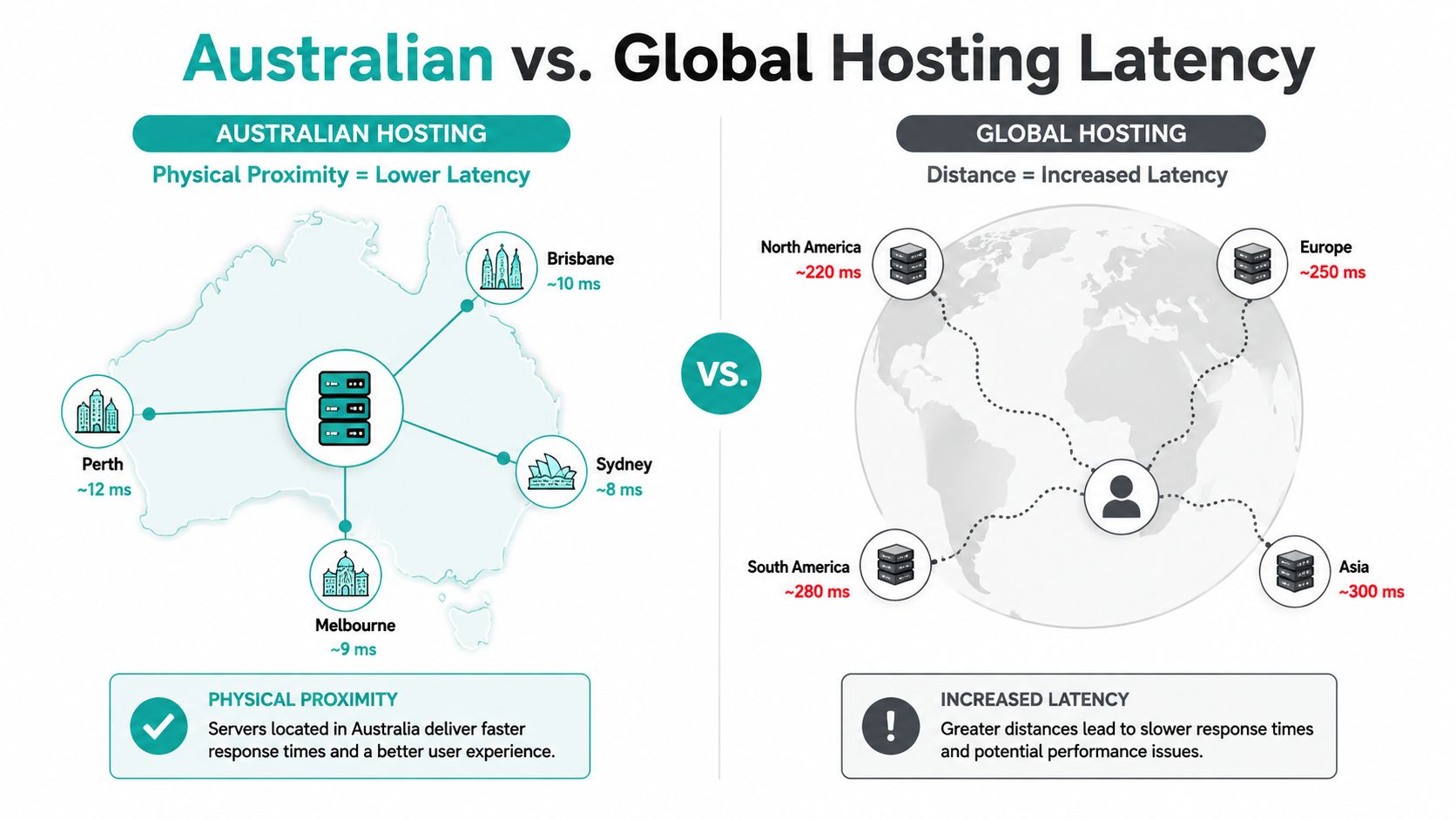
A practical routing example makes the point clearly. A Melbourne visitor hitting a Sydney origin usually has a cleaner path than a Melbourne visitor reaching a server in the US, and the gap gets wider once you add DNS lookup, TLS negotiation, and the first uncached byte. Perth is a different story again, because west coast traffic has to cross the country before it reaches an east coast origin. That is why the origin location matters, even before you start tuning plugins or PHP.
Local origin versus global routing
A local origin reduces the number of network hops before content appears, and that matters for login states, carts, and forms that cannot be fully cached. For a Sydney user, a Sydney host keeps the request path short. For a Brisbane user, an east coast origin is still far easier to reach than a server sitting offshore. If the host is overseas, you can still get acceptable performance, but you are fighting the network path from the start.
If you want the local-hosting case laid out in plain language, read why switching to local Australian hosting makes sense for business sites. It is the clearest way to separate marketing claims from the performance you can feel in real use.
CDN placement and dynamic caching
A CDN with Australian edge nodes can do more for perceived speed than a bigger origin server with no nearby delivery path. Independent guidance says CDN placement and smart routing can matter more than raw server location for TTFB, and that dynamic caching can improve TTFB by 72% (hosted delivery guidance). That matches what I see in migrations. The edge closest to the visitor often matters more than another notch of CPU at the origin.
Rule of thumb: if the origin is close and the edge is close, the site feels close.
That is why I prefer an Australian origin plus a properly configured CDN over a distant server trying to make up for distance later. For local businesses, the right question is simple. Which setup keeps first-byte times down for Australian customers, and which one just looks good on a benchmark chart?
A Practical Checklist for Choosing a Fast Australian Host
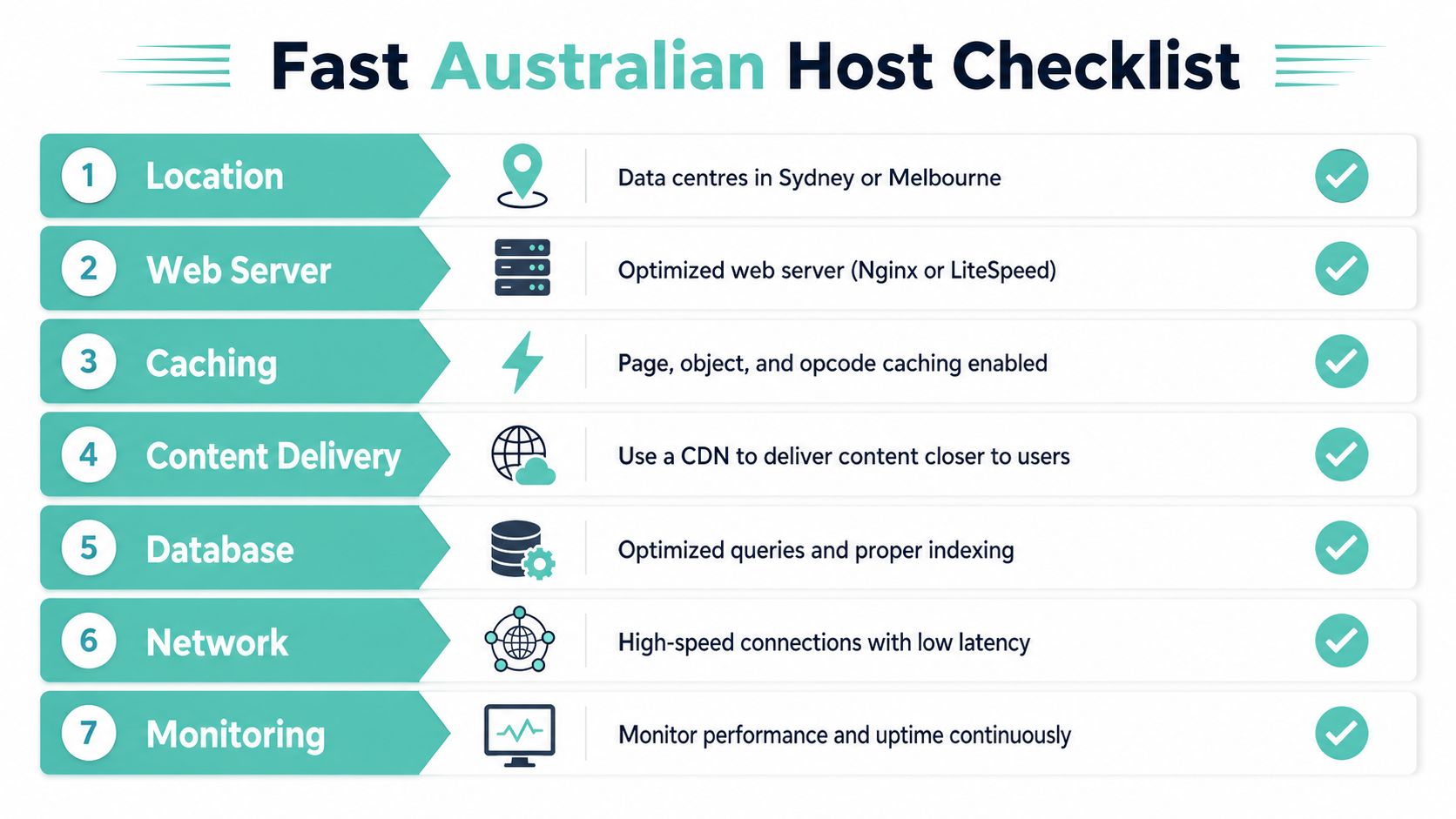
Start by asking where the site will serve users. If the answer is mostly Australian cities, your shortlist should stay Australian too. Then force every host to answer the same seven-layer questions, because that's the only way to strip out sales fluff.
Questions that cut through the pitch
- Location: Are the data centres in Australia, and can you choose Sydney, Melbourne, Brisbane, or Perth rather than getting whatever's left over?
- Web server: Is it LiteSpeed or Nginx, or are you stuck on a generic Apache-only setup?
- Caching: Is server-side caching built in, or are you expected to patch speed with plugins after signup?
- PHP and workers: Can the plan run PHP 8.0+, and can it handle realistic worker counts when traffic spikes?
- Backups and security: Are backups off-site, encrypted, and automatic, and is there SSL, malware scanning, and DDoS protection included?
- Support: Is support local, responsive, and available outside office hours, or are you sending tickets into another time zone?
- Pricing: Is GST included, are there hidden fees, and are you locked into a contract you can't exit cleanly?
The short list I give clients always includes contract flexibility, free SSL, off-site backups, and monitoring that doesn't wait for a customer complaint before acting. I also avoid reseller-only setups for serious business sites, because the structure can hide where the resources live and how quickly problems get fixed.
If you want a third-party comparison list before you buy, the Wise Web hosting picks page is a useful external reference point, especially if you're cross-checking Australian options rather than global ones. I'd still verify every claim against the host's own documentation and test results.
Test before you commit
A good pre-purchase check is simple. Run a short trial, measure TTFB from Sydney, full page load, and under-load response, then compare the numbers against your old host. If the provider won't let you validate performance from an Australian endpoint, walk away.
You don't need a lab to do this properly. You need a clean browser test, a repeatable synthetic check, and enough patience to ignore the sales copy. If the host can't survive a basic 7-day evaluation, it won't survive your busiest month.
Register your new domain name at competitive market prices including free domain add-ons like privacy, DNS Hosting, Custom Nameservers and Forwarding.
Always the best price and no nasty renewal price hikes.
Register A Domain Name
How UpTime Web Hosting Delivers on These Performance Layers
UpTime Web Hosting maps neatly onto the seven-layer model because it treats location, delivery, and security as one stack instead of separate promises. The biggest practical advantage is obvious, it offers four Australian data centre locations, Sydney, Melbourne, Brisbane, and Perth, which helps with both latency and redundancy. That matters when you're servicing customers across the country and don't want every request taking the long way around.
What each feature actually does
LiteSpeed sits at the web server layer, and on WordPress it's the kind of choice that makes sense for dynamic pages and plugin-heavy sites. AccelerateWP is the optimisation layer that ties caching and PHP workers together, so the site doesn't just look fast on a brochure, it has the machinery to stay responsive when requests stack up. The plan also includes free SSL, encrypted off-site nightly backups, DDoS-protected firewalls, malware scanning, 24/7 monitoring, and CloudLinux isolation, which line up directly with the TLS, backup, and protection layers discussed earlier.
The operational side matters too. UpTime uses cPanel, offers managed VPS, keeps no contracts, prices plans with GST included, and provides Australian-based 1300 support. That's the difference between a host that sounds local and a host that behaves like one when something breaks on a Friday afternoon.
If you're moving a live site, the details matter more than the slogan. A clean WordPress migration still depends on keeping the old site stable, testing the new origin, and checking that the new stack handles your real plugins and database load without stuttering. For a migration path, the WordPress migration support page is the right place to start.
Why this stack matters for a real business site
A local brochure site needs speed. A booking site needs speed plus stability. A WooCommerce store needs both, then more headroom for checkout and inventory activity. UpTime's setup covers the things I'd expect to see on a serious Australian WordPress platform, local origin, proper server-side acceleration, and protection that doesn't depend on you bolting on half a dozen extra plugins.
Optimisation and Migration Tips for WordPress Sites
Once the host is sorted, stop wasting time on random tweaks and fix the things that move the needle. First, turn on the host's caching layer, then make sure object caching is configured with Redis or Memcached if the site benefits from it. If the site supports it, move to PHP 8.0 or newer, because old PHP versions tax every request.
The WordPress side of the job
Keep plugins lean. Use a lightweight theme. Clean up the database. Compress images, lazy-load what doesn't need to appear immediately, and use a CDN with Australian edge presence for static assets. Those changes don't replace good hosting, they let good hosting do its job properly.
A fast host won't rescue a bloated WordPress build, but it will expose the bloat faster.
Migration is where people create avoidable downtime. Use a staging environment, run a migration tool or a managed transfer, and test the site from an Australian endpoint before you switch DNS. If you're moving to a host that helps with the transfer, keep the old host live for at least seven days so you can catch missing media, plugin conflicts, and form issues before users do.
Post-migration checks
- SSL: confirm the certificate is active and auto-renewing.
- 404s: scan for broken links, missing assets, and old URLs.
- Monitoring: make sure uptime alerts are live before you announce the move.
- Core Web Vitals: retest after launch, not before.
If you want a clean handover and you're sick of fighting the same slow pages on the old host, talk to UpTime Web Hosting. They offer Australian hosting built around local data centres, LiteSpeed, caching, backups, and support, which is exactly the stack that keeps WordPress fast for Australian users.