In an Australian business scan of 507 websites, the average score was 62/100, only one site earned an A grade, and none earned a B. That's not a polishing problem, it's a loss-prevention problem, because the same review found 82% missing a Content-Security-Policy header, 75% lacking AI-search foundations, and 47% tracking visitors without a consent banner, all signs that routine checks uncover real technical and compliance gaps in the local market. What 507 Australian website scans found
A proper website health checkup isn't a vanity audit. It's the fastest way to find the issues that turn into downtime, breaches, broken forms, slow pages, and compliance headaches, especially for Australian SMBs that rely on one site to handle leads, bookings, payments, and support.
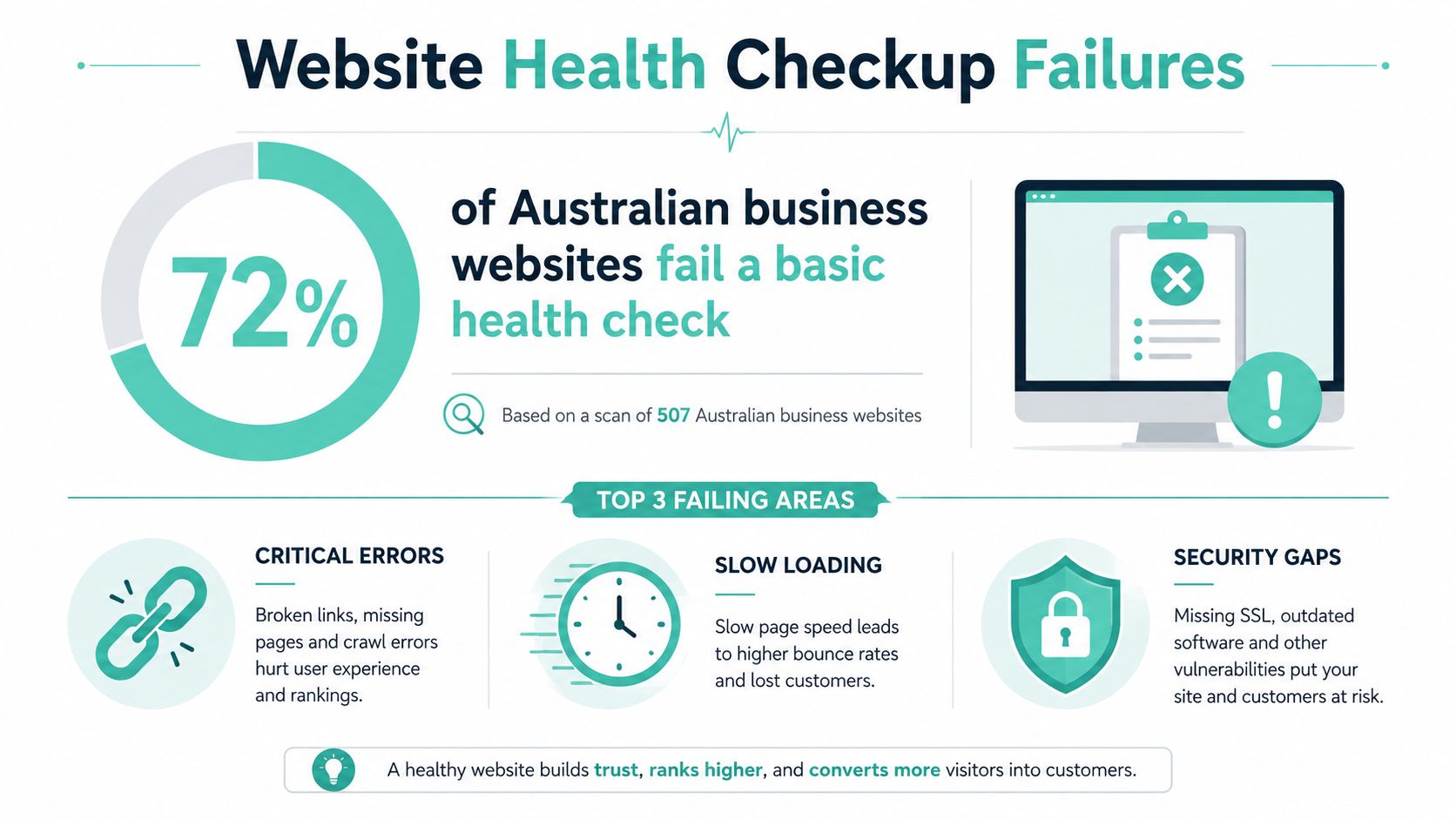
Table of Contents
- Why Most Australian Websites Fail a Health Check
- Start With Uptime Monitoring and Basic Availability
- Speed and Performance Checks That Actually Move the Needle
- Security Hardening From SSL to Firewalls and Malware Scans
- Backups Recovery and CMS Hygiene for WordPress and ASP NET
- Email Deliverability SEO and Accessibility Plus Your Remediation Plan

Performance you can feel, backed by clients who depend on it. Read how our support and uptime create long‑term customer success.Power Your Business with Better Hosting
Why Most Australian Websites Fail a Health Check
Most sites don't fail because one thing is catastrophically broken. They fail because the basics are handled piecemeal, a plugin update here, a theme tweak there, a forgotten header, a stale backup, a firewall rule that never got checked. That's exactly why the scan results above matter, they show a pattern, not a one-off problem. What 507 Australian website scans found
Health checks expose the gap between “works” and “safe”
A site can load in your browser and still be a bad business asset. It might miss security headers, log visitors without proper consent handling, or have no foundation for modern search surfaces, which means the site is visible in the narrowest sense but fragile in practice. Australian government reporting tells the same story over time, routine maintenance improves outcomes, but the improvement only sticks when the process is systematic. Commonwealth Cyber Security Posture in 2025
That's the lens I use after recovering hundreds of sites. Start with the things that stop revenue or create risk, then move to the things that improve speed, accessibility, and discoverability. If you begin with design tweaks and ignore reachability, encryption, or recoverability, you'll spend money on the wrong layer.
Practical rule: if a site can't be reached reliably, can't be restored quickly, or can't pass basic compliance checks, it's not healthy, it's just online.
A useful starting point is a production readiness checklist that forces you to check the site like an operator, not a visitor. Production readiness checklist
The order matters
A sensible health check starts with availability, then moves to speed, security, backups, accessibility, and deliverability. That sequence reflects business risk. A site that is down or compromised needs repair before anyone spends time on search polish or visual refinement.
The Australian hosting market makes this more important, not less. Sites often sit on mixed stacks, WordPress, cPanel, ASP.NET, mail services, and third-party plugins all in the same environment. One weak link can undo everything else. The goal isn't to find perfect scores, it's to identify the few faults that drive the most loss.
Start With Uptime Monitoring and Basic Availability
The first question is simple, can real users reach the site right now. If the answer is inconsistent, nothing else matters yet. Uptime monitoring gives you the earliest signal that something has gone wrong, and it's the cheapest problem to catch before customers notice it.
Check reachability before you inspect anything else
Set up 24×7 monitoring on the homepage, the login page, the checkout path, and any critical form. Don't stop at a single ping check, because a page can return a response while still being effectively unusable for a customer. Watch for full-page failures, SSL failures, slow responses, and redirects that loop or point somewhere unintended.
The Australian Cyber Security Centre says websites should use HTTPS rather than HTTP, and if HTTPS is missing, the host or developer should set it up. It also recommends reviewing the website regularly for unauthorised or malicious changes, enabling automatic backups if available, and keeping software and devices updated. Secure your website
A good baseline is the free Australian Cyber Health Check, because it's quick, anonymous, and gives specific suggestions you can act on without waiting for a big consultancy engagement. If the site is already showing warning signs, the hotline and resilience service listed there are the right escalation path. Australian Cyber Health Check checklist
A website that only fails when a human clicks the right page is still failing. Monitoring has to cover the pages that make money and the ones people forget to test.
Validate the basics manually
Automation catches outages, but the manual pass catches bad assumptions. Open the site in a fresh browser session, check the certificate indicator, submit a form, and confirm the site isn't redirecting people to the wrong version. Then test basic DNS resolution from a second network, because local caching can hide a real fault.
A simple practical workflow is to use a monitoring alert for immediate detection, then a human review for confirmation and triage. That combination is better than relying on a dashboard alone. The knowledge base guide on free monitoring is the fastest way to get a baseline in place. Free Website Monitoring
Host your website with our 5-star rated, cPanel website hosting plans.
Super fast servers, with security included and hosted in your choice of Australian Data Center.
View cPanel Plans
Speed and Performance Checks That Actually Move the Needle
Speed work pays off only when it targets the actual bottleneck. Too many site owners spend time chasing a few lost milliseconds while the page is still bloated with unoptimised images, weak caching, and a server stack that can't keep up. The health check should tell you where the drag comes from, not just that the site feels slow.
Measure the page, not your hunch
Start with a real page load, not the homepage alone. Test the most important template, usually the homepage, a service page, a product page, and the contact or booking page. Then compare what the user sees to what the server is doing, because a fast server doesn't help much if the front end is heavy.
Caching is usually the first big win on WordPress. If a plugin update breaks page caching, or if a config change disables object caching, you'll feel it immediately in page load times. Image optimisation matters just as much, especially on sites that rely on large hero banners and uncompressed gallery assets.
For Australian hosting stacks, the practical checks are straightforward:
- Cache behaviour: confirm full-page cache is serving, not just installed.
- Image sizing: make sure large images are resized and compressed before upload.
- CDN coverage: verify static assets are being pulled from a nearby edge where available.
- Server resources: check whether the site is hitting its memory or CPU limit during normal traffic.
- Application stack: confirm the platform fits the workload, especially on WordPress or ASP.NET sites.
If the site runs on WordPress, the maintenance guide on improving speed is the right place to sanity-check cache, plugin, and theme settings. How to improve website speed
Fix the bottleneck you can prove
The mistake is to change three things at once and declare success. Change one layer, retest, and keep notes. If page speed improves after cache tuning but falls again after a plugin update, you've found a maintenance problem, not a design problem.
A useful comparison I've seen repeatedly is this. One site looks fine after a theme refresh in the admin panel, but the front end slows down because the new layout loads extra scripts. Another site is technically fine but slow because the hosting stack is under-provisioned for its database-heavy plugin set. The right fix is different in each case, and a real health check should tell you which one you're dealing with.
Security Hardening From SSL to Firewalls and Malware Scans
Security checks need to be layered, not symbolic. A green tick on an SSL badge does not mean the site is hard to compromise, and a malware scan does not mean the login path is safe. For Australian SMBs, that matters because a compromise usually means more than cleanup. It can mean lost trading time, recovery work, and a messy compliance gap when someone asks what was protected and when.
Start with encryption and headers.
Check that the site uses a valid HTTPS certificate, not a mixed or expired setup. Then confirm the site sends a sensible Content-Security-Policy header, because that is one of the basic controls that helps limit damage from injected content. In the scan of Australian business websites, 82% were missing that header, which shows how often “secure enough” is really just a guess. What 507 Australian website scans found
Don't stop at the browser padlock. Check the full chain, renewal process, HTTP to HTTPS redirects, and any legacy pages still resolving over plain HTTP. If a developer manages the site, ask them to show the certificate renewal workflow and the header configuration, not just the public-facing result.
Layer scanning with protection
Malware scanning is useful, but it is not prevention. Scan the site regularly, review file changes, and watch for admin accounts, unexpected redirects, and altered templates. Then add firewall rules that cut down bot noise and common probes, because low-effort attacks are often the ones that turn into the expensive incident.
Routine beats panic. The ACSC says vulnerability scanning should ideally be automated and run at least twice as often as patches or updates are required, with assessments and penetration tests before deployment, after significant changes, and at least annually. Guidelines for security assurance
If you want a practical checklist to match those findings back to the site, use the website security checklist as a working reference and tie each item to an owner.
Practical rule: if you only look at security after an alert, you are already in recovery mode.
For a deeper audit of security fundamentals alongside visibility gaps, the best ai seo agency for saas team offers structured tooling, but the principle is the same, automated scanning only works when someone acts on the results.
Harden logins and reduce recovery time
Login hardening is a business loss issue, not just a technical preference. Use stronger admin passwords, remove stale accounts, and limit who can change core settings. If backups, firewall rules, and patching are handled but the admin panel is still wide open, the site remains one phishing email away from trouble.
The cleanest security health check is the one that shows what changes were made, who made them, and when they were last verified. If your report cannot answer that, it is not finished.
Backups Recovery and CMS Hygiene for WordPress and ASP NET
Backups only matter when they restore cleanly. Plenty of site owners see a job marked “successful” and stop there, then discover the archive is unusable after a bad update, a compromise, or simple data loss. A proper website health check asks a harder question, how fast can the site be rebuilt without losing customer data or blowing up recovery time?
Verify the backup, then verify the restore
Off-site backups are a good baseline, but the file sitting in storage is not the proof. Check that backups are encrypted, kept away from the live server, and include files plus databases where the platform needs both. Then run a restore test in staging or another recovery environment. If it has not been restored, it has not been tested.
Use off-site backup solutions as the reference point for setting that up properly.
A sensible backup review covers a few simple checks:
- Backup creation: confirm the schedule exists and includes the right data.
- Integrity check: open the backup set and confirm it is not empty or corrupted.
- Test restore: bring the site back in a safe environment and verify the pages load.
- Recovery notes: record how long the restore took and who owns the process.
That same discipline matters for verification and change control. The Guidelines for security assurance position automation and regular assessment as part of the job, not a one-off clean-up. For an SMB, that means backups, scans, and restore tests need an owner, or they slip until the next incident.
Keep the CMS tidy, not just updated
WordPress failures usually come from plugin drift, abandoned themes, or update conflicts that only show up when the front end breaks. ASP.NET sites tend to fail differently, often around application dependencies, configuration drift, or database pressure. The check should match the platform instead of assuming every CMS breaks the same way.
Maintenance has to be deliberate. Remove anything unused, confirm core files are current, and apply updates in a controlled order. A plugin untouched for years is not stable, it is just untested under pressure.
Recovery also deserves a practical sign-off. Someone should know how to bring the site back, what to verify first, and where the clean copy lives. If you need a broader way to frame the visible side of the audit, the Sight AI SEO audit for brands can help map quality gaps, but the test is still hand-on-keyboard recovery.
Register your new domain name at competitive market prices including free domain add-ons like privacy, DNS Hosting, Custom Nameservers and Forwarding.
Always the best price and no nasty renewal price hikes.
Register A Domain Name
Email Deliverability SEO and Accessibility Plus Your Remediation Plan
The last sweep is where site health stops being a list of disconnected fixes. Email, search visibility, and accessibility all affect whether people can find you, trust you, and complete a task without friction. If those areas are handled separately, fixes tend to stall. If they're handled together, you get a cleaner remediation plan and fewer repeat problems.
Check deliverability, then scan for visibility gaps
Email deliverability belongs in a website health check because customer contact often starts in the inbox, not on the site. Review whether the domain's mail setup is aligned with the platform, spam filtering is working, and key mailboxes are healthy. If messages aren't landing, the site can look fine while leads disappear.
SEO basics still matter, but keep them practical. Make sure the important pages are indexable, the titles and descriptions aren't broken, and the site isn't blocking crawlers by mistake. That's enough to catch the common failures without turning the audit into a marketing project.
If you want a broader checklist view, find website audit essentials is a useful way to compare categories, but the Australian priority order stays the same, deliverability, findability, and task completion need to be reliable before decorative polish does anything useful. Email deliverability best practices
Accessibility needs manual testing, not just a scanner
Australian accessibility guidance now recognises WCAG 2.2 Level AA as the benchmark for websites and web content, which is a more practical standard than a purely visual checklist. A proper audit usually combines automated evaluation, manual checks, at least one assistive technology such as a screen reader, then a discussion or short written report. NSW Digital also recommends keyboard-only testing, colour-contrast checks, screen-reader testing, multi-device and browser testing, and documenting severity plus remediation steps. Canberra Blind Society accessibility audit background
That's where automated-only tools fall short. A scan might flag missing alt text, but it won't tell you whether a form can be completed with a keyboard, whether error messages make sense to a screen reader, or whether the focus order traps the user in the wrong place. The Australian telco review found that all five sites could improve accessibility and that some issues were slipping through existing processes, which is exactly why the manual layer matters. Telcos for All report
A good accessibility report doesn't just say what failed. It tells the owner what to fix first, who can fix it, and how to confirm the fix worked.
Turn the findings into a timetable
A practical remediation plan starts with the issues that stop revenue or create exposure, then moves to the slower quality improvements. Fix availability and security blockers first, then backup gaps, then accessibility and deliverability issues that affect completion and trust. Assign owners, set a review date, and keep the evidence in one place so the next audit isn't starting from zero.
That's the difference between a checklist and a health checkup. A checklist gets you through the page. A health checkup gives you a repeatable way to keep the business online, recoverable, and compliant.
If you want a hands-on Australian hosting partner that treats site health as uptime, security, and recovery work, visit UpTime Web Hosting for local hosting, monitoring, backups, and support built for real business use. If your site needs a proper checkup, their team can help you turn the findings into fixes that stick.