DDoS protection is the layered set of practices and services that keeps a website online when it's flooded with malicious traffic. In Australia, ASD's ACSC responded to more than 200 DoS/DDoS incidents in FY2024–25, an increase of more than 280% from the previous year.
That change reframes the question “what is DDoS protection?” It isn't a niche control reserved for banks or government departments. It's the practical combination of traffic filtering, resilient hosting, monitoring, response procedures and application controls that helps a normal Australian business stay available when attackers try to fill its internet connection or overwhelm its website.
A local retailer, medical clinic, trades business or software provider can all be exposed. The attack might be a noisy flood that saturates a link, or a quieter stream of apparently normal requests that exhausts a checkout, search function or login service. The right defence depends on what the attacker is targeting and where your site is hosted.
Table of Contents
- A Plain-English Definition of DDoS Protection
- How DDoS Attacks Actually Work
- The Layers That Stop an Attack
- Spotting an Attack Before Customers Do
- Australian Hosting Plans With and Without Protection
- Choosing the Right Setup for Your Business
- Building a Minimum Viable Defence
- Common Questions From Australian Site Owners

Performance you can feel, backed by clients who depend on it. Read how our support and uptime create long‑term customer success.Power Your Business with Better Hosting
A Plain-English Definition of DDoS Protection
DDoS protection keeps legitimate visitors moving while malicious traffic is identified, filtered or absorbed elsewhere. Think of it as putting trained security staff and a larger waiting area in front of a small shop. Real customers still reach the counter, but a crowd trying to block the entrance gets stopped before it takes over the premises.
The Australian context matters. ASD's ACSC reported that DoS and DDoS events made up 31% of incidents affecting critical infrastructure entities, compared with 16% across all incidents handled by ASD's ACSC in FY2024–25. The same reporting recorded more than 20 attacks in FY2021–22 and more than 50 in FY2022–23, showing that the increase isn't a one-off event. Australia's Annual Cyber Threat Report 2024–25 provides the local source for this pattern.
What the protection actually does
A working setup usually combines several controls:
- Upstream filtering: Traffic is inspected before it reaches your hosting connection.
- Edge absorption: Scrubbing infrastructure handles large floods away from your origin server.
- Request controls: Rate limiting slows suspicious clients that repeatedly hit the same resource.
- Application inspection: A web application firewall examines HTTP and HTTPS requests.
- Origin protection: Firewalls and server rules restrict what can reach the website.
- Operational response: Monitoring and an escalation plan give someone a clear job during an incident.
This matters whether your website runs on shared hosting, a virtual private server or a public cloud platform. A CDN may cache your images and other static content, but it won't automatically solve every application-layer attack. A firewall may drop malformed packets, but it can't always recognise a slow stream of expensive search requests that look like genuine browsing.
Practical rule: Protection should sit in front of the origin server. If attackers can reach the origin directly, they may bypass the controls you thought were protecting it.
Business owners who want a wider view of governance and risk can also use this guide to cybersecurity for IT leaders, particularly when website availability forms part of a broader operational resilience plan.
How DDoS Attacks Actually Work
Start with a shopfront. A thousand fake customers arrive together, stand in the doorway and occupy every staff member. Genuine customers may still be outside, but they can't get service. A distributed denial-of-service attack does something similar online, using many systems or connections to send more traffic or requests than the service can handle.
Volumetric attacks fill the road
A volumetric attack is like delivery vans filling the car park and blocking the road used by everyone else. The attacker sends enough traffic to consume the available network capacity, often by using UDP or other traffic that creates a large volume of packets. The website may be healthy inside the data centre, but visitors can't reach it because the connection leading to it is saturated.
The important measurement here is the rate of traffic and packets arriving at the network edge. Australian guidance recommends sizing service capacity for the maximum packets-per-second on the link, rather than looking only at ordinary bandwidth usage. ACSC preparation guidance also recommends upstream UDP filtering and source-port filtering.
Protocol attacks exhaust the doorkeepers
Protocol attacks aim at the equipment that manages connections, including routers, firewalls and load balancers. A SYN flood, for example, can create many incomplete connection requests and consume the device's connection state. The server might have spare processing power, yet the firewall or load balancer in front of it can no longer keep up.
This is why a basic server firewall isn't the same as complete DDoS protection. If the attack exhausts the connection-tracking equipment before traffic reaches the server, local rules may arrive too late.
Application attacks imitate customers
Application-layer attacks are harder to separate from legitimate use because the requests can look like ordinary web browsing. A Melbourne retailer running a sale might notice that one product-filter endpoint is being queried repeatedly. Each request appears valid, but the database work behind the filter consumes resources until genuine shoppers experience slow pages or failed checkouts.
That's a different problem from a full network flood. The mitigation must understand request behaviour, endpoint cost and user patterns. A CDN, WAF and carefully tuned rate limit can help, while buying a larger internet connection may not.
The traffic's apparent source location doesn't tell you where the attacker or target is. Regional reporting identified Australia among the most targeted countries in Asia-Pacific, with 20.3 billion web and API attacks, while source traffic often came from locations including Indonesia, Singapore and Hong Kong. The ACSC Annual Cyber Threat Report 2024–25 supports the practical conclusion: choose protection based on attack behaviour and mitigation capability, not on whether traffic looks local.
Host your website with our 5-star rated, cPanel website hosting plans.
Super fast servers, with security included and hosted in your choice of Australian Data Center.
View cPanel Plans
The Layers That Stop an Attack
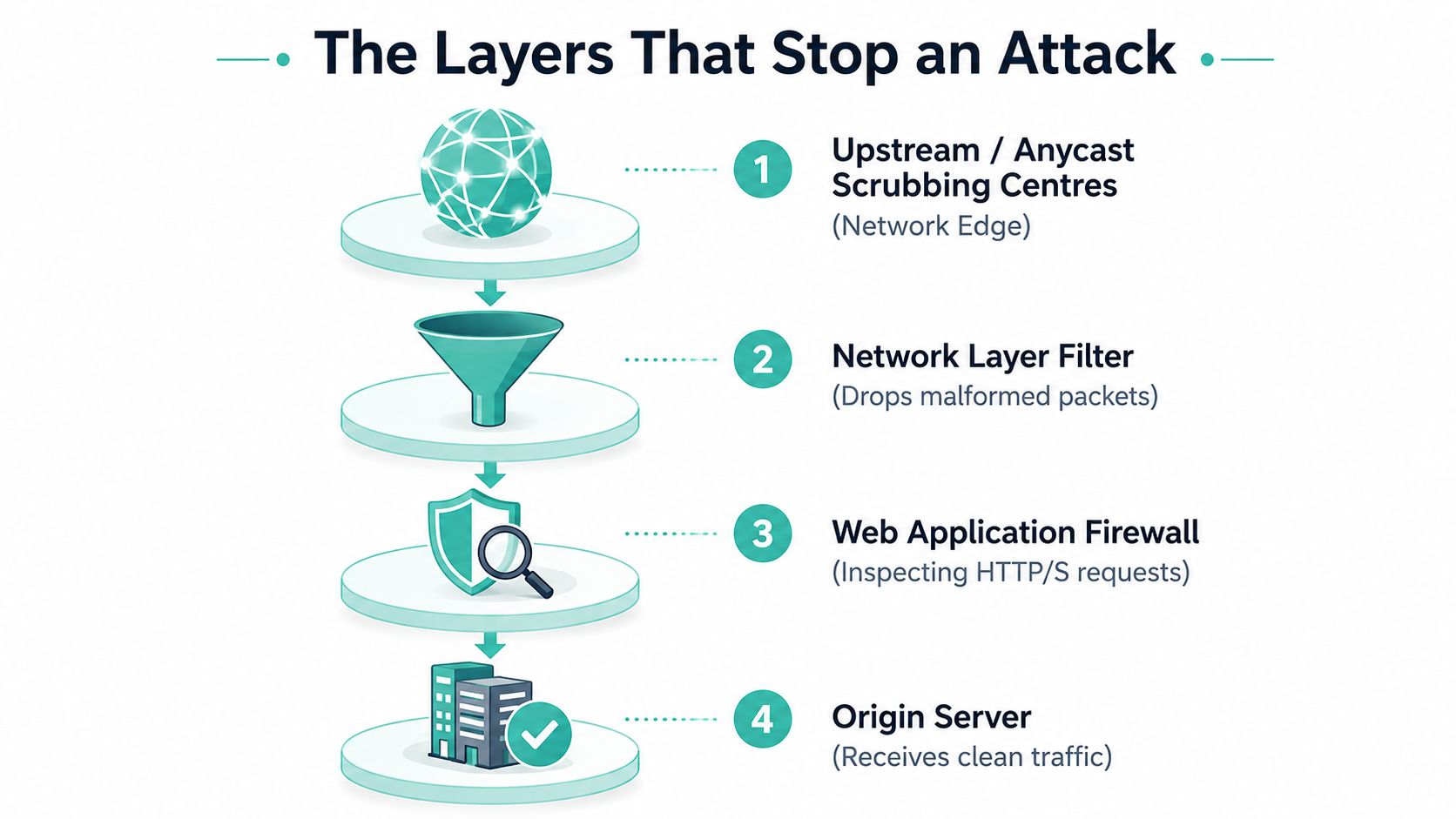
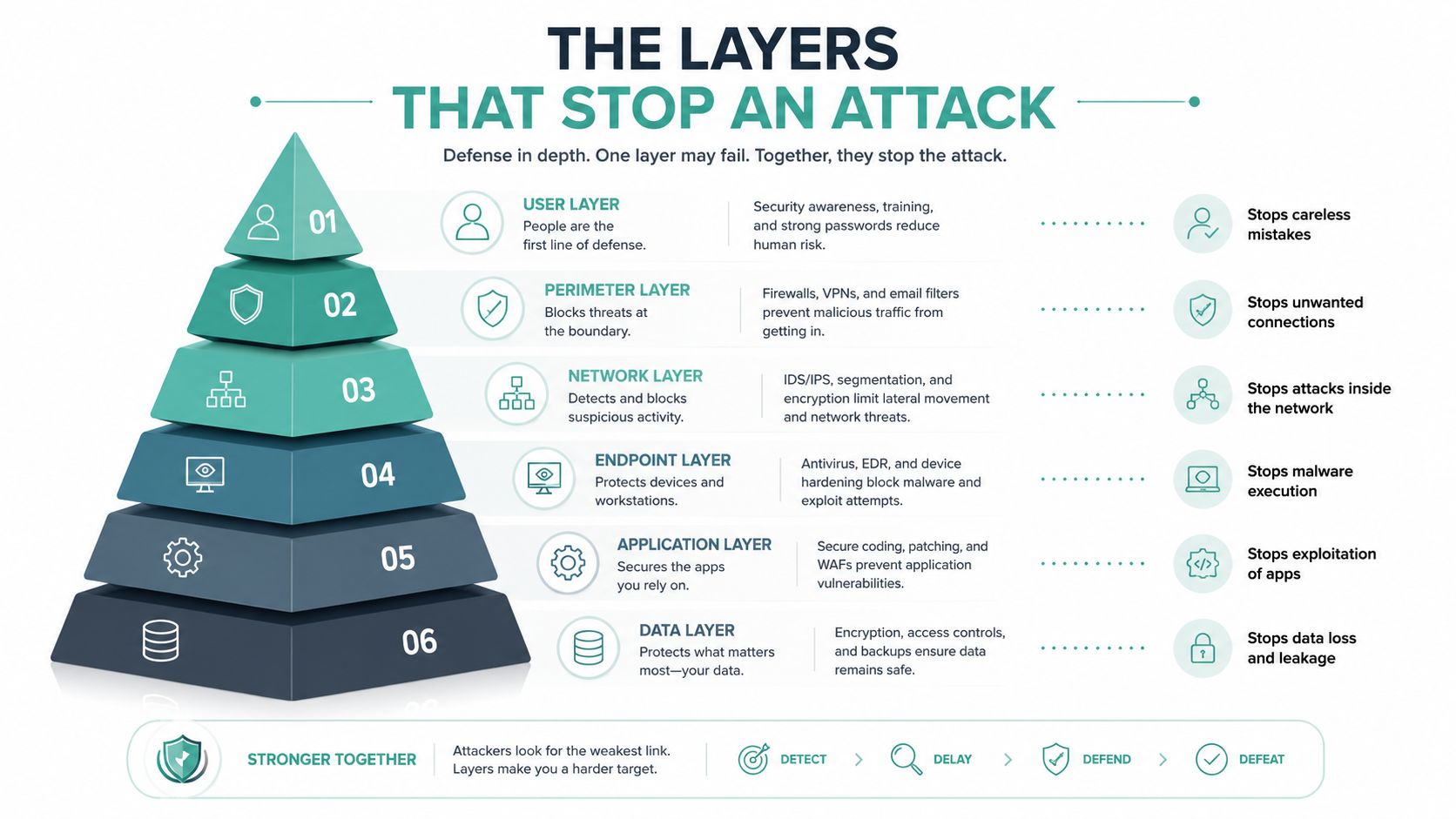
DDoS mitigation works best as a stack, not as one magic appliance. Each layer removes a different class of unwanted traffic, leaving the origin server to handle requests that have passed through the earlier checks.
The network edge takes the first impact
Upstream or anycast scrubbing centres receive traffic across a distributed network and remove obvious floods before they travel to your hosting connection. This is the layer that matters most when an attacker is trying to fill the link into your Sydney VPS or shared hosting environment.
A CDN adds another useful function. It can serve cached images, stylesheets and other static assets from an edge location, so an ordinary visitor doesn't need to contact the origin for every file. That reduces routine origin load, although dynamic pages and application requests still need suitable controls.
Filters narrow the path
Network-layer filters can drop malformed packets, unwanted protocols and traffic aimed at ports the business doesn't use. Australian guidance recommends using cloud or CDN-based mitigation, hiding the origin IP behind a firewall when a CDN is deployed, and permitting only required network ports. Those measures make it harder for an attacker to bypass the edge and contact the source server directly.
A WAF operates higher up. It examines HTTP and HTTPS requests for suspicious patterns, abusive automation and payloads that don't fit the application's normal behaviour. If you're assessing this layer in more detail, this explanation of what a web application firewall does is a useful knowledge-base reference.
The origin still needs hardening
The server should assume that some unwanted traffic will get through. Apply web-server rate limits, use SYN cookies or equivalent kernel protections, restrict administrative access and keep public services separated where possible. Firewall security for SMBs is a useful resource for business owners comparing perimeter controls and managed firewall practices.
Consider three common setups:
- Small Shopify store: The platform handles much of the underlying infrastructure, while the store owner still needs sensible application settings, account security and a clear support path.
- Self-hosted WordPress on a Sydney VPS: Use a CDN and WAF, then add server-side limits and origin restrictions so direct traffic can't ignore the edge.
- Regulated fintech: Combine upstream scrubbing, application inspection, segmented services, hardened origins, monitoring and documented response evidence.
Australian guidance also recommends moving foundational services such as DNS to reputable providers that can withstand DoS, separating email from more attack-prone web services and monitoring availability, traffic, CPU usage and associated costs. Protection must preserve more than a homepage. It should help keep essential services operating while the team investigates and communicates.
Spotting an Attack Before Customers Do
A Melbourne e-commerce business owner notices that a WooCommerce shop feels slow during a Tuesday morning sale. The first assumption is familiar: the host must be having a bad day, or a plugin has misbehaved. Checkout pages take longer to load, then a few customers report timeouts.
The monitoring dashboard tells a more useful story. Requests per second have jumped from unfamiliar geographic ranges, and a large share of the activity is aimed at one product-filter URL. That points towards an application-layer problem rather than a general performance issue. The endpoint may be valid, but repeated expensive queries can consume the resources that genuine shoppers need.
Read the signals in context
A sudden bandwidth spike suggests a volumetric flood, especially if the site's normal content hasn't changed. A rise in small packets aimed at the network layer can indicate a protocol attack, where connection-handling devices are under pressure rather than the web pages themselves.
A growing number of 503 responses and timeout errors means the service is already struggling. Those errors don't prove an attack by themselves, but they become more meaningful when they appear alongside unusual request patterns, concentrated URL activity or abnormal network traffic.
The owner should compare several views rather than stare at a single graph:
- Availability checks: Confirm whether the website is unreachable from outside the hosting network.
- Request patterns: Look for a single endpoint receiving disproportionate attention.
- Traffic shape: Separate a broad flood from repeated small requests.
- Server health: Check CPU, memory, connection counts and application logs.
- Business impact: Watch failed checkouts, support messages and payment interruptions.
Traffic monitoring tools for websites can help establish those checks before an incident. The value isn't a fancy dashboard. It's having a baseline, an alert and a person who knows what to do when the pattern changes.
Early detection gives the business time to contact the host or mitigation provider before customers abandon carts. The team should preserve relevant logs, note when symptoms started, identify affected services and use the agreed escalation channel. Don't respond by blocking an entire country because some traffic appears to come from there. Source geography can be misleading, and a broad block can exclude legitimate Australian customers.
Australian Hosting Plans With and Without Protection
A cheap plan and a managed protected plan can both host the same WordPress site, but they don't provide the same answer when unwanted traffic arrives. The difference is less about a badge labelled “secure” and more about where filtering happens, who watches the service and what support does during an outage.
| Feature | Unprotected Australian Plan | Protected Australian Plan |
|---|---|---|
| Origin exposure | Often relies on a single origin address | Uses edge controls and origin restrictions where supported |
| Upstream filtering | No dedicated upstream scrubbing included | Network-level filtering or mitigation included |
| CDN and WAF | May require separate setup | CDN absorption and WAF controls may be part of the service |
| Rate limiting | Usually configured by the customer | Available through managed rules or hosting controls |
| Monitoring | Customer checks uptime and logs | Provider monitors availability and infrastructure signals |
| Support response | Outage investigation starts with the customer | Escalation path is defined with the hosting provider |
| Pricing | Lower entry cost, but security services may be separate | Higher service scope may be included in the plan or tier |
| Service commitments | Check whether any uptime commitment exists | Review the stated SLA, exclusions and response terms |
The table describes common plan differences, not a promise that every Australian host uses the same design. Read the inclusions carefully. A plan that says “firewall” might mean a basic host firewall, while another includes upstream mitigation, application controls and operational monitoring.
Ask what happens during the incident
Pricing, support response and any uptime guarantee belong in the same conversation. A low monthly price won't compensate for an unclear escalation process if nobody can tell you who acts at two in the morning. Likewise, an uptime statement may exclude planned maintenance, attacks or provider dependencies, so read the terms rather than treating “SLA” as a complete guarantee.
Australian DDoS-protected web hosting is one example of the type of hosting information a business can compare when reviewing included protection. The important question is whether the service matches the site's needs and clearly explains its controls.
An ordinary brochure site, booking system or local online shop still depends on availability. The risk isn't limited to banks. If your website generates enquiries, accepts bookings, sends customer information or supports staff workflows, an outage can become an operational problem quickly.
Register your new domain name at competitive market prices including free domain add-ons like privacy, DNS Hosting, Custom Nameservers and Forwarding.
Always the best price and no nasty renewal price hikes.
Register A Domain Name
Choosing the Right Setup for Your Business
Choose protection by looking at the service you need to keep available, not by chasing the largest headline capacity. A small brochure site has a different exposure from a WooCommerce shop with dynamic search, and both differ from a developer-led SaaS product with public APIs.
Start with the service map
List the public components first. Include the website, APIs, DNS, email, customer portal and any remote access service. Then identify which components can be cached, which require live application processing and which must remain available if the main website is under attack.
A sensible decision path looks like this:
- Small brochure site: Use Australian hosting with built-in network mitigation, a CDN and basic WAF protection. Keep the origin hidden where the design permits.
- Growing e-commerce store: Add endpoint-specific rate limits, application monitoring and a tested fallback page. Pay particular attention to search, login, cart and checkout.
- Developer-led SaaS: Protect APIs as well as web pages, separate critical services and agree an escalation procedure with the upstream provider before launch.
Questions for an Australian host
Ask for plain answers, not a sales slogan:
- Where does scrubbing occur? Find out whether traffic is handled through infrastructure suitable for Australian users and whether the provider can explain its routing.
- Is mitigation always on or activated during an incident? On-demand protection can create delay if onboarding starts after the attack.
- What capacity is available? Ask how the provider describes upstream capacity in gigabits per second and whether that figure applies specifically to DDoS mitigation.
- How are WAF rules tuned? You need a way to reduce false positives while still controlling abusive search, login and API requests.
- Who answers at two in the morning? Get the escalation path, contact method and responsibilities in writing.
Warning sign: “Enterprise-grade security” means little if the host can't explain its filtering layers, capacity, monitoring or incident handover.
Be cautious when a provider can't name its mitigation partners, offers protection only as an expensive top-tier add-on or gives no practical description of what happens when capacity is exceeded. A plan can still be suitable, but you should understand the trade-off before committing.
Building a Minimum Viable Defence
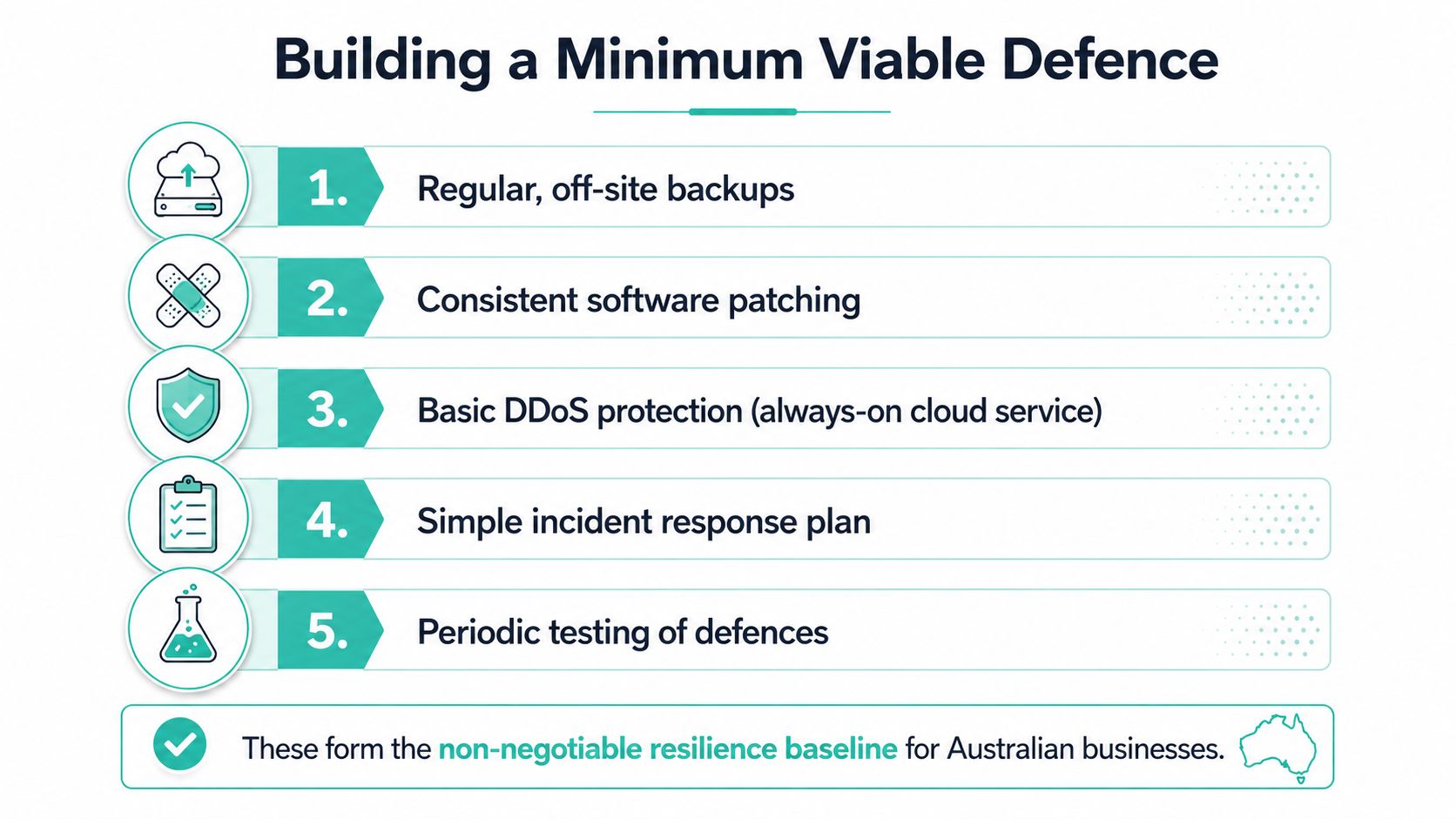
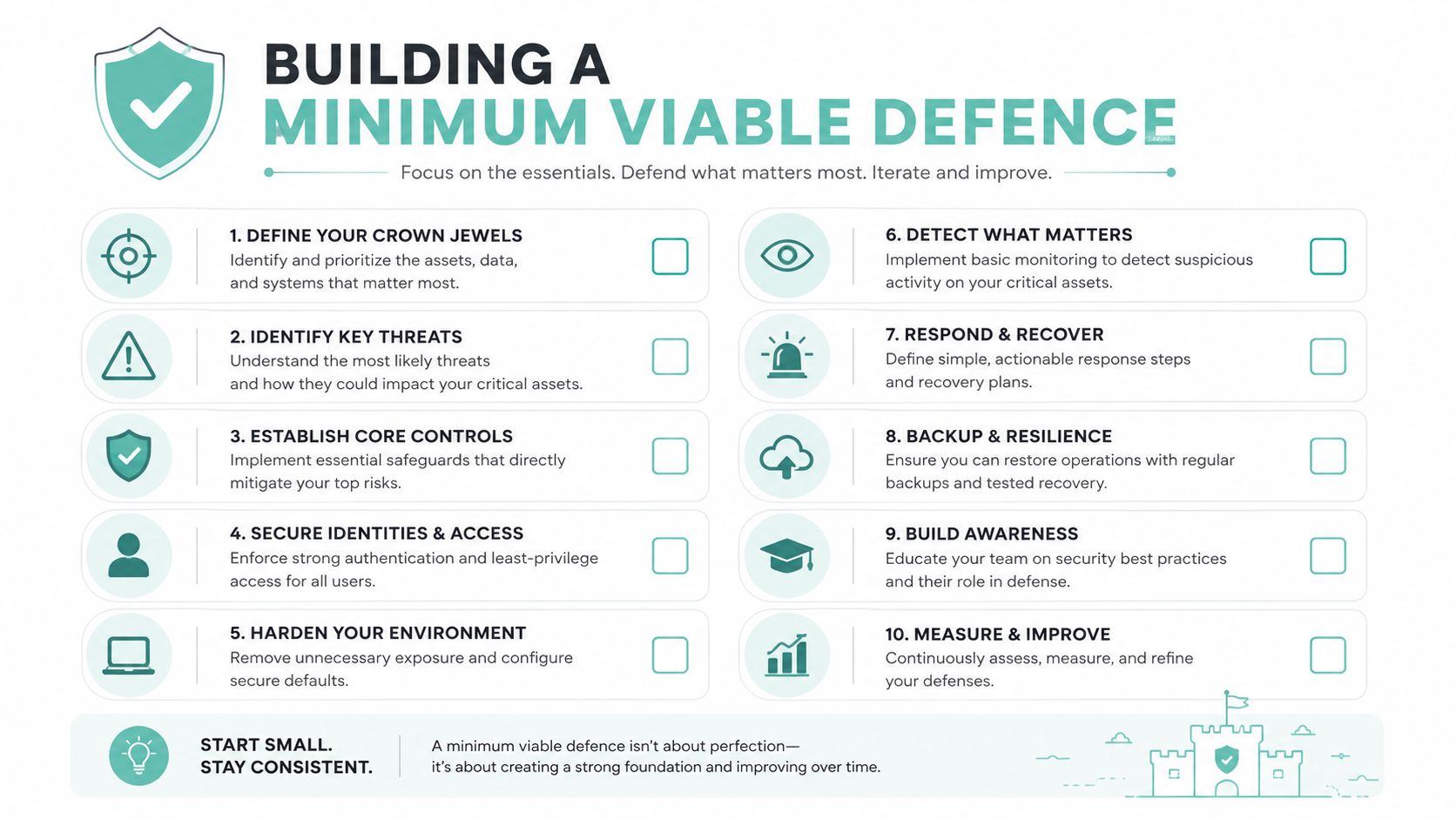
DDoS protection belongs beside backups and patching in a small business resilience plan. Australian guidance recommends cloud-based DoS mitigation, formal response readiness, service separation, restricted ports and real-time monitoring of availability, traffic, CPU usage and costs. The ACSC's 2025 denial-of-service guidance.pdf) turns those principles into practical operating measures.
For a small site, the minimum viable posture includes:
- Network mitigation: Choose hosting with upstream filtering rather than relying only on the origin firewall.
- Always-on HTTP protection: Put a CDN and WAF in front of public web traffic.
- Endpoint limits: Rate-limit login, search and other resource-heavy functions.
- Origin hardening: Keep the source server out of public discovery where possible, restrict SSH with fail2ban or an equivalent control, and use lawful, carefully tested geographic filtering where appropriate.
- Service separation: Keep email and other foundational services away from an attack-prone website.
- Incident readiness: Write a short runbook covering escalation, evidence collection, customer communication and a static splash page for a sustained event.
- Developer controls: Pre-negotiate upstream contacts and test that the application behaves acceptably when filtering becomes stricter.
A Brisbane sole trader can start with the lower-cost controls this week: enable monitoring, review hosting inclusions, add rate limits and document contacts. A Melbourne SaaS team should also test API behaviour, isolate origins and schedule a resilience review. Use this production readiness checklist to check the wider launch posture, not just the firewall setting.
Experience Microsoft 365 Business Standard for free for 30 days.
Up to 25 users with full access to email, OneDrive and Teams. Includes full versions of desktop apps of Outlook, Word, Excel, PowerPoint and more.
Try Microsoft 365
Common Questions From Australian Site Owners
Does standard Australian shared hosting include DDoS protection?
Some shared plans include basic network filtering, but “shared hosting” doesn't automatically mean full upstream scrubbing, WAF coverage or incident monitoring. Ask what the provider filters, whether it's always on and who handles escalation.
Will scrubbing add noticeable latency in Sydney or Perth?
A well-routed edge service can keep traffic close to users, but the result depends on the provider's network and the site's dynamic content. Ask the host how Australian traffic is routed and test important pages from both east and west coast locations.
Does a static WordPress site still need a WAF?
Yes, especially if WordPress, plugins or administrative pages remain publicly reachable. Static caching reduces origin work, but it doesn't remove abusive requests aimed at login paths or other exposed endpoints.
What happens if an attack exceeds the plan's mitigation ceiling?
The provider may apply stricter filtering, null-route traffic, move the service or escalate to an upstream mitigation partner. Get this process in writing before an incident, including who makes the decision and how you'll communicate with customers.
Are Shopify and WooCommerce stores exposed?
They can be. Shopify manages much of the platform infrastructure, while the store remains dependent on its application configuration and provider support. WooCommerce owners carry more responsibility for hosting, WAF rules, plugins and origin protection. This cyber security guide for small business covers the surrounding controls that support availability.
UpTime Web Hosting offers Australian hosting with DDoS-protected firewalls, monitoring, malware scanning, encrypted off-site nightly backups and local support across hosting options including WordPress, cPanel, ASP.NET and managed VPS services. Visit UpTime Web Hosting to compare a setup that keeps DDoS mitigation and everyday website resilience in the same operational plan.