In short
Subdomains do not receive an automatic SEO penalty or bonus. Google says it has no indexing or ranking preference between subfolders and subdomains. Choose a subdomain when the content needs separate ownership, technology, security, audience or operations. Choose a subdirectory when the content belongs to the same customer journey and team.
Key takeaways
- Google's 2026 guidance says it has no indexing or ranking preference between subdomains and subdirectories.
- A subdomain is a separate hostname, so it can have its own DNS, TLS certificate, robots.txt file, platform, release process and reporting view.
- A Search Console Domain property includes all subdomains, although an additional URL-prefix property can provide isolated reporting.
- A business blog usually belongs in a subdirectory when it supports the same services, audience and conversion path as the main website.
- Moving content between a subdomain and subdirectory requires redirects, updated internal links, new canonicals, sitemap changes and post-launch monitoring.
Table of contents
- Will a subdomain help or hurt SEO?
- Should you use a subdomain or a subdirectory?
- When is a subdomain the better choice?
- What changes when content moves to a subdomain?
- How do common use cases change the answer?
- What should you check before choosing?
- How do you launch a subdomain without creating SEO problems?
- What if you already use the wrong structure?
- What else do people ask about subdomains?
- What should you do next?
Most advice about subdomains for SEO starts with a universal rule. The problem is that the rule changes depending on who is selling the advice. One page says a subdomain starts from zero, while another says Google automatically connects it to the root domain.
Google's published guidance supports neither extreme. The safer decision is to choose the structure that the business can organise, connect and maintain properly. If the terminology is still unclear, start with this explanation of what a subdomain is.
Will a subdomain help or hurt SEO?

A subdomain can perform well in search, and a subdirectory can perform poorly. The URL format itself does not create an automatic ranking bonus or penalty.
In its 2026 crawling and indexing FAQ, Google says site owners should choose the option that is easiest to organise and manage because Google has no indexing or ranking preference between subfolders and subdomains. That is the clearest available answer to the core question.
Why, then, do businesses report gains after moving a blog from blog.example.com to example.com/blog? A migration often changes more than the URL. Navigation may improve, internal links may be added, duplicate pages may be consolidated, templates may become faster and content may move under the main editorial team. Any of those changes can affect results.
A subdomain can still operate as a distinct site in several technical systems. Google's site name documentation supports site names for domains and subdomains, but not subdirectories. Google's July 2026 crawl budget guidance also defines a site as a unique hostname for crawl-budget purposes. The same guidance says most ordinary business sites do not need to worry about crawl budget.
These distinctions show that a subdomain can be treated as its own operating unit. They do not prove that Google applies an automatic ranking handicap.
A subdomain does not hurt SEO by default; weak integration and weak maintenance do.

Performance you can feel, backed by clients who depend on it. Read how our support and uptime create long‑term customer success.Power Your Business with Better Hosting
Should you use a subdomain or a subdirectory?
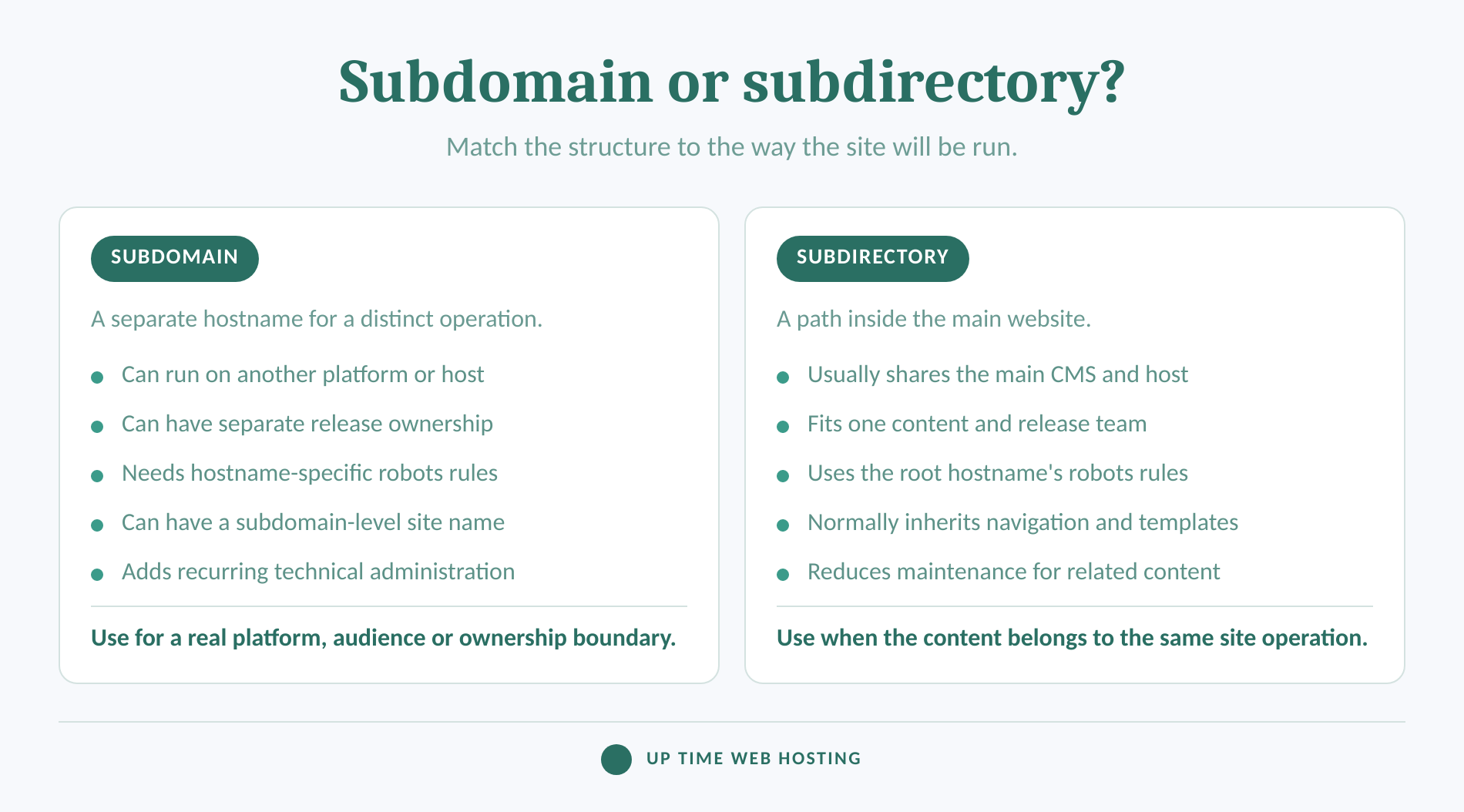
Use a subdirectory when the new content is part of the same site, audience and publishing operation. Use a subdomain when the content needs a genuine boundary that would be awkward or unsafe to maintain inside the main site.
| Decision factor | Subdomain: support.example.com | Subdirectory: example.com/support |
|---|---|---|
| Hostname | Separate hostname | Same hostname as the main site |
| Platform | Can run on a different CMS, host or application | Usually runs within the main site stack |
| Ownership | Suits a separate team, vendor or release process | Suits one shared web and content team |
| Navigation | Must be deliberately connected to the main site | Usually inherits the main navigation and templates |
| Search reporting | Can have an isolated property or report view | Can be filtered by path in the main property |
| Technical controls | Can have its own DNS, TLS and robots.txt rules | Shares hostname-level controls |
| Maintenance | More moving parts to monitor | Usually simpler to maintain |
| Best default | A distinct product, application, portal or regional operation | A blog, resource centre, service section or closely related content hub |
The phrase subdomain vs path describes the same choice. A path or subdirectory keeps the content beneath the main hostname. A subdomain creates another hostname beneath the registrable domain.
For closely related content, the subdirectory is usually the simpler default. It keeps templates, navigation, publishing, analytics and technical controls together. A subdomain becomes worthwhile when its separation solves a real business or platform problem.
Use a subdirectory for shared work and a subdomain for a real operating boundary.
When is a subdomain the better choice?
A subdomain is the better choice when separation improves ownership, deployment, security administration or the user experience. The business should be able to name the boundary before creating the hostname.
A different team or supplier owns the experience. A support portal managed by a customer-service team may have different permissions, publishing rules and release dates from the marketing site. A subdomain gives that operation a clear home without requiring a second registered domain.
The content needs a different platform. A customer application, technical documentation system, learning portal or hosted help desk may not fit the main CMS. Pointing app.example.com or support.example.com to another platform can be cleaner than forcing the platform to work below a path it does not support well.
The release risk is different. A software application may be deployed several times a week while the marketing site changes twice a month. Separate hostnames can support different access controls, monitoring and rollback processes. Separation only helps when those controls are configured and maintained properly.
The audience expects a distinct destination. A logged-in customer portal serves a different task from a public sales site. A clear hostname can signal that the visitor is entering an application or service area, while shared branding and navigation can preserve trust.
Regional operations are independently managed. Google's multi-regional site guidance lists both subdomains and subdirectories as valid locale-specific structures. It describes subdomains as easy to separate and capable of using different server locations, while subdirectories have the benefit of lower maintenance on the same host. Either structure still needs clear regional URLs and, where applicable, hreflang annotations.
A public staging site is not a good reason to create an indexable subdomain. Google's technical requirements explain that public, working and indexable pages can become eligible for Search. Protect staging environments with authentication or an appropriate noindex rule rather than relying on an obscure hostname.
A subdomain is justified by separate ownership, technology, audience or operations, not by a hoped-for ranking boost.
Host your website with our 5-star rated, cPanel website hosting plans.
Super fast servers, with security included and hosted in your choice of Australian Data Center.
View cPanel Plans
What changes when content moves to a subdomain?
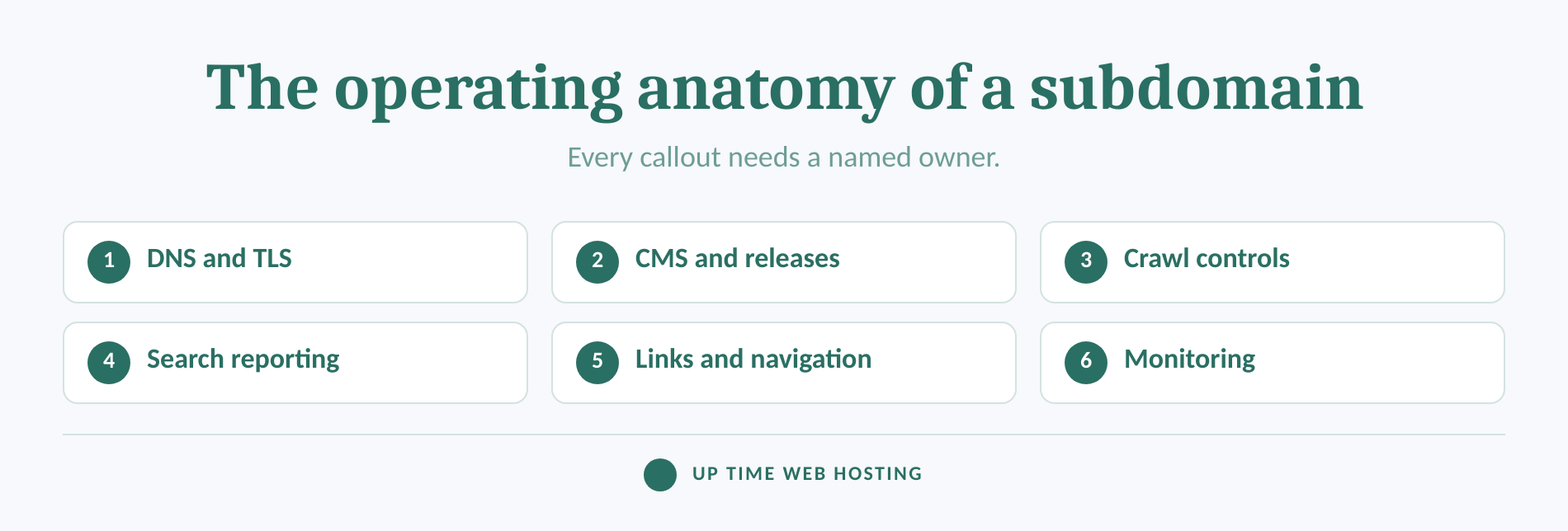
Creating a subdomain changes more than the address shown in the browser. It creates another hostname that needs a named owner and a complete operating plan.
The cPanel domain and virtual host documentation describes a subdomain as a hostname that can exist on a separate virtual host. It may remain inside the same hosting account, or its DNS can point to a completely different service.
Check each of these areas:
- DNS and HTTPS: The hostname needs a valid DNS record, working hosting destination and TLS certificate.
- CMS and releases: Record which platform runs the content, who can deploy changes and how failed releases are reversed.
- Search Console: A Domain property for
example.comaggregates data from its subdomains and protocols. An additional URL-prefix property forhttps://support.example.com/is optional but useful when a team needs an isolated view. - Robots rules: Google's robots.txt specification says the file applies only to the same host, protocol and port. Rules at
example.com/robots.txtdo not automatically controlsupport.example.com. - Sitemaps and canonicals: Include the preferred URLs and keep canonical signals consistent. Google's sitemap guidance allows cross-site sitemap submission when ownership of the included sites is verified.
- Navigation and internal links: Google says in its link best practices that internal links help people and Google discover pages and understand how content relates. Link the main site and subdomain where the relationship helps users.
- Analytics and monitoring: Confirm that sessions, conversions, uptime alerts, backups and error reports include the new hostname.
These jobs are manageable when one person or team owns the checklist. They become expensive when responsibility is split between marketing, a developer and an external platform with no shared record. Businesses already overseeing several properties can use the same operating principles described in this guide to managing multiple websites.
For its September 2026 publication information, UpTime lists unlimited subdomains under fair use, full DNS management and free Let's Encrypt SSL across its current cPanel website hosting configurations. Those hosting features remove several setup barriers, but the business must still decide who owns the content, tracking and maintenance.
Choosing a subdomain means accepting another hostname's recurring technical and editorial upkeep.
How do common use cases change the answer?
The best structure depends on what the section does and how closely it belongs to the main website. No content type is forced to use one structure in every business.
| Use case | Usual starting point | When to choose the other option |
|---|---|---|
| Company blog | Subdirectory | Use a subdomain if the publication has a separate brand, team, platform and audience. |
| Resource centre | Subdirectory | Use a subdomain if it becomes an independently managed publication or product. |
| Help centre | Depends on the platform | Use a subdomain for a separately hosted support system; use a path when support content is part of the main CMS. |
| Customer application | Subdomain | Use a path only if the application is intentionally integrated into the main platform and release process. |
| Online store | Depends on ownership and technology | A path suits an integrated store; a subdomain can suit a separate commerce platform or team. |
| Country or language site | Either | Choose according to regional ownership, hosting, maintenance and hreflang capability. |
| Campaign landing pages | Subdirectory | Use a subdomain only when the campaign requires a separate platform or operating life cycle. |
| Developer documentation | Often a subdomain | A path works when documentation shares the main CMS, design system and release team. |
A normal business blog supports product pages, services and the same customer journey as the main website. Keeping it in a subdirectory usually makes publishing and internal linking easier. Its role should be defined in the wider SEO content strategy rather than decided by URL folklore.
A store or support centre needs a closer look. If the platform cannot run reliably under a subdirectory, technical reality may settle the choice. If either structure works, prefer the one that keeps navigation, measurement and maintenance clear.
The right structure follows the use case, not a universal rule about blogs, stores or support content.
What should you check before choosing?
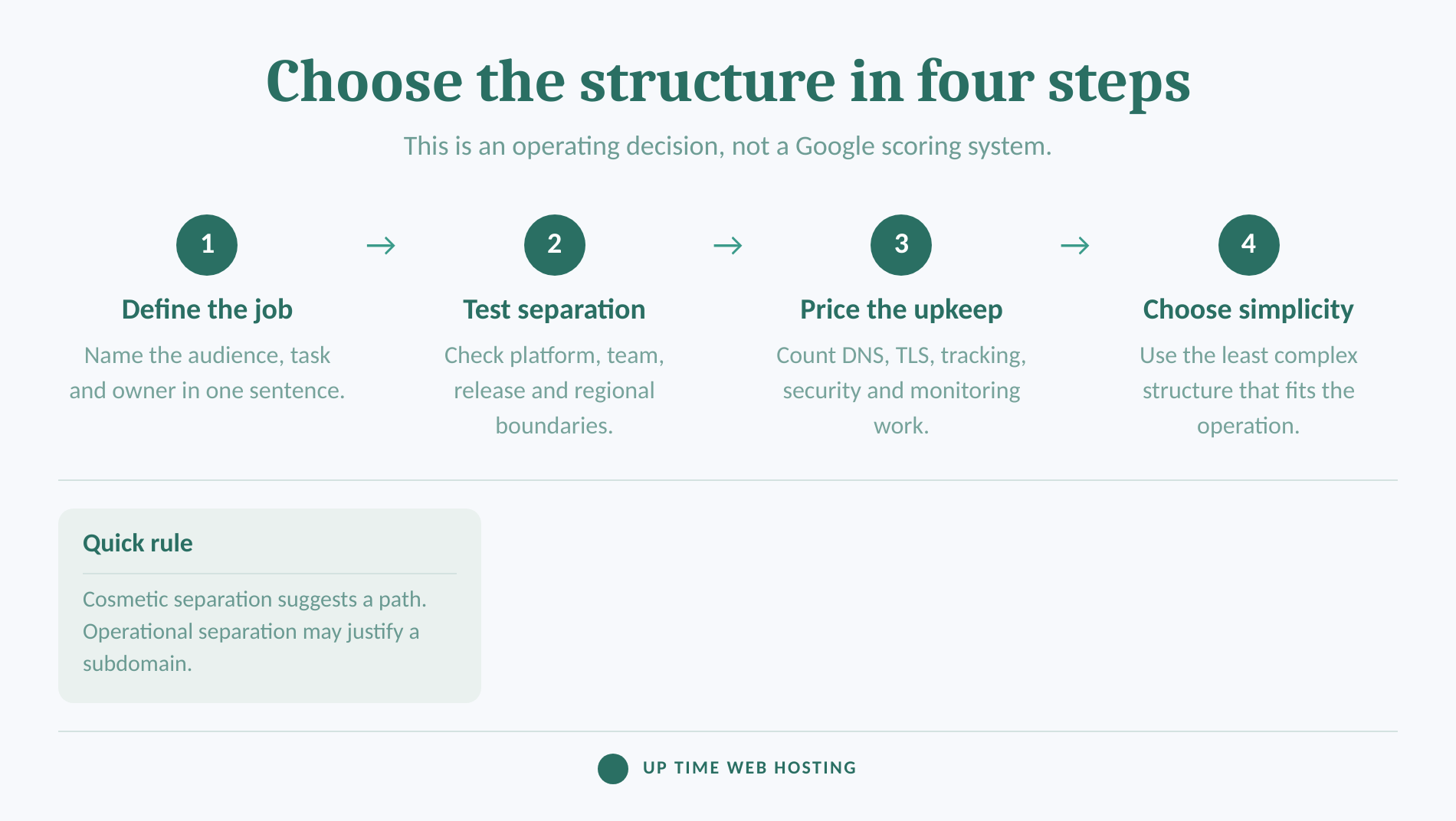
Choose only after checking the people, platform and processes behind the proposed site section. If the answers reveal no meaningful boundary, a subdirectory is usually the lower-risk choice.
Ask these questions:
- Who owns the content? Is it the same team that controls the main website?
- Who owns the platform? Can the existing CMS support the section without fragile workarounds?
- Who owns releases? Will the new area follow the same testing, approval and rollback process?
- Does the audience change? Is the visitor completing the same journey or entering a distinct application, region or service?
- Will the experience stay connected? Can users move between the two areas through clear, crawlable navigation?
- Can the business maintain another hostname? Account for DNS, HTTPS, robots rules, sitemaps, analytics, monitoring, backups and security updates.
- Is a migration already involved? Moving successful content creates work and short-term uncertainty, so the long-term benefit must be clear.
Do not choose blog.keyword.example.com because the hostname contains a target phrase. Google recommends understandable URLs, but it does not say that putting a keyword in a subdomain creates an automatic ranking benefit. The content and its place in the site matter more than a decorative prefix.
A useful practical rule is simple. If the proposed separation is mostly visual, keep the content in a path. If ownership, platform, release schedule and audience all change, investigate a subdomain.
If the separation is cosmetic, use a path; if it changes who runs the site and how, consider a subdomain.
Register your new domain name at competitive market prices including free domain add-ons like privacy, DNS Hosting, Custom Nameservers and Forwarding.
Always the best price and no nasty renewal price hikes.
Register A Domain Name
How do you launch a subdomain without creating SEO problems?
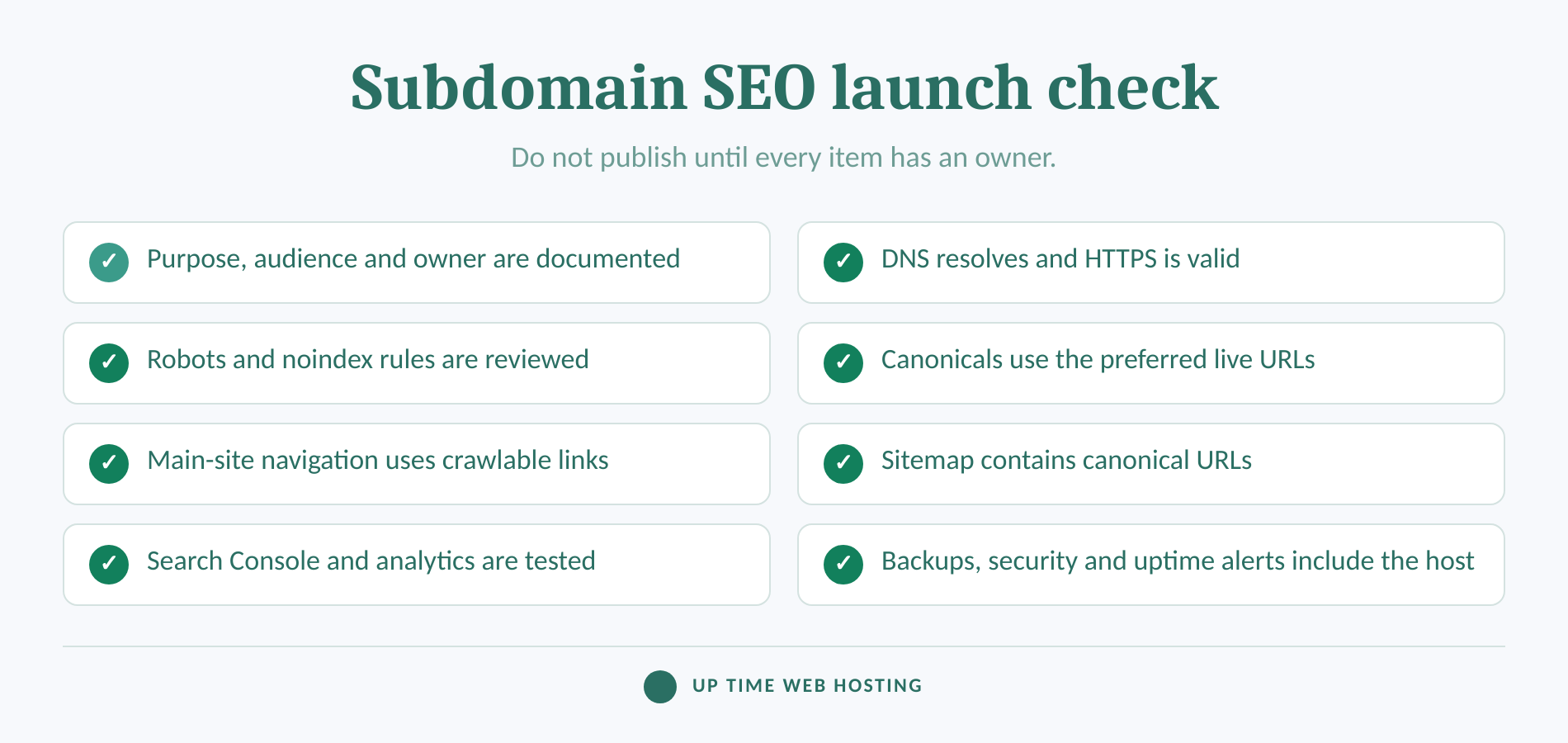
Launch the subdomain as a complete site section, not as an isolated technical experiment. Search engines and visitors should be able to reach it, understand it and move between it and the main website.
Use this checklist:
- Write its purpose in one sentence. Name the audience, task and owner before creating DNS records.
- Create DNS and HTTPS. Confirm that the intended hostname resolves, presents a valid certificate and returns an HTTP
200response for live pages. - Check crawl and index controls. Review the subdomain's own robots.txt file, page-level robots directives and authentication settings.
- Set preferred URLs. Use self-referencing canonicals on original pages and follow Google's canonicalisation guidance where duplicate or near-duplicate versions exist.
- Connect the navigation. Add descriptive links from relevant main-site pages and provide a clear route back. Do not depend on JavaScript controls that fail to produce crawlable links.
- Create and submit a sitemap. Include the canonical URLs that should appear in search results.
- Configure reporting. Use the root Domain property for the full view and add a URL-prefix property when the subdomain needs separate reporting or user access.
- Test analytics and conversions. Confirm cross-host session handling, goals, forms, ecommerce events and referral exclusions before launch.
- Add operational monitoring. Include the hostname in uptime checks, backups, security scans, certificate alerts and release documentation.
- Check special annotations. Add and test
hreflangwhen the subdomain represents a language or regional version.
WordPress users should also check titles, indexability, XML sitemaps, canonical tags and internal links after installation. The broader WordPress SEO best practices still apply when WordPress runs on a subdomain.
If the decision calls for a subdomain, compare UpTime's Australian cPanel website hosting plans. The September 2026 plan information lists DNS management, Let's Encrypt SSL and unlimited subdomains under fair use, allowing the hosting layer to support the structure without another domain registration.
A well-launched subdomain is crawlable, secure, linked, measurable and clearly owned.
What if you already use the wrong structure?
Do not migrate solely because a generic article says subdirectories always rank better. Move when the current structure causes a lasting problem with ownership, user experience, technology or maintenance.
Google's 2026 site move documentation warns that significant URL changes can cause temporary ranking fluctuations while Google recrawls and reindexes the new URLs. A small or medium-sized site may take a few weeks or more to settle.
Plan the move in this order:
- Record current rankings, clicks, conversions, backlinks and indexed URLs.
- Map every valuable old URL to its closest equivalent new URL.
- Prepare the new templates, content, canonicals, robots rules and sitemap before launch.
- Use direct server-side
301or308redirects rather than chains or redirects to an irrelevant home page. - Update internal links, navigation, structured data,
hreflang, images and downloadable-file URLs. - Submit the new sitemap and monitor both old and new URLs in Search Console and analytics.
- Keep permanent redirects for as long as possible. Google's current guidance recommends at least one year for a site move.
Google states that 301 and other permanent redirects do not cause a loss of PageRank, but that does not make a migration risk-free. Broken mappings, missing content, redirect chains, blocked resources and simultaneous redesigns can still damage results.
Check whether the Change of Address tool supports the exact source and destination. Google provides the tool for domain-level and subdomain moves, but not for a simple move between paths on the same hostname. A subdomain-to-path project combines a hostname change with a new path, so redirects and direct monitoring remain essential even when the tool can be used.
Migrate only when the long-term operating gain is worth the temporary search and implementation risk.
Experience Microsoft 365 Business Standard for free for 30 days.
Up to 25 users with full access to email, OneDrive and Teams. Includes full versions of desktop apps of Outlook, Word, Excel, PowerPoint and more.
Try Microsoft 365
What else do people ask about subdomains?
These answers cover the practical domain and hosting questions that often appear beside the subdomain SEO debate. Each answer applies independently of the decision framework above.
Which domain is best for SEO?
The best domain for SEO is a clear, memorable domain that matches the business and audience, not a keyword-stuffed hostname. Google gives no ranking preference to subdomains or subdirectories. For country targeting, a relevant country-code domain can be a strong location signal, but it also ties the site to that country.
Can I get a subdomain for free?
A subdomain usually does not require another domain registration because it sits under a domain already controlled. Hosting limits still apply. UpTime's September 2026 cPanel plan information lists unlimited subdomains under a fair-use policy, plus DNS management and Let's Encrypt SSL, so customers can create subdomains without buying another domain name.
What is a subdomain example?
In shop.example.com, shop is the subdomain and example.com is the registrable domain. Other common examples are support.example.com for a help centre, app.example.com for a customer application, and au.example.com for an Australian regional site. Each can point to a different platform or the same hosting account.
How do I find my subdomain?
Look at the hostname before the main domain in the browser's address bar. In support.example.com, support is the subdomain. Website owners can also check the Domains area in cPanel or inspect DNS records. Remember that www is technically a subdomain, even though it usually represents the main website.
Subdomains are easy to identify and often inexpensive to create, but their SEO result depends on how they are run.
What should you do next?
Write one sentence explaining why the proposed content needs its own hostname. Then name the team, platform, audience, tracking setup and maintenance process that will support it.
If the sentence describes the same website, team and customer journey, use a subdirectory. If it identifies a genuine operating boundary, a subdomain can be the cleaner choice without carrying an automatic SEO penalty.
Write the operating case first, then choose the simplest URL structure that supports it.