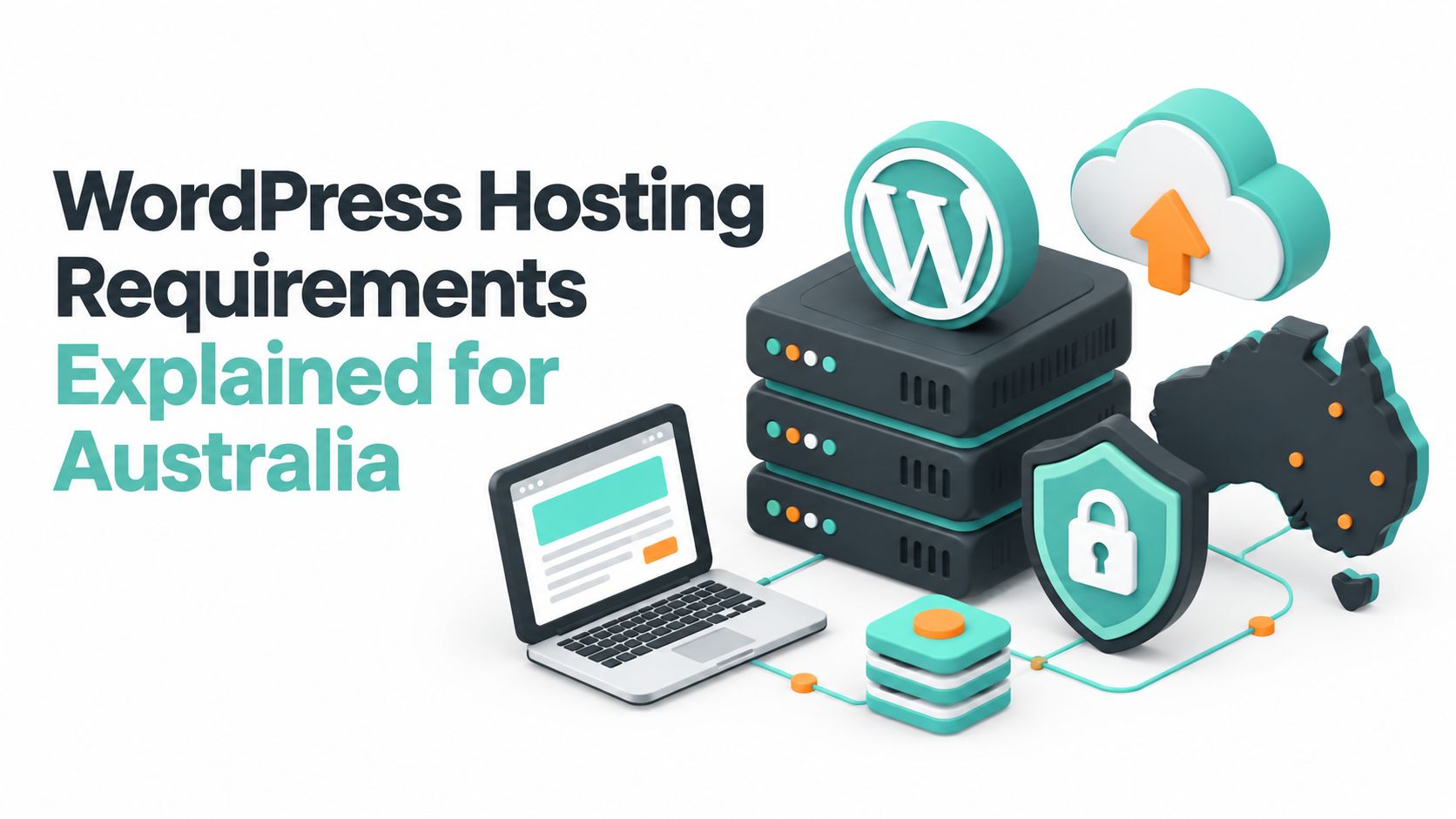
You're probably here because your WordPress site is due for an update, your host says everything is “compatible”, and you still don't feel confident pressing the button.
That caution is sensible. A lot of Australian business sites run on hosting that can still install WordPress, but isn't set up the way a current production site should be. The trouble usually shows up at the worst time. A plugin update fails, checkout stops working, or the site loads over a mix of secure and insecure connections. Nothing looked wrong when the plan was purchased. The gaps were hidden in the stack.
This guide is for that exact situation. It maps today's WordPress requirements to what Australian businesses need on the ground. That means looking at software versions, SSL, local server location, backup practices, and the less obvious local issue of whether your .au domain registration lines up with Australian eligibility rules.
Table of Contents
- Introduction to WordPress Hosting Requirements in Australia
- Understanding Minimum and Recommended Requirements
- Core Software Requirements for WordPress
- Server Environment and Performance Requirements
- Recommended Hosting Plan Specs by Site Size
- Practical Example Installing WordPress with cPanel
- WordPress Multisite and Advanced Configuration Requirements
- Australian Domain and Security Requirements for WordPress
- Common Gaps and How to Avoid Outdated Hosting Advice
- Quick Reference and Cross Referenced Lookup

Performance you can feel, backed by clients who depend on it. Read how our support and uptime create long‑term customer success.Power Your Business with Better Hosting
Introduction to WordPress Hosting Requirements in Australia
A common scenario goes like this. A small business in Brisbane has a WordPress site that's been running for years. The site still opens, email still works, and nobody has touched the hosting settings in ages. Then a routine plugin update runs, and suddenly something breaks in the admin area or on the public site.
The owner asks the obvious question. “How can WordPress break if the host says it supports WordPress?”
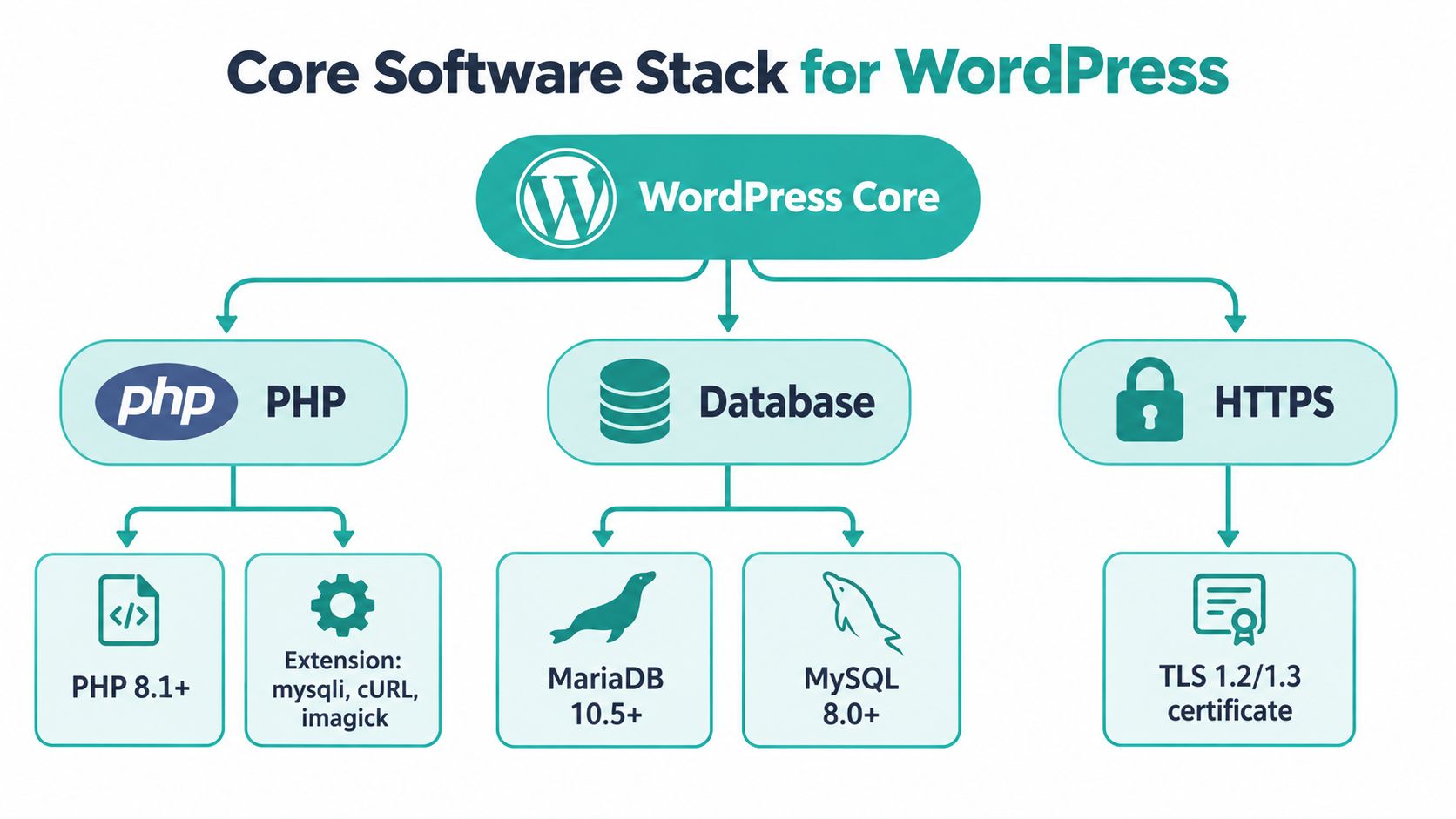
The answer is that supporting WordPress and meeting current WordPress hosting requirements are not the same thing. WordPress now recommends PHP 8.3 or greater, MariaDB 10.11 or greater or MySQL 8.0 or greater, and HTTPS support on its official requirements page. That's a modern baseline, not an optional extra. Older hosting can still look fine until an update, theme change, or new plugin exposes the mismatch.
Australian businesses have one more layer to think about. If the site uses a .au domain, the business also needs to satisfy local namespace rules. The auDA product guide says .au registrations require a validated Australian presence, and .com.au or .net.au names are limited to businesses or entities registered to trade in Australia or holding an Australian trademark.
That's why this topic isn't just about installing software. It's about making sure the hosting stack and the domain identity both fit the Australian operating environment.
If you want a plain-English primer on what WordPress hosting includes before getting into requirements, this short guide on what WordPress hosting means is a useful companion.
A WordPress site can be “running” and still be poorly prepared for updates, security, and growth.
What business owners usually need to know
Most owners don't need deep server administration. They need answers to practical questions:
- Will this host run current WordPress properly: Not just today, but after theme and plugin updates.
- Is the site secure by default: Meaning HTTPS is active and the environment isn't stuck on old software.
- Will the site feel quick for Australian visitors: Which often comes back to local data centre placement and server tuning.
- Does the .au domain setup pass local rules: Especially if the site trades under a .com.au or .au name.
What you'll get from this guide
By the end, you should be able to do three things with confidence:
- Check your host against current WordPress requirements
- Spot the difference between a basic install environment and a production-ready setup
- Choose a plan that suits an Australian SME without overspending or under-provisioning
Understanding Minimum and Recommended Requirements
When people compare hosting, they often mix up minimum requirements and recommended requirements. That confusion causes a lot of trouble.
Minimum requirements answer one narrow question. Can WordPress install?
Recommended requirements answer the question that matters more. Can WordPress run securely, update cleanly, and stay manageable for a real business website?
The practical difference
A ute that technically starts versus one that's roadworthy, serviced, and ready for daily work. Both might move. Only one is a sensible business tool.
For WordPress, the official recommendation is clear. The English Australia WordPress requirements page lists PHP 8.3 or greater, MariaDB 10.11+ or MySQL 8.0+, and says HTTPS is required for every install. If a host is still talking like old PHP generations are “good enough”, you're looking at dated guidance.
A simple decision rule
Use this rule when reviewing any Australian host.
- If it only meets the floor needed to install WordPress, keep looking.
- If it matches current WordPress recommendations and includes HTTPS by default, it's worth proper consideration.
- If it also gives you local infrastructure, backups, and easy version management, it's closer to what an SME should run in production.
That middle step matters because hidden maintenance risk often starts with old stack versions. A site may load today, but the risk appears later when a plugin update, payment integration, or theme change expects a more current environment.
Practical rule: Buy hosting for the next update cycle, not for the fact that the homepage loads right now.
What to ask before you commit
Busy owners don't need a long checklist. They need a short filter:
- Ask about PHP first: Is the account running the current recommended branch for WordPress?
- Confirm the database layer: Is it on MariaDB or MySQL at the versions WordPress now recommends?
- Check HTTPS status: Is SSL active from the start, or treated as a separate task?
- Look for operational readiness: Can the host handle upgrades cleanly, or will every change become a support issue?
If you're not sure how to interpret version numbers in your own account, treat them as labels for currency and maintainability. Higher isn't automatically better, but current and supported is the standard you want.
Host your website with our 5-star rated, cPanel website hosting plans.
Super fast servers, with security included and hosted in your choice of Australian Data Center.
View cPanel Plans
Core Software Requirements for WordPress
Once you separate “can install” from “can run well”, the next step is the actual stack. WordPress depends on a small group of core components. If one is outdated or misconfigured, the site may still work, but it won't be dependable.
PHP and what it actually does
PHP is the server-side language WordPress uses to build pages, process forms, run plugins, and power the admin area. If PHP is too old, WordPress may still launch, but compatibility trouble becomes more likely when you update themes or plugins.
The current recommendation is already established earlier in this guide. The practical point here is verification. In a typical cPanel environment, you can usually check the active PHP version through the PHP selector area or from WordPress itself in Site Health.
If you need help understanding what version you're looking at and why it matters, this article on the right PHP version for WordPress explains it in a practical way.
MariaDB and MySQL in plain English
WordPress stores site content, settings, users, and plugin data in a database. That database will usually be MariaDB or MySQL.
You don't need to obsess over which badge is on the box. What matters more is that the version is current enough for modern WordPress use. If a host can't clearly tell you which one your account uses and whether it matches current guidance, that's a warning sign.
A quick check inside WordPress often tells you the database type and version. On many sites, you'll find it under Tools > Site Health > Info.
HTTPS and SSL are not optional
HTTPS means your site loads over an encrypted connection. In practical terms, it protects form submissions, logins, and customer trust. WordPress now treats HTTPS as required, so any Australian hosting setup should include a valid SSL certificate and use secure URLs consistently.
Check three things:
- Your site opens with https
- The browser shows a secure connection
- WordPress address settings use the secure version
If the homepage redirects inconsistently or loads a mix of secure and insecure assets, you've got a setup issue to fix.
If SSL feels like an add-on in a hosting plan, the rest of the stack may also be behind current standards.
Required extras people forget
Beyond version numbers, WordPress also depends on common PHP extensions and normal web server functions. You don't always need to check these manually, because competent shared hosting should already have them available.
Still, if you're troubleshooting odd media upload issues, API failures, or permalink problems, ask whether the environment has the expected PHP modules and rewrite support enabled. That's often where a “WordPress-ready” label turns out to be thinner than it sounded.
Server Environment and Performance Requirements
A common Australian business scenario goes like this. The site loads well enough at first, then the admin area starts dragging during updates, booking requests take too long to save, and nobody is sure whether the problem is WordPress or the hosting account. In practice, this usually comes back to the server environment.
WordPress can run on modest hosting, but a business site needs more than the bare minimum. The server is the workshop your site works from. If the room is cramped, the lighting is poor, and the tools are dated, even simple jobs take longer and mistakes are harder to fix.
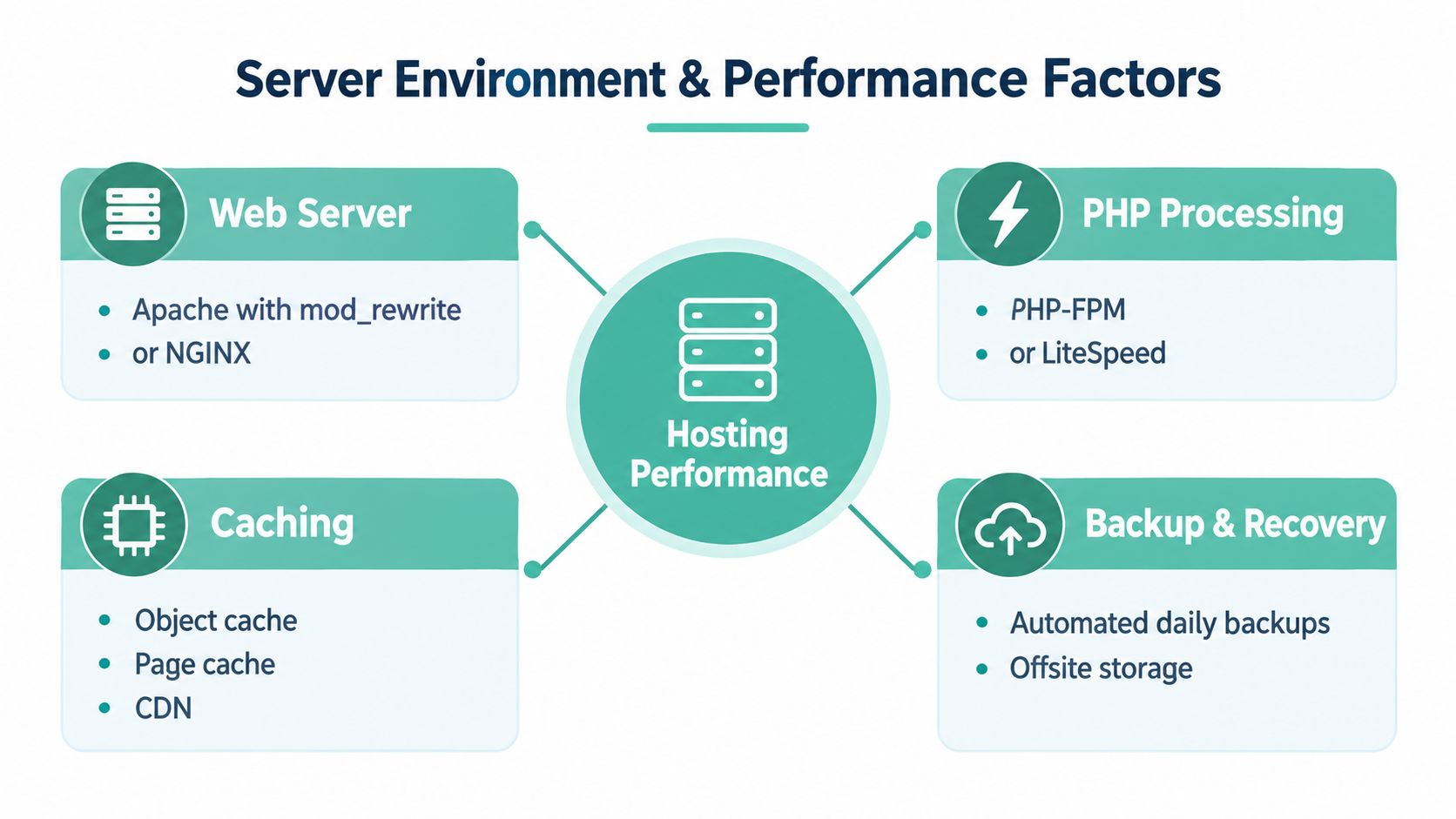
For Australian WordPress hosting, the checklist is fairly practical. You want an Australian data centre close to your customers, current PHP, a modern web server such as LiteSpeed, server-side caching, account isolation such as CloudLinux, SSD or NVMe storage, and off-site backups. Those pieces support faster response times, a steadier admin experience, and a safer recovery path if an update breaks something. A useful reference point is this guide to fast WordPress hosting in Australia.
Why Australian server location matters
Distance adds delay. If your customers are mainly in Sydney, Melbourne, Brisbane, Perth, Adelaide, or regional Australia, hosting the site in Australia usually helps pages start loading sooner.
That does not rescue a poorly built site with oversized images and heavy plugins. It does remove one avoidable source of slowness. For an Australian accountant, clinic, tradie, wholesaler, or local online store, that is the sensible starting point.
It also matches how many Australian businesses operate. If you hold a .au domain because you meet local eligibility rules and serve Australian customers, keeping the hosting close to that audience is often the cleaner fit.
The environment features worth asking about
Hosting pages can be vague, so ask direct questions and look for direct answers.
- Web server stack: Apache and Nginx are common. LiteSpeed is also widely used for shared WordPress hosting because it can handle WordPress traffic efficiently.
- Server-side caching: This stores ready-to-serve page data so the server does less repeated work.
- Account isolation: CloudLinux-style isolation helps stop one busy or misbehaving account from slowing down others on the same server.
- Storage type: SSD is standard on decent hosting. NVMe is a newer storage type that usually improves read and write speed.
- Off-site backups: A backup stored separately from the main server gives you a better recovery option after file corruption, failed updates, or account issues.
What these features change in day-to-day use
The point of these features is not technical bragging rights. It is fewer interruptions.
| Area | What you notice | Why it matters |
|---|---|---|
| Site speed | Pages respond faster and more consistently | Visitors are less likely to give up while waiting |
| Admin stability | Updates, edits, and plugin changes are less likely to hang or time out | Staff can work in the site without second-guessing each task |
| Recovery | Backups are easier to restore after a bad plugin or theme update | Problems stay manageable instead of turning into an outage |
A good example is a typical SME WordPress site with a visual builder, forms, image galleries, and a booking tool. That is still a small business website, but it asks more from hosting than a five-page brochure site. On an older stack with weak storage and no server-side caching, the admin area often feels slow even before traffic increases.
A note on hosting services
If you are comparing Australian hosting services, look for plans that list the underlying platform clearly instead of relying on broad labels like "WordPress optimised". UpTime Web Hosting, for example, lists cPanel, LiteSpeed, CloudLinux, and encrypted off-site backups. That sort of detail helps you judge whether a plan matches the requirements above.
Recommended Hosting Plan Specs by Site Size
Most business owners don't need “the biggest plan”. They need a plan sized for the kind of WordPress site they run.
Hosting advice often becomes unhelpful. One site might be a simple brochure with a few pages and a contact form. Another might be a WooCommerce store with regular updates, heavier plugins, and a much busier admin area. Both are “WordPress sites”, but they won't behave the same way on the same resources.
How to think about sizing
Start with workload, not vanity.
A site tends to need more headroom when it has:
- Dynamic features: Stores, membership areas, booking tools, or user dashboards
- Heavier plugins: Builders, form suites, SEO tools, backup plugins, and image processing
- Larger media libraries: Product images, blog graphics, downloadable files, or video embeds
- More people working in the site: Staff editing content, managing orders, or updating stock
Recommended WordPress Hosting Specs by Site Size for Australia
| Site Size | Storage and Memory | CPU and Performance Features | Best For |
|---|---|---|---|
| Small | Modest storage, enough memory for core plugins and routine updates | Current PHP, HTTPS, basic caching, Australian server location | Brochure sites, tradie sites, consultant pages, local services |
| Medium | More room for media, backups, and plugin growth | Stronger CPU allocation, server-side caching, account isolation, SSD or NVMe storage | Growing business sites, active blogs, lead generation sites |
| Large or dynamic | Generous storage and memory headroom for complex workloads | Higher CPU availability, tuned caching, stronger isolation, faster storage, dependable off-site backups | WooCommerce, booking systems, multisite, high-change content teams |
Upgrade triggers to watch for
You don't need to resize hosting every month. You do need to notice when the site has outgrown the plan.
A good rule is to upgrade when the admin area starts struggling during normal business tasks, not after customers begin reporting problems.
Common triggers include:
- Plugin or theme updates taking too long
- Media uploads feeling slow or timing out
- Checkout, forms, or booking steps becoming inconsistent
- Staff noticing delays while editing pages
- Frequent need to disable plugins just to keep things responsive
Avoiding two common mistakes
The first mistake is buying the cheapest plan because the current site is small. That ignores how quickly WordPress sites pick up extra plugins, larger images, and new marketing tools.
The second is overbuying enterprise-style resources for a basic site. Many Australian SMEs just need a balanced shared or managed environment with current software, local hosting, SSL, caching, and clean upgrade paths.
That middle ground is where most sensible WordPress hosting decisions sit.
Register your new domain name at competitive market prices including free domain add-ons like privacy, DNS Hosting, Custom Nameservers and Forwarding.
Always the best price and no nasty renewal price hikes.
Register A Domain Name
Practical Example Installing WordPress with cPanel
It's 4:30 on a Thursday, the new site needs to go live soon, and you log in to your hosting account hoping WordPress won't turn into an IT project.
On a properly set up Australian cPanel account, it usually doesn't. The host has already prepared the server pieces WordPress needs, so the install feels more like filling out a form than building a server from scratch. That matters for busy Australian businesses, because the goal is not just to install WordPress. The goal is to get a site running on the right domain, with HTTPS working, and with settings that make sense for local customers and staff.
The basic install flow
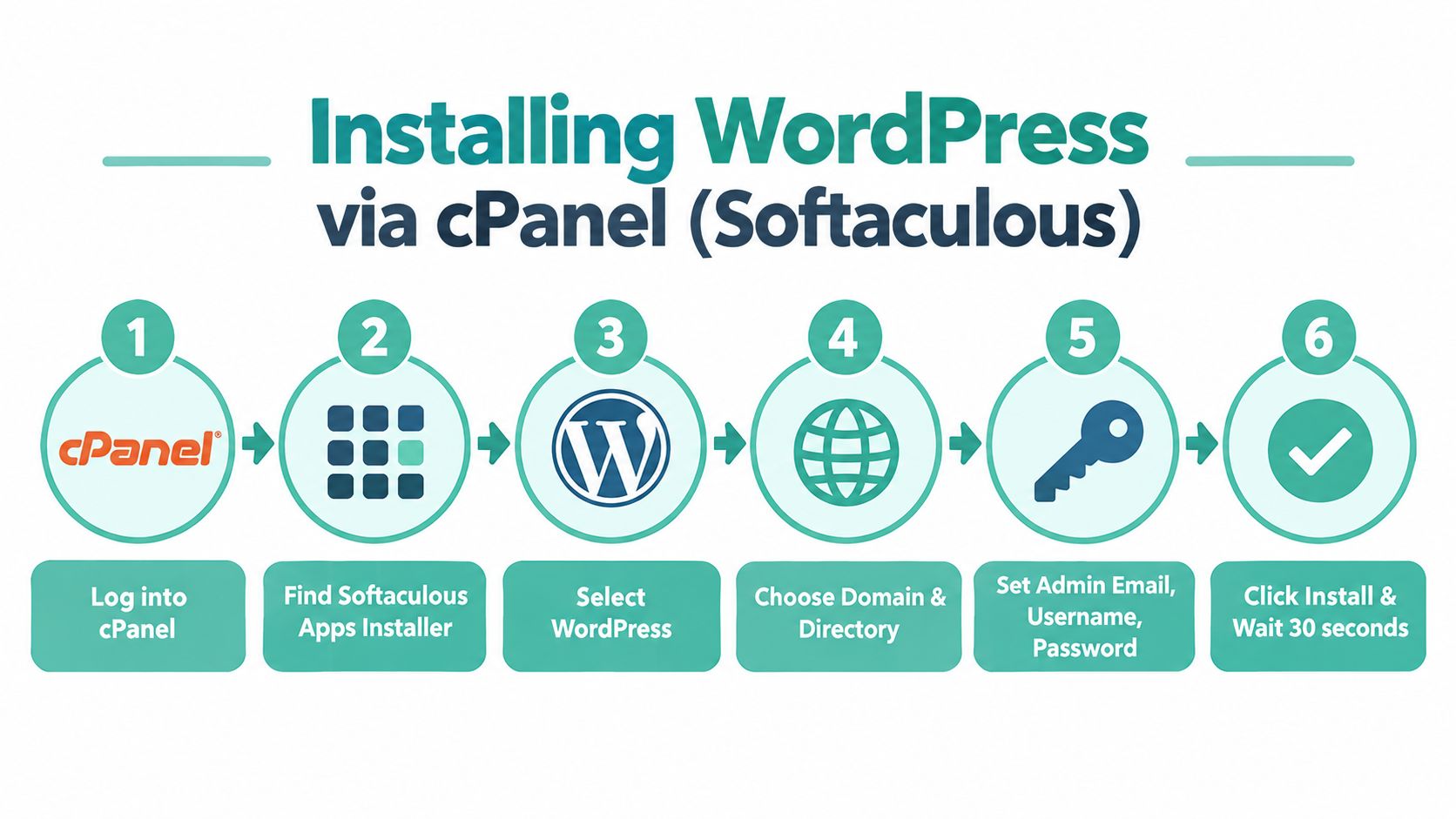
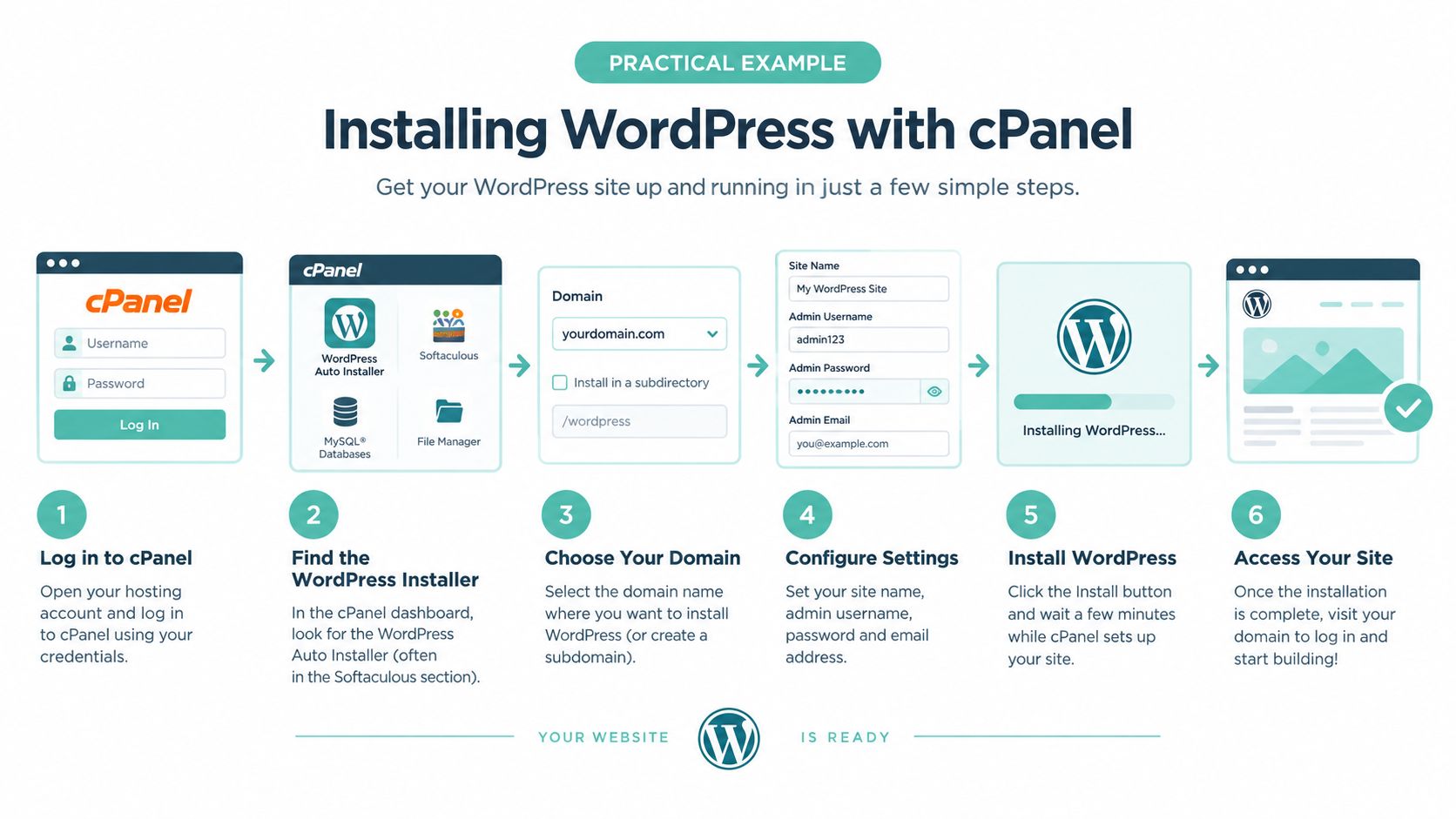
cPanel is the hosting control panel. Softaculous is the installer inside it that handles the setup steps for you. If your host offers both, the usual process is simple:
- Log in to cPanel
- Open Softaculous Apps Installer
- Choose WordPress
- Pick the domain and install folder
- Add the site name, admin username, and password
- Start the installation
A good way to picture it is a shop fit-out where the plumbing and wiring are already done. You are choosing the shop name, front door, and keys, while the host has already put the building services in place.
If you want the full screens and step-by-step clicks, this guide on creating a website using cPanel and WordPress shows the practical workflow.
What cPanel is doing for you behind the scenes
The install looks quick because several requirements have already been met before you touch WordPress.
- PHP is installed on the server. WordPress runs on PHP, so the host has to provide a current version that WordPress supports.
- A database is available. WordPress stores posts, pages, settings, and user accounts in that database.
- The web server is configured to serve WordPress properly. That includes permalink support and the standard server functions WordPress expects.
- SSL is ready to use, or easy to enable. Your site should load over HTTPS from the start, especially if you are collecting enquiries or payments.
- The domain is already connected to the hosting account. For Australian businesses, that often means making sure the .com.au or .au domain is pointed to the right nameservers or DNS records before installing.
That is why one-click installs feel easy on decent hosting. The installer handles the WordPress application layer because the hosting layer was prepared first.
Checks to do straight after installation
Don't stop at “installation complete”. Spend a few minutes checking the basics before you upload content or add plugins.
- Confirm the site opens on HTTPS
- Check the WordPress admin login works properly
- Open Site Health in the dashboard to review server details and obvious configuration issues
- Set the timezone to the relevant Australian city so scheduling, forms, and order notifications match local business hours
- Test a contact form or login page if one is already active
- Confirm the correct domain is being used if you have both a .au and .com.au and only one should be the live address
One small Australian wrinkle catches people out. If the business has registered a new .au name alongside an older .com.au, install WordPress on the domain you plan to keep as primary. Changing it later is possible, but it adds cleanup work around links, redirects, and SSL.
A final practical check is speed from where your customers are. If your audience is mainly in Sydney, Melbourne, Brisbane, Perth, or regional Australia, a local data centre usually gives the WordPress admin area a more responsive feel and helps site pages load with less delay. You'll notice that during day-to-day editing long before you start reading server reports.
WordPress Multisite and Advanced Configuration Requirements
Most business sites don't need WordPress multisite. If you're running one brand, one site, and one admin area, standard hosting requirements are enough.
Multisite changes that. It lets you run a network of sites from one WordPress installation, which is useful for organisations, agencies, schools, or businesses managing separate branches or microsites. It also adds stricter requirements.
The baseline for multisite
For Australian WordPress installs using multisite, the practical guidance is more specific. A stable network needs PHP 8.1+, MySQL 5.7 or MariaDB 10.4+, and Apache or Nginx with mod_rewrite according to this guide on WordPress multisite hosting.
That doesn't replace the broader recommendation discussed earlier for current WordPress deployments. It means multisite has its own operational checklist as well.
Subdomains add extra moving parts
If the multisite network uses subdomains, you also need:
- A wildcard DNS record
- A wildcard SSL certificate
Those two items are easy to miss, and they're often the reason a multisite rollout stalls halfway through setup.
Multisite usually fails at the edges. Not because WordPress can't create the network, but because the supporting domain and SSL pieces weren't prepared first.
When advanced setup is worth it
Multisite makes sense when you need centralised user management, shared codebase control, or many closely related sites. It's often the wrong choice when the sites are operationally separate, use very different plugins, or need distinct hosting policies.
Before enabling it, ask your host three plain questions:
- Is multisite supported on this plan
- Can the environment handle subdomain networks if needed
- Will SSL and domain configuration support the structure cleanly
If the answers are vague, pause there. Advanced WordPress setups need clarity before deployment, not after.
Experience Microsoft 365 Business Standard for free for 30 days.
Up to 25 users with full access to email, OneDrive and Teams. Includes full versions of desktop apps of Outlook, Word, Excel, PowerPoint and more.
Try Microsoft 365
Australian Domain and Security Requirements for WordPress
A Brisbane retailer launches a new WordPress site on Friday, points a fresh .au domain at it, and by Monday runs into two separate problems. The domain paperwork is unclear, and the site still shows as “not secure” in some browsers. Both issues sit outside WordPress itself, but both affect whether the site feels ready for customers.
In Australia, that is the practical difference from generic hosting advice. You are not only checking whether WordPress can run. You are also checking whether your domain can be held lawfully, whether HTTPS is configured properly, and whether the hosting setup suits visitors in Australia.
The .au domain side
A .au domain works a bit like a business sign on a leased shopfront. You can put your name on it, but you still need the right to occupy the space.
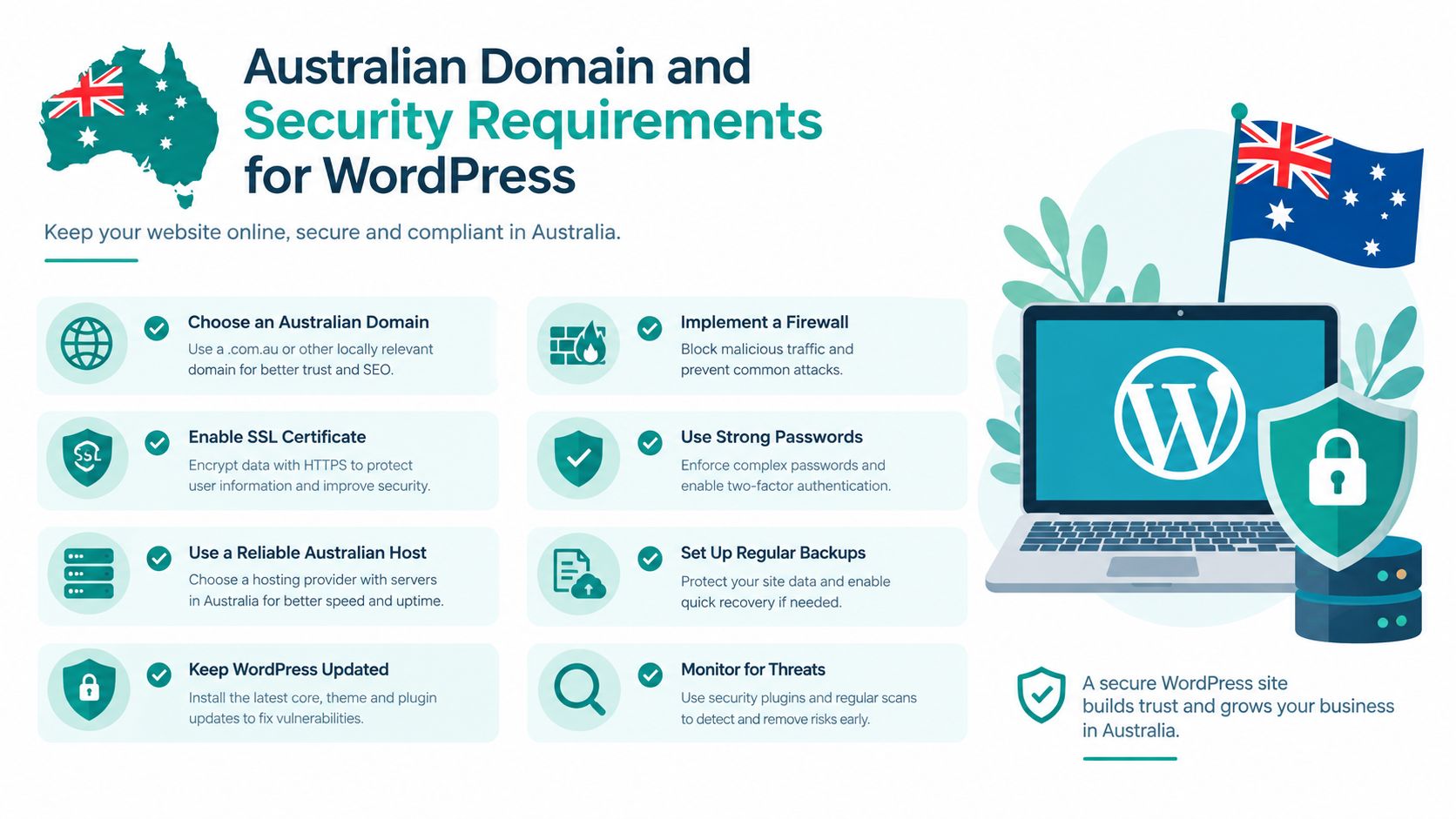
The auDA rules and policy material set the framework for who can register and hold names in the .au namespace. For a business owner, the useful takeaway is simpler than the policy wording:
- A .au domain requires a real Australian connection
- Eligibility is checked as part of registration
- The name you choose should match your business identity, trading name, or another valid basis under the rules
If you are unsure whether your ABN, business name, or organisation details line up, this guide to Australian domain registration requirements is a practical starting point.
The security side
Security starts with HTTPS. That means the site has a valid SSL certificate and every page, image, form, and login loads over a secure connection.
For an Australian business site, that is not a technical extra. It affects trust straight away. A customer who sees browser warnings, mixed-content errors, or a login form on plain HTTP may stop there, especially on mobile.
WordPress also depends on ordinary account security around the server. Good hosting should make it easy to use current PHP versions, keep certificates renewed, isolate accounts properly, and run backups you can restore without a support marathon. If your customers are mainly in Sydney, Melbourne, Brisbane, Perth, or Adelaide, local or nearby data centre options can also trim delay, which helps the site feel more responsive during logins, checkout, and form submissions.
Why domain and security checks should happen together
These checks belong in the same conversation because they solve different parts of the same business problem. One confirms you can use the name. The other confirms people can use the site safely.
A practical checklist looks like this:
| Requirement area | What to confirm |
|---|---|
| Domain eligibility | The registrant has a valid Australian Presence and the .au name fits that basis |
| HTTPS setup | SSL is active, renews reliably, and the whole site loads over HTTPS |
| Server location | The host offers Australian or nearby infrastructure suitable for your audience |
| Business-grade safety | Backups, account isolation, and update support are available on the plan |
For many Australian SMEs, this is the right standard to aim for. The domain is valid. The padlock works. The site loads quickly enough for local visitors. And the hosting plan is not oversized, but it is not so cheap that routine security work becomes your problem.
Common Gaps and How to Avoid Outdated Hosting Advice
A lot of hosting comparison content lags behind reality. It tells readers that if WordPress can install, the host is fine. That advice is too shallow for a live business site.
The more useful question is whether the host is aligned with current WordPress core requirements and security defaults. The older way of judging hosts often treated previous PHP generations as acceptable for ordinary use. That's where businesses get caught. The site works until a plugin, theme, or checkout flow depends on a more modern environment.
The hidden problem with old advice
The biggest gap in older articles is that they focus on compatibility, not operational readiness.
A host might technically run WordPress while still creating friction around:
- Routine updates
- Staging and rollback
- Backups after failed changes
- Plugin compatibility under current PHP
- Performance tuning from day one
For lean Australian teams, that matters more than abstract technical purity. If the office manager, agency, or owner is the one handling updates, they need a setup that reduces risk rather than exposing hidden weak points.
Red flags in hosting marketing
When reading host pages or old blog comparisons, watch for these signs:
- The copy talks vaguely about “WordPress support” but not current versions
- SSL sounds optional rather than standard
- There's no mention of local data centre options for Australian audiences
- Backups are mentioned, but restore workflow is unclear
- The plan looks cheap because key operational features are separate extras
Hosting advice becomes outdated fastest where it talks only about installation and says almost nothing about safe upgrades.
Better questions to ask
If you want to cut through marketing, ask short operational questions:
- What PHP and database versions are standard on this plan
- Is HTTPS active by default
- Are backups off-site and easy to restore
- Is the platform tuned for WordPress from the start
- Can the plan grow without a painful migration
Those questions are harder for vague hosts to answer. That's useful. A provider that can explain the environment clearly is usually easier to work with when something needs attention later.
Quick Reference and Cross Referenced Lookup
If you only need a fast checklist, use this section as your bookmarkable version.
Fast checklist for WordPress hosting requirements
- Core software: WordPress currently recommends PHP 8.3 or greater, MariaDB 10.11+ or MySQL 8.0+, and HTTPS support, as covered earlier from the official requirements reference.
- SSL and transport: The site should load fully over HTTPS with a valid certificate.
- Australian locality: Choose an Australian data centre if your audience is mainly in Australia.
- Environment quality: Look for LiteSpeed or another modern web server setup, caching, account isolation, SSD or NVMe storage, and off-site backups.
- .au domain fit: If using .au, .com.au, or .net.au, confirm the registration matches Australian eligibility rules.
- Advanced needs: If using multisite with subdomains, prepare wildcard DNS and wildcard SSL before launch.
Glossary in plain language
| Term | Meaning |
|---|---|
| PHP | The language WordPress uses on the server to generate pages and run plugins |
| MariaDB / MySQL | The database engine that stores your content, users, and settings |
| HTTPS | Secure website delivery over an encrypted connection |
| LiteSpeed | A web server platform often used for WordPress performance on shared hosting |
| CloudLinux | A hosting platform approach that isolates accounts to improve stability |
| TTFB | Time to first byte. A common way to think about how quickly the server starts responding |
| Off-site backup | A backup stored separately from the live hosting environment |
| Multisite | One WordPress installation that runs a network of sites |
Cross-reference guide
Use these shortcuts when you're diagnosing one specific issue:
- Version confusion: Go to Understanding Minimum and Recommended Requirements
- Need to verify software in your account: Go to Core Software Requirements for WordPress
- Slow site or weak admin performance: Go to Server Environment and Performance Requirements
- Choosing the right plan size: Go to Recommended Hosting Plan Specs by Site Size
- Installing a fresh site in cPanel: Go to Practical Example Installing WordPress with cPanel
- Running a site network: Go to WordPress Multisite and Advanced Configuration Requirements
- Working with .au domains and SSL: Go to Australian Domain and Security Requirements for WordPress
The simplest way to use this guide is to start with the symptom you have. Slow site, broken update, new install, or domain question. Then check the matching section rather than trying to solve everything at once.
If you want a local hosting environment that already lines up with these WordPress hosting requirements, UpTime Web Hosting provides Australian cPanel and WordPress hosting with local infrastructure, free SSL, CloudLinux, LiteSpeed, and encrypted off-site backups. If that's the kind of setup you're after, visit UpTime Web Hosting and compare the hosting options against the checklist above.