In short
A 404 Not Found error means the web server is reachable, but it cannot find the requested page or file at that URL. Fix it by confirming the address, restoring missing content, repairing WordPress permalinks or internal links, or adding a 301 redirect when the content has moved to a clear replacement.
Key takeaways
- A genuine 404 means a server answered the request but could not supply the requested resource.
- Use a permanent redirect only when the missing URL has a clear, relevant replacement.
- WordPress 404 errors affecting many published posts often point to rewrite rules, permalink settings or
.htaccessconfiguration. - A custom error page must still return an HTTP 404 status rather than a successful 200 response.
- Not every 404 needs repair, but broken internal links, submitted sitemap URLs and valuable moved pages should be prioritised.
Contents
- What does 404 page not found mean?
- How do I fix error 404 Not Found?
- Why is WordPress returning 404s for published posts or pages?
- When should I redirect a missing URL, leave a 404 or use 410?
- How can I find every broken URL on my site?
- What should a useful custom 404 page contain?
- When is the problem actually DNS, hosting or server configuration?
- What else do website owners ask about 404 errors?
- What should you do next?
Start with one exact failing URL rather than changing settings across the whole website. The response, the page’s intended purpose and the number of affected URLs will usually reveal whether the repair belongs in the content management system, a redirect, an internal link or the hosting configuration.
What does 404 page not found mean?
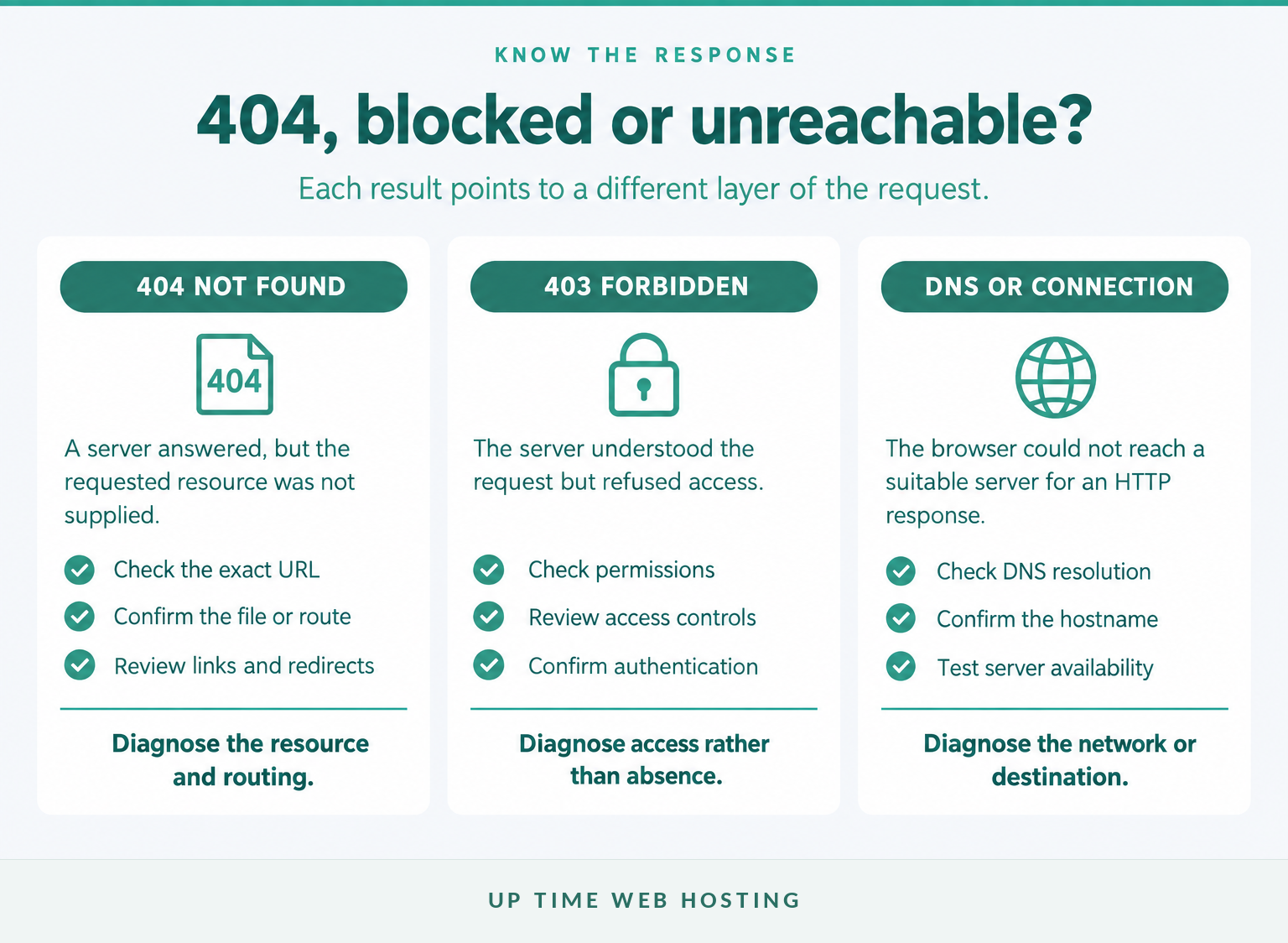
A 404 Not Found response means the server did not find a current representation of the requested resource, or is unwilling to disclose that one exists. A 404 does not say whether the missing resource is temporarily unavailable or permanently gone.
The HTTP Semantics standard, RFC 9110, published in 2022, defines that behaviour and recommends 410 Gone when the server knows the removal is likely to be permanent. The standard also allows a server to return 404 instead of 403 when it deliberately wants to conceal the existence of a forbidden resource. (rfc-editor.org)
The visible wording can vary. A browser or website template may display “404 Not Found”, “Not Found 404”, “Page not found” or a branded message, but the HTTP response code is the part that software, crawlers and monitoring systems use.
Do not confuse a 404 with these failures:
- 403 Forbidden: the server understood the request but refuses access.
- 5xx server error: the server received a valid-looking request but could not complete it.
- DNS or connection failure: the browser could not reach a suitable web server to receive an HTTP response.
- Soft 404: the page looks missing to people or search systems but returns a successful 200 status.
A 404 is classified as a client-error response because the requested address did not produce a resource, but that does not automatically make it the visitor’s fault. A broken menu link, deleted product page, failed deployment or incorrect rewrite rule is controlled by the website owner.
A 404 confirms that a server answered, but it does not confirm that the requested page exists on that server.

Performance you can feel, backed by clients who depend on it. Read how our support and uptime create long‑term customer success.Power Your Business with Better Hosting
How do I fix error 404 Not Found?
Fix a 404 by identifying whether the address is wrong, the content moved, the content was deleted or the server routed the request incorrectly. Do not begin by sending every missing URL to the home page, because that hides the cause and can create soft 404 errors.
- Copy the complete failing address. Include the domain, path, file name and query string. Record where the link came from, such as a menu, search result, email, sitemap or another website. If a diagnostic tool reports only part of the address, understanding how URLs and URIs differ can help isolate the component sent to the server.
- Confirm the real HTTP response. Test the URL in a private browser window and inspect its status with browser developer tools, a header checker or
curl -I https://example.com/old-page. A friendly error design is not proof that the response is genuinely 404. Google defines a soft 404 as an error-like page returning 200 success. (developers.google.com)
- Decide whether the resource should exist. Search the content management system, media library and hosting files. Confirm that the item is published, deployed to the expected directory and available under the exact slug or filename requested.
- Trace the broken reference. Check the menu item, body link, canonical URL, sitemap entry, structured data, image source or external campaign that sends people to the missing address. Fixing only the destination leaves the incorrect reference in circulation.
- Apply one appropriate repair. Restore the missing resource if it should still exist, correct the referring link if the address was wrong, create a permanent redirect if the content moved, or leave a genuine 404 or 410 if the content is gone without a replacement.
- Retest both sides of the change. The old URL should return the intended status or redirect once, and any redirect destination should return 200. Purge relevant server or content delivery network caches after the repair because RFC 9110 permits 404 responses to be cached unless other controls say otherwise. (rfc-editor.org)
If the error appears on a website that is not under your control, check the spelling, remove obvious tracking parameters, move up one directory or use the website’s navigation and search. Only the website owner can restore a deleted resource or configure its redirect.
The correct fix depends on what should happen to that exact URL, not on making the error message disappear at any cost.
Why is WordPress returning 404s for published posts or pages?
When the WordPress home page and administration area work but published posts, pages or custom content return 404, the likely problem is URL rewriting rather than a total server outage. Start with WordPress permalink rules and .htaccess, then narrow the diagnosis to the affected content type or individual slug.
Use this order:
- Record the current permalink structure. Do not switch structures casually. WordPress describes permalinks as permanent content addresses, and changing them can break existing links unless old URLs are mapped to their replacements. WordPress.org’s permalink documentation also says the hosting environment must support the configuration required for pretty permalinks. (wordpress.org)
- Open Settings > Permalinks. As of September 2026, the current WordPress Permalinks screen documentation states that visiting this screen triggers a flush of rewrite rules. Saving is not required solely to perform that flush. Retest an affected page after visiting the screen. (wordpress.org)
- Save only when settings need to be applied or confirmed. If
.htaccessis writable, WordPress can update it automatically after Save Changes. If it is not writable, WordPress displays the rewrite rules that must be added manually. Back up.htaccessbefore editing it and ask the host for assistance if file permissions or rule placement are unclear. (wordpress.org)
- Clear relevant caches. Purge the WordPress page cache, server cache and content delivery network cache after rewriting or redirect changes. Then test while logged out so an administration session does not mask the public response.
- Check the content itself. For one failing page, confirm that it is published, its slug matches the link, its parent page still exists and no plugin has assigned a conflicting route. If only one custom post type fails, inspect the plugin or theme that registers that content type.
- Test conflicts safely. Use a staging copy where possible. Temporarily disable the suspected routing, redirect or security component, retest, then restore it before checking the next component. Avoid disabling multiple live-site plugins at once because that makes the result difficult to interpret.
| WordPress failure pattern | Likely cause | First check |
|---|---|---|
| Home page works, but most posts return 404 | Rewrite or permalink rules | Visit Settings > Permalinks, then inspect .htaccess |
| Only one page returns 404 | Wrong slug, status, parent or link | Compare the published permalink with the failing URL |
| One custom post type returns 404 | Plugin or theme rewrite conflict | Test the component on staging and regenerate its rules |
| URLs fail after a migration | Old paths, document root or incomplete redirect mapping | Compare the old and new URL lists |
| The repair works only while logged in | Cache or access-rule difference | Purge caches and test the public response |
After moving a WordPress website, compare the source and destination URL lists before changing individual pages. A structured website migration process reduces the risk of missing media, old subdirectories and unrecorded redirect mappings.
When many WordPress URLs fail together, inspect the shared rewrite layer before editing every page separately.
Host your website with our 5-star rated, cPanel website hosting plans.
Super fast servers, with security included and hosted in your choice of Australian Data Center.
View cPanel Plans
When should I redirect a missing URL, leave a 404 or use 410?
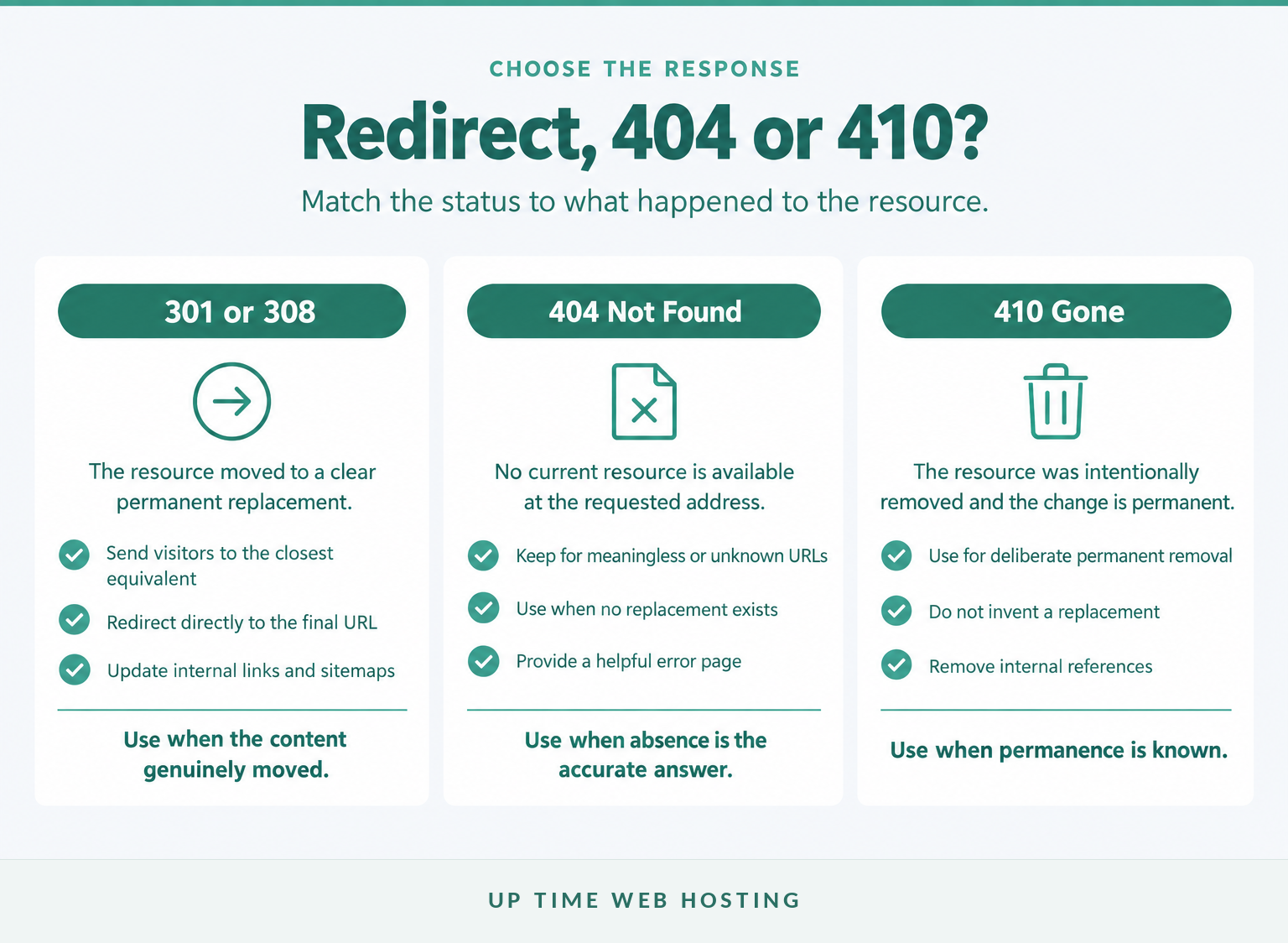
Use a permanent redirect when a missing page has moved to a close replacement, return 404 when no current resource is available, and use 410 when the server deliberately identifies the removal as permanent. The chosen response should describe what actually happened to that URL.
Use a 301 or 308 permanent redirect when:
- a page moved to a new address;
- a product was replaced by a closely equivalent product or category;
- a site migration changed the URL structure;
- two duplicate addresses have been consolidated into one preferred page.
Google recommends server-side permanent redirects for permanent URL changes. The destination should satisfy substantially the same visitor intent rather than merely being a convenient live page. (developers.google.com)
Keep a 404 when:
- the URL never existed and is not a common mistake;
- the resource was removed without a useful replacement;
- an automated crawler invented a meaningless address;
- the server cannot determine whether the absence is temporary or permanent.
Use 410 Gone when:
- the resource was intentionally removed;
- the removal is expected to be permanent;
- explicitly signalling that permanent removal is operationally useful.
Google Search Central advises returning 404 or 410 when content is unavailable and has no similar replacement. Redirecting every missing address to the home page can confuse people and may be treated as a soft 404. (developers.google.com)
For cPanel accounts, the Redirects interface documentation, last modified on 8 July 2026, identifies Permanent as a 301 redirect. It also warns that cPanel adds rules to the bottom of .htaccess, where WordPress or another application may override or ignore them because of rule order. (docs.cpanel.net)
Redirect a missing URL only when the destination is the page the visitor was reasonably trying to reach.
How can I find every broken URL on my site?
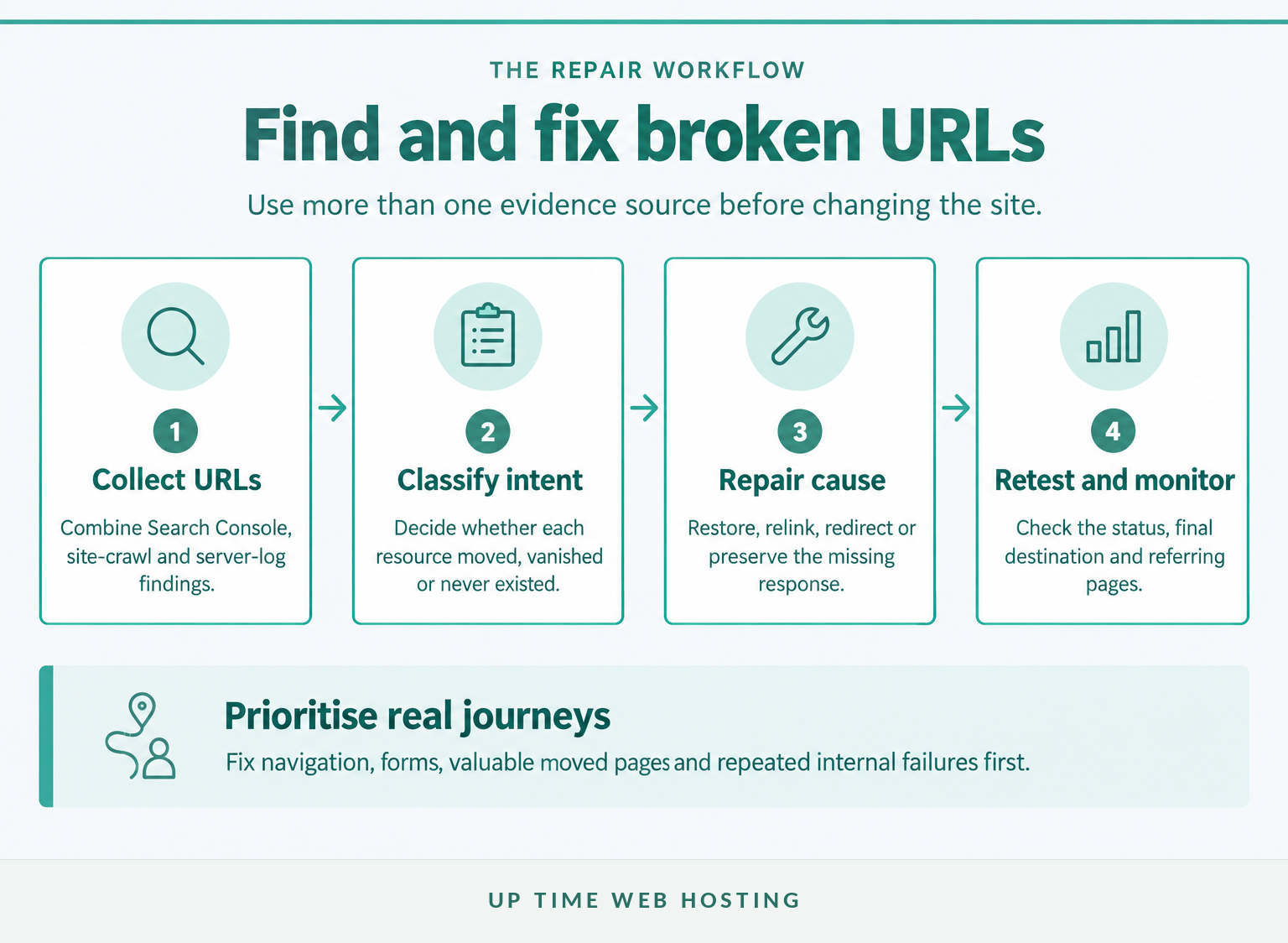
Find broken URLs by combining search-engine reports, an internal site crawl and server request logs. No single source shows every failure because each one observes a different path by which people and bots reach the website.
Check Search Console
Review the Page Indexing report for Not found and Soft 404 examples. Inspect whether each URL came from a submitted sitemap, an internal link or another discovery source. Google says many intentional 404s can be left alone, while moved pages, submitted URLs and incorrect internal references deserve attention. (support.google.com)
Crawl the website’s own links
Run a crawler across pages, menus, images, stylesheets and scripts. Export the source URL, broken destination, anchor or asset reference, and response code. Fixing the source link is often cleaner than creating a redirect for a typing mistake that exists only on one page.
Routine reviews should also check redirect chains, outdated sitemap entries and links that no longer match their anchor text. These checks belong beside broader WordPress SEO maintenance rather than being delayed until visitors report an error.
Review server and application logs
Logs reveal requested 404 URLs that are not linked internally, including old campaign paths, external backlinks, mistyped addresses and automated probes. Group repeated requests by path, referring page and user agent so high-value failures are not lost among meaningless bot traffic.
Prioritise repairs in this order:
- URLs linked from primary navigation, forms or checkout flows.
- Moved pages with relevant external links or regular visits.
- Broken internal links that affect many pages.
- Submitted sitemap URLs that should still be live.
- Missing images, scripts or styles that break otherwise valid pages.
- Common misspellings with a clear intended destination.
After each repair, test the old address, its final destination and the pages that linked to it. Monitor the reports again after crawlers and caches have had time to observe the change.
Use multiple evidence sources, then prioritise the 404s that interrupt real journeys or contradict the website’s intended structure.
What should a useful custom 404 page contain?
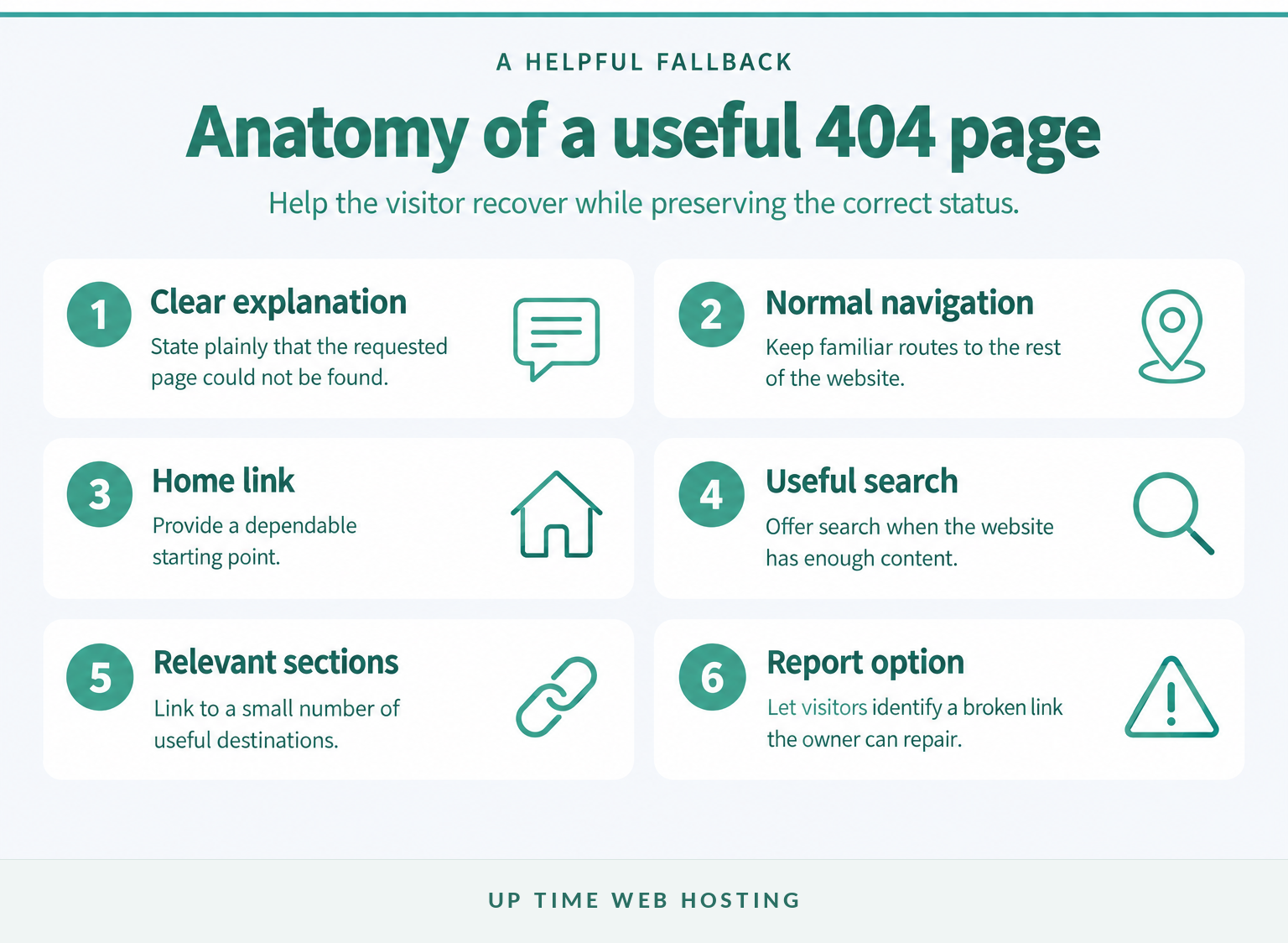
A useful custom 404 page tells visitors that the requested page could not be found and gives them a practical route forward. The page must still return an HTTP 404 status so browsers and search systems do not mistake it for valid content.
Include:
- a plain explanation that the page is unavailable;
- the normal website navigation;
- a link to the home page;
- search when the site has enough content to justify it;
- links to a few genuinely useful sections;
- a way to report a broken link where reports can be acted on.
Avoid automatically redirecting visitors after a countdown. The person may need the original URL to report the problem, and an automatic jump can hide a faulty internal link from both the visitor and the site owner.
Google’s current crawling guidance recommends familiar navigation, popular content links and a reporting option, while requiring the server to preserve the 404 response. (developers.google.com)
On an Apache server, the ErrorDocument directive can point 404 responses to a local error document. On supported hosting accounts, the cPanel Error Pages interface can customise the page associated with a selected status code. (httpd.apache.org)
A good 404 page helps the visitor recover without pretending that the missing resource still exists.
Register your new domain name at competitive market prices including free domain add-ons like privacy, DNS Hosting, Custom Nameservers and Forwarding.
Always the best price and no nasty renewal price hikes.
Register A Domain Name
When is the problem actually DNS, hosting or server configuration?
A normal 404 is a page-level response, but hosting or DNS configuration can cause the request to reach the wrong site, directory or application. If the browser shows a DNS lookup failure, connection error or 5xx response instead, diagnose that error rather than treating it as a missing page.
Check these layers:
- Hostname: Test both the intended host and any
wwwor subdomain variant. One may point to a different service or document root. - DNS destination: Confirm that the hostname resolves to the expected hosting environment. A guide to DNS records not found can help when the domain does not resolve or points somewhere unexpected.
- Document root: Confirm that the domain is attached to the directory containing the website. A correctly uploaded file in the wrong document root still appears missing to visitors.
- Deployment: Check that the page, file, build output and media assets were included in the most recent release.
- Rewrite configuration: Inspect
.htaccess, application routes and redirect order. A syntax problem may cause a different error, while missing or overridden rewrite rules commonly expose 404s. - Migration state: Confirm that visitors are no longer split between old and new environments through stale DNS, proxy or cache settings.
- Logs: Identify which virtual host or application produced the response. A generic server 404 may indicate that the request never reached WordPress or the intended application.
The cPanel HTTP error guidance, updated in July 2026, lists missing files, .htaccess issues and DNS-related configuration among possible 404 causes. It also distinguishes 404 responses from 5xx failures where the server cannot fulfil an otherwise valid request. (docs.cpanel.net)
Contact the hosting provider when the domain reaches an unexpected default page, WordPress cannot apply required rewrite rules, the document root appears incorrect, or server-level configuration cannot be inspected from the hosting account. Provide the exact URL, the time tested, the response headers and the troubleshooting already completed.
A hosting-level diagnosis is justified when the request reaches the wrong environment or the application cannot control the rules needed to route it.
What else do website owners ask about 404 errors?
The most common 404 questions concern responsibility, blocked access and the right repair. The short answers below separate visitor-side mistakes from website-side configuration.
How do I fix error 404 Not Found?
To fix a 404 Not Found error, confirm the exact URL, check whether the page should exist, then restore it, correct the broken link or add a permanent redirect to a close replacement. For WordPress, inspect permalinks and .htaccess. Retest the old URL and the destination after the change. (wordpress.org)
What does 404 page not found mean?
A 404 page not found response means a web server answered the request but did not provide a current resource at that address. The status does not prove whether the resource is temporarily missing or permanently deleted. A 410 response can be used when permanent removal is known. (rfc-editor.org)
Does 404 error mean I was blocked?
A 404 error does not usually mean the visitor was blocked. Blocked or refused access normally produces 403 Forbidden. However, RFC 9110 permits a server to return 404 when it deliberately does not want to reveal that a forbidden resource exists, so the response alone cannot rule that out. (rfc-editor.org)
Is error 404 my fault?
A 404 can result from a visitor typing the address incorrectly, but it can also be caused by a deleted page, broken internal link, failed migration, missing file or incorrect server rule. Website owners should investigate repeated or internally linked 404s rather than assuming every error came from the visitor. (docs.cpanel.net)
A 404 can begin with either a visitor mistake or a website fault, so the exact URL and its source provide the best starting evidence.
Experience Microsoft 365 Business Standard for free for 30 days.
Up to 25 users with full access to email, OneDrive and Teams. Includes full versions of desktop apps of Outlook, Word, Excel, PowerPoint and more.
Try Microsoft 365
What should you do next?
Choose one affected URL and trace it from the referring link to the final server response. Repair the cause, retest the old address and then repeat the same process for the next failure rather than applying a site-wide redirect that hides several different problems.
If recurring WordPress 404s are tied to migrations, rewrite rules or hosting configuration, review the available WordPress hosting options before the next move or rebuild.
Fix the cause first, then make the old URL return the correct status or redirect.