In short
Spam email filtering checks each incoming message against multiple signals, including sender reputation, authentication results, headers, content, links and attachments, then delivers, flags, quarantines or rejects it. Businesses should use domain-level filtering with quarantine and searchable logs, backed by email authentication, multi-factor authentication, staff training and a clear false-positive process.
Key takeaways
- A business filter should inspect sender identity, message content, links and attachments before a message reaches the user's inbox.
- SPF, DKIM and DMARC help check domain use, but they do not replace phishing and content analysis.
- Quarantine is safer than silent deletion for borderline messages because authorised users can review and release legitimate mail.
- Mailbox rules can sort known patterns, but domain-level filtering applies consistent protection across all protected addresses.
- No filter stops every convincing scam, so MFA, staff reporting and trusted-channel verification remain essential.
Contents
- How does spam email filtering work?
- What protection should an Australian organisation choose?
- What does a business-grade spam filter check?
- Why are mailbox-only rules not enough for a business?
- What happens to suspicious email?
- How do you reduce false positives without weakening protection?
- What can staff and admins do alongside filtering?
- What else do people ask about spam email filtering?
- What should you do next?
How does spam email filtering work?
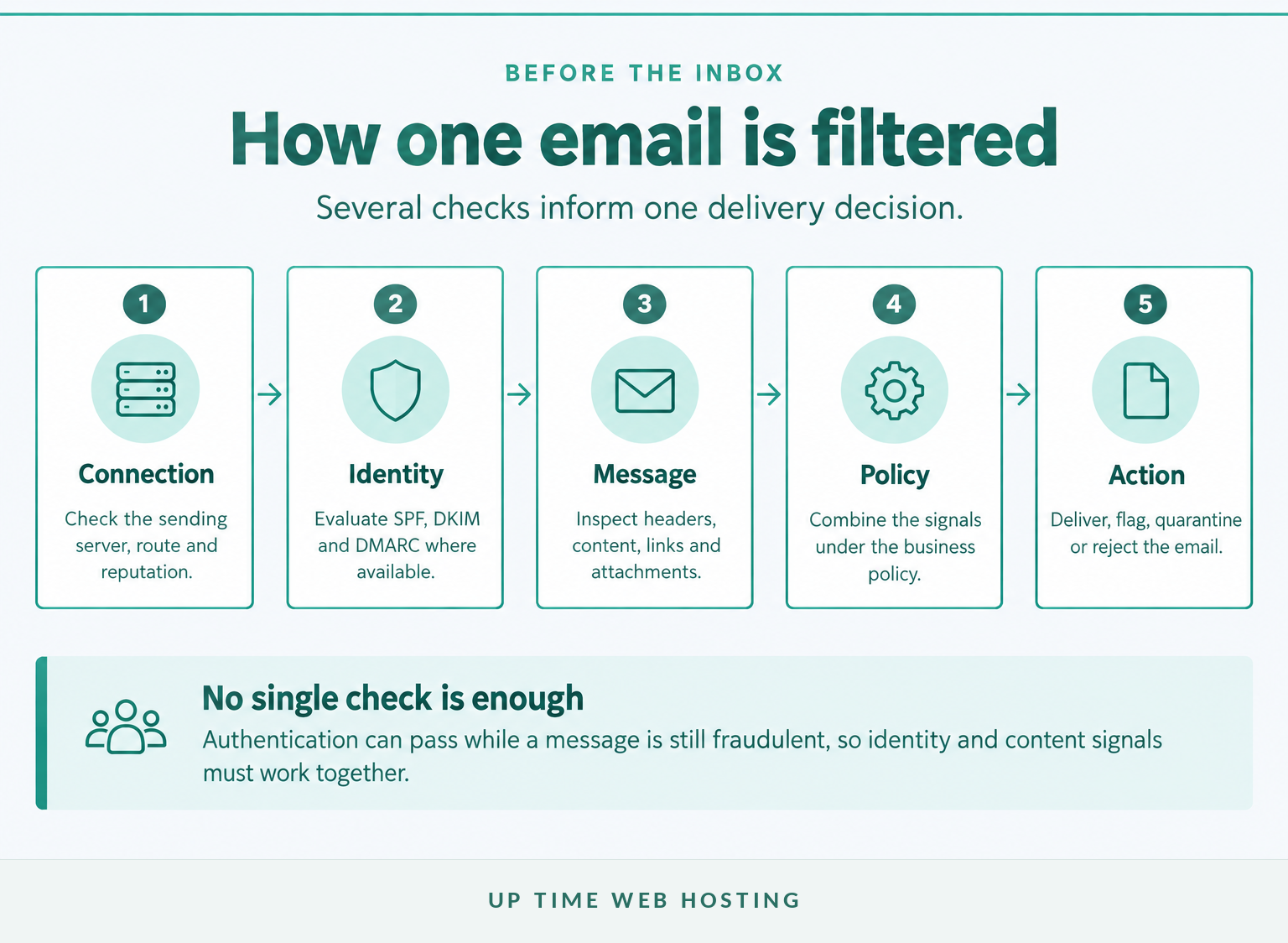
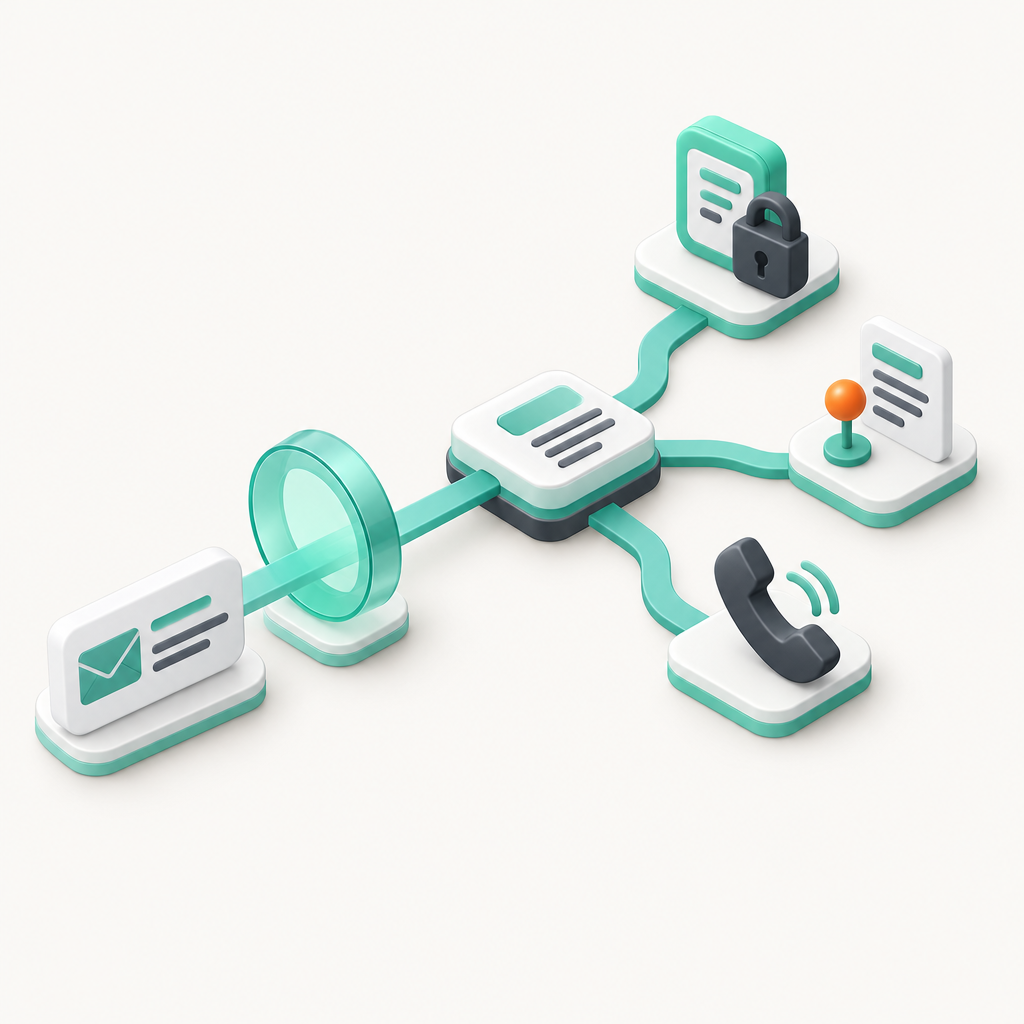
Spam email filtering routes each incoming message through a sequence of checks before a final delivery action is taken. A modern filter generally evaluates the connection, sender identity, message structure and content, then follows a policy to deliver, flag, quarantine or reject the message.
Filtering can begin as soon as a sending mail server connects. The service may consider the sending IP address, domain reputation, connection behaviour and whether the source has recently been associated with abusive traffic. A clearly blocked source may be rejected before the complete message is accepted.
The next layer checks identity signals. SPF identifies systems authorised to send for a domain, DKIM uses a cryptographic signature, and DMARC checks whether an SPF or DKIM identity aligns with the domain visible in the From address. The May 2026 DMARC standard is explicit about the limit: DMARC addresses unauthorised domain use, but it does not analyse message content or stop display-name impersonation.
A message can therefore pass authentication and still be dangerous. A criminal may send from a newly registered domain, use a compromised supplier mailbox or write a message that contains no malware but convincingly asks an employee to change bank details.
Content filtering examines other evidence. Depending on the service, that can include headers, wording, HTML structure, links, attachment types, embedded code, known malware indicators and similarities to current campaigns. The Australian Signals Directorate's September 2026 Guidelines for email recommend filtering potentially harmful content in email bodies and attachments as a defence-in-depth measure.
The filter then combines the available signals under the organisation's policy. A low-risk message may be delivered normally, a borderline message may be tagged or quarantined, and a message with strong malicious indicators may be rejected.
This is why useful filtering is layered. A keyword such as invoice is not enough to block a message, just as an SPF pass is not enough to prove that the message is trustworthy. The inbound filtering overview for the platform behind UpTime's premium service similarly describes multiple independent detection engines rather than one fixed rule set.
The safest filtering decision comes from several independent signals, not one keyword or one blocklist.

Performance you can feel, backed by clients who depend on it. Read how our support and uptime create long‑term customer success.Power Your Business with Better Hosting
What protection should an Australian organisation choose?
A business should choose domain-level filtering that checks mail before final mailbox delivery and provides quarantine, searchable logs and controlled release. The best spam email filtering setup should also work alongside SPF, DKIM, DMARC, MFA, staff training and established payment-verification procedures.
Use these questions when comparing a service:
- Does it protect the whole domain? Protection should cover every required business address, including shared mailboxes such as accounts, sales and support.
- Which threats does it inspect? Look beyond bulk advertising and ask about phishing, impersonation, malicious links, attachments, spoofing signals and malware.
- Where does filtering occur? A domain-level service should sit in the real inbound mail path rather than relying solely on an app or a rule inside one mailbox.
- Can mail bypass the filter? Where the architecture supports it, the downstream mail server should accept inbound delivery only through approved filtering infrastructure.
- What happens to uncertain messages? Quarantine with a reason, digest and controlled release is usually more useful than silent deletion.
- Can administrators investigate? Searchable logs should show the sender, recipient, time, outcome and reason for the decision without requiring staff to hunt through individual devices.
- How are false positives handled? Users or administrators need a defined way to release legitimate mail, submit a correction and create a narrow exception where necessary.
- What can be configured centrally? Domain policy, user permissions, allowlists and blocklists should not depend on every employee setting up personal rules correctly.
- Is it compatible with the current mail setup? Confirm support for the organisation's hosting, MX records, aliases, forwarding arrangements and downstream mail server.
Routing matters more than it first appears. Primary filtering documentation shows that a domain-level inbound service commonly receives mail through changed MX records, scans it and then passes accepted messages to a downstream server. The service's MX and downstream mail routing guide illustrates why DNS and server configuration should be checked before deployment rather than treated as an individual mailbox setting.
Privacy and operational questions also belong in the buying decision. Ask where message data and logs are processed, how long they are retained, who can access quarantine and how accounts are removed when staff leave. The OAIC's Guide to securing personal information advises organisations to consider controls that protect email systems from malware, spam and spoofing, with the appropriate measures depending on the circumstances.
Choose a service that filters at domain level, explains its decisions and gives users a safe recovery path for legitimate mail.
What does a business-grade spam filter check?
A business-grade filter should check who is sending the message, whether the claimed identity is plausible, what the message contains and how it behaves. Each signal has limitations, so the filter should combine them instead of treating one successful check as proof that the message is safe.
| Filtering signal | What may be examined | What it helps detect | Main limitation |
|---|---|---|---|
| Connection and reputation | Sending server, IP address, domain history and connection behaviour | Known abusive infrastructure and high-volume spam | New or shared infrastructure may have limited history |
| Authentication | SPF, DKIM and DMARC results and alignment | Unauthorised use of a protected domain | A compromised legitimate account may still pass |
| Headers | From, Reply-To, routing data and structural anomalies | Spoofing, odd routing and reply-address substitution | Legitimate forwarding can change header patterns |
| Message body | Text, HTML, obfuscation, formatting and campaign similarities | Bulk spam and common phishing patterns | A polished targeted message may look ordinary |
| Links | Visible text, destination domains, redirects and reputation | Credential theft and malicious websites | A newly created site may not yet have a reputation |
| Attachments | File type, malware indicators, macros, archives and inspectability | Malware and high-risk executable content | Encrypted archives may prevent inspection |
Table: No single signal can establish that an email is safe or malicious on its own.
Sender reputation is useful because abusive campaigns often reuse infrastructure, but it should not be the only test. A new domain can be malicious before it appears on a reputation list, while a legitimate shared service can be affected by another customer's behaviour.
Authentication answers a narrower question: is the message using the claimed domain in an authorised way? It does not answer whether the person controlling an authorised mailbox has been compromised or whether the message is attempting fraud.
Header and body analysis look for structural and language patterns. Filters may notice a Reply-To address that differs from the visible sender, disguised HTML, unusual encoding or content associated with known campaigns. Readers who want to see the human side of these signals can compare real spam email examples and the warning signs used when identifying phishing emails.
Links require separate attention because the visible anchor text may not match the destination. A filter may assess the destination domain, known redirects and other reputation signals, but a newly created phishing page can still lack enough history to trigger a confident block.
Attachments are another distinct layer. The Australian Signals Directorate's malicious email mitigation guidance recommends allowing approved business attachment types, analysing or sanitising hyperlinks and common document formats, and quarantining risky content such as macros. Password-protected archives may also need to be blocked or quarantined because their contents cannot be inspected safely.
A useful business filter checks who sent the message, what it contains and what it is trying to make the recipient do.
Host your website with our 5-star rated, cPanel website hosting plans.
Super fast servers, with security included and hosted in your choice of Australian Data Center.
View cPanel Plans
Why are mailbox-only rules not enough for a business?
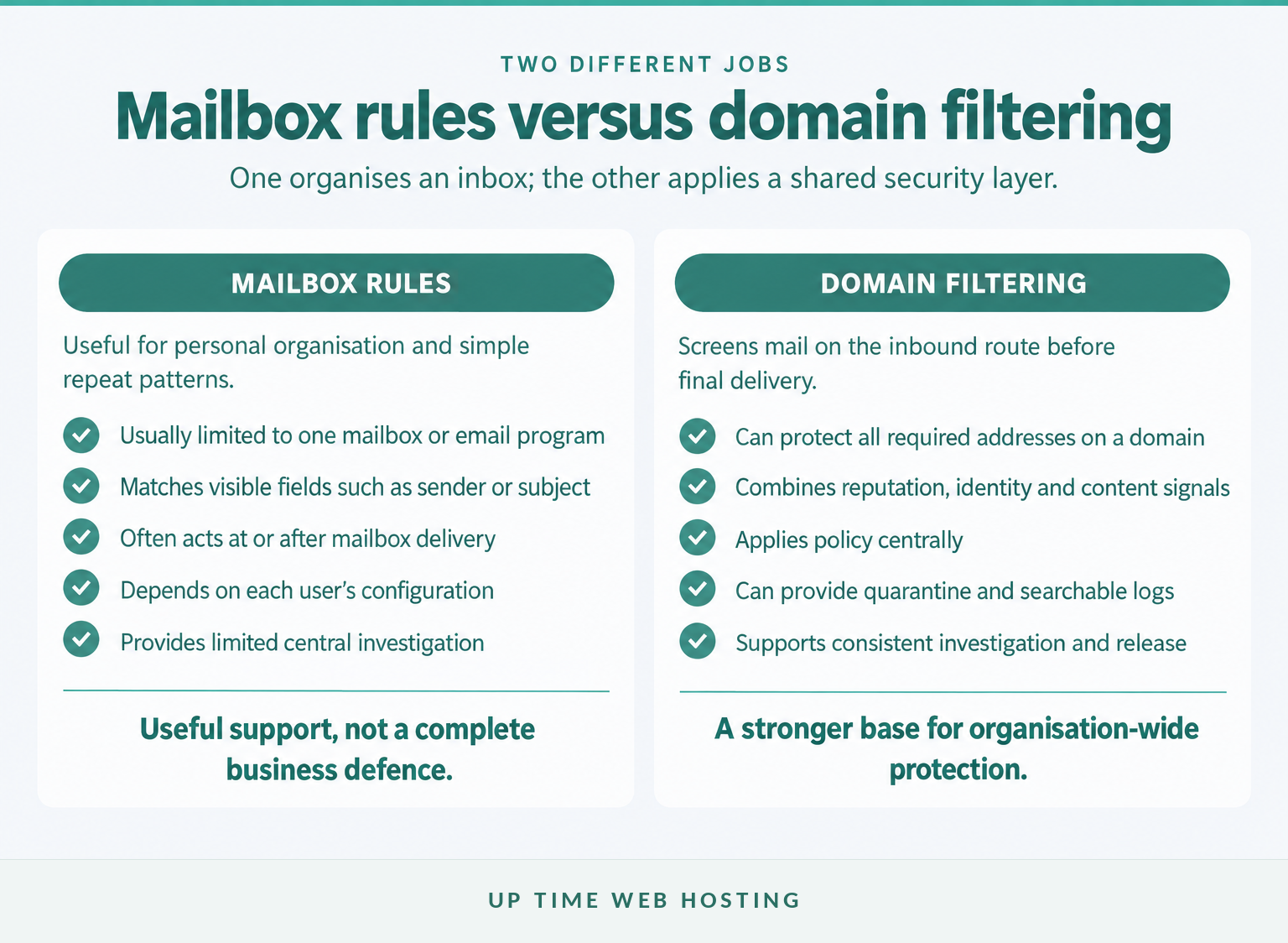
Mailbox rules are useful for organising newsletters, filing known senders and blocking simple repeat nuisances. They are not a complete business security control because most operate at or after mailbox delivery, apply to one address and have less evidence than a domain-level filtering service.
A personal rule generally matches information visible to that mailbox, such as a sender address, subject phrase or recipient. A spam email filtering app installed on a desktop or phone may be similarly limited to a device, account or email program.
Attackers can change sender addresses, wording and subjects faster than staff can maintain rules. A rule that blocks one fake invoice sender may do nothing when the next message uses a different address or arrives through a compromised legitimate account.
Mailbox-only controls also create inconsistent protection. One employee may use strict rules, another may use none, and a shared accounts mailbox may have settings nobody wants to change because it supports several users. That makes investigation and policy enforcement difficult.
Domain-level filtering can provide several advantages:
- One policy can protect all required mailboxes on the domain.
- Messages can be screened before final inbox delivery.
- The service can use connection and reputation data that a personal rule does not have.
- Administrators can search central logs when someone asks where a message went.
- Quarantine can isolate uncertain messages without relying on every employee's junk folder.
- Policy changes can be applied centrally when a campaign affects several users.
Filtering is still only one part of secure business email. Account access, MFA, domain authentication, encrypted connections, recovery controls and payment-verification procedures address risks that a content filter cannot solve by itself.
Mailbox rules are useful for tidying email, but they are not a complete security control for an organisation.
What happens to suspicious email?
A suspicious message may be delivered with a warning, sent to a junk folder, held in quarantine or rejected. The right action depends on the strength of the evidence, the organisation's policy and whether the message can be reviewed safely without exposing the user.
The main outcomes are:
- Deliver: The message is considered low risk and proceeds to the mailbox.
- Flag or junk: The message is delivered but marked or placed in a spam folder.
- Quarantine: The message is held outside the normal inbox while an authorised user or administrator reviews it.
- Reject: The sending system is told that the message will not be accepted.
Quarantine is particularly useful for borderline decisions. It keeps the message away from normal inbox activity but preserves a controlled recovery path when a legitimate supplier, customer or automated service is classified incorrectly.
The filtering platform's quarantine documentation describes held messages with a decision reason and a release action. Its broader documentation also supports logs and quarantine digests, which help users review held messages without treating a junk folder as an unexplained dead end.
A quarantine review should not become an excuse to open every suspicious message. Check the sender, subject, filtering reason and business context first. If the email concerns a payment, account change or sensitive request, verify it through a known phone number or another trusted channel before release.
Rejecting mail is appropriate when evidence is strong or policy requires it, but it offers less room to recover a legitimate message. That is why organisations should know which conditions trigger rejection and which trigger quarantine.
Quarantine keeps suspicious mail away from users while preserving a controlled way to recover legitimate messages.
How do you reduce false positives without weakening protection?
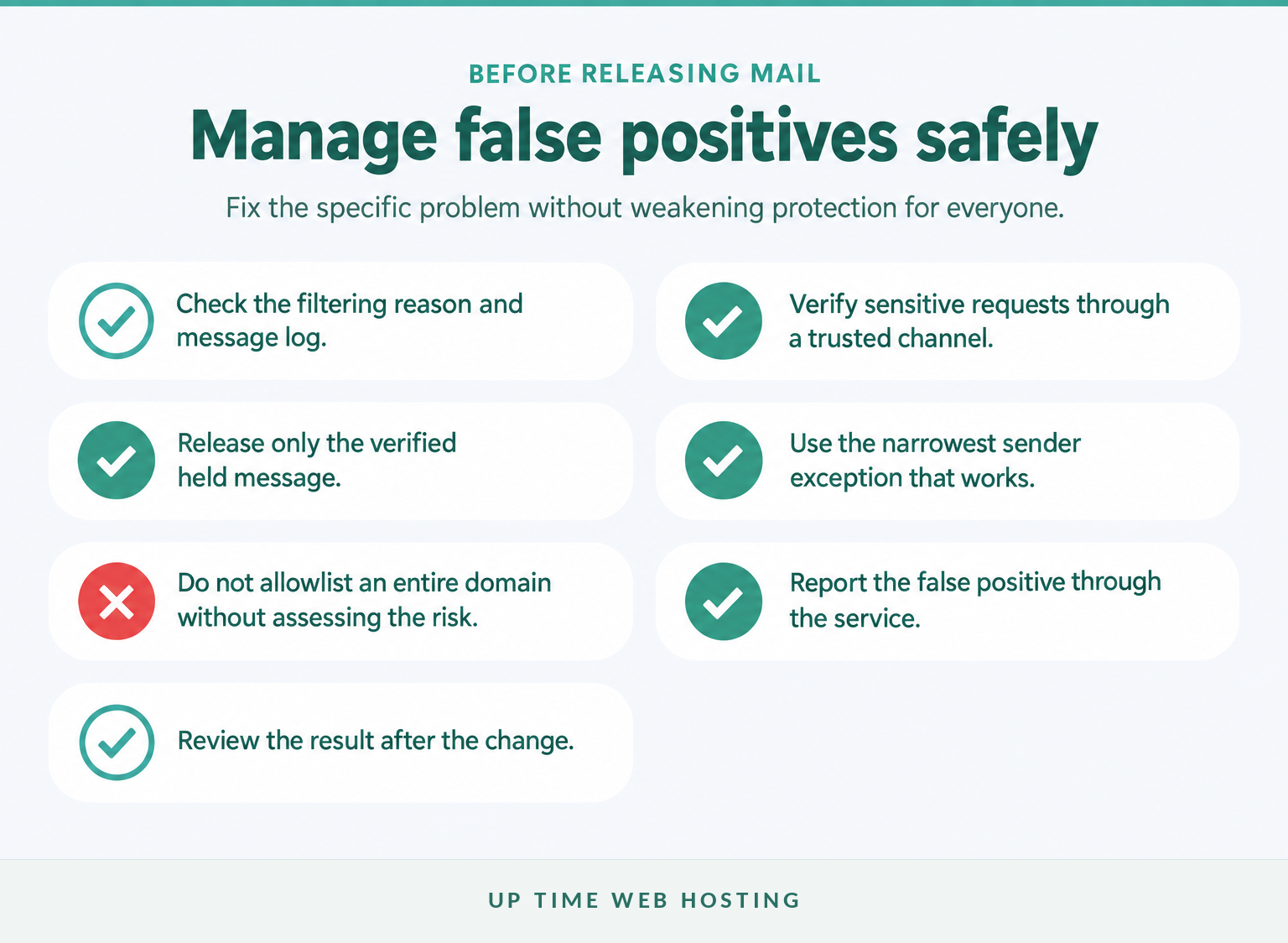
Reduce false positives by investigating the reason for the decision, verifying the sender and applying the narrowest correction that solves the problem. Do not weaken filtering for an entire domain simply because one expected newsletter, invoice or automated notification was quarantined.
A false positive is a legitimate message incorrectly treated as spam or malicious. A false negative is the reverse: an unwanted or dangerous message reaches the user.
Use this process when legitimate mail is held:
- Check the filtering reason. Review authentication results, the sender, attachment type and any reputation or policy reason shown in the log.
- Confirm that the message was expected. Contact the sender through details already held by the organisation when the message involves money, credentials or confidential information.
- Release only the verified message. Release should deliver the held item through the filtering system rather than encouraging staff to forward suspicious content manually.
- Choose a narrow exception. Allowlist a specific sender or address only when there is a continuing business need. Avoid broad domain-wide exceptions unless their consequences have been assessed.
- Correct the underlying problem. A legitimate sender may need to repair SPF, DKIM, DMARC or sending practices rather than relying permanently on an exception.
- Report the classification. Use the service's false-positive process so the provider or administrator can investigate and tune future decisions.
- Review the result. Confirm that similar legitimate messages are arriving and that the change has not opened an avoidable path for unwanted mail.
Broad allowlisting can create a new problem. If every address from a supplier's domain bypasses normal checks, a compromised supplier mailbox may receive more trust than it should. The exact effect depends on the filtering service, so administrators should understand which checks an exception overrides.
The same caution applies to threshold changes. Lowering protection for all users can increase false negatives and expose people who were not affected by the original problem. A targeted correction is easier to test, explain and reverse.
False positives are managed best with evidence, narrow exceptions and regular review, not weaker filtering for everyone.
Register your new domain name at competitive market prices including free domain add-ons like privacy, DNS Hosting, Custom Nameservers and Forwarding.
Always the best price and no nasty renewal price hikes.
Register A Domain Name
What can staff and admins do alongside filtering?
Filtering reduces the number of harmful messages users must assess, but it cannot prove that every delivered request is genuine. Staff behaviour, account security and trusted business processes remain necessary when a criminal uses a compromised mailbox or a convincing new identity.
The Australian Signals Directorate's September 2026 Small business cyber security handbook recommends MFA, current software, staff training and verification of payment requests through a trusted channel. Those controls address the damage a message can cause after it passes filtering.
Staff should:
- Report suspicious messages using the approved internal or mailbox reporting process.
- Avoid opening unexpected attachments or using login links supplied in unusual messages.
- Verify bank-detail changes, urgent payments and sensitive requests using a known phone number.
- Treat a familiar display name as a clue, not proof of identity.
- Tell the responsible manager or IT contact immediately after a suspicious click instead of hiding the mistake.
Administrators should:
- Require MFA for email accounts wherever the service supports it.
- Configure and maintain SPF, DKIM and DMARC for the organisation's sending domain.
- Review filtering logs, quarantine activity and repeat false-positive or false-negative reports.
- Keep mail clients, devices and security software updated.
- Remove or secure unused accounts, aliases and forwarding rules.
- Document who can release quarantined mail and who handles suspected compromise.
- Give finance and payroll teams a separate approval process for payment or account changes.
A practical email security best-practices checklist can help turn these controls into repeatable tasks rather than relying on staff memory.
Filtering reduces exposure, while MFA, training and trusted-channel verification reduce the damage when a message gets through.
What else do people ask about spam email filtering?
These short answers address common questions about filtering and unwanted business email. Incident response, record-keeping and legal requirements may justify retaining a particular message even when ordinary junk would normally be deleted.
Is there a way to filter out spam emails?
Yes. Turn on the spam controls supplied by the mail host, mark missed messages as spam, block repeat senders and use domain-level filtering for business mail. The strongest setup combines reputation, authentication, content, link and attachment checks, with quarantine for messages that need review rather than immediate delivery.
Why should you never delete spam emails?
The premise is incorrect: ordinary spam can be deleted. In a business mailbox, mark or report it first so the event is recorded, then delete it under the organisation's retention policy. Keep the original when it may be evidence for an incident, legal hold or an ACMA spam complaint.
Why am I suddenly getting lots of spam emails?
A sudden increase can follow an address leak, public posting, data breach, guessed address pattern, newsletter resale or a campaign targeting the organisation's domain. It can also happen when a filter or mail route changes. Check mail logs, recent configuration changes and whether several staff members are seeing the same campaign.
How to permanently stop receiving spam emails?
You cannot permanently stop every spam email because senders change addresses, domains, wording and infrastructure. You can reduce it sharply by limiting public exposure of addresses, using aliases where appropriate, reporting spam, enforcing email authentication, applying domain-level filtering and reviewing quarantine and logs for campaigns that keep changing shape.
Spam can be reduced substantially, but no organisation can guarantee a permanently spam-free inbox.
Experience Microsoft 365 Business Standard for free for 30 days.
Up to 25 users with full access to email, OneDrive and Teams. Includes full versions of desktop apps of Outlook, Word, Excel, PowerPoint and more.
Try Microsoft 365
What should you do next?
Start by checking where filtering occurs and whether every business mailbox is protected by the same policy. If suspicious messages still arrive regularly, prioritise domain-level filtering with quarantine, log search and a clear false-positive process before adding more personal inbox rules.
As at October 2026, UpTime's per-domain service is documented for compatible cPanel hosting and protects the mailboxes on the protected domain with intelligent quarantine, log search and quarantine digests. Review Premium Email Spam Protection and confirm compatibility before changing the organisation's DNS or existing mail flow.
The practical next step is to check whether every mailbox on the domain is protected before changing individual user rules again.