The spam email examples in this guide are fictionalised training scenarios based on real-world scam patterns targeting Australian businesses. Do not reproduce or click links in messages you receive. Treat these examples as recognition exercises only.
You will find eight common categories below: ATO refund phishing, fake Australia Post delivery notices, bank verification scams, NBN Co billing lures, payment platform alerts, ASIC and ABR compliance fakes, job offer scams, and invoice or licence renewal fraud. Each example includes red flags and practical identification tips.
Urgency is a reason to verify, not a reason to act.
Before examining each example, follow this rapid triage method:
- Pause before taking any action
- Inspect the sender and reply-to fields closely
- Hover over links without opening them
- Avoid unexpected attachments
- Verify through an independently opened official website or known phone number
- Report the message through your internal process
For a deeper walkthrough of identification techniques, our phishing identification guide covers the mechanics in detail.
Australian SMBs reduce risk most effectively when staff awareness is paired with technical controls: SPF, DKIM, DMARC, strong spam filtering, malware scanning, multi-factor authentication and a documented reporting process. Our email spam filtering resource outlines implementation steps suited to small teams.
Additional reading from the SMB phishing resilience playbook provides structured approaches to testing and improving how your team responds to fraudulent messages.
Table of Contents
- 1. Fake Australian Tax Office (ATO) Refund Phishing
- 2. Fake Australia Post Package Delivery Notifications
- 3. Fake Bank or Financial Institution Account Verification
- 4. Fake NBN Co Account Management and Billing Notices
- 5. Fake PayPal, Stripe or Australian Payment Platform Alerts
- 6. Fake Australian Business Register (ABR) and ASIC Compliance Notices
- 7. Fake Job Offer and Employment Scams
- 8. Fake Software License, Invoice and Business Service Renewal Scams
- Comparison of 8 Common Australian Email Scams
- Turn Recognition Into an SMB Email Defence Routine

Performance you can feel, backed by clients who depend on it. Read how our support and uptime create long‑term customer success.Power Your Business with Better Hosting
1. Fake Australian Tax Office (ATO) Refund Phishing
Among spam email examples targeting Australian businesses, ATO impersonation scams remain alarmingly effective. These emails may arrive during tax season, from July to October, with subject lines such as “Your $2,400 tax refund is waiting” or “Action required: Update your banking details to receive your refund.” The message claims you are owed money and pressures you to click a link within 48 hours or forfeit the refund.
That link redirects to a convincing replica of the ATO portal, where you may be prompted to enter your tax file number, bank account details and credit card information. Small business owners managing their own tax affairs are particularly vulnerable because the emails feel timely and legitimate.
Common Red Flags
- Sender addresses like
refunds@ato-gov-au.comornoreply@ato.org.auinstead of the genuine@ato.gov.audomain - Urgent deadlines designed to bypass rational thinking
- Links that show legitimate text but redirect to unrelated URLs when you hover over them
- Generic greetings such as “Dear Taxpayer” rather than your actual name
The ATO never initiates contact about refunds via email or SMS. Always log in directly through
ato.gov.auto verify any outstanding payments.
Actionable Steps
- Forward suspicious emails to the ATO’s dedicated phishing line at reportfraud@ato.gov.au before deleting them
- Enable DMARC, SPF and DKIM authentication through your web hosting provider's email settings to block spoofed messages at the server level
- Educate staff who handle bookkeeping or invoicing about these tactics
- If anyone has entered information, contact the ATO and your financial institution immediately
To learn more about identifying phishing attempts, including those mimicking the ATO, check out how to detect phishing emails. Understanding the mechanics behind these scams gives your business a genuine advantage when training staff and configuring email filters.
2. Fake Australia Post Package Delivery Notifications
Among spam email examples that catch Australian businesses off guard, Australia Post impersonation scams are remarkably convincing. These emails may use subject lines such as “Your Australia Post parcel couldn’t be delivered — click here to reschedule” or “Action required: Parcel held for seven days — update delivery details now.” They reference a tracking number and pressure you to click a link to confirm delivery details or update your address.
That link leads to a convincing replica of the Australia Post portal, where you may be prompted to enter login credentials, banking details and personal information. Small businesses receiving daily deliveries are particularly vulnerable because the emails blend seamlessly with genuine shipping notifications.
Common Red Flags
- Sender addresses like
delivery@auspost-notifications.comornoreply@auspost.orginstead of the genuine@auspost.com.audomain - Subject lines creating artificial urgency with countdown timers
- Tracking numbers that do not match any actual shipment you ordered
- Generic greetings such as “Dear Customer” rather than your actual name
- Requests for payment to “release” a held parcel
Australia Post never asks for personal details, passwords or payment via email. Always log in directly through
auspost.com.auto check on packages.
Actionable Steps
- Hover over links to verify the true destination URL before clicking any delivery notification
- Call Australia Post directly on 13 13 18 if you are unsure whether a notification is legitimate
- Implement SPF, DKIM and DMARC through your web hosting provider's security settings to filter spoofed messages before they reach staff inboxes
- Ask staff to match the tracking number with an order or supplier record before taking action
Businesses that receive high volumes of parcels should establish a clear protocol for verifying delivery notifications. Train staff who handle incoming shipments to recognise these tactics and report suspicious emails immediately.
Host your website with our 5-star rated, cPanel website hosting plans.
Super fast servers, with security included and hosted in your choice of Australian Data Center.
View cPanel Plans
3. Fake Bank or Financial Institution Account Verification
Among spam email examples targeting Australian small businesses, bank impersonation scams are some of the most financially damaging. These emails may use subject lines such as “Commonwealth Bank: Verify your account immediately — unusual activity detected” or “Westpac Security Alert: Confirm your login credentials within 24 hours.” The message claims suspicious transactions have occurred or that a system update requires you to re-enter payment details.
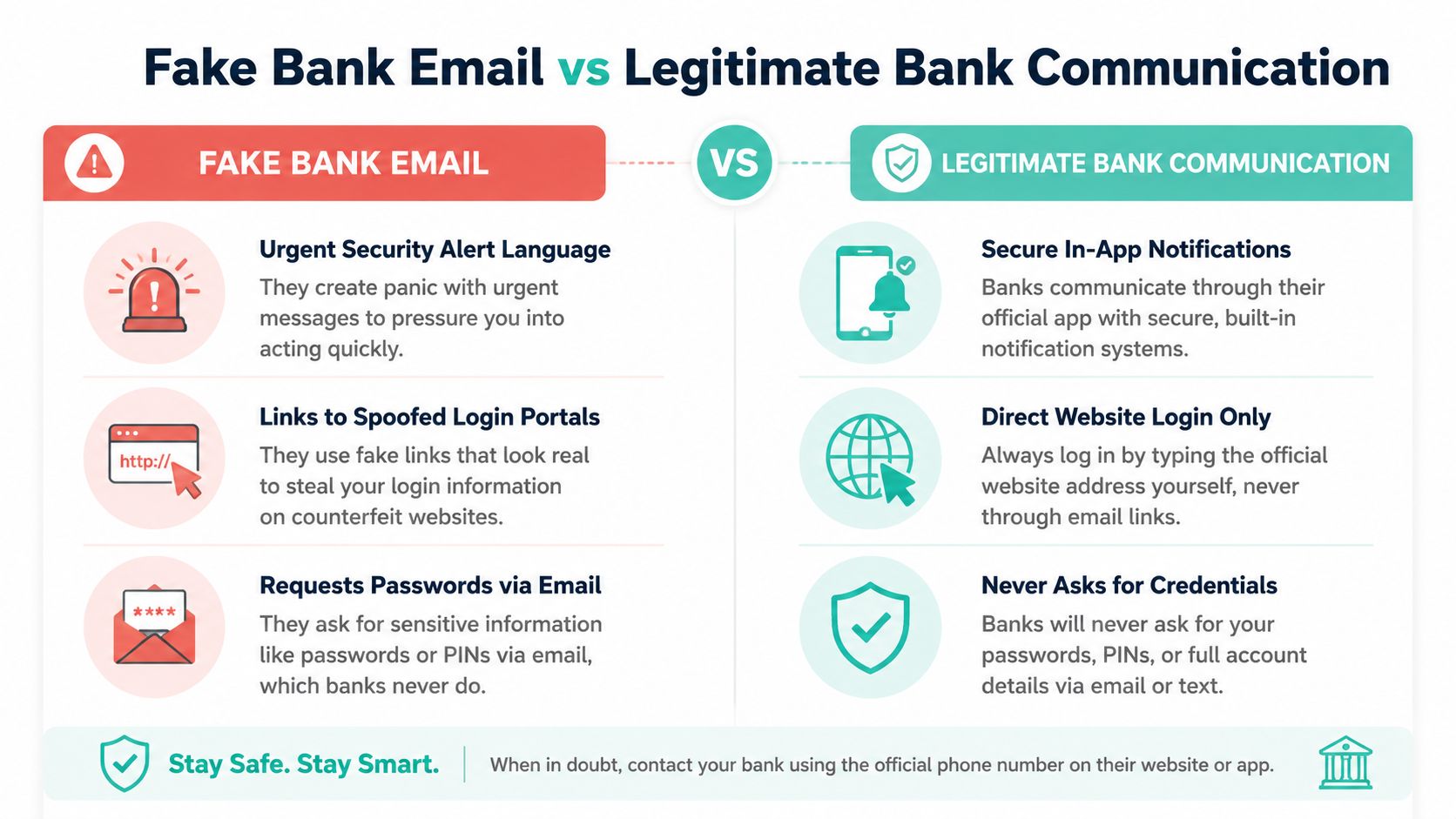
The infographic above highlights differences between fraudulent bank emails and genuine communications from a financial institution. Spotting these distinctions before clicking can prevent significant financial loss.
The link inside these emails redirects to a replica of your bank’s login page. Once you enter your credentials, attackers may gain access to business accounts. Companies managing larger balances are especially attractive targets because a single compromised login can enable rapid unauthorised transfers.
Common Red Flags
- Sender addresses using domains like
security@commbank-alert.cominstead of the official@commbank.com.au - Threats of account suspension or frozen funds if you do not act immediately
- Requests for passwords, PINs or card details, which no legitimate bank will ask for via email
- Poor formatting, spelling errors or low-resolution bank logos
- Unexpected requests to approve a payment or add a new payee
Major Australian banks never request passwords or sensitive information through email. Always access your account by typing the bank’s URL directly into your browser or using its official app.
Actionable Steps
- Call your bank directly using the number printed on your bank card to verify suspicious alerts
- Enable multi-factor authentication on business accounts. Learn more about two-factor authentication setup to secure your accounts properly
- Configure DMARC and SPF through your hosting provider to block spoofed bank emails before they reach your inbox
- Train anyone who handles business banking to recognise these phishing tactics and report them immediately
- Contact your bank immediately if you clicked a link, disclosed credentials or approved an unexpected transaction
4. Fake NBN Co Account Management and Billing Notices
Among spam email examples targeting Australian businesses, NBN Co impersonation scams exploit confusion around network billing and service upgrades. These emails may use subject lines such as “Your account is suspended due to payment failure” or “Urgent: Confirm your billing details to restore NBN service.” The message warns that your internet will be disconnected unless you update payment information within 24 hours.
That urgency pushes small business owners, especially those without dedicated IT staff, to click through to a replica of an NBN-related portal. Once there, they may be prompted to enter banking details, credit card numbers or identity documents to “verify” an account. The technical nature of NBN infrastructure makes this scam effective because many business owners do not know how NBN billing works.
Common Red Flags
- Sender addresses using
@nbnco.netor@nbn-billing.com.auinstead of the genuine@nbnco.com.audomain - Threats of immediate service disconnection without prior contact
- Links directing to URLs like
portal-nbnco.comrather than the officialnbnco.com.au - Requests for credit card details or direct debit authorisation via email
- A message that confuses NBN Co infrastructure with your retail internet provider
NBN Co never suspends service based solely on an email notification. Contact your internet provider using the phone number on your latest bill, or verify information through an independently opened official website.
Actionable Steps
- Forward suspicious emails to the Australian Competition and Consumer Commission via Scamwatch before deleting them
- Contact your NBN provider directly using the phone number on your most recent bill, not the one in the email
- Ensure your business email has properly configured SPF and DKIM records to filter spoofed messages
- Check whether the alleged billing issue appears in your provider’s independently opened customer portal
For further guidance on identifying these threats, explore how to detect phishing emails to strengthen your team’s awareness and protect business operations.
5. Fake PayPal, Stripe or Australian Payment Platform Alerts
Among spam email examples targeting Australian e-commerce businesses, payment platform phishing remains one of the most financially damaging. These emails impersonate PayPal, Stripe, Square or eWAY with subject lines such as “Your account has been limited” or “Suspicious activity detected.” The message claims payment processing will be suspended unless you verify your identity within 24 hours.

Clicking the link leads to a replica of the payment portal, where you may be asked for login credentials, banking details or credit card information. Digital agencies and online retailers managing multiple client accounts are especially vulnerable because these requests feel routine during busy trading periods.
Common Red Flags
- Sender addresses using domains like
paypal-secure.comorstripe-notifications.netinstead of@paypal.comor@stripe.com - Threats of account suspension designed to create panic
- Links displaying legitimate platform names but redirecting to unrelated URLs when hovered over
- Requests for full passwords or credit card numbers, which legitimate payment processors do not require via email
- Unexpected refund, payout or chargeback notifications that do not appear in the account dashboard
PayPal and Stripe never ask for complete login credentials or payment card details through email. Always access your account directly through the official app or website.
Actionable Steps
- Log into your payment platform directly through its official app or bookmarked website to check notifications
- Enable two-factor authentication on every payment account
- Contact payment processor support through verified phone numbers or in-app chat
- Configure your email hosting security settings to flag spoofed payment notifications
- Reconcile unexpected payment alerts with your merchant dashboard before contacting a customer or issuing a refund
For a broader look at these scams, read how to spot a phishing email. Recognising the patterns protects business revenue and customer trust.
Register your new domain name at competitive market prices including free domain add-ons like privacy, DNS Hosting, Custom Nameservers and Forwarding.
Always the best price and no nasty renewal price hikes.
Register A Domain Name
6. Fake Australian Business Register (ABR) and ASIC Compliance Notices
Among spam email examples targeting Australian companies, ABR and ASIC impersonation scams exploit regulatory anxiety. These emails may use subject lines such as “ASIC: Your company registration expires in 30 days”, “ABR Update Required: Verify your business details for compliance” or “Urgent: ASIC compliance notice — director action required within seven days”. The message claims your registration is lapsing or your business faces penalties unless you act immediately.
The email directs you to a replica of the ASIC Connect or ABR portal, where you may be prompted to enter your ABN, ACN, director details or credit card information to “renew” or “verify” your registration. Small business owners managing their own compliance are especially vulnerable because the emails arrive during busy periods when genuine paperwork may be overdue.
Common Red Flags
- Sender domains like
compliance@asic-au.orgorupdates@abr.gov.com.auinstead of genuine@asic.gov.auor@abr.gov.audomains - Threats of fines, deregistration or legal action within tight timeframes
- Links displaying official ASIC or ABR text but redirecting to unrelated domains when hovered over
- Requests for payment details through unsolicited email
- Unexpected invoices for services that should be checked through official government channels
ASIC and the ABR never request sensitive business or financial details through unsolicited email. Verify notices through official government portals and independently confirmed contact details.
Actionable Steps
- Verify compliance notices by visiting asic.gov.au or abr.gov.au directly
- Call ASIC on 1300 300 630 to confirm whether a notice is genuine
- Implement DMARC, SPF and DKIM authentication through your web hosting provider's email settings to block spoofed messages
- Train anyone who handles company ASIC or ABR correspondence to recognise these phishing tactics
- Check your company’s registered contact details before responding to any compliance request
These scams work because they mimic regulatory touchpoints Australian business owners deal with regularly. Understanding how they operate helps protect registration details and financial data.
7. Fake Job Offer and Employment Scams
Among spam email examples targeting Australian job seekers and businesses alike, employment scams have become increasingly polished. These emails may use subject lines such as “Congratulations! You’ve been selected for an $85,000 remote role” or “Part-time work from home — $60/hour with flexible hours.” The message claims you have been pre-approved and only need to complete onboarding, which involves providing your tax file number, ABN or banking details through a linked portal.
That portal is designed to capture information for identity theft or payroll fraud. Some variants target businesses directly by impersonating job candidates and asking hiring managers to click links to view fabricated resumes or verify fake candidate details.
Common Red Flags
- Sender addresses using domains like
@recruitment-au.comor@employment-aus.orgrather than legitimate company domains - Salaries that significantly exceed market rates for low-skill or entry-level roles
- Vague job descriptions with no specific responsibilities
- Requests for personal information before a formal interview
- Onboarding links that redirect to pages unrelated to the claimed employer
- Requests to pay for training, equipment or background checks before employment begins
Legitimate employers verify candidates before offering positions. Never provide personal information to unverified employers, especially when the initial contact arrives unsolicited.
Actionable Steps
- Verify job offers by contacting the company through its official website
- Check employment email domains against the company’s actual web address
- Use your hosting provider’s email filtering to block suspicious job offers
- Never pay an upfront fee or deposit for a job
- Report fraudulent employment offers to the Australian Competition and Consumer Commission through Scamwatch
Understanding these scams helps job seekers and hiring managers protect sensitive information during recruitment.
Experience Microsoft 365 Business Standard for free for 30 days.
Up to 25 users with full access to email, OneDrive and Teams. Includes full versions of desktop apps of Outlook, Word, Excel, PowerPoint and more.
Try Microsoft 365
8. Fake Software License, Invoice and Business Service Renewal Scams
Among spam email examples targeting Australian businesses, fake renewal and invoice scams exploit the difficulty of managing multiple software subscriptions. These emails may use subject lines such as “Microsoft 365 License Renewal: $299 due now” or “Adobe Creative Cloud Subscription Expiring.” They reference real company details scraped from public records and include payment links or bank account details for “immediate settlement.”
Business owners managing subscriptions from accounting software to antivirus tools are especially vulnerable. The invoices may look legitimate, reference genuine vendor names and create artificial urgency around services that matter to daily operations.
Common Red Flags
- Sender domains that mimic real vendors but use subtle misspellings such as
microsoft-365-renewal.com - Invoice amounts slightly higher than usual, designed to avoid immediate suspicion
- Payment instructions directing funds to unknown Australian bank accounts
- Generic greetings rather than your company’s registered account name
- Attachments labelled “Invoice” that may contain malware
- Requests to change supplier bank details without independent verification
Legitimate software vendors send renewal reminders to your registered account email. Verify payment requests through the vendor’s official portal rather than unsolicited email links.
Actionable Steps
- Log directly into software accounts to verify renewal status
- Contact vendors using phone numbers from their official websites
- Set calendar reminders for genuine subscription renewal dates
- Forward suspicious invoices to the legitimate vendor’s fraud team for verification
- Verify any changed bank details by calling a known supplier contact
- Configure email security settings through your hosting provider to catch spoofed vendor notices
Learn more about email security best practices to strengthen your business against invoice fraud and vendor impersonation attacks.
Comparison of 8 Common Australian Email Scams
| Item | Implementation complexity | Resource requirements | Expected outcomes | Ideal targets | Key advantages |
|---|---|---|---|---|---|
| Fake Australian Tax Office (ATO) Refund Phishing | Moderate — needs convincing government branding and spoofed portal | Email templates, spoofed domains/sites, target lists, tax-season timing | Harvest TFNs, personal and banking details; potential direct fraud | Individual taxpayers and small business owners during tax season | High trust in government messages and urgent refund language drive clicks |
| Fake Australia Post Package Delivery Notifications | Low to moderate — simple spoofed notices with tracking links | Mass mailing capability, fake tracking numbers, credential-harvesting pages | Credential theft, account compromise, phishing click-throughs | General public and businesses that receive frequent parcels | Routine delivery communications make this highly believable and scalable |
| Fake Bank or Financial Institution Account Verification | High — requires near-identical bank portals and social engineering | Sophisticated spoofed login pages, targeted lists, credential capture systems | Account takeover, immediate fund transfers, identity theft | Business and personal bank account holders, especially high-balance accounts | Banking trust and urgency about security alerts yield high payoff |
| Fake NBN Co Account Management and Billing Notices | Moderate — uses technical jargon and official-looking templates | Spoofed portals, knowledge of NBN references, mailing lists | Banking or billing details, service-disruption leverage for extortion | Businesses reliant on stable internet connections (SMBs) | Exploits technical uncertainty and critical infrastructure concerns |
| Fake PayPal/Stripe/Payment Platform Alerts | Moderate to high — mimics payment dashboards and transactions | Spoofed merchant portals, fake transaction details, targeted merchant lists | Merchant account compromise, payment diversion, credential theft | E-commerce businesses and digital agencies | Direct impact on transactions makes recipients act quickly to restore service |
| Fake ABR and ASIC Compliance Notices | Moderate — uses bureaucratic language and reference numbers | Public company data, spoofed compliance pages, targeted company lists | Business registration details, director data, potential identity fraud | Small-to-medium businesses with ABNs and registered directors | Legal/compliance urgency pressures businesses to respond without verification |
| Fake Job Offer and Employment Scams | Low to moderate — professional-looking offers and onboarding links | Fake job postings/emails, onboarding portals, candidate databases | Personal data theft (TFN, bank details), advance-fee fraud, identity misuse | Job seekers and employers posting vacancies | Attractive offers and perceived career opportunity encourage disclosure |
| Fake Software License, Invoice & Service Renewal Scams | Moderate — plausible invoices and vendor references required | Scraped vendor/company info, invoice templates, fake payment links | Unauthorized payments, credential capture, malware from links | Businesses managing many subscriptions and finance teams | Routine invoice processing habits increase likelihood of prompt payment |
Turn Recognition Into an SMB Email Defence Routine
The eight spam email examples covered in this article share a common thread: they exploit urgency, trust and familiarity to bypass rational thinking. Spotting one scam today means little unless your entire team can spot the next one tomorrow. The real value lies in building repeatable habits that make verification automatic rather than optional.
Before Opening
Train every staff member to pause and run through this checklist:
- Check the sender address for subtle misspellings or unexpected domains.
- Hover over links without clicking; preview URLs in the bottom-left corner of your mail client.
- Verify attachments by sender context, not by file name or icon.
- Compare the “Reply-To” address against the visible sender.
- Confirm unexpected invoices, payment changes or account alerts using a separate channel.
The safest verification route starts outside the suspicious message.
After Suspicion
If anything feels wrong, take these steps immediately:
- Do not reply, click or download anything.
- Preserve the email as evidence; do not delete it yet.
- Report it through the relevant Australian service or Scamwatch.
- Alert affected financial or business providers if credentials or data were shared.
- Change exposed passwords from a trusted device and revoke active sessions where possible.
Prevention
Long-term resilience comes from layered controls and regular practice:
- Run short, scenario-based staff training using real spam email examples from your industry.
- Enable multi-factor authentication on business accounts, starting with email, accounting and hosting platforms.
- Implement SPF, DKIM and DMARC records for your domain to reduce spoofed-sender success.
- Apply spam filtering and malware scanning at the gateway, not just on endpoints.
- Maintain secure, tested backups and a documented escalation path for suspected incidents.
- To help your team turn recognition into a routine, consider automating parts of your email defence with this practical guide from Technovation.
Monthly review for Australian SMBs
Once each calendar month, spend 15 minutes running through these actions:
- Review flagged or quarantined messages in your spam filter for false positives and missed threats.
- Confirm that all business domains have current SPF, DKIM and DMARC records published.
- Test multi-factor authentication recovery options for key accounts.
- Share one recent spam email example with the team and discuss what made it suspicious.
- Verify that backup jobs completed successfully and that restore tests are scheduled.
This rhythm keeps defences current without overwhelming small teams. UpTime Web Hosting supplies email-security guidance, phishing-identification checklists, spam-filtering configuration notes and two-factor-authentication walkthroughs within its knowledge base, giving Australian SMBs a practical reference point alongside their hosted services. Mastering these concepts protects your inbox, client relationships, revenue and reputation.
Strengthen your email defences with a host that takes spam and phishing seriously. UpTime Web Hosting provides Australian SMBs with secure, filtered business email hosting backed by practical security resources designed to reduce phishing risk. Explore your options at UpTime Web Hosting and build a more resilient inbox today.