In short
Website migration usually takes two to eight hours for a small or standard WordPress site and one to three business days for an ecommerce site, including copying, testing and cutover. The website does not need to go offline if the new host is tested first, DNS is changed last and the old service stays active during propagation.
Key takeaways
- A compatible small or standard WordPress site is usually a same-day job, while ecommerce, live databases and platform changes need longer.
- DNS propagation is not the transfer itself; official 2026 DNS guidance allows from a few minutes to 48 hours for nameserver changes.
- UpTime's published migration terms say split traffic usually lasts about four hours, but the current configuration can change this and uninterrupted service cannot be guaranteed.
- Do not cancel the old hosting until web traffic, email delivery, scheduled jobs and forms work on the new service.
Table of contents
- How long does a website migration usually take?
- Will the website go offline during the move?
- How can a website move without going offline?
- What makes a migration take longer?
- How to migrate a website without losing SEO?
- What else do businesses ask about website migration?
- What should you do before booking the migration?
Website migration has three clocks. The first measures how long files, databases and mailboxes take to copy. The second covers testing and the final cutover. The third covers DNS caches, email routing, monitoring and, when URLs change, search engines processing the move.
How long does a website migration usually take?
For planning, a small site moving to a compatible host can often be completed on the same business day. A standard WordPress site commonly needs half a day to a full day, while stores, large databases and platform changes need a longer window.
Planning ranges by site type
| Migration type | Sensible planning allowance | Main time driver |
|---|---|---|
| Small static or brochure site | 2-6 hours | File volume, DNS access and testing |
| Standard WordPress site | 4-8 hours | Files, database, plugins, PHP and forms |
| Large WordPress or multisite setup | 1-2 business days | Storage, site count, database size and compatibility |
| WooCommerce or other ecommerce site | 1-3 business days | Orders, customer data, payment tests and final synchronisation |
| Custom application or platform change | Several days to weeks | Rebuilding, data conversion, code changes and redirects |
| Business email mailboxes | 2-8 hours to copy, then 24-48 hours of monitoring | Mail volume, MX records, devices and final mailbox synchronisation |
These ranges are scheduling allowances, not measured industry averages or service guarantees. A clean 5 GB WordPress site with working control-panel access may be easier than a smaller site with a damaged database, obsolete PHP code or no reliable backup.
Transfer time and propagation time are not interchangeable. Copying may finish in two hours while some visitors still reach the old server because their DNS resolver has cached the previous record. The reverse can also happen: DNS may update quickly, but testing uncovers a form, scheduled task or database connection that needs repair.
UpTime's migration terms describe a split-traffic period of around four hours as usual, while also stating that the current hosting configuration and domain setup can change that period. Ecommerce sites and sites with live client data need extra care because writes can reach different databases while traffic is split.
Book the migration around the work that must be copied and tested, not around DNS alone.

Performance you can feel, backed by clients who depend on it. Read how our support and uptime create long‑term customer success.Power Your Business with Better Hosting
Will the website go offline during the move?
A website does not normally need a long outage just because it is changing hosts. The safer approach keeps the old website serving visitors while a complete copy is prepared and tested on the new hosting environment.
What low-downtime migration looks like

Both servers may receive traffic for a short period after DNS changes. If they serve the same stable content, visitors may not notice, but live forms, orders, bookings, account changes and comments can create conflicting data.
As of October 2026, cPanel's current Transfer Tool documentation says its Live Transfer feature can reduce downtime by updating DNS, routing certain web and mail requests to the destination and copying mailbox data again. That tooling applies to compatible cPanel environments and does not remove the need for testing.
For a content-only website, keeping both versions online is often enough. For ecommerce or another system with frequent database writes, use a short maintenance period or read-only window for the final database copy. Customers should not be able to place an order on the old database after the final synchronisation has started.
UpTime's published migration terms aim to keep websites and email online but do not guarantee that every configuration can be moved without interruption. The wider guide to prevent website downtime covers monitoring, backups and failure planning outside the migration window.
Downtime is usually avoided by keeping both environments available until the new one has proved stable.
How can a website move without going offline?
A low-downtime migration copies and tests the site before changing anything the public can see. DNS is changed near the end, and the old hosting remains available until traffic and email have moved successfully.
The safe cutover sequence
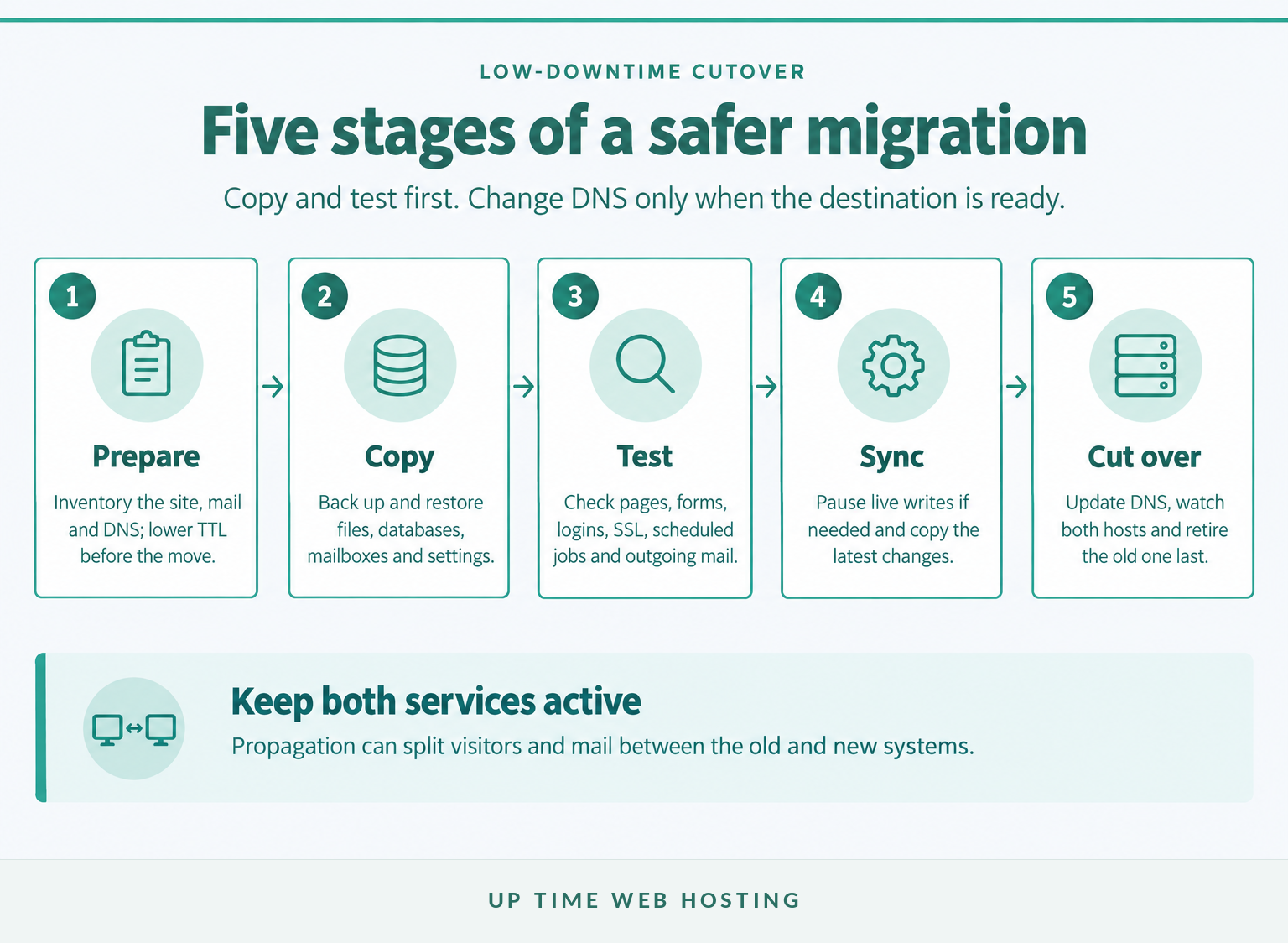
- Inventory the service and prepare DNS. Record the domains, subdomains, files, databases, mailboxes, DNS entries, scheduled tasks, SSL requirements and software versions. Use a website migration checklist so less visible items such as redirects and background jobs are not missed. As of October 2026, Google Search Central's hosting-move guidance recommends lowering DNS TTL at least a week before the move when possible.
- Take a backup and build the destination. Copy files, import databases, create mailboxes and reproduce required DNS records. Match PHP, database, runtime and extension requirements rather than assuming the destination defaults will suit the application.
- Test the new host privately. Use a hosts-file entry, temporary hostname or controlled preview to load the new server before public DNS changes. Test representative pages, logins, search, forms, uploads, downloads, SSL, redirects, scheduled tasks, database writes, outgoing email and payment callbacks.
- Control live changes and perform a final synchronisation. Pause publishing or place a busy store into maintenance mode if new data cannot safely be written to both systems. Mailboxes may also need a second copy after DNS changes; the full email migration process should account for MX records, historical messages, devices and messages that still reach the old server.
- Change DNS, monitor both systems and retire the old host last. Check the old and new server logs, website functions and mail delivery during propagation. Keep the previous service available until its traffic reaches zero or the agreed monitoring period has passed, then take a final backup before cancellation.
A domain registrar transfer does not need to happen at the same time as the hosting cutover. Separating the jobs makes troubleshooting easier because one change can be verified before the next begins.
Copy and test first, then change DNS, monitor both systems and retire the old host last.
Host your website with our 5-star rated, cPanel website hosting plans.
Super fast servers, with security included and hosted in your choice of Australian Data Center.
View cPanel Plans
What makes a migration take longer?
Migration delays usually come from access, compatibility, live data or repair work rather than the DNS edit itself. A site that is already unstable may need to be repaired before it can be copied reliably or declared ready for launch.
What separates a fast move from a slow one
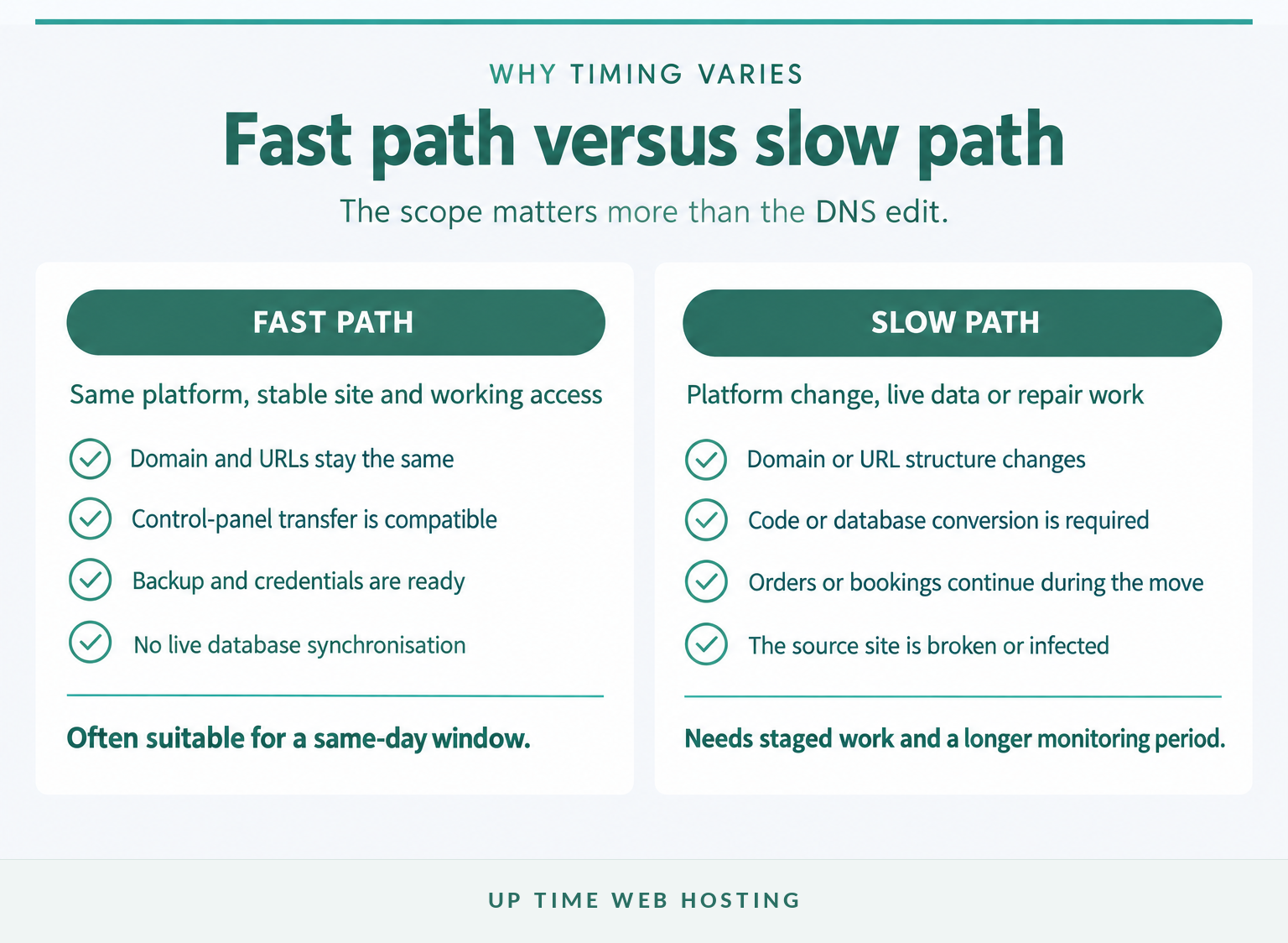
The fastest path is a host-to-host move that keeps the same domain, URLs, content management system and software stack. The slow path combines the hosting move with a redesign, platform conversion, domain change or major software upgrade.
Common causes of delay include:
- Missing or restricted access: The migration team cannot reach the control panel, DNS, database, registrar or old server. Two-factor authentication and approval delays can also stop automated work.
- Large archives or many small files: Backup creation, compression, transfer and extraction all take time. Storage limits on either service may need attention first.
- Old software: An application built for an obsolete PHP, .NET or database version may fail on a current server even when every file copies correctly.
- Database activity: Orders, bookings, membership updates and form submissions may require a maintenance window and a final database synchronisation.
- Email on the hosting account: Websites and email may share DNS and storage but have different migration steps. Mailbox size, routing and user devices add work.
- Broken or infected sites: Malware, database errors, missing files and failed plugins should not be copied blindly into the new environment.
- URL or domain changes: Redirect mapping, canonical tags, internal links, sitemaps and search monitoring expand the job beyond a simple hosting move.
- No agreed approver: Testing may be complete, but the cutover cannot proceed until someone confirms the website, orders, forms and email are working.
Changing the site design, host, domain and content management system in one release makes it harder to identify the cause of a problem. Keeping the hosting move separate reduces variables and gives the business a clearer rollback point.
The fastest migrations keep the platform, URLs, credentials and data flow simple.
How to migrate a website without losing SEO?
A host-only move is usually lower risk because public URLs and page content can stay the same. A migration that changes domains or URL paths needs redirects and longer search monitoring because search engines must process each old and new address.
For a host-only move, preserve the URLs, page content, status codes, canonical tags, structured data, analytics and Search Console verification. Check that the new firewall permits legitimate crawlers and remove any temporary noindex rule or robots.txt block before launch.
When URLs change, Google Search Central's URL-change guidance recommends mapping old URLs to their relevant new destinations, using permanent server-side redirects, updating internal links and sitemaps, and monitoring both properties. Google advises keeping redirects for at least one year and says a small to medium site may take a few weeks for most changed URLs to move through its systems.
Those weeks describe search reprocessing, not a website outage. Visitors should reach the new pages through redirects while search results gradually replace old URLs with new ones.
Avoid redirecting every removed page to the home page, launching a blocked staging site or changing URL structure without a map. The guide to common website migration mistakes provides a broader pre-launch risk check.
Preserve URLs where possible; when URLs must change, map and redirect every important page.
What else do businesses ask about website migration?
These questions cover the timelines that are commonly confused with the hosting transfer itself. The correct answer depends on whether the business is moving hosting, email, a registrar, a domain or the visible URL structure.
How long does the migration process take?
A small website moving between compatible hosting environments can often be copied, tested and switched within one business day. A standard WordPress site may take half a day to a full day, while ecommerce, large databases, email and platform changes can extend the work to several days or weeks.
How to migrate a website without losing SEO?
Keep the same URLs where possible, test the new host before DNS changes, preserve Search Console verification and monitor both servers after launch. If URLs change, map each old page to its closest new page, use permanent server-side redirects, update internal links and sitemaps, and remove accidental noindex or robots.txt blocks.
Will my website go down during a domain transfer?
Not necessarily. A registrar transfer and a hosting cutover are separate events. Keep the existing DNS and nameservers unchanged while the registrar transfer completes, then switch hosting only after the new site has been tested. For .au domains, auDA's transfer guidance says an approved registrar transfer can take up to three days.
How much does it cost to migrate a website?
Migration cost depends on the control panel, site size, platform, database activity, email volume, testing and timing. Some hosts include compatible cPanel or Plesk migrations with hosting, while custom platforms, repair work, after-hours cutovers and complex ecommerce synchronisation may cost extra. Ask for the scope and exclusions in writing.
A hosting migration, a domain transfer and search reprocessing run on different timelines.
Register your new domain name at competitive market prices including free domain add-ons like privacy, DNS Hosting, Custom Nameservers and Forwarding.
Always the best price and no nasty renewal price hikes.
Register A Domain Name
What should you do before booking the migration?
Confirm who controls the hosting account, domain, DNS and business email before choosing a cutover date. The migration should not begin until there is an offline backup, a tested destination, an authorised approver and a workable rollback plan.
Prepare these items:
- Current hosting and control-panel access
- Domain registrar and DNS access
- A recent offline backup
- A list of domains, databases, mailboxes and scheduled tasks
- A low-traffic migration window
- A plan for orders, forms and other live data
- A named person who can approve the cutover
- Enough overlap to keep the old hosting active during monitoring
Do not cancel the old plan as soon as the homepage loads from the new server. Test contact forms, transactions, staff logins, outgoing mail, mailbox delivery, SSL, redirects and automated jobs first.
Once access, backup, ownership and rollback are confirmed, move your website to UpTime Web Hosting as part of a compatible cPanel or WordPress hosting move.