
A customer in Perth tells you your website is painfully slow. You test it from an office in Sydney, see a respectable PageSpeed result, and wonder whether the complaint is caused by their connection. That response misses the true issue. Website performance is regional, and a test that ignores Australian mobile networks, geography, devices and hosting location can give you confidence the customer never feels.
The practical way to test website performance is to build a repeatable process around four questions. Which metrics describe the experience? Does the test represent customers in Sydney, Melbourne, Brisbane, Perth and regional areas? What does the waterfall reveal about the bottleneck? Did the fix improve a real task, such as submitting an enquiry or completing checkout?
The method below is designed for Australian small and medium businesses. It covers lab testing, field data, Core Web Vitals, server diagnosis, WordPress and ASP.NET hosting choices, accessibility and ongoing monitoring. A single score is useful as a clue. It isn't a performance strategy.
Table of Contents
- Why Australian Sites Need a Smarter Performance Test
- Understanding the Metrics That Actually Matter
- Designing an Australian-Aware Test Plan
- Reading a Waterfall Like a Hosting Engineer
- Load Testing, Uptime and Real-User Monitoring
- Hosting, Caching and CDN Fixes for WordPress and ASP.NET
- Acting on Findings and Proving the Win

Performance you can feel, backed by clients who depend on it. Read how our support and uptime create long‑term customer success.Power Your Business with Better Hosting
Why Australian Sites Need a Smarter Performance Test
The first mistake is treating a fast internet connection as proof of a fast website. The ACCC's June 2021 Web Performance Test Report tested two popular reference websites across Australian broadband connections and found that NBN access speed and internet provider didn't materially determine browsing performance. The sites produced similar results across the tested NBN speed tiers.
That finding matters for an owner who says, “Our office has fast NBN, so the site is fine.” The browser still has to resolve the domain, establish a connection, wait for the server, download CSS and JavaScript, decode images, and render the page. Design, third-party scripts, server response, geographic distance and device capability can dominate the experience.
Australia also has a strong reason to separate mobile results from desktop results. The ACMA's 2024 internet-use findings report that 99% of Australian adults used at least one device to go online, 95% used a mobile phone to access the internet, and 92% accessed the internet by mobile multiple times a day during the relevant measurement period. At June 2024, 98% of Australians had internet access at home, and 81% of home connections using a fixed or wireless service excluding 4G and 5G used the NBN. Those figures make mobile and fixed-line testing complementary, not competing choices.
The four decisions behind a useful test
Choose meaningful metrics. Record server response, visible rendering, main-content loading, interaction responsiveness and layout stability. Each exposes a different failure mode.
Build an Australian sample. Test mobile and desktop from Sydney, Melbourne, Brisbane and Perth, then add regional locations where your customers live. A Sydney result shouldn't stand in for Perth or a regional town.
Read the evidence. Use PageSpeed Insights or Lighthouse for repeatable diagnostics, field data for actual visitors, and the waterfall for separating hosting delay from front-end delay.
Act and retest. Change one variable at a time, record the protocol, then repeat the same test after deployments, image changes, analytics updates and third-party-script additions.
Your hosting region should follow your audience, not a generic promise of “fast hosting”. This Australian web hosting comparison can help you compare the practical differences before you choose where the origin server sits.
Understanding the Metrics That Actually Matter
A PageSpeed score compresses a complicated browser session into one grade. For diagnosis, record the individual timings instead. Time to First Byte, First Contentful Paint, Largest Contentful Paint, Interaction to Next Paint and Cumulative Layout Shift tell you where the visitor waits and what kind of wait they experience.
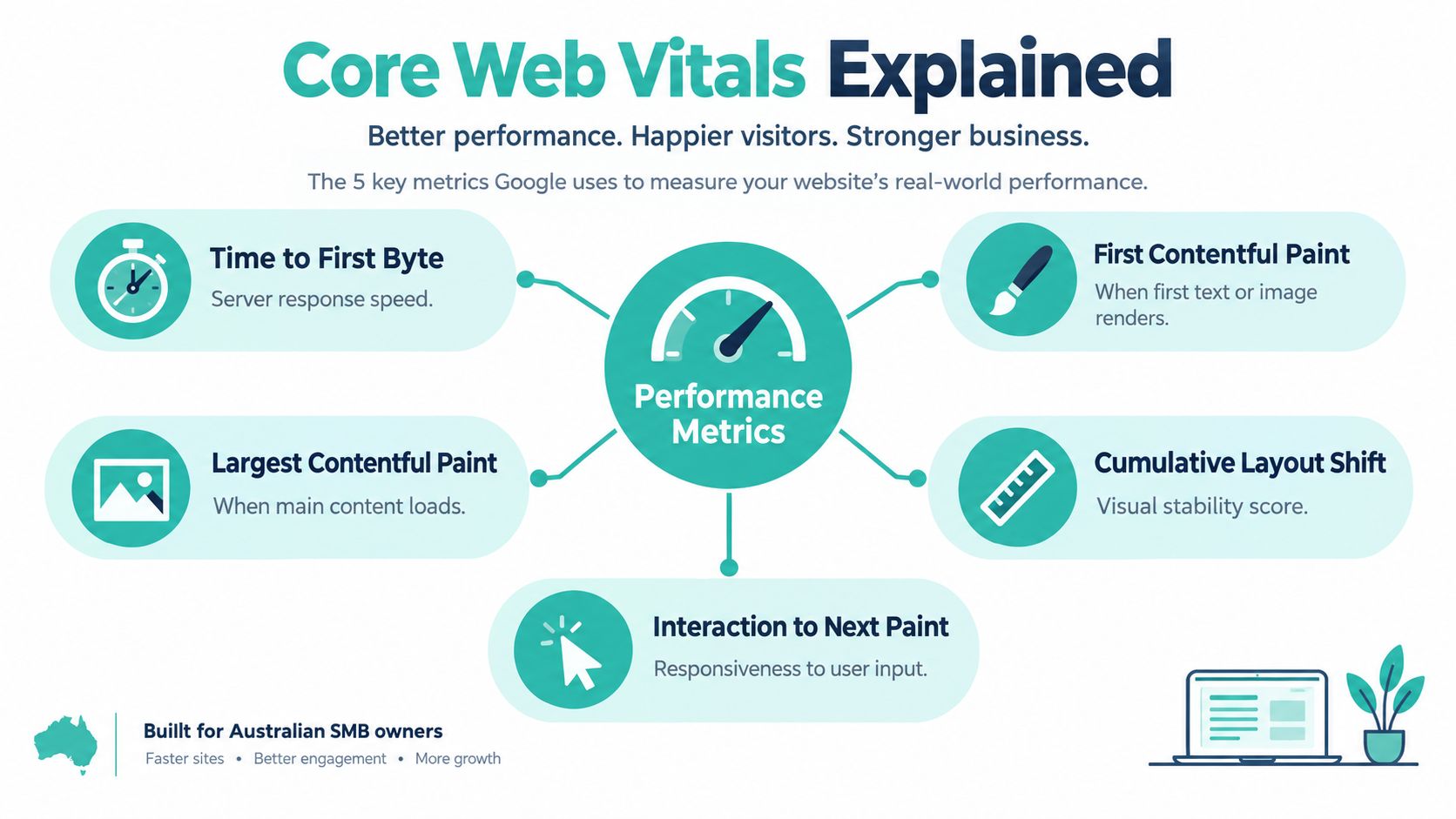
Time to First Byte, or TTFB, measures how quickly the browser receives the first response bytes. It is primarily a server and network signal. Slow database queries, overloaded shared resources, application work and distance from the origin can all contribute. A Sydney-hosted site may produce a different TTFB for a Perth visitor than for a Sydney visitor, especially when the test excludes CDN-cached content.
First Contentful Paint, or FCP, records when the browser first renders visible text, an image or another content element. It helps answer the visitor's first question, “Is anything happening?” It isn't a Core Web Vital, but it gives useful context when a page appears blank despite a reasonable server response.
Largest Contentful Paint, or LCP, measures when the main visible content loads. Google's Core Web Vitals guidance and PageSpeed Insights documentation define LCP as the loading metric. The recommended threshold is within 2.5 seconds.
Interaction to Next Paint, or INP, measures responsiveness after a visitor clicks, taps or types. The recommended threshold is below 200 milliseconds. A page can display quickly but still feel broken if a menu, form or checkout control doesn't respond promptly.
Cumulative Layout Shift, or CLS, measures visual stability. The recommended threshold is below 0.1. Unreserved image space, late-loading adverts, banners and font changes can move a button while a customer is trying to use it.
Use percentiles, not comfortable averages
Google evaluates an origin or page as passing only when the 75th percentile is rated “Good” for all three Core Web Vitals. That means a fast average can hide a poor experience for a substantial group of users. Treat LCP, INP and CLS as separate pass or fail measures, not as ingredients to average into a flattering score.
TTFB deserves its own line in an Australian report because it helps separate the hosting stack from front-end work. The Core Web Vitals thresholds describe user experience, while TTFB helps explain why that experience starts late. For a broader explanation of this server-side measure, see what server response time means.
Record at least these values for every important URL:
- Server start: TTFB, DNS timing and connection timing.
- Visual start: FCP and the first visible element.
- Main content: LCP and the element that produced it.
- Responsiveness: INP on menus, forms, search and checkout controls.
- Stability: CLS during the full page load and the key interaction.
A desktop pass doesn't cancel a mobile failure. Mobile CPUs, screen sizes, network latency and touch interactions change the work the browser must perform.
Host your website with our 5-star rated, cPanel website hosting plans.
Super fast servers, with security included and hosted in your choice of Australian Data Center.
View cPanel Plans
Designing an Australian-Aware Test Plan
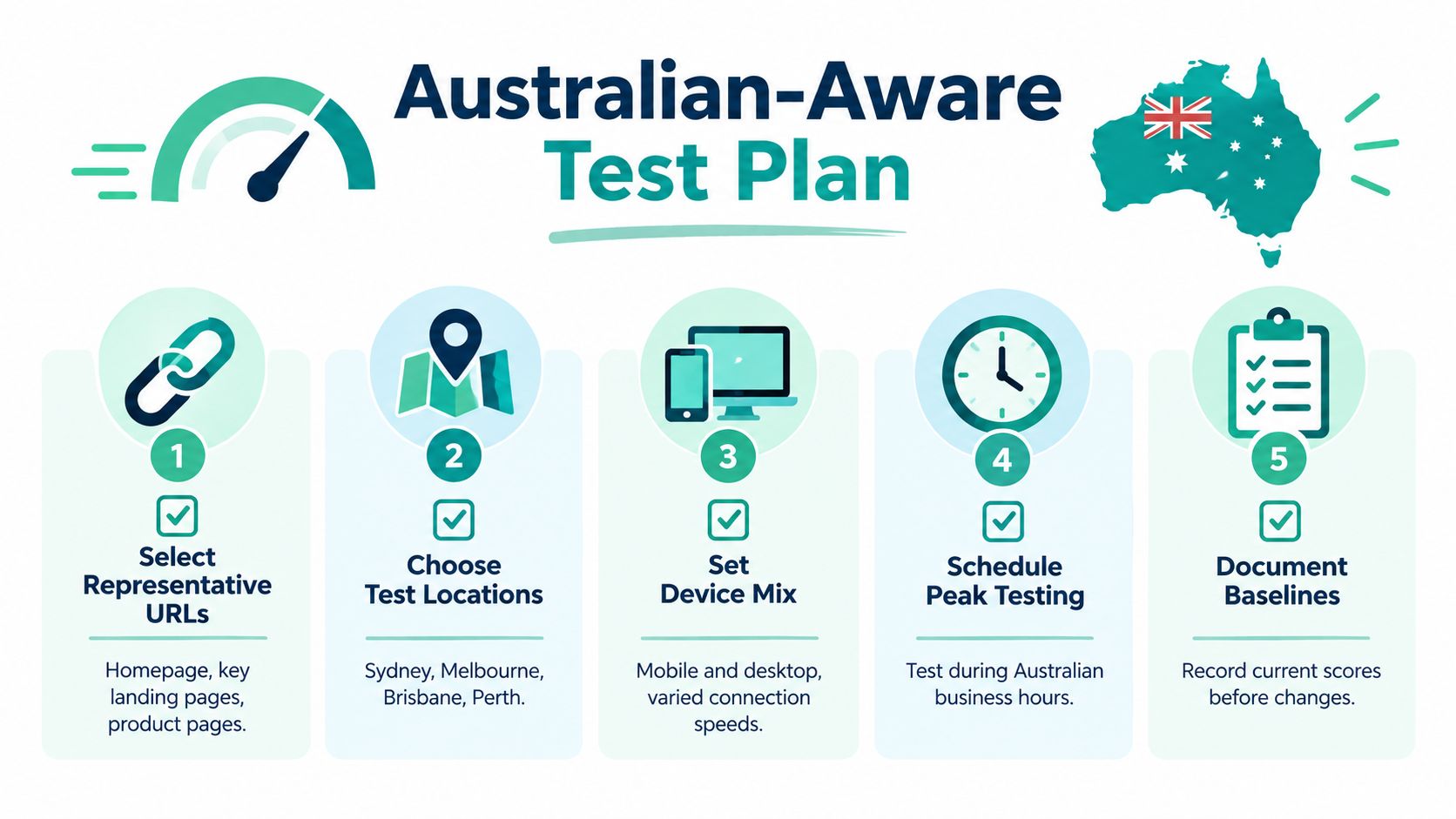
Start with pages that make money or collect intent, not just the homepage. A small business should normally include the homepage, a high-traffic landing page, a product or service page, the contact or quote form, and the checkout or booking flow where one exists. Test each URL on mobile and desktop as separate environments.
The lab stage gives you control. In Lighthouse or PageSpeed Insights, run at least five tests per URL, remove obvious outliers, and record the median. Then compare that result with the 75th percentile field experience. The lab result tells you whether a controlled change altered the page. The field result tells you whether actual Australian visitors receive the intended experience.
Build the sample around customers
Run the same protocol from Sydney, Melbourne, Brisbane and Perth. Add regional areas when the business serves them. A local trades business, for example, might need a Brisbane and regional Queensland comparison, while a national retailer may need a wider sample across the states.
Keep these variables visible in the test record:
- Location: city or regional test point.
- Device: mobile or desktop profile, including browser version.
- Connection: mobile, fixed-line or wireless profile, with latency and throttling settings.
- Cache state: cold and warm cache where the tool supports both.
- Timestamp: especially important when traffic, campaigns or releases vary.
Use a two-stage process. First, run the controlled tests and identify a suspected bottleneck. Next, validate with real-user monitoring from Australian visitors. The Australian performance optimisation guidance is useful when turning that test design into an operating routine.
Put testing on the calendar
Test before launch, after every material deployment, and on a monthly schedule. Retest after image updates, plugin changes, analytics changes, consent-tool changes and new advertising tags. Test during Australian business hours as well as quieter periods when a campaign or seasonal event could change server load.
A release gate for a conversion-critical mobile page should require all three Core Web Vitals thresholds at the 75th percentile. Don't approve a deployment because the Lighthouse score looks attractive if the form still produces a high INP or the hero image creates a failing LCP.
A benchmark of 18 Australian sites found an average mobile Lighthouse score of 48, with only two sites exceeding 80, according to Studio Slate's Australian Core Web Vitals research. The lesson isn't to chase a particular score. It is to establish a repeatable protocol and prove that the customer task works.
Reading a Waterfall Like a Hosting Engineer
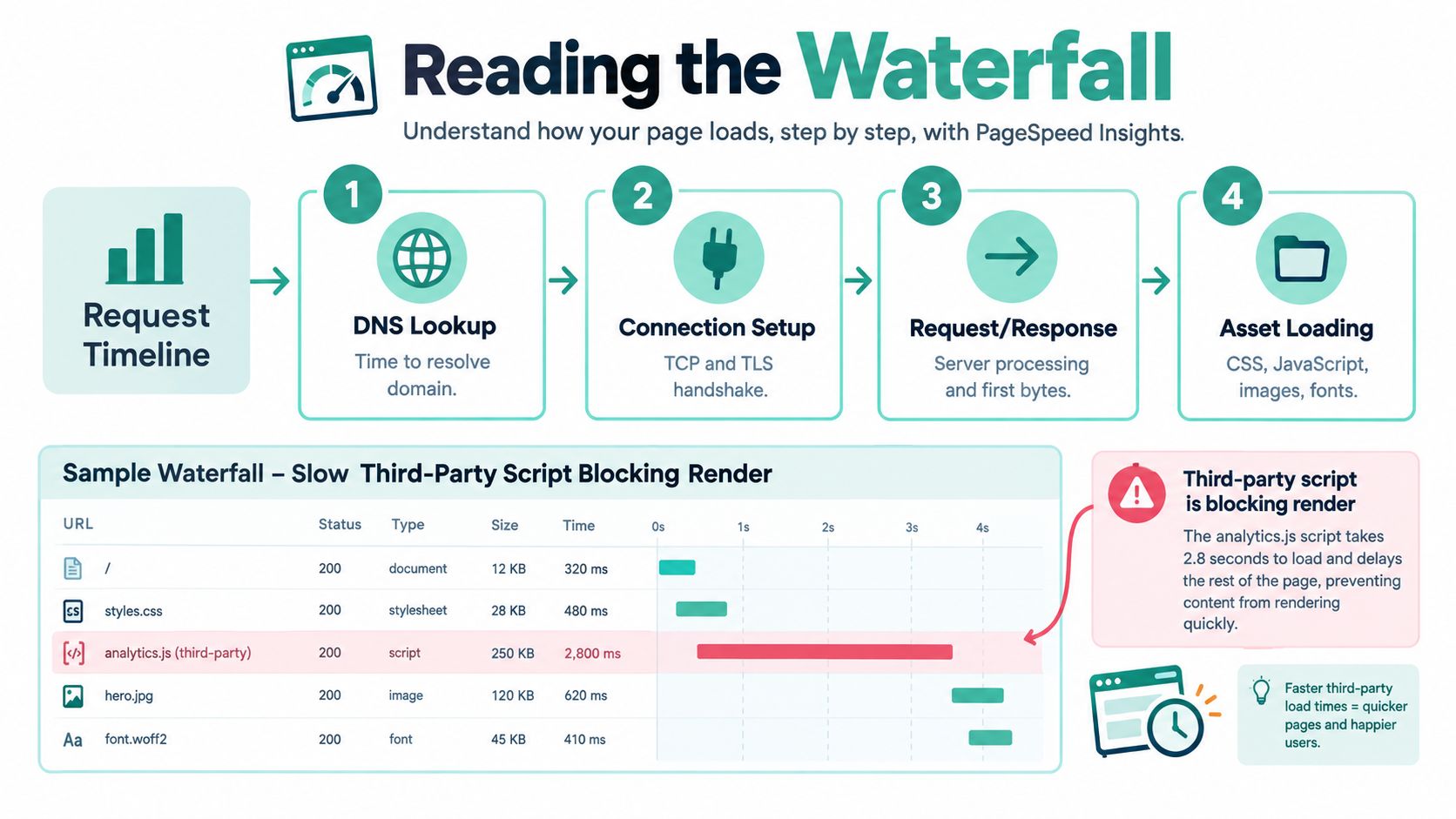
Open the network waterfall for a realistic small-business homepage and read it from left to right. The browser first looks up the domain, establishes the connection, waits for the response, then downloads and processes the assets that create the visible page.
Follow the request sequence
DNS lookup is the domain-resolution phase. If it takes noticeably longer in Perth than Sydney, check the location, resolver path and DNS service before changing page code.
Connection setup includes the network connection and TLS handshake. Slow DNS followed by slow connection setup often points towards routing, hosting or CDN placement. A CDN can help static assets, but it won't automatically fix slow application work at the origin.
Request and response expose the server. A large gap before the first response byte usually points towards application processing, database work, server contention or an uncached request. On WordPress, that may involve an expensive plugin or dynamic page. On ASP.NET, inspect application execution, IIS configuration and MSSQL queries.
Asset loading covers CSS, JavaScript, images and fonts. If TTFB is quick but LCP arrives late, look for a render-blocking stylesheet, a hero image discovered too late, excessive JavaScript, font delays or a third-party script that holds the browser's attention.
Practical rule: Slow DNS and connection setup suggest a network or hosting path problem. Large TTFB suggests server or application work. Late LCP with fast TTFB suggests front-end assets.
For a controlled test of a site before DNS changes are complete, the Hosts File testing guide can help a developer inspect the new environment without sending public traffic there.
Use the symptom-to-fix shortcut
| Symptom | Likely cause | First fix |
|---|---|---|
| DNS and connection bars are slow | Routing, origin location or CDN path | Compare Australian locations and inspect hosting or CDN placement |
| Long wait before first byte | Application, database or resource contention | Profile server work, queries and cache behaviour |
| Fast TTFB, late LCP | Hero media, CSS, fonts or JavaScript | Compress the LCP asset, defer non-critical scripts and remove render blockers |
| Layout moves after content appears | Missing dimensions or late inserts | Reserve image and embed space, then review banners and fonts |
| Clicks feel frozen | Main-thread JavaScript or heavy third-party code | Inspect long tasks, defer optional tags and simplify interaction code |
| One release suddenly regresses | Plugin, tag, image or template change | Compare the release waterfall with the saved baseline |
Don't optimise every row. Find the longest delay that blocks a customer-visible milestone, change one variable, and rerun the same city, device and cache profile.
Load Testing, Uptime and Real-User Monitoring
A page can pass a short lab run and still slow down when a campaign, email or seasonal event sends more visitors to the same application. Load testing should answer a narrow question: can the site maintain acceptable response and task completion under the expected demand?
Start with a representative journey, such as opening a landing page, searching, submitting a quote form or adding an item to checkout. Use a lightweight synthetic tool for a basic check, and use a fuller stress-testing platform when the business needs controlled concurrency, ramp-up, thresholds and detailed server metrics. Never point an aggressive test at production without approval and a rollback plan.
The practical starter approach is to simulate two to three times typical concurrent visitors for ten minutes after a release, but only when “typical” has been measured by the business. That is a test design example, not a universal capacity guarantee. Watch response time, error rate, database pressure, CPU and memory, then stop if the environment begins to affect real customers.
Synthetic uptime checks and real-user monitoring answer different questions. A synthetic check confirms that a known URL responds from a chosen location. Real-user data shows what visitors experience across devices, carriers, browsers and regions. Use both.
Keep the dashboard small
Review p75 mobile LCP and INP, uptime, error rate and conversion completion weekly. Review regional comparisons, waterfall changes, accessibility task completion and capacity behaviour monthly or after a major release. A small business doesn't need a wall of charts to notice a regression.
| Monitoring layer | What it catches | Best use | Cadence |
|---|---|---|---|
| Synthetic uptime | Outages and failed endpoint checks | Alerting for important URLs | Continuous |
| Synthetic performance | Repeatable timing changes | Release comparison and regional baselines | After releases and monthly |
| Real-user monitoring | Device, network and regional experience | Validate Australian field conditions | Continuous review |
| Load testing | Capacity and degradation under demand | Campaign and deployment readiness | Before expected spikes |
| Task monitoring | Broken forms, checkout and login paths | Protect conversion workflows | Weekly and after changes |
An Australian monitoring service can also check load time, responsiveness, TTFB, DNS time, connection time and total duration at intervals such as every 1, 5 or 10 minutes, with alerts when problems appear. Keep the alert list focused. If every minor variation creates a notification, the team will stop acting on the serious ones.
Register your new domain name at competitive market prices including free domain add-ons like privacy, DNS Hosting, Custom Nameservers and Forwarding.
Always the best price and no nasty renewal price hikes.
Register A Domain Name
Hosting, Caching and CDN Fixes for WordPress and ASP.NET
The right fix depends on where the waterfall spends its time. A WordPress owner with fast TTFB but a late hero image shouldn't replace hosting first. An ASP.NET application with a long server wait shouldn't start by converting every image to AVIF.
WordPress decisions
For WordPress, enable full-page caching where the page allows it, then confirm that logged-in and cart pages bypass the cache correctly. LiteSpeed caching can reduce repeated PHP work on a compatible server, while CloudLinux resource limits help isolate accounts and expose when CPU or memory allocation is the constraint. AccelerateWP can assist with WordPress-specific optimisation, but automation still needs verification in the waterfall.
Compress hero and product images into WebP or AVIF where browser support and image quality are acceptable. Set dimensions so the browser reserves space, lazy-load below-the-fold media, and avoid loading a large desktop image into a mobile viewport. Review fonts and third-party tags after the image work, because a marketing script can still block interaction.
The LiteSpeed and OPcache optimisation guide for WordPress in cPanel covers the relevant server controls. Add a CDN with Australian edge locations when customers are distributed across the country. It can shorten the distance for static assets, but it won't repair slow uncached PHP or a poorly indexed database.
ASP.NET decisions
For ASP.NET, begin with output caching for pages and responses that don't change per visitor. Check IIS configuration, compression, application recycling behaviour and the database connection path. A slow MSSQL query can create a large TTFB that no front-end minification will solve.
Shared Windows hosting can suit a modest site with predictable demand and low operational overhead. A managed VPS gives more control over CPU, memory, IIS and database resources as the application grows, but it also creates more responsibility and cost. Choose based on the measured bottleneck, not on a generic preference for one hosting type.
Place the origin in Sydney, Melbourne, Brisbane or Perth according to the audience's actual concentration. A CDN reduces distance for cacheable files, while regional testing confirms whether the improvement reaches users outside the origin city.
Prioritise fixes in this order:
- Remove the largest blocking delay: server response, render-blocking code or oversized LCP media.
- Cache safely: page, object, output or static-file caching where the workflow permits it.
- Reduce browser work: defer optional scripts, trim plugins and reserve layout space.
- Recheck the origin and CDN: test all four major Australian cities.
- Protect the result: add uptime, field monitoring and a release baseline.
UpTime Web Hosting provides Australian cPanel, WordPress and ASP.NET Windows hosting, with infrastructure in Sydney, Melbourne, Brisbane and Perth. Its plans include features such as LiteSpeed, CloudLinux, AccelerateWP, free SSL, malware scanning, firewalls and monitoring, so it can be evaluated as one hosting option against the bottleneck your tests identify.
Acting on Findings and Proving the Win
A useful performance project ends with a comparable result, not a prettier score. Record the URL, city, device, browser, connection profile, cache state, timestamp, response headers and Core Web Vitals before making changes. Repeat the same protocol afterwards, then compare p75 mobile LCP and INP, CLS, TTFB, uptime, errors and the completion of the relevant business task.

A practical 30-day sequence
- Days 1 to 5: Establish baselines for the homepage, key landing page, form and checkout from Sydney, Melbourne, Brisbane and Perth.
- Days 6 to 12: Fix the largest waterfall delay, whether that is server work, an LCP image, render-blocking code or an unreliable third-party script.
- Days 13 to 20: Retest mobile and desktop, then validate with field data and a real task such as submitting an enquiry.
- Days 21 to 30: Add monitoring, document the accepted thresholds, and test accessibility with keyboard navigation and a screen reader.
Don't test only the homepage. Don't trust one run. Don't use desktop results as a substitute for mobile field data, and don't optimise for a grade while a customer still can't complete a form. Western Australia's Accessibility and Inclusivity Guidelines call for regular testing before launch and afterwards, including browser, platform and device compatibility and successful user-task completion. For government-facing services, the ATO identifies WCAG 2.2 Level AA alongside Australian digital-service and inclusion requirements in its accessibility guidance.
Performance testing becomes valuable when it becomes routine. Start with the four city baseline, fix one measured bottleneck, verify the customer task, and keep the same checks running after every meaningful change.
If you need help applying these checks, UpTime Web Hosting offers Australian WordPress, cPanel and ASP.NET hosting with local infrastructure, monitoring and performance-focused server features. Visit the site to compare hosting options or discuss a setup that matches your customers' locations and the bottleneck your tests uncovered.