In short
Website downtime is best prevented by removing single points of failure and detecting trouble early: choose hosting with headroom, monitor from outside the server, patch through a controlled test path, secure DNS and administrator access, keep tested off-site backups, and document who restores what. Prioritise recovery speed over an unrealistic promise of perfect uptime.
Key takeaways
- At 99.9% availability, the mathematical allowance is about 43 minutes 12 seconds per 30-day month; 99.999% allows about 26 seconds.
- A practical monitoring baseline checks important pages every one to five minutes from outside the hosting environment and alerts a named primary and backup contact.
- Hosting capacity should be reviewed before campaigns, seasonal peaks and major site changes, not after repeated resource-limit errors begin.
- A backup is not proven until the complete website, database and configuration can be restored and tested.
- Failover is most useful when the cost of an outage justifies the extra infrastructure, testing and operational complexity.
Table of contents
- How much downtime does an uptime percentage allow?
- Which hosting and capacity changes prevent overload?
- How do you detect trouble before customers do?
- How do you change the site without causing an outage?
- How do you protect DNS, domains and the site itself?
- What makes backups, failover and incident response usable?
- What should you change in the next 30 days?
- What else do businesses ask about website downtime?
- What should you change first?
Most small-business outages do not have one cause. A healthy server can be hidden by broken DNS, an available homepage can sit beside a failed checkout, and a recent backup can prove useless when nobody knows how to restore it.
The following 11 measures treat uptime as an operating process. Each measure should leave evidence behind, such as a working alert, a capacity report, a successful restore or an incident runbook that another person can follow.

Performance you can feel, backed by clients who depend on it. Read how our support and uptime create long‑term customer success.Power Your Business with Better Hosting
How much downtime does an uptime percentage allow?
An uptime percentage is a time allowance, not proof that an outage will be harmless. Using a 30-day month, 99.9% availability permits about 43 minutes 12 seconds of downtime, while 99.999% permits about 26 seconds.
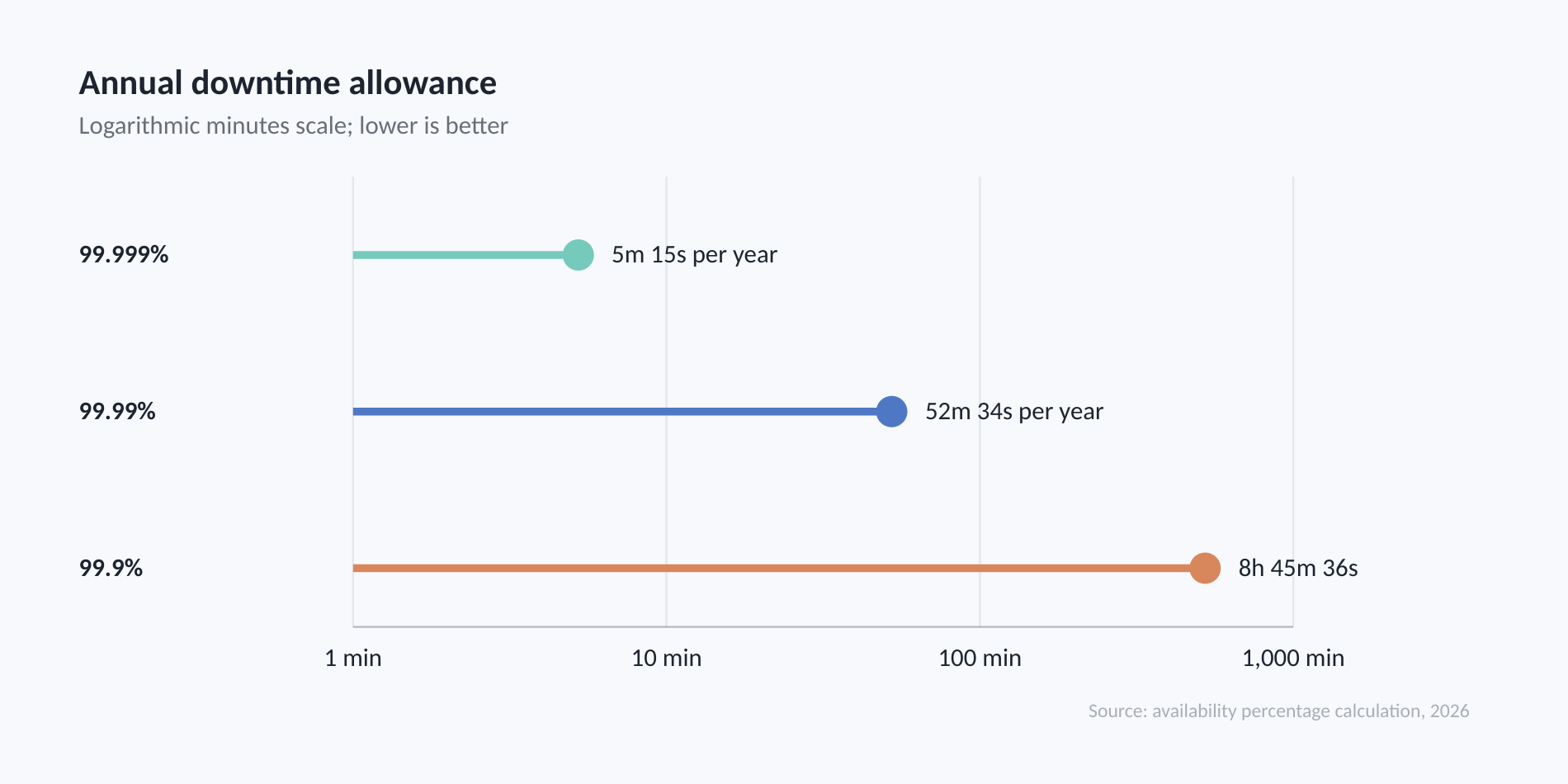
Across a 365-day year, the same calculation permits 8 hours 45 minutes 36 seconds at 99.9%, about 52 minutes 34 seconds at 99.99%, and about 5 minutes 15 seconds at 99.999%. Each additional nine reduces the allowance tenfold.
The percentage still cannot tell a business whether the outage happens during a quiet Sunday or a major sales campaign. Read the measurement window and exclusions in any service-level agreement, then ask how incidents are escalated and how quickly support starts diagnosis.
Practical rule: Buy the recovery process behind the uptime number, not the number by itself.
Treat the SLA percentage as one input; recovery speed and exclusions determine what the number means for the business.
Which hosting and capacity changes prevent overload?
Reliable hosting lowers downtime risk when the plan has enough resources and a clear escalation path. The useful questions concern capacity limits, monitoring, backups, support and upgrade options, not price alone.
1. Choose a host for failure response, not price alone. Confirm who monitors the infrastructure, how support is contacted during an outage, where backups are stored and whether resources can be increased without a disruptive migration. Australian businesses should also ask which services depend on the same location, network or control panel.
2. Keep resource headroom. Record the plan limits for processing, memory, concurrent connections, processes, storage and bandwidth. Review usage before advertising campaigns, seasonal peaks, imports, plugin installations or catalogue growth.
The July 2026 cPanel documentation for CPU and concurrent connection usage confirms that supported cPanel environments can expose account-level resource usage. Repeated limit events, database errors, slow administration screens or rising response time are signals to optimise the site or move to a larger cPanel plan or managed VPS before customers encounter failures. (docs.cpanel.net)
Reliable hosting prevents more downtime when capacity limits, escalation paths and upgrade options are understood before demand rises.
Host your website with our 5-star rated, cPanel website hosting plans.
Super fast servers, with security included and hosted in your choice of Australian Data Center.
View cPanel Plans
How do you detect trouble before customers do?

Use an external monitor to test what a customer can reach, then pair it with server and application signals that explain why a failure occurred. Monitoring reduces downtime only when an alert reaches someone authorised to act.
3. Monitor from outside the hosting environment. For a lead-generation or ecommerce website, a practical baseline is a check every one to five minutes from at least two locations. Test HTTPS availability and one important journey, such as submitting a form, opening a login page or reaching checkout.
4. Watch resources and dependencies. Monitor response time, server errors, CPU, memory, storage, database availability, scheduled tasks, DNS and certificate expiry. Use traffic monitoring tools for Australian sites to correlate demand with errors and resource pressure rather than treating visitor counts as an uptime check.
Each alert should include the failed URL or service, time, observed error and recent change history. Send it to a named primary contact and a backup contact, with an escalation point if nobody acknowledges it.
Monitoring only reduces downtime when it checks real customer journeys and sends an actionable alert to a named person.
How do you change the site without causing an outage?
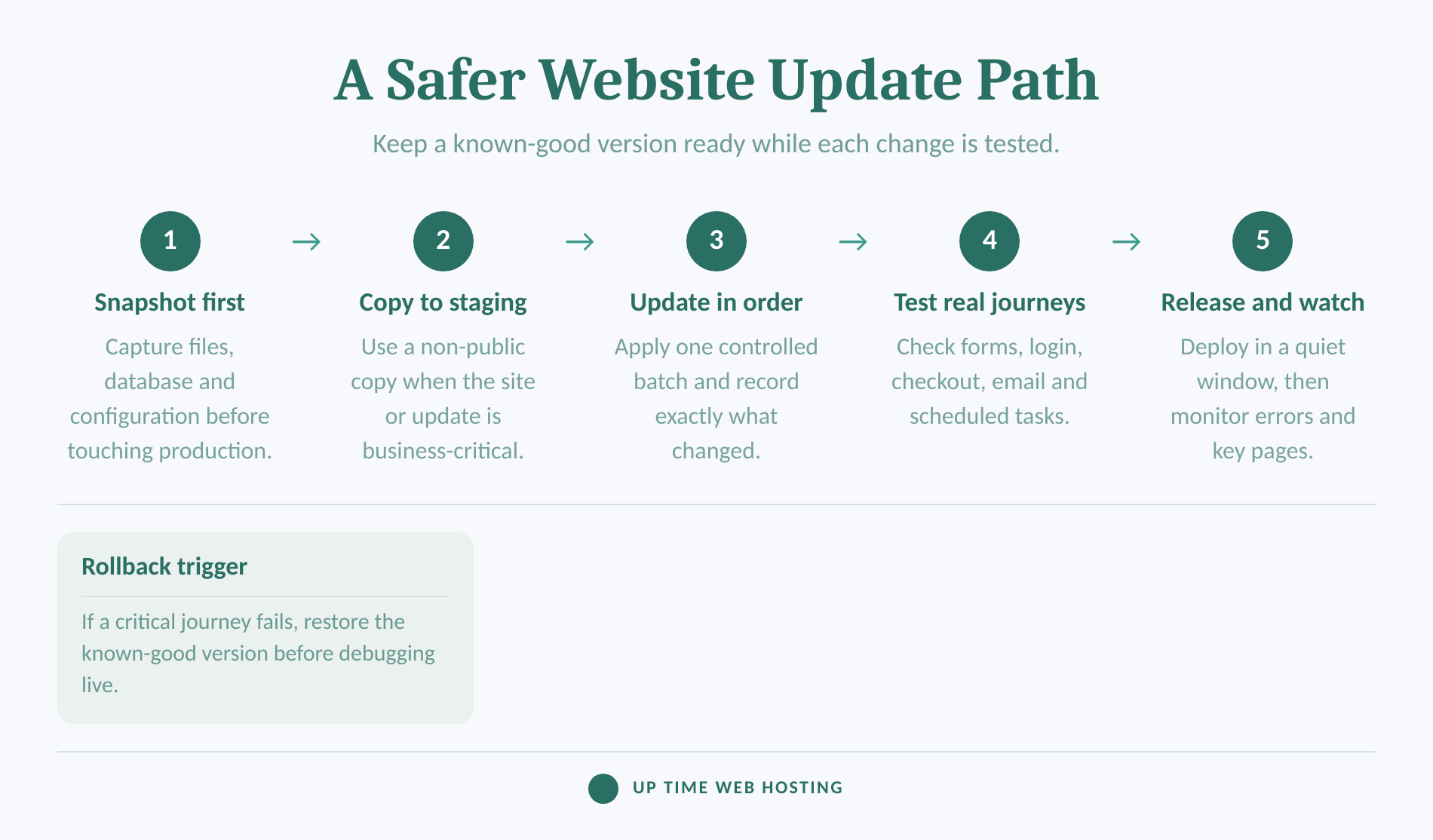
Treat every software or configuration change as something that may need to be reversed. A safe release begins with a known-good backup, tests the affected customer journeys and defines the condition that triggers rollback.
5. Make updates reversible. The WordPress documentation on plugin and theme auto-updates advises keeping plugins and themes current and having regular automatic backups available for rollback. WordPress also recommends backing up before core updates. (wordpress.org)
Use a staging copy when the update is business-critical or affects several components. After updating, test the homepage, forms, login, search, checkout, payment hand-off, transactional email and scheduled jobs that matter to the business. Release during a lower-risk window and watch errors and response time immediately afterwards.
Avoid combining unrelated plugin, theme, PHP, DNS and content changes in one release. Smaller batches make the cause easier to identify and the rollback safer.
A safe update is a reversible change with a backup, a test path and a clear rollback trigger.
How do you protect DNS, domains and the site itself?
DNS, domain registration, certificates and security controls can make a healthy server unreachable. Protecting uptime therefore requires controls outside the website application as well as inside it.
6. Build resilient DNS. The Australian Cyber Security Centre's DNS security guidance for domain owners, updated in 2021, recommends two or more geographically dispersed authoritative name servers. It also recommends restricted administrative access, multi-factor authentication, logging and current DNS software. (cyber.gov.au)
Keep a record of the authoritative DNS provider, registrar, nameservers, important records and authorised administrators. Lower the relevant time to live before a planned migration, check the new records independently, and retain the previous configuration until the change is verified.
7. Prevent domain and certificate expiry. As of August 2026, auDA's current .au renewal guidance says a .au licence can be renewed up to 90 days before expiry. During the 30-day grace period after expiry, the website and email services stop working. Keep registrant details current, enable renewal where appropriate and make reminders reach more than one responsible person. (auda.org.au)
Use automatic certificate renewal and monitor the public certificate separately. The ACME client guidance from Let's Encrypt warns that manual renewal workflows increase the risk of missed renewals. Automatic renewal can still fail after DNS, firewall or hosting changes, so an independent expiry alert remains useful. (letsencrypt.org)
8. Reduce security-driven outages. The Australian Cyber Security Centre's 2025 small-business cyber security guide prioritises multi-factor authentication, software updates and backups. Apply MFA to hosting, WordPress and domain administration; remove unused accounts and plugins; use malware scanning and a web application firewall; and restrict privileges to what each user needs. (cyber.gov.au)
A web application firewall filters suspicious application requests, while upstream denial-of-service mitigation addresses traffic volume before it overwhelms the service. The Australian Government's March 2025 denial-of-service guidance recommends preparation before an attack, including knowing which non-essential functions can be disabled. Review these DDoS-protected hosting considerations when the website handles sales, bookings, portals or other time-sensitive transactions. (cyber.gov.au)
Domain, DNS, certificate and security controls belong in the uptime plan because each can make a healthy server unreachable.
Register your new domain name at competitive market prices including free domain add-ons like privacy, DNS Hosting, Custom Nameservers and Forwarding.
Always the best price and no nasty renewal price hikes.
Register A Domain Name
What makes backups, failover and incident response usable?
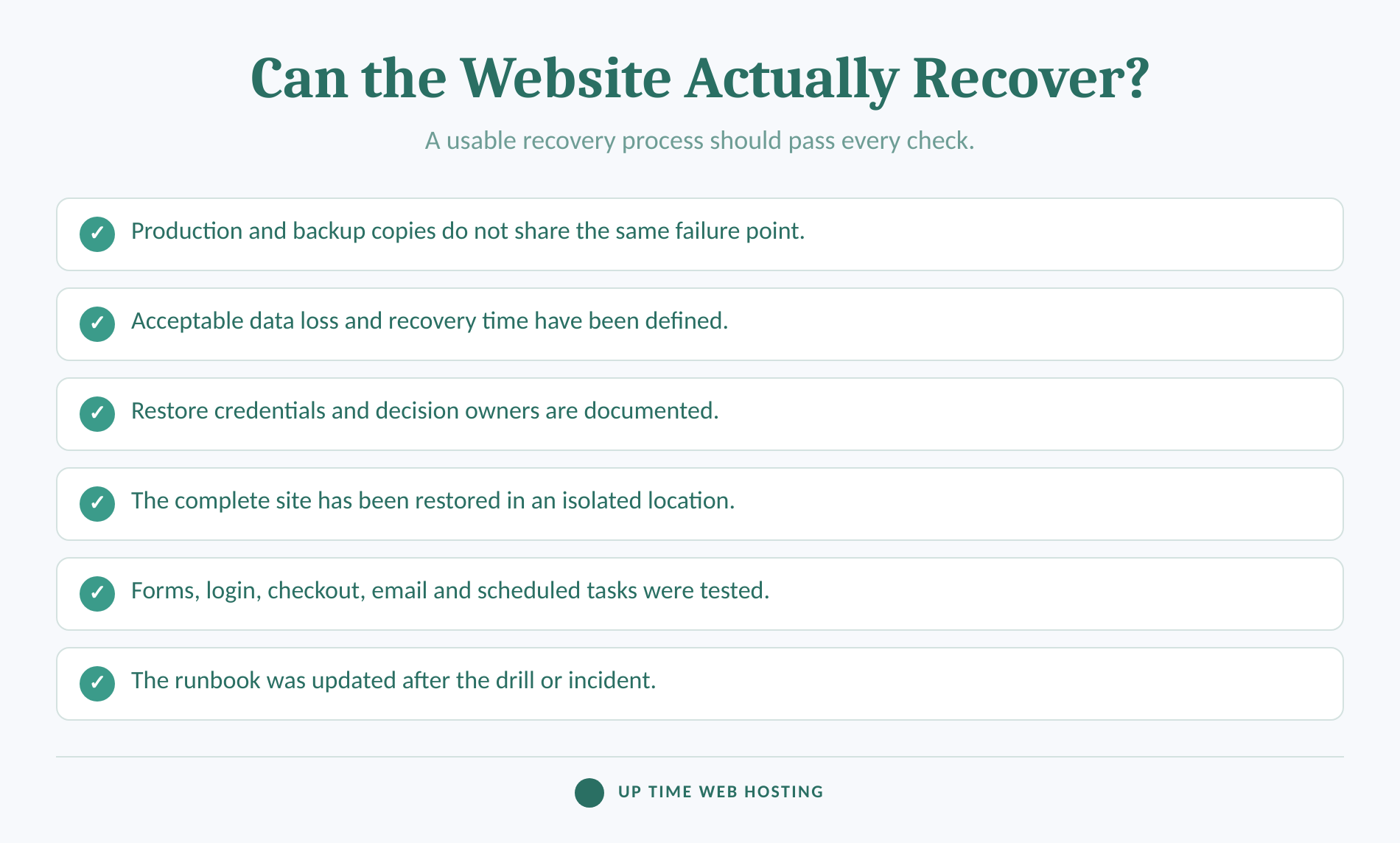
Recovery capability must answer two questions: how much data can the business afford to lose, and how long can the website remain unavailable? Backups, failover and incident documentation should be designed around those answers and tested before an outage.
9. Keep separated, versioned backups. Back up website files, databases and configuration often enough to meet the acceptable data-loss window. Keep copies outside the production account or failure zone, protect deletion with strong authentication and retain more than one recovery point so a corrupted or infected copy does not replace every clean version.
The Australian Cyber Security Centre's small-business backup testing guidance advises testing the entire backup rather than spot-checking a subset. The Australian Government Information Security Manual also states that data, applications and settings should be restored to a common point in time during disaster recovery exercises. (cyber.gov.au)
10. Prove restoration and decide whether failover is justified. Set a recovery point objective for acceptable data loss and a recovery time objective for acceptable interruption. Restore the complete site into an isolated location, time the process, and test forms, logins, checkout, email and scheduled jobs.
A brochure site may be adequately protected by monitoring, separated backups and a rehearsed restore. A store, booking platform or customer portal may justify a warm standby or another failover path. The disaster recovery hosting guide explains the difference between retaining backups and maintaining a usable recovery environment.
11. Maintain an incident runbook and review every outage. Record who declares an incident, who contacts the host, where credentials are stored, which services are restored first, how customers are updated and who approves the return to normal operation. The Australian Cyber Security Centre's cyber incident response planning guidance, updated in December 2024, says organisations should have a plan to support effective response and prompt recovery. (cyber.gov.au)
After recovery, record the trigger, detection time, response time, cause, customer impact and corrective action. Feed the result back into business continuity planning instead of treating the incident as finished when the homepage returns.
Recovery is credible only when a complete restore has been timed, checked and assigned to someone.
What should you change in the next 30 days?
The first month should establish visibility, recovery evidence and ownership before adding complex infrastructure. Complete the work in four short passes so each week leaves a result that can be checked.
| Week | Action | Evidence to keep |
|---|---|---|
| 1 | Inventory hosting limits, DNS, domains, certificates, administrators and critical website journeys. Assign an uptime owner and backup contact. | Dependency register, access list and escalation contacts |
| 2 | Add external availability checks and internal resource alerts. Test that both contacts receive and acknowledge an alert. | Alert screenshots and escalation test |
| 3 | Review updates, MFA, malware controls, firewall settings and renewal contacts. Document the release and rollback process. | Change checklist and access review |
| 4 | Restore the complete site to an isolated location, time the recovery and run a short incident exercise. | Restore record, measured recovery time and updated runbook |
Repeat the capacity review before campaigns and repeat the restore exercise after major infrastructure changes. Put recurring tasks in a shared calendar rather than relying on one person's memory.
The first 30 days should produce evidence: working alerts, spare capacity, a successful restore and a runbook people can follow.
Experience Microsoft 365 Business Standard for free for 30 days.
Up to 25 users with full access to email, OneDrive and Teams. Includes full versions of desktop apps of Outlook, Word, Excel, PowerPoint and more.
Try Microsoft 365
What else do businesses ask about website downtime?
Website downtime questions often mix availability, internet connectivity and recovery into one problem. The following answers separate those issues so the next diagnostic step is clearer.
How do you reduce downtime?
Downtime is reduced by combining prevention, detection and recovery. Use hosting with spare capacity, monitor the public site and server resources, control software changes, protect DNS and administrator accounts, and keep tested backups. Then assign an incident owner so alerts lead to action instead of sitting unread.
What does 99.999% uptime mean?
99.999% uptime means a service is available for all but 0.001% of the measurement period. Mathematically, that permits about 26 seconds of downtime in a 30-day month or 5 minutes 15 seconds in a 365-day year. The SLA's measurement method and exclusions still matter.
Why is every website going down?
When many sites seem down at once, a shared dependency is often the cause: an internet service provider, DNS resolver, major network, certificate service or local device. Check from mobile data and an external monitor. If unrelated sites fail only on one connection, the problem may be local rather than each website.
What is downtime of a website?
Website downtime is any period when intended users cannot reach or use the website's required functions. A page may be fully offline, return an error, time out, or load while critical features such as checkout, login or forms fail. Monitoring should therefore test both availability and important user journeys.
Website downtime becomes manageable when the business can distinguish a local fault, a shared dependency failure and its own outage.
What should you change first?
Start by verifying that somebody will receive an external alert, that the site has resource headroom and that a complete backup can be restored. Those three checks expose the most expensive gaps without requiring a complicated architecture.
For WordPress sites that need locally hosted infrastructure with included updates, automatic and on-demand backups, malware protection, firewall controls, DoS protection and SSL, review Australian WordPress Hosting on cPanel and compare the available resources with the site's measured demand. (uptimewebhosting.com.au)
The first practical move is to verify monitoring, restore capability and resource headroom before buying more complexity.