You've bought a domain, your website's nearly ready, and you want customers to see a proper business address rather than a personal inbox. Then the questions start: does your hosting include email, who changes the DNS records, and why do messages from your website form keep landing in spam?
Business email domain hosting is more than mailbox storage. You're choosing how staff access messages, how other servers recognise your authorised senders, and who controls business correspondence. For an Australian small business, the right setup combines manageable costs, tested DNS authentication and clear answers about data access, not just a local server address.
Table of Contents
- Which Business Email Hosting Option Fits Your Business
- What Business Email Hosting Costs and What Drives It
- Data Location, Privacy and Provider Checks
- The DNS Records Behind Every Business Email Address
- How to Set Up Business Email on Your Domain
- Moving Existing Mail to Your New Host Without Losing Messages
- Stopping Spoofing and Payment Fraud with Email Authentication
- Confirm Your Email Setup Before You Switch

Performance you can feel, backed by clients who depend on it. Read how our support and uptime create long‑term customer success.Power Your Business with Better Hosting
Which Business Email Hosting Option Fits Your Business
Which option fits a business that wants an address like name@yourbusiness.com.au? Say you're a tradie with one website, two staff and a shared accounts inbox. You probably need reliable email on phones, a straightforward way to handle invoices and someone who can fix a DNS mistake without sending you elsewhere.
Start with those jobs rather than a feature list. A collaboration suite can be worthwhile, but paying for document editing and video meetings won't fix an incorrectly configured website form.

Business email hosting options compared
| Option | Best fit | DNS control | Spam and sender checks | Ongoing effort |
|---|---|---|---|---|
| Specialist email hosting | Growing teams with shared inboxes | Full control of MX, SPF, DKIM and DMARC records | Dedicated filtering and sender authentication | Low |
| Email with cPanel web hosting | One website and a few mailboxes | Records managed in the web host's DNS zone | Built-in spam protection on many plans | Low to medium |
| International productivity suite | Teams using calendars, documents and video | Managed through the suite's admin console, with some custom records | Platform-level controls plus your own DNS records | Medium |
| Self-hosted mail server | Technical teams wanting full control | Complete control of every record | Entirely your responsibility | High |
Specialist email hosting separates mail from the website's hosting environment. It suits a team that needs shared inboxes, mail-focused support and filtering without buying a broader office suite. Confirm whether shared addresses provide delegated access or forward copies to staff, because those workflows aren't interchangeable.
Email bundled with cPanel web hosting is usually the simplest starting point when your business runs a single website. You manage mailboxes alongside the site, and many plans include spam protection and generous account allowances. The trade-off is shared administration: a hosting cancellation or careless account change can affect both services.
Our cPanel and Australian Email options at UpTime Web Hosting are local examples of these approaches. Choose between bundled hosting and separate email according to how your business works, not because every service must sit in the same package.
When extra capability earns its keep
An international productivity suite makes sense when staff actively use shared calendars, documents and video. Its admin console supplies domain-verification and authentication settings, but you may still need to publish records with a separate DNS provider. Check which custom records you can edit and who handles changes.
Self-hosting offers complete control, along with responsibility for patching, outbound queues, blocklist monitoring, backups and deliverability. It's a technical operating commitment, not a cheap mailbox shortcut.
Practical rule: If your website already runs on the domain, start by evaluating the option that keeps DNS and mail administration together. Fewer hand-offs make routine changes easier, provided the service meets your email requirements.
Keeping administration together isn't compulsory. A separate mail host can be sensible, but someone must own the whole setup rather than leaving each provider responsible for only its piece.
What Business Email Hosting Costs and What Drives It
The price per mailbox rarely explains the total cost. Storage, shared-address licensing, recovery options and configuration work can matter more than the advertised starting price.
Cost drivers to check in any business email quote
| Cost driver | What to check | How it changes the bill |
|---|---|---|
| Mailboxes | Number of users plus shared and role addresses | Cost usually rises with each added mailbox |
| Domains | Number of domains hosted on the plan | Extra domains may carry their own fee |
| Storage | Mailbox quota and archiving options | Heavy attachment users may need more space |
| DNS and configuration help | Who edits records and how help is billed | Support billed by the block of time adds cost during changes |
| Backups and retention | Restore options and how long deleted mail is kept | Shapes recovery risk more than the monthly price |
| Renewals | Renewal date and the renewal rate after any introductory discount | First-year savings can be reversed at renewal |
For example, a sole trader with one domain and two mailboxes could start with cPanel-based email. Mailbox allowances and renewal pricing are likely to matter more than collaboration features they won't use.
A five-person office with shared inboxes and a sales address should investigate specialist email with shared-access features. Establish which addresses need separate storage, who can reply as sales, and whether deleted messages can be restored. An alias isn't a substitute for a shared inbox with permissions and a common sent-mail history.
Compare the bill you'll actually pay
An agency managing several client domains needs transparent per-domain pricing and a clear charge for configuration help. A low mailbox rate won't compensate for repeated administrative charges whenever a client changes their accounting platform.
Compare costs across the initial term and renewal period, rather than buying on the introductory figure alone. Record the renewal date and rate, set a calendar reminder, and request quotes in AUD with GST shown separately.
Before purchasing, get the hourly or block rate for DNS changes in writing. Also distinguish backups from retention: a provider's disaster-recovery copy doesn't necessarily let you restore an individual message that an employee deleted.
Host your website with our 5-star rated, cPanel website hosting plans.
Super fast servers, with security included and hosted in your choice of Australian Data Center.
View cPanel Plans
Data Location, Privacy and Provider Checks
Australian servers don't automatically satisfy your privacy obligations. An accounting practice or clinic can keep client correspondence in an Australian data centre and still face questions about overseas support access, subprocessors and contractual control.
Australian hosting involves data sovereignty, security policies and compliance with local laws, not geography alone. Our Australian data sovereignty hosting guide provides context for assessing those responsibilities.
Location and control are different checks
Under Australian Privacy Principle 8, an APP entity generally must take reasonable steps before disclosing personal information to an overseas recipient and can remain accountable for its handling, as discussed in Gilbert + Tobin's digital sovereignty analysis. That analysis also distinguishes physical storage location from ownership and legal control, including circumstances where a foreign-owned provider may face another country's legal demands.
For a clinic, the useful question isn't whether the primary mailbox server is local. It's whether a support operator, backup service or security subprocessor can access patient correspondence, and under what conditions.
Local storage can be valuable, but it doesn't replace reviewing the service agreement. Nor should a private business assume it needs Australian Government hosting certification by default. Match the assessment to the information you hold, your applicable obligations and any client contracts.
Send this checklist before signing
Request written answers covering:
- Storage locations: Where are live mailboxes, archives and backups stored?
- Subprocessors: Which other organisations handle or access the information?
- Support access: Who can open mailbox content, and what approval and logging apply?
- Breach procedures: How will the provider notify you, through which contact and on what timeline?
- Retention and deletion: What remains after cancellation, and when is it deleted?
- Exit arrangements: How can you export messages, contacts and relevant records?
- Domain ownership: Does your business control the registration and DNS zone?
- Overseas disclosure: What does the contract permit, and what safeguards apply?
A local server address is useful evidence about storage. It isn't evidence of every person, company or legal authority that can access the data.
Keep the answers with the contract and your internal privacy assessment. Written commitments provide something concrete to evaluate and revisit; a verbal assurance that everything is Australian doesn't establish the service's actual boundaries.
The DNS Records Behind Every Business Email Address
A domain registration doesn't, by itself, create working email. Think of the domain as the street and DNS as the directory that tells mail where to go and which signatures to trust.
The records perform different jobs. An incoming-mail problem needs a different investigation from an outgoing message that fails authentication.
DNS records a business email domain needs
| Record | What it does | What fails without it |
|---|---|---|
| MX | Points inbound mail to your mail host | Messages to your addresses bounce or are lost |
| SPF (TXT) | Lists the servers allowed to send mail for your domain | Legitimate mail from forms, CRM or accounting tools may fail checks |
| DKIM (TXT) | Publishes the public key that verifies each outgoing signature | Receiving servers cannot confirm messages were signed by you |
| DMARC (TXT) | Sets the policy for failed checks and sends reports | No instruction for failures and no visibility of spoofing attempts |
MX records direct incoming messages to the mail service. Changing them doesn't move stored messages or create mailboxes at the destination. Our knowledge base article explaining what an MX record does helps distinguish mail routing from website hosting.
SPF identifies authorised sending infrastructure. Your staff mailbox host might be correctly included while your accounting application or website relay is missing. Maintain a sender inventory so you're not guessing which services need authorisation.
Don't create a separate SPF record for every application. Have the authorised mechanisms combined correctly into the domain's SPF policy, and check the result rather than assuming the DNS editor will merge them.
Copy provider values rather than improvising
DKIM requires cooperation between the sending service and DNS. The mail service signs outgoing messages using its private key, while the public key allows recipients to verify that signature. Publishing a key without enabling signing at the sender won't complete the setup.
DMARC connects authentication to the visible From domain and provides policy and reporting. A message can pass a service's authentication checks without authenticating the domain your customer sees, so alignment matters. The Western Australian Government's email security guidance explains why these controls belong together.
Copy the exact record names and values supplied by each sending provider. Some services supply DKIM through delegated records rather than a public key pasted directly into a TXT field, so follow that service's instructions.
DNS editors also handle domain suffixes differently. Check whether the interface appends your domain automatically, otherwise you can accidentally publish a record under the wrong name.
Allow a maintenance window for cached DNS records to expire and avoid busy trading periods. Publishing successfully is only an administrative check; a real message must still demonstrate that the sender uses the new configuration.
How to Set Up Business Email on Your Domain
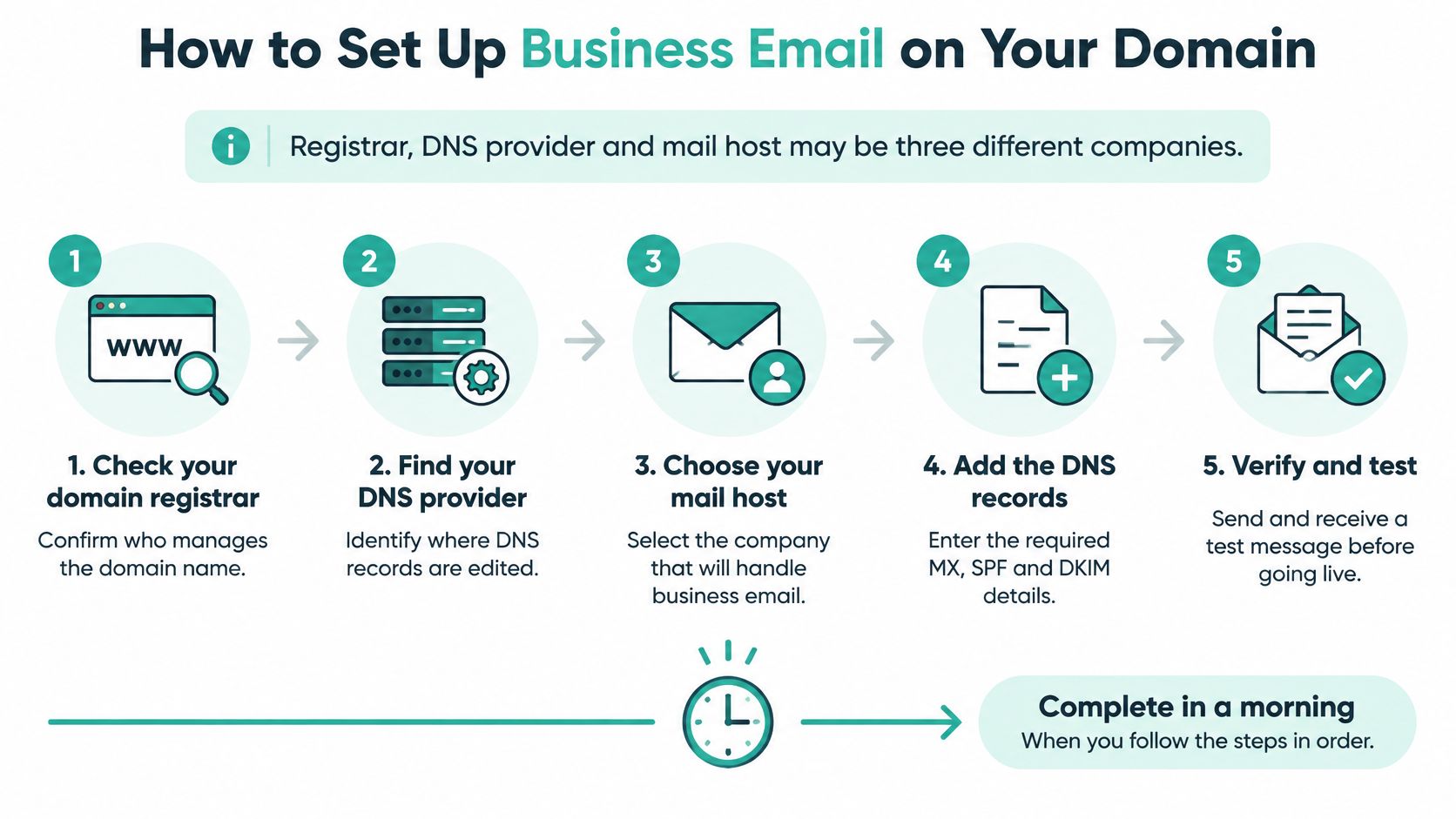
For a straightforward new domain, you can often complete the administrative setup in a morning if access and provider details are ready. Don't treat that as a promise that DNS caches or authentication reports will update immediately.
The registrar, DNS provider and mail host may be separate companies. The ACSC's account-compromise guidance recommends discussing authentication with the service provider and involving the DNS provider when DNS hosting is separate.
Prepare ownership and publish the records
Confirm domain ownership. Make sure the business is the registrant, with access to renewal notices and the management account. Leaving registration solely under a developer's control creates an avoidable dependency when that relationship ends.
Create addresses and assign responsibility. Set up sales@, accounts@ and support@ where useful, with a named owner for each workflow. Don't distribute a shared password when delegated access is available.
Obtain current provider values. Collect the required MX, SPF, DKIM and DMARC details from the mail host and other authorised senders. Reusing an old setup template can point mail at retired infrastructure.
Edit the authoritative DNS zone. Save a copy of the existing records, then add the mail records without disturbing the website's A record. Editing an inactive DNS dashboard is another common mistake, so confirm which nameservers serve the domain.
Start DMARC in monitoring mode. Use the monitoring policy with an aggregate-report destination that someone reviews. An unattended reporting inbox provides little operational value.
Connect devices and prove delivery
Configure staff access. Use the host's supplied IMAP or POP3 settings, or webmail, and configure authenticated outgoing mail with encrypted connections. IMAP generally suits staff using several devices because their folders stay synchronised; add a consistent business signature.
Test every sending route. Send messages from a mail client, the website contact form and each third-party sending tool, then inspect the recipient's authentication results for spf=pass, dkim=pass and dmarc=pass. A successful desktop test doesn't prove that the accounting platform is configured correctly.
For website forms, use an authenticated relay and put the customer's address in Reply-To rather than pretending the website can send on their behalf. Test replies as well as delivery, otherwise enquiries may arrive but staff responses may go to the wrong address.
Our Hosting Configuration support covers email tasks, domain and DNS changes, PHP configuration, SSL certificate installation and renewal, database administration, and storage clean-up. When handing over a configuration task, supply the sender inventory and desired outcome rather than only reporting that email doesn't work.
Register your new domain name at competitive market prices including free domain add-ons like privacy, DNS Hosting, Custom Nameservers and Forwarding.
Always the best price and no nasty renewal price hikes.
Register A Domain Name
Moving Existing Mail to Your New Host Without Losing Messages
Treat migration as a separate job from opening new mailboxes. Before touching routing, inventory every mailbox, shared inbox, alias, forwarding rule and auto-responder, together with the old service's cancellation date.
Our email account migration knowledge base guide is a useful starting point for organising the transfer. The key distinction is between copying stored information and redirecting new deliveries.
Copy first and cut over second
- Pre-copy mailbox contents: Use IMAP migration to transfer messages and folders to matching destination mailboxes. Export and import contacts and calendars separately, because IMAP doesn't transfer them.
- Prepare DNS caching: Lower the MX time-to-live ahead of cutover, allowing the previous cache lifetime to expire before changing the destination.
- Authorise overlapping senders: Add the new sending service to SPF before staff use it, and retain the old authorisation until that service stops sending.
- Keep both services available: Leave the old mailboxes active through a deliberate overlap period, then run a final synchronisation to collect late deliveries.
- Rebuild mailbox behaviour: Check forwarding, auto-responders, device settings and third-party integrations rather than assuming they migrated with the messages.
Work around the business's busiest periods
For example, a five-person office could retain sales@ and accounts@, pre-copy its historical shared folders and schedule cutover for Friday evening. That only helps if someone can monitor delivery afterwards and staff know when to reconnect their devices.
Migration safeguard: Don't cancel the old service because the new inbox received a test message. Confirm folder contents, late deliveries and replies before closing access.
Compare source and destination folder counts, and open samples of older attachments. If DNS is supplied independently, confirm access and cooperation before scheduling the change.
Finally, record the old provider's cancellation date and any retention or deletion conditions. That prevents an open-ended overlap bill without sacrificing the recovery window you deliberately planned.
Stopping Spoofing and Payment Fraud with Email Authentication
Publishing a DMARC record isn't the same as blocking impersonation. A monitoring-only policy gives you visibility, but doesn't ask recipients to stop messages that fail DMARC.
A criminal doesn't always need your mailbox password. They can spoof your domain or register a similar-looking name and send an invoice that appears plausible. Scamwatch reported that Australian businesses lost $227 million to payment-redirection scams in 2021, a 77 per cent increase from 2020, in its payment-redirection warning.

DMARC policy stages and what each does
| Policy | Effect on failed mail | Move on when |
|---|---|---|
| p=none | Monitors failures and sends reports; nothing is blocked by this policy | All legitimate senders pass in the reports |
| p=quarantine | Asks receivers to send failed mail to spam | Quarantine shows no legitimate mail failing |
| p=reject | Asks receivers to refuse failed mail outright | Reports stay clean after the quarantine stage |
The ACSC's guidelines for email identify SPF, DKIM and DMARC as core domain-protection controls. SPF checks authorisation of the sending server, DKIM verifies the signature, and DMARC checks alignment with the visible From domain and supplies the handling policy.
DMARC passes when an aligned authentication method succeeds. Don't interpret it as requiring every message to pass both SPF and DKIM, although configuring both gives your legitimate mail more resilience.
Receiving systems apply their own handling rules, so enforcement isn't an absolute guarantee. It also doesn't stop an attacker sending from a different, look-alike domain or abusing a compromised mailbox.
Move from reports to enforcement
Begin with monitoring and inspect aggregate reports across normal business activity. Allow enough time to capture less frequent senders such as newsletters, payroll notifications and month-end invoices, rather than tightening the policy after desktop email passes once.
Fix failed legitimate sources before progressing. Website forms should use authenticated relay, CRM platforms need their own verified sending setup, and newsletters must align with the business domain they display.
For a supplier invoice announcing changed bank details, staff should call a number from a trusted existing record. Don't use the phone number supplied in the suspicious email. Our business email compromise prevention guide supports that combination of technical controls and payment procedures.
Protect secondary and parked domains too. If a domain never sends email, configure an appropriate non-sending policy after confirming that no legitimate service uses it. Registering sensible name variations can reduce opportunities, but won't eliminate every look-alike.
Before enforcement, confirm:
- Sender inventory: Every legitimate service has been identified and appropriately authorised.
- Signing: DKIM works for the relevant outbound services.
- Alignment: Genuine messages pass DMARC.
- Report ownership: Someone investigates new failures after changes.
Experience Microsoft 365 Business Standard for free for 30 days.
Up to 25 users with full access to email, OneDrive and Teams. Includes full versions of desktop apps of Outlook, Word, Excel, PowerPoint and more.
Try Microsoft 365
Confirm Your Email Setup Before You Switch
Don't go live until you can demonstrate that the setup works. Confirm business ownership of the domain, put renewal reminders in the calendar and verify that the published records resolve correctly.
Keep an authorised-sender document with your account records. Move beyond DMARC monitoring only when reports support enforcement, not because a setup wizard shows a green tick.
Make the final checks practical
- Access: Confirm IMAP is included without add-ons and test staff devices.
- Filtering: Establish how spam is handled and how users recover false positives.
- Authentication: Check real messages, not just the presence of DNS records.
- Recovery: Verify migration completeness and the available restore process.
Our Australian Email plan is billed at $3.30 per domain per month. Reliable IMAP is included with every hosting plan without add-ons, and SPF, DMARC and DKIM are included; outbound email uses Mailchannels for filtering and guaranteed delivery, with no server blacklisting issues. Those outbound features don't remove the need to configure each authorised third-party sender correctly.
Use our SPF record checking knowledge base article alongside the DNS and authentication guidance when validating the setup. Send a test email today from your website form and inspect the received message's authentication headers.
UpTime Web Hosting offers Australian domain email, cPanel hosting and configuration support for mailboxes and DNS changes. Visit UpTime Web Hosting to compare the relevant options and arrange help connecting your domain, email service and authorised senders.