If you’re running a small business in Australia, the usual starting point is familiar. You need a proper website. You want to publish updates, answer customer questions, show up in search, and stop relying on a social profile you do not control. You also do not want a build that becomes expensive, slow, or hard to manage six months later.
That is where a wordpress website blog makes sense.
For most businesses, a blog is not a side project. It becomes the engine room of the site. Your service pages explain what you do. Your blog gives you a practical way to publish helpful articles, local advice, project updates, FAQs, and seasonal content that brings people back. Done properly, it also gives you control over performance, content structure, and long-term SEO.
Australian businesses have one extra consideration that many generic tutorials ignore. Server location matters. If your customers are in Brisbane, Sydney, Melbourne, Perth, or regional Australia, your site should be built and hosted with that audience in mind. A clean WordPress setup on local Australian hosting is often the difference between a site that feels sharp and one that always feels a fraction behind.
Why a WordPress Blog is Your Best First Step Online
WordPress is the default choice for a reason. It is flexible enough for a one-person consultancy, but it can also handle a growing service business, an online store, or a content-heavy company site without forcing a rebuild.
The scale of adoption matters because it affects the practical things. You get more themes, more plugins, more developers, more tutorials, and fewer dead ends. As a projection for 2026, WordPress powers 43.5% of all websites worldwide, and more than 250,000 .com.au and .au domains actively run on WordPress, representing more than 60% of the CMS market share for Australian-hosted sites according to Popupsmart’s WordPress statistics roundup.
Why that matters for a small business
A wordpress website blog works well as a first build because it lets you start small without boxing yourself in.
You can launch with:
- A home page that explains who you help
- A services page for enquiries
- A contact page with a form and email address
- A blog for advice, updates, and search visibility
Later, you can add booking tools, landing pages, location pages, a members area, or WooCommerce without moving to a new platform.
That is a better path than choosing a closed system that looks simple at first but becomes restrictive once the business grows. If you are weighing the trade-offs between platforms, this comparison of Wix v WordPress is useful because it highlights where convenience can limit control.
The local hosting piece people miss
Plenty of business owners choose WordPress, then put it on generic overseas hosting and wonder why the site feels clunky. WordPress itself is not the issue. The stack around it is.
For an Australian audience, local hosting changes the experience in ways people notice straight away:
- Pages load faster for local visitors
- Admin tasks feel more responsive
- Local search performance starts from a stronger technical base
- Support conversations happen in the same market and time zone
A business blog only helps if people can load it quickly, read it easily, and trust it enough to enquire.
The strongest first step online is not just “get a website”. It is to launch a site you can keep improving without replacing the foundation. WordPress gives you that foundation. Local Australian hosting makes it fully functional.

Performance you can feel, backed by clients who depend on it. Read how our support and uptime create long‑term customer success.Power Your Business with Better Hosting
Choosing Your Australian Hosting and Domain Name
Most first-time site owners spend too much energy on colours and logos, and not enough on hosting and domain choices. That usually leads to avoidable problems later: Slow pages, cramped resources, confusing email setup, and a domain name that does not quite fit the business.
Start with the two decisions that affect everything else: your hosting plan and your domain.
Pick hosting based on workload, not guesswork
Your hosting plan should match how you expect the site to behave over the next year. A simple brochure site with a blog needs one level of resources. A site with frequent articles, more email accounts, several staff logins, and heavier plugins needs another.
For Australian businesses, I usually look at four basics first:
Audience location
If most visitors are in Australia, choose Australian-hosted infrastructure.Content volume
A business publishing regular articles, media, and landing pages should avoid the cheapest possible setup if it means tighter limits or less headroom.Admin convenience
cPanel is still the most practical option for many small businesses because email, file access, databases, SSL, and installs sit in one place.Growth path
You do not need to overbuy on day one, but you do want room to grow without a messy migration.
If you want a plan overview grounded in local hosting considerations, this guide to the best Australian WordPress hosting is a useful reference.
A simple way to think about plan sizes
Use the smallest plan that comfortably fits your next stage, not just today’s launch.
| Plan Feature | Economy Plan | Business Plan | Premium+ Plan |
|---|---|---|---|
| Best fit | Solo operator, starter blog, brochure site | Established small business, active content publishing, multiple mailboxes | Growing business, heavier plugins, more traffic, agency-style flexibility |
| WordPress use case | One clean site with essential plugins | Business site with blog, forms, email, and room to expand | Larger WordPress setup with more functionality and operational headroom |
| Email needs | Basic branded email | Several staff mailboxes | More users and broader business use |
| Performance headroom | Suitable for lean builds | Better for regular publishing and plugin-based workflows | Better for demanding sites that need extra breathing room |
| Who should choose it | New business keeping things simple | Most SMBs | Businesses that expect growth or run more complex features |
That table is intentionally practical. Many businesses should skip the tiniest plan if they already know they want professional email, regular content, and a site that can expand.
Choosing between .au and .com.au
Both can work. The right one depends on branding and how established your business identity already is.
A .com.au domain still feels familiar to many customers and suits businesses that want the classic Australian commercial web identity.
A .au domain is shorter, cleaner, and easier to fit on signage, social bios, and business cards. It can work especially well if your brand name is distinct and easy to remember.
My usual advice is simple:
- choose the name customers will type correctly
- avoid hyphens unless you absolutely need one
- avoid unusual spellings if phone referrals matter
- register the version that aligns with your brand, then consider securing the other relevant variation if available
A practical naming example
A bookkeeping business in Geelong has better long-term branding with something like:
- clear business name
- short, readable domain
- Australian extension
- no unnecessary extra words
A weaker choice usually adds location, category, and filler terms into one awkward string. That might feel SEO-friendly at first, but it tends to hurt memorability.
If a customer hears your domain once, they should be able to type it without asking you to repeat it.
Hosting and domain setup are not glamorous decisions. They are foundational ones. Get them right and the rest of the build becomes far easier.
Launching Your WordPress Site with cPanel
Once your hosting account and domain are active, the actual WordPress install is usually the easy part. For most small business owners, the biggest hurdle is not technical difficulty. It is the assumption that this part will be difficult.
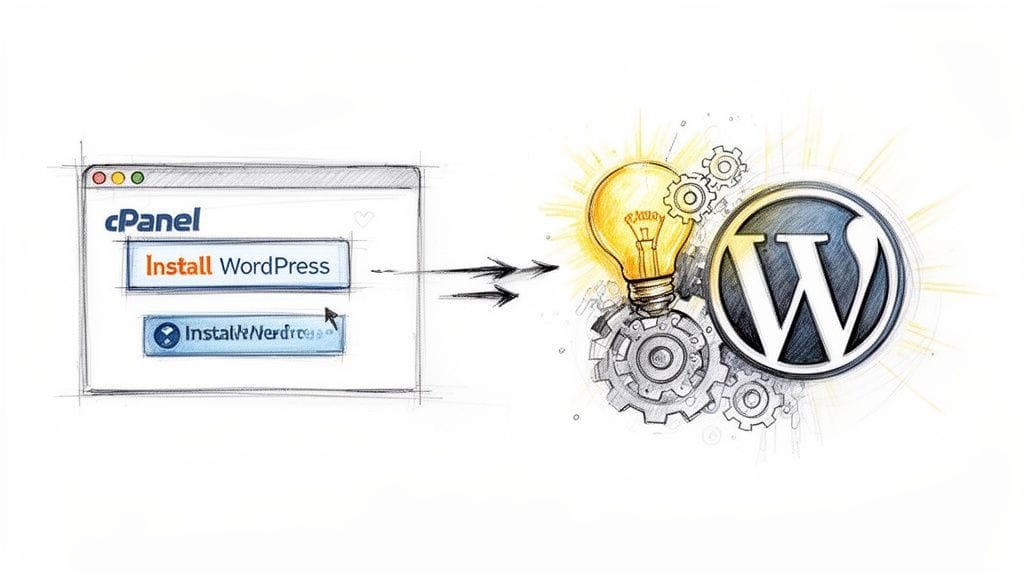
It usually is not, especially when the account uses cPanel and a one-click installer.
The basic install flow
If your hosting includes cPanel, the process is normally:
Log in to cPanel
Open your hosting dashboard and sign in.Find the WordPress installer
In many setups this is Softaculous or a similar app installer.Choose your domain
Make sure you select the correct .au or .com.au domain if you have more than one.Set the install path
Leave the directory field empty if you want WordPress on the main domain. Only use a subfolder if you intentionally want the blog installed there.Create your admin account
Use a strong username and password. Avoid “admin” as the username.Run the installation
The installer creates the database, configures WordPress, and gives you the login URL for the admin area.
If you want a clearer picture of what cPanel hosting includes, this page on web hosting services with cPanel covers the key tools.
What to set correctly on day one
A first install goes more smoothly when you pause for a few sensible settings.
Check these before you start publishing:
- Site title and tagline should match your business name and offer
- Admin email should be one you actively monitor
- Timezone should be set for your location
- Permalinks should use a clean post-name structure
- Discourage search engines should be unchecked once the site is ready for public viewing
A small example from real builds
A common mistake is installing WordPress into a subfolder like /wp by accident. The business then wonders why the homepage URL looks wrong or why links are untidy.
Another one is creating the admin account with a shared inbox that several people access informally. That causes confusion later when password resets, plugin notices, and update alerts start arriving.
Keep the first install clean: Main domain, clear admin details, sensible permalink structure, and no unnecessary extras.
At this point, your wordpress website blog is live. It may still look plain, but the core system is running. That is the right time to focus on design and functionality, not before.
Host your website with our 5-star rated, cPanel website hosting plans.
Super fast servers, with security included and hosted in your choice of Australian Data Center.
View cPanel Plans
Designing and Equipping Your New Blog
A new WordPress site can go off track quickly at this stage. A business owner picks a theme that looks polished in the demo, adds a page builder, installs ten plugins to fill gaps, and ends up with a site that feels slow on Australian connections before the first proper blog post goes live.
Design choices affect performance. For a business targeting local readers, that matters more than many owners expect. Even with Australian hosting reducing latency for local visitors, a heavy theme and bloated plugin stack can throw away that advantage.

Choose a lean theme first
The theme sets the baseline for speed, editing, and day-to-day maintenance. A good one should present your brand clearly, work properly on mobile, stay easy to update, and avoid loading design effects you will never use.
Themes packed with sliders, animations, bundled builders, and large option panels often create extra work later. They can also add CSS and JavaScript on every page, including blog posts that do not need any of it. That is a poor trade-off for a small business site where clarity and speed usually matter more than novelty.
A practical business blog theme should offer:
- clean typography
- sensible spacing
- clear blog archive layouts
- simple header and footer controls
- good compatibility with the WordPress block editor
If you want a practical reference point, this guide to choosing a WordPress theme for your site structure and design needs is useful.
Build the feature stack with restraint
WordPress gives you plenty of choice. The trap is treating every missing feature as a plugin problem.
Start with the functions that support publishing, enquiries, and visibility. For most small business blogs, that means:
an SEO plugin
Use one plugin for titles, meta descriptions, XML sitemaps, and basic content checksa security plugin
Focus on login protection, alerts, and a few sensible hardening settingsa forms plugin
Your contact or quote form needs to be reliable and easy to testa caching or optimisation plugin
Pick one that suits your hosting setup instead of stacking overlapping tools
That is enough for many first builds.
Skip the extras until the site earns them
Plenty of early installs come from nerves rather than real business needs. Popup builders, advanced animation packs, duplicate analytics dashboards, review sliders, and oversized menu tools often add weight without improving enquiries or readership.
I usually tell owners to hold off unless they can answer two questions clearly. What problem does this solve, and what page will use it?
That filter removes a lot of clutter.
A practical setup for an Australian small business blog
Take a local electrician, accountant, or outdoor service specialist building a first wordpress website blog for an Australian audience. The site usually needs a clean homepage, service pages, a contact or quote form, a blog archive, suburb pages if they target specific areas, and a simple path for visitors to get in touch.
In that setup, the right theme and a short plugin list help local hosting do its job properly. Visitors in Sydney, Melbourne, Brisbane, or Perth get the benefit of lower latency from Australian servers, but only if the front end stays light enough to load quickly. Fast hosting cannot rescue a theme that ships large scripts, multiple font libraries, and visual effects on every page.
A sensible first setup often includes:
- a fast business theme
- an SEO plugin
- a forms plugin
- basic caching
- image optimisation
- security hardening
It usually does not include:
- an event calendar
- page transition effects
- a mega menu builder
- multiple font plugins
- overlapping SEO tools
Every plugin should solve a specific problem that WordPress core, your theme, or your hosting does not already handle.
That approach keeps the site easier to edit, easier to update, and easier to scale as the blog grows.
Optimising for Speed Security and Performance
A slow site costs trust before it costs rankings. If a customer in Brisbane taps your blog post on a phone and waits three or four seconds for the page to settle, the problem is not only annoyance. It affects enquiries, time on site, and how useful your content feels.
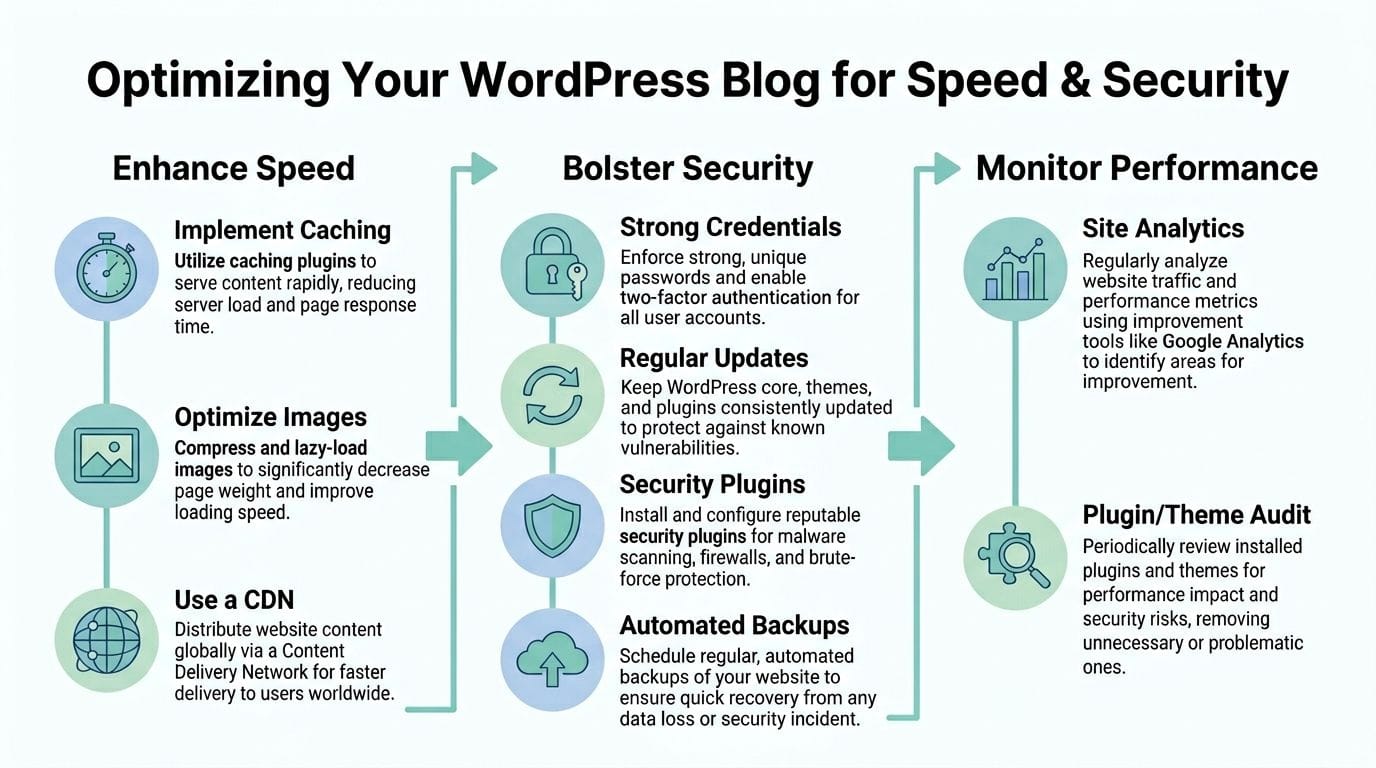
For an Australian business targeting Australian readers, speed work should start with geography and server response. Hosting your WordPress site in Australia reduces the distance between your visitor and the server. That usually means faster initial response times, a smoother experience on mobile networks, and less friction for local users trying to read, click, or submit a form.
Start with the server side
Site owners often spend hours compressing images while ignoring the part of the stack that sets the baseline. Server configuration has a direct effect on how quickly WordPress can deliver each page.
Check these items first:
- server location close to your audience
- server-side caching such as LiteSpeed
- a current PHP version
- enough memory and processing headroom for your theme and plugins
- database health and cleanup
If your host offers LiteSpeed or similar server caching, set that up before chasing minor front-end tweaks. A practical guide to improving WordPress speed with a cache plugin is useful here, especially on hosting that already includes LiteSpeed, local server locations, SSL, malware scanning, and nightly backups. That combination matters because fast caching on an overseas server still leaves Australian visitors dealing with extra latency.
Clean up the front end
Once the server is in order, the front end usually needs restraint rather than more tools.
The common problems are predictable. Oversized images. Too many font files. Plugins loading scripts on every page. Sliders, animations, and popups all competing for attention and browser resources. A small business blog does not need much of that to perform well.
Focus on:
image size and format
Upload images at the size you need. Convert heavy files where possible and avoid dropping huge originals into narrow content areas.fonts
Limit font families and weights. Two families with a sensible weight range is usually plenty.scripts
Remove plugins that add site-wide JavaScript for one small feature. That trade-off is rarely worth it.layout stability
Set image dimensions and keep page elements from shifting during load. Pages that jump around feel broken, even if they eventually finish loading.
A good outcome is a site that feels quick on an ordinary phone using ordinary mobile data in Australia. That is the test that matters.
Security supports performance
Security problems often show up as performance problems first. A hacked site can become slow, unstable, spammy, or completely unavailable.
The baseline is straightforward:
- SSL enabled
- strong admin passwords
- two-factor authentication if available
- regular core, theme, and plugin updates
- malware scanning
- backups you can restore
- protection against common login and bot attacks
Unified Infotech’s WordPress statistics roundup notes how often WordPress sites are targeted because of the platform’s popularity. In day-to-day work, the weak points are familiar. Abandoned plugins, outdated themes, reused passwords, and backups nobody has tested.
Fast sites feel current. Secure sites stay reliable.
Practical trade-offs that hold up
Perfection is not the goal. Stability is.
What works
- Australian hosting for Australian audiences
- one caching setup, configured properly
- a lean theme with minimal extras
- a short plugin list
- regular updates and verified backups
What fails in practice
- stacking multiple optimisation plugins that do the same job
- installing heavy features for occasional use
- leaving updates untouched for months
- assuming backups exist without checking restore options
- blaming every speed issue on images
When speed and security are handled together, the whole site improves. Pages load with less delay. Forms behave more consistently. Admin screens feel less sluggish. Search engines can crawl the site with fewer technical obstacles. For a first professional WordPress blog, that is the standard worth aiming for.
Content Creation and Post-Launch Maintenance
A clean launch is only the start. Once the site is live, the business value comes from publishing useful content and keeping the system in good condition.
The good news is that WordPress is strong at both. The block editor is straightforward once you stop fighting it and build a simple routine around it.
Publish your first proper post
Most business blogs do not need clever content formats. They need useful articles written for real customers.
A good first post is often one of these:
- an FAQ article answering the top question customers ask before they call
- a service explainer that clears up confusion in plain English
- a local advice post tied to your city or region
- a practical checklist your audience can use
In the WordPress editor, keep the structure clean:
- add a clear title
- write a short introduction
- break the article into headings
- use short paragraphs
- add one clear call to action at the end
For example, a Brisbane accountant might publish “What sole traders should organise before tax time”. A Perth outdoor design business owner might write “Best times of year to install new turf in WA conditions”. Those are useful, local, and commercially relevant.
Basic on-page SEO for Australian businesses
Do not overthink SEO at the beginning. Your first job is to make each article understandable to both readers and search engines.
That usually means:
- use the target phrase naturally in the title
- mention the service and location where relevant
- write a readable meta title and description in your SEO plugin
- link to a related service page
- add descriptive alt text to important images
- keep URLs short and tidy
A wordpress website blog often performs best when each post supports a business page. The post attracts broader searches. The service page handles the enquiry intent.
Set up branded email properly
A site looks more trustworthy when the contact details match the domain. An address like hello@yourbusiness.com.au gives a very different impression from a generic free mailbox.
If your hosting account includes email through cPanel, set up:
- a main contact mailbox
- role-based addresses such as sales or support if needed
- forwarders only where they make operational sense
- spam filtering before the inbox starts collecting junk
This matters for enquiries, but it also matters internally. Domain-based email keeps the brand consistent across contact forms, invoices, and client communication.
A professional site and a professional email address should arrive together.
Keep a light maintenance routine
Maintenance does not need to become a big monthly project. It does need to happen consistently.
A practical routine looks like this.
Each week
- check for WordPress core updates
- update plugins and themes
- test your contact form
- review comments or spam
- confirm recent content displays properly on mobile
Each month
- remove plugins or themes you no longer use
- review user accounts and permissions
- run a quick front-end speed check
- inspect backup status
- scan the site visually for broken layouts or odd behaviour. Neglected sites become vulnerable over time. As noted earlier, neglected sites become attractive targets, and WordPress, being popular, experiences a significant number of security incidents globally and in Australia. That is why proactive updates, malware scanning, and stable hosting matter for small businesses just as much as for larger organisations.
The businesses that get value from WordPress are usually not the ones doing complicated things. They are the ones doing the basics, regularly.
Register your new domain name at competitive market prices including free domain add-ons like privacy, DNS Hosting, Custom Nameservers and Forwarding.
Always the best price and no nasty renewal price hikes.
Register A Domain Name
Frequently Asked Questions
Should I choose .au or .com.au for my business blog
Choose the version that best fits your branding and how customers already know you. .au is shorter and cleaner. .com.au is still very familiar and suits many established businesses. If budget allows and both are relevant, securing both can help protect the brand.
Do I really need a blog if I already have service pages
Usually, yes. Service pages explain what you offer. Blog posts answer questions, target supporting search terms, and give you a reason to keep the site fresh. For many small businesses, the blog is where trust starts.
Can I move an existing site onto new hosting later
Yes, in most cases. A proper migration keeps the content, database, media, and structure intact. The key is to plan the move carefully so URLs, forms, and email continue working as expected after the transfer.
How many plugins should a new WordPress site have
There is no perfect number. The practical answer is “as few as needed”. A lean plugin stack is easier to update, easier to secure, and easier to speed up. Install based on function, not curiosity.
Is WordPress too technical for a small business owner
Not if the setup is sensible. The hard part is usually the initial decisions around hosting, theme choice, and plugin restraint. Daily tasks like editing pages, publishing posts, and managing images are manageable for most business owners after a short learning curve.
How often should I update WordPress
Check weekly. Apply updates regularly rather than letting them pile up. If the site is important to your business, pair updates with backups and a quick post-update test of forms, menus, and key pages.
Will local Australian hosting help SEO
It can help the technical side of user experience by improving response times for Australian visitors. That supports a better site experience overall. It is not a substitute for good content or site structure, but it is a practical advantage for businesses targeting local customers.
If you want a wordpress website blog that is fast, secure, and built for Australian visitors, UpTime Web Hosting is one local option to consider. It offers Australian server locations, cPanel, domains, email, WordPress hosting, free SSL, malware scanning, nightly backups, and performance tooling suited to businesses that want a solid local foundation without unnecessary complexity.