Network security isn't just for the big players. For a small business, it’s about building practical, layered defences to protect your data, your reputation, and ultimately, your bottom line. It means looking at everything from your office Wi-Fi and employee devices to the security of your website, and ditching the old "set it and forget it" mindset.
Your security is only ever as strong as its weakest link, which makes getting proactive absolutely essential.
Why Your Small Business Is a Bigger Target Than You Think
Staring down the barrel of cybersecurity can feel pretty overwhelming when you're running a small business in Australia. There's a common—and dangerous—myth that your operation is too small to attract the wrong kind of attention.
The hard truth is that automated hacking tools don't care about your company's size. They just scan the internet for vulnerabilities, and smaller businesses often have fewer defences, making them easy pickings.
This misunderstanding creates a risky gap. Many owners know cyber attacks are on the rise, but they still don't see themselves as a prime target. Attackers, on the other hand, love the path of least resistance. They know that hitting ten small businesses with weaker security is often easier and just as profitable as trying to breach one large, heavily-fortified corporation.
The Sobering Statistics for Australian Businesses
The numbers don't lie, and they paint a pretty urgent picture. In the last financial year, the Australian Cyber Security Centre (ACSC) fielded over 84,700 cybercrime reports. That’s a new report landing every six minutes.
For small businesses, the average cost of a single incident jumped by 14% to $56,600. And that figure often doesn't even begin to cover the long-term damage to your reputation. You can get a clearer picture of the risks from the full Australian cyber threat report.
This isn't just about losing money, either. A successful attack can bring your operations to a grinding halt. Imagine a local Melbourne cafe unable to use its point-of-sale system during the morning rush. Or a Sydney consulting firm with all its client files encrypted and held for ransom, completely paralysing its ability to work.
The real issue here is that cybercriminals don't see small businesses as insignificant. They see them as targets of opportunity. Your customer data, financial records, and even your server's computing power are all valuable assets on the digital black market.
Shifting from Cost to Investment
It’s time to stop thinking of network security as an annoying cost and start treating it as a crucial business function—just as important as your marketing or accounting. Every decision you make, from how your team accesses files remotely to the web host you partner with, becomes part of your defence.
A secure provider can handle the server-level threats, freeing you up to focus on strengthening your internal practices. This guide is your roadmap to building a security posture that’s both powerful and manageable, starting right from the basics. For a deeper dive, you can also explore our detailed guide on cybersecurity and data protection.

Performance you can feel, backed by clients who depend on it. Read how our support and uptime create long‑term customer success.Power Your Business with Better Hosting
Building Your First Line of Digital Defence
Think of your business network like your physical office. You wouldn't just leave the front door unlocked overnight, and your digital front door—the firewall—deserves the same, if not more, attention. Getting your firewall sorted is the absolute starting point for any small business network security plan.
A firewall acts as a gatekeeper. It inspects all the data coming in and going out of your network, and based on a set of security rules you define, it blocks anything that looks suspicious. It's your most fundamental barrier against the constant, automated attacks happening on the web 24/7.
The good news? You almost certainly have one already. Most modern business routers come with a firewall built-in. The trick isn't having one, it's making sure it’s switched on and configured properly, not just left on its default, out-of-the-box settings.
Fortifying Your Digital Front Door
Your firewall's job is to create a secure perimeter around your local network. While your hosting provider (like us here at UpTime Web Hosting) manages enterprise-grade firewalls and DDoS protection for your website out on the internet, you’re responsible for the network inside your office or home.
This creates a defence-in-depth approach. We protect your online assets at the server level, while you secure the computers and devices connecting to them from your end.
Here’s a real-world example: A small accounting firm in Perth configures their router’s firewall to block all incoming connections except for a specific, secure port needed by their off-site backup software. This one simple rule prevents thousands of automated scans from ever reaching their internal network, slashing their risk without messing up their essential business operations.
Securing Your Wireless Network
Your Wi-Fi network is another massive entry point for trouble. An unsecured or poorly configured network is basically an open invitation for anyone in range to snoop on your internet traffic or even gain access to your internal systems. It's a huge risk.
One of the most powerful things you can do is segment your network. In plain English, that means creating at least two separate Wi-Fi networks: one for trusted company devices only, and another completely isolated network just for guests.
The threats are real, and the consequences can be devastating for a small business, as this infographic shows.
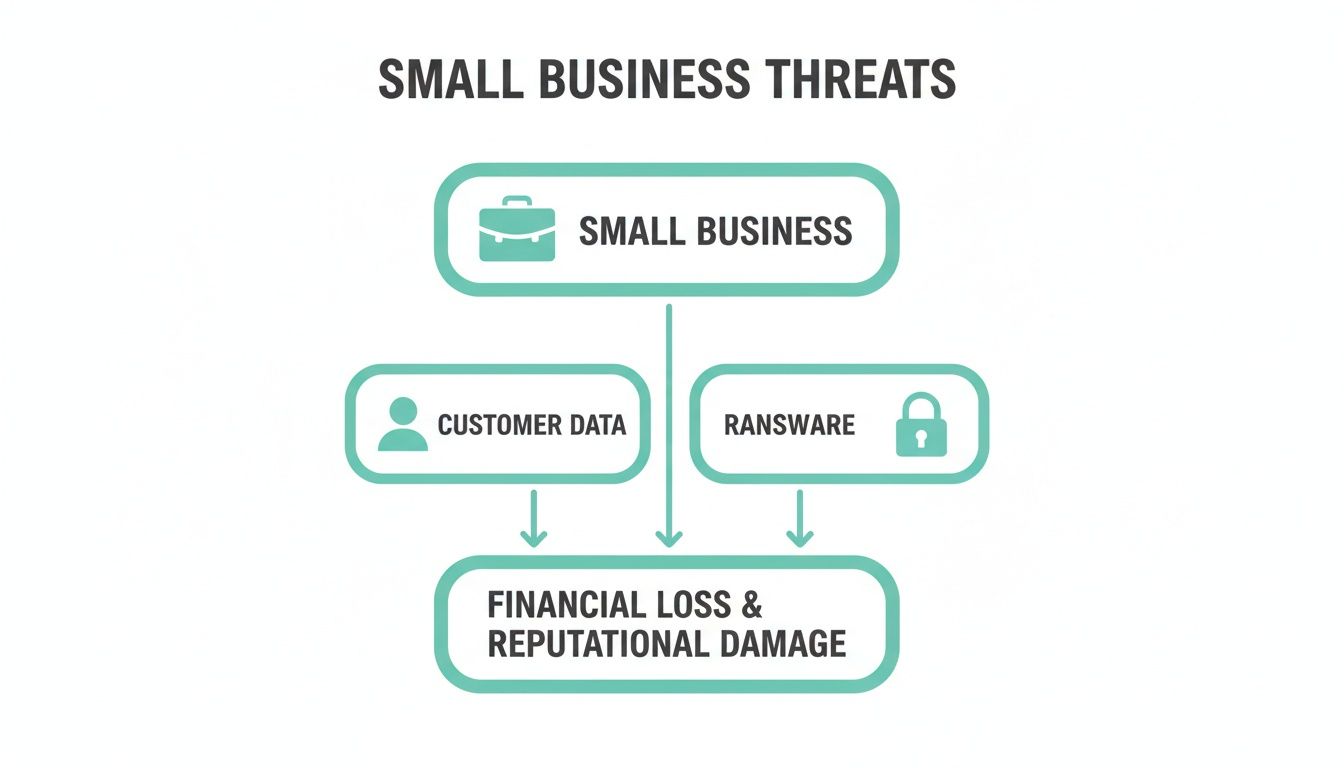
As you can see, a breach that starts with network access can quickly escalate into a customer data leak or a costly ransomware incident. This is why getting these foundational layers right is so critical.
A guest network stops a customer checking Facebook in your waiting room from having any visibility of your point-of-sale system, shared server, or office printers. It’s a simple security measure that packs a huge punch.
Here are the absolute must-dos for locking down your Wi-Fi:
- Change Default Logins: The very first thing an attacker will try is the default admin username and password for your router. Change these immediately to something unique and strong.
- Use WPA3 Encryption: This is the current gold standard for Wi-Fi security. If your router and devices support it, use it. WPA2 is the absolute minimum you should accept.
- Turn Off WPS (Wi-Fi Protected Setup): It was designed for convenience, but WPS has well-known security holes and should always be disabled.
Implementing these Wi-Fi security best practices is a non-negotiable part of protecting your wireless connections from unwanted eyes.
Below is a quick checklist to help you get these foundational pieces in place.
Foundational Security Measures Checklist
| Security Layer | What It Protects | Your First Actionable Step |
|---|---|---|
| Firewall | Your entire local network from unauthorised external access. | Log into your office router and confirm the firewall is enabled. Review and tighten its rules. |
| Secure Wi-Fi | Your wireless data and prevents unauthorised network access. | Change the default router password and create a separate, isolated guest network. |
| VPN | Data transmitted over public networks (e.g., cafes, airports). | Choose a reputable VPN service like NordVPN Teams or Perimeter 81 and install it on all company devices. |
This isn't an exhaustive list, but it's the solid foundation every business needs to build upon.
Enabling Secure Remote Access With VPNs
With flexible work now the norm, your team is likely connecting from all over the place—home, a client’s office, or the local cafe. They need a secure way to access company files and apps, and that’s where a Virtual Private Network (VPN) comes in.
A VPN creates an encrypted "tunnel" over the public internet. It essentially scrambles the connection between your employee's device and your business network, making the data completely unreadable to anyone who might be trying to intercept it. It’s like they're plugging directly into the office network with a secure, private cable.
Imagine an employee from a Brisbane marketing agency working from a public hotspot. Without a VPN, their login details and any sensitive client data they handle could be easily snatched by someone on the same public network. Turn on the VPN, and all that traffic becomes gibberish to outsiders, keeping company information safe and confidential.
This works much like how HTTPS provides an encrypted link to your website visitors. Understanding the crucial difference between HTTP vs HTTPS is just as vital for your web presence as a VPN is for your network.
Alright, you've got your network perimeter locked down, but now the real work begins. We need to shift our focus inwards, to the individual devices and the ways your team communicates. These are the things cybercriminals love to target.
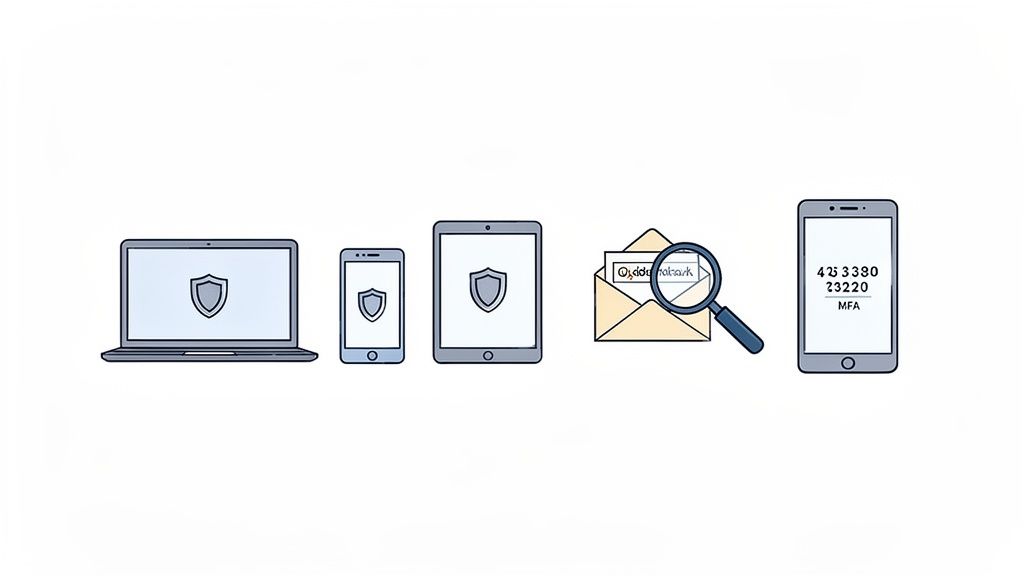
A solid firewall is a great start, but true network security for small business success means treating every single laptop, phone, and server as its own potential way in. This is the whole idea behind endpoint protection.
Think of it like this: a strong front door doesn't help if the windows are left wide open. Every device your team uses is a window into your business network. It only takes one compromised computer to bypass your carefully configured firewall and cause absolute chaos from the inside.
This means every single device—whether it's in the office, at an employee's home, or being used on the road—needs its own dedicated security. This isn't about making things complicated; it’s about building a defence that's tough to break, protecting your data no matter where it is.
Protecting Every Endpoint
Endpoint protection is a hands-on strategy, not just a bit of software. It starts with making sure every company device has reputable antivirus and anti-malware software installed. More importantly, it has to be kept up to date. This is your first line of automated defence against the known nasties out there.
Next up, you need a simple patch management schedule. This is just a fancy way of saying you have a process for regularly updating all the software on your devices—everything from the operating system to apps like Adobe Reader or your web browser. Hackers thrive on finding old security holes in outdated software, and running your updates is the only way to plug those gaps.
There's another powerful tool that's often overlooked, and it's probably already built into your devices: encryption.
On a Windows machine, this is called BitLocker. If you're using a Mac, it's FileVault. Flicking this feature on scrambles all the data on the hard drive, making it completely unreadable if a laptop is ever lost or stolen. It’s literally a one-click action that gives you incredible protection for sensitive company data.
And when it's time to retire old hardware, don't just toss it. Look into professional services for secure hard drive shredding to make sure old data can't come back to haunt you.
Tackling the Biggest Threat: Email
Despite all the sophisticated hacking techniques we hear about, the number one way a small business gets breached is still through a dodgy email. Phishing attacks have become scarily realistic, sometimes perfectly mimicking an invoice from a supplier or an urgent request from your bank.
The goal is always the same: trick someone on your team into clicking a bad link or opening an infected attachment. This is exactly why training your staff to be vigilant is just as important as any bit of tech you install.
Here are a few classic signs of a phishing attempt your team should be trained to spot immediately:
- A False Sense of Urgency: The email tries to pressure you into acting fast, with threats like "Your account will be suspended in 24 hours!"
- Suspicious Sender Address: The display name might look right, but the actual email address is slightly off (e.g.,
invoice@comonwealth-bank.com). Always check the real address. - Generic Greetings: The email uses a vague opener like "Dear Customer" instead of your name.
- Poor Grammar or Spelling: Professional organisations very rarely send out official communications riddled with mistakes.
A business-grade email service with strong, built-in spam and malware filtering is non-negotiable. It acts as your first line of defence, catching the most obvious junk before it even has a chance to land in your team's inboxes.
Your Ultimate Defence: Multi-Factor Authentication
If you only do one thing from this section, make it this: turn on Multi-Factor Authentication (MFA). Stolen or weak passwords are behind an incredible number of data breaches, and MFA is your single best weapon against this threat.
MFA simply asks for a second piece of information—usually a code sent to a mobile phone—on top of the usual password. This means that even if a criminal steals an employee's password, they still can't get into the account without also having that person's phone.
It's a simple idea with a massive impact. You should enable MFA on absolutely everything you can:
- Email Accounts: This is your top priority. Getting into an email account is often the master key to everything else.
- Banking and Financial Apps: An absolute must for protecting your company's money.
- Cloud Storage: Lock down your sensitive files in services like Dropbox or Google Drive.
- Admin Logins: This includes your website's WordPress dashboard and your hosting control panel.
Putting strong endpoint security in place is a crucial layer in your overall defence. For a deeper dive into the software side of this, check out our guide on choosing the right anti-virus protection for your business to ensure every device is properly covered.
Developing a Resilient Backup and Recovery Plan
Prevention is fantastic, but true business resilience comes from knowing how to recover when something inevitably goes wrong. Solid network security for a small business isn't just about building walls; it’s about having a tested, reliable plan to get back on your feet after a hit.
This is where your focus shifts from blocking attacks to surviving them. A ransomware attack, a hardware failure, or even a simple human error can wipe out critical business data in seconds. Without a solid backup and recovery strategy, you're not just risking data—you're risking your entire business.
The Unbreakable 3-2-1 Backup Rule
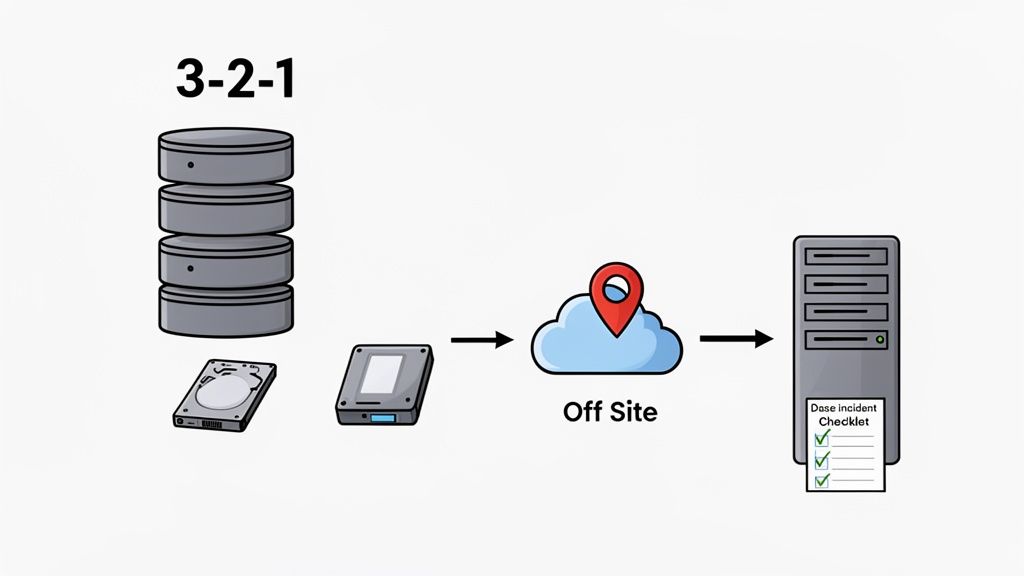
The gold standard for data protection is the 3-2-1 rule. It's a simple concept that dramatically increases your chances of a successful recovery, no matter what disaster strikes.
The rule is straightforward:
- Have three copies of your data.
- Store them on two different types of media.
- Keep one copy completely off-site.
This isn't just theory; it's a practical defence that works in the real world.
Let’s picture a Brisbane accounting firm. They keep their primary client files on their office server (Copy 1). Every night, an automated process backs up that data to a separate Network Attached Storage (NAS) device in the server rack (Copy 2, on different media). Crucially, a third, encrypted copy is sent to a secure cloud server every night (Copy 3, off-site).
When a ransomware attack encrypts their entire office network, the first two copies become useless. But because they have that clean, off-site backup, they can restore all their critical data and be operational again in hours, not weeks. They don't have to even consider paying the ransom.
This highlights the incredible value of partnering with a hosting provider that includes automated, off-site backups. Having an expert team manage that critical "one off-site copy" for your website and emails provides a powerful safety net, taking a huge security task off your plate.
Choosing Your Backup Strategy
Your business data lives in multiple places—on local computers, servers, and cloud services. Your backup plan needs to cover all of them. Here’s a quick breakdown of what you need to protect and how.
Data Protection Checklist
| Data Location | What to Protect | Common Backup Method |
|---|---|---|
| Local Devices | Staff laptops, desktops, point-of-sale systems. | Cloud-based backup software (e.g., Backblaze, Carbonite) that runs automatically in the background. |
| Office Server | Shared files, databases, internal applications. | A combination of a local NAS device and a cloud backup service for the off-site copy. |
| Website & Email | Your website files, customer database, company emails. | Your web hosting provider should offer automated, daily, off-site backups as a core feature. |
By ensuring all these areas are covered, you eliminate single points of failure. If you want to dive deeper into protecting your company data, you can learn more about our comprehensive business backup solutions that automate this process.
Creating a Simple Incident Response Plan
When a security incident happens, panic is the enemy. A simple, one-page Incident Response Plan (IRP) can be your guide through the chaos, empowering you to act decisively instead of freezing under pressure.
This isn't some complex technical document. It’s a practical checklist designed for a high-stress situation. The whole point is to have a clear plan before you need it.
Your one-page IRP should include:
- Key Contacts: Who do you call first? List names and phone numbers for your IT support person, web host, and any key business partners.
- Immediate Actions: A short list of first steps. This should include simple but critical tasks like "Isolate the affected machine from the network" by unplugging its network cable.
- Communication Plan: A pre-written template for notifying staff and customers. Knowing what to say and when is crucial for managing your reputation.
- Recovery Steps: A high-level overview of how to start data restoration. For example, "Contact web host to restore website from last night's backup."
Keep a printed copy of this plan somewhere accessible, not just on the server. In a real emergency where your network might be down, having a physical checklist is invaluable. It turns a potential catastrophe into a manageable process.
Host your website with our 5-star rated, cPanel website hosting plans.
Super fast servers, with security included and hosted in your choice of Australian Data Center.
View cPanel Plans
Turning Your Team Into a Security Asset
All the firewalls and security software in the world can only get you so far. When it comes down to it, your people can either be your strongest line of defence or your biggest vulnerability. You can spend a fortune on tech, but if you ignore the human element, you’re leaving a gaping hole in your protection.
Every small business, even if it's just you and a couple of staff, needs a straightforward cybersecurity policy. This isn't about drafting a hundred-page legal document that gathers dust. It's about setting clear, simple ground rules that everyone understands and can actually follow.
This kind of document creates a baseline for secure behaviour. It empowers your team by spelling out what’s expected, turning security from some vague, technical concept into a shared responsibility.
Crafting a Practical Cybersecurity Policy
The best policy is one that actually gets used. Keep it concise, write it in plain English, and focus on the day-to-day actions that make the biggest difference. Think of it as a one or two-page guide, not a novel.
Your policy should cover a few non-negotiable areas:
- Password Requirements: This is a big one. Mandate the use of a password manager like 1Password or Bitwarden and enforce Multi-Factor Authentication (MFA) on all critical accounts, no exceptions. You can specify minimum complexity, but don't make the rules so tough that staff resort to sticky notes.
- Acceptable Device Use: Be clear about what personal activities are okay on company devices. What are the rules for connecting personal phones or laptops to the business Wi-Fi?
- Data Handling: Lay out simple guidelines for handling sensitive customer or financial data. This is especially important when sending information via email or saving it to the cloud.
- Incident Reporting: Create a simple, no-blame process for reporting a suspected security issue. People need to feel safe putting their hand up the moment they think something’s off.
A clear framework like this builds a culture of awareness. It gets everyone, from the owner to a casual employee, on the same page about protecting the business.
Moving Beyond Tick-Box Training
Let's be honest: annual security training is often a forgotten, tick-box exercise. For training to stick, it has to be ongoing, engaging, and relevant to the threats your team is actually facing. The goal isn't to deliver a lecture; it's to build security reflexes.
The readiness of Aussie small businesses is a real worry. A recent study revealed that only 20% of Australian small businesses have a formal cyber security policy or provide staff training. That figure has actually gone down since 2021. With human error behind so many breaches, this lack of preparation is a massive weak spot. You can get more insights on this growing digital divide in Australia and its impact.
A well-trained employee is your best real-time threat detection system. They are far more likely to spot a sophisticated phishing email than any automated filter. Investing in their awareness delivers an incredible return on investment.
Here are a few effective, low-cost ways to train your team:
- Run Simulated Phishing Campaigns: Use a service like KnowBe4 to send safe, simulated phishing emails to your staff. It’s a practical, real-world test that provides a powerful learning moment for anyone who clicks.
- Hold Monthly Security Huddles: Just ten minutes in a team meeting each month is all it takes. Pick one topic—maybe a recent phishing attempt you blocked or a quick tip on password managers.
- Share Real-World Examples: When you read about a local business getting hit by a breach, share the story. Talk about how your own policies and training would help prevent the same thing from happening to you.
Picture this: a retail employee in Adelaide gets an email that looks like it's from Australia Post. It says a package is delayed and asks them to click a link to reschedule. Because they've had training, they notice the sender's email address is slightly off and the link looks dodgy.
Instead of clicking, they report it. That single, simple action just stopped malware from infecting the point-of-sale system, saving the business from a data breach and thousands in recovery costs. That’s the power of making your team a security asset.
Building this human firewall is a crucial part of securing all your communications, and that definitely includes your email. For a refresher, you can check out our guide on how to set up your business email securely.
Common Questions on Small Business Network Security
Getting your head around network security can feel like a mammoth task, so it's natural to have a few questions. Let's clear up some of the most common queries we hear from Aussie small business owners. My goal here is to give you some straightforward answers that you can actually use.
How Much Should a Small Business Budget for Network Security?
Look, there’s no magic number that fits every single business. But as a general rule of thumb, setting aside 3-6% of your total IT budget for security is a pretty solid starting point. The most important thing? Move away from a budget of zero, which is a scary reality for too many small businesses.
Start with the essentials—the things that give you the most bang for your buck. A secure web hosting plan that already includes features like SSL certificates, a proper firewall, and regular malware scanning is a brilliant first move. After that, make sure you've got a reliable backup system and good quality endpoint protection on every single device your business uses.
Remember, it’s not about one massive, eye-watering spend. Consistent, smart investments over time build a much stronger defence that can grow right alongside your business.
What Is the Single Most Important Security Measure I Can Implement Today?
If you do just one thing after reading this guide, make it this: enable Multi-Factor Authentication (MFA) on everything. I'm talking about your email, online banking, cloud services like Xero or Google Workspace, and especially your website's admin login.
Passwords get stolen, guessed, or leaked in data breaches all the time. It happens. MFA is your safety net. By asking for a simple code from your phone, it slams the door on the vast majority of crooks trying to get in. It's simple, usually free, and ridiculously effective at protecting your most important accounts. For a bit more detail, check out our guide on how to improve website security, which covers MFA and other key steps.
Think of MFA like needing both a key and a PIN code to open a safe. A thief might steal the key (your password), but they're still stuck outside without that second piece of verification.
My Business Is Very Small Am I Really a Target?
Yes. Absolutely, one hundred percent. This is probably the most dangerous myth out there. Cybercriminals aren't sitting in a dark room picking out businesses by name; they use automated bots that constantly scan the internet for any weakness, on any website, regardless of size.
Small businesses are often seen as 'soft targets' because attackers assume they have weaker security and fewer resources to fight back. They're after your customer data, your payment details, or even just control of your server to launch attacks on someone else. The Australian government’s own reports show time and time again that small and medium businesses get hit hard. Believing you're 'too small to be a target' is the riskiest gamble you can take.
How Does My Web Host Affect My Overall Network Security?
Your web host isn't just a place to park your website—they should be a critical security partner. Your website is your digital shopfront, and it's on the front line of cyber attacks. A good, secure hosting provider handles the really complex server-level security for you, creating a powerful shield around your online presence.
This is the heavy lifting you don't want to be doing yourself, like:
- Patching the server's operating system to block new threats.
- Providing DDoS protection to stop your site from being knocked offline.
- Running proactive malware scans to find and get rid of nasty code.
- Taking encrypted, off-site backups of your entire website and data.
When you have experts managing that side of things 24/7, a massive piece of the security puzzle is already solved. It lets you focus on securing your own office network and devices, knowing your website is in safe hands.
Protecting your business starts with a secure foundation. At UpTime Web Hosting, we provide 100% Australian hosting with built-in security features like free SSL, DDoS protection, malware scanning, and nightly off-site backups, all supported by our local team. Secure your online presence today by exploring our secure hosting services.