Your WordPress site probably didn’t become slow overnight. It usually happens in stages. A few more plugins go in, image libraries get bigger, traffic picks up, and then the site that felt fine on shared hosting starts dragging at the worst moments. The admin area lags. Checkout pages feel heavy. Updates time out. Support tells you that you’re hitting resource limits.
That’s a familiar pattern for Australian businesses. WordPress powers over 43.5% of all websites in Australia’s CMS market as of 2026, according to Hostinger’s WordPress statistics roundup. When so many local businesses rely on WordPress, the key question isn’t whether the platform can grow. It’s whether your hosting can keep up with it.
A wordpress vps is usually the point where a site stops fighting its hosting and starts getting room to work properly. For a business site, that means faster pages, steadier uptime, better isolation from other users on the server, and a setup that makes sense for Australian customers and Australian compliance requirements.
Is Your Shared Hosting Holding Your WordPress Site Back
A common scenario looks like this. A local tradie business launches with a clean brochure site on shared hosting. It works well for months. Then they add quote forms, more service pages, suburb landing pages, a booking plugin, a gallery, and email marketing tools. Nothing unusual. But the site is now doing much more work than it did on day one.
The same thing happens with WooCommerce stores. At first, shared hosting seems economical. Then product imports grow, stock sync runs more often, plugin updates become riskier, and a traffic bump during a campaign slows the whole site down. The owner assumes WordPress is the problem. Often, it isn’t. The hosting plan is too crowded.
Shared hosting still has a place. For a new or simple site, it can be the right starting point. If you’re there now, this kind of shared web hosting service is often enough while the site is small and predictable.
What outgrowing shared hosting actually feels like
You don’t need server graphs to notice the signs. You’ll usually see them in day-to-day work:
- Slow admin screens: Editing pages, saving posts, or updating plugins takes longer than it should.
- Random performance swings: The site is quick in the morning, then sluggish later with no obvious change on your end.
- Timeouts during important tasks: Backups, imports, updates, and checkout actions become unreliable.
- Support replies about limits: CPU, memory, or process usage starts coming up in tickets.
Shared hosting is like renting one room in a busy building. It’s affordable, but you feel every noisy neighbour.
When a business depends on its website for leads, bookings, or sales, that unpredictability becomes expensive in practical terms. A wordpress vps is the next step because it gives your site its own allocation of resources instead of hoping the rest of the server stays quiet.

Performance you can feel, backed by clients who depend on it. Read how our support and uptime create long‑term customer success.Power Your Business with Better Hosting
Understanding Your Private Slice of the Server
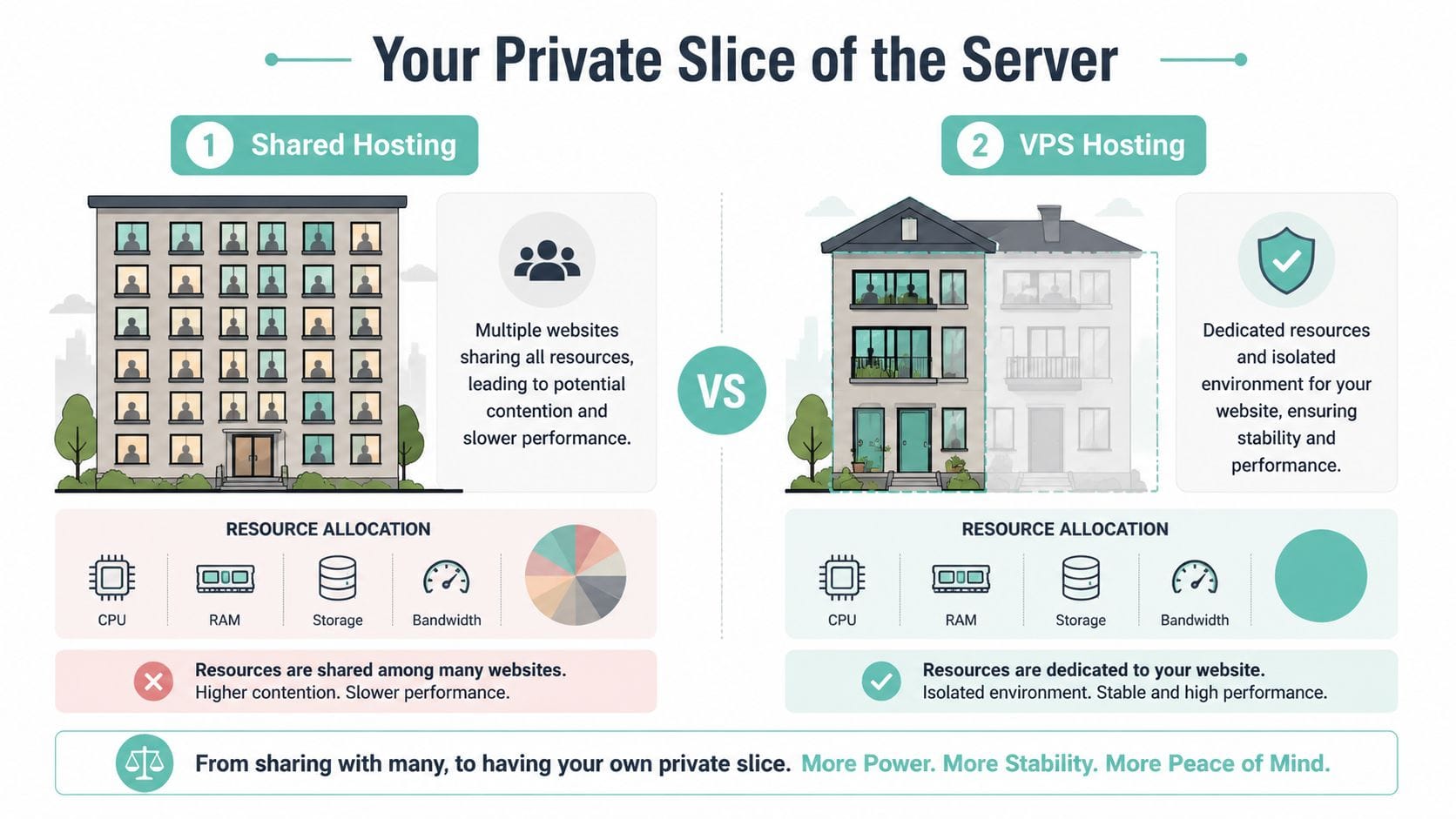
A VPS is a virtual server environment with its own allocated CPU, RAM, storage, and operating system resources. Your WordPress site still runs on a physical machine shared with other customers, but your account is separated in a way that gives you more predictable behaviour and more room to work.
That separation is the part that matters.
On shared hosting, one busy account can push the server hard enough that everyone else feels it. On a VPS, your site has its own reserved slice of those resources, so plugin updates, admin tasks, imports, and database activity are less likely to get dragged down by someone else’s traffic spike or background job.
A simple way to picture it is this. Shared hosting works like a busy building where everyone draws from the same pool of power and water. A VPS gives your business its own metered connection inside that larger setup. You still use the same infrastructure, but your day-to-day performance is far less affected by the neighbour who suddenly turns everything on at once.
What you actually get on a VPS
A wordpress vps usually includes:
- Allocated CPU: Processing power for PHP workers, WordPress admin actions, scheduled tasks, and dynamic pages.
- Allocated RAM: Memory for the web server, database queries, object caching, and plugin activity.
- Storage space: Room for WordPress files, uploads, logs, backups, and email data if that is part of the service.
- Account isolation: Separation from other customers on the same physical host, which reduces cross-account slowdowns and some security risks.
- Server-level access options: Depending on the plan, you may get root access or a managed setup where the host handles system administration for you.
That last point matters for Australian businesses. Some owners want full control because they have a developer or agency managing the stack. Others want the host to handle patching, monitoring, and server maintenance so they can stay focused on running the business. Both approaches can work. The right choice depends on who will maintain the server once it is live.
Where a VPS fits for an Australian business
A VPS sits between shared hosting and a dedicated server in both cost and control. It gives a growing WordPress site more headroom without pushing you into the expense and admin overhead of renting an entire physical machine.
For Australian businesses, location is part of the decision. If your customers are in Sydney, Melbourne, Brisbane, Perth, or regional areas, hosting your WordPress site on Australian infrastructure can improve responsiveness because the data has less distance to travel. Multi-city data centre options also give you more flexibility for performance, redundancy, and support coverage during local business hours. If you are comparing plans, this guide to VPS hosting in Australia is a useful place to start.
There is also the compliance side. If your site collects customer details, enquiry forms, medical information, or ecommerce data, server location can affect how you handle privacy, client contracts, and internal IT policies. Australian hosting does not remove every legal obligation, but it can make data sovereignty requirements easier to manage, especially for businesses that prefer customer data to stay under Australian jurisdiction where possible.
A good VPS gives you steadier performance, clearer resource limits, and more control over where your WordPress data lives. For a business site, that is usually the upgrade.
Upgrading Your Performance Security and Control
WordPress has changed a lot from its early blog-platform days. The release of WordPress 3.0 in 2010 introduced custom post types and advanced menus, which increased resource demands and pushed growing Australian businesses towards VPS hosting to avoid bottlenecks, as noted in Elementor’s hosting statistics article. Modern WordPress sites are far heavier than many owners expect, especially once page builders, ecommerce, memberships, search tools, and marketing plugins enter the mix.
That’s why a wordpress vps is better understood as a business upgrade, not a technical indulgence.
Performance that stays usable under load
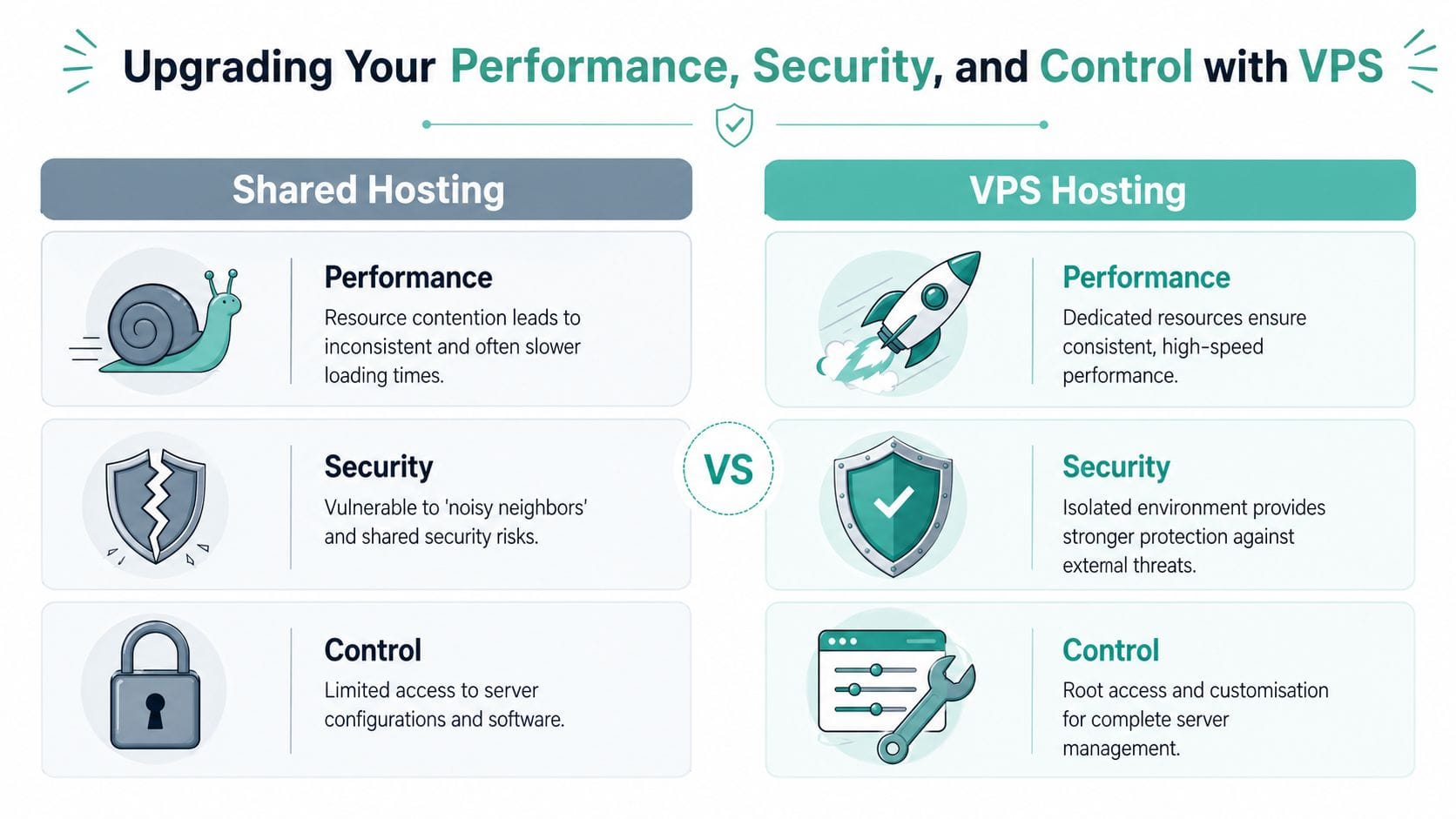
On shared hosting, your site competes for attention. On a VPS, your server resources are allocated to your site environment. That changes how the site behaves when traffic picks up, when cron jobs run, or when WooCommerce needs to process carts and checkout actions.
For Australian audiences, low-latency delivery also matters. A locally tuned setup using tools such as LiteSpeed, server-side caching, and an Australian low latency hosting environment gives WordPress a far better chance of feeling responsive for people browsing from major cities and regional areas.
Practical examples where this matters:
- Brochure sites: Faster page loads on mobile mean quote forms and call buttons are easier to use.
- Content sites: Publishing, media uploads, and search functions stay smoother in the admin area.
- WooCommerce stores: Cart, account, and checkout pages benefit because they can’t be cached as aggressively as static pages.
Security that isn’t shared with strangers
A VPS doesn’t make a WordPress site magically secure. You still need updates, backups, malware scanning, and firewall rules. What it does do is reduce the blast radius.
On shared hosting, one badly maintained account can create broader risk around the server environment. With a VPS, your setup is isolated. That gives your host more room to apply server-level protections cleanly, and it gives you a more controlled place to run WordPress.
A managed VPS often includes practical protections such as:
- Dedicated environment isolation
- DDoS-protected firewalls
- Malware scanning
- Off-site backups
- Monitoring and patching
Control without jumping straight into sysadmin work
Many business owners often get the wrong idea. They hear “VPS” and assume they’ll need to manage Linux all day. That’s only true with an unmanaged service.
With a managed wordpress vps, you can get extra control where it matters, such as PHP settings, caching behaviour, staging, backup handling, and software compatibility, without having to become your own server technician. That’s useful when a plugin needs more memory, when a store needs a cleaner PHP setup, or when a developer needs a more flexible stack than shared hosting allows.
Practical rule: If your website is now important enough to lose business when it slows down, it’s important enough for VPS hosting.
Host your website with our 5-star rated, cPanel website hosting plans.
Super fast servers, with security included and hosted in your choice of Australian Data Center.
View cPanel Plans
Matching Your VPS Resources to Your Website Needs
A Melbourne accountant and a Sydney online store can both get similar traffic and still need very different VPS plans. One mostly serves cached service pages. The other runs live carts, payment checks, customer accounts, and plugin requests all day. Visitor numbers matter, but site behaviour is usually the better sizing guide.
What the main resources mean
CPU does the processing work. WordPress uses it for PHP execution, admin actions, search, plugin tasks, and logged-in sessions.
RAM is the working area. If there is not enough of it, the site starts swapping work to disk, admin screens drag, and busy periods feel worse than they should.
SSD storage holds WordPress core files, themes, plugins, uploads, email if it is hosted on the server, and database growth over time. Fast storage helps database-heavy sites, but it will not make up for a plan that is short on CPU or memory.
For Australian businesses, location matters too. If your customers are mostly in Brisbane, Sydney, Melbourne, or Perth, local hosting in an Australian data centre usually trims delay better than buying a bigger plan in another country. Multi-city infrastructure also gives you better options if your host needs to place workloads closer to your audience or support failover inside Australia.
Practical starting points
These are sensible starting points for common small business WordPress setups, not hard rules.
| Website Type | Example | Recommended CPU | Recommended RAM | Recommended SSD Storage |
|---|---|---|---|---|
| Brochure Site | Local plumber, accountant, consultant, clinic | 2 vCPU | 2 GB | 30 GB SSD |
| Growing Content Site | Blog, publisher, education site, community resource | 2 to 4 vCPU | 4 GB | 50 GB SSD |
| Busy WooCommerce Store | National retailer, subscription shop, high-activity store | 4 vCPU | 8 GB | 80 GB SSD |
A plain business site with a lean theme can run well on modest resources.
A WooCommerce build with a page builder, form tracking, stock sync, and several third-party scripts usually needs more headroom than its traffic report suggests. The same applies to booking sites, membership platforms, LMS installs, and multilingual sites.
Match the plan to workload, not just visits
Resource planning gets clearer when you check what the site does each day:
- Count plugin load: WooCommerce, LMS tools, booking engines, search plugins, and bulky page builders all add server work.
- Check logged-in activity: Staff logins, customer accounts, and members areas use more uncached requests.
- Allow room for growth: Media libraries, staging copies, backups, and database bloat all eat storage.
- Review your caching setup: Good caching can reduce CPU load on brochure sites. If you need help there, start with these LiteSpeed Cache settings for cPanel WordPress hosting.
- Look at search and content habits: If you publish often and handle SEO in-house, processes like manual WordPress keyword optimization can keep plugin load lower on some sites.
There is also a compliance angle Australian businesses should not ignore. If your WordPress site collects contact forms, health details, booking records, or customer account data, server location is part of the risk decision. Keeping data on Australian infrastructure can make internal policy, client contracts, and privacy reviews easier to handle, especially for businesses that want clear data sovereignty arrangements.
A managed VPS is usually the safer fit when the site is tied to sales, bookings, or lead generation. You get enough resources for WordPress to breathe, without having to spend your own time sizing PHP workers, tracing memory limits, or cleaning up poor server defaults after the fact.
Securing and Optimising Your WordPress VPS
Once the VPS is live, the work shifts from “Do I need one?” to “Am I using it properly?” That’s where many site owners either get strong results or waste the extra headroom they’ve paid for.
Security for Australian business conditions
This part is often glossed over in generic hosting advice. Under Australian law, businesses can face fines up to AU$50 million for data breaches, and using a local WordPress VPS provider with servers in Sydney or Melbourne is an important step towards complying with the Privacy Act 1988 and the Notifiable Data Breaches scheme, as discussed in ScalaHosting’s guide to WordPress on unmanaged VPS hosting.
That doesn’t mean local hosting solves compliance by itself. It does mean your hosting choice becomes part of your risk management.
For most small businesses, the practical security baseline should include:
- Automatic backups: Nightly off-site backups are far better than remembering to click “backup now” before a plugin update.
- Malware scanning: Useful for catching file changes and common compromises early.
- DDoS-protected firewalling: Helps absorb nuisance traffic before it affects customers.
- Patch management: WordPress core, themes, plugins, PHP, and server software all need regular attention.
- Account separation: Keep staging, development, and live access tidy so too many people aren’t using broad admin permissions.
Performance work that pays off on VPS
A VPS gives you room, but WordPress still needs discipline.
The basics that usually deliver the biggest gains are straightforward:
- Use LiteSpeed Cache properly: A tuned cache setup cuts repeat work for the server. This LiteSpeed Cache settings guide for cPanel is a practical starting point.
- Optimise images before upload: Huge image files waste bandwidth and slow mobile users.
- Keep plugins lean: Remove what you don’t use. Deactivated clutter often turns into forgotten risk.
- Choose simpler themes: Heavy themes can cancel out the benefits of better hosting.
- Review page intent: A page packed with sliders, popups, maps, tracking scripts, and video embeds will feel heavy no matter what it runs on.
If you're improving site speed and organic visibility together, this guide to manual WordPress keyword optimization is worth reading because it keeps content changes deliberate instead of piling on more SEO plugins.
Hosting fixes server problems. It doesn’t fix bloated design decisions.
For businesses that don’t want to manage these layers themselves, UpTime Web Hosting offers managed VPS with local servers, LiteSpeed, AccelerateWP, backups, monitoring, and security tooling built around cPanel-based hosting workflows.
Your Checklist for a Smooth Migration
Migration worries stop a lot of businesses from upgrading. Fair enough. Nobody wants broken forms, missing emails, or a checkout issue after launch. But a WordPress move is manageable when it’s handled in a clean order.
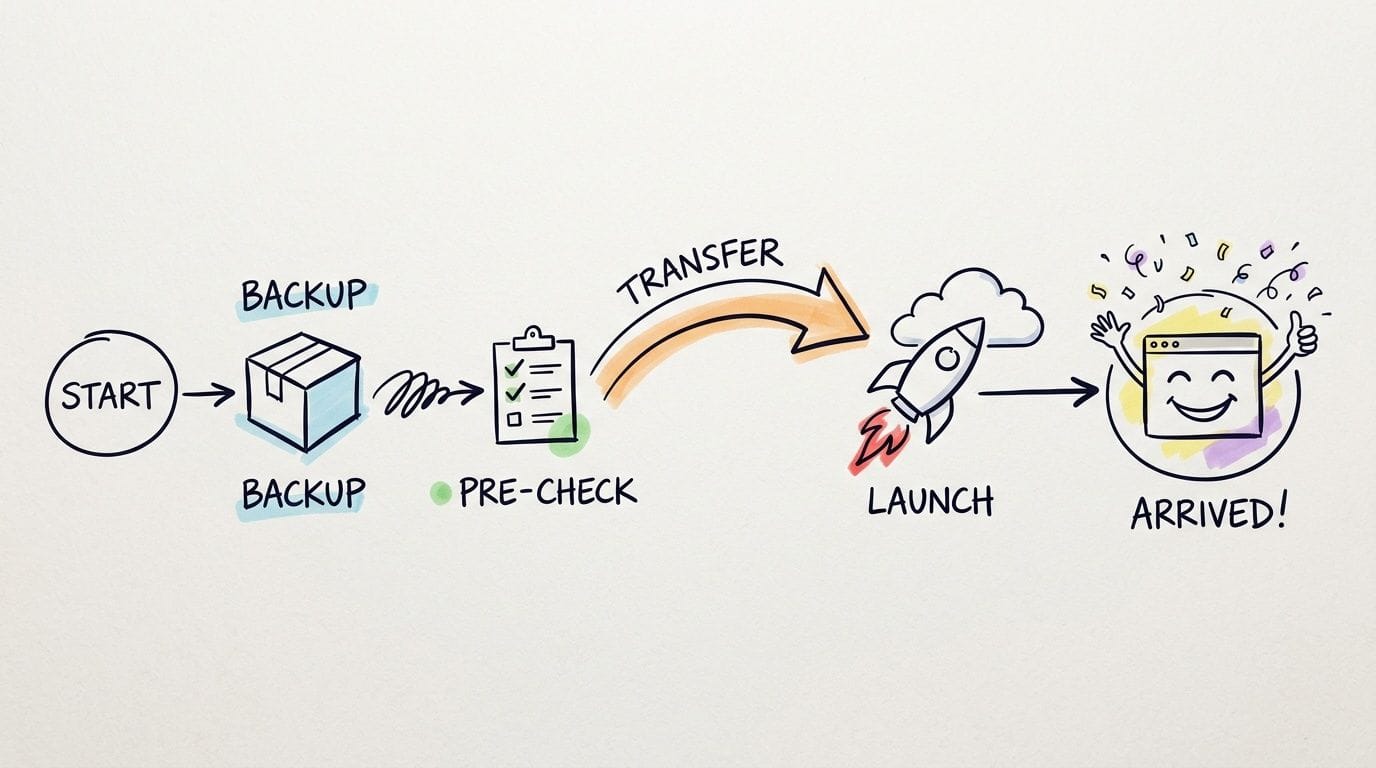
The migration order that keeps risk down
A smooth move usually follows this sequence:
Take a full backup first
Back up both the site files and the database. Don’t rely on a partial plugin export and assume that’s enough.Confirm what’s being moved
List the important parts before migration starts. Themes, plugins, forms, transactional emails, redirects, SSL, cron jobs, and any custom code should all be accounted for.Build the new environment before cutover
Set up WordPress on the VPS, match the needed PHP version, and make sure required extensions and settings are in place.Test before making the site live
Check page layouts, contact forms, logins, carts, checkout flows, search, and any third-party integrations. A pre-launch test catches the obvious breakages.
What to check after launch
The final stage is where careful site owners save themselves support tickets.
Use a short post-launch review:
- Front-end pages: Open key pages on desktop and mobile.
- Forms and emails: Submit test enquiries and order notifications.
- Logins: Confirm admin and customer account access still works.
- Redirects and links: Check important old URLs and navigation paths.
- Backups and caching: Make sure they’re active on the new server, not assumed.
A host-assisted move helps a lot here. If you want a practical reference for the process, this website migration checklist covers the items most often missed during a hosting move. If your main concern is avoiding customer disruption, this walkthrough on how to migrate WordPress without downtime is also a useful companion read.
Most migration problems don’t come from the move itself. They come from skipped checks.
That’s why good migrations feel uneventful. They aren’t dramatic. They’re organised.
Register your new domain name at competitive market prices including free domain add-ons like privacy, DNS Hosting, Custom Nameservers and Forwarding.
Always the best price and no nasty renewal price hikes.
Register A Domain Name
Your WordPress VPS Questions Answered
What does managed VPS mean in practice
It means you’re not left alone with a server and a login prompt. The host handles core server upkeep such as monitoring, patching, security tooling, backups, and the broader operating environment. You still manage your WordPress content and business settings, but you’re not expected to act as a full-time sysadmin.
Is a wordpress vps only for large websites
No. It’s for websites that matter to the business. A local service company with a modest lead flow may benefit from VPS hosting sooner than a hobby blog with more casual traffic, because every enquiry counts and downtime costs more.
Why do Australian data centres matter so much
They matter for both responsiveness and business operations. If your customers are in Australia, serving the site from Australian infrastructure reduces the distance the data has to travel. It also makes support, backups, legal considerations, and service expectations easier to keep aligned with local business needs.
Is one Australian city enough for national traffic
Not always. For an ecommerce store serving customers nationwide, a single-city VPS can result in 30 to 50% higher loading times for interstate users, while using servers across cities such as Sydney, Melbourne, and Perth helps maintain faster performance across Australia, according to this VPS performance guide.
That matters most for stores, booking systems, and member portals where users interact with the site rather than just read a page.
What’s the point of features like LiteSpeed and AccelerateWP
They help WordPress do less repetitive work. LiteSpeed improves how pages are served and cached. AccelerateWP focuses on performance tooling around the WordPress environment. The practical benefit is a site that feels quicker and copes better as plugins, content, and traffic increase.
Why does GST-inclusive pricing matter
Because small businesses need predictable costs. Clear pricing makes hosting easier to budget, easier to compare against other business services, and easier to hand to the bookkeeper without surprises.
If your WordPress site is feeling cramped, slow, or harder to manage than it should be, a managed local VPS is usually the cleanest next step. UpTime Web Hosting offers Australian-based hosting with servers in Sydney, Melbourne, Brisbane and Perth, plus managed VPS options, local support, LiteSpeed, backups, and security features that suit growing business sites.