WooCommerce is a free, open-source e-commerce plugin that transforms any WordPress website into a powerful online store. It was launched on 27 September 2011, now powers over 6.6 million stores globally, and represents 37% of the global e-commerce market share for businesses that want to sell online without monthly platform fees for the core software (Wikipedia's WooCommerce overview).
If you're an Australian business owner, you're probably in a familiar spot. Your products are ready, your service is proven, and customers already ask whether they can buy online. What usually slows things down isn't the product. It's choosing the right setup without wasting money or ending up with a store that's hard to manage.
That's where understanding what WooCommerce is really matters. For many Australian businesses, it's the practical middle ground between a basic brochure website and a fully custom store build. If you already have WordPress, or you're comfortable with the idea of running a website on WordPress, WooCommerce gives you the tools to sell physical products, digital downloads, subscriptions, and more from the same dashboard you use to manage your pages and posts.
The part many guides skip is the Australian reality. Your store doesn't just need product pages and a checkout. It needs local payment options, GST-friendly settings, fast loading for Australian visitors, and hosting that doesn't leave your checkout crawling when traffic picks up. That practical side is what makes platform choice far more than a software decision.
Table of Contents
- Your First Step into Australian E-commerce
- How WooCommerce and WordPress Work Together
- Core Features for Selling Products Online
- The Pros and Cons for Small Business Owners
- Hosting and Security Your WooCommerce Store Needs
- Getting Started With Your WooCommerce Store

Performance you can feel, backed by clients who depend on it. Read how our support and uptime create long‑term customer success.Power Your Business with Better Hosting
Your First Step into Australian E-commerce
A Brisbane tradie finishes a job, posts photos to the business website, and gets the same question again that night. Can I pay a deposit online? A Melbourne gift shop owner hears a similar one. Can you hold this item and ship it this week? In both cases, the business already has a website. What's missing is the part that takes orders, accepts payments, and keeps everything organised.
That is where WooCommerce fits. WooCommerce is a plugin for WordPress that adds the tools needed to sell online, including product listings, a cart, checkout, payment options, and order management. For many Australian small businesses, that means you can build on the site you already have instead of starting from scratch on a separate platform.
That practical point matters.
Running one website is usually simpler than managing one site for content and another system for sales. Your pages, blog posts, branding, and store can stay in the same admin area, which saves time and reduces mistakes. If you already know how to update text or upload images in WordPress, the jump into online selling feels much more manageable.
For Australian operators, the decision is not only about features. It is also about performance, security, and where your store is hosted. A WooCommerce store on quality Australian hosting can load faster for local customers, keep checkout more responsive, and make it easier to choose hosting that aligns with your privacy and business requirements. If you are weighing up the broader business side, this guide to online selling in Australia is a useful local starting point.
Why it suits small Australian businesses
WooCommerce works well for businesses that sell in different ways. A suburban bakery can take pre-orders for weekend pickup. A consultant can sell downloadable resources. A gym can offer recurring memberships. The software adapts to those models without forcing you into a one-size-fits-all setup.
That flexibility is one reason many business owners choose it early.
Another reason is control. You choose your theme, your payment gateway, your shipping setup, and your host. That matters more in Australia than many owners realise, because local hosting affects customer experience in very concrete ways. If a shopper in Perth or Newcastle is waiting on a slow checkout page hosted far from Australia, you risk losing the sale before payment is complete.
Some owners also like having a faster path to launch. If you are starting with a new site, a tool such as CodeDesign.ai AI WordPress builder can help you get the WordPress side in place before adding WooCommerce.
Where people usually get confused
The main point to clear up is simple. WooCommerce is not a standalone website builder. It extends WordPress so your existing site can also work as an online store.
A shop fit-out is a useful comparison. The building already exists. WooCommerce adds the counter, shelves, cash register, and order process.
That distinction helps small business owners make better decisions early. If you know WooCommerce needs WordPress underneath it, you are more likely to choose hosting, security, backups, and support that suit both the website and the store. That leads to fewer surprises once real customers start placing orders.
How WooCommerce and WordPress Work Together
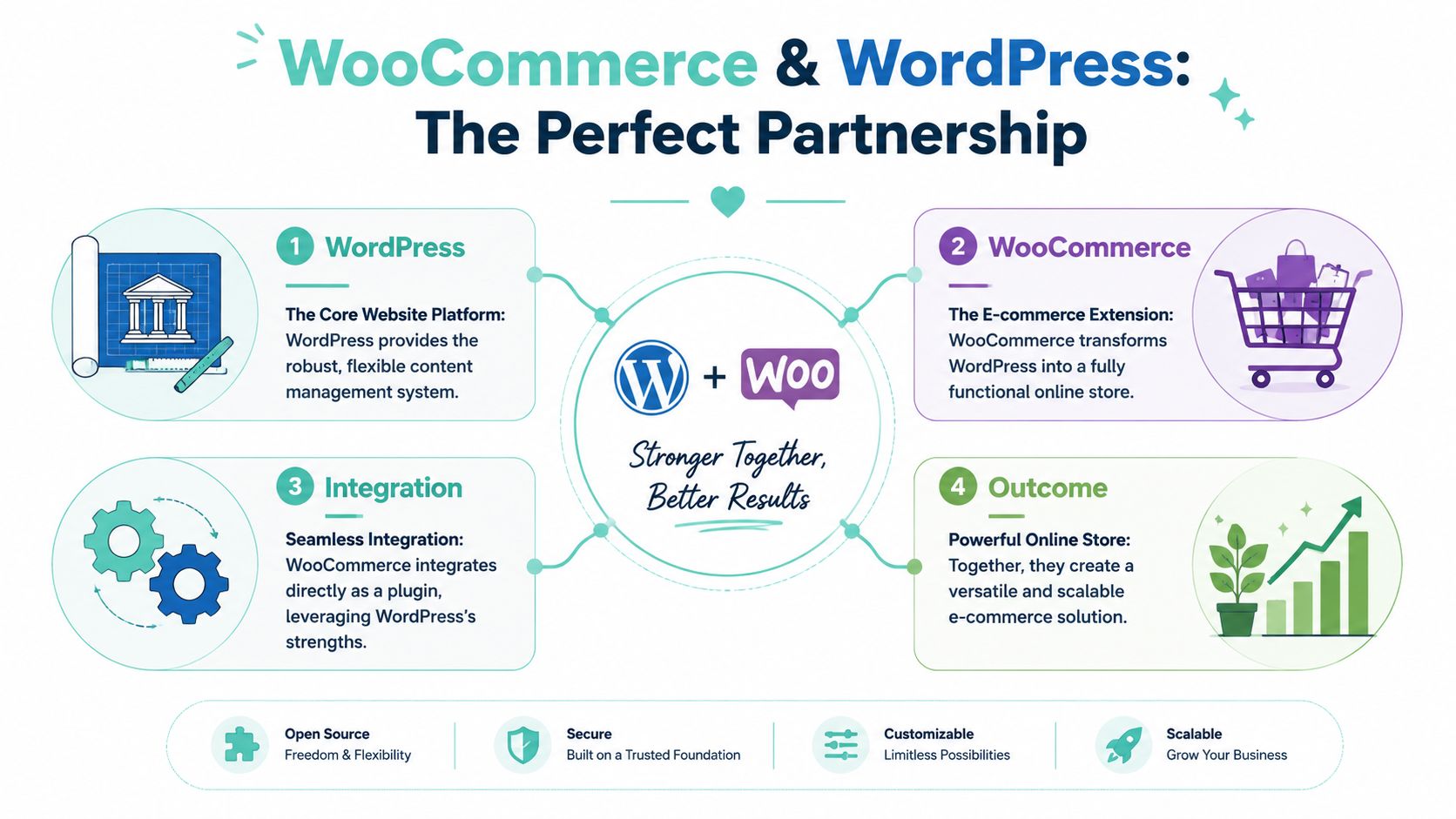
Think of WordPress as the building and WooCommerce as the shop fit-out
WordPress gives you the structure of the website. It handles pages, blog posts, menus, media, users, and themes. WooCommerce adds the parts needed to trade online, such as products, cart pages, checkout flows, customer orders, and stock management.
A good analogy is a commercial tenancy. WordPress is the building shell with plumbing, wiring, and entry doors already in place. WooCommerce is the retail fit-out that adds shelves, tills, back-office processes, and the payment counter.
If you're still working out the broader WordPress side, this plain-English guide on whether WordPress is free helps clarify where the software is free and where real-world costs come in.
What changes after you install it
Under the hood, WooCommerce is a modular PHP plugin for WordPress. It extends the WordPress REST API with custom endpoints for product management, cart operations, and checkout workflows. It also creates key database tables such as wp_wc_products and wp_wc_order_items so the site can store product and order data properly.
That technical detail matters because it explains why WooCommerce feels integrated rather than bolted on. Once installed, you manage products inside WordPress. You don't jump into a separate control panel just to change a price or process an order.
Here's what a typical setup looks like in practice:
- A service business might use WordPress pages for service descriptions and WooCommerce for deposits or package purchases.
- A retail store can add product categories, stock levels, sale pricing, and order emails inside the same admin area.
- A content-led brand can publish blog posts for SEO and sell related products from the same domain.
Practical rule: If you can already manage a WordPress page, you're much closer to managing WooCommerce than you might think.
For businesses starting from scratch, tools like the CodeDesign.ai AI WordPress builder can speed up the website foundation before WooCommerce is added, especially if you want a faster path to a working WordPress layout.
Host your website with our 5-star rated, cPanel website hosting plans.
Super fast servers, with security included and hosted in your choice of Australian Data Center.
View cPanel Plans
Core Features for Selling Products Online
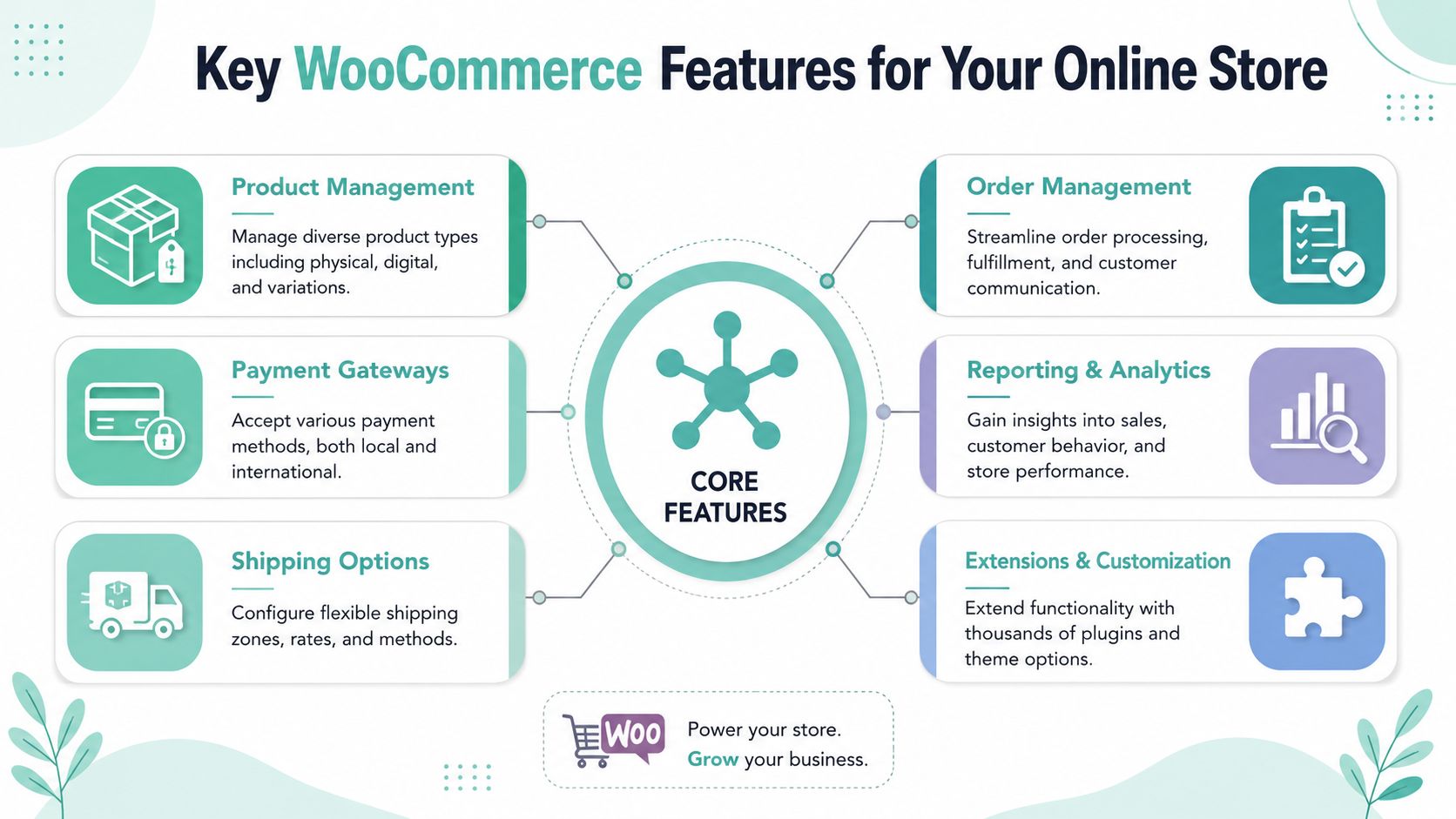
What you can actually sell
WooCommerce is flexible because it doesn't lock you into one product type. An Australian business can use it for physical goods, digital downloads, recurring subscriptions, bookings, or variations such as size, colour, or pack quantity.
That opens up useful combinations. A skincare brand can sell products and downloadable routines. A tradie can sell call-out vouchers or maintenance plans. A gym can combine merch with recurring memberships.
The practical strength is that the product setup stays familiar. You add titles, descriptions, images, pricing, stock status, and categories in a way that feels close to standard WordPress editing.
Payments shipping and day-to-day operations
For Australian merchants, WooCommerce supports over 50+ payment integrations, including PayPal, Stripe, and AU-specific gateways, while allowing multiple currencies and integration with carriers such as Australia Post according to WooCommerce's platform information. That matters because checkout friction often comes from forcing customers into payment methods they don't want.
Here's what that means in day-to-day terms:
- Payments: You can offer mainstream options Australians already trust, rather than limiting customers to a single processor.
- Shipping: You can configure delivery methods around local expectations, including courier options and Australia Post workflows.
- Tax handling: WooCommerce can be configured to support GST requirements, which keeps the checkout clearer for both you and your customers.
- Store control: You keep control over checkout data and store settings instead of handing every decision to a closed platform.
If your store will ship at scale, fulfilment becomes part of the customer experience. A guide on how a 3PL warehouse works is useful when you're moving beyond packing orders at the back of the shop.
The best WooCommerce features are the ones customers never notice. Fast checkout, clear shipping choices, accurate tax, and straightforward order emails.
Plugins also extend what your store can do. That could mean product filters, loyalty tools, SEO add-ons, advanced fields, or marketing integrations. If you want a strong baseline stack, this roundup of top plugins for every WordPress website is a solid starting point.
A short feature snapshot helps make this concrete:
| Store need | How WooCommerce helps |
|---|---|
| Sell products | Add physical, digital, or variable products |
| Take payments | Connect local and international payment gateways |
| Ship orders | Set shipping zones, methods, and carrier options |
| Handle GST | Configure tax rules for Australian selling |
| Grow later | Extend with plugins instead of rebuilding the store |
The Pros and Cons for Small Business Owners
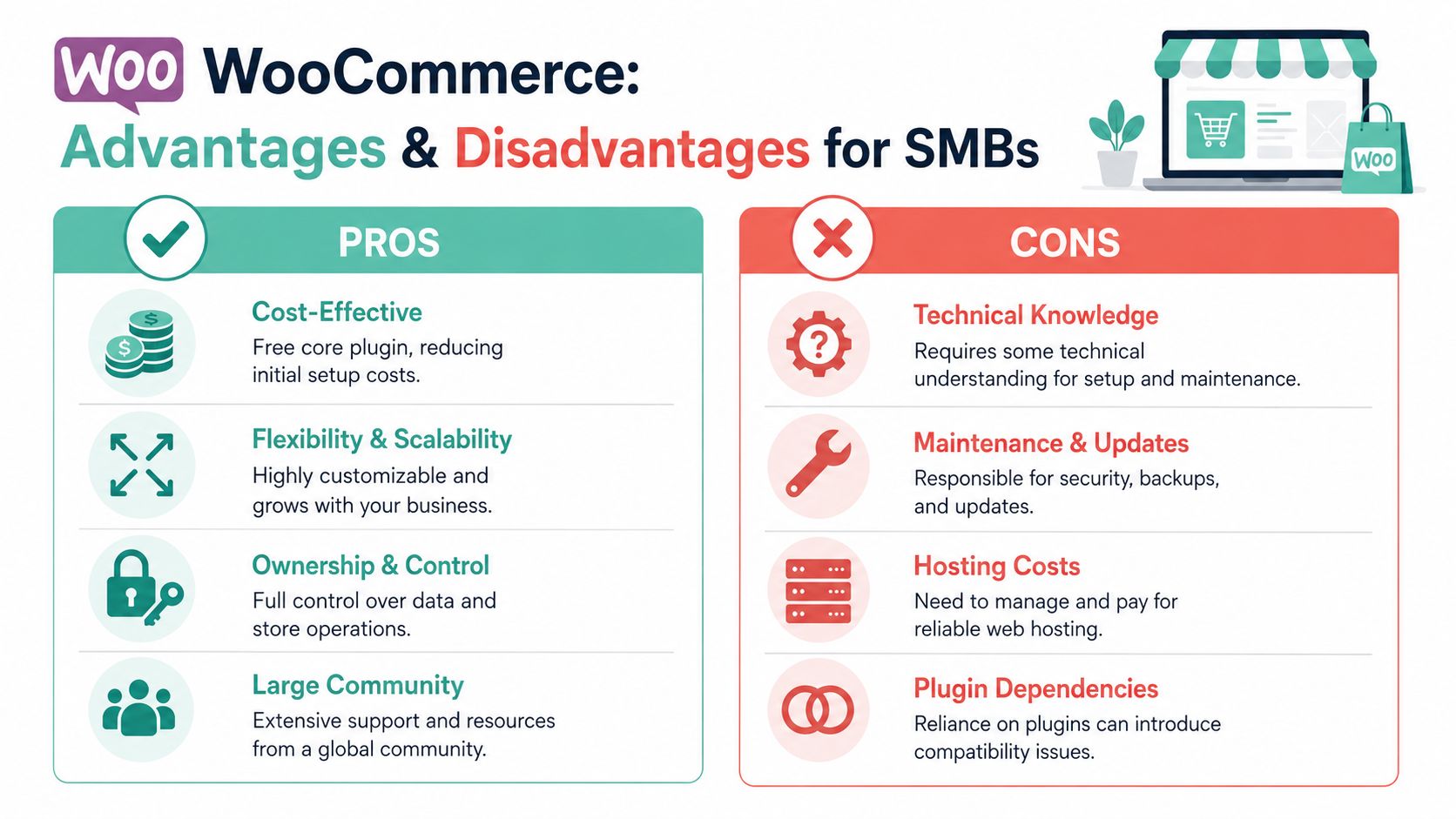
Where WooCommerce gives small businesses a real advantage
A lot of Australian small business owners reach this point with a practical question. Will WooCommerce make life easier, or just give them another system to manage?
The honest answer is that it can do both, depending on how you set it up.
WooCommerce suits businesses that want their website to be an asset they control, not a rented shopfront with fixed rules. You decide how your product pages look, how the checkout works, what customer data you keep, and which tools you connect. For a retailer, tradie, clinic, or specialty store that plans to grow over time, that control matters.
It also gives you room to start small. A business might begin with ten products and basic shipping, then later add bookings, memberships, wholesale pricing, or custom order forms. WooCommerce handles that kind of growth well because it sits inside WordPress, which many Australian businesses already use for content, service pages, and blog posts.
That setup is a bit like owning a shop in your own building rather than renting a kiosk in someone else's centre. You have more responsibility, but you also have more say in how the business runs.
Where owners get caught out
The confusion usually starts with the word “free”. WooCommerce itself does not cost anything to install, but running a proper online store still involves paid parts. Hosting, backups, security, maintenance, premium plugins, payment processing, and occasional developer help all add up.
That catches out small businesses that budget only for the plugin and the design work. In practice, WooCommerce is often affordable, but it is not cost-free.
The other challenge is responsibility. With a closed platform, many technical decisions are made for you. With WooCommerce, you or your provider need to choose reliable hosting, keep plugins updated, test changes, and protect the store properly. That is not a flaw in the platform. It is the trade-off that comes with control.
For Australian SMBs, local conditions make that trade-off more important. A store hosted well in Australia will usually feel faster for local customers, give you support during local business hours, and make data handling easier to assess. Security matters too, especially if your store processes customer accounts and order details. A solid WordPress security setup for online stores helps reduce common risks before they turn into downtime or lost sales.
A balanced view looks like this:
| Pros | Cons |
|---|---|
| Full ownership of site and store data | You're responsible for hosting and maintenance |
| Strong customisation options | Setup can feel technical at first |
| Works inside WordPress | Plugin conflicts can happen if choices are poor |
| Can grow with the business | Costs can rise once you add premium tools and support |
One more point is easy to miss. WooCommerce often rewards good planning more than quick decisions. If you choose dependable hosting, a sensible plugin stack, and WordPress security measures for business websites, the platform is usually far easier to manage.
If you're comparing website platforms more broadly, this review of WordPress, Wix, and Shopify is useful for understanding the trade-offs without treating any one setup as magic.
For many Australian businesses, the downsides are manageable. The owners who do best with WooCommerce usually know what they are buying into from the start, then match the platform with local hosting, sensible support, and realistic expectations.
Hosting and Security Your WooCommerce Store Needs

A Brisbane retailer launches a promotion at 10 am, customers click through from Instagram, and the store slows to a crawl at checkout. The products are fine. The problem sits underneath the site. With WooCommerce, hosting shapes how fast pages load, how reliably orders process, and how quickly you can recover if something goes wrong.
Why local hosting matters for Australian stores
WooCommerce runs inside WordPress, but it behaves more like a busy shopfront than a simple business website. Every cart update, login, stock check, and payment request asks the server to do work in real time. If the hosting is underpowered or far from your customers, the whole buying experience can feel sluggish.
For Australian small businesses, local hosting can make a noticeable difference. A server closer to your customers usually means less delay between the shopper clicking a button and the page responding. That matters most on product pages, the cart, and checkout, where hesitation often turns into abandoned sales.
Local infrastructure also helps with business practicalities. If you prefer customer data to stay in Australia where possible, or you want support during local business hours, your hosting choice becomes part of your risk management, not just a technical purchase.
What good WooCommerce hosting should actually include
A useful way to judge hosting is to treat it like the foundation under a shop. Customers rarely notice it when it works well, but they notice fast when it cracks.
Look for these basics before launch:
- Server performance built for WordPress: Hosting should handle dynamic pages, not just cache a few static files.
- Caching and speed tools: Features such as server-level caching and an optimised PHP setup help stores respond faster under load.
- SSL included by default: Customers expect the padlock in the browser, especially when entering personal and payment details.
- Daily backups with easy restores: Backups only help if you can restore them quickly after an update problem or security incident.
- Security controls at the server level: A web application firewall, malware scanning, login protection, and account isolation reduce common risks.
- Room to grow: If a sale, seasonal spike, or ad campaign brings more traffic, the hosting plan should cope without forcing an urgent rebuild.
Cheap shared hosting can work for a brochure site. A store is different.
A WooCommerce site has moving parts all the time. It tracks sessions, updates inventory, processes orders, sends transactional emails, and runs plugins that affect the checkout experience. That is why e-commerce hosting should be chosen for consistency under load, not just the lowest monthly price.
Slow or unstable hosting costs more than the hosting bill. It can lead to failed checkouts, duplicate support requests, and lost trust from first-time buyers.
Security needs attention above the server layer too. WordPress core, themes, and plugins all need sensible update habits, strong login protection, and fewer unnecessary add-ons. If you want a practical checklist before launch, this guide to WordPress security for business websites is a good place to start.
For Australian SMBs, the best WooCommerce setup is rarely the flashiest one. It is the one that loads quickly for local shoppers, protects customer data properly, and gives you support you can reach when your store is taking orders.
Register your new domain name at competitive market prices including free domain add-ons like privacy, DNS Hosting, Custom Nameservers and Forwarding.
Always the best price and no nasty renewal price hikes.
Register A Domain Name
Getting Started With Your WooCommerce Store
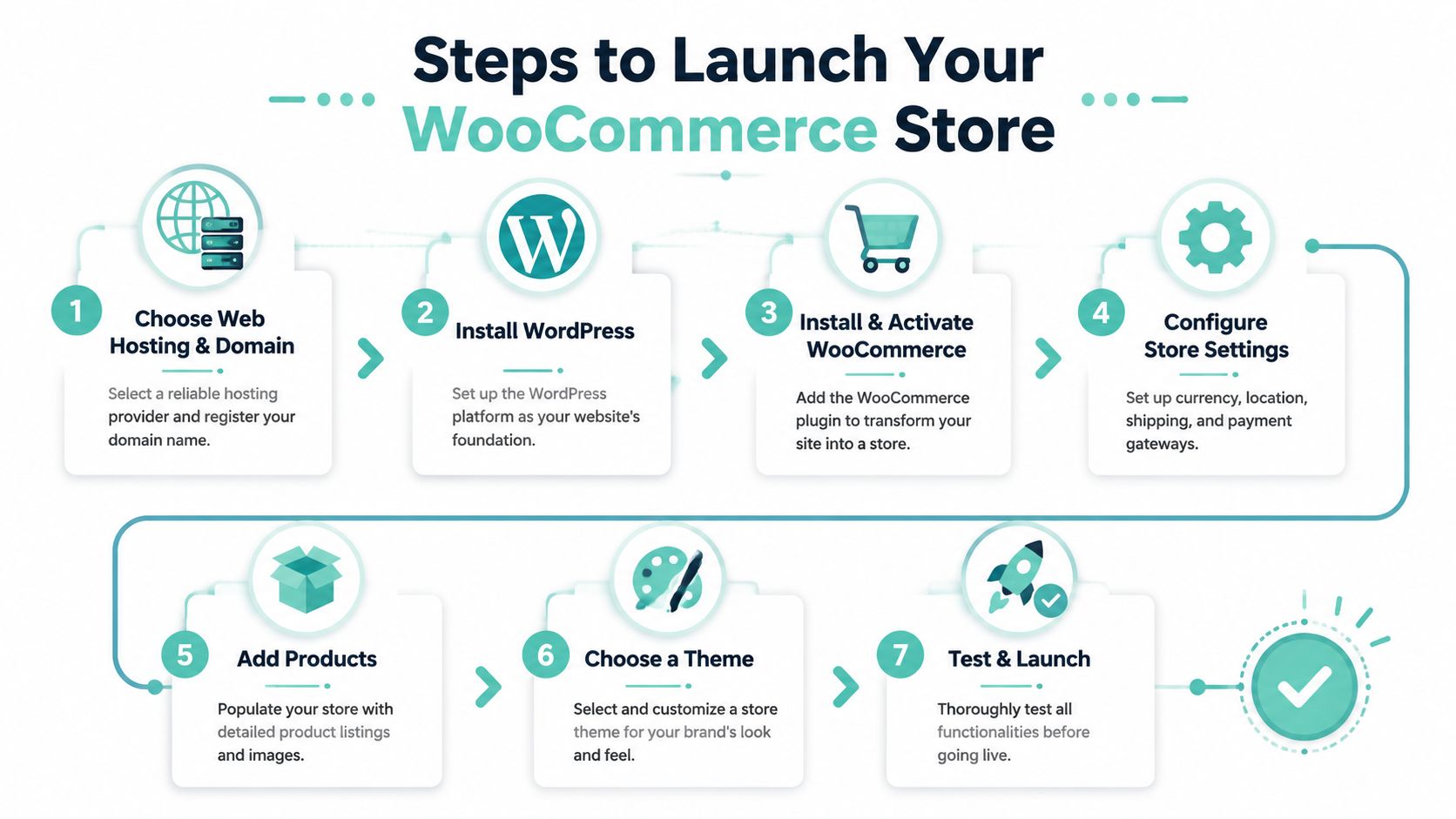
A simple path from idea to launch
Getting started is usually more straightforward than people expect. The key is doing the setup in the right order so you don't redesign the site three times or install random plugins to patch missing basics.
A clean launch path looks like this:
Choose your domain and hosting
Start with a .au domain if your business serves the Australian market, then choose hosting that's built for WordPress and e-commerce.Install WordPress
This gives you the site framework, page editor, media library, and theme system.Install WooCommerce
Activate the plugin and follow the setup wizard to enter your location, currency, product type, and basic store details.Set payments shipping and tax
Connect your preferred gateway, define shipping rules, and confirm your GST settings are correct for your business.
What to do before taking your first order
Once the foundation is ready, focus on a few practical tasks rather than chasing perfection.
- Add one product properly: Write a clear description, upload strong photos, set pricing, and check mobile layout.
- Pick a suitable theme: Choose one designed for WooCommerce so your cart and product pages behave properly. If you need direction, this guide to choosing a WooCommerce theme is a helpful place to start.
- Test the customer journey: Add a product to cart, move through checkout, check confirmation emails, and review how it feels on a phone.
- Plan your extensions carefully: Some plugins are free, some are paid, and too many add-ons can create unnecessary complexity.
A local example makes this easier to picture. A Melbourne gift shop doesn't need a giant catalogue on day one. It can launch with ten products, one payment gateway, simple flat-rate shipping, and a polished homepage. That's enough to start selling, learn what customers want, and improve from real orders.
Launch a store your team can manage confidently. You can always add advanced features after the basics are working well.
If you're ready to turn a WordPress site into a fast, secure online store, UpTime Web Hosting offers Australian hosting, local support, WordPress-friendly performance features, and the infrastructure small businesses need to run WooCommerce with confidence.