You’re probably in one of two camps right now. You’ve either been selling through Instagram messages, weekend markets, or a physical shop and you’re tired of losing sales after hours. Or you’ve been meaning to launch online for months, but every decision feels loaded. Website platform, payments, shipping, security, GST, domains, product pages. It’s easy to stall.
The good news is that online selling in australia isn’t a niche move anymore. It’s part of how people shop across the country, and small businesses that build the right foundation early give themselves far more room to grow without rebuilding everything later.
Tapping into Australia’s Digital Marketplace
Australian business owners don’t need convincing that customers are online. The main issue is whether their own business is set up to capture that demand properly.
The opportunity is substantial. The Australian online shopping industry has reached a market size of $64.9 billion in 2026, yet only 39% of Australian SMEs derive at least 10% of their revenue from online sales, compared to 67% across the Asia-Pacific region, according to IBISWorld’s Australian online shopping industry data. That gap matters. It means plenty of local businesses still have room to catch up if they stop treating ecommerce as a side project.
A lot of owners hesitate for sensible reasons. They worry about getting the wrong platform, overspending on tech, mishandling shipping, or launching a site that looks fine but doesn’t convert. Those concerns are valid. But they’re usually solved by making a few solid decisions at the start, not by waiting for the perfect moment.
If you’re still sorting out the basics of business structure, planning, and launch steps, this guide on opening an online business in Australia is a useful companion resource. For a more hosting-focused setup path, there’s also a practical walkthrough on how to start an online business in Australia.
Why many small businesses get stuck
Most stalls happen before the first product goes live. Owners spend weeks comparing platforms, watching overseas tutorials, and copying advice that doesn’t match Australian buyers or Australian operations.
The bigger problem is that generic ecommerce advice often jumps straight to ads, social media, or flashy design. It skips the practical layer that decides whether your store functions effectively. Things like:
- Where your site is hosted and how fast it loads for Australian shoppers
- Which domain you use and whether it builds trust locally
- How you handle payments and GST from day one
- Whether your checkout is simple enough for mobile users
- How you’ll ship reliably outside metro areas
Practical rule: Launch a store that is clear, fast, and trustworthy before you try to make it fancy.
That’s the difference between a store that becomes a business asset and one that becomes another admin headache.
What a sensible launch looks like
A good online store in Australia doesn’t need every feature under the sun on day one. It needs the basics done properly. Clean product pages. Clear pricing. Mobile-friendly checkout. Reliable hosting. Basic legal pages. Straightforward shipping rules.
A florist in Brisbane, a homewares brand in Adelaide, and a parts supplier in regional NSW won’t use the exact same setup. But they do need the same discipline. Build the foundation first, then scale traffic and offers once the store is stable.

Performance you can feel, backed by clients who depend on it. Read how our support and uptime create long‑term customer success.Power Your Business with Better Hosting
Choosing Your Digital Storefront
The first real fork in the road is simple. Do you sell through a marketplace, or do you build your own website?
A lot of businesses start on marketplaces because they’re fast to set up and they come with existing shopper traffic. That can work. But speed at launch and control over the long term are two different things.
Here’s the quick comparison.
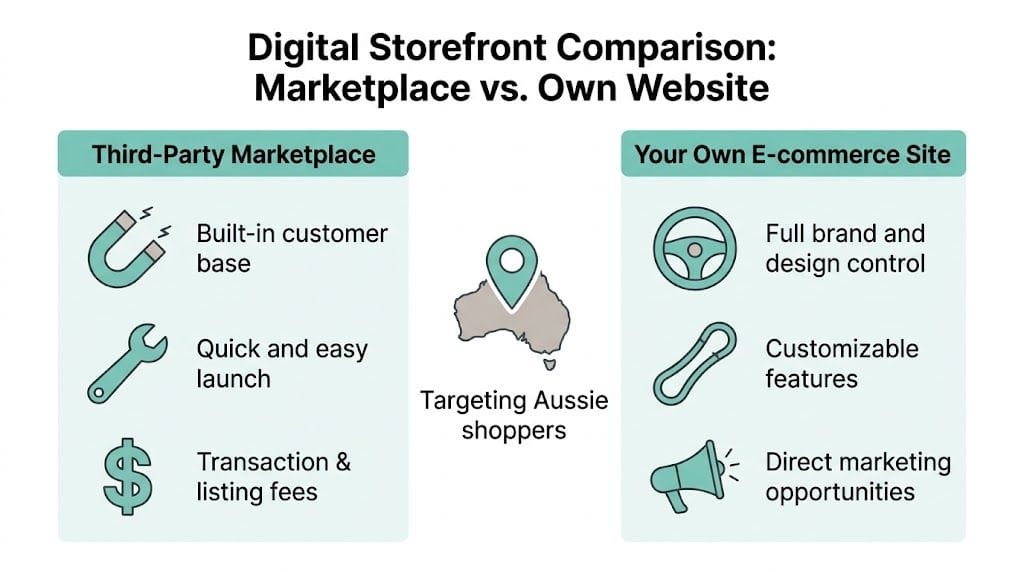
Marketplace vs. Your Own Website Key Differences
| Factor | Marketplace (e.g., Amazon, eBay) | Your Own Website (e.g., Self-Hosted WordPress) |
|---|---|---|
| Setup speed | Faster to start | Slower at first |
| Brand control | Limited by platform rules | Full control over design and messaging |
| Customer relationship | Platform owns much of the experience | You control email capture, retention, and follow-up |
| Fees | Ongoing listing and transaction costs | Hosting, plugins, and payment costs instead |
| SEO value | Little long-term benefit to your own brand | Content and pages can build your own search visibility |
| Flexibility | Restricted layouts and features | Custom checkout, product types, bundles, and integrations |
| Risk | Platform policy changes can affect you overnight | You carry more responsibility, but you own the asset |
What works well on a marketplace
Marketplaces suit a narrow set of goals.
If you’re testing whether a product has demand, moving clearance stock, or selling items that shoppers already search for by exact name, a marketplace can give you traction quickly. A hobby seller with a small product range may also prefer the simplicity.
That’s especially true if the owner doesn’t want to manage content, plugins, product categorisation, or site maintenance. The trade-off is that you’re operating on someone else’s rules. Your branding is constrained. Your customer data is limited. Your store often looks interchangeable with dozens of similar sellers.
What works better on your own site
An independent store suits businesses that want repeat customers, stronger margins, and a recognisable brand.
A ceramic artist in Hobart is a good example. On a marketplace, the listing competes on thumbnail, title, reviews, and price. On a self-hosted site, that same business can tell the story behind the collection, group products by style, offer gift bundles, capture email subscribers, publish care guides, and rank for local or product-specific searches over time.
That difference compounds. A marketplace listing can produce sales. A website can become a business asset.
For many Australian businesses, a practical middle ground works best. Keep a marketplace presence if it helps with discovery, but build your own site as the primary home for the brand. If you go down the WordPress path, choosing the right WooCommerce theme for Australian online stores matters more than people think. A poor theme creates clutter, slows the store down, and makes product management harder than it should be.
The trade-offs owners often underestimate
The biggest mistake I see is treating this as only a design choice. It isn’t. It’s an ownership choice.
A marketplace helps you rent visibility. Your own site helps you build equity.
That doesn’t mean every business must avoid marketplaces. It means you should know what you’re giving up when you rely on one as your main channel. You may get simplicity. You may also get less room to differentiate, fewer ways to retain customers directly, and less resilience if the platform changes its fees, rules, or visibility settings.
Sell where customers already browse if it helps early cash flow. Build where your brand can grow if you want staying power.
A practical decision filter
If you’re unsure, use this filter:
- Choose marketplace-first if you need a quick test, have a limited range, and don’t want to manage a website yet.
- Choose website-first if branding, SEO, repeat purchases, or direct customer relationships matter.
- Choose both if the marketplace supports discovery and your own site handles long-term growth.
For online selling in australia, the businesses that tend to last don’t just ask where they can list products fastest. They ask where they can build trust, own the customer journey, and keep control as the business expands.
Building Your Technical Foundation
A common launch scenario looks like this. The store is live, the products are loaded, and traffic starts coming in from social ads or word of mouth. Then the site slows down on mobile, emails land in spam, the domain looks slightly off, and the owner starts losing sales without a clear warning sign.
That usually comes back to technical decisions made too casually at the start.
Start with the right domain
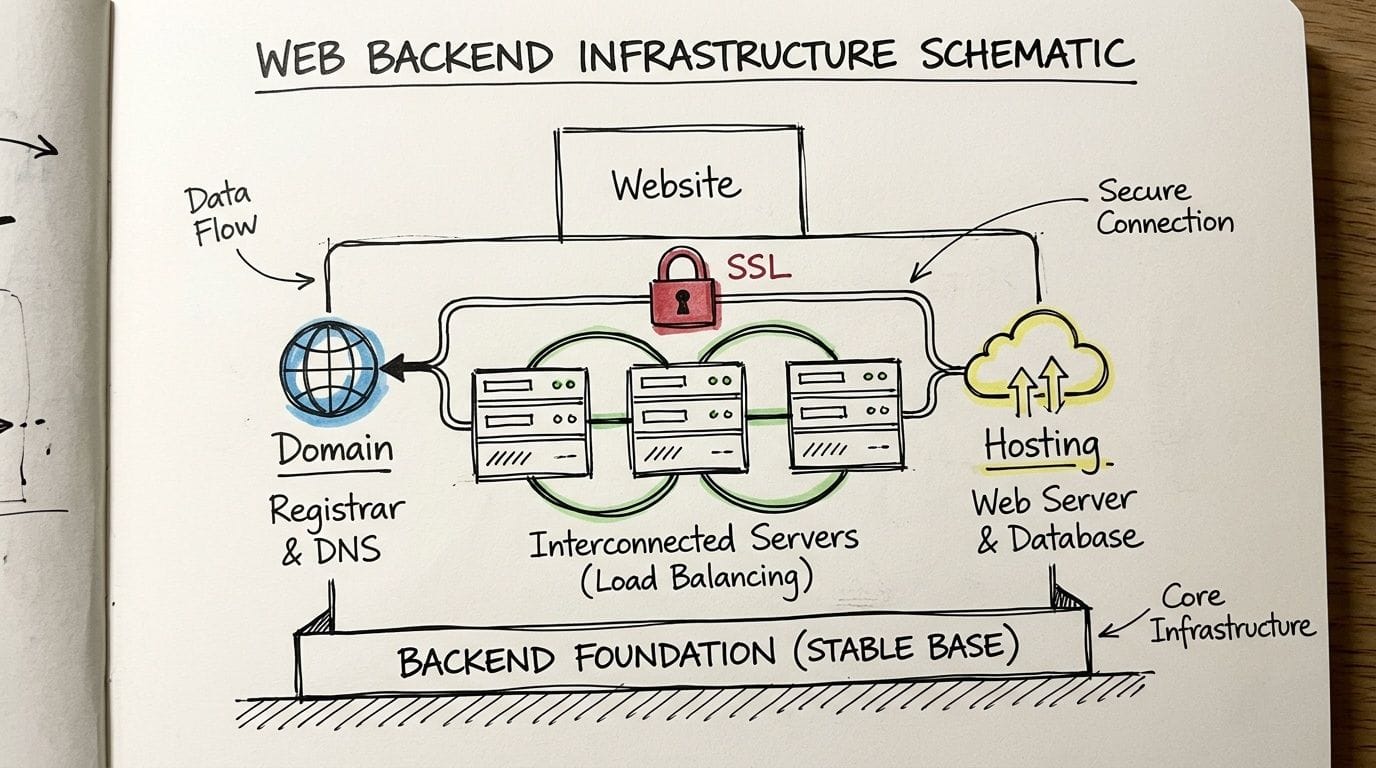
For Australian businesses, your domain is part of your trust signal. A .com.au or .au address tells customers they are dealing with a business that operates here, not a vague offshore store with no obvious local presence.
That matters more than many owners expect, especially for a first purchase.
Choose a domain that matches your business name closely, is easy to spell, and still makes sense if the product range grows. Shorter is usually better. So is clarity. If you have to keep correcting the spelling when you say it out loud, it is probably the wrong choice.
Good domain choices tend to be:
- Easy to remember
- Easy to type
- Closely aligned with the business name
- Flexible enough for future product expansion
A keyword-stuffed domain can help you feel specific on day one. It can also look dated and restrictive a year later.
Hosting affects more than speed
Hosting is one of the first technical choices that can either save you time or create recurring problems. It affects site responsiveness, update reliability, backups, security, and how quickly issues get fixed when something breaks.
For Australian stores, local server options are worth serious consideration. If your buyers are in Sydney, Melbourne, Brisbane, Perth, or regional areas, reducing latency helps pages load faster and checkout feel more reliable. That does not mean every business must use an Australian host. It does mean you should compare support quality, server location, backup policies, and ecommerce performance before signing up. If you need a shortlist, this guide to Australian web hosting options for ecommerce sites is a useful place to start.
What matters in practice:
- Local or nearby server locations for better response times
- Free SSL certificates so customer data is encrypted
- Automatic backups that can be restored without a drawn-out support ticket
- Malware scanning and firewall tools to reduce common attacks
- Staging environments so updates can be tested before they hit the live store
- Support that answers hosting issues clearly, not generic scripted replies
Cheap hosting can still be expensive. You pay for it later in downtime, slow pages, and support delays.
Speed problems show up as trust problems
Customers rarely say, “your server response time was poor.” They say nothing, close the tab, and buy elsewhere.
That is why technical setup matters from the first week. A store that loads quickly on mobile, displays product pages properly, and gets customers through checkout without lag will usually outperform a prettier store built on shaky infrastructure.
The usual weak points are predictable. Oversized images. Too many plugins. Heavy themes. Poor caching. Cheap hosting plans that struggle once traffic rises. I see this often with small stores that launch with good intent but add feature after feature before the core setup is stable.
Security should be boring
A well-secured store functions unobtrusively. Customers should see a legitimate domain, secure checkout, and consistent site behaviour. They should not be forced to wonder whether the site is safe.
For a new store, I treat the following as required from day one:
SSL enabled across the whole site
Not just the checkout page. Login areas, account pages, forms, and admin access all need encryption.Automatic backups with a tested restore process
Backups are only useful if you can restore them quickly. Check that before you need it.Security updates handled promptly
Core software, themes, and plugins should not sit outdated for months.Malware scanning and firewall protection
Small businesses get targeted by automated attacks all the time. Size does not protect you.Separate user accounts for staff and suppliers
Shared admin logins create avoidable risk and make troubleshooting harder.A lean plugin stack
Every extra plugin adds overhead, update risk, and another possible conflict.
Build for stability first
A practical setup for many Australian SMBs is straightforward. A branded .com.au or .au domain, reliable hosting with Australian server options, SSL, controlled user access, a small number of trusted plugins, and a store theme that is light enough to run well on mobile.
That is not flashy. It is profitable.
Owners usually run into trouble when they overbuild too early. They install page builders on top of page builders, stack multiple pop-up tools, add overlapping security plugins, and chase features they do not yet need. The result is a store that becomes harder to update, slower to load, and more fragile during busy periods.
Technical choices shape customer trust long before the first order is placed. In online selling in australia, getting the foundation right early gives you fewer headaches, lower recovery costs, and a store that can grow without being rebuilt six months later.
Host your website with our 5-star rated, cPanel website hosting plans.
Super fast servers, with security included and hosted in your choice of Australian Data Center.
View cPanel Plans
Managing Money and Movement
A store isn’t operational just because the site is live. It becomes operational when customers can pay smoothly, you can ship reliably, and your pricing holds up under real-world admin.
That’s where many stores feel less glamorous and more serious. Good. This is the part that keeps the business healthy.
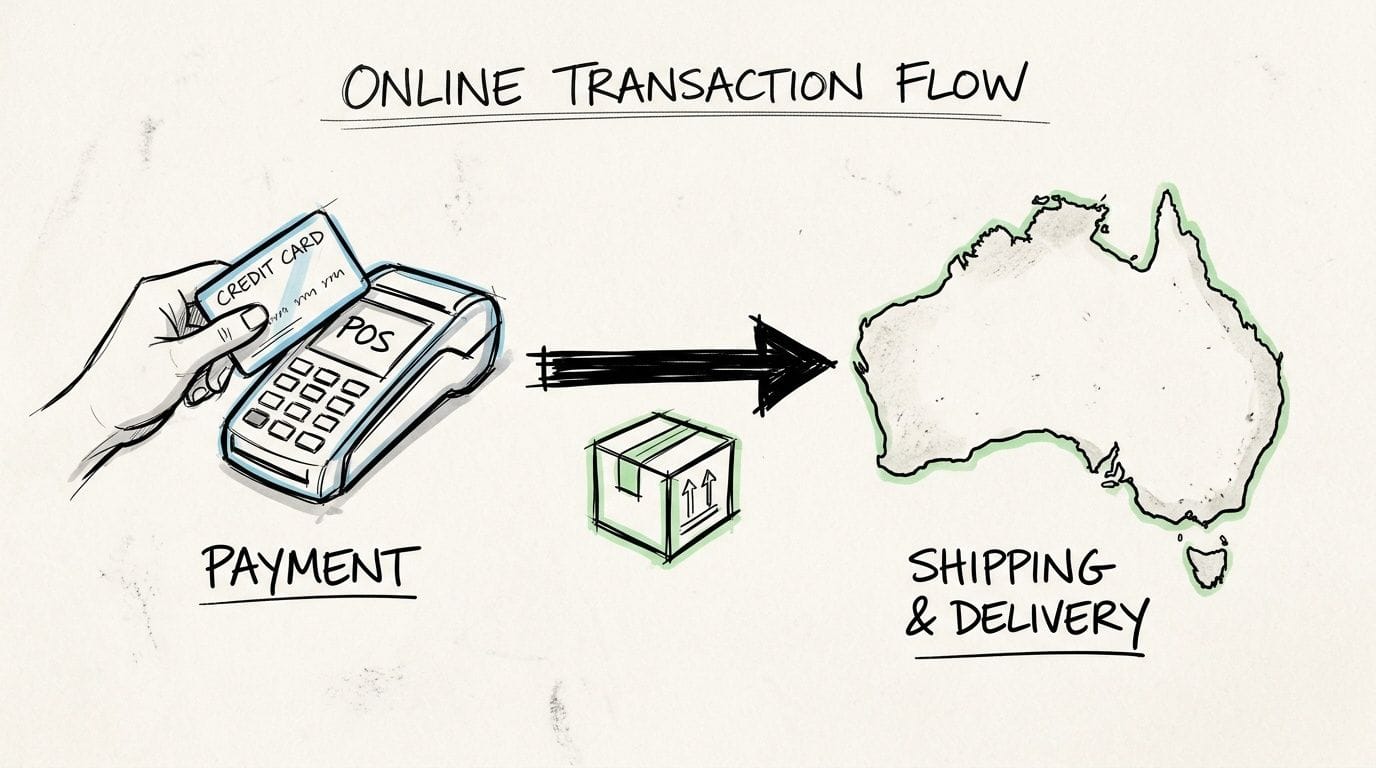
Payment gateways that fit Australian stores
For most small Australian stores, Stripe and PayPal are common starting points. Afterpay may also make sense depending on what you sell and who buys from you. The right choice depends on your average order value, your margins, and how much simplicity matters to your team.
What usually works:
- Stripe for straightforward card payments and broad plugin support
- PayPal for customer familiarity and a quick option for shoppers who prefer not to enter card details directly
- Afterpay where the product category and customer base suit instalment purchasing
What doesn’t work as well is adding too many payment options too early. A cluttered checkout can create decision friction. Start with the payment methods your customers are most likely to trust and use.
GST and pricing discipline
GST isn’t an afterthought. It affects how you display prices, how you account for sales, and how you keep your books clean. If you’re unsure about your obligations, check the ATO directly and get accounting advice specific to your structure.
In practice, small businesses should be careful about three things:
Price display
Be consistent. If prices shown to consumers include GST, keep that treatment clear throughout the store.Shipping and tax settings
Don’t leave tax behaviour to default plugin settings without checking them. Review the actual checkout output on a test order.Record keeping
Save invoices, transaction records, refunds, and shipping data in a way your bookkeeper can work with easily.
A messy ecommerce backend creates accounting pain later, especially once order volume grows.
Shipping inside Australia is a strategy decision
Shipping isn’t just fulfilment. It’s part of the offer.
Some customers want speed. Others care more about cost certainty. Some are happy to wait if the product is specialised or made to order. Your shipping setup should reflect the business model, not copy whatever a large retailer does.
For many small stores, the sensible options include Australia Post for broad reach and Sendle for suitable parcel profiles, depending on service fit and coverage for your operation. The key is to make your policy easy to understand. Confusing delivery wording creates support tickets before the parcel even leaves.
Don’t overlook regional buyers
This is one of the most underused opportunities in online selling in australia. While 80% of Australian households shop online, many businesses neglect the significant opportunity in regional Australia. Focusing on this underserved market with reliable fulfilment can provide a strong competitive advantage, as online shopping behaviours are no longer restricted to metro areas, as noted by One Orange Cow’s analysis of regional expansion.
That matters because many stores still write shipping policies as if their only serious customers live in inner-city postcodes.
If regional customers can understand your shipping times, trust your dispatch process, and get fair delivery terms, they’ll buy. The barrier is often the store setup, not the demand.
A practical fulfilment model for small operators
If you’re shipping from your own premises, keep it simple:
- Pack in one standard workflow so every order is checked the same way
- Set clear dispatch cut-off times and publish them transparently
- Use packaging that protects the product without inflating parcel size
- Write return instructions in plain English
- Test your own post-purchase emails so customers know what happens next
If you’re considering alternative models, a plain-language guide on whether dropshipping is legal in Australia can help you understand the compliance side before you build around it.
Customers are usually forgiving about reasonable delivery times. They’re less forgiving about vague policies, missing updates, and checkout surprises. If money comes in smoothly and parcels move out predictably, your store already has an edge over a lot of competitors.
Attracting Aussie Shoppers
A common pattern plays out after launch. The store looks polished, products are loaded, payments work, and then sales come in slower than expected because the site is hard to find, hard to trust, or harder to buy from than the owner realised.
For Australian SMBs, traffic quality matters more than raw visitor numbers. A smaller stream of shoppers who searched for the exact product, saw clear local delivery terms, and landed on a fast mobile page will usually outperform broad traffic from vague campaigns.
Local SEO that matches buyer intent
Australian store owners often chase rankings before fixing product discovery. The better starting point is simple. Make it easy for a buyer to find the right item, confirm it suits their needs, and feel confident ordering from an Australian business.
That usually means:
- Product titles written in customer language, not supplier codes or internal catalogue names
- Category pages built around how people shop, such as by use case, recipient, brand, or compatible model
- Plain-English shipping, returns, and contact pages that answer trust questions early
- Location cues only where they help the buyer, such as local pickup, service areas, or Australia-wide compatibility
- A maintained Google Business Profile if the business also has a showroom, warehouse pickup, or service area
Stores get into trouble when they try to force local relevance onto every page. Repeating suburb names rarely helps. A well-built page for "commercial kitchen aprons Australia" or "replacement filter cartridges for Brisbane pools" gives searchers a clearer path and usually converts better.
If organic search is part of the plan, this guide to search engine optimisation services for Australian businesses is a useful checklist for assessing what deserves attention.
The metrics worth watching
Skip vanity numbers first.
Plenty of small stores spend too much time on sessions, likes, and top-line reach while ignoring the points where buyers hesitate. The practical metrics are the ones tied to revenue and friction.
Check these regularly:
Product page exits
If shoppers leave from product pages, the usual causes are weak photos, unclear sizing or specifications, missing delivery information, or poor mobile layout.Add-to-cart rate
This helps separate traffic problems from page problems. If people arrive but rarely add anything, the offer or page presentation needs work.Checkout completion
Long forms, forced account creation, and unclear shipping costs still kill sales.Mobile conversion performance
Many Australian buyers browse and buy on their phones. If mobile lags well behind desktop, test the full journey on an actual device, not just a browser preview.Returning customer rate
This matters for stores selling consumables, gifts, apparel, parts, or products with repeat purchase potential.
What usually improves conversion
The highest-impact fixes are usually operational, not flashy redesigns.
| Problem | Better approach |
|---|---|
| Busy product pages | Put price, delivery timing, key specs, and returns information near the top |
| Hidden shipping details | Show dispatch expectations and delivery estimates before checkout |
| Forced account sign-up | Offer guest checkout and ask for account creation after purchase |
| Slow mobile pages | Trim unused apps, compress images, and reduce third-party scripts |
| Generic email follow-up | Send order updates that answer the customer's next question clearly |
One caution here. Marketing cannot compensate for a slow or clumsy store. If pages drag on mobile, trust badges look inconsistent, or forms are awkward, paid traffic highlights those weaknesses faster.
Marketing channels that suit smaller Australian brands
Small operators do better when they pick a few channels they can run properly.
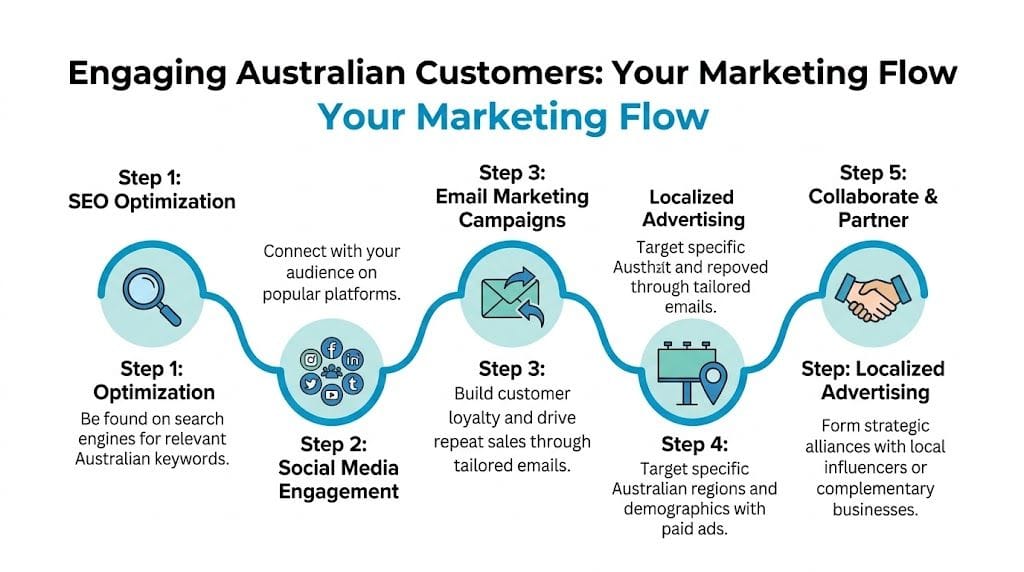
Email is often the strongest retention channel because it reaches past buyers without paying for every click. Useful emails outperform constant discounting. Restock alerts, reorder reminders, product care advice, how-to content, and seasonal buying prompts all give customers a reason to come back.
Search ads work well when the buyer already knows what they want. Social content works better when the product needs demonstration, styling, or repeated exposure before someone buys. If the team is stretched, start with the channel closest to purchase intent and build from there. For broader planning ideas, 12 Powerful Ecommerce Growth Strategies gives a solid overview of channel and conversion priorities.
A practical weekly rhythm
The owners who improve steadily usually follow a simple routine and stick to it.
- Review search queries and landing pages
- Check where mobile users drop off
- Improve one product or category page
- Send one useful email
- Test one change to checkout or product presentation
- Record the result before changing something else
That last point saves a lot of wasted effort. If pricing copy, page layout, free shipping thresholds, and email timing all change in the same week, it becomes hard to tell what helped.
Good acquisition brings the right shopper in. Good store setup gets them to finish the order.
Scaling Your Online Store and Staying Secure
Growth changes the store. What worked for a handful of weekly orders can start creaking once traffic rises, product ranges expand, and more people need backend access.
That’s why scaling isn’t just about getting more visitors. It’s about protecting the systems that now carry more revenue.

Know when the store has outgrown its setup
You’ll usually feel it before you see it in a report. Product updates take too long. Admin feels clunky. Marketing tools pile up. Page speed slips during busy periods. Plugin conflicts become more common.
That’s the point to tighten the operation, not just push harder on marketing.
A sensible growth review includes:
- Hosting capacity and performance under load
- Plugin and app sprawl
- User access and admin permissions
- Backup and recovery readiness
- Which channels bring profitable customers, not just traffic
Security also needs to stay active as the business grows. Backups, malware scanning, software updates, login discipline, and customer data protection aren’t launch tasks you tick off once. They’re routine maintenance. This guide to cybersecurity and data protection for Australian businesses is a useful reference point for that ongoing work.
Scale by simplifying, not by stacking complexity
A lot of growing stores get messier instead of stronger. They bolt on more tools, more scripts, more coupons, more automations, and more admin accounts. The better approach is to review what earns its place.
If you want broader ideas for expansion, this roundup of 12 Powerful Ecommerce Growth Strategies is worth reading alongside your own analytics and operational constraints.
The businesses that scale well tend to do a few things repeatedly. They keep the site fast. They maintain security in the background. They improve product pages based on real buyer behaviour. They treat checkout friction as a revenue problem, not just a design issue.
Online selling in australia rewards businesses that stay practical. Get the basics right, protect what you build, and improve the store in small deliberate steps. That’s how a side channel becomes a dependable sales engine.
If you’re ready to launch or strengthen an ecommerce site, UpTime Web Hosting offers Australian hosting, domains, SSL, local support, and ecommerce-ready infrastructure that suits small businesses building for reliability from day one.