You log in to check a simple content update, and instead you see a browser warning, strange spam pages in Google, or a host suspension notice because your site is serving malware. For a small Australian business, that moment lands hard. Customers lose trust fast, forms stop working, email reputation can take a hit, and the clean-up usually costs more time than the original website build ever did.
Most advice about how to protect a website from malware starts too late. It jumps straight to plugins, password tips, or one-off scans inside WordPress. Those matter, but they're not the foundation. The foundation is your hosting environment, then your application hardening, then your monitoring and recovery process. If the server layer is weak, everything above it is under more pressure than it should be.
That's also why broader reading on Bridge Global's cyber security expertise is useful. Website malware isn't a single-tool problem. It sits inside a bigger security picture that includes people, hosting, email, backups, and response discipline.
Table of Contents
- That Sinking Feeling When Your Website Is Hacked
- Start With a Secure Foundation Your Hosting Choice
- Harden Your Website Application and User Access
- Implement Automated Scanning and Active Monitoring
- Establish a Rock-Solid Backup and Recovery Plan
- Your Incident Response Checklist What to Do Right Now

Performance you can feel, backed by clients who depend on it. Read how our support and uptime create long‑term customer success.Power Your Business with Better Hosting
That Sinking Feeling When Your Website Is Hacked
The usual call goes like this. A business owner in Brisbane or Melbourne notices their homepage is redirecting to a gambling site, or a customer says the contact form now triggers a browser warning. Someone tries to log in to fix it, but the admin account password no longer works. Then the stress starts piling up. Is customer data exposed? Has Google flagged the domain? Is the email account compromised too?
Malware on a website rarely arrives in a dramatic Hollywood-style attack. More often, it slips in through a stale plugin, a reused password, an infected laptop, or a weak hosting environment where one compromised account affects others on the same server. Small businesses are attractive targets because attackers automate the work. They don't need a personal grudge. They only need an easy opening.
A lot of owners make the same mistake at this point. They look for a single magic cleanup plugin. That can help with detection, but it doesn't fix the whole chain. If the entry point remains open, the infection often comes back.
Practical rule: If malware appeared once, assume there's an underlying weakness in hosting, access control, or update discipline until you prove otherwise.
The most reliable approach has three layers. Build on secure hosting first. Lock down the website application and user access second. Then run active monitoring and keep a recovery path ready. That combination is what works in day-to-day operations, especially for Australian SMEs that don't have an internal security team watching the site full-time.
Start With a Secure Foundation Your Hosting Choice
Most malware prevention guides spend too much time inside WordPress and not enough time underneath it. That's backwards. Your website lives on a server, and if that server is poorly isolated, lightly monitored, or badly maintained, you're starting from a disadvantage before you install a single theme or plugin.
Research shows 43% of Australian small businesses experienced a cyber incident in 2024, with hosting vulnerabilities identified as a primary vector, and the Australian Cyber Security Centre notes 28% of breaches involved compromised third-party services, including hosting providers in its guidance on protecting yourself from malware. That's why hosting choice deserves more attention than it usually gets.
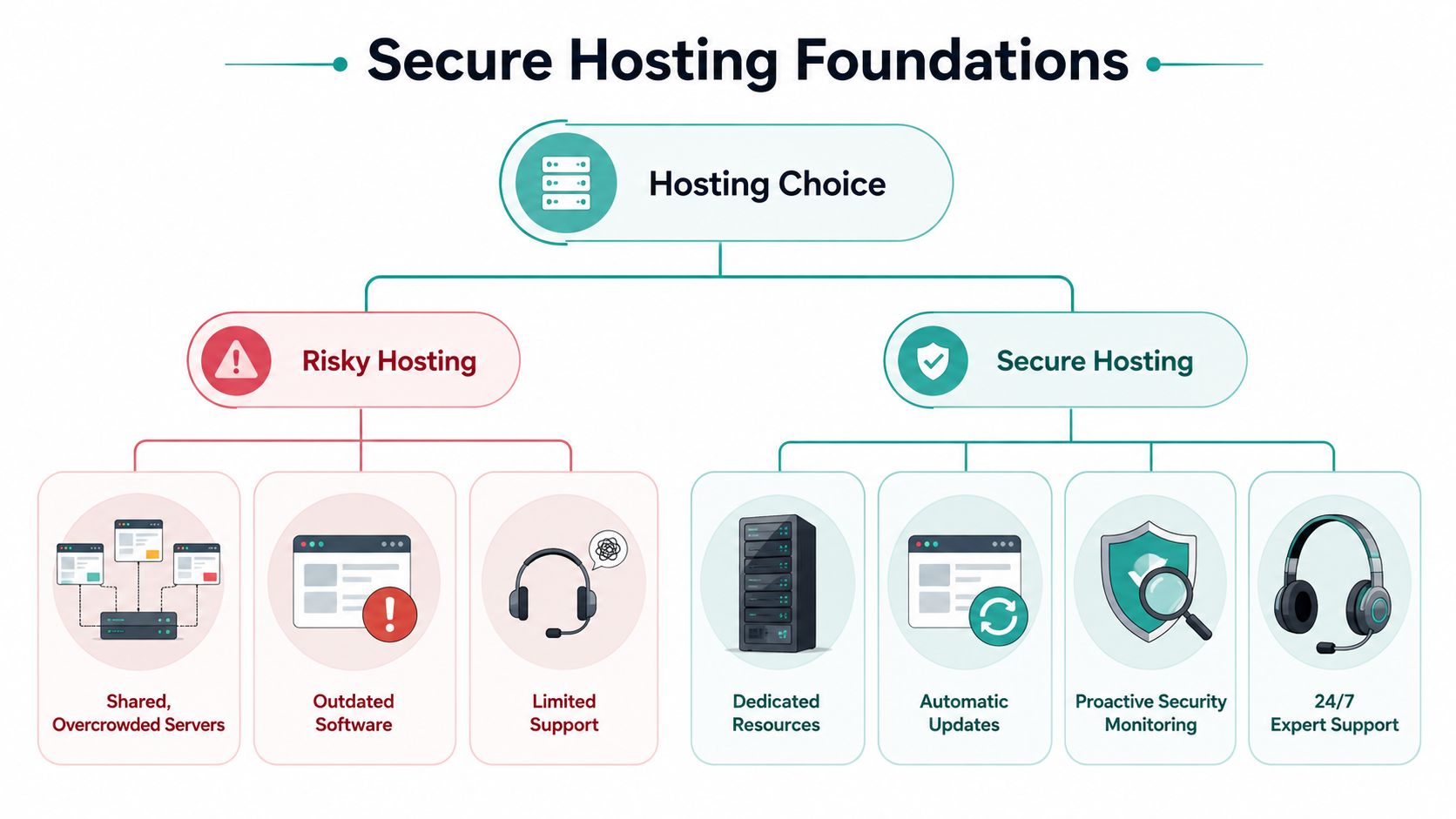
Cheap hosting often creates someone else's problem on your site
Budget hosting can look fine on a pricing page. The trouble shows up later. Overcrowded shared servers, delayed patching, weak account isolation, and slow support all increase the time between an intrusion and a response.
For malware prevention, the hosting layer should do work before WordPress even sees the request. That means a Web Application Firewall, DDoS-aware filtering, malware scanning at the server level, and operating system hardening. On Linux-based environments, technologies such as CloudLinux matter because they isolate accounts from each other. That helps stop cross-account contamination, which is one of the uglier problems on low-cost shared hosting.
Here's the simple version.
| Hosting setup | What it usually means for malware risk |
|---|---|
| Overcrowded shared environment | Higher exposure if another site on the same server is compromised |
| Delayed patching on the server | Attackers get a longer window to exploit known issues |
| No upstream traffic filtering | More malicious requests reach the application |
| Strong account isolation and WAF | Fewer attacks reach your website files at all |
A good host reduces your attack surface before you log in to WordPress.
What to look for from an Australian host
For local businesses, I'd look for a host that can clearly explain its security stack in plain English. If support can't tell you how accounts are isolated, how malware is scanned, or how backups are stored, that's a warning sign.
Focus on these checks:
- Server isolation: Ask whether accounts are segregated so one infected site can't easily affect others.
- Traffic filtering: Ask whether a WAF or similar firewall blocks suspicious requests before they hit the site.
- Patch management: Confirm the host patches server software and doesn't leave old stacks lingering.
- Local support: You want a team that can respond in Australian business hours, especially when an incident affects trading.
- Backup separation: Check that backups aren't just kept on the same server as the live site.
If you're weighing local infrastructure and support, this guide on why businesses switch to local Australian hosting is a useful starting point because it ties performance and support back to practical operations, not just marketing claims.
Host your website with our 5-star rated, cPanel website hosting plans.
Super fast servers, with security included and hosted in your choice of Australian Data Center.
View cPanel Plans
Harden Your Website Application and User Access
Once the hosting layer is sound, the next job is reducing the number of ways attackers can use valid access or exploitable code to get in. These vulnerabilities frequently lead to infections. Not because the site is famous, but because it's easy to automate attacks against common setups.
Tighten passwords and logins first
A strong password policy still matters because weak logins are one of the easiest ways to lose a site. Australian guidance recommends unique passphrases of 13 characters or more, combining words, numbers, symbols, and mixed case, and warns against entering credentials into forms opened from links in emails, which is a common phishing path. That advice is summarised in Australian Cybersecurity Magazine's password best practices.
Use that rule everywhere that matters, not just the main admin login. That includes:
- WordPress admin users
- Hosting control panel accounts
- Developer logins
- Billing logins
- Domain registrar access
- Email accounts tied to password resets
For admin and privileged accounts, MFA should be on for everyone, not just the owner. In practice, I see businesses secure the founder's account but leave a contractor, marketer, or old support login without MFA. Attackers don't care which admin account works. They just need one.
A practical example. If a staff member receives a fake Microsoft 365 login prompt by email and enters their password, that same password is often tried against the website admin, hosting panel, and email account. If those systems share credentials, the compromise spreads fast. Reading through Mailneo on SMTP encryption is also worthwhile here, because secure mail transport is part of protecting the communications around account access and password resets.
Reduce who can change what
Over-permissioned websites are common. A staff member who only needs to upload blog posts shouldn't have plugin installation rights. A freelancer updating CSS doesn't need ongoing administrator access months after launch.
For WordPress, review user roles and strip them back:
- Administrator: Reserve for owners or technical managers who must change site configuration.
- Editor: Good for content managers who publish pages and posts.
- Author or lower roles: Use for contributors who don't need broad control.
- Temporary developer access: Time-box it, then remove it when the job is done.
For ASP.NET or Windows hosting, the same principle applies even though the stack is different. Limit file permissions, secure connection strings properly, and avoid leaving deployment folders writable when they don't need to be.
The boring housekeeping matters too. Remove plugins and themes you're not using. Update the ones you keep. Restrict administrative privileges on systems that manage the website, and use vulnerability scanners to spot unpatched software. Australian guidance for small healthcare businesses also stresses that anti-virus should automatically scan USBs and external drives on connection, which is a useful discipline for any business machine that touches web assets or site backups.
If you're running WordPress, this WordPress security knowledge base guide covers the practical side of hardening common weak points.
Implement Automated Scanning and Active Monitoring
A website can stay infected for far too long if nobody is watching for changes. That's why passive security isn't enough. You need tools that check the site routinely and flag suspicious behaviour fast.
Australian business benchmarks reported in Astra Security's malware statistics roundup show 78% of successful malware infections were on sites without daily automated scans. The same source notes that tools combining a WAF, file integrity monitoring, and automated quarantine can achieve 95% faster restoration after an attack, especially when paired with nightly backups.
What active monitoring should actually do
A proper monitoring setup doesn't just say “site looks fine” from the outside. It should watch for file changes, suspicious injections, and known bad code patterns inside the environment.
Three controls matter most:
- External scanning checks the public-facing website for defacements, blacklisting indicators, or obvious malicious scripts.
- File integrity monitoring alerts you when core files, theme files, or plugin files change unexpectedly.
- Automated quarantine or isolation helps contain infected files before the damage spreads.
For a WordPress site, imagine you haven't updated a plugin and an attacker injects a small PHP backdoor into a theme directory. The homepage may still load normally, so a casual check misses it. File integrity monitoring catches the unexpected change. That's the difference between finding malware early and discovering it after customers complain.
This is also where a server-level WAF matters. It reduces the volume of malicious traffic reaching the application in the first place. If you want a plain-English overview, this guide on what a web application firewall does is useful for connecting the concept to day-to-day site protection.
Watch for this pattern: a modified file date you can't explain, a new admin user, or a plugin folder that changed without a recorded update.
How to respond to an alert without making it worse
Don't start deleting files at random. That often breaks evidence and can take a recoverable infection into a longer outage.
Instead, use a short triage process:
- Confirm the scope: Is the change in core files, uploads, plugins, or multiple areas?
- Check recent activity: Look at plugin updates, admin logins, and any recent developer work.
- Preserve a copy: Keep a snapshot before changing anything major.
- Prepare a restore option: If the infection is widespread, restoring from a known-clean backup is usually safer than hand-editing.
For higher-risk websites, an outside review can add value. A focused external assessment, such as MSP Pentesting external services, can help identify exposure that internal checks miss.
One practical note from hosting operations. Some plans include built-in security tooling. For example, UpTime Web Hosting includes malware scanning, DDoS-protected firewalls, off-site backups, and continuous monitoring as part of the hosting environment. That sort of bundled protection can reduce tool sprawl, provided you still review alerts and act on them.
Establish a Rock-Solid Backup and Recovery Plan
If malware prevention is your lock on the front door, backups are your spare keys and rebuilding kit. They matter because cleanup isn't always tidy. Sometimes the fastest safe option is restoring the whole site to a known-good state, then patching the weakness that let the attacker in.
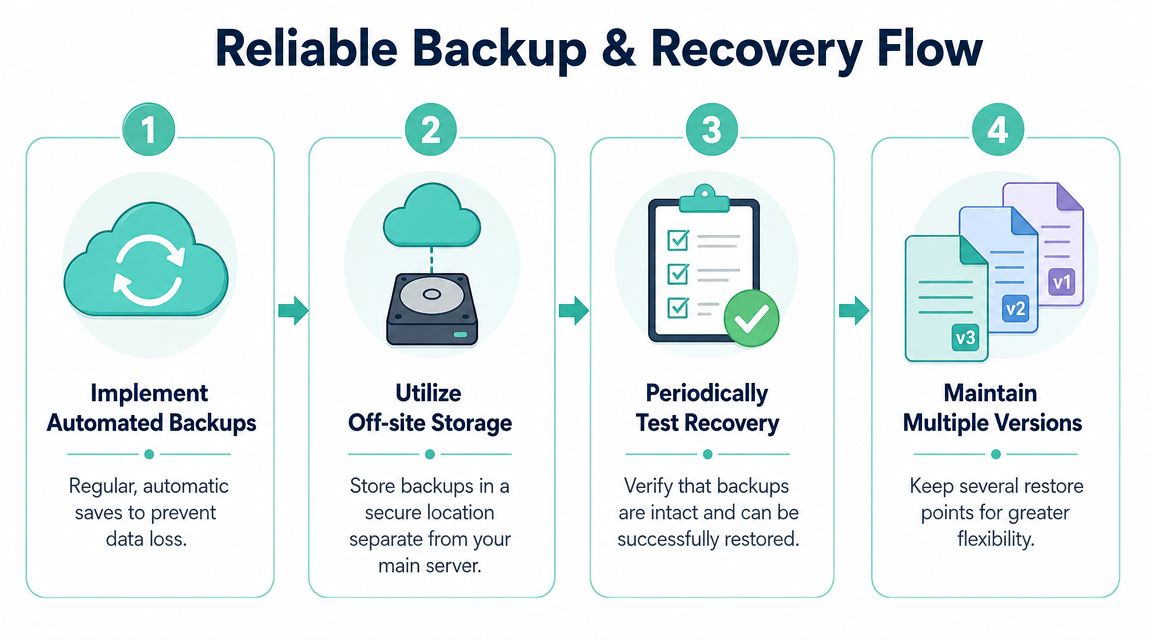
A usable backup is separate tested and recent
Many businesses say they have backups when what they really have is a single archive sitting on the same hosting account as the live site. If the server is compromised, that backup may be altered, deleted, or encrypted along with everything else.
A reliable website backup plan should be:
- Automated: Manual backups are forgotten when things get busy.
- Off-site: Stored separately from the live hosting environment.
- Encrypted: Especially if the site handles customer information.
- Versioned: You need multiple restore points in case malware remained undetected for a while.
- Tested: A backup that won't restore isn't a backup you can trust.
Restore a backup on a schedule, not only during a crisis. That's how you find out whether the process actually works.
A lot of small businesses ask whether daily backups are enough. For a brochure site, nightly backups may be fine. For an online shop, booking system, or active membership site, you may need more frequent recovery points because data changes during the day.
A simple backup routine for small business sites
The classic 3-2-1 thinking still works well in web hosting. Keep multiple copies, use more than one storage location, and make sure at least one copy is off the primary environment.
A practical routine looks like this:
| Backup element | Good practice |
|---|---|
| Website files | Automated scheduled backup |
| Database | Captured with the same schedule or more often if content changes frequently |
| Storage location | Separate off-site destination |
| Retention | Keep several historic versions, not just the latest |
| Testing | Perform routine test restores |
What doesn't work well is relying on a plugin backup stored inside the same web root, or downloading a one-off zip file to someone's laptop and assuming that counts as disaster recovery.
If you need a reference point for structured off-site backup options, this business backup service page explains the kinds of backup features businesses typically look for, including recovery flexibility and separation from the production environment.
Register your new domain name at competitive market prices including free domain add-ons like privacy, DNS Hosting, Custom Nameservers and Forwarding.
Always the best price and no nasty renewal price hikes.
Register A Domain Name
Your Incident Response Checklist What to Do Right Now
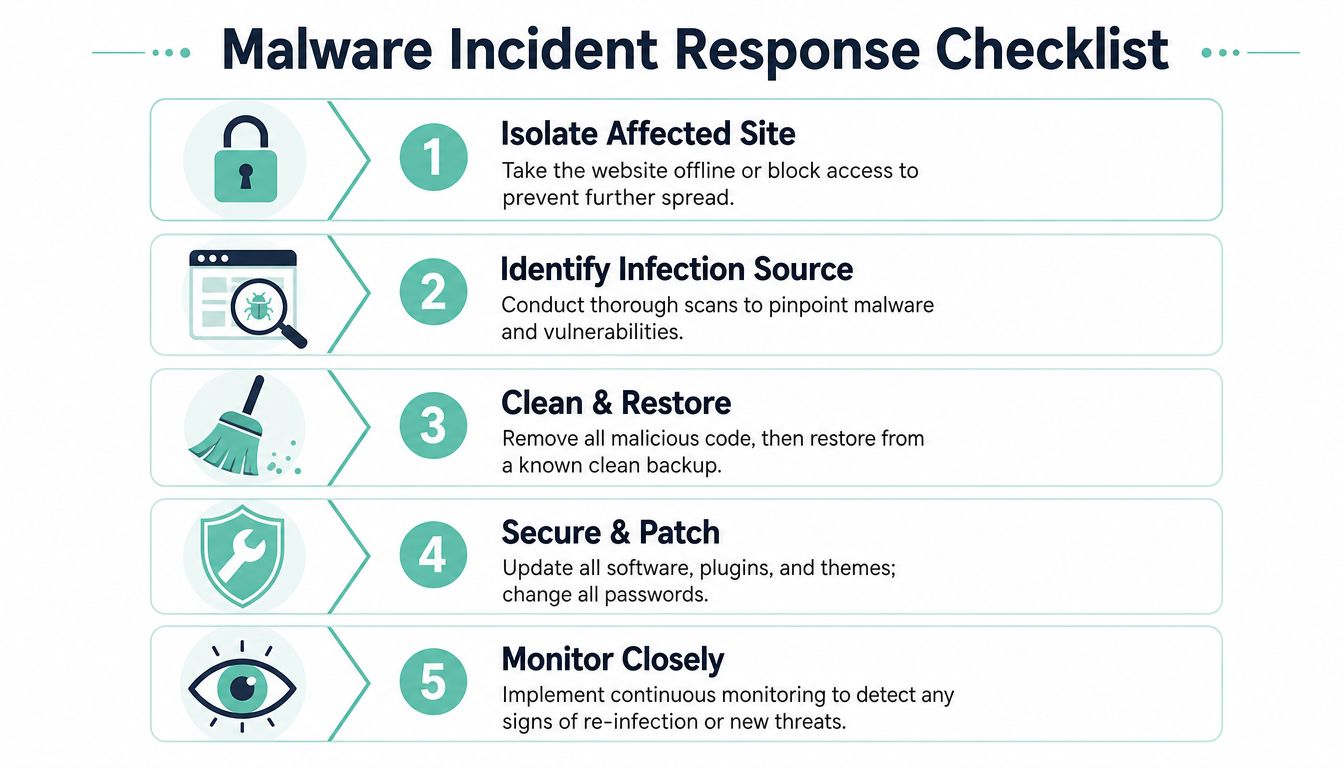
If you think your website is infected, slow down and work through the basics in order. Rash changes cause extra damage. A calm sequence usually gets you back online faster.
One reason incidents often spread is email compromise. In Australia, 92% of all malware is delivered via email, and 91% of cyber attacks are email-borne, which makes phishing and credential theft central to post-incident analysis according to the same malware statistics summary cited earlier in the article. That matters because a hacked website often starts with stolen logins, not a dramatic server breach.
First contain the problem
Start by limiting further harm.
- Take the site offline or restrict access if it's actively serving malware, phishing pages, or suspicious redirects.
- Pause admin changes so multiple people aren't editing and obscuring what happened.
- Check scan results and file changes to see whether the issue is isolated or widespread.
- Review recent access across website admin, hosting, domain, and email accounts.
If customer logins or transactions are involved, document what you find as you go. Keep timestamps. Keep notes. That helps when you need to retrace the sequence later.
Then remove the cause not just the symptom
Manual cleanup can work for a tiny isolated issue. For broader infections, restoring from a known-clean backup is usually safer and faster. After the restore, patch the weakness immediately or the malware may return.
Use this checklist:
- Reset credentials: Change passwords for admin users, hosting panels, database access, domain access, and related email accounts.
- Enforce MFA: Apply it to all privileged access and remote access points.
- Update everything: Core software, themes, plugins, frameworks, and server-side components you control.
- Scan local machines: If a staff laptop was used to manage the site, check it for malware too.
- Remove unused access: Old users, old plugins, and abandoned tools all increase risk.
- Monitor closely after restoration: Re-infection often shows up quickly if the root cause remains.
If you need hands-on help with cleanup, this WordPress malware removal service page outlines the kind of remediation support site owners typically use when they need to isolate, restore, and harden a compromised installation.
Don't treat a clean homepage as proof the job is finished. Malware often leaves behind backdoors, rogue admin users, or scheduled tasks that bring the infection back later.
The businesses that recover best usually do one thing well. They don't stop at cleanup. They improve the hosting layer, lock down access, and keep monitoring switched on so the same incident doesn't repeat next month.
If you want a local team to handle the hosting foundation as part of that process, UpTime Web Hosting provides Australian-based hosting with server-level protections, malware scanning, encrypted off-site nightly backups, and local support. For small businesses that don't want to stitch these layers together manually, that can simplify how you protect a website from malware and how you recover if something slips through.