
Your website probably looks fine from your own office computer. Then a customer in Adelaide tries to load a product page, waits, refreshes, and gives up. A staff member asks where customer data is stored. Your developer says the server is “somewhere offshore”. Your bookkeeper asks why the renewal invoice is in another currency and full of extras you didn't expect.
That's a common place for Australian small businesses to end up. The site went live quickly, but the hosting choice was never really thought through. Speed becomes patchy, support arrives out of timezone, and compliance questions get awkward fast.
Local web hosting fixes a lot more than load time. It puts your website on servers physically based in Australia, usually in Sydney, Melbourne, Brisbane or Perth. That changes how quickly pages travel to visitors, how easy it is to understand where your data lives, and how confidently you can answer privacy questions from customers, staff, and advisers. It also matters at a market level. The Australian web hosting services market reached approximately AUD 4.07 billion in 2025 and supports 1,825 distinct providers, reflecting strong local demand for sovereign data and low-latency solutions, according to Expert Market Research's Australia web hosting services market report.
For many SMBs, the hidden benefit is legal, not just technical. A local host can act like a practical shield when you're trying to reduce privacy risk under Australian rules. That part is missing from most beginner guides, which tend to stop at “local servers are faster”.
Table of Contents
- Introduction to Local Web Hosting
- Understanding the Key Concepts of Local Web Hosting
- Benefits and Trade-Offs of Local Web Hosting
- Australian Factors Driving Local Hosting Adoption
- Examples of Local Hosting in Action
- Decision Checklist for Choosing a Local Host
- Conclusion and Key Questions to Ask Providers

Performance you can feel, backed by clients who depend on it. Read how our support and uptime create long‑term customer success.Power Your Business with Better Hosting
Introduction to Local Web Hosting
A Brisbane retailer once told me their site felt “randomly slow”. Some days it was fine. Some evenings it dragged. Their web designer had used an overseas host because it was cheap and familiar. Nobody thought much about it until customers started calling instead of ordering online.
That situation is more ordinary than most business owners realise. Hosting often gets chosen once, early, by whoever set up the site. Then the business grows around it. You add email, a booking form, a payment gateway, maybe a staff portal, and suddenly one simple hosting decision affects sales, support, security, and privacy.
Local web hosting means your website runs on servers physically located in Australia. In practice, that usually means infrastructure in Sydney, Melbourne, Brisbane or Perth. If your customers are mostly in Australia, that local placement changes the path your website data travels. It can also make it much clearer where your backups, logs, and account tools sit.
Why this matters for an Australian SMB
For a local café roaster, the main issue might be online orders arriving through a WooCommerce site. For an accountant, it might be keeping client information onshore. For a tradie with a simple brochure website, it might just be wanting support during Australian business hours without chasing an offshore help desk.
These are different businesses, but the questions are similar:
- Where is the site hosted
- Who can access the data
- How quickly does the site load for Australian visitors
- What happens when something breaks at 9 am on a Tuesday
Local hosting isn't only about shaving time off a page load. It's about reducing friction in day-to-day business decisions.
What local hosting usually includes
A local hosting service may cover more than just web space. Depending on the plan, you might get:
- Shared hosting for simple sites and smaller budgets
- Managed WordPress hosting for easier updates and better WordPress tuning
- VPS hosting for developers, agencies, and custom applications
- Domain and email services so your website and business email sit under one account
For Australian businesses, local hosting also sits alongside other local signals such as a .au domain, Australian billing in AUD, and support that understands local business habits. Those details sound small until you need them. Then they become the difference between a calm fix and a week of avoidable confusion.
Understanding the Key Concepts of Local Web Hosting
Some people hear “local hosting” and think it just means the company is Australian owned. That's only part of it. The more important question is where the servers and related systems live.
What local really means
Think of your website like sending parcels through a post office. If the parcel starts and ends in the same city, it usually arrives faster and with fewer handoffs. If it has to go overseas first, the route gets longer, slower, and harder to predict.
That's how web traffic works too. When an Australian visitor opens your site, their browser requests files from a server. If the server is in Australia, the request usually takes a shorter path. If the server is offshore, the request takes more network hops before the page can assemble on screen.
A local provider should be able to tell you plainly:
- Which city your server is in
- Where backups are stored
- Whether account tools and logs stay onshore
- What kind of hosting environment you're buying
If they can't answer those questions cleanly, the service may only be “local” in marketing, not in architecture.
How proximity changes performance
Three terms confuse readers most often: DNS, latency, and server response time.
Here's the simple version:
| Term | Plain-English meaning | Why you care |
|---|---|---|
| DNS | The system that points your domain name to your website | Slow or messy DNS can delay the first step |
| Latency | The travel time between visitor and server | Higher latency often makes sites feel sluggish |
| Server response time | How quickly the server starts answering the request | A slow response delays everything after it |
If you want a useful plain-language breakdown of that last item, this guide to server response time explains what visitors experience before the full page even loads.
For Australian traffic, server location matters because every extra hop adds delay. Dynamic pages make that worse because they often need multiple requests. One Australian hosting guide notes that hosting in Sydney can reduce latency by about 2 seconds compared to US-hosted servers for dynamic pages making 10 server requests, which directly affects bounce and conversion for Australian users, according to HostAccent's Australia VPS hosting guide.
The main hosting types
Local hosting isn't one product. It's a group of hosting models delivered from Australian infrastructure.
Shared hosting
Best for brochure sites, blogs, and smaller business websites. You share server resources with other accounts, which keeps cost down.Managed WordPress hosting
Better for site owners who want WordPress-specific support, easier updates, caching, and tools built around that platform.VPS hosting
Better for agencies, custom applications, or businesses that need more control. You get a more isolated environment and more flexibility.
Practical rule: Match the hosting type to the job. Don't put a busy online store on a bargain plan chosen for a five-page brochure site.
A suburban law firm, for example, may do well on managed WordPress with local support and automated backups. A software team running a custom ASP.NET app may need a local VPS or Windows hosting environment. The server can be local in both cases, but the shape of the service should fit the business.
Host your website with our 5-star rated, cPanel website hosting plans.
Super fast servers, with security included and hosted in your choice of Australian Data Center.
View cPanel Plans
Benefits and Trade-Offs of Local Web Hosting
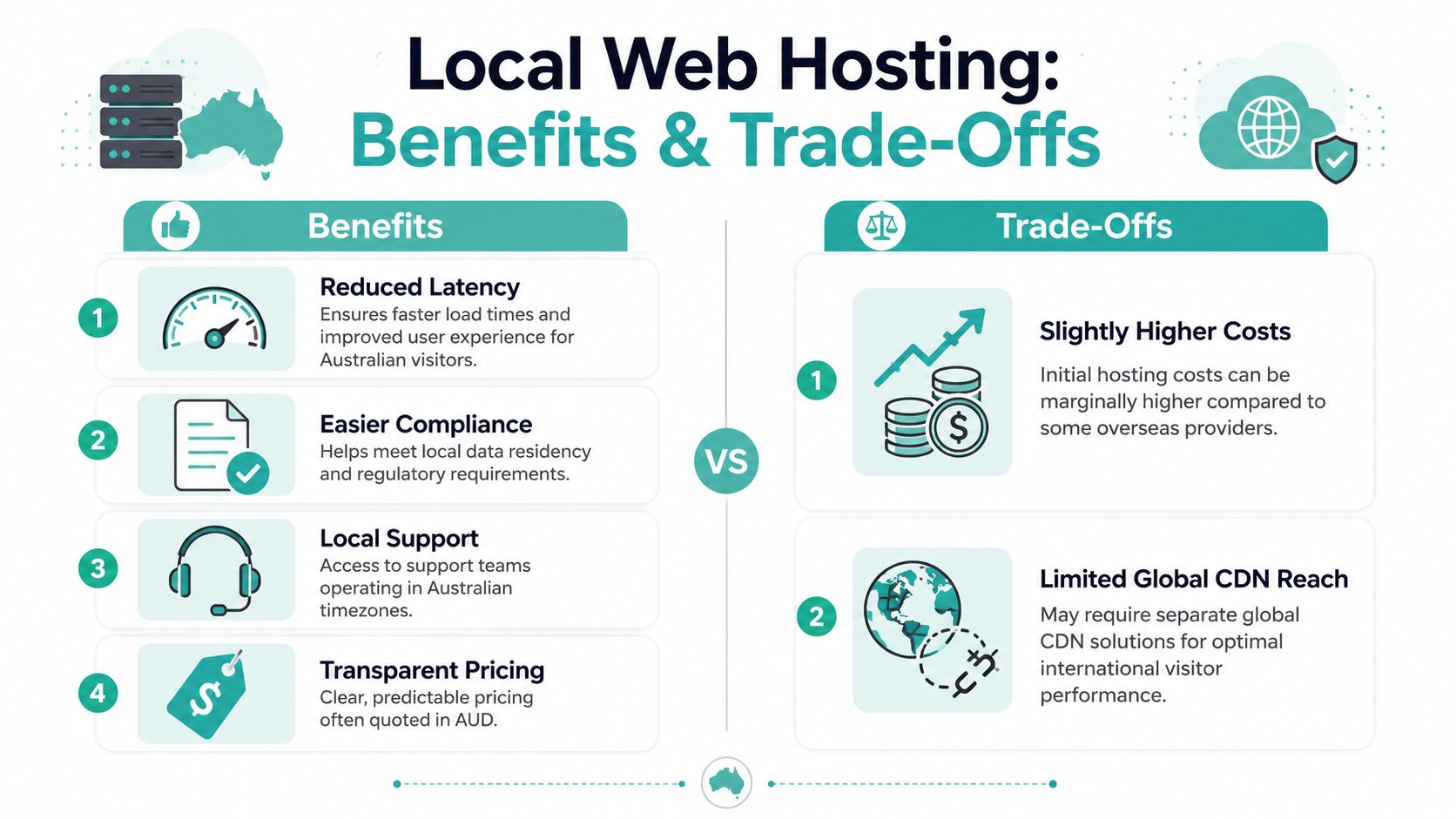
The strongest case for local hosting in Australia comes from combining three things: visitor experience, legal exposure, and day-to-day manageability. Most businesses feel all three, even if they start by only noticing speed.
Speed that affects sales
When a site sits close to the people using it, the whole experience tends to feel more stable. Product filters react faster. Checkout pages hesitate less. Admin areas feel less clunky when staff are updating content.
For local eCommerce, there's a direct commercial angle. Sites hosted in Sydney or Melbourne achieve sub-200 ms latency for domestic users, cutting cart abandonment by up to 35% and boosting SMB eCommerce conversion by 15%, according to UpTime's explanation of why businesses switch to local Australian hosting.
That matters because shoppers don't experience “latency” as a technical metric. They experience it as hesitation. The add-to-cart button feels sticky. The checkout spins. The page reload takes just long enough to make them doubt the transaction.
A local service can also reduce reliance on workarounds. If your core audience is in Australia, you don't want to be using a distant origin server and then trying to patch the problem with layers of extra optimisation.
The compliance benefit most guides miss
Speed is the obvious benefit. Compliance is the deeper one.
Australian businesses in sectors like healthcare, finance, education, and professional services keep getting asked harder questions about where data sits and who can reach it. If your hosting setup spreads the website, backups, logs, and admin tools across multiple countries, answering those questions becomes messy.
A local-first setup helps because it simplifies the chain of custody. Instead of saying “the site is local but the backups are elsewhere and the management platform is overseas”, you can aim for a cleaner answer. The data stays under Australian jurisdiction.
That's why it's worth reading a practical overview of Australian data sovereignty hosting before signing any hosting renewal. The legal shield isn't magical. It doesn't replace your broader privacy obligations. But it does remove avoidable exposure created by offshore infrastructure.
The easiest compliance problem to solve is the one you never create. Keeping website infrastructure onshore is often exactly that kind of decision.
One background source in this space also points out a major content gap in the market. Many guides focus on speed but ignore how local hosting can reduce legal complexity under Privacy Act reforms. That's the point SMBs most often miss until their accountant, IT adviser, or client asks a direct question.
Support pricing and practical trade-offs
Local hosting still involves trade-offs. It isn't a fairy tale where every Australian plan beats every overseas option on every metric.
A few practical ones matter most:
Cost can be a little higher upfront
Australian hosting plans generally range from AUD $7 to $70 per month, with many entry-level shared, WordPress, and starter VPS options under AUD $10 per month, according to PickaHost's review of fast Australian web hosting.Global reach may need extra planning
If most of your traffic is in Australia, local hosting makes sense. If you serve Australia, Europe, and North America equally, you may still want a CDN or region-specific architecture.Support quality varies by provider
“Local support” only matters if it's real. Look for Australian business-hour relevance, clear tickets, and call-back options instead of generic outsourced chat that only reads scripts.
The upside is that local providers often align better with Australian expectations on billing and transparency. GST-inclusive pricing, no hidden fees, and no-contract options are easier to compare than invoices built for another market.
A sensible way to think about value is this: if a local host removes customer friction, shortens support delays, and makes privacy answers easier, you're not only buying server space. You're buying operational clarity.
Australian Factors Driving Local Hosting Adoption
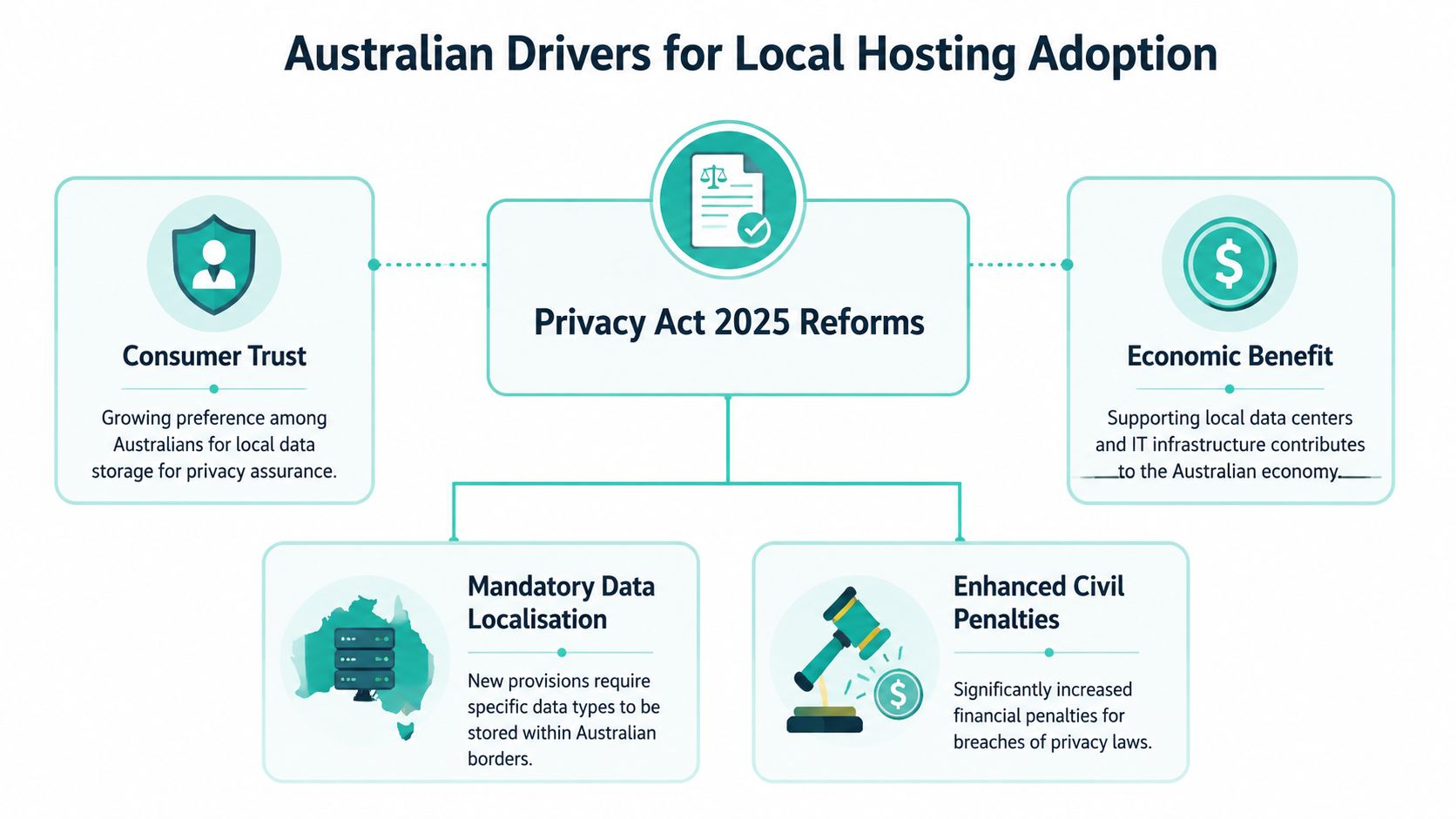
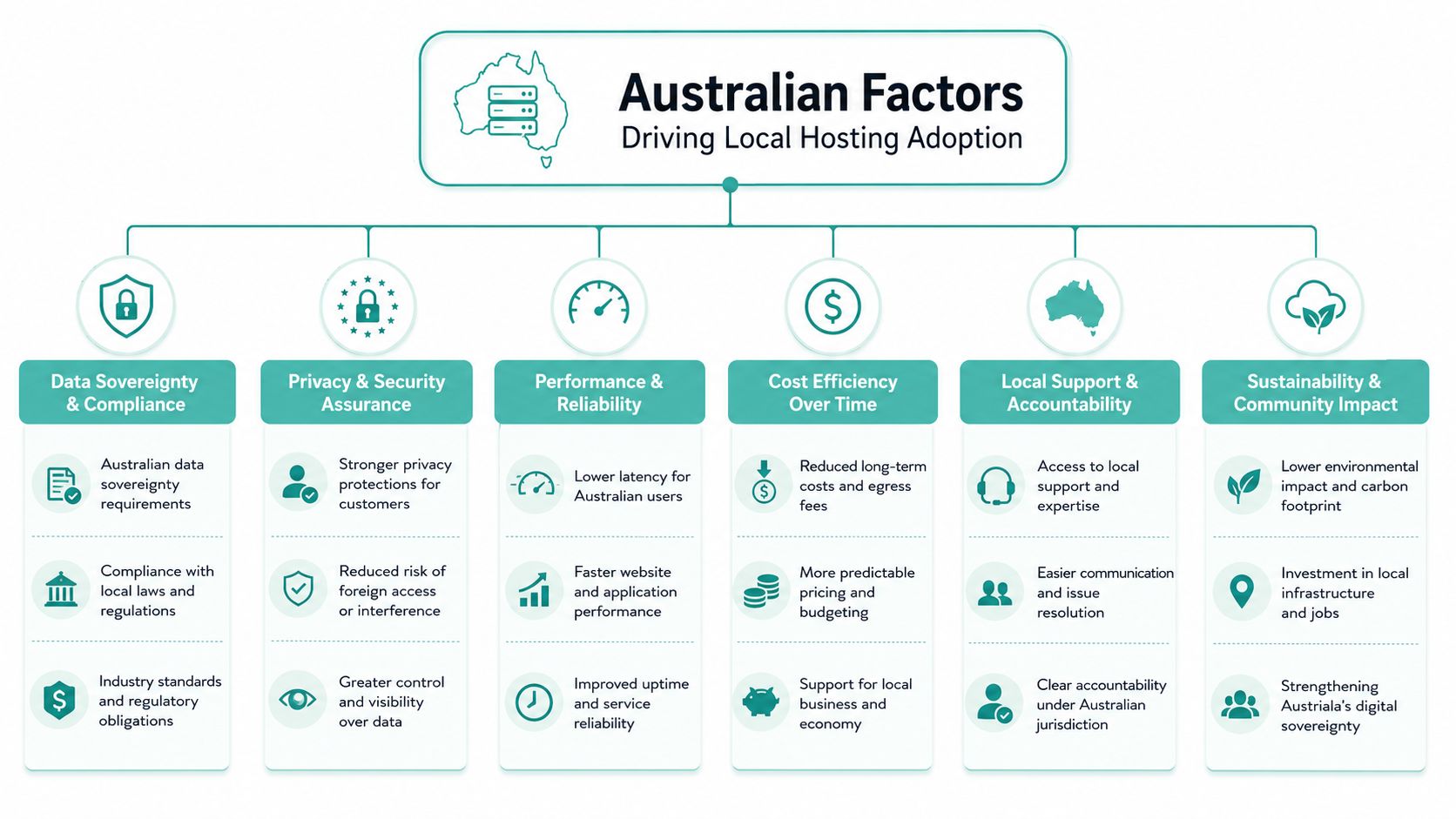
Australia has a few hosting realities that overseas comparison articles often gloss over. Our geography is one. Our privacy expectations are another. The legal position of your business data matters more when customers, advisers, and regulators expect clear answers.
Privacy law and onshore control
The most overlooked Australian factor is data handling under local privacy obligations. A provider can call itself Australian, but that doesn't help much if critical pieces of the service are still hosted offshore.
The cleaner standard is simple. Providers keeping all infrastructure onshore, data centres, backups, logs and tooling, ensure compliance with the Australian Privacy Act and shield businesses from extraterritorial data access, as explained in this Australian data sovereignty hosting guide.
That last point matters more than many SMBs think. If your data is handled through offshore systems, foreign legal regimes may become relevant. If everything stays onshore, your position is easier to explain and govern.
Infrastructure and true data sovereignty
“Hosted in Australia” can mean several different things. Sometimes it only refers to the live server. Sometimes the backup location, monitoring systems, or admin platform still sit elsewhere.
For businesses that want true sovereignty, ask about the full stack:
- Production servers in Australian data centres
- Backup storage also kept in Australia
- Monitoring and logs retained onshore
- Administrative tooling operated within Australia
That's the difference between local presence and local control.
Australian infrastructure also has practical strengths. Local benchmarks point to strong performance from providers using facilities in Sydney, Melbourne, Brisbane and Perth, including NextDC-connected environments and Google Cloud Sydney for domestic traffic. Hosting built on LiteSpeed, CloudLinux, and accelerated WordPress stacks can also improve responsiveness for small business sites when implemented properly.
Brand trust with Australian signals
Customers don't all read server architecture notes, but they do respond to trust signals. A .au domain, local business address, local support number, and plainly stated Australian hosting locations all reduce hesitation.
That's especially useful if your website is connected to operations such as quoting, bookings, invoicing, or client portals. Businesses rolling those systems into a broader software stack often need the website and back-office systems to make sense together. If you're planning that sort of integration, this essential Odoo ERP guide is worth reading because it helps frame how local business systems connect across sales, finance, and operations.
For search visibility, local signals also matter. A local infrastructure choice won't replace solid SEO work, but it does support it. If your audience is Australian, your hosting, domain, and content strategy should point in the same direction. Practical advice on local SEO for Australia becomes useful, especially for service businesses targeting cities or regions.
A local website feels more trustworthy when every surrounding detail supports the same story. The domain, hosting location, support hours, and privacy answers should all line up.
Examples of Local Hosting in Action
The easiest way to understand local hosting is to see how different businesses use it. Not every site needs the same stack. What matters is how the hosting choice fits the business model.

A retail business rebuilding for local customers
A small homewares retailer had outgrown a basic site that pointed customers to social media messages for orders. They rebuilt on WordPress with WooCommerce because they wanted control over products, shipping rules, and content. Their main concern wasn't only speed. They also wanted customer order data and backups to stay in Australia.
The migration process was straightforward in concept but fiddly in practice. They moved the domain, imported product content, checked SSL, rebuilt checkout flows, and reviewed image sizes. During that work, knowledge base articles became more useful than sales pages. The practical questions were things like migration timing, certificate setup, and hardening the new site after launch.
For that kind of project, a guide focused on fast WordPress hosting in Australia helps site owners think beyond monthly price and look at performance features that affect the actual store experience.
A developer deploying a Windows app locally
A developer working with a custom ASP.NET application had a different problem. The app needed a Windows environment and MSSQL support, and the client wanted the service hosted in Australia for commercial and privacy reasons. Shared Linux hosting was never going to suit that setup.
Local hosting transitions from a consumer web product to infrastructure with requirements. The developer needed a platform that matched the stack, gave enough control for deployment, and still kept the environment local. A local VPS or Windows hosting plan made more sense than trying to bend a generic plan into shape.
One Australian option in that category is UpTime Web Hosting, which offers Australian-based cPanel, WordPress, and ASP.NET Windows hosting, along with managed VPS, free SSL, malware scanning, DDoS-protected firewalls, encrypted nightly backups, and local support. That combination is relevant when the website is also part application, part compliance concern.
A blogger bundling site email and support
A hobby blogger is at the other end of the scale, but the same logic still applies. They didn't need a custom application. They wanted one account for a simple website, email, a .au domain, and support they could contact without waiting overnight for a response.
A bundled setup using a website builder such as Sitejet plus business email can suit that case well. The blogger doesn't want to manage plugins or server settings every weekend. They want the site online, email working, and someone local to help if a form stops submitting.
Here's the useful lesson from smaller setups: local hosting still matters even when the site is modest. If the audience is Australian and the owner wants simple billing, local support, and fewer privacy unknowns, the benefits don't disappear just because the website is small.
Register your new domain name at competitive market prices including free domain add-ons like privacy, DNS Hosting, Custom Nameservers and Forwarding.
Always the best price and no nasty renewal price hikes.
Register A Domain Name
Decision Checklist for Choosing a Local Host
By the time you're comparing providers, marketing language starts to blur together. “Fast”, “secure”, and “reliable” appear on nearly every hosting page. A checklist forces clearer answers.
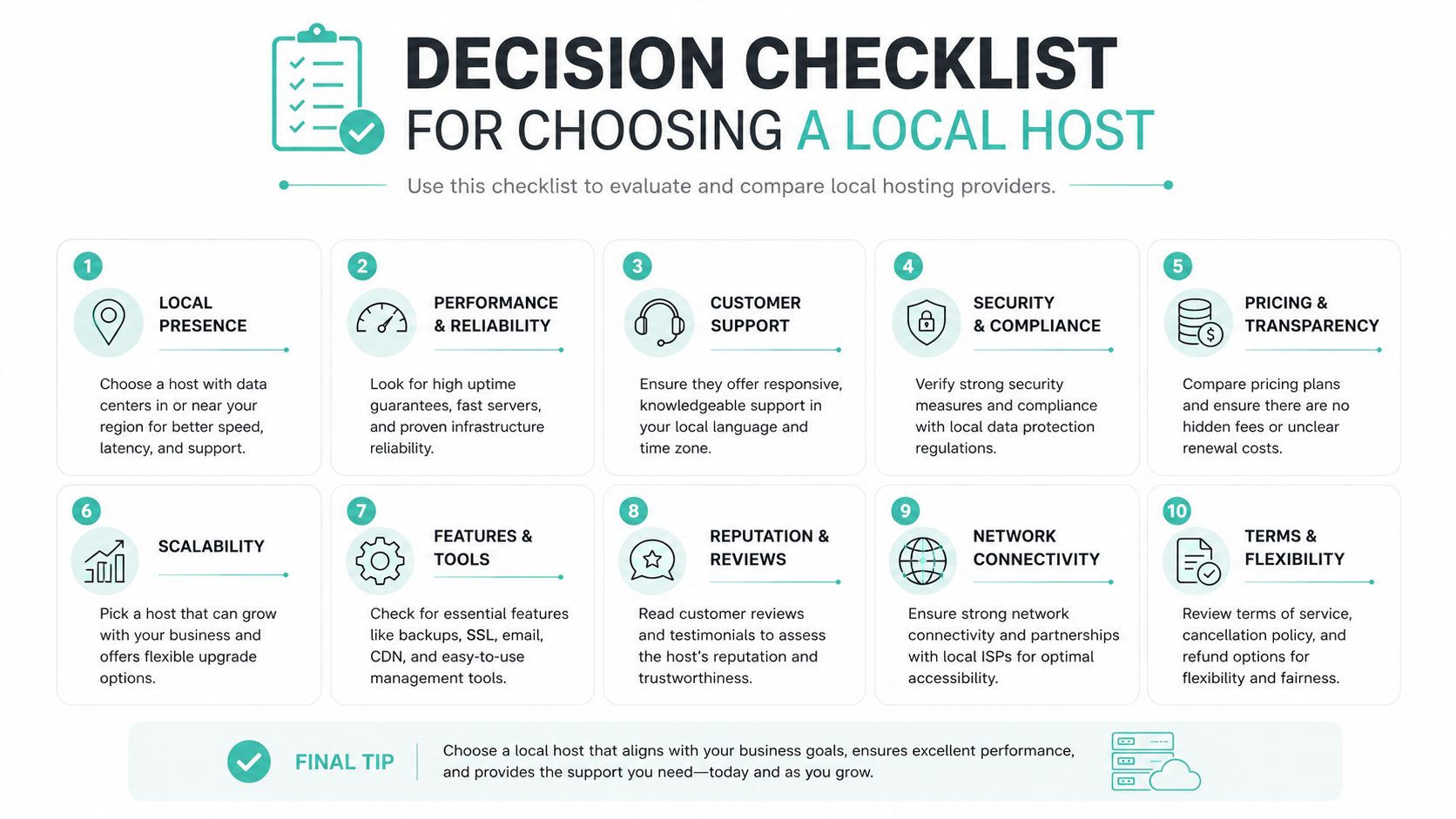
Performance and uptime checks
Start with the user experience. If the provider can't explain performance in concrete terms, keep looking.
- Ask where the server sits: Sydney and Melbourne are often the first places to check for domestic traffic performance.
- Confirm the uptime standard: Many Australian hosting services aim for a 99.9% uptime standard, which PickaHost's Australian hosting review identifies as a key benchmark for SMEs and eCommerce.
- Check the hosting stack: Ask whether the environment uses tools like LiteSpeed, CloudLinux, or WordPress acceleration.
- Test from Australia: Don't rely on a US-based test result if your customers are in Australia.
Compliance and sovereignty checks
Often, many businesses skip too quickly to price.
Where are backups stored
A local live server with offshore backups doesn't give you full onshore control.Where are logs and admin tools hosted
Ask directly. If the answer is fuzzy, that's useful information.How is data sovereignty handled
You want a plain-English answer, not a brochure paragraph.
Ask the provider to describe their data path in one short email. If they can't explain it simply, they probably can't support it clearly either.
Support pricing and platform fit
The final checks are practical. They affect how easy the service is to live with after signup.
| Category | What to ask |
|---|---|
| Support | Do you offer local phone, ticket support, and call-backs |
| Pricing | Is GST included, are there contracts, and are there hidden fees |
| Platform fit | Do you support WordPress, Windows, ASP.NET, MSSQL, email, and builder tools if needed |
| Growth path | Can I move from shared hosting to VPS without a messy migration |
For a broader buying framework, this guide on how to choose the best web hosting service for your needs is a good companion because it helps sort business needs from feature noise.
A final tip for SMBs: write down your real use case before comparing plans. “We need a website” is too vague. “We need a WooCommerce store for Australian customers with local support and onshore backups” is specific enough to make a good choice.
Conclusion and Key Questions to Ask Providers
Local web hosting makes the most sense when your customers, staff, and business obligations are mostly in Australia. The speed benefit is real, but it's only the first layer. The stronger long-term advantage is that local infrastructure can make your website simpler to manage, easier to support, and safer to explain when privacy questions come up.
That's the part many SMBs miss. They compare price and disk space, then ignore where backups sit, where logs are stored, and which country controls the surrounding systems. Under Australian privacy expectations, that's not a minor technical detail. It's part of your risk profile.
When you speak with a provider, keep the questions direct:
- Where are your servers located
- Where are backups, logs, and account tools located
- How do you support Australian data sovereignty
- What uptime standard do you work to
- How do you handle support for Australian customers
- Are your prices in AUD with GST included
- Are there hidden fees or lock-in contracts
- Which hosting type suits my site now, and what's the upgrade path later
The strongest providers answer those questions without dodging, jargon, or vague “global cloud” language. They should be able to tell you what is onshore, what isn't, and why that setup exists.
If you run a WordPress site, online store, custom app, or even a small service-business website, local hosting is one of those choices that keeps paying off. Customers notice a smoother site. Staff spend less time chasing support. You spend less time wondering where your data lives.
If you want a local option to evaluate, UpTime Web Hosting offers Australian-based hosting with servers in Sydney, Melbourne, Brisbane and Perth, plus WordPress, cPanel, Windows hosting, email, domains, and managed VPS. It's worth a look if you want local infrastructure, transparent AUD pricing, and support that operates in Australian time zones.