
A hosting guide for Australia usually starts with storage, free SSL, or “unlimited” features. This overlooks a primary buying signal. 58% of Australian businesses encounter unexpected fees after signup when providers leave GST out of advertised pricing or add charges for essentials like backups and DDoS protection (Canberra Times coverage of Australian cPanel pricing issues). For most small businesses, the best cPanel hosting decision is less about the longest feature list and more about cost clarity, local latency, and support that understands the Australian operating context.
That matters because cPanel remains a small-business tool first. It's popular with teams that need to manage files, email, domains, backups, and app installs without hiring a sysadmin. In Australia, that practical fit intersects with a local infrastructure question many “best hosting” lists barely touch. If your customers are in Sydney, Melbourne, Brisbane, Perth, or regional centres, server location changes how quickly pages start loading and how responsive the admin side of WordPress feels.
The sharper way to compare hosting in 2026 is to treat cPanel as an operational platform, not a checkbox. You're choosing where your website runs, how predictable your monthly bill will be, and how much friction your team faces every time it needs to create an email account, restore a backup, or launch a new site.
| Provider | Best fit | Local relevance | Pricing visibility | Support style | Operational note |
|---|---|---|---|---|---|
| UpTime Web Hosting | SMBs that want local infrastructure and clear billing | Strong Australian focus with onshore footprint | Strong emphasis on GST-inclusive clarity | Local channels including phone and call-backs | Suits businesses that value straightforward hosting operations |
| VentraIP | Small eCommerce and domain-heavy setups | Australian market presence | Check inclusions carefully by plan | Local support workflows | Good fit when domain management is a major part of the workload |
| Netregistry | Agencies and businesses with multiple domains | Established local recognition | Review plan details before committing | Support processes vary by service layer | Useful for businesses juggling several web properties |
| HostGeek | Windows and ASP.NET workloads | Australian-relevant option for mixed hosting needs | Confirm included services upfront | Local support availability | Worth shortlisting for Microsoft stack requirements |
Table of Contents
- Introduction to cPanel Hosting in Australia
- Understanding cPanel Hosting
- How to Choose the Right cPanel Hosting
- Comparing Top Australian cPanel Hosting Providers
- Top cPanel Hosting for Specific Scenarios
- Migrating to a New cPanel Host
- Analyzing cPanel Hosting Costs in Australia
- Recommendations for Best cPanel Hosting

Performance you can feel, backed by clients who depend on it. Read how our support and uptime create long‑term customer success.Power Your Business with Better Hosting
Introduction to cPanel Hosting in Australia
Australian businesses don't need abstract uptime theory. They need websites that stay available and load quickly enough for local customers to act. The projected premium benchmark for Australian cPanel hosting in 2026 is a 99.9% uptime guarantee, sub-200 ms load times, and worldwide connection speeds under 250 ms to and from Sydney (Australian hosting speed benchmarks for 2026). That benchmark reframes what “best cPanel hosting” should mean in this market.
The bigger point is operational. A fast local host doesn't just help visitors. It also improves the admin experience for teams working in WordPress, managing mailboxes, uploading assets, and restoring backups. For a small business that updates pages between sales calls or after hours, lower friction matters almost as much as raw speed.
Another local factor sits under most purchase decisions. 72% of cPanel users in Australia are businesses with fewer than 50 employees, a segment that tends to prefer straightforward pricing and support over enterprise-style complexity (Australian cPanel SMB usage data). That aligns with how cPanel is used in the field. A business owner, office manager, marketer, or developer can handle routine work from one dashboard instead of splitting tasks across separate systems.
Why the Australian context changes the shortlist
A hosting company can look competitive on a global comparison page and still be a poor match for an Australian SMB. Offshore servers can add avoidable latency. International pricing can create tax confusion. Support teams in other time zones can turn a simple issue into a multi-day exchange.
That's why local hosting deserves more weight than many buyers give it. The argument for switching to local Australian hosting isn't just patriotic branding. It's about cleaner billing, better support alignment, and infrastructure closer to your customers.
Practical rule: If most of your customers are in Australia, don't treat server location as a minor detail. Treat it as part of performance planning.
What separates a strong cPanel host from a merely familiar one
The strongest providers for Australian SMBs usually combine five things: local data centre options, visible uptime commitments, GST-inclusive pricing, bundled security, and support channels that work during Australian business hours.
The weaker ones often still look good at first glance. They advertise cPanel, free SSL, and generous plan wording. The difference only appears later, when you need to move a site, restore a file, ask about billing, or find out that an “optional” security add-on should really have been standard.
Understanding cPanel Hosting
cPanel stays relevant because it concentrates routine hosting tasks in one place. For Australian businesses, that's practical rather than glamorous. Teams can manage their website, email, domains, and backups without learning server administration or relying on a developer for every small change.
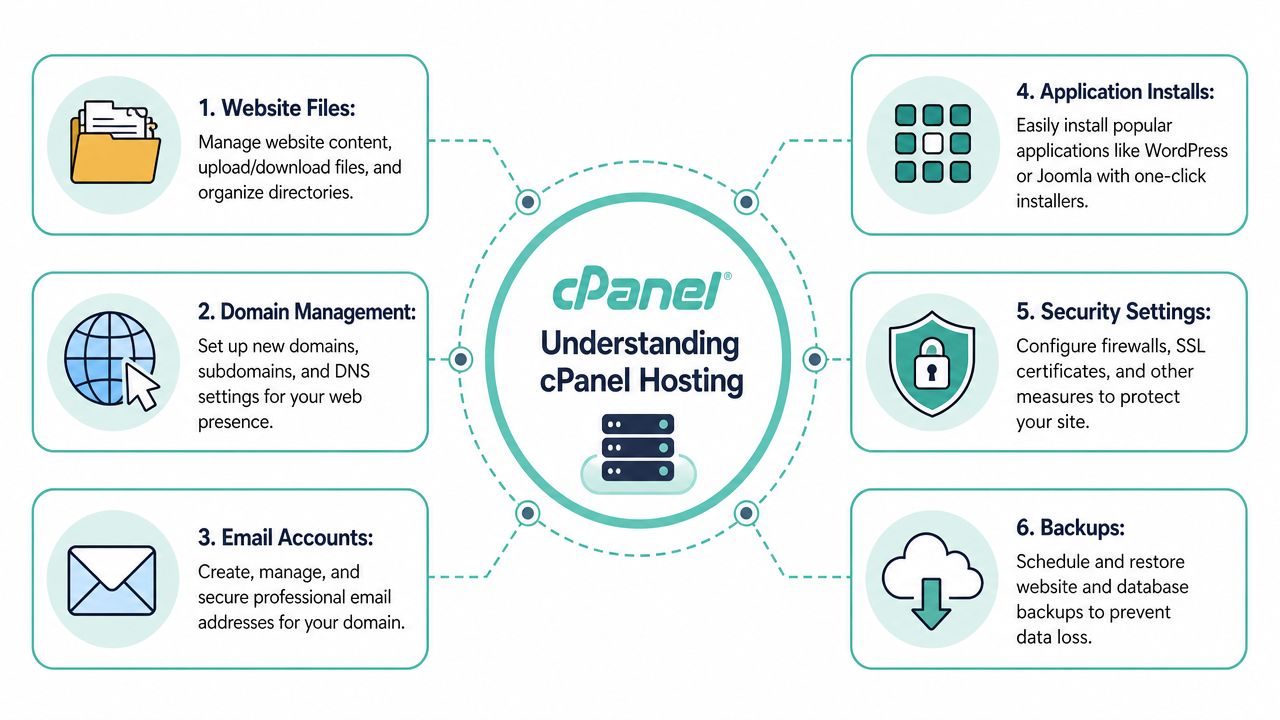
Australian hosting customers using cPanel manage six core business functions through a single interface: website files, domain management, email accounts, application installations, security configurations, and backups (overview of how cPanel is used in Australian hosting). That's the clearest reason cPanel remains so common in small and medium organisations.
Why cPanel still fits Australian SMBs
For lean teams, one control panel reduces handoffs. The person updating homepage text might also create a new mailbox for a staff member, install WordPress for a microsite, or restore a database backup after a plugin issue. cPanel supports that kind of mixed responsibility well.
That fit is especially relevant in Australia because 72% of local cPanel users are businesses with fewer than 50 employees. Smaller teams rarely want layered procurement, custom support contracts, or feature menus that require a specialist to interpret. They want a stable admin environment and costs they can predict.
A good cPanel setup doesn't eliminate technical work. It removes unnecessary technical work.
The six functions that matter day to day
Here's how those six functions typically show up in real operations.
- Website files let a business upload landing page assets, swap images, organise folders, and inspect what was published during a rushed campaign update.
- Domain management supports tasks like connecting a new .au address, adding a subdomain for staging, or keeping multiple brand domains organised under one account.
- Email accounts matter when a firm needs a new mailbox for sales, accounts, or support without outsourcing the job.
- Application installs simplify launches. A one-click WordPress deployment is often faster and safer for a small team than doing a manual install.
- Security configurations handle practical controls such as SSL setup and account-level protections that reduce avoidable exposure.
- Backups give teams a way to recover from a bad update, accidental deletion, or content overwrite.
A practical example makes this clearer. A Brisbane consultant launching a new service line might register a fresh domain, create two branded email addresses, install WordPress, upload brochures, and set a backup routine in one sitting. None of those tasks require enterprise infrastructure. They require a dashboard that's organised.
Why local hosting still affects the cPanel experience
The panel itself is only part of the story. Server location influences how quickly the admin area responds, how smoothly file operations complete, and how quickly site changes become testable from Australia.
That's one reason cPanel should be judged as a working environment, not just a badge on a hosting page. If your team logs in often, the best cPanel hosting feels faster in dozens of small moments, not only on public page-speed tests.
Host your website with our 5-star rated, cPanel website hosting plans.
Super fast servers, with security included and hosted in your choice of Australian Data Center.
View cPanel Plans
How to Choose the Right cPanel Hosting
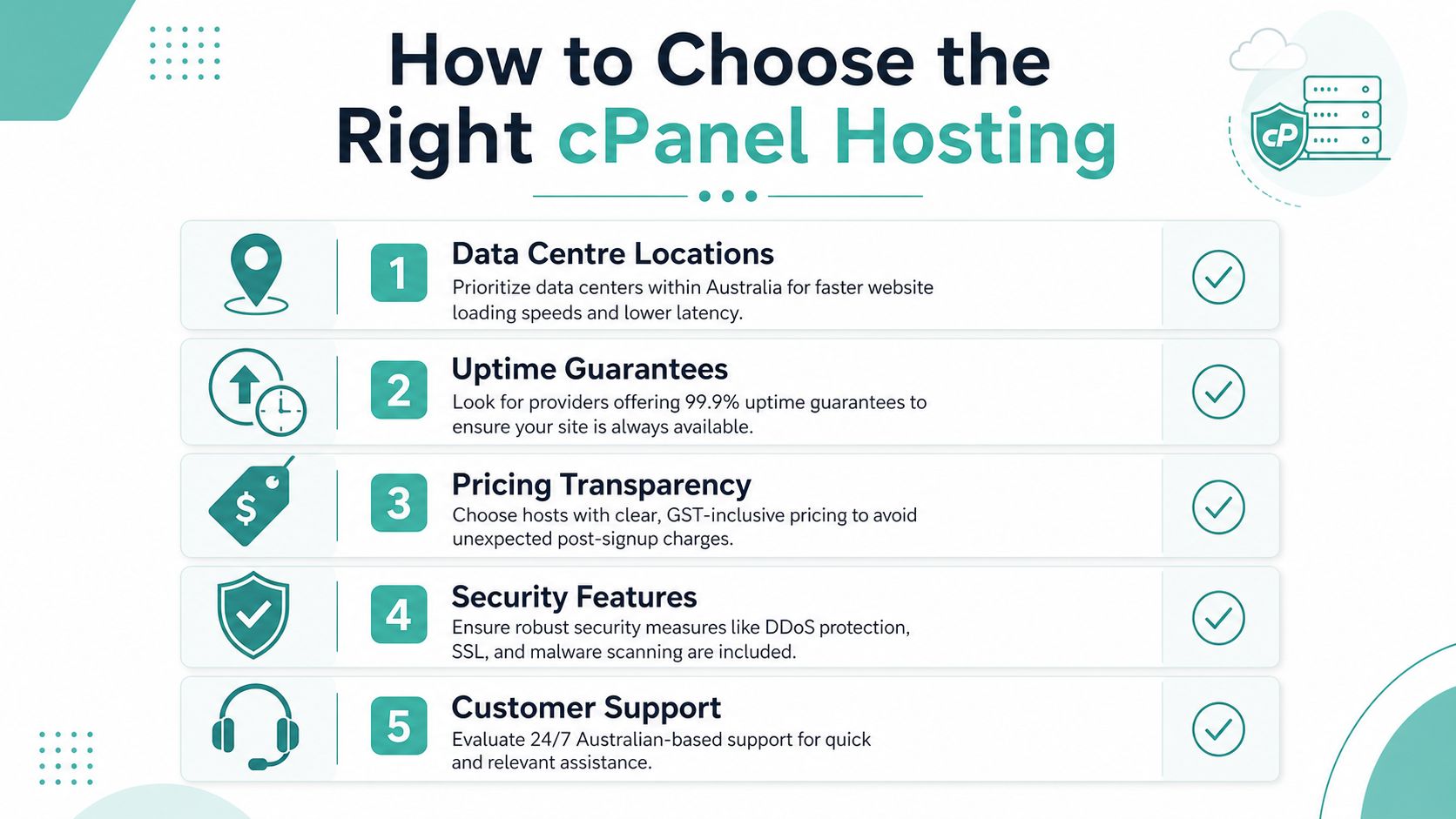
Most Australian buyers can narrow the field quickly if they stop comparing plan slogans and start checking a few operational signals. The projected benchmark for premium Australian cPanel hosting in 2026 is 99.9% uptime, sub-200 ms load times, and worldwide connection speeds under 250 ms to and from Sydney (Australian-owned hosting benchmarks and context). That gives you a standard to test against.
Five checks that matter before you buy
The first check is data centre location. If your customers are in Australia, onshore hosting deserves priority. Local infrastructure usually means lower latency and a more responsive site and admin panel. It also makes support conversations easier when the provider understands local routing, traffic patterns, and data residency concerns.
The second is the uptime guarantee. A host should state it clearly and support it with mature monitoring and operational discipline. Promises without visible standards aren't enough.
Third comes pricing transparency. Australian businesses should confirm whether advertised pricing includes GST and whether backups, malware scanning, and DDoS protection are bundled or billed separately later. Neglecting these factors often causes comparisons to fall apart, as they frequently evaluate entry prices instead of the total usable service.
Fourth is security inclusion. Free SSL is common. What matters more is whether the provider includes meaningful baseline protection and backup capability without turning essentials into add-ons.
Fifth is support accessibility. For many SMBs, local phone support and call-back options matter because they shorten the path from issue to resolution.
A practical buying checklist
Use this list before you commit to any host.
- Confirm the server city. Ask where your site will run, not just where the company is registered.
- Read the billing page carefully. Look for GST treatment and whether security or backup features sit outside the base plan.
- Check support paths. See whether you can reach a local team by phone, ticket, or call-back.
- Review included tools. cPanel alone isn't enough. Look for backup access, security controls, and straightforward app installs.
- Match the host to the workload. A brochure site, a WooCommerce store, and an ASP.NET application don't need the same environment.
Short test: If you can't tell where the server is, what the real monthly cost is, and how to reach support in Australia, keep looking.
A final point often gets missed. The best cPanel hosting isn't always the provider with the broadest feature page. It's the one whose infrastructure, billing model, and support style fit how your business works.
Comparing Top Australian cPanel Hosting Providers
A useful comparison for Australian SMBs has to go beyond feature badges. It should weigh how each provider handles five practical areas: feature depth, local performance, bundled security, support channels, and pricing clarity. The names below are common shortlists for local buyers looking for cPanel hosting without moving into enterprise infrastructure.
Australia's market baseline helps keep this comparison grounded. cPanel hosting providers in Australia consistently guarantee 99.9% uptime, which translates to roughly 43 minutes of downtime annually (Australian hosting uptime benchmark). That means uptime alone won't differentiate much at the top end. Key differences appear in how each host packages the rest of the service.
Comparison of cPanel Hosting Features
| Provider | Features | Performance | Security | Support | Pricing |
|---|---|---|---|---|---|
| UpTime Web Hosting | cPanel, CloudLinux, LiteSpeed, AccelerateWP, backups, Windows/ASP.NET options | Strong local positioning with infrastructure across multiple Australian cities and a public focus on fast Australian hosting | Free SSL, malware scanning, DDoS-protected firewalls, encrypted off-site nightly backups | Local 1300 phone, tickets, call-backs | No contracts, GST included, positioned around no hidden fees |
| VentraIP | cPanel-based shared hosting with domain-focused account management | Local-market relevant, suitable for Australian business traffic | Security features vary by plan and service layer | Local support workflows and ticketing | Needs plan-by-plan review for included services |
| Netregistry | cPanel hosting suitable for businesses managing several domains and sites | Local relevance for Australian business hosting | Core protections expected, but inclusions should be checked per plan | Support available through standard hosting channels | Compare total usable cost, not headline entry price |
| HostGeek | cPanel hosting with options relevant to Windows and ASP.NET users | Useful for businesses running mixed workloads | Security needs checking against specific application stack | Local assistance matters more for specialised environments | Best assessed by workload fit rather than base-plan appeal |
Where each provider stands out
UpTime Web Hosting stands out for buyers who care about Australian infrastructure coverage, predictable billing, and a broad set of included operational features. The local city spread is unusual enough to matter in an Australian context because it supports lower-latency service delivery and clearer data residency positioning. It also aligns with businesses that want one provider for cPanel, WordPress, and Windows hosting.
VentraIP is often a sensible shortlist option when domain administration is a major part of the job. Agencies and multi-site businesses tend to notice usability around domain workflows faster than they notice abstract infrastructure details. Its limitation isn't weakness so much as the need to confirm what's included on the exact plan you're evaluating.
Netregistry tends to appeal to businesses that want a familiar local name and a service model that suits multiple domains or agency-style management. The strength here is organisational fit. The caution is that buyers should still inspect inclusions and support expectations rather than assuming a well-known brand automatically means the cleanest value.
HostGeek is the specialist option in this group. If your workload involves Windows or ASP.NET, the shortlist changes immediately because many mainstream “best cPanel hosting” lists are built around Linux WordPress scenarios. HostGeek becomes more relevant when application compatibility matters more than broad-market convenience.
What an analyst would prioritise
For an Australian SMB, the first elimination test is simple. Remove any provider that can't answer three questions clearly: where the servers are, what's included in the advertised price, and how support works when something breaks.
After that, the choice becomes scenario-based. A content-heavy WordPress business should weight speed and caching environment more heavily. A service firm with multiple staff mailboxes may value billing clarity and support responsiveness. A developer managing mixed stacks may prioritise flexibility over standardised shared hosting simplicity.
The best cPanel hosting list only becomes useful when it reflects those different operating realities.
Top cPanel Hosting for Specific Scenarios
A generic ranking hides the fact that hosting decisions are usually scenario decisions. A suburban retailer, a design agency, a blogger, and a software team running ASP.NET won't judge the same provider by the same criteria. Matching the host to the workload is more useful than chasing a single overall winner.

Best fit for WordPress content sites
For a WordPress blog, publisher site, or service business that updates content frequently, the strongest fit is usually the provider that combines cPanel simplicity with a performance stack built for PHP sites. In this scenario, UpTime Web Hosting looks strongest because it pairs cPanel with LiteSpeed and AccelerateWP, which suits businesses that want speed without moving to a more complex setup.
A practical example is a Melbourne consultant who runs a content-driven lead generation site. They don't need advanced agency tooling. They need page edits, backups, email, and fast local delivery. A local host with LiteSpeed-based optimisation and straightforward support makes more operational sense than an offshore budget plan with slower admin responsiveness.
Best fit for eCommerce agencies and Windows workloads
For a small eCommerce shop, VentraIP is a reasonable fit when the business also cares about domain organisation and wants a provider with solid Australian market relevance. A local online store usually values support and straightforward management at least as much as headline specs. That makes VentraIP worth considering for owner-managed shops and stores with modest complexity.
Netregistry makes more sense for agencies or businesses managing multiple client websites and domains. In those environments, a slightly more familiar service structure can be helpful because coordination forms the core task. Teams often need one place to handle several brands, renewals, and account-level tasks without unnecessary friction.
HostGeek is the specialist recommendation when the website isn't just a website. If the project runs on Windows or ASP.NET with MSSQL requirements, standard Linux-first comparisons stop being useful. In that case, compatibility, support quality, and stack fit matter far more than broad shared-hosting appeal.
Choose the host that fits your application first. Then compare features inside that narrower category.
Here's a quick scenario map.
| Scenario | Best fit | Why |
|---|---|---|
| WordPress blog or service site | UpTime Web Hosting | Strong fit for local performance, cPanel usability, and WordPress-friendly stack |
| Small eCommerce operation | VentraIP | Sensible option for local business hosting with solid domain-management relevance |
| Agency handling many domains | Netregistry | Useful when account organisation and multi-site administration matter most |
| Windows or ASP.NET project | HostGeek | Better aligned with Microsoft stack requirements |
The broader lesson is simple. “Best” only means anything once you attach it to a workload.
Register your new domain name at competitive market prices including free domain add-ons like privacy, DNS Hosting, Custom Nameservers and Forwarding.
Always the best price and no nasty renewal price hikes.
Register A Domain Name
Migrating to a New cPanel Host
Migration is where hosting decisions become real. A provider can look perfect on paper, then create unnecessary risk if the move is rushed. The safest migrations follow a sequence that separates preparation, transfer, testing, and cutover instead of trying to do everything at once.
If you're moving from one cPanel environment to another, the process is usually manageable because the control-panel structure is familiar. A practical starting point is to review a provider's website migration guide for moving to a new host and make sure your team knows which tasks belong to content, databases, mail, and DNS before any switch happens.
A low-risk migration sequence
Start with backups. Take a full site backup and keep an additional copy outside the hosting account. If your host provides encrypted off-site nightly backups, treat that as a safety layer, not your only copy.
Next, export the parts of the site you'll need to verify. That usually includes website files, application data, and any settings tied to domains or email. Once the files are in place on the new host, use cPanel's File Manager or your preferred transfer method to rebuild the site in the destination account.
Then create a staging or test version before changing live traffic. A staging subdomain gives you room to inspect page layouts, forms, media, and login behaviour without exposing half-finished work to customers.
Where migration errors usually happen
Most problems don't come from the file transfer itself. They come from skipped validation.
- Email oversight happens when teams move the website but forget to recreate or confirm mailbox behaviour.
- Database mismatch appears when content loads partially, logins fail, or plugins can't reach the right data.
- DNS timing issues create confusion when some users reach the new host and others still hit the old one.
- Theme and plugin surprises surface after launch because nobody tested key pages before cutover.
Move the copy first, validate the copy second, switch traffic last.
If you want a low-drama migration, reduce live changes during the move. Avoid publishing new site content mid-transfer. Prepare a small validation checklist for homepage rendering, contact forms, checkout flow if relevant, and admin access. Then make the DNS cutover only after those checks pass.
A calm migration usually looks less heroic than people expect. That's a good sign.
Analyzing cPanel Hosting Costs in Australia
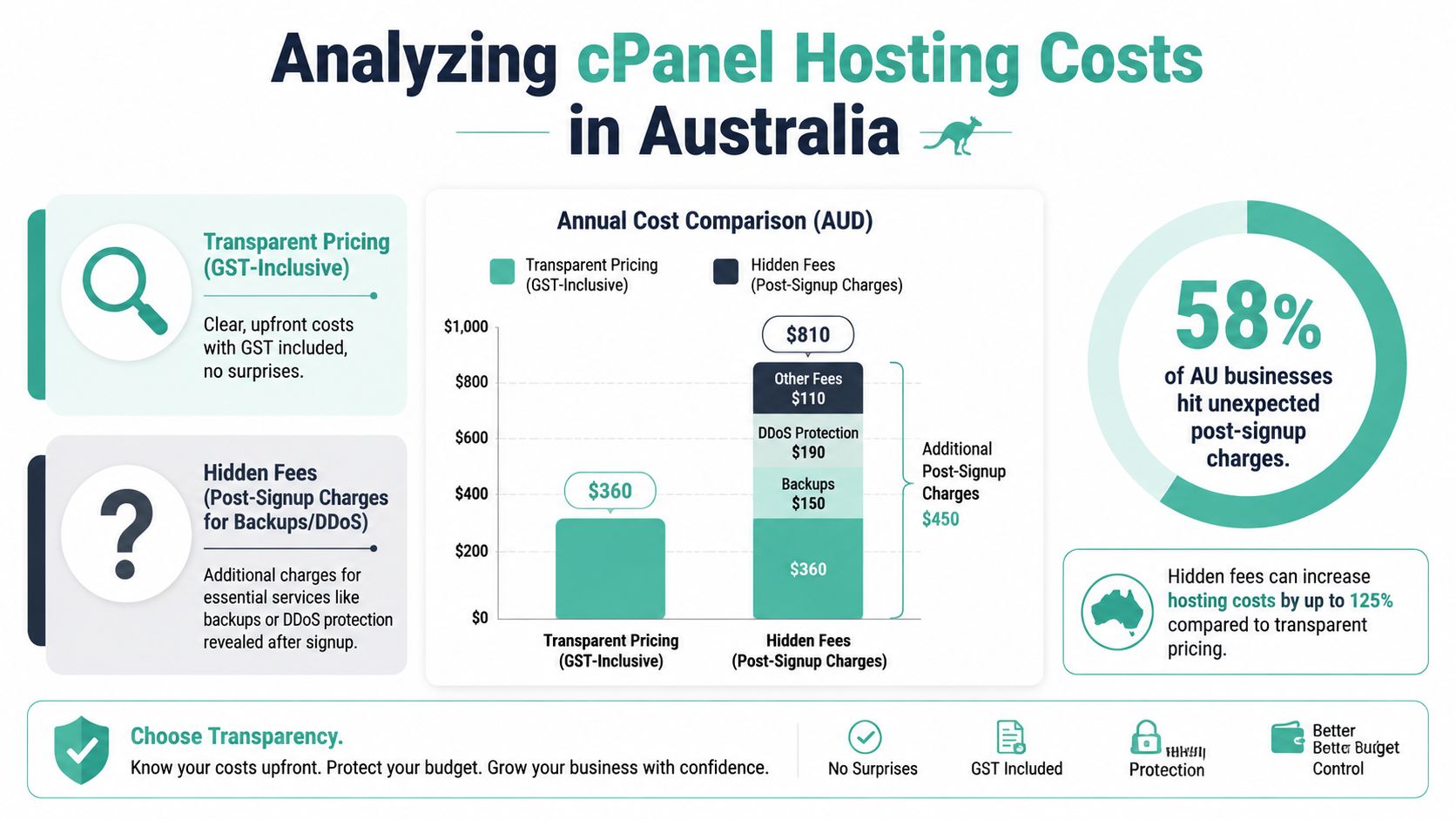
Australian businesses often underestimate hosting cost because they compare sticker prices instead of usable service. The market problem is visible in one number. 58% of Australian businesses encounter unexpected fees after signup when providers exclude GST from pricing or add charges for essentials like DDoS protection and daily backups (Australian reporting on hidden cPanel hosting costs). That makes cost analysis a service-inclusion exercise, not just a monthly-price exercise.
Transparent pricing versus hidden fees
A transparent plan tells you the complete bill up front. That means GST is visible, core security is bundled, backups are included or clearly itemised, and there's no ambiguity around what's needed to run the site safely.
A hidden-fee plan often looks cheaper in a comparison table because it strips out operational essentials. The business only discovers the true cost later, usually at checkout or after a support conversation about features that should have been standard.
This matters more in Australia because many SMBs budget hosting as a predictable operating expense. They don't want enterprise negotiation. They want a monthly number they can trust.
How to estimate real first-year cost
Don't start with the homepage price. Start with the environment you need.
- List the must-haves such as cPanel, backups, mailboxes, malware scanning, SSL, and any platform requirement like WordPress or ASP.NET.
- Check GST treatment so the advertised price and invoiced price don't diverge.
- Ask what counts as extra. Backups, DDoS protection, migrations, and support tiers are the usual traps.
- Review contract terms because no-contract flexibility changes the risk of trying a new provider.
A simple way to compare plans is to use two columns in your own notes: “advertised plan” and “operational plan”. If the second column is materially higher because the first leaves out essentials, the cheaper plan isn't cheaper.
Budgeting advice: The right hosting cost is the price of a workable service, not the smallest number on the page.
Experience Microsoft 365 Business Standard for free for 30 days.
Up to 25 users with full access to email, OneDrive and Teams. Includes full versions of desktop apps of Outlook, Word, Excel, PowerPoint and more.
Try Microsoft 365
Recommendations for Best cPanel Hosting
There isn't one universal winner for best cPanel hosting in Australia. There are better matches for different operating models. If you're buying like an SMB operator rather than a hobbyist, the strongest options separate themselves by fit, not by marketing breadth.
Quick picks by business type
| Provider | Best for | Pros | Cons | Primary use case |
|---|---|---|---|---|
| UpTime Web Hosting | Australian SMBs wanting performance and billing clarity | Local infrastructure, transparent pricing, broad included features, strong support model | May be more than a very basic brochure site needs | WordPress, business sites, local organisations wanting predictable operations |
| VentraIP | Domain-heavy businesses and smaller eCommerce setups | Strong local relevance, useful for domain-centric workflows | Need to inspect inclusions plan by plan | Small online stores and businesses managing several domains |
| Netregistry | Agencies and multi-site management | Familiar local option for handling multiple properties | Value depends on the exact service mix | Agencies or businesses coordinating several client or brand sites |
| HostGeek | Windows and ASP.NET environments | Better fit for Microsoft stack workloads | Less relevant if you only need standard Linux shared hosting | ASP.NET and MSSQL projects |
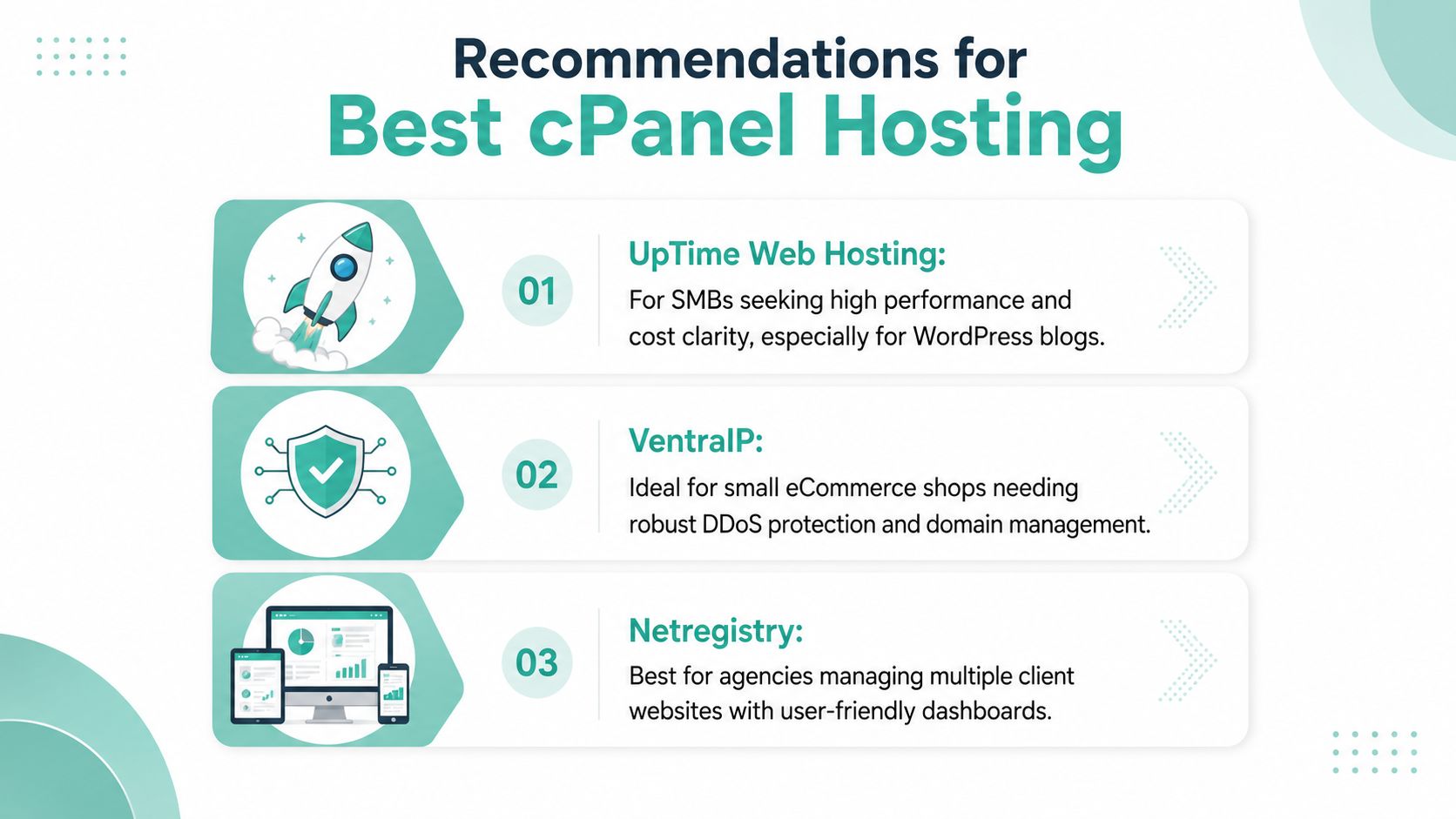
If your priority is simple operations with low billing ambiguity, UpTime Web Hosting is the most compelling choice. If your team lives in domain management and client-site administration, VentraIP and Netregistry deserve a closer look. If your application stack is Microsoft-based, HostGeek moves up the list quickly because compatibility narrows the field.
The actual error isn't choosing the “wrong” brand from a shortlist. It's choosing a plan that looks cheap until you add the features required to run the site properly.
If you want an Australian provider that combines cPanel, local infrastructure, GST-inclusive pricing, strong security defaults, and support that fits local business hours, take a closer look at UpTime Web Hosting. It's a practical option for SMB websites, WordPress projects, business email, and Windows hosting, and the service pages and knowledge base make it easier to compare features before you migrate.