You've probably got the same half-finished Facebook Page problem plenty of Australian owners do. The logo is ready, the page name is sitting in a notes app, and every time you think about finishing it, another job takes priority. The catch is that a Page only starts working once it's set up for contact, trust, and follow-up, not just for appearance.
A proper Facebook Page still gives local businesses a practical home on Meta, especially when customers want to check hours, send a message, or see whether you look legitimate before they call. Meta's own help now routes Page owners through Insights and the Professional dashboard, not the retired Facebook Analytics product, which is another sign that Pages are now part of the live business workflow rather than a side project (Meta help on Page Insights and Analytics). For a useful lead-generation angle that matches this mindset, Machine Marketing's lead guide is a solid companion read.
For Australian SMBs, that matters because a Page is doing three jobs at once. It needs to be findable, it needs to convert visitors into messages, and it needs to feed trust back into the rest of the business, especially your website. If your site is hosted locally and built for local search intent, your Page and website start reinforcing each other instead of competing for attention, which is exactly why a local SEO foundation matters too (local SEO for Australian businesses).
Table of Contents
- Why Australian Small Businesses Still Need a Facebook Page
- What to Prepare Before You Create the Page
- Walking Through the Facebook Page Creation Flow
- Configuring the Page for Trust and Enquiries
- Publishing Your First Posts and Building a Simple Content Rhythm
- Linking Your Website, Reading Insights and Growing Organically
- Your First 30 Days With a New Facebook Page

Performance you can feel, backed by clients who depend on it. Read how our support and uptime create long‑term customer success.Power Your Business with Better Hosting
Why Australian Small Businesses Still Need a Facebook Page
A cafe owner in Newcastle, a sparky in Ballarat, and a boutique owner in Adelaide all hit the same wall. They know they should create fb page presence, but they keep putting it off because the page feels like “marketing admin” rather than something that will bring in work. That hesitation costs time, because the business still gets searched, still gets checked, and still gets judged on whether the Page looks active and credible.

A finished Page gives people a quick answer to three questions. Can I trust this business? Can I contact it easily? Is it worth clicking through? That's why a half-built profile is weaker than no profile at all. A properly published Page, on the other hand, gives you a public contact point that can be tied back to your website, your email, and your other local channels.
Why the Page matters more than the logo
The biggest mistake I see is treating the Page like a branding exercise. The logo matters, but the Page is really a discovery and enquiry layer. Meta's current setup puts performance data inside Insights and the Professional dashboard, which shows how much the platform expects businesses to manage pages as live assets rather than static profiles (Meta help on Page Insights and Analytics).
Australian businesses also operate in a digital-first environment. The Australian Government's 2030 Digital Economy Strategy puts business digital capability at the centre of national growth, and that lines up with how local customers now expect to deal with traders and retailers online. If your Page isn't ready, the customer moves on.
Practical rule: don't launch a Page until it can answer basic contact questions without making the customer chase you.
The strongest Pages also support the website behind them. If your business site is fast, local, and easy to use, the Page becomes a traffic bridge rather than an isolated social profile. That's where the combination of Facebook, local search, and a properly hosted website starts to work as a system, not three separate tasks.
What to Prepare Before You Create the Page
Before you open the creation flow, get the foundations sorted. The admin should log in with a personal Facebook profile, because that's what Meta uses to control Page access and permissions. Running a business from a personal profile is a bad long-term habit, since it blurs ownership, makes staff off-boarding awkward, and looks less credible to customers who are trying to work out whether you're a real business.
Build the pre-flight folder first
Have the essentials ready in one folder, then you can move quickly without stopping every few seconds to look for files. I'd prep the trading name, the short business description, the contact details, and the visual assets before starting.
- Page name: use the trading name customers already recognise, and keep it consistent with your ABN and website branding.
- Business description: write a short version offline first, then paste it in once it's tidy.
- Profile image: prepare a square version that's clear at small size.
- Cover image: have a banner ready, since guidance commonly points to 851 × 315 pixels for the cover area and at least 170 × 170 pixels for the profile image (Entrepreneur guide on Facebook Page imagery).
- Contact details: include website, phone, email, location, and hours.
- Email address: use a business email address that matches the domain on your website, which keeps the setup cleaner and more credible (business email setup guide).
A business Page is the right choice for almost every Australian operator here. A personal profile might feel faster, but it doesn't give you the same structure for staff roles, messaging, or future ad access. If you plan to use Meta properly, set it up as a business asset from the start.
Keep the page name and visuals consistent
Consistency makes the Page easier to recognise and easier to trust. If the Facebook name, website name, signage, and Google Business Profile all tell the same story, customers don't have to second-guess whether they've found the right place.
Use the name customers already say out loud, not a clever version that only makes sense inside your office.
That same consistency helps later when you connect the Page to your website and local search setup. A clear name, a matching email domain, and ready-to-upload artwork save time and reduce mistakes once the Page is live.
Host your website with our 5-star rated, cPanel website hosting plans.
Super fast servers, with security included and hosted in your choice of Australian Data Center.
View cPanel Plans
Walking Through the Facebook Page Creation Flow
The creation flow itself is straightforward, but the decisions inside it matter. Log in through the personal profile that will own the Page, open the Pages creation flow, and choose Create a Page. Then enter the page name, select up to three categories, and write a short description that tells people what the business does in plain language (Meta help on creating a Page).
Choose the category like a search term
Category choice shapes how people and Facebook understand the Page. A Brisbane cafe should not hide behind something generic if Cafe fits the business better. A Geelong plumber should use Plumber, and an Adelaide boutique can choose something like Boutique Clothing Store if that reflects the trading model more accurately.
The category isn't just labelling. It influences search suggestions and helps the Page appear where local people expect it to show up. Keep the first category as close to the main service as possible, then use the extra slots for adjacent lines if they genuinely apply.
Fill the preview with real business details
After the name and categories, add the description, profile image, and cover photo. The description should be short and useful, not a slogan. One of the easiest ways to lose trust is to publish a page that says almost nothing about what the business does.
You'll also see options for business type, and the platform may present choices that look close to each other. For a company selling products or services, the business path is usually the cleanest fit. A public figure setup is for a very different use case, and it's the wrong structure for an Australian retailer, tradie, clinic, or cafe.
Publish once the basics are right
The preview screen is your last chance to catch obvious mistakes. Check spelling, make sure the profile image is clear, and confirm that the business name matches the actual trading identity. Once you publish, the Page becomes a live asset that people can find, follow, and message.
A small but useful habit is to invite one or two collaborators early, especially if someone else will be handling content or messages. That way the founder doesn't become the bottleneck for every update and reply.
Configuring the Page for Trust and Enquiries
The Page is live, but it's not ready until the trust signals are in place. Start with the About section, because people often read that before they browse posts. Use the opening carefully, since the first 155 characters do a lot of the heavy lifting in search and preview contexts (Sprout Social guide to Facebook marketing for small business).
Make the Page easy to contact
Add the username as soon as you can, because a clean handle makes the Page easier to share and easier to find. Then complete the fields that help people act fast, including website, phone number, email, location, and trading hours. Those details are not decoration, they're the difference between a casual visitor and an enquiry.
The CTA button deserves deliberate choice. For service businesses, Contact Us or Send Message usually fits best. For bookings, Book Now makes sense. For product-led retailers, Shop Now can work well if the website is ready to carry that traffic. If the Page is meant to handle questions quickly, enable messaging and set a greeting so people know what response to expect.
Set roles before messages start arriving
Roles matter more than most owners think. If a staff member is going to answer DMs or update posts, give them the right Page role instead of sharing the founder's login. That keeps the Page secure and makes off-boarding cleaner if someone leaves.
Practical rule: the person who replies to enquiries should never need the founder's personal password.
A well-configured Page should also reflect legal and operational basics. If you're linking out to a public website, make sure the site itself is compliant and up to date, because the Page and the website reinforce each other in the customer's mind. A useful reference for that is this overview of website legal requirements for Australian businesses.
The last piece here is visibility control. Some businesses need to draft privately before launch, especially when they're building out content or preparing an Instagram connection. A hidden or unpublished Page can be useful for that staging phase, but once you're ready for enquiries, publishing and completing the setup is the more commercially useful option.
Publishing Your First Posts and Building a Simple Content Rhythm
A new Page shouldn't sit there empty. Before you promote it, publish three to five posts and have at least another week of content planned and scheduled, so the Page doesn't look abandoned the moment someone lands on it (Buffer guide to managing a Facebook business page). That early content window gives people a reason to follow, trust, and message.
Start with useful, ordinary posts
Skip the pressure to be clever. The first posts should make the business easier to understand.
- Welcome post: introduce the team and say what the business helps with.
- Service explainer: spell out what you do in plain Australian English.
- Hours update: confirm opening times, holiday hours, or seasonal changes.
- Customer review quote: share one genuine piece of feedback if you have permission.
- Behind-the-scenes photo: show the shopfront, workspace, vehicle, or stockroom.
A local retailer or service business can keep this simple. A cafe might post a team introduction, a menu highlight, and a weekend hours update. A plumber might post a service area explainer, a before-and-after job photo, and a short welcome note. An online store might use a product photo, a packing-room shot, and a shipping or returns note.
Keep the rhythm manageable
The Page doesn't need constant reinvention. A weekly mix of photo or video, text, and link posts is usually enough to keep the feed active without turning it into a second full-time job. Pin a “Start Here” post at the top so new visitors understand who you are and what to do next.
A Page that answers questions fast will outperform a Page that posts often but says very little.
You can also automate some of the routine if you want a light-touch approach. For example, some businesses use workflows that share new blog posts or product updates to their Page, which reduces the chance that the feed goes quiet when the team gets busy. For stores that run Facebook shopping, a practical resource on how to manage your Facebook product feeds can help keep product content organised.
Register your new domain name at competitive market prices including free domain add-ons like privacy, DNS Hosting, Custom Nameservers and Forwarding.
Always the best price and no nasty renewal price hikes.
Register A Domain Name
Linking Your Website, Reading Insights and Growing Organically
A Page becomes more valuable when it points back to a proper website. Link it to an Australian-hosted site, make sure the business email aligns with the domain, and keep the website fast and easy to use so the social click has somewhere credible to land. If the site is also used for local discovery, the Facebook Page and site can support each other rather than splitting attention.
Use Meta's tools without overcomplicating them
Meta Business Suite is the cleanest place to manage posts and messages across desktop and mobile. It keeps the admin work in one place, which matters once the Page starts getting real enquiries. If you've connected messaging, keep an eye on the inbox, because Australian customers tend to expect quick replies.
When you open Insights or the Professional dashboard, don't drown in metrics. Focus on the numbers you can act on in the first week, page visits, post reach, profile visits, message clicks, and net new followers. Those figures tell you whether people are finding the Page, whether they're interested enough to click, and whether they're willing to start a conversation.
Grow from the local web, not just the feed
Organic growth is usually slower but more durable when it's tied to local behaviour. Join neighbourhood community groups where appropriate, cross-post key content to your Google Business Profile, and ask happy customers to tag the business when they leave feedback. Those moves work because they sit close to how Australians already look for nearby services.
If you want the Facebook Page to support broader local visibility, pair it with a solid website and content setup. A useful related resource is this guide on using Google for local business growth, which fits neatly beside a well-run Facebook presence.
The main trade-off is simple. More features can be turned on, but the Page still works best when the basics are clean, the messages are monitored, and the website behind it loads quickly. That's the difference between a social profile and a working lead source.
Your First 30 Days With a New Facebook Page
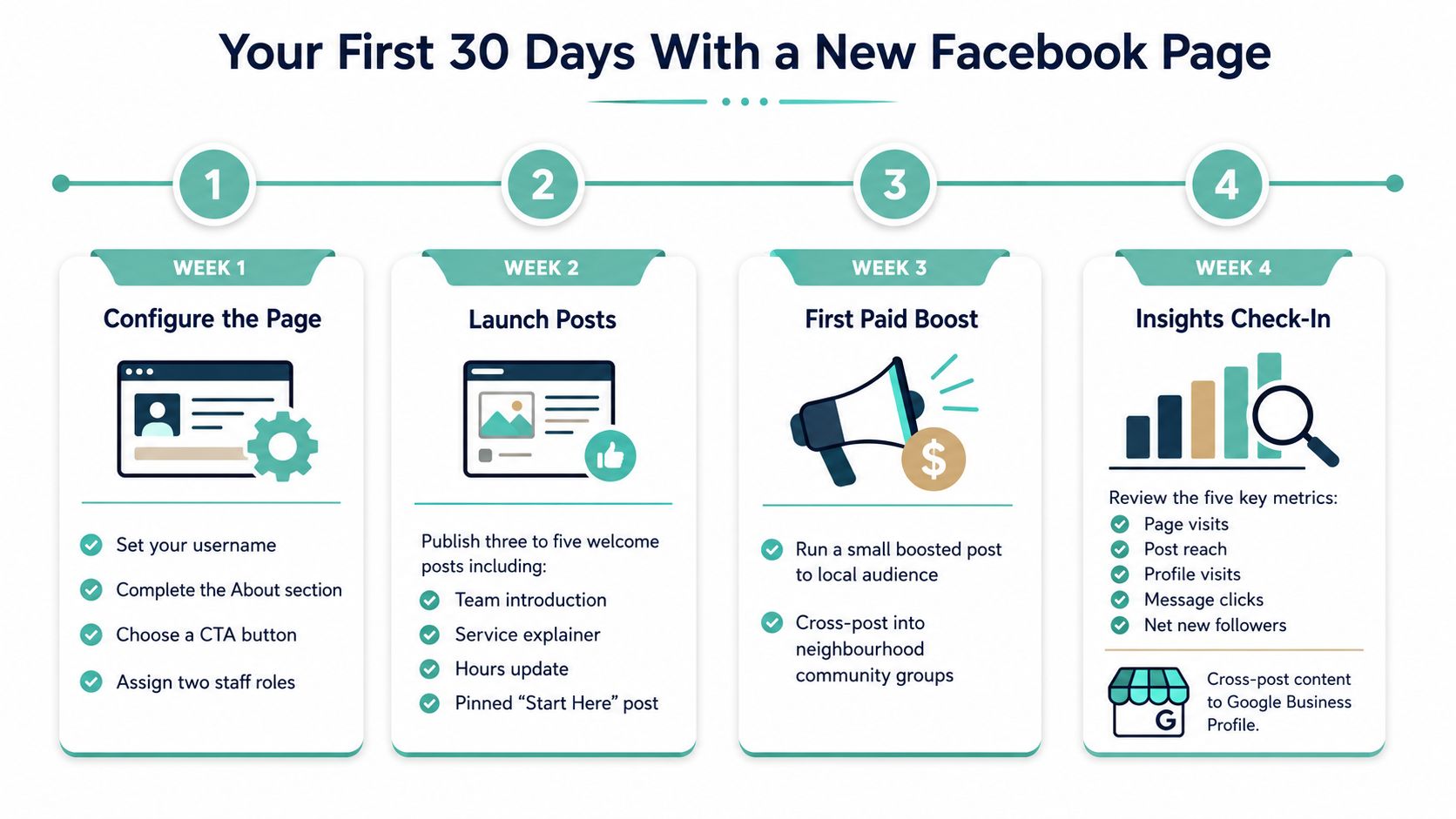
The first month is about building momentum without clutter. Week one is for configuration, week two is for launch content, week three is for your first boost or paid test if you want to try one, and week four is for a calm review of what people did on the Page.
Keep the first month focused
Treat the launch like a small campaign, not a one-day admin task. In week one, lock in the username, complete the About field, choose the CTA button, and assign two staff roles. In week two, publish the first three to five posts and pin the Start Here post.
By week three, test a small boosted post to a local audience if that fits your model, then watch how people respond before spending more. If you're using product content, keep your feeds tidy and aligned with your website so the messaging stays consistent across channels. If your site sells, this is also where a clean site-to-Page handoff matters, especially for anyone comparing options on the way to purchase. A related reference on making money on Facebook through a website-led approach fits that broader thinking.
Use this checklist before you call it done
- Username set: the Page is easy to search and share.
- About completed: visitors can see what the business does at a glance.
- CTA chosen: the button matches the main enquiry path.
- Two staff roles assigned: messages and posts don't depend on one person.
- Three to five posts published: the feed doesn't look empty.
- Website link tested: the click path works on mobile.
- Insights bookmarked: you know where to check progress.
By the end of the month, the Page should feel like part of the business, not a side project. Review it again each quarter, especially if hours change, offers change, or your website gets updated.
If you want the Facebook Page to do real work for your business, pair it with hosting, email, and a website that load fast and look professional from the first click. UpTime Web Hosting provides Australian hosting, email, domains, and website options that fit the same local-first setup this guide is built around. Visit UpTime Web Hosting to get the website and email foundation in place before you drive more people to your Page.