You've got mail. It looks routine, maybe a supplier invoice, a myGov refund notice, or an Australia Post redelivery message that landed right when the office is busy and nobody wants another interruption. That's exactly how phishing works in Australian small businesses, it shows up dressed like normal work, then tries to rush someone into clicking, replying, or handing over credentials before they stop to think.
Table of Contents
- Why Phishing Is the First Threat to Teach Your Team
- Red Flags You Can Spot in 30 Seconds
- Inspecting the Sender, Links, and Headers
- When the Sender Looks Legitimate
- Safe Handling, Reporting, and What to Do If Someone Clicks
- Stopping Phishing Before It Reaches the Inbox
- Your Phishing Defence Checklist

Performance you can feel, backed by clients who depend on it. Read how our support and uptime create long‑term customer success.Power Your Business with Better Hosting
Why Phishing Is the First Threat to Teach Your Team
If you run an Australian SMB, phishing is the first attack your staff need to recognise because it's the one they'll see most often in their inbox. The Australian Cyber Security Centre reported phishing was involved in 60% of incidents reported in FY2024–25, which tells you straight away that email deception is still the main entry point attackers use against real organisations in Australia. ACSC Annual Cyber Threat Report 2024–2025
That matters because your spam filter doesn't catch everything, and it only takes one person to click the wrong thing. A fake bookkeeping invoice, a myGov-style refund email, or a bank security alert can look normal enough to slip past a busy receptionist, payroll officer, or accounts person who's juggling too much already. The point isn't that every email is dangerous, it's that one careless click can bypass every other control you've paid for.
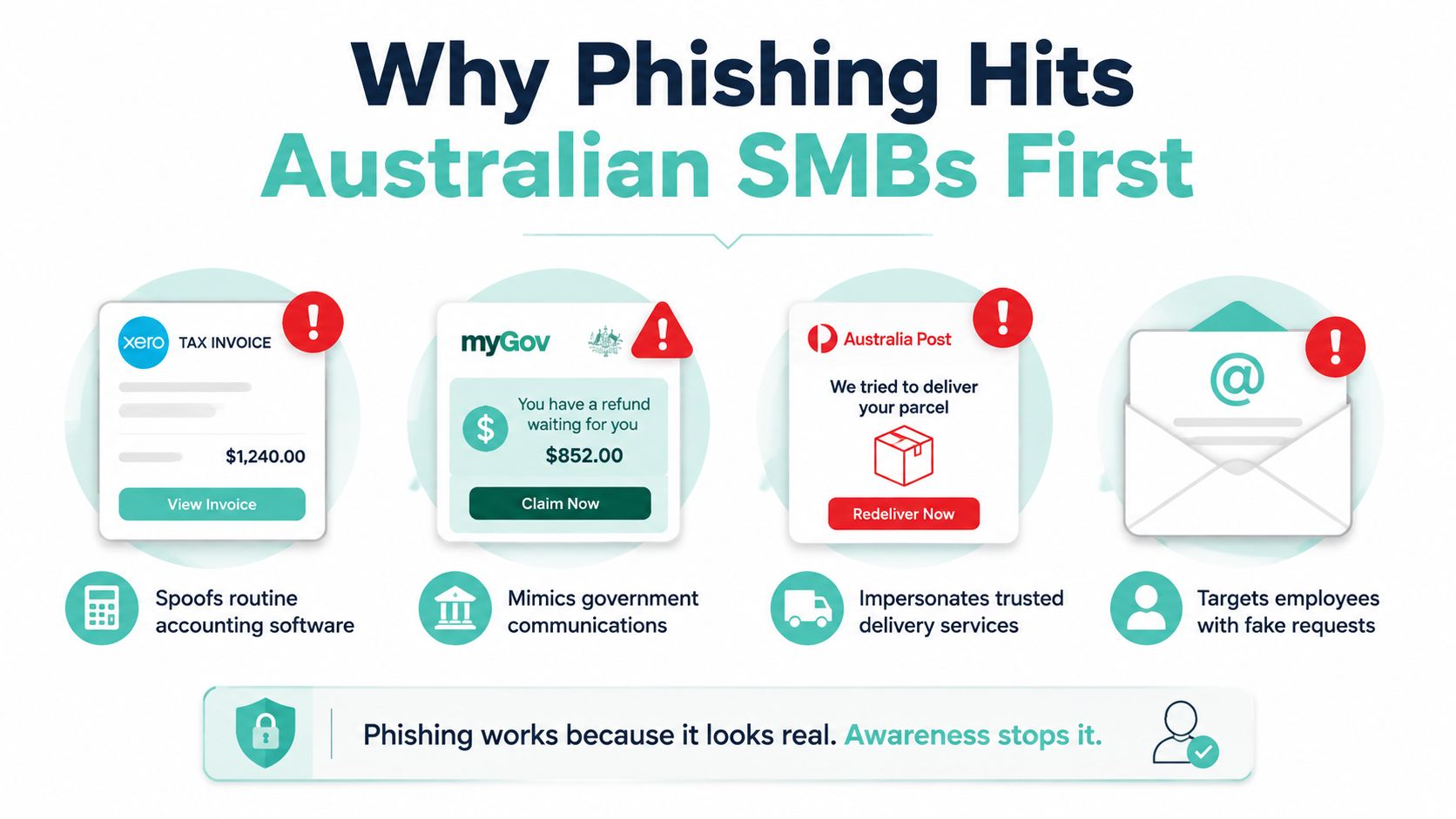
Practical rule: if an email pressures someone to act fast, asks for login details, or sends them to a website, treat it as suspicious until you've checked it through another channel.
The Australian reporting picture backs that up. Scamwatch says email was the most commonly reported contact method in early 2026, and phishing was one of the most commonly reported scam types in that period. Scamwatch phishing email examples The message for business owners is simple, your people need to learn the visual and behavioural cues, not just the spelling mistakes.
If you've only got a few minutes with your team, teach them four things first. Spot the obvious red flags. Inspect the sender and the links properly. Verify anything finance-related out of band. Then report it fast if someone clicks anyway.
For a broader security baseline, UpTime Web Hosting has a plain-English overview of cyber security for small business that fits neatly beside phishing training, especially if you're tightening up email and website risk together. cyber security for small business
Red Flags You Can Spot in 30 Seconds
Start with urgency, not grammar
The oldest phishing trick still works because people hate delay. An email saying your account will be suspended, a tax issue needs immediate action, or a parcel can't be delivered unless you click now is trying to push the recipient into panic mode. The Australian guidance is blunt about this pattern, urgent payment requests, login demands, suspicious attachments, and requests to confirm details are all classic warning signs. Phishing scam emails and SMS continue
That means your staff shouldn't start by hunting for typos. AI-written scams can look polished, and a clean sentence doesn't make a message safe. A better first pass is to ask whether the request makes sense for the relationship. If a courier message is generic, unexpected, and not tied to any shipment you know about, treat it as suspect.
Look for the stuff people ignore
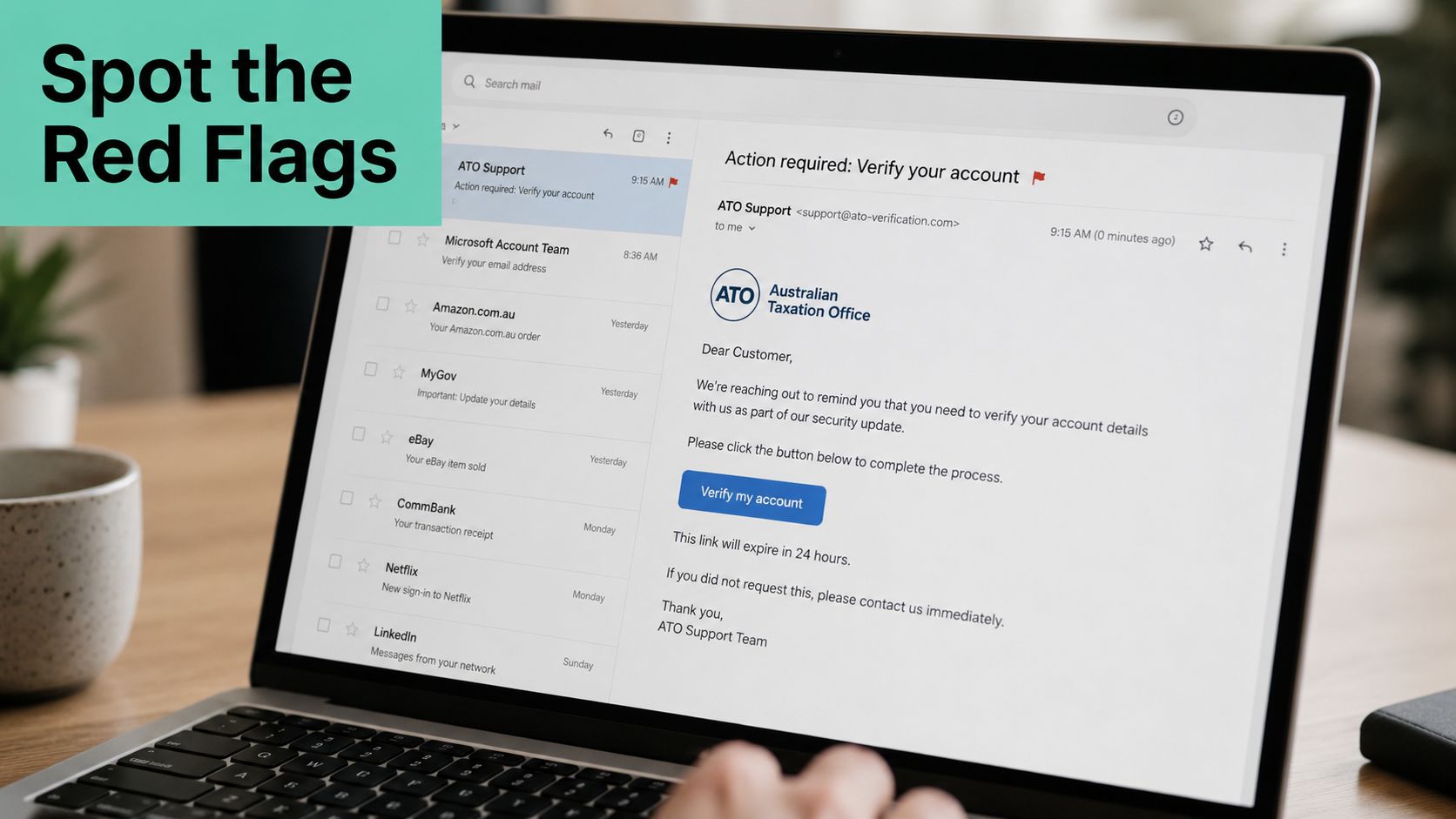
A lot of phishing emails give themselves away through small visual problems. The sender name says ATO, but the actual address is a Gmail account. The logo is the right shape but the wrong shade. The greeting says Dear Customer when the sender normally uses your company name or the employee's name. Those are not cosmetic issues, they're the attacker trying to borrow trust.
If you want a quick outside reference that shows the same logic with different examples, Digital Footprint Check scam tips is a useful walk-through of why fake sign-in and document emails need a second look. Don't rely on branding alone. Branding is cheap to copy. Behaviour is harder to fake.
A good mental checklist for every external email is simple.
- Does it create pressure? That includes deadlines, threats, or account lockout language.
- Is the greeting generic? That's common in bulk phishing.
- Is the sender odd? A display name can hide a fake address.
- Does it contain an attachment or link I wasn't expecting? Treat that as risky.
- Does it ask me to move off email to SMS or WhatsApp? That's a red flag, not convenience.
For the inbox itself, UpTime Web Hosting's note on what is SSL in email is worth reading if you're trying to explain to staff why secure-looking messages can still be fake. what is SSL in email
Quick rule: if the email feels urgent, looks a bit off, and wants a click or reply, stop there and verify it.
Host your website with our 5-star rated, cPanel website hosting plans.
Super fast servers, with security included and hosted in your choice of Australian Data Center.
View cPanel Plans
Inspecting the Sender, Links, and Headers
The display name is not the sender
A polished phishing email can look convincing until you check the details. The From name might say ATO, myGov, or Australia Post, but that is only the label. The address underneath is what matters, and attackers rely on people not looking closely.
Check the sender address on desktop by hovering over it. On mobile, tap and hold carefully if your mail app shows a preview. Look for lookalike domains, swapped letters, extra words, or odd add-ons that do not belong to the organisation. If the visible name says myGov and the underlying address comes from a domain unrelated to Services Australia, treat it as hostile.
Check links before you touch them
Do the same with links. Hover on desktop, long-press on mobile, and inspect the actual destination instead of the friendly text. The visible wording might say View invoice or Log in now, but the URL tells you where it really goes. If the destination does not match the legitimate organisation's web address exactly, do not click it.
Reply-to addresses need the same treatment. The sender can look fine while the reply goes to a different mailbox controlled by the attacker. That shows up often in invoice fraud and payment diversion scams, so accounts staff need to check the header, not the appearance.
Headers tell you where the message really came from
If you are comfortable going one level deeper, open the full email headers. In Outlook, that is usually under message options or properties. In Gmail, use Show original. Check the Authentication-Results line and see whether SPF, DKIM, and DMARC passed or failed. A failed result does not prove fraud on its own, but it is a strong sign the message did not come from where it claims to.
If you are setting this up on your own domain, the cPanel guide on Implementing SPF, DKIM, and DMARC in cPanel is a practical reference.
Simple rule: if the sender domain, reply-to domain, or link destination does not match the legitimate organisation exactly, treat the message as hostile.
When the Sender Looks Legitimate
This is the dangerous one
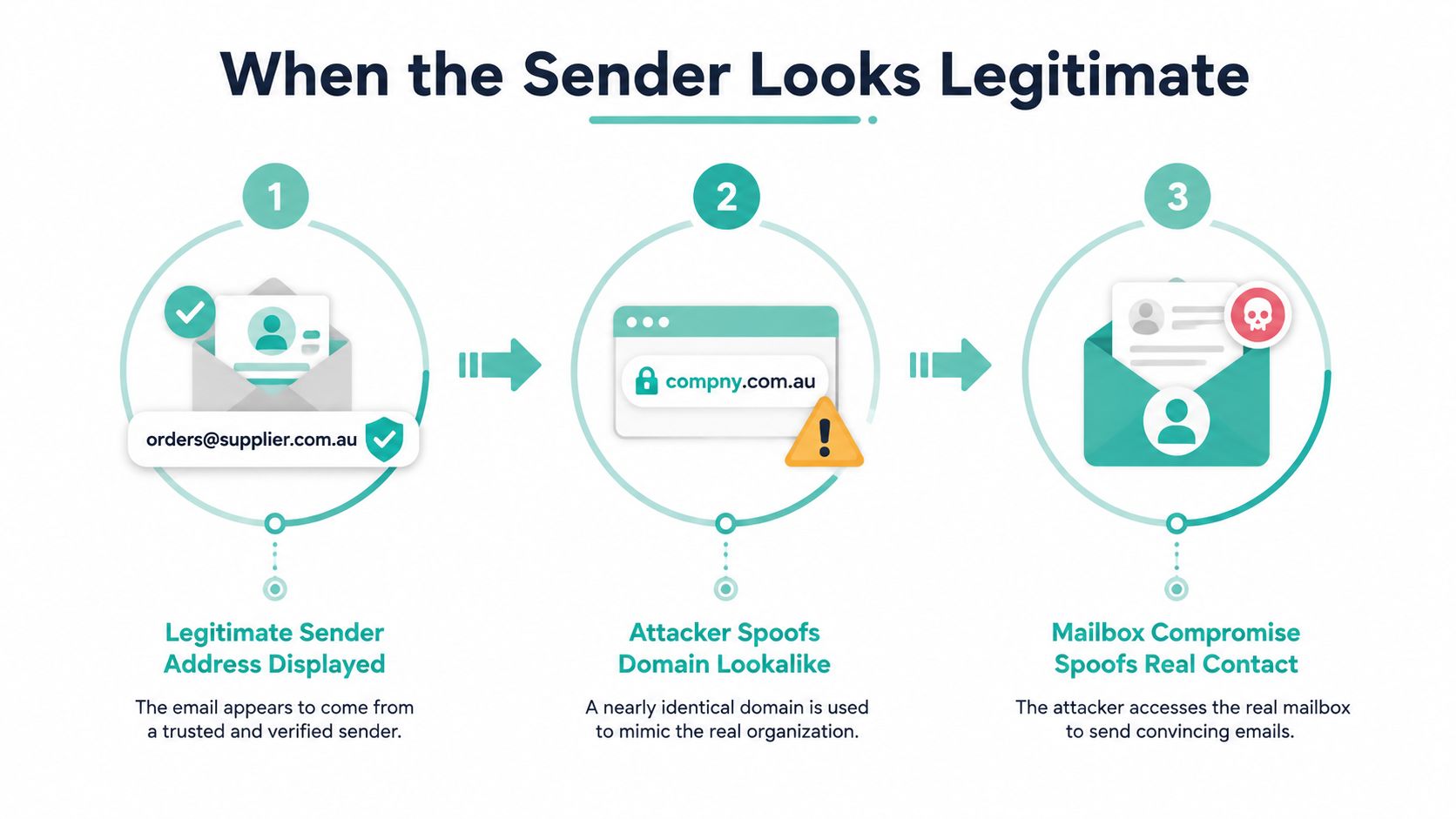
The hardest phishing email to catch is the one that looks like it came from someone you know. That's where business email compromise and impersonation come in. A real supplier account gets hijacked, a display name gets spoofed, or the reply-to address gets swapped while the message itself looks normal.
Australian guidance says not to trust the display name alone, and that's the right call. Finance staff, payroll officers, and anyone handling invoices should assume a payment change request is unsafe until it's checked through another channel. If a regular tradie suddenly emails new EFT details before the next invoice lands, don't process it on the email alone. Ring the number you already have on file and confirm it directly.
Out-of-band verification is the habit that saves money
Out-of-band verification just means checking the request outside the email thread. Use a known phone number. Use the business website you already trust. Use a previous invoice or contact record you found yourself. Never use the phone number, link, or reply address in the suspicious email.
That rule matters because a convincing message can still be false. The sender can be real, the mailbox can be compromised, and the request can still be fraudulent. If someone asks for a bank detail change, login reset, or urgent payment, that request needs a second channel every time. No exceptions.
The Australian signals are consistent here, too. Scamwatch has reported phishing-related losses climbing, even when total reports shift, which is exactly what you'd expect when the attack gets more believable instead of more obvious. Phishing
A practical finance rule for SMBs is easy to enforce:
- Bank detail changes need a call-back to a known number.
- Invoice changes need a second approval path.
- Login reset requests need to be confirmed with the actual person.
- Urgent transfer requests are paused until verified.
Safe Handling, Reporting, and What to Do If Someone Clicks
Stop the damage first
If someone suspects phishing, the first move is boring but correct, stop interacting with the message. Don't click again. Don't open the attachment. Don't reply. Don't forward it around the office “to check”. That just spreads the risk.
Then report it internally to the person who owns IT, or the manager who handles incidents. If your email platform has a phishing button, use it. Microsoft 365 and Google Workspace both support quick reporting through built-in tools, and that's faster than arguing about whether the email looks suspicious enough.
Report it to the right places
For Australian businesses, report the incident through the right channels, especially if it involves government impersonation or a live scam. Use ReportCyber for cyber incidents, Scamwatch for scam reporting, and notify the impersonated brand if it's clearly pretending to be ATO, myGov, Australia Post, or a bank. If the message pretends to be from a specific service, that organisation also needs to know.
If someone has clicked or entered details, move quickly. Disconnect the affected device from the network if credentials were entered. Change passwords immediately. Force MFA re-registration if you use it. Notify the bank if there's any financial exposure. Keep the original email and full headers for investigation, because you'll want the exact message, not a screenshot with half the evidence missing.
For staff training around account protection, UpTime Web Hosting's guide on two-factor authentication setup gives a useful reference point for turning MFA on before trouble starts.
Don't make the common mistake
The biggest mistake after a click is trying to manage it yourself. People hide it because they're embarrassed, then the damage gets worse. Tell your team now, not after the fact, that reporting a bad click is better than covering it up.
Bottom line: if someone clicked, treat it like an incident, not a mistake to be swept under the rug.
Register your new domain name at competitive market prices including free domain add-ons like privacy, DNS Hosting, Custom Nameservers and Forwarding.
Always the best price and no nasty renewal price hikes.
Register A Domain Name
Stopping Phishing Before It Reaches the Inbox
Build a layered email defence
If you want phishing to stop landing in staff inboxes so often, you need layers. SPF tells receiving servers which mail systems are allowed to send on behalf of your domain. DKIM signs the message so tampering can be detected. DMARC tells the receiver what to do when those checks fail. Put together, they make spoofing harder and give you better control over what gets delivered.
Start DMARC in monitor mode, watch what's failing, then move it towards quarantine and reject when you're confident nothing legitimate is being blocked. Don't rush that part if your business still has old systems sending mail from odd places. Fix the sending sources first, then tighten policy.
For practical email filtering on hosted mail, UpTime Web Hosting offers a premium email filtering add-on using MailChannels Inbound Email Filter on cPanel plans, which is a sensible layer if you want suspicious inbound mail screened before it reaches users. safe email practices for SMBs is also a worthwhile external checklist if you want a second plain-English reference on basic email hardening.
Keep the admin habits simple
Don't overcomplicate training. Put external sender banners on mailboxes so staff can spot outside traffic fast. Turn on MFA for every mailbox, not just the important ones. Then keep the awareness work short and regular, because people remember repetition better than policy PDFs.
Monthly simulated phishing tests work because they train reflexes. A five-minute huddle on the latest real scam keeps the examples current. A printed pause and verify rule near the finance desk keeps the reminder where the money moves. No single control solves this, and that's the point.
| Record | What It Does | Where To Set It | What It Stops |
|---|---|---|---|
| SPF | Lists which mail servers can send for your domain | Your domain's email settings | Basic sender spoofing |
| DKIM | Signs each message so changes can be detected | Your mail platform or DNS setup | Tampered messages |
| DMARC | Tells receivers what to do when checks fail | Your domain's email policy | Spoofed mail landing as if it were yours |
If you want a broader checklist for staff-facing controls, the online threat protection for SMEs article is a decent companion piece for discussing layered defence with non-technical owners.
Your Phishing Defence Checklist
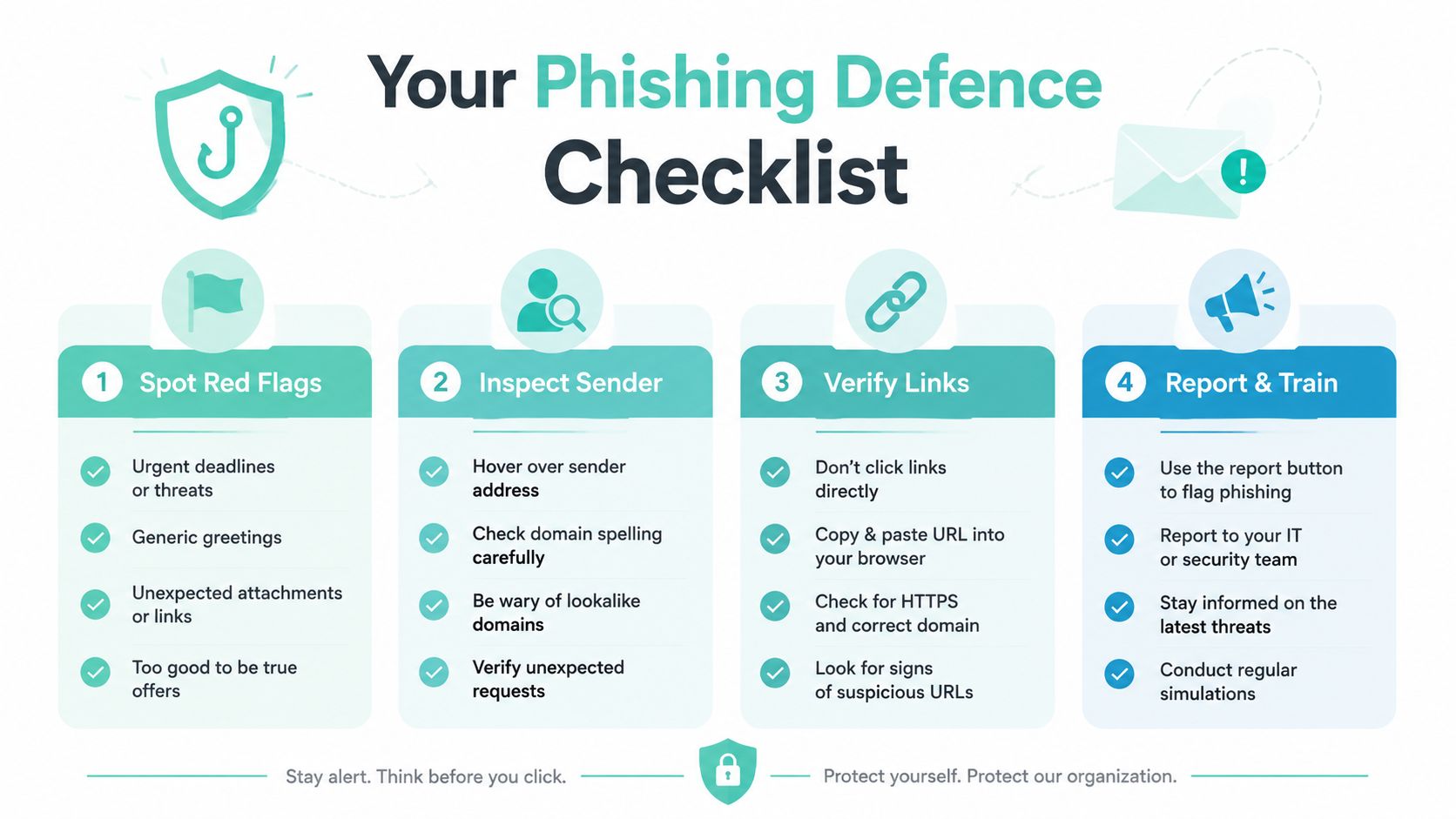
Print this and keep it where staff can reach it fast.
- Spot red flags: urgent deadlines, generic greetings, mismatched sender names, odd attachments, and links that pressure people to act now.
- Inspect the sender: hover over the address, check the domain, and ignore the display name if it does not match.
- Verify links: do not click first, check the URL, and use a known channel if anything looks off.
- Report and train: use the report button, tell the IT contact straight away, and keep running phishing simulations.
If someone clicks, act fast. Change passwords, notify the bank if money or data may be exposed, and save the original email with headers. Once it has been reported, delete the message so nobody else opens it later.
Tighten the controls before the next bad email lands. Turn on SPF, DKIM, and DMARC. Enable spam filtering, and back it up with email spam protection for small business. Run phishing drills, then review a real scam in the next staff meeting so the team sees what these emails look like in the wild.
If you want a broader checklist for staff-facing controls, the online threat protection for SMEs article is a decent companion piece for layered defence with non-technical owners.