In Australia, business email compromise is no longer a side issue. The ACSC has reported almost $84 million in BEC losses in 2023-24, with an average loss of over $55,000 per confirmed incident (ACSC business email compromise guidance). For a small business, that's not a cyber headline, it's a cash-flow hit, a supplier dispute, and a serious operational mess.
The part owners miss is this, BEC is often a hosted email and payment workflow problem, not a generic phishing problem. If your DNS, mailbox rules, and payment verification process are weak, MFA alone won't save you. That's the hard truth, and it's where most SMB defences still fall short.
Table of Contents
- The Real Cost of Business Email Compromise in Australia
- What Business Email Compromise Actually Is and How It Works
- Why BEC Is Now Australia's Top Business Cybercrime
- Real Australian BEC Cases and How the Attack Plays Out
- Warning Signs and Email Logs Worth Checking Daily
- Layered Prevention Controls That Actually Stop BEC
- First 24 Hours Incident Response Checklist for Australian SMBs
- Putting It Together and Frequently Asked Questions

Performance you can feel, backed by clients who depend on it. Read how our support and uptime create long‑term customer success.Power Your Business with Better Hosting
The Real Cost of Business Email Compromise in Australia
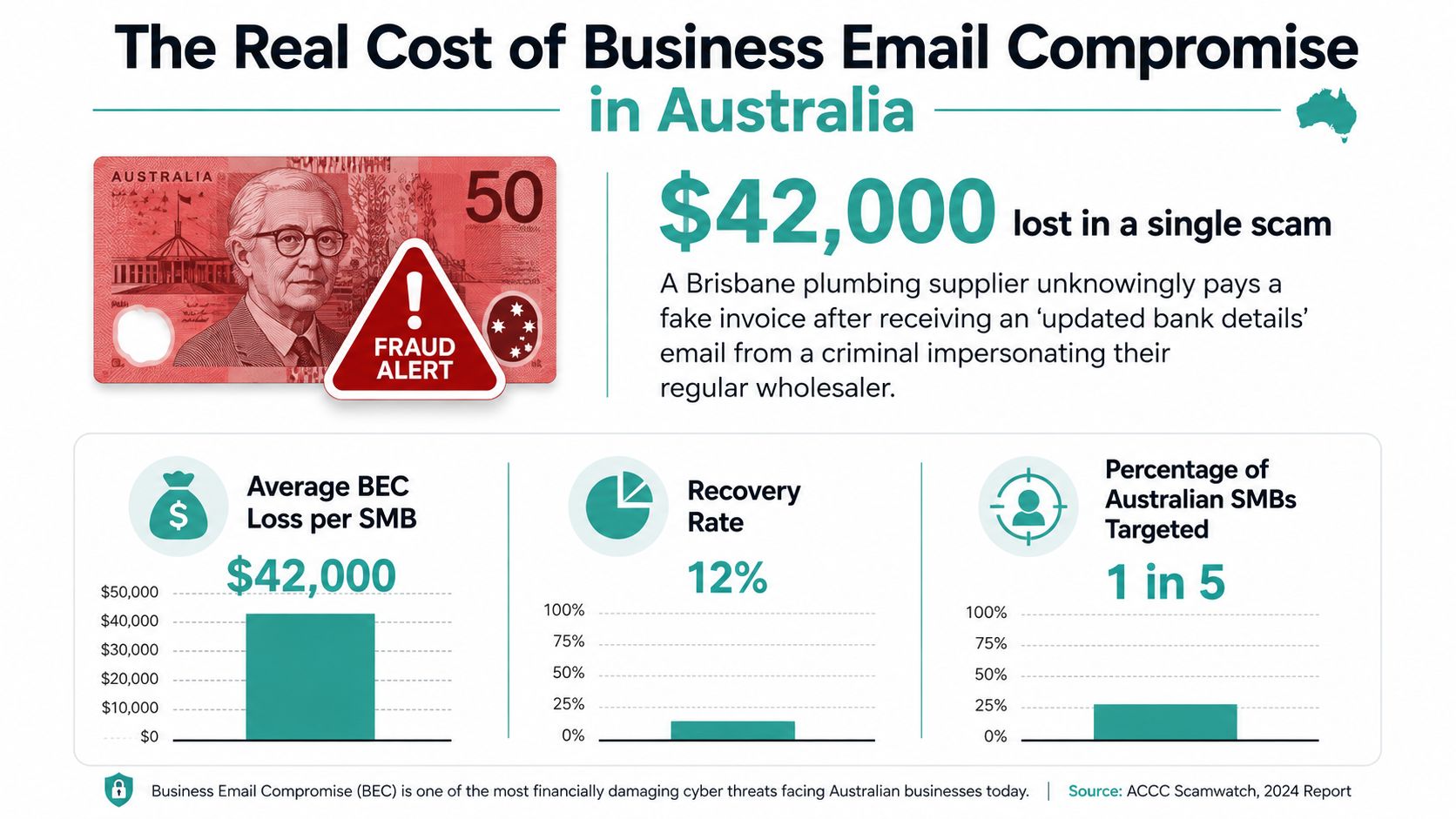
A Brisbane plumbing supplier gets an email that looks like it came from its regular wholesaler. The subject line is routine, the tone is calm, and the new bank details look plausible enough to rush the payment through. Three days later, the money's cleared into a mule account, and the owner is on the phone trying to work out how a normal invoice turned into a loss.
That story isn't unusual. The ACCC said BEC scams cost businesses $132 million in 2019, which was the highest loss category that year, and Scamwatch received almost 6,000 business reports with $5.3 million in reported losses (ACCC and Scamwatch reporting). Later ACSC reporting showed BEC still producing almost $80 million in self-reported losses in 2022-23, then almost $84 million in 2023-24 (ACSC business threat trends report).
What hurts most is not just the transfer
The direct payment loss is only part of the damage. Once a business pays the wrong account, staff spend days chasing banks, suppliers, and insurers. If the mailbox was compromised rather than just spoofed, the attacker may also have been reading invoices and approvals for weeks or months.
Practical rule: treat every fraudulent payment request as an email incident first, and a finance problem second. If you only fix the invoice, you leave the mailbox open.
For an SMB, one successful BEC hit can wipe out the profit from a quarter, especially when the payment was meant for stock, wages, or trade creditors. If the compromise exposed customer or staff data, you may also need to think about Notifiable Data Breach obligations, not just the lost money. A good continuity plan should assume both problems can happen together, which is why your hosting and mailbox setup matters so much (business continuity guidance).
What Business Email Compromise Actually Is and How It Works
Business email compromise is a targeted scam where criminals use email trust to push through a payment, harvest sensitive data, or take over an account. It's not bulk phishing. It's deliberate, researched, and aimed at the people who can move money.
The five ways attackers usually get in
- Domain spoofing: a fake sender address looks close enough to the authentic one that someone skims past it on an invoice.
- Lookalike domains: the criminal swaps one letter, so a supplier domain reads almost right at a glance.
- Mailbox takeover: the attacker steals a password, beats weak MFA, or rides an existing session.
- Thread hijack: the criminal enters an ongoing email chain and drops in a payment update where nobody expects a fake.
- Vendor impersonation: the request sounds routine, usually a “new bank details” message before a scheduled payment.
Each of those paths hits your hosted email setup differently. Spoofing lives in your DNS and authentication records. Mailbox takeover starts with credentials and session control. Thread hijack and inbox abuse happen inside the mailbox itself, where the message looks ordinary because the conversation already looks trusted.
The ACP and AFP guidance both point to simple verification habits, separately calling the person or organisation using independently verified details and checking the sender's domain spelling before paying (ACSC public guidance). That advice matters because BEC doesn't usually rely on malware or a flashy attachment. It relies on a person seeing something familiar and moving too fast.
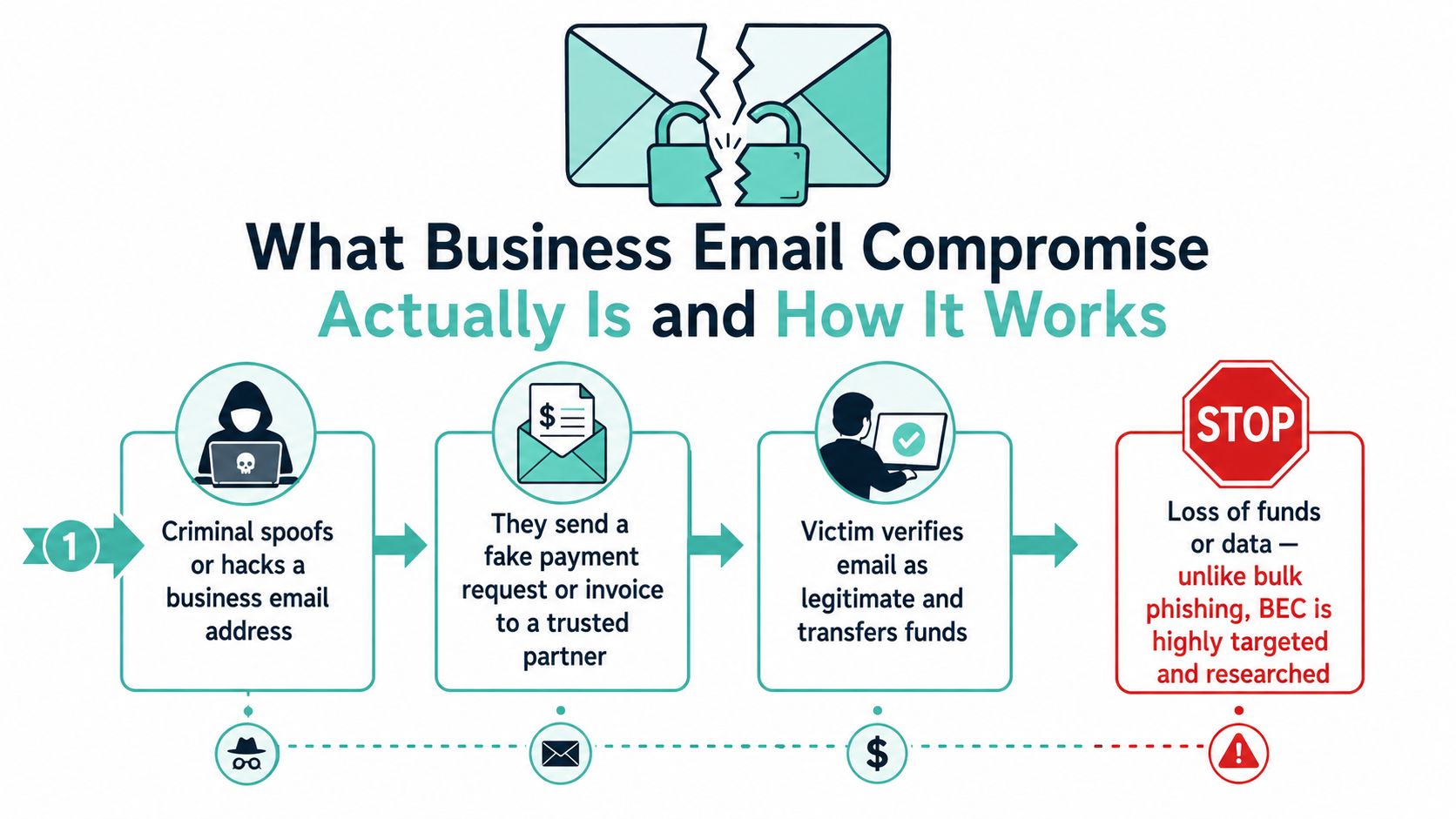
Bottom line: if a payment request can be changed by email alone, the process is too weak.
If you're trying to spot the difference between a BEC lure and ordinary phishing, the safest shortcut is this. Phishing is broad. Business email compromise is specific, patient, and built around one payment or one trusted relationship. That's why your response controls have to sit around the payment process, not just the inbox.
Host your website with our 5-star rated, cPanel website hosting plans.
Super fast servers, with security included and hosted in your choice of Australian Data Center.
View cPanel Plans
Why BEC Is Now Australia's Top Business Cybercrime
Australian reporting makes the trend hard to ignore. In 2024-25, the ASD said email compromise without direct financial loss was the top reported business cybercrime at 19%, while BEC fraud with financial loss accounted for 15% (ACSC business fact sheet). That puts email compromise at the centre of what's hitting small business.
What the numbers are really saying
The visible losses are only the part that gets reported to finance, police, or the bank. The quieter problem is the mailbox that was compromised but didn't trigger an immediate transfer. Those incidents still matter because the attacker may have copied threads, watched approval behaviour, or set up forwarding rules for later use.
| Category | Share of Reports | Avg Loss per Report | Trend |
|---|---|---|---|
| Email compromise without financial loss | 19% | Not stated in verified data | Top reported business cybercrime |
| BEC fraud with financial loss | 15% | Over $55,000 per confirmed incident (ACSC 2023-24 reporting) | Persistent and costly |
| Other reported business cybercrime categories | Not stated in verified data | Not stated in verified data | Lower than email compromise patterns |
The mistake a lot of owners make is assuming no loss means no problem. A mailbox that's been compromised is often the setup phase for the payment fraud that arrives later, and it can also expose login reuse, supplier contacts, and internal documents. If the attacker got into a shared mailbox or an admin account, you may also have a broader identity problem than a simple scam.
Cloud-hosted email has made collaboration easier, but it has also left a lot of weak controls sitting in place. If you run hosted email and you have no proper DNS authentication, no mailbox rule monitoring, and no verification step for payment changes, you've built a soft target. MFA helps, but it is no longer enough on its own. You need the mail host, the DNS records, and the mailbox rules under active control. For small businesses that want a cleaner baseline, cyber security for small business starts with those settings, not with another warning email.
Real Australian BEC Cases and How the Attack Plays Out
A South Australian victim lost $813,000 after criminals used a fake email address that differed by just one letter from the actual business address. The AFP later recovered $777,000 after the victim reported quickly (AFP recovery case). That single detail, one letter, is the whole game. It's enough to fool a busy accounts payable team if nobody checks the domain properly.
What the criminals usually do first
They look at the company website, staff bios, and LinkedIn profiles to work out who approves payments. They pick a trusted relationship, then send a calm message that fits the normal flow of business. If they've already compromised a mailbox, they'll sit in the thread and wait for the right moment to edit a bank detail or ask for a “quick update” before a payment goes out.
The AFP's advice lines up with what any fraud investigator will tell you, preserve the message, verify separately, and move fast. If you want a deeper look at the evidence trail and how teams structure a response, the guide to corporate fraud investigation is a useful reference.
A second common pattern is quieter. A Sydney design agency might not lose cash immediately, but an attacker who gets mailbox access can set a hidden forwarding rule and siphon off invoice threads for weeks. Nobody notices until a supplier chases a missing payment or a client asks why a request didn't get answered.
What matters most: the first report usually comes from the outside, not from the inbox owner.
That's why timing matters. Once a fraudulent payment lands, the funds can be moved again very quickly through mule accounts and onto another destination. If you wait until the end of the day to check, you're already behind. If you wait until Monday, you may be chasing a recovery trail instead of stopping the transfer.
Warning Signs and Email Logs Worth Checking Daily
BEC rarely starts with a flashing alert. It starts with something slightly off that someone on the office team can spot if they know where to look.
The red flags that deserve immediate attention
- Reply-to mismatch: the display name looks right, but the reply address in the full header points somewhere else.
- Bank-detail change mid-thread: a supplier suddenly wants payment sent to a new account.
- Urgent tone and authority pressure: words like “urgent”, “confidential”, or “need this today” are designed to shut down normal checking.
- Hidden inbox rules: mail gets auto-forwarded out of the account without the owner noticing.
- Unusual logins: the mailbox signs in from a new location, an unfamiliar device, or a strange time pattern.
Check the message header's Received chain if the email looks suspicious. In Microsoft 365, look through the unified audit log for UserLoginFailed and MailboxLogin activity. In Google Workspace, use the admin login audit. In both ecosystems, review forwarding settings and any filters that send mail elsewhere.
If you're on Outlook on the Web, check mailbox rules directly in the settings area. If you're using Gmail, inspect filters and forwarding carefully. In cPanel environments, a delivery trail can help you track what was sent, and the account activity can be checked through the mail tools your host provides. A practical walkthrough of that kind of tracking is available in the delivery tracking guide for cPanel.
Don't confuse silence with safety. A mailbox can be compromised even when nothing obvious appears in the inbox.
The key habit is to check the same places every day, not only after something goes wrong. If the message headers are clean but the business process feels wrong, still treat it as an incident. Fraudsters are betting that no one will dig into the logs before the payment goes out.
Register your new domain name at competitive market prices including free domain add-ons like privacy, DNS Hosting, Custom Nameservers and Forwarding.
Always the best price and no nasty renewal price hikes.
Register A Domain Name
Layered Prevention Controls That Actually Stop BEC
Start with your hosted DNS. SPF tells other mail systems which servers are allowed to send for your domain, DKIM signs outbound messages, and DMARC tells recipients what to do when authentication fails. If you're still sitting on a monitoring-only DMARC posture, move it in stages, first to quarantine, then to reject. If you want to sanity-check your current setup before you tighten the policy, the SPF and DKIM checker is a useful external tool.
MFA helps, but it's not enough
You still need MFA, but app codes and SMS codes aren't the finish line anymore. Use phishing-resistant FIDO2 hardware keys or platform passkeys wherever you can, and disable basic authentication for IMAP, POP3, and SMTP if those protocols are still exposed. CyberCX reported that 75% of BEC attacks it handled in 2025 involved MFA bypass, which is exactly why I'm blunt about this point. MFA is necessary. It is not the whole answer (CyberCX threat report release).
Put alerts around the mailbox, not just the perimeter
Turn on mailbox rule change alerts. Turn on new-forwarding notifications. Watch for suspicious sign-ins and conditional access violations. If someone creates a rule that auto-forwards invoices outside the business, you want that to scream immediately, not sit until the month-end reconciliation.
Then fix the process layer. Any change to supplier bank details needs a known-number callback, not a reply in the same email thread. High-value payments need dual approval. Staff should practise payment-change requests specifically, not just generic phishing awareness, because BEC succeeds when finance teams trust the process too much.
You can apply those controls whether your mail is in Microsoft 365, Google Workspace, or a hosted cPanel environment. If your provider can also review routing, login history, and outbound activity after a suspected compromise, that's the right shape of support for this problem. UpTime Web Hosting provides managed DNS records, email services, filtering, and local support that can help with those control points in one place.
First 24 Hours Incident Response Checklist for Australian SMBs
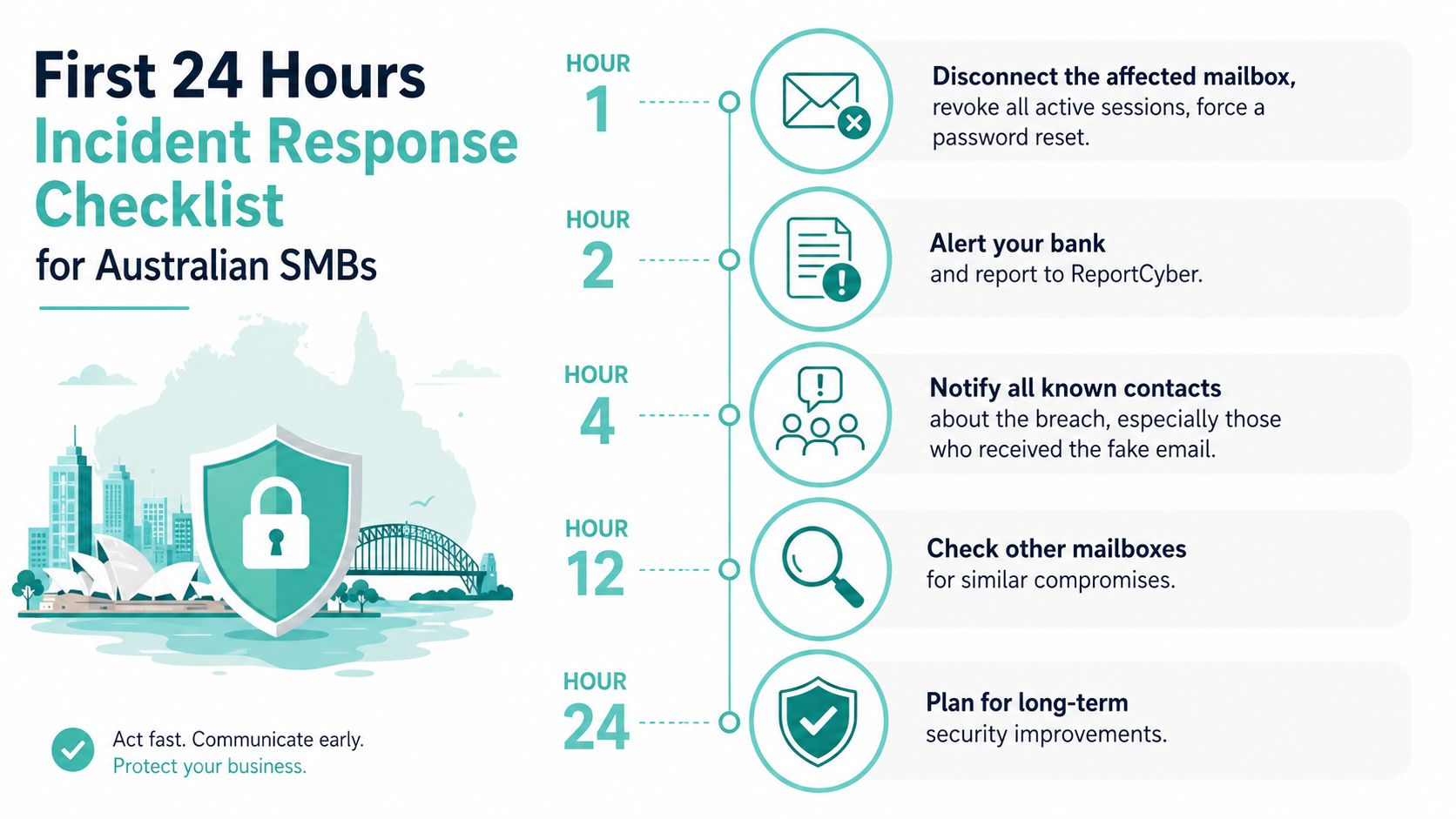
If the mailbox is active, disconnect it first. Revoke all live sessions, force a password reset, reset the MFA factor, and remove any inbox rules or forwarding the attacker created. If the person still has access on a phone or laptop, don't leave the device trusted while you sort it out.
The first few hours matter most
Call the bank immediately if money's gone or a transfer is still pending. Ask for a recall and push the receiving bank to freeze the destination account. Then contact the ACSC through ReportCyber or the 24/7 Cyber Security Hotline on 1300 CYBER1 (1300 292 371), because that's the official path for Australian reporting (ACSC emergency response guide).
What to do by the end of day one
Audit mailbox rules, forwarding, connected apps, OAuth grants, and login logs. Reset any other account that shared the same password or recovery method. Notify the people who received the fake payment instructions so they don't keep wiring funds to the wrong place.
By the final stretch of the day, preserve raw mail logs, message headers, and any forensic artefacts before you rebuild anything. Staff need a short briefing on what to watch for over the next week, because attackers sometimes come back through the same route. Your hosting provider should review the original mail flow, check outbound spam filters, and help close the entry point.
Fast reporting beats perfect reporting. Send what you have, then keep collecting evidence.
This is the point where too many businesses waste time trying to work out whether the event is “serious enough”. It is. If an attacker touched a mailbox, payment instruction, or identity flow, treat it as a live incident and move.
Experience Microsoft 365 Business Standard for free for 30 days.
Up to 25 users with full access to email, OneDrive and Teams. Includes full versions of desktop apps of Outlook, Word, Excel, PowerPoint and more.
Try Microsoft 365
Putting It Together and Frequently Asked Questions
The cleanest SMB defence is simple. Publish SPF, DKIM, and DMARC on your hosted DNS. Enforce phishing-resistant MFA on every mailbox. Require out-of-band payment verification for any bank-detail change. Work with a local hosting provider that can log, monitor, and act fast when a mailbox is compromised.
A Sydney or Melbourne-hosted provider with DDoS-protected mail infrastructure, managed DNS, and encrypted off-site backups can help you contain the damage faster when something goes wrong. UpTime Web Hosting fits that model with local hosting, email services, DNS management, nightly backups, and support that can suspend a compromised account quickly. That matters because BEC response is mostly about speed, visibility, and reducing the number of places an attacker can keep moving.
FAQ
What if staff use personal Gmail accounts for work?
Treat them as in scope. If they're used for supplier conversations, approvals, or forwarding business mail, they need the same verification rules as a company mailbox.
Is email authentication expensive to set up?
Not usually. The work is mostly in getting SPF, DKIM, and DMARC aligned correctly and then tightening the policy in stages.
Will insurance cover a loss if DMARC wasn't in place?
Maybe, but don't assume that. Policy wording, control failures, and the way the fraud happened all matter, so the insurer will look closely at your process and evidence.
How long does an inbox rule audit take?
For a small business, it should be a short, routine check, not a project. If it takes long enough to become a burden, your mailbox structure is already too loose.
What does the ACSC want when I report an incident?
Send the details you've got, the impersonation method, message headers, bank details used, recovery steps, and anything you preserved from the mailbox. The sooner you report, the more useful that record becomes.
If you want a hosting setup that gives you managed DNS, secure email, local support, and a team that can help you shut down a compromised mailbox without delay, visit UpTime Web Hosting and put the basics in place before the next invoice thread goes sideways.