An email domain is the part after the @ symbol in an email address, and it identifies the internet domain responsible for routing and authenticating messages. Australia's .au namespace had 4,275,710 domain names under management at 30 June 2025, including business identities used for websites and email.
You might see a payment request from a free mailbox and hesitate before opening the attachment. Then an enquiry arrives from accounts@harbourplumbing.com.au, matching the business website and invoice details. The visible address doesn't prove that either message is genuine, but a domain-based identity gives you a controlled foundation for routing, authentication and customer recognition.
Table of Contents
- Why Your Email Domain Matters for Australian Businesses
- How Email Domains Work Behind the Scenes
- SPF DKIM and DMARC Explained for Business Email
- Choosing the Right Australian Domain Format
- Setting Up Your Business Email Domain Correctly
- Security and Deliverability Best Practices for SMEs
- Real-World Australian Business Email Examples

Performance you can feel, backed by clients who depend on it. Read how our support and uptime create long‑term customer success.Power Your Business with Better Hosting
Why Your Email Domain Matters for Australian Businesses
For a small Australian business, the difference between harbourplumbing@gmail.com and accounts@harbourplumbing.com.au is more than appearance. The first address is tied to a public mailbox service. The second uses a domain the business can register, renew, protect and connect to its website, mailboxes and security records.
That distinction matters when a customer checks an invoice, a supplier adds your address to an allow-list, or a staff member sends a booking confirmation. A professional domain won't prevent fraud by itself, but it gives you an identity that you control rather than one dependent on a third-party mailbox name.
Practical rule: Treat the domain as a long-term business asset. Treat the mailbox provider as a service you can change.
The domain remains yours when you move from one email platform to another, provided you retain registrar access and control of the authoritative DNS zone. You can change the MX record to point incoming mail to a new provider while leaving the website connected to its existing web server. Changing the domain itself is a different decision. It can disrupt customer recognition, website links, supplier records, authentication policies and old correspondence.
Australian businesses should also separate branding from proof of legitimacy. A .au address can support local recognition, while SPF, DKIM and DMARC help receiving systems assess whether messages were authorised. Neither replaces careful payment verification.
The practical ownership details are covered in this guide to domain name ownership in Australia. Keep the registrant information accurate, protect the registrar login with MFA, and make sure more than one trusted person knows how to manage the domain.

How Email Domains Work Behind the Scenes
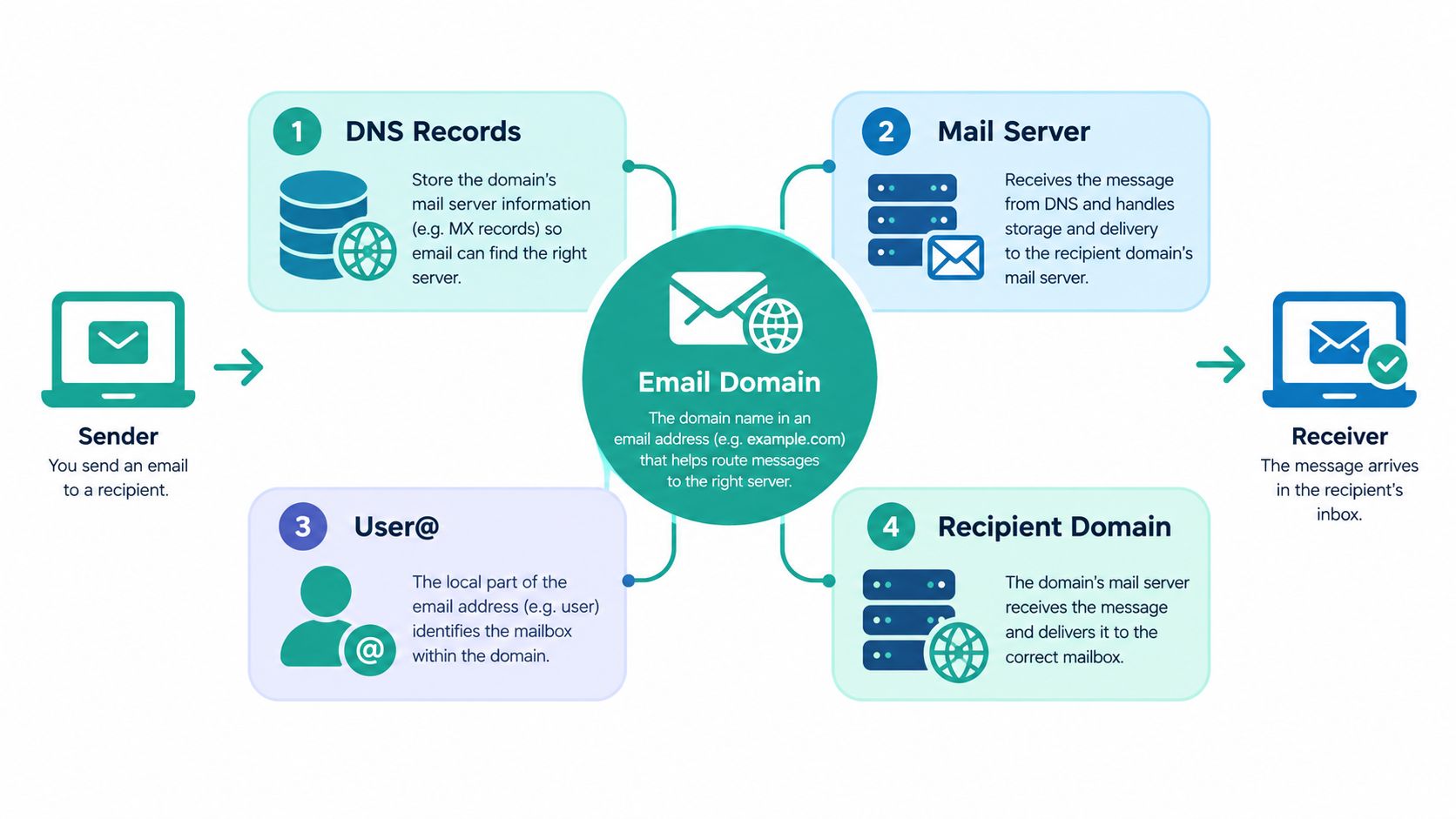
An email address has two main parts. In sales@harbourtrades.com.au, sales is the mailbox or local part, while harbourtrades.com.au is the email domain. The local part identifies the destination within the organisation, and the domain identifies the organisation's internet namespace.
When someone sends a message, receiving systems use DNS to find where mail for the domain should go. The domain's MX records identify the mail exchangers responsible for receiving messages. That lookup happens behind the scenes, so the visible address alone doesn't determine delivery.
A simple example is a business with these addresses:
- Customer enquiries:
info@harbourtrades.com.au - Service requests:
support@harbourtrades.com.au - Invoices:
accounts@harbourtrades.com.au - Staff communication:
jane@harbourtrades.com.au
All four can use the same domain while reaching different mailboxes or workflows. The website can also use that domain without the mailbox name matching the web address. sales@harbourtrades.com.au might support a website at harbourtrades.com.au, while the domain's DNS records direct web and email traffic to separate systems.
DNS is the control point
The hosting company, website server and mailbox platform don't have to be the same provider. The important control point is the domain's authoritative DNS zone. If you can update the relevant records, you can move email providers without abandoning the address customers already know.
Before a migration, record the current MX, SPF, DKIM and DMARC entries, as well as the website records. A change made without that inventory can send mail to the wrong provider or interrupt the website. The practical role of MX records is explained in this guide to what an MX record does.
The Australian context is substantial. auDA reported 4,275,710 .au domain names under management at 30 June 2025, with 605,006 new .au registrations during the 2024–25 financial year in its annual report. That scale reflects a nationally administered naming system supporting Australian websites and email identities.
Host your website with our 5-star rated, cPanel website hosting plans.
Super fast servers, with security included and hosted in your choice of Australian Data Center.
View cPanel Plans
SPF DKIM and DMARC Explained for Business Email
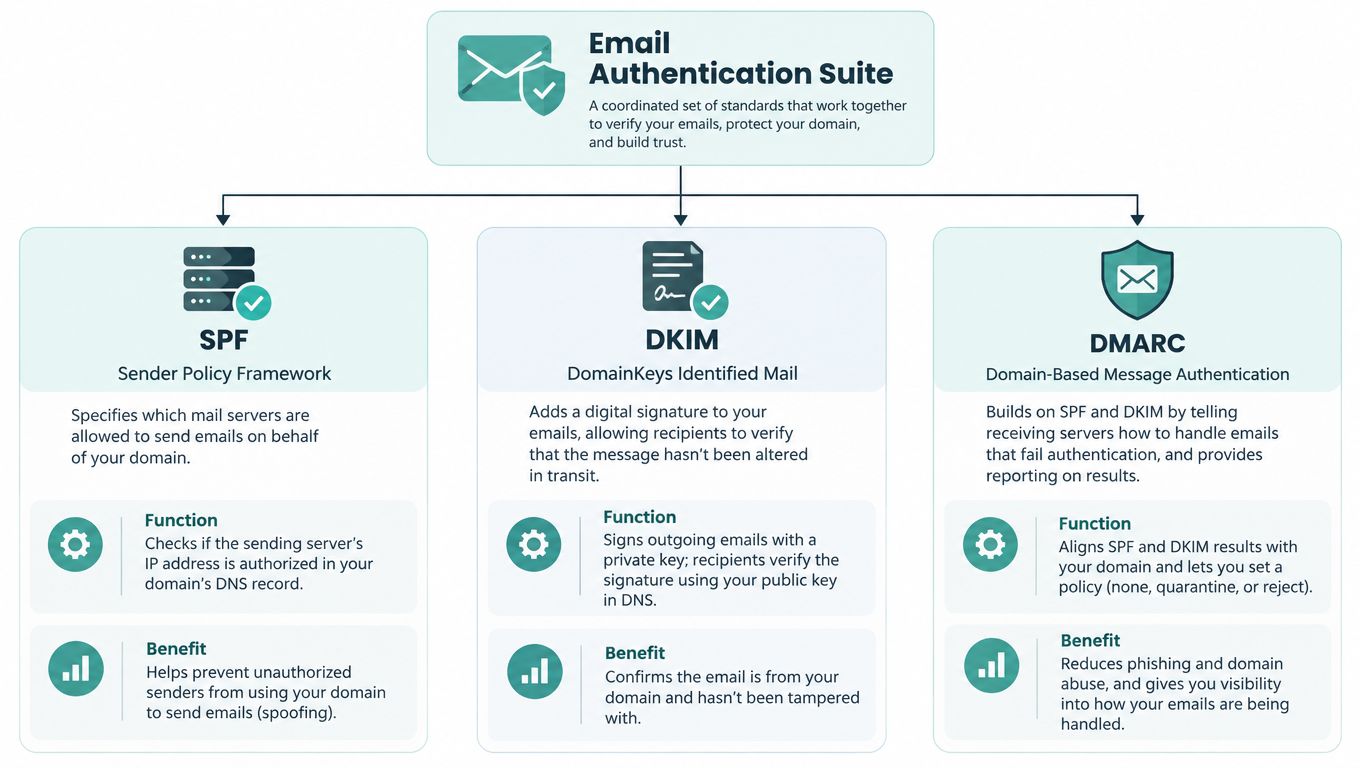
A business domain can receive mail correctly and still be vulnerable to spoofing if its sending identity isn't authenticated. SPF, DKIM and DMARC address different parts of that problem, so configuring only one record leaves gaps.
SPF publishes the mail servers or IP addresses authorised to send for the domain. If your website host, newsletter platform and accounting application all send legitimate messages, each approved sender needs to be represented in the SPF policy. A broad or unrestricted authorisation is a poor trade-off because it gives unknown systems more permission than they need.
DKIM adds a cryptographic signature to outgoing messages. The sending service signs the message, and the corresponding public key is published in DNS. Receiving systems can use that key to check the signature and detect altered or unauthorised content.
DMARC connects authentication with a policy. It checks alignment between the visible From domain and authenticated SPF or DKIM identities, then lets the domain owner tell receiving servers how to treat failures.
| Control | What it checks | Business purpose |
|---|---|---|
| SPF | Whether the sending host is authorised | Limits unauthorised sending sources |
| DKIM | Whether the message carries a valid signature | Helps detect alteration and spoofing |
| DMARC | Whether the visible domain aligns with authentication | Sets treatment for failed messages |
Use a staged policy
DMARC supports three relevant policy choices:
nonemonitors failures without enforcement.quarantinetreats failed messages as suspicious or spam.rejectrefuses messages that fail the required checks.
A sensible operational sequence is to start with monitoring while you identify every legitimate sender, then move towards quarantine or rejection once the records reflect your real systems. A rushed policy can block invoices, booking confirmations or newsletters that haven't been configured correctly.
The Australian Cyber Security Centre email guidance recommends SPF, DKIM and DMARC to reduce spoofing, phishing and impersonation risk. This isn't just a deliverability exercise. An attacker could send a fake invoice that appears to come from accounts@business.com.au, and weak domain controls make that impersonation harder for recipients to identify.
For cPanel administrators, the SPF, DKIM and DMARC implementation guide provides a practical reference. Check records after adding every new sending platform, not only when a message starts landing in spam.
Choosing the Right Australian Domain Format
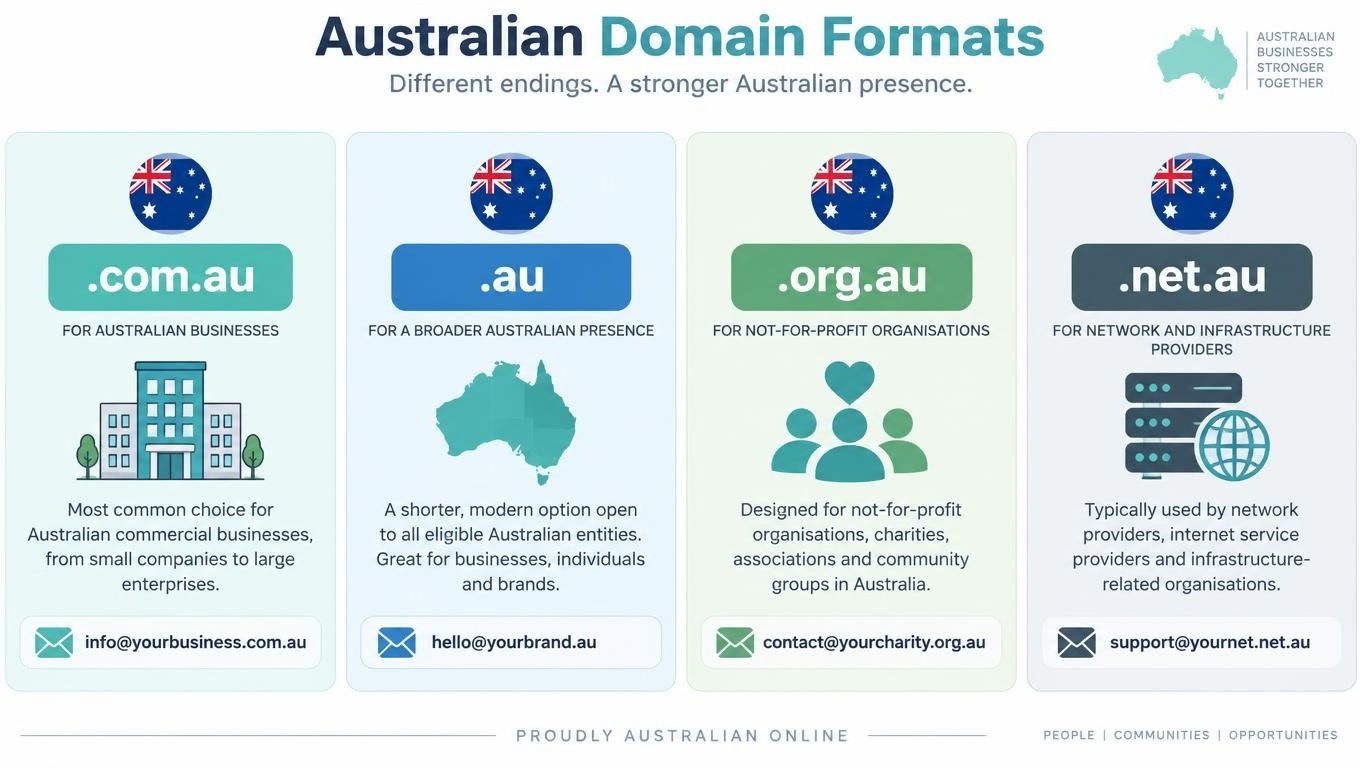
The right domain format depends on your business structure, eligibility and customer expectations. .com.au is the familiar commercial choice for many Australian businesses. Direct .au, such as harbourplumbing.au, is a shorter Australian namespace. Other formats, including .org.au, .edu.au and .net.au, serve different eligible categories and shouldn't be selected solely because a preferred commercial name is unavailable.
Most Australian businesses use .com.au, and registering a commercial .com.au or net.au generally requires an eligible commercial entity with an ABN or ACN. Confirm the current rules with auDA before registering, particularly if your trading name differs from your registered entity.
A practical comparison
| Format | Suitable context | Main consideration |
|---|---|---|
| .com.au | Commercial businesses | Strong recognition, with eligibility requirements |
| .au | Australian businesses and brands eligible under the rules | Shorter format, but customers may know .com.au better |
| .org.au | Eligible organisations | Intended for qualifying organisations rather than ordinary commercial use |
| .net.au | Eligible commercial or network-related entities | Confirm eligibility and whether the format fits your public identity |
Local relevance can influence trust. auDA research found that seven in ten Australian small businesses with a domain chose .au for their website or business email, while three in four Australian consumers were more likely to trust an Australian business when its website ended in .au according to auDA's .au product guide. The same research found that half of Australian consumers said they would only purchase online from a business with an Australian .au website.
Those findings support a local domain choice, but they don't make the suffix a guarantee. A business with a .com.au address still needs accurate registration details, renewal ownership and authenticated mail. A direct .au address may be concise, while .com.au can be easier for customers to recognise from existing business usage.
In 2024, com.au represented 74.9% of .au domains under management, direct .au represented 17.9%, and net.au represented 4.6% in auDA's product guide. Choose a name that matches your registered identity or public brand, then use it consistently across the website, mailbox, invoices and reply-to fields.
Setting Up Your Business Email Domain Correctly
A reliable setup starts with ownership, not with the mailbox screen. Register the domain in the correct business entity, retain registrar access and make sure the domain isn't held solely by a former employee, designer or hosting contractor.
For an Australian business, uptimewebhosting.com.au in hello@uptimewebhosting.com.au identifies the organisation. DNS records determine which systems can receive and send messages, so the mailbox service is only one part of the arrangement.
Keep these controls under your authority
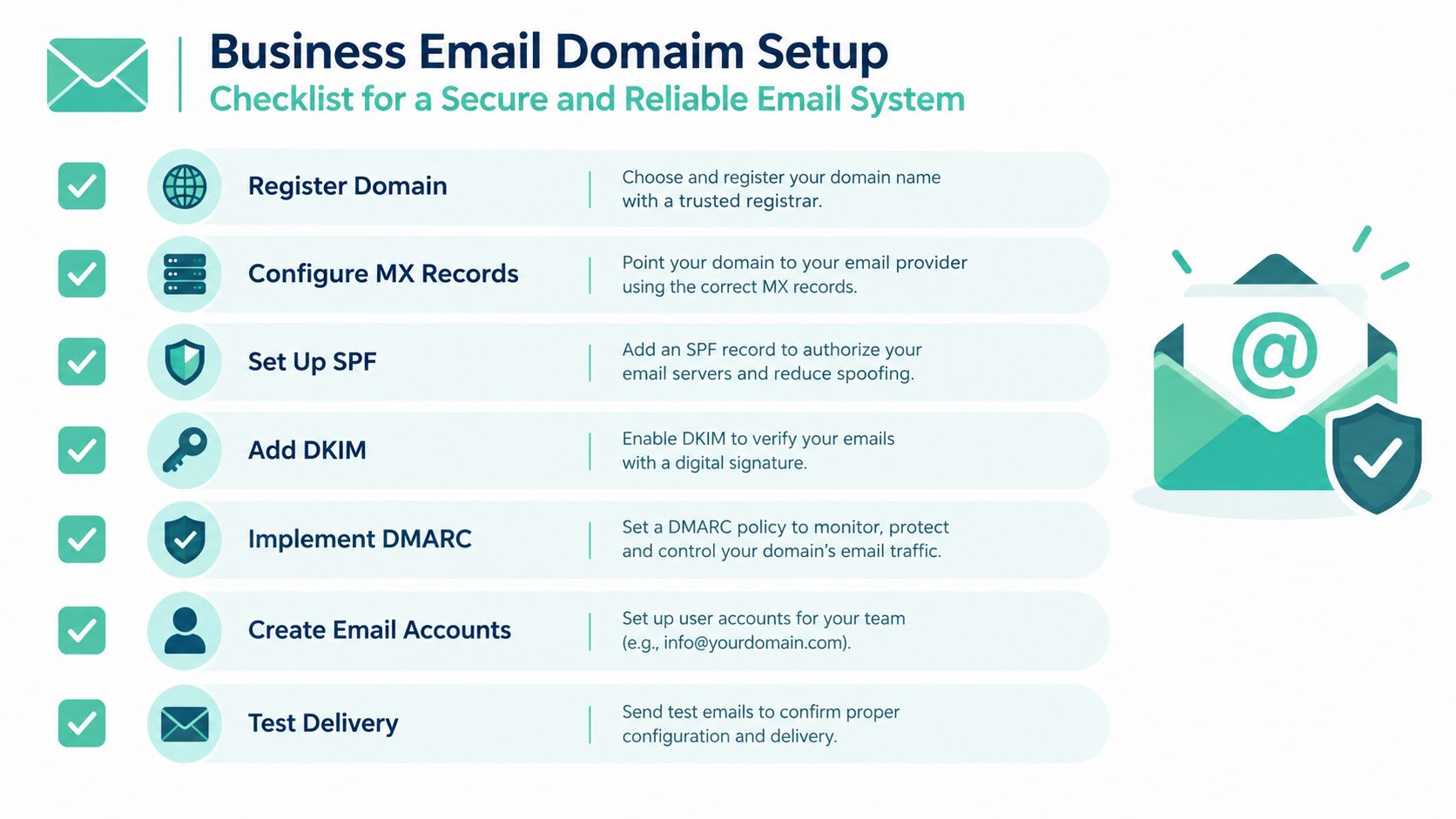
Register the domain correctly. Use accurate ABN or ACN details where required, confirm renewal responsibility and keep the registrar account protected with MFA.
Configure receiving mail. Point the MX records to the chosen mail provider. Don't change the website's web records unless the website is moving as well.
Authorise legitimate senders. Publish SPF for the mail servers that should send on behalf of the domain. If the website host, newsletter system and accounting application all send mail, review the combined setup carefully.
Enable message signing. Add DKIM through each sending platform that supports it, then confirm that the public key is available in DNS.
Set a DMARC policy. Begin with a monitoring approach while legitimate sources are identified, then strengthen enforcement once failed messages have been investigated.
Create useful addresses. Separate
info@,support@,accounts@and staff mailboxes so customers and suppliers have clear destinations.Test before changing providers. Send and receive messages, check replies, test invoices and confirm that website forms and newsletters still use authorised senders.
Migration rule: Moving the mailbox provider should usually mean changing mail routing, not changing the public address.
A business that hosts its website with one company and email with another can keep those services separate. The MX record can move to the new email provider while the website's A or CNAME records remain directed to the existing web server. This separation reduces unnecessary downtime, but only if someone has documented the records before the change.
The domain email setup guide is useful for businesses configuring mailboxes and server settings. Keep a private record of the domain registrar, DNS host, mail provider, website host, authorised senders, DKIM selectors and DMARC policy. Don't place passwords in that document. Store credentials in an appropriate password manager and review access when staff or contractors leave.
Register your new domain name at competitive market prices including free domain add-ons like privacy, DNS Hosting, Custom Nameservers and Forwarding.
Always the best price and no nasty renewal price hikes.
Register A Domain Name
Security and Deliverability Best Practices for SMEs
Small businesses usually run more sending systems than they realise. A staff mailbox, website contact form, accounting application, booking system and marketing platform may all send under the same domain. Each one creates a configuration responsibility.
The practical routine is to keep an inventory of legitimate senders, remove services that no longer send mail, and review SPF, DKIM and DMARC after every provider change. Limiting SPF to necessary hosts is safer than authorising broad sources, and DMARC reports can reveal systems using the domain without the owner's knowledge.
Protect the identity, not just the inbox
Use a separate subdomain for newsletters or high-volume campaigns when that separation suits the business. It can help isolate reputation risk from ordinary staff communication, but it isn't a shortcut around authentication. Every sending domain and subdomain still needs deliberate SPF, DKIM and DMARC controls.
Keep website and email records documented separately. A web developer who changes hosting should not need to alter mail routing, and an email provider migration should not remove the website's DNS records. This is why domain ownership matters more than the provider's logo in the mailbox interface.
The broader guidance on keeping company email secure is useful when building an internal checklist, although Australian businesses should apply it alongside local Cyber.gov.au recommendations and their own domain eligibility obligations.
Consistent addresses help customers recognise a business, but authentication helps receiving systems decide whether the message deserves trust.
Use the same domain in the website header, invoice sender, staff signature and reply-to address where appropriate. Train staff to verify changed bank details through a known channel rather than relying on an email thread. A domain can support recognition and security, but neither one removes the need for sensible payment controls.
Real-World Australian Business Email Examples
A local plumbing business might use contact@harbourplumbing.com.au for new enquiries, bookings@harbourplumbing.com.au for appointments and accounts@harbourplumbing.com.au for invoices. The website, van signage and email signatures can use the same public identity, while DNS records authorise the systems that send confirmations and receipts.
A consultancy may keep jane@consultancy.com.au for client conversations and use a separate transactional sender for automated invoices. The team can change mailbox providers without changing Jane's public address, provided the business retains domain and DNS control.
A small retailer might send order updates from orders@retailer.com.au, answer replies through support@retailer.com.au and use the same domain in its website and printed correspondence. The customer sees a consistent identity rather than unrelated addresses for each stage of a purchase.
Before launching or migrating, check four things:
- Ownership: The business controls the registrar account and renewal details.
- Routing: MX records point to the intended mail service.
- Authentication: SPF, DKIM and DMARC cover every legitimate sender.
- Continuity: The migration plan protects website access, inbound mail and historical correspondence.
For local guidance, consult Cyber.gov.au's email security recommendations and confirm domain eligibility through auDA before registering or changing a .au identity.
UpTime Web Hosting provides Australian domain email hosting, mailbox management and DNS support for businesses using their own domain, including practical setup around MX records and authenticated sending. Visit UpTime Web Hosting to review Australian hosting and email options, then set up a domain identity you can retain when your website or mailbox provider changes.