You've got a handful of Australian WordPress sites under one cPanel login, separate invoices, repeated plugin updates, and no clear answer to the question that matters most: how many sites can the account handle before performance becomes unreliable? "Unlimited websites" tells you what the plan permits, not where CPU, memory, database connections, or storage activity become bottlenecks.
That distinction matters more in Australia, where local latency, caching, traffic patterns, and shared infrastructure all influence the experience. The right setup might be several independent WordPress installations, a Multisite network, or a move to a VPS with better resource isolation. The practical decision is less about counting domains and more about matching the hosting architecture to the sites you're operating.
Table of Contents
- Why Australian Agencies Host Multiple WordPress Sites Together
- WordPress Multisite Versus Separate Installations
- Setting Up Multiple Sites on Your Hosting Account
- Capacity Planning and Performance for Australian Users
- Domain Mapping and DNS Configuration
- Backups, Security, and Ongoing Maintenance

Performance you can feel, backed by clients who depend on it. Read how our support and uptime create long‑term customer success.Power Your Business with Better Hosting
Why Australian Agencies Host Multiple WordPress Sites Together
A small Brisbane agency might manage a trades business website, a regional franchise site, a campaign microsite, and a client's online catalogue. Each site has its own domain, email requirements, staging needs, and update schedule. Keeping them on separate hosting plans is easy to understand, but billing, backups, login credentials, SSL renewals, and support requests quickly become repetitive.
A single hosting account can simplify that administration. In cPanel, the agency can create add-on domains, assign separate document roots, create individual databases, and manage the sites from one control panel. A developer can use one workflow for file access, backups, PHP settings, security checks, and resource monitoring rather than switching between unrelated dashboards.
Australia already has a substantial WordPress footprint. BuiltWith data lists 666,369 live WordPress websites in Australia, and identifies 17,185 Australian websites using WordPress Multisite in the same dataset, as reported in this Australian WordPress hosting and usage overview. That makes multi-site hosting a practical operational question for local agencies, universities, franchises, publishers, and organisations with related web properties.
Convenience comes with shared risk
Consolidation isn't automatically efficient. If several sites share one account, a resource-intensive backup, uncached search request, or badly behaved plugin can compete for the same server allocation. A compromised site can also create additional investigation and containment work across the account, even where the installations use separate databases.
Multisite creates a tighter relationship still. Every site uses the same WordPress codebase and shared infrastructure. That centralisation can be useful, but a plugin conflict, traffic spike, or database problem can affect the whole network.
Practical rule: Consolidate sites that share ownership, governance, and technical standards. Separate sites that have unrelated owners, different risk profiles, or sharply different performance requirements.
Australian organisations have used Multisite at serious institutional scale. A CSIRO presentation described over 300 WordPress sites and over 300 WordPress Multisite sites, alongside 50 plugins and themes, as detailed in this Australian WordPress hosting resource. That example shows why centralised publishing can work, but it also shows the governance effort required.
The decision usually comes down to two paths: a WordPress Multisite network for closely related properties, or separate installations for stronger site-level independence.
WordPress Multisite Versus Separate Installations
WordPress Multisite gives you one installation, one Network Admin area, and a shared set of core files, themes, and plugins. It suits a university with departmental sites, a franchise group with consistent branding, or a publisher operating related regional properties. A network administrator can control available themes and plugins centrally, while each site retains its own content and settings.
Separate installations use cPanel add-on domains or equivalent virtual-host arrangements. Each website has its own WordPress files, database, configuration, and administrator account. That means more maintenance, but a problem on one site is less likely to spread through the application layer to the others.
Compare the operating model
| Criteria | WordPress Multisite | Separate Installs |
|---|---|---|
| Isolation | Shared codebase and infrastructure, with strong application coupling | Independent files and databases, subject to account-level resource sharing |
| Updates | Centralised theme, plugin, and core management | Updates handled per website |
| Resource sharing | All sites draw on the same stack and can influence one another | Sites still share the hosting account, but failures are easier to isolate |
| Complexity | More demanding network governance and plugin compatibility checks | More repetitive administration, migrations, and maintenance |
| Best fit | Related sites with consistent policies and branding | Unrelated clients, custom stacks, or sites with different risk and traffic profiles |
Multisite reduces duplicated work. Install a compatible plugin once, manage network-wide settings from one dashboard, and apply shared standards across related sites. The trade-off is that site administrators have less freedom, and not every plugin behaves well in a network environment. A plugin that works correctly on one standalone site still needs testing before network-wide activation.
Separate installs are usually the safer choice for an agency serving unrelated businesses. One client might need WooCommerce, another might rely on a lightweight brochure site, and a third might require a custom integration. Giving all three the same plugin environment creates unnecessary coupling. Separate databases also make it clearer which site needs restoring, migrating, or investigating.
The decision isn't only technical. Consider ownership, access control, compliance expectations, development workflows, and exit plans. A client who may later move their website to another provider will generally have a simpler migration path from a standalone installation than from a subsite inside a larger network.
For a practical overview of the platform requirements and trade-offs, review this WordPress Multisite hosting guide. Use Multisite when central control is the dominant benefit. Use separate installations when independence matters more than update efficiency.
Host your website with our 5-star rated, cPanel website hosting plans.
Super fast servers, with security included and hosted in your choice of Australian Data Center.
View cPanel Plans
Setting Up Multiple Sites on Your Hosting Account
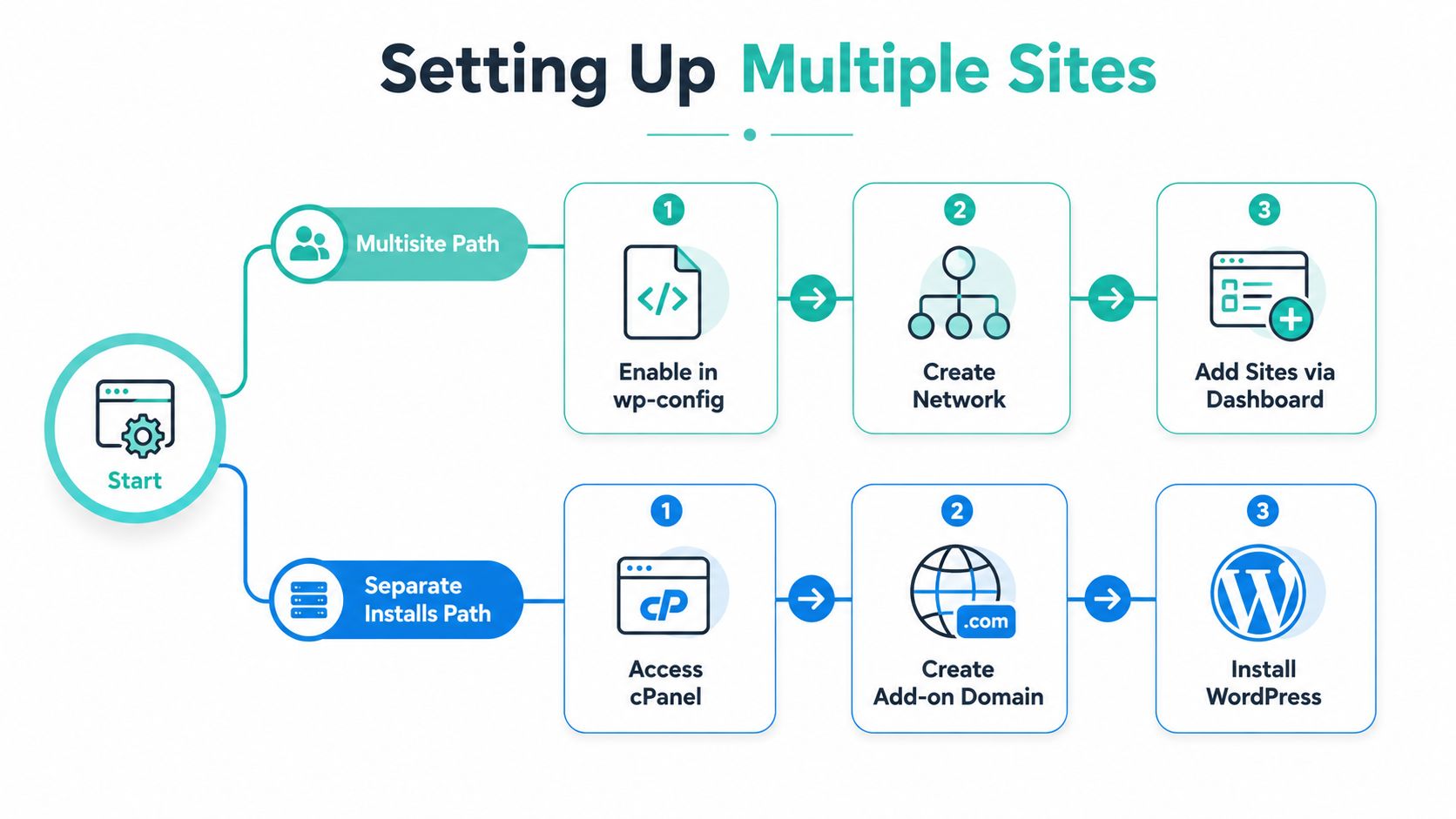
For separate websites, cPanel provides a familiar workflow. Open Domains or Add-on Domains, depending on the cPanel version, and add the domain you want to host. Choose a dedicated document root rather than placing several sites in the same directory. Then create a database and database user for that installation, and give the user access only to its own database.
You can install WordPress through cPanel's application installer, WP Toolkit, or by uploading the WordPress files manually. During the installation, use the database credentials created for that domain. Repeat the process for each site, keeping a written inventory of domains, document roots, databases, PHP versions, SSL status, and administrator contacts.
The cPanel knowledge base article for adding additional domains is useful when the interface labels differ between hosting environments. Don't confuse an alias or parked domain with an independent installation. An alias points another domain at an existing website, while an add-on domain should have its own document root when you're hosting a separate WordPress site.
Validate the Multisite stack first
Before enabling Multisite, confirm PHP 8.1 or newer, MySQL 5.7 or newer, or MariaDB 10.4 or newer, and Apache or Nginx with mod_rewrite support. You'll also need wildcard subdomain handling and a PHP memory limit of at least 256MB, according to this Australian WordPress Multisite setup guidance.
Take a full file and database backup before changing the existing installation. In wp-config.php, enable Multisite with the WP_ALLOW_MULTISITE setting, then open Tools, choose Network Setup, and select a subdomain or subdirectory structure. WordPress will generate configuration changes for wp-config.php and .htaccess. Apply those changes carefully, log back in, and use Network Admin to create additional sites.
Wildcard DNS is a common failure point for subdomain networks. If the wildcard record isn't configured, newly created subdomains may not resolve even though the WordPress network itself is correctly enabled. Check the hosting panel, DNS zone, and domain registrar settings together before troubleshooting WordPress.
A staging check is worthwhile before adding production properties. Confirm permalink behaviour, media uploads, cron tasks, plugin compatibility, SSL issuance, and administrator permissions. Setup is straightforward when the hosting stack meets the prerequisites, but rushed consolidation can turn one working site into a network-wide troubleshooting exercise.
Capacity Planning and Performance for Australian Users
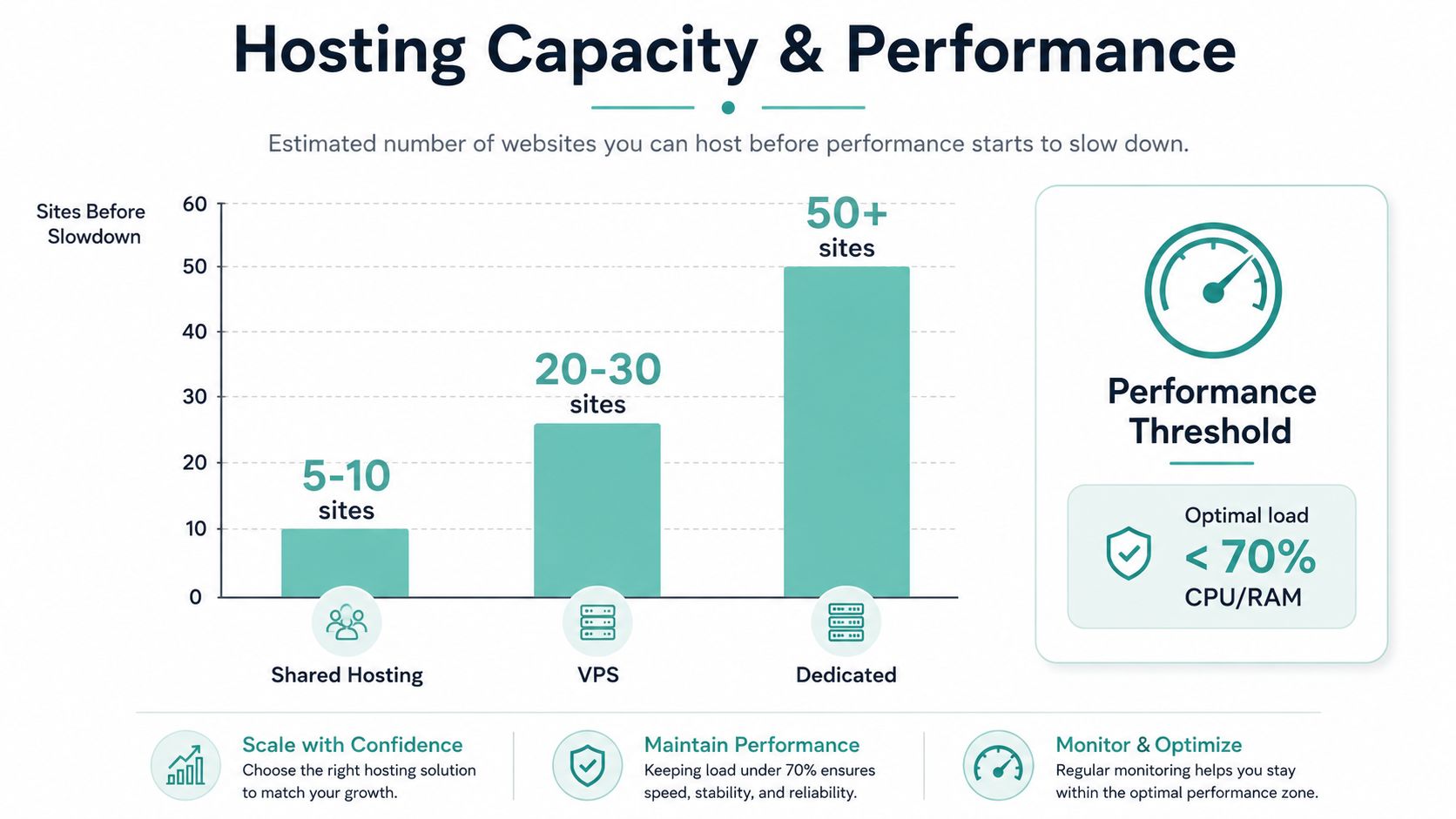
The number of domains a plan allows isn't a capacity forecast. A quiet brochure site and a busy WooCommerce shop might both count as one website, yet their PHP execution, database queries, image processing, and background tasks can be very different.
Capacity planning starts with workload rather than site count. Review the following for every installation:
- Traffic pattern: A steady stream of visits creates a different load from short campaign bursts.
- Plugin weight: Page builders, search tools, ecommerce extensions, and reporting plugins can increase PHP and database work.
- Caching coverage: Full-page caching reduces repeated application requests, while object caching can reduce database pressure.
- Media behaviour: Large image uploads, video handling, and image regeneration can create heavy storage input and output activity.
- Background jobs: Backups, updates, scheduled imports, and email processing can compete with visitor requests.
Watch the shared bottlenecks
CPU throttling is often the first visible warning, but memory pressure and disk I/O can be just as damaging. A site may appear fast in a basic page test while administrator screens, checkout requests, search pages, or scheduled jobs become slow. Database contention can affect every installation when several sites make dynamic requests at once.
Start with a small portfolio, then watch account-level CPU, memory, entry processes, I/O, database activity, PHP worker usage, and error logs during normal and peak periods. When one site repeatedly consumes a disproportionate share, move it to a separate account or VPS rather than allowing the entire portfolio to operate without headroom.
Capacity is a working threshold, not a marketing label. Leave room for updates, backups, campaigns, and occasional traffic spikes.
Australian latency makes the infrastructure location relevant. One Australian-focused test reported that adding a CDN and WP Rocket caching reduced average local delivery from 3.2 seconds to 2.0 seconds, a 40% improvement, as documented in this Australian WordPress hosting benchmark. The same benchmark source reports Australian load times as low as 0.9 seconds with TTFB around 120 milliseconds on top-tier infrastructure across Sydney, Melbourne, and Perth.
Those figures aren't a promise for every website. They show why local hosting and aggressive caching should be evaluated together. A well-optimised site on nearby infrastructure can feel very different from an uncached site serving dynamic requests across a distant region.
The WordPress performance optimisation resource can help structure that review. Stay on shared hosting when the sites are light, stable, and comfortably below resource limits. Consider a VPS when several sites need predictable allocation or server-level tuning. Split sites across accounts when one business-critical or high-workload installation threatens the stability of the rest.
Domain Mapping and DNS Configuration
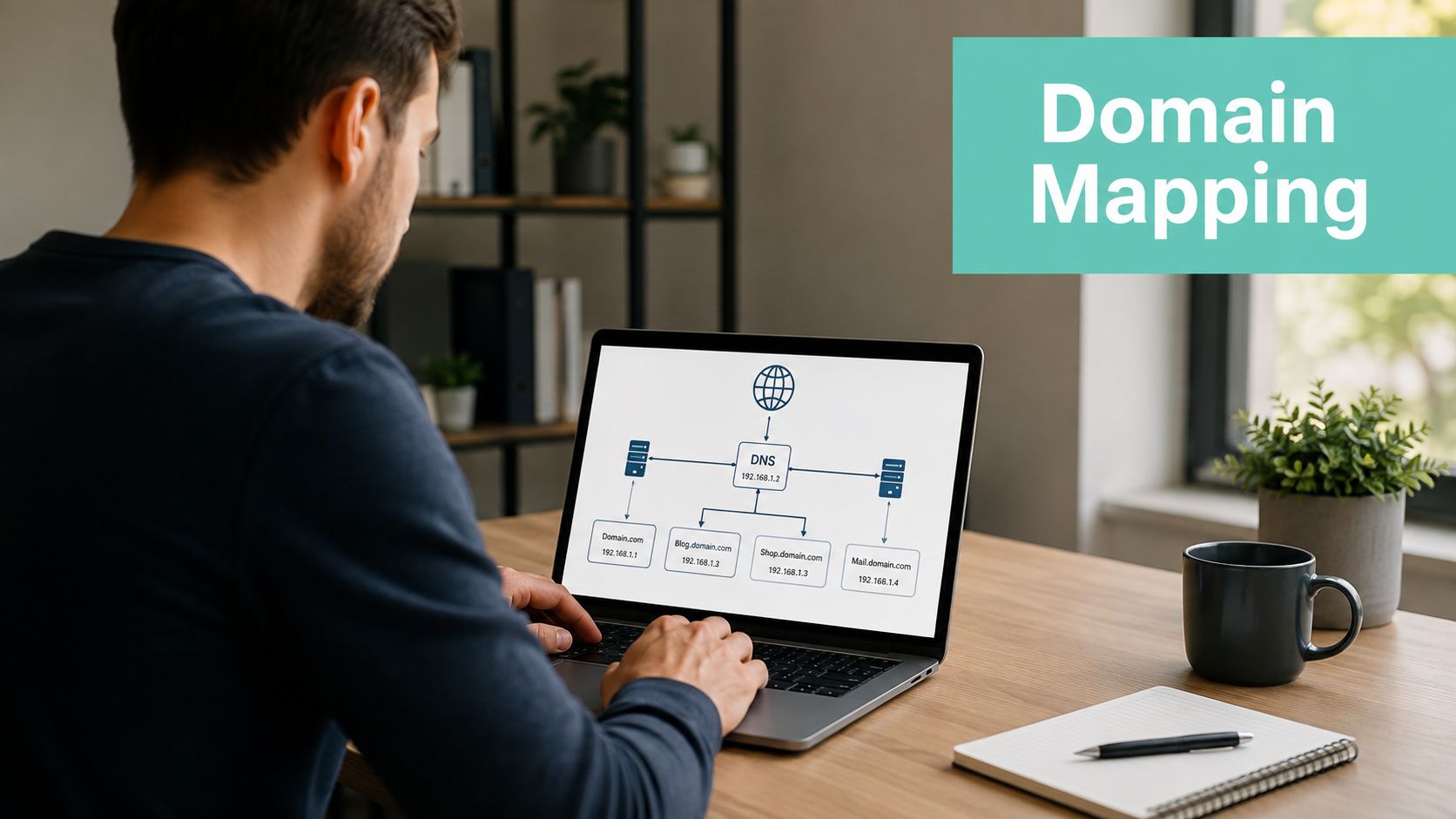
Domain mapping determines how visitors reach each site, and small mistakes here can look like WordPress failures. With separate installations, point each domain to the hosting service and make sure the domain's document root matches the intended WordPress directory. With Multisite, you can use subdomains, subdirectories, or mapped custom domains, depending on the network design.
An A record connects a domain name to the hosting destination. A CNAME can point a subdomain to another hostname where the provider supports that arrangement. A Multisite network using subdomains also needs a wildcard record so new site subdomains resolve through the same hosting environment. Don't add wildcard DNS because it sounds convenient. It belongs to the subdomain architecture, not every multi-domain setup.
Distinguish the domain roles
A parked or aliased domain displays an existing website under another domain. An add-on domain normally supports a separate site with its own directory. A mapped domain in Multisite points a custom domain at a particular subsite while the network continues to manage the underlying site.
For an Australian domain, make DNS changes through the registrar or DNS provider responsible for the zone. Confirm whether the authoritative nameservers are held at the registrar, the hosting company, or a separate DNS service before editing records. The DNS verification record knowledge base article is relevant when services such as Google or Microsoft require a verification record alongside website records.
DNS changes don't always appear immediately. During a migration, keep the old hosting service available while records update, lower the DNS TTL before a planned move where possible, and avoid changing nameservers, A records, and WordPress URLs simultaneously unless you have a rollback plan.
SSL needs attention for every mapped domain. Separate installations can use individual Let's Encrypt certificates, while a subdomain-based network may use a wildcard certificate where the hosting environment supports it. Check certificate coverage for the root domain, www version, custom mapped domains, and any active subdomains. WordPress site URLs should use HTTPS consistently, otherwise redirects, mixed content, and login loops can appear after the DNS change.
Register your new domain name at competitive market prices including free domain add-ons like privacy, DNS Hosting, Custom Nameservers and Forwarding.
Always the best price and no nasty renewal price hikes.
Register A Domain Name
Backups, Security, and Ongoing Maintenance
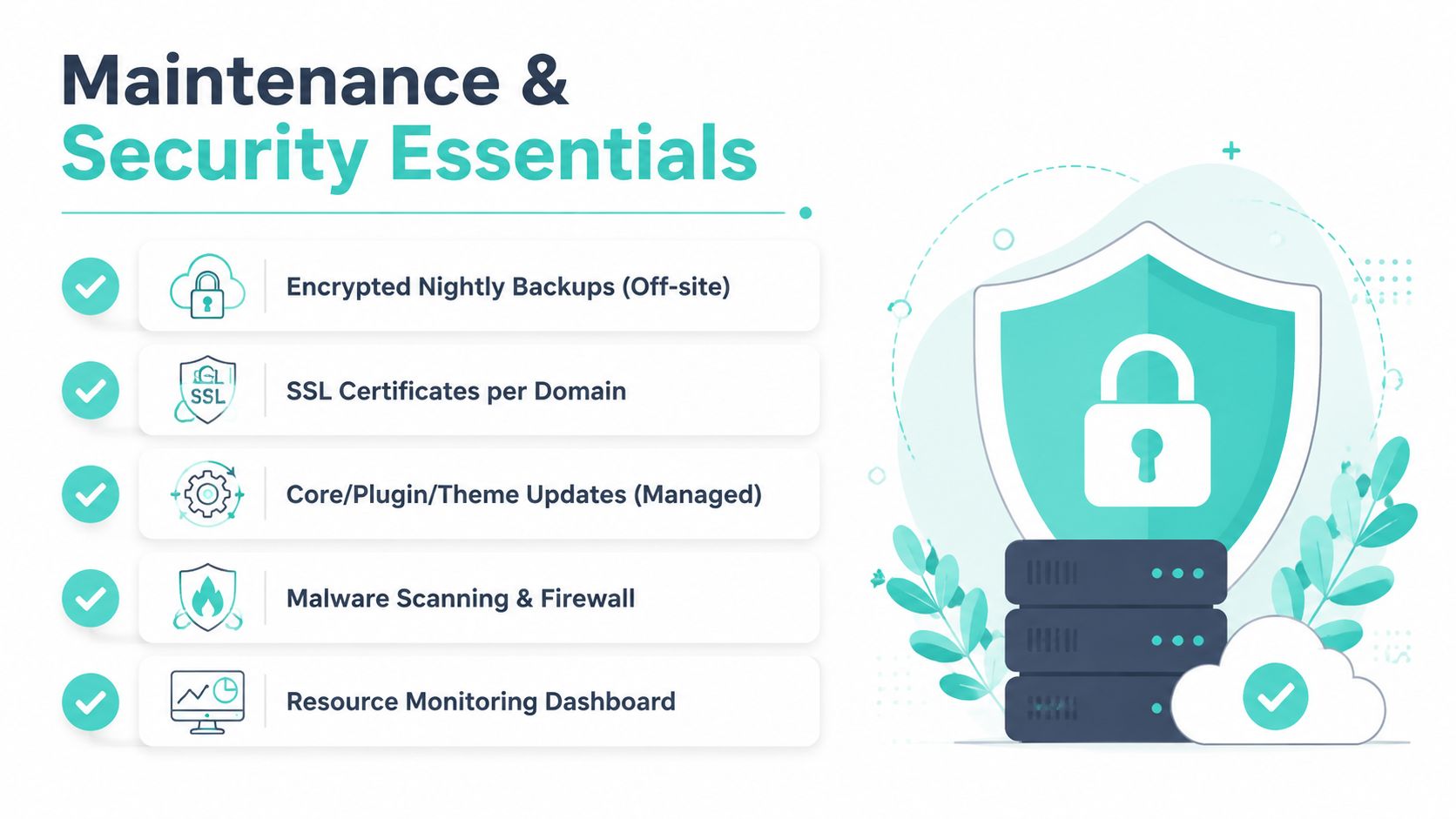
A multi-site account needs recovery plans at two levels. Keep encrypted off-site nightly backups for the hosting environment, and maintain a per-site recovery option where practical. A Multisite network should have a network-level backup for the shared files and database, plus a documented method for restoring or extracting an individual subsite.
Backup success isn't the same as restore readiness. Test a restoration on a safe environment, confirm media files are included, and record which credentials, DNS settings, and plugin licences are needed to bring a site back online. Per-site backup plugins can help with independent installations, but they also consume storage, CPU, and scheduled task capacity, so coordinate their schedules rather than letting every site run a heavy backup at once.
Keep a repeatable operating rhythm
- Weekly: Review updates, failed logins, malware alerts, backup results, and resource graphs. Apply updates to staging first where the site is business-critical.
- Monthly: Audit inactive plugins and themes, check database growth, test forms and transactions, review administrator accounts, and inspect error logs.
- Quarterly: Perform a restoration test, review PHP compatibility, assess site-by-site resource consumption, and decide whether the account still provides enough isolation.
Use malware scanning and a DDoS-protected firewall at the hosting layer, then keep WordPress administrators on strong unique credentials with only the access they need. Shared infrastructure increases the consequences of weak maintenance, particularly when several properties rely on the same account.
The WordPress maintenance service information provides a useful reference for organising these tasks. UpTime Web Hosting offers cPanel WordPress hosting, WP Toolkit, local Australian infrastructure, SSL, malware scanning, DDoS-protected firewalls, encrypted off-site nightly backups, and monitoring for organisations that prefer managed hosting support.
If you're consolidating Australian WordPress sites, start by auditing each site's workload, isolation needs, and recovery requirements, then choose separate cPanel installations or Multisite accordingly. Visit UpTime Web Hosting to review Australian hosting options for multiple WordPress sites and discuss an account structure that leaves practical room for growth.