You're already halfway there if your site or client app has outgrown a basic Linux stack and now needs ASP.NET, IIS, or MSSQL support in Australia. The hard part isn't finding a Windows plan, it's figuring out which parts are real infrastructure and which parts are just sales copy, especially when the app has to keep working for customers, staff, or internal users who never think about the server behind it.
Australian businesses have moved from "maybe we need a website" to "the website is part of the business itself." The ABS recorded that 51.1% of Australian businesses had a web presence in 2016–17, up from 24% in 2001–02, while internet access rose from 72% to 95.4% over the same period, which helps explain why hosting for Windows apps became a durable need rather than a niche choice (ABS web presence and internet access data). If you're trying to decide whether your next move is shared hosting, a managed VPS, or a cloud instance, this guide gives you the questions that matter.
A useful starting point is a broad comparison of hosting models, not because every provider looks the same, but because the trade-offs are easier to see once they're side by side. If you're also sorting out the network side of the equation, a resource like broadband deployment specialists can help when the problem is connectivity or rollout planning rather than the app itself. For a simple background contrast between platforms, the internal guide on Windows hosting versus Linux hosting is a good companion read.
Table of Contents
- Why Windows ASP.NET Hosting Feels Confusing in Australia
- The Building Blocks Every Windows ASP.NET Host Needs
- Deployment Options for Australian ASP.NET Workloads
- Publishing an ASP.NET Core App to IIS Step by Step
- A Practical Australian Security Baseline for ASP.NET Hosting
- Privacy Act Obligations and the Notifiable Data Breaches Scheme
- How to Choose an Australian Windows ASP.NET Host

Performance you can feel, backed by clients who depend on it. Read how our support and uptime create long‑term customer success.Power Your Business with Better Hosting
Why Windows ASP.NET Hosting Feels Confusing in Australia
A small Sydney agency receives an ASP.NET project on Friday afternoon. Its previous host never explained what was installed, the developer needs a Windows environment, and the application must connect to its database without failing during deployment. “Windows hosting” can describe a managed IIS setup, or a label on a plan page.
The gap is between what the application requires and what the provider operates. Your workload may depend on a compatible Windows environment, IIS configuration, the required .NET runtime, database access, application isolation, backups, and a tested recovery process. A plan labelled "Windows-compatible" does not reveal who applies patches, whether separate application pools are used, or whether a restore has been tested.
Practical rule: if the plan page does not identify who patches Windows, installs the runtime, and recovers the site, you do not have the answer yet.
Three labels regularly create confusion:
- “Windows-compatible” says the platform is intended for Windows workloads, but not which Windows Server configuration or IIS features are available.
- “Supports .NET” does not identify the supported .NET Framework or .NET versions, nor whether you can install a missing runtime.
- “Database included” leaves open whether you receive Microsoft SQL Server access, what permissions apply, and how database backups are restored.
Those details matter more than a long feature list. A connectivity provider such as broadband deployment specialists may help with network rollout, while the hosting provider remains responsible for the server and application environment. For the platform distinction itself, compare Windows hosting and Linux hosting.
A buyer needs three practical answers. Does the stack support the application version? Which tasks belong to the customer and which belong to the provider? If a deployment is misconfigured or the site is compromised, can the application be isolated and restored using a documented process? Those questions separate operational control from marketing language.
The Building Blocks Every Windows ASP.NET Host Needs
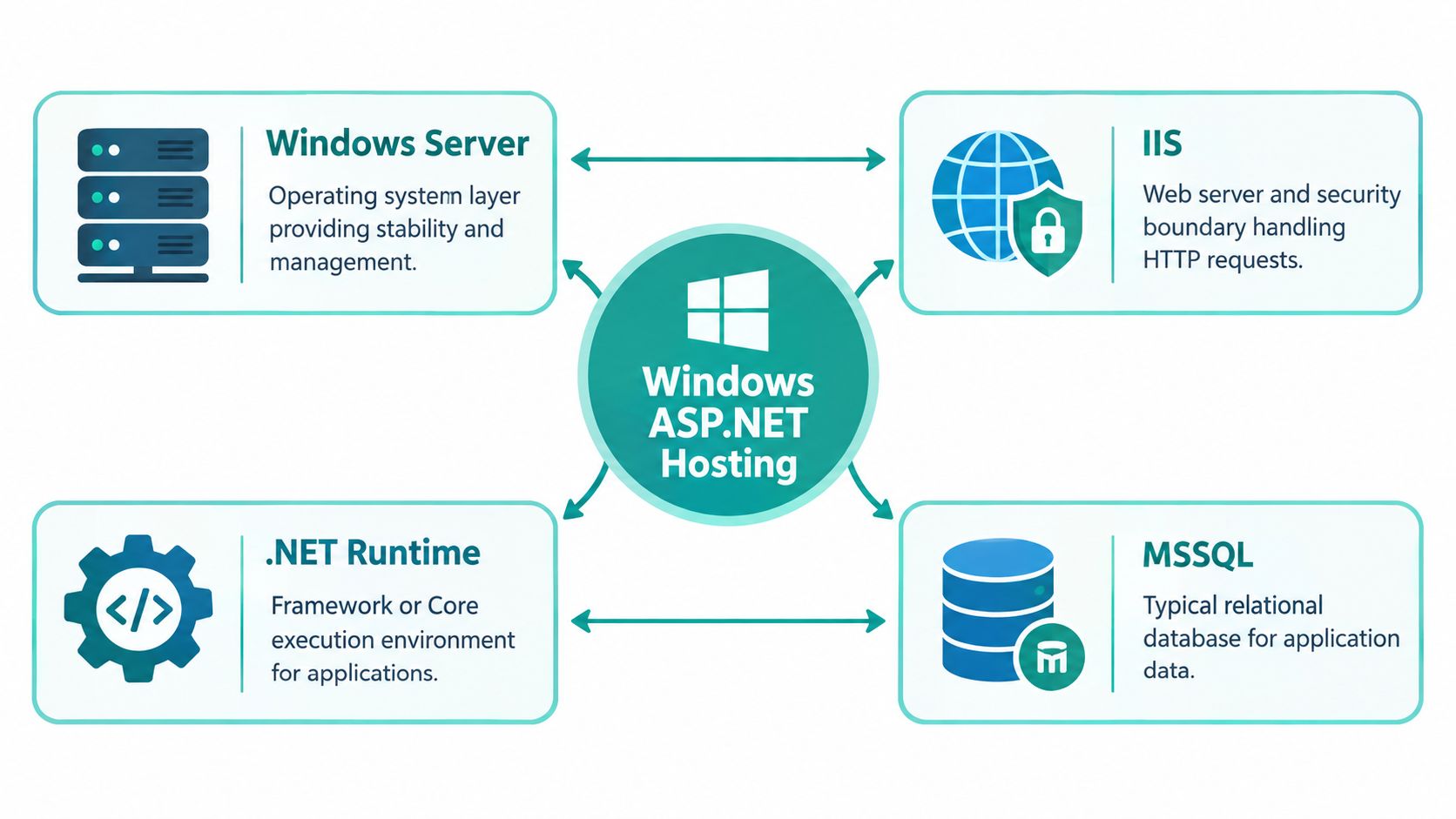
A customer submits an order, but the page returns an error. The cause could be the Windows server, IIS configuration, the installed .NET runtime, or the database connection. These components form one chain, so checking only the advertised storage or bandwidth can miss the control that matters.
The four layers and their jobs
Windows Server provides the operating system. It manages users, services, permissions, and the environment in which IIS and the application run. Ask which server features and administrative controls your plan includes.
IIS receives web requests and passes them to the appropriate application pool. Each pool has a security identity, allowing file and resource permissions to limit what an ASP.NET process can access, as described in Microsoft IIS hosting documentation. If an application is compromised, those boundaries can reduce access to other sites and system resources. Their value depends on correct permissions and isolation, not on the IIS label alone.
The .NET runtime executes the application code. ASP.NET Core commonly connects to IIS through the ASP.NET Core Module for IIS, while older .NET Framework applications require their matching Windows and IIS components. Confirm the required runtime before choosing a plan, because a server can support Windows while still lacking the version your application needs.
MSSQL stores business data such as accounts, orders, forms, and internal records. Check whether the plan includes Microsoft SQL Server access, the permissions available to the application, connection limits, and a documented restore process. Further guidance is available in this overview of MSSQL database hosting.
A normal request follows a predictable path. The browser connects to IIS, IIS selects the application pool, the application runs under its configured identity, and the code may query MSSQL before returning HTML or JSON. A failure at any point can appear to the user as one generic error.
Practical rule: identify the application's runtime, IIS requirements, database arrangement, and access boundaries before treating a Windows ASP.NET plan as suitable.
Host your website with our 5-star rated, cPanel website hosting plans.
Super fast servers, with security included and hosted in your choice of Australian Data Center.
View cPanel Plans
Deployment Options for Australian ASP.NET Workloads
A lot of buyers start by asking, “Which option is cheapest?” That's the wrong first question. The better question is, “Who patches what, who can isolate a problem fastest, and how much control do I need over the app and server?” Once you ask that, the three realistic paths become much easier to sort.
Shared, managed, and self-managed
Shared Windows hosting fits small websites, low-risk client portals, and simple internal tools. You get a provider-managed server environment, but you also accept that your app shares the platform with others. That can be fine if the provider is disciplined about isolation, but it's not the right choice for every workload.
Managed Windows VPS suits agencies and SMEs that need more control without wanting to become system administrators. You usually manage the app and data, while the provider handles the operating system, access, and platform maintenance. If multiple client sites live on the same box, isolation becomes far more important than a lower monthly price.
Self-managed cloud on Azure, AWS, or a similar platform gives the most control and the most responsibility. It's a fit when you have a developer or operations team ready to handle patching, runtime management, backups, monitoring, and recovery. For many smaller Australian teams, that amount of ownership is heavier than it looks on paper.
| Windows ASP.NET hosting options at a glance | Best for | You manage | Provider manages | Typical cost |
|---|---|---|---|---|
| Shared Windows hosting | Small sites, simple apps, low admin overhead | App content, code, basic configuration | Server, OS, runtime stack, backups depending on plan | Lower |
| Managed Windows VPS | Agencies, multiple client apps, teams that need more control | App, deployments, database use, sometimes site-level settings | OS, patching, platform stability, infrastructure | Mid-range |
| Self-managed cloud | Teams with sysadmin capacity and strict custom requirements | Everything above the VM layer | Underlying cloud infrastructure only | Variable |
A procurement page like Amazon Web Services Australia procurement is a reminder that cloud can be a valid route, but it also shifts more responsibility onto your team than a managed host usually does. If you're hosting several client apps on one Windows server, don't buy the cheapest option just because it starts fast.
Publishing an ASP.NET Core App to IIS Step by Step
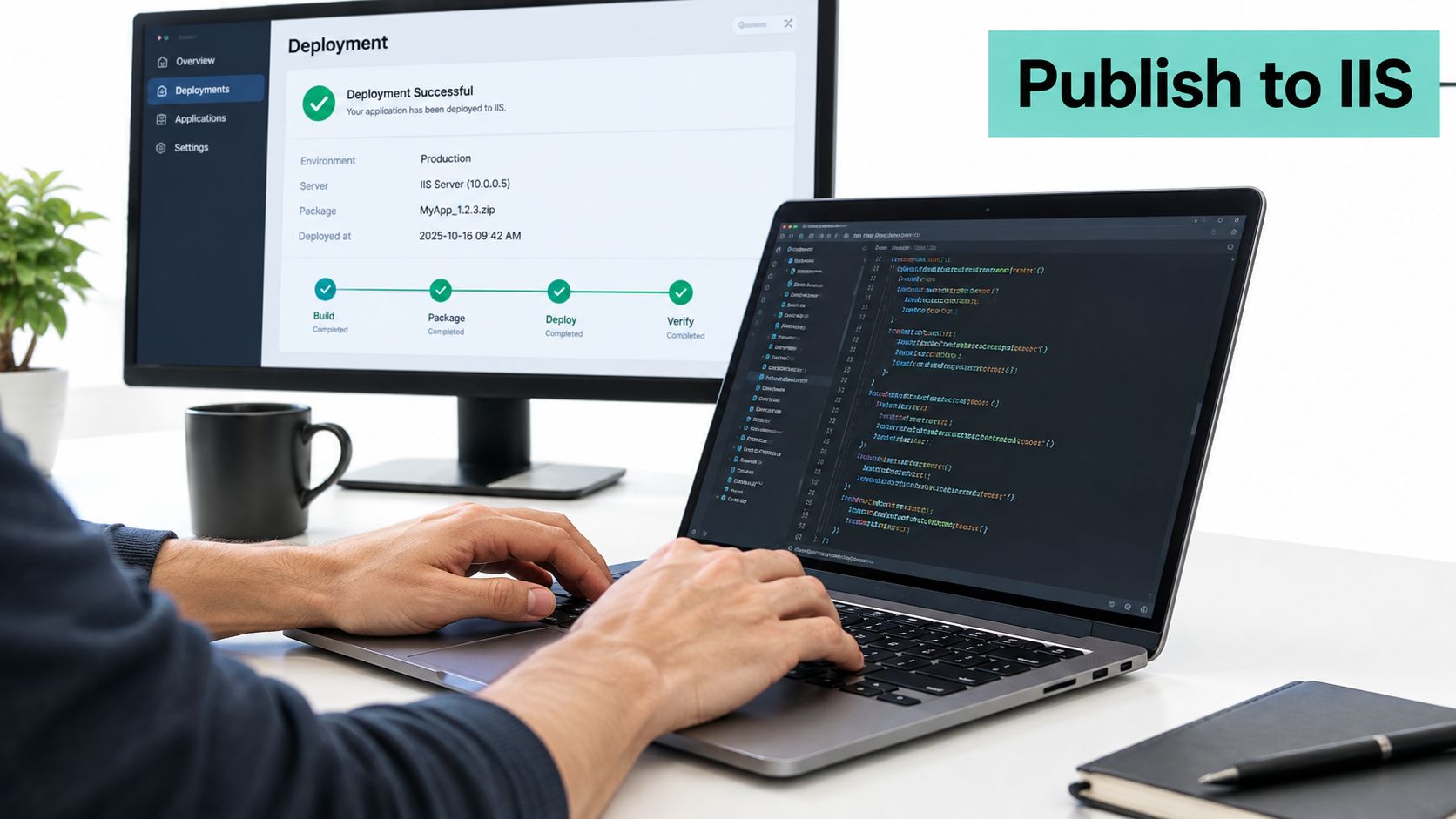
A deployment often begins with a customer portal rather than a lab exercise. Suppose an Australian trades business has an ASP.NET Core portal ready for publication on a Windows server running IIS. The process is predictable when the server, runtime, permissions, and application settings align. One missing dependency can stop the site before the first useful request reaches the application.
The deployment sequence that matters
Enable the Web Server (IIS) role through Server Manager and add the role services the application requires. The server also needs the .NET Hosting Bundle. It installs the .NET Runtime, .NET Library, and ASP.NET Core Module, which allows IIS to pass requests to the ASP.NET Core application. The Microsoft ASP.NET Core on IIS troubleshooting guide is useful when that hand-off fails.
Create the IIS site and its application pool, then match the pool configuration to the application's runtime requirements. Publish the application files to the site's intended directory, confirm the site binding, and check that the app pool identity can read the files and reach any required resources. Teams using deployment tooling can follow this Web Deploy publishing guide for Plesk as a practical reference for the publishing workflow.
Where failures usually show up
A missing Hosting Bundle is a common cause of an immediate IIS failure. Other causes include a startup exception, an absent connection string, a runtime mismatch, or an unsuitable application pool setting.
Check the hosting bundle first, then confirm the runtime version, application pool identity, file permissions, and environment-specific settings. Server logs and the application's own logs can distinguish an IIS configuration problem from an application startup problem.
If the app works locally but fails after publication, compare the two environments carefully. The server may use a different runtime, configuration source, operating-system permission, or database connection.
Practical rule: Deployment problems are usually one missing dependency. Find the dependency before blaming the server.
A Practical Australian Security Baseline for ASP.NET Hosting
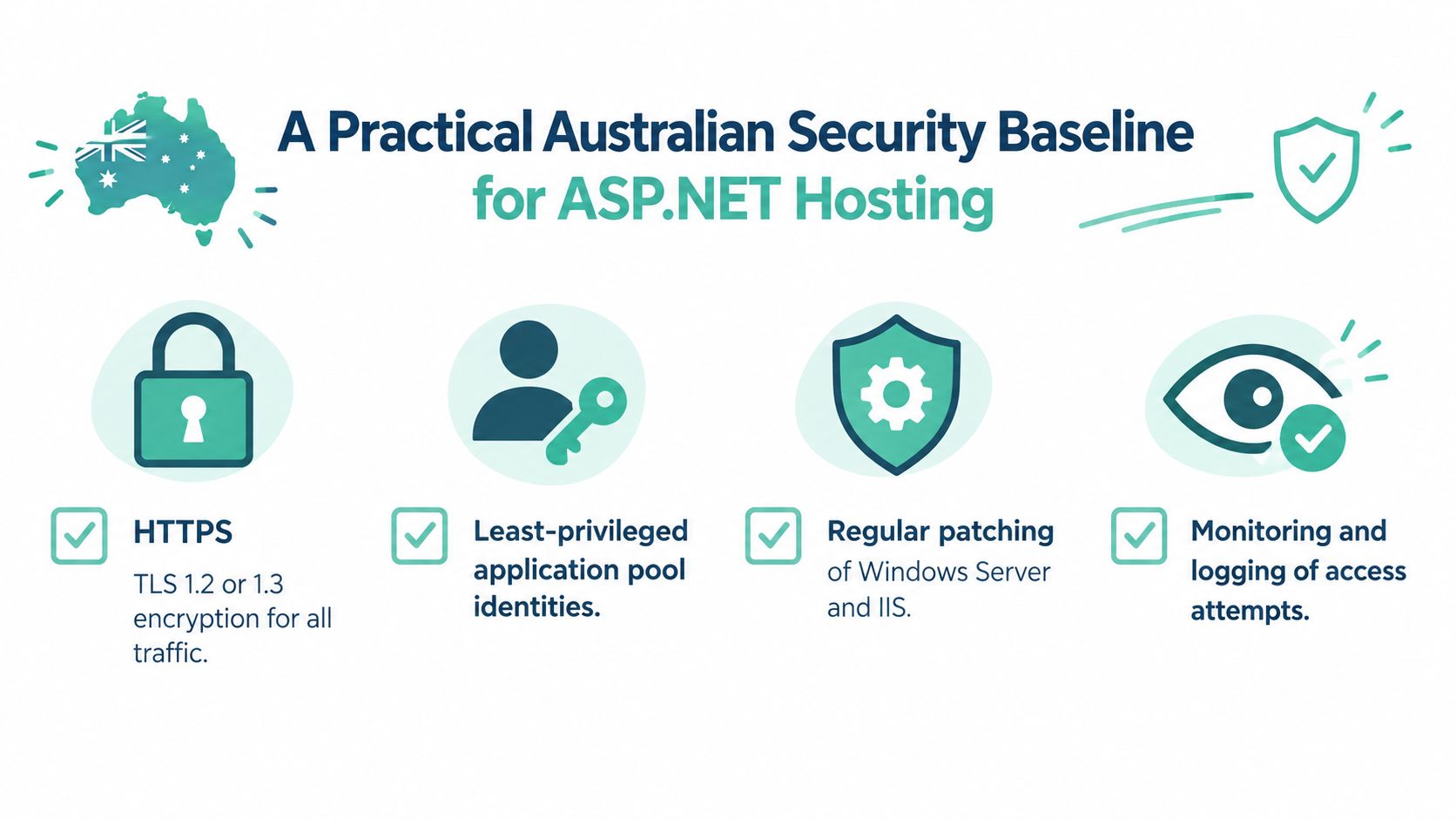
A Windows ASP.NET host starts to make sense once you separate marketing claims from operational controls. For an Australian SME, the baseline is straightforward: encrypt traffic, reduce privileges, isolate applications, keep logs that are usable, and prove backups can be restored instead of assuming they will work when needed.
Start with transport and identity
Australian Cyber Security guidance recommends moving away from insecure SSL and TLS 1.0/1.1 in favour of TLS 1.2 or TLS 1.3, so an ASP.NET site should enforce HTTPS at the Windows and IIS layer and encrypt downstream connections too, including APIs, SQL connections, SMTP, and webhooks (Australian Signals Directorate guidance). That protects data in transit, but it does not stop misuse on its own.
Microsoft's IIS model helps here because application pools have separate identities. Run each ASP.NET application in its own pool, give it the least privilege it needs, and avoid write access to the application directory unless the app needs it. If several customer sites share a Windows server, separate pools, filesystem permissions, deployment credentials, and databases make isolation and troubleshooting much cleaner.
Make logging and recovery operational, not decorative
The Australian Signals Directorate also places weight on central logging of security-relevant usage, denied access attempts, database queries, crashes, and error messages, while excluding sensitive values such as passwords and session tokens. IIS logs and application logs should stay separate, timestamps should be synchronised, and alerts should exist for repeated authentication failures, unusual 4xx or 5xx patterns, application-pool crashes, and unplanned configuration changes.
Backups need the same honesty. An off-site backup is useful only if you can restore it, so ask for restoration tests, not just confirmation that backups ran. A website security checklist is a useful companion when you want to map these controls to a real hosting decision.
Australian incident data makes the risk plain. The ABS reported that 21% of businesses experienced a cybersecurity incident in 2024–25, up only slightly from 22% in 2021–22, and that cyber risk is still an operational issue for ordinary businesses (ABS 2024–25 business characteristics). Government maturity data points in the same direction, with only 22% of Commonwealth entities reaching overall Essential Eight maturity level 2 in 2025, up from 15% in 2024 (ABS-linked data brief in the latest release). A host in Sydney with no tested restores is a bigger risk than a well-controlled host elsewhere.
Register your new domain name at competitive market prices including free domain add-ons like privacy, DNS Hosting, Custom Nameservers and Forwarding.
Always the best price and no nasty renewal price hikes.
Register A Domain Name
Privacy Act Obligations and the Notifiable Data Breaches Scheme
If your ASP.NET app stores customer names, contact details, booking records, or account data, hosting security isn't just an IT preference. Under Australian Privacy Principle 11, an organisation must take reasonable steps to protect personal information from misuse, interference, loss, unauthorised access, modification, or disclosure (OAIC APP 11 guidance). That obligation stays with the organisation, even if a provider runs the server.
The practical controls are familiar. Restrict IIS and database admin access, apply security updates, use encrypted connections, separate application and database permissions, and keep backups recoverable. If your host can't explain how those pieces are handled, compliance becomes harder to defend when something goes wrong.
What counts as an eligible breach
Under the Notifiable Data Breaches scheme, an eligible breach happens when personal information is lost or exposed to unauthorised access or disclosure, the incident is likely to cause serious harm, and that likely serious harm has not been prevented by remedial action (OAIC NDB scheme guidance). If that threshold is met, the organisation must prepare a statement for the Commissioner and notify affected individuals as soon as practicable.
A realistic example is an exposed SQL Server database behind an ASP.NET app. The first move is containment, not panic. Disable the affected access path, review the records involved, identify whether the information could cause serious harm, and preserve logs and other evidence so you can explain what happened.
Practical rule: if your incident response depends on memory instead of logs, your process isn't ready.
The internal Australian data sovereignty hosting page is relevant only if it's paired with the controls above. Data location can support a policy position, but it doesn't replace patching, logging, access control, or breach response.
How to Choose an Australian Windows ASP.NET Host
Start with the runtime question. Ask which ASP.NET Core and .NET Framework versions are supported, whether the .NET Hosting Bundle is installed, and who is responsible if Microsoft releases an update that affects the app. If the answer is vague, the platform may not be maintained with the level your application needs.
Then move to isolation and recovery. Ask how application pools are separated, whether each site gets its own identity, where the IIS and application logs live, how MSSQL backups are taken, and whether restores are tested. Also ask what happens if you suspect compromise, because the escalation path matters just as much as the technical stack.
A good provider should be able to explain those answers in plain language. They should also make it clear whether local infrastructure and Australian support are available for time-sensitive issues, since patching, restarts, and incident handling are easier when the support team is in your timezone and can act without delay.
For Australian buyers, the right checklist is simple. What runs the app? Who patches it? How is it isolated? How are logs stored? How is recovery proven? If a host can answer those questions cleanly, you're looking at operational maturity, not just a Windows badge.
If you want a Windows ASP.NET host that's built around Australian infrastructure, local support, and practical hosting controls, visit UpTime Web Hosting and check how its Windows hosting, MSSQL support, backups, and deployment tools line up with the checklist above. If you're comparing options for a live app or a client migration, that's the quickest way to see whether the platform fits your deployment and security requirements.