In short
An Australian business should usually choose self-hosted WordPress when ownership, flexibility and future growth matter most, or a hosted website builder when speed and low day-to-day administration matter more. Headless or custom systems suit businesses with complex integrations, multiple digital channels and a budget for ongoing developer support.
Key takeaways
- Self-hosted WordPress separates the CMS from the hosting provider, giving the business more choice but also more maintenance responsibility. (wordpress.org)
- A hosted website builder bundles the editing system and hosting, which reduces setup decisions but makes the provider's export and migration rules more important. (docs.cpanel.net)
- Domain ownership, administrator access, backups and a tested exit path matter more than the number of templates in a platform demo.
- A CMS is not secure simply because it is managed; every business still needs clear responsibility for accounts, content, integrations and recovery. (wordpress.org)
- Australian hosting can clarify data location and support, but it does not replace the privacy and security obligations that apply to the business. (oaic.gov.au)
Table of contents
- What are CMS platforms?
- Which CMS approach suits your business?
- Who controls the website, content and domain?
- How much work does each CMS create after launch?
- How should you compare security, backups and updates?
- What should an Australian business check about hosting and support?
- What should an online store or growing site choose?
- How do you test a CMS before committing?
- What else do business owners ask about CMS platforms?
- What should you do next?
The wrong CMS rarely looks wrong on launch day. The problems usually appear later, when the website needs a new integration, an urgent security update, a different host or a feature the original platform cannot support without a rebuild.
The useful question is not simply, “Which CMS has the most features?” It is, “Which CMS can this business own, operate and support for the next several years?”
What are CMS platforms?
A CMS platform is software used to create, organise, edit and publish website content through an administration interface. A CMS lets authorised users manage pages, articles, images and navigation without manually coding every change.
Most content management systems provide an editor, media library, templates, user permissions, publishing controls and a way to add integrations. The differences sit underneath those familiar features.
The main approaches are:
- Self-hosted open-source CMS: The software and hosting are selected separately. WordPress is the most relevant example for many small and medium businesses.
- Hosted website builder: The editor, templates, hosting and platform updates are bundled into one service.
- Commerce CMS: Store management, products, orders and payments are central rather than optional additions.
- Headless or custom CMS: Content is stored separately and delivered to a website, application or other channel through an API or custom frontend.
WordPress.org describes WordPress as open-source, GPL-licensed software and states that users can control their website content and data. Its flexibility comes from the ability to choose hosting, themes and extensions rather than accepting one fixed service package. See the official WordPress features and this explanation of hosted and self-hosted WordPress. (wordpress.org)
A CMS is not just an editor; it is the operating system for how a business publishes, maintains and moves its website.

Performance you can feel, backed by clients who depend on it. Read how our support and uptime create long‑term customer success.Power Your Business with Better Hosting
Which CMS approach suits your business?
Choose the CMS model that matches how the business wants responsibility divided after launch. For most small businesses, the realistic shortlist is self-hosted WordPress or a hosted website builder, not a custom enterprise system.
Compare the three main approaches
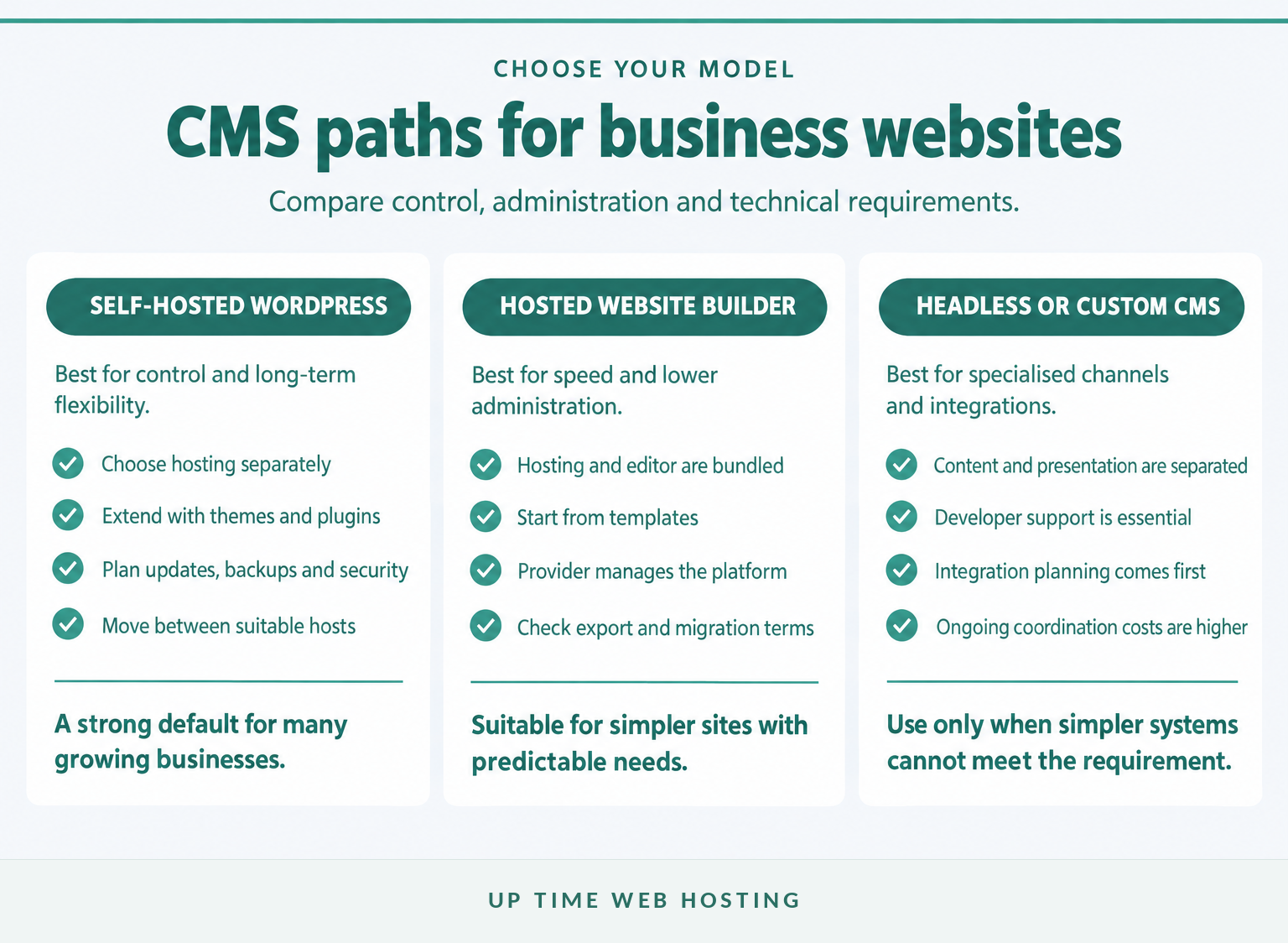
Choose self-hosted WordPress when the website is expected to grow, publish substantial content, add integrations or move between hosting providers. It provides more technical choice, but someone must manage updates, backups, performance and security.
Choose a hosted website builder when the site is relatively simple and the priority is getting online quickly with fewer technical decisions. The business should still confirm what can be exported, which features depend on the provider and how support works when something breaks. This guide to how a website builder works explains the bundled model in more detail.
Choose a headless or custom CMS only when there is a defined requirement that simpler systems cannot meet. Examples include publishing the same structured content to several channels, operating complex approval workflows or connecting deeply with internal business systems.
Do not start by comparing template counts. Start by deciding whether the business values control, low administration or specialised integration most.
Choose the CMS operating model before comparing templates or feature lists.
Who controls the website, content and domain?
Website control depends on more than access to the CMS dashboard. The business should control the domain account, DNS, administrator credentials, content, backups and a documented way to move the site.
Check these ownership points
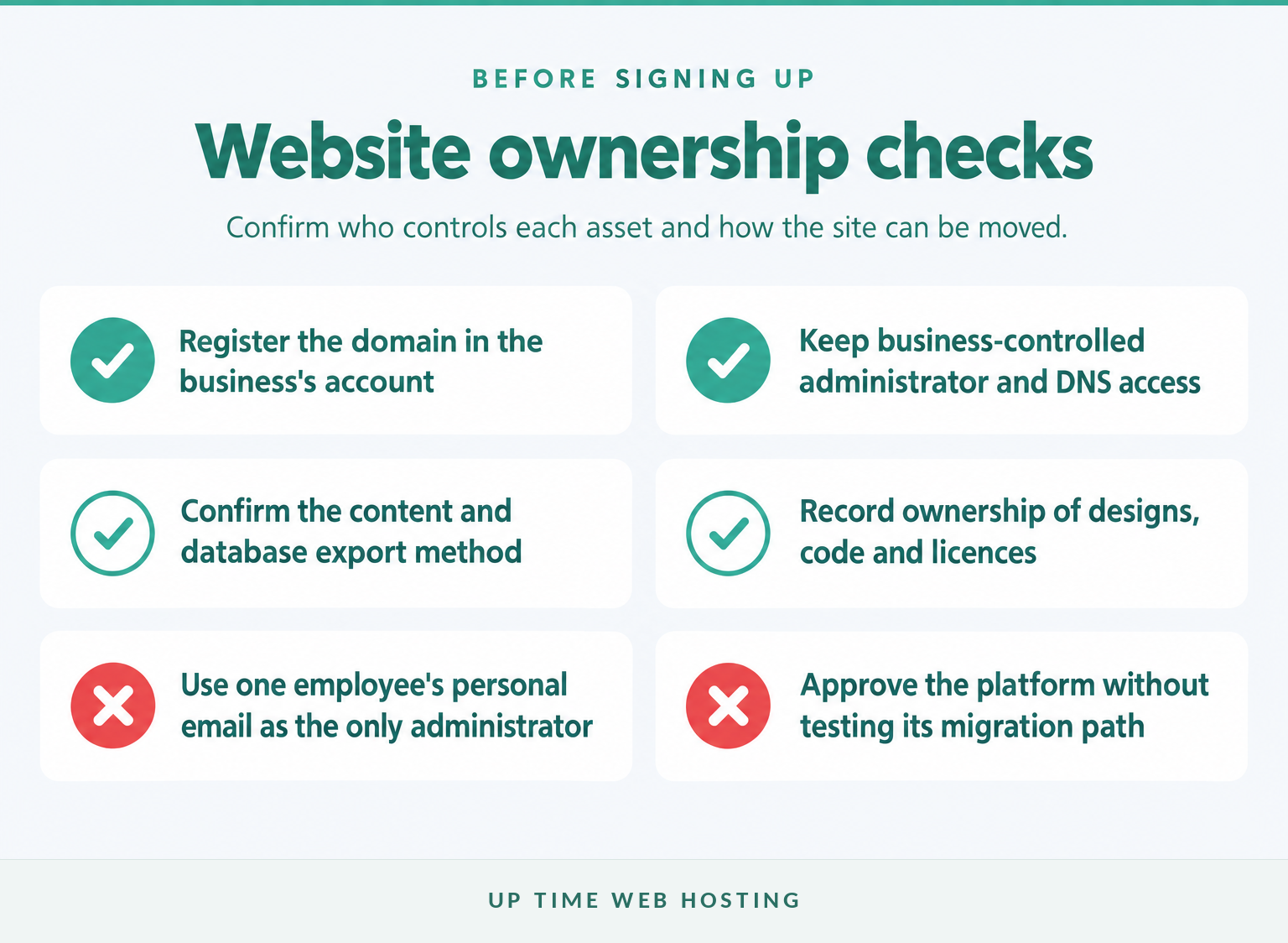
Before signing a CMS or website contract, ask:
- Is the domain registered in the business's name and account?
- Does the business have its own CMS and hosting administrator access?
- Can pages, posts, images, customer records and form submissions be exported?
- Who owns the theme, design files, custom code and paid extension licences?
- Can the site be moved to another provider without rebuilding it?
- What happens to forms, search, ecommerce and other dynamic features after an export?
WordPress provides built-in content export tools, but the official documentation explains that a standard content export is not the same as moving the complete site. A full migration may also need the database, uploaded files, configuration, theme and extensions. Review the official WordPress export and import tools before treating an XML export as a complete exit plan. (learn.wordpress.org)
Hosted builders vary. As of October 2026, the official Sitejet Builder documentation says its cPanel integration publishes managed files to the domain's document root and uses a Sitejet sharing workflow when moving a website between supported domains. That process should be demonstrated before purchase rather than assumed from a general export promise. (docs.cpanel.net)
Keep the domain outside any individual employee's personal account. Store recovery details in a controlled business password system and record who can approve DNS, hosting and CMS changes.
A business does not truly control its website unless it controls the domain, access, backups and a tested way out.
Host your website with our 5-star rated, cPanel website hosting plans.
Super fast servers, with security included and hosted in your choice of Australian Data Center.
View cPanel Plans
How much work does each CMS create after launch?
Every CMS creates ongoing work, but the person doing it changes. A hosted builder shifts more platform maintenance to the provider, while self-hosted and custom systems give the business more control and more operational responsibility.
Compare the ongoing workload
| Ongoing task | Self-hosted WordPress | Hosted website builder | Headless or custom CMS |
|---|---|---|---|
| CMS updates | Owner, host or maintenance provider | Usually the platform provider | Developer or software vendor |
| Extensions and integrations | Owner or developer | Provider-approved options | Developer and integration owners |
| Backups and restores | Host and website owner must confirm responsibilities | Usually provider-managed, with terms to check | Requires a designed recovery process |
| Performance tuning | Hosting, theme, extensions and content all matter | Mainly handled within platform limits | Shared across frontend, CMS, APIs and infrastructure |
| Support path | Host, developer and software community | One platform support channel | Several technical teams may be involved |
Official WordPress documentation says plugins and themes should be kept current and recommends making a backup before plugin updates. The plugin and theme update guidance also shows that automation can be set separately for individual components. (wordpress.org)
A hosted builder removes many server and software tasks, but it does not remove content reviews, domain renewals, form testing, accessibility checks or privacy obligations. A custom system can support specialised processes, but every unique integration adds another component that may need monitoring and specialist support.
The cheapest launch price is therefore not the total cost. Include staff time, maintenance, paid extensions, support, recovery work and the possible cost of moving later. A more focused discussion of these WordPress and hosted-builder trade-offs can help identify where the workload changes. (uptimewebhosting.com.au)
Low administration and high control are different benefits, and every CMS makes the business pay for one with more of the other.
How should you compare security, backups and updates?
CMS security is a shared responsibility involving the platform, hosting environment, administrator accounts, extensions and recovery process. A provider saying that security is included is not enough unless the contract identifies what is protected and who acts when something fails.
Put five controls in place before launch
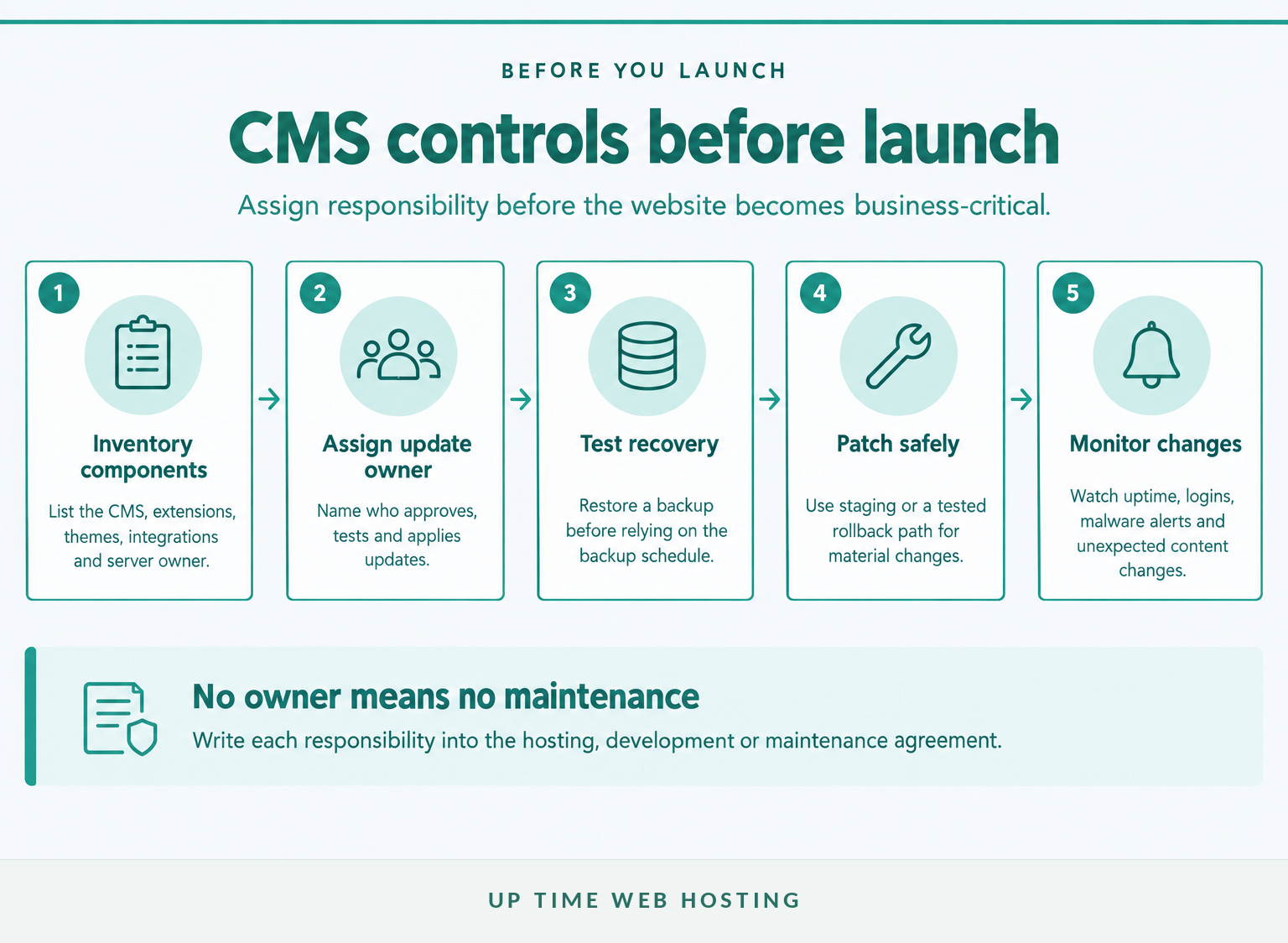
The official WordPress hardening guide recommends current software, trusted extension sources and a recovery plan. The Australian Cyber Security Centre's CMS hardening guidance also covers hardening controls and detecting unauthorised website changes. (developer.wordpress.org)
Ask each shortlisted provider or developer:
- Who applies urgent CMS and extension patches?
- Are administrator accounts protected with multi-factor authentication?
- How often are backups taken, and how long are they retained?
- Has a backup been restored successfully in a test?
- Who monitors malware alerts, failed logins and unexpected content changes?
- What is the escalation process if the website is compromised or unavailable?
Automatic updates can reduce exposure, but they are not a complete maintenance plan. Material changes should have a backup, a test method and a rollback path, especially when the website handles sales, bookings or customer enquiries.
Security improves when every layer has a named owner, a tested backup and a patching routine.
What should an Australian business check about hosting and support?
Australian hosting can provide clearer data location, local-time support and potentially lower latency for an Australian audience. The business should verify those benefits rather than assuming that an Australian brand, office or support number means every server, backup and subcontractor is in Australia.
Review the Australian hosting questions

Ask where the primary server and backups are located, which team answers support requests, what the escalation hours are and whether billing is in Australian dollars including GST. Also ask which overseas software providers or support teams may access business or customer information.
The OAIC's APP 8 guidance, updated on 3 October 2025, explains that an entity may have obligations when personal information is disclosed to an overseas recipient. It also notes that some cloud arrangements may be treated differently where the Australian entity retains effective control through contractual and technical measures. (oaic.gov.au)
Hosting in Australia does not automatically make a website compliant with the Privacy Act 1988 or any industry-specific requirement. It can make the data path easier to understand, but the business still needs suitable contracts, access controls, privacy notices, retention rules and incident procedures.
Australian hosting is useful only when the server location, support path and privacy responsibilities are all clear.
Register your new domain name at competitive market prices including free domain add-ons like privacy, DNS Hosting, Custom Nameservers and Forwarding.
Always the best price and no nasty renewal price hikes.
Register A Domain Name
What should an online store or growing site choose?
An online store should choose its CMS around daily operations, not only the number of products at launch. Payments, inventory, shipping, refunds, tax, subscriptions, point-of-sale systems and accounting integrations can become more important than the page editor.
A hosted commerce system may suit a business that wants the provider to operate most of the platform. A WordPress commerce setup may suit a content-heavy business that wants greater control over hosting, extensions and design. A custom or headless approach becomes reasonable only when the store has integration or channel requirements that justify ongoing development.
Before deciding, map the complete order process from product entry to fulfilment and refund. This guide lets businesses compare common ecommerce CMS approaches without treating the monthly subscription as the only cost. (uptimewebhosting.com.au)
An ecommerce CMS should fit the store's operations, not just its launch-day catalogue.
How do you test a CMS before committing?
Run a small pilot using the people who will operate the finished website. A controlled test reveals publishing friction, permission problems and support gaps that a polished sales demonstration may hide.
Use this five-part test:
- Build a real page: Recreate a service, product or article page with images, links, metadata and a form.
- Test staff roles: Give an editor limited access and confirm that the person can complete normal work without administrator rights.
- Export and restore: Export the available content, inspect the files and ask the provider to demonstrate a restore or migration.
- Simulate maintenance: Check how an update, staging change or rollback would be handled.
- Contact support: Submit a realistic technical question and assess the clarity of the response, not just its speed.
Score each option against the same criteria: ease of publishing, ownership, integrations, security responsibility, backup recovery, performance, support and three-year cost. Reject any option that cannot answer a critical requirement, even if its overall score is high.
A short pilot exposes more risk than a long sales demonstration.
Experience Microsoft 365 Business Standard for free for 30 days.
Up to 25 users with full access to email, OneDrive and Teams. Includes full versions of desktop apps of Outlook, Word, Excel, PowerPoint and more.
Try Microsoft 365
What else do business owners ask about CMS platforms?
These questions clarify where CMS terminology overlaps with website builders and other business software. The answers focus on the operating model rather than a list of brands.
What are CMS platforms?
CMS platforms are software systems used to create, organise, edit and publish website content through an administration interface. Most include page editing, media management, templates, user permissions and publishing controls. The main business models are self-hosted open-source software, hosted website builders, commerce systems and headless or custom systems.
What is CMS or CRM?
A CMS manages website or digital content. A CRM manages relationships with leads and customers, including contact records, sales activity and service history. Some business software connects both functions, but they solve different problems: the CMS publishes information, while the CRM tracks people and commercial interactions.
Is WordPress a CMS or a website builder?
WordPress is a content management system. It can also feel like a website builder when a visual editor or page-building theme is added, but the underlying software still manages content, users, templates and publishing. With self-hosted WordPress, hosting remains a separate decision. (wordpress.org)
Is a hosted website builder a CMS?
Yes. A hosted website builder is a type of CMS because it lets users create and manage website content. The difference is commercial and operational: the editor, hosting, updates and platform rules are bundled together, so convenience is higher but portability and technical control depend on the provider.
Which CMS is best for a small business?
The best CMS for a small business is the one the business can operate safely for several years. Self-hosted WordPress is often the stronger fit for flexibility and growth; a hosted builder can be better for a simple site with limited administration. Complex systems need a clear business case and developer budget.
The best CMS answer depends on who will operate the site, not which platform has the longest feature list.
What should you do next?
Write down who will publish content, maintain the software, manage hosting and respond when the site fails. If those responsibilities cannot be assigned clearly, choose the simpler operating model or include managed support in the budget.
Up Time Web Hosting documents Australian cPanel and WordPress hosting with local support, backups and security controls. If WordPress fits the checklist, review what WordPress hosting should include before selecting a plan and assigning its maintenance owner. (uptimewebhosting.com.au)
Choose the operating model first, then select the CMS and hosting that make that model realistic.