In short
The best ASP.NET MVC hosting is the plan that matches your application’s exact framework and deployment model, not the one with the longest feature list. Australian buyers should confirm the supported .NET version, IIS setup, SQL Server requirements, SSL, tested backups, deployment access, resource limits, server location and the provider’s support boundaries before paying.
Key takeaways
- Identify whether the application uses ASP.NET MVC 5 on .NET Framework or ASP.NET Core MVC before comparing plans.
- As of 26 November 2026, Microsoft supports .NET 10 LTS and .NET 11 STS; support for .NET 8 and .NET 9 ended on 10 November 2026. (dotnet.microsoft.com)
- ASP.NET Core behind IIS requires the ASP.NET Core Module supplied through the Hosting Bundle, including for self-contained deployments. (learn.microsoft.com)
- SQL Server edition, database limits, deployment access and application-pool restrictions can matter more than advertised storage or traffic allowances.
- Backups are useful only when the scope, retention period and restoration process are known and tested. (cyber.gov.au)
Table of contents
- Is your app ASP.NET MVC 5 or ASP.NET Core MVC?
- Which .NET version should the host run?
- Which hosting features matter most?
- Does an Australian server automatically make the host suitable?
- When is shared Windows hosting enough?
- How can you test a host before migrating?
- What else do people ask about ASP.NET MVC hosting?
- Which hosting option should you choose?
Start with the application rather than the plan card. A low price does not help if the server lacks the required runtime, the database uses an unsupported feature or the host cannot reproduce the app’s deployment and recovery process.
The aim is not to find the provider with the most ticks. It is to eliminate every plan that cannot run, protect and restore the application correctly.
Is your app ASP.NET MVC 5 or ASP.NET Core MVC?
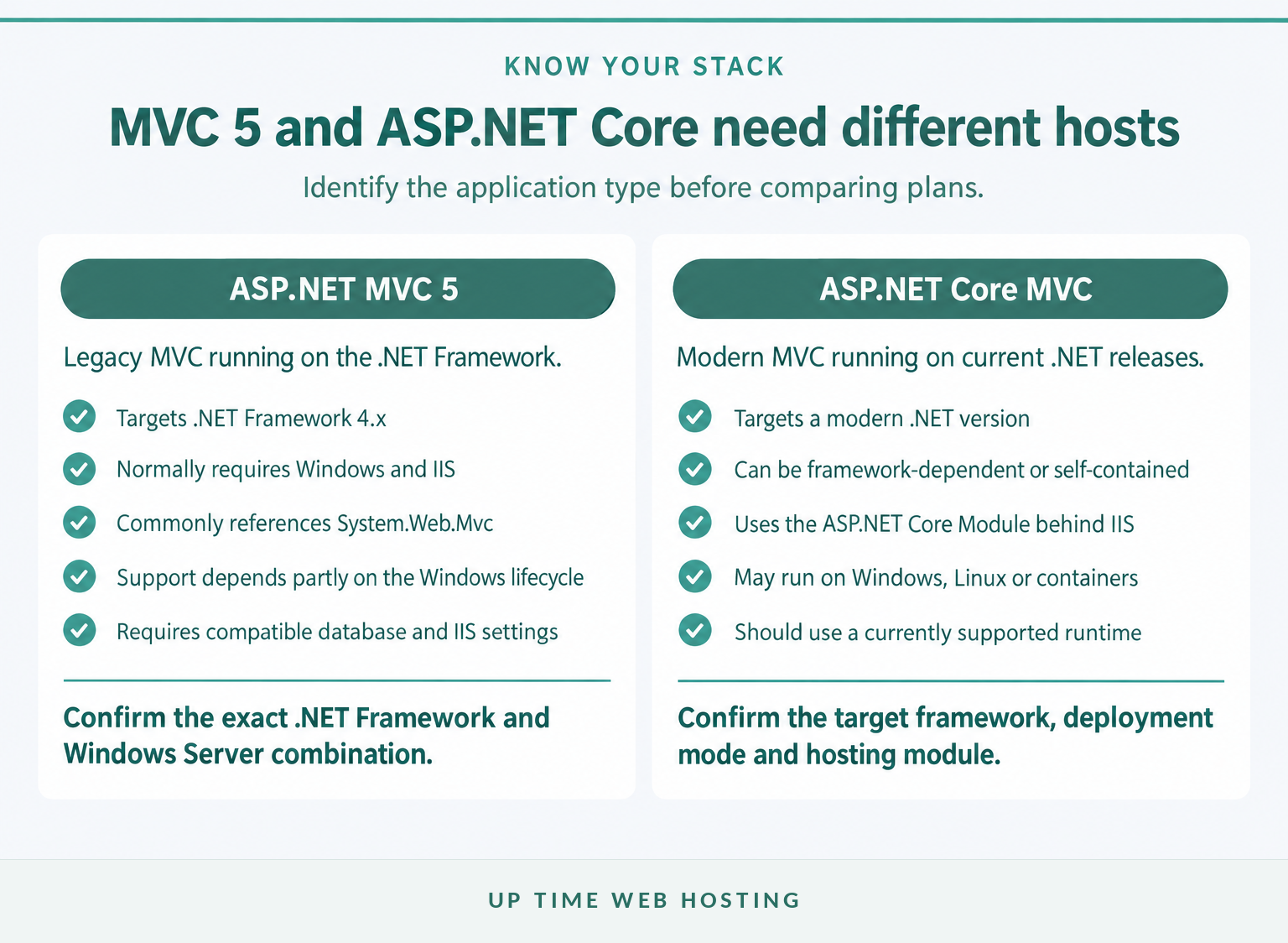
ASP.NET MVC 5 and ASP.NET Core MVC are not interchangeable hosting labels. MVC 5 runs on .NET Framework and normally needs Windows and IIS, while ASP.NET Core MVC runs on modern .NET and supports more than one deployment model.
An MVC 5 project commonly references System.Web.Mvc and targets a .NET Framework 4.x release. Microsoft continues to list ASP.NET MVC 5.x as a supported external ASP.NET package, while older MVC releases have reached end of support. (dotnet.microsoft.com)
An ASP.NET Core MVC project normally uses an SDK-style project file with a <TargetFramework> such as net10.0 or net11.0. The project may be published as framework-dependent, which requires a compatible server runtime, or self-contained, which includes the runtime in the deployment package. Microsoft explains both modes in its .NET publishing overview. (learn.microsoft.com)
If the terminology is still unclear, first establish what ASP.NET is and inspect the project file, NuGet packages and existing publish profile. Do not rely on a folder name or an old invoice that merely says ASP.NET hosting.
The hosting search only becomes useful after the application is identified as MVC 5 or ASP.NET Core MVC.

Performance you can feel, backed by clients who depend on it. Read how our support and uptime create long‑term customer success.Power Your Business with Better Hosting
Which .NET version should the host run?
The host should support the exact production target and keep that runtime patched for as long as the application uses it. An installed but unsupported runtime may run the site while leaving the business without current security servicing.
Microsoft’s .NET support policy, updated on 10 November 2026, lists .NET 10 LTS and .NET 11 STS as the currently supported releases. Both are scheduled for support until 14 November 2028, while .NET 8 and .NET 9 ended support on 10 November 2026. (dotnet.microsoft.com)
Legacy ASP.NET MVC 5 follows a different path. MVC 5.x remains supported under the ASP.NET support policy, while .NET Framework 4.x support is connected to the lifecycle of the Windows operating system on which it is installed. (dotnet.microsoft.com)
Up Time Web Hosting’s ASP.NET plan page, checked on 26 November 2026, specifically lists ASP.NET Framework 4.8 and ASP.NET Core 5 to 10. Its plan summaries also use the broader wording ‘All versions of .Net’. Because .NET 11 was released on 10 November 2026 but is not in the detailed framework list, a .NET 11 deployment should receive written compatibility confirmation before purchase. (uptimewebhosting.com.au)
Practical rule: A runtime being installed is not the same as that runtime still receiving security support.
A host is compatible only when it supports the exact runtime today and has a credible path for the next upgrade.
Which hosting features matter most?
The most useful hosting features are the ones tied to a known application requirement. Compare each plan against a written matrix instead of counting generic inclusions.
| Check | What to verify | Clarify before buying if |
|---|---|---|
| Framework | Exact .NET or .NET Framework target and patch policy | The provider only says ASP.NET supported |
| IIS | Hosting Bundle, ASP.NET Core Module, app-pool model and architecture | IIS details or application-pool limits are unavailable |
| Database | SQL Server version, edition, size, count, remote access and SQL Agent | The application uses an unlisted feature or edition |
| Deployment | Web Deploy, SFTP, Git, publish-folder access and rollback | Only source-code uploads or manual support tickets are allowed |
| HTTPS | Certificate inclusion, renewals, bindings and redirect control | SSL covers the website but not required subdomains |
| Backups | Files, databases, retention, off-site storage and restoration method | A backup is advertised without a restore process |
| Resources | CPU, memory, storage, concurrent processes and throttling | Traffic is unlimited but processing limits are unclear |
| Operations | Logs, health checks, monitoring and application-pool recycling | The provider cannot explain how failures are diagnosed |
| Support | Migration scope, response path and responsibility boundaries | Support covers the server but not deployment problems |
Microsoft’s IIS hosting guidance states that the Hosting Bundle installs the .NET runtime, libraries and ASP.NET Core Module used to run ASP.NET Core behind IIS. Even a self-contained deployment still needs the module when it runs through IIS. (learn.microsoft.com)
The developer should also confirm processor architecture, application-pool settings, folder permissions and the exact publish method. A practical walkthrough of hosting an ASP.NET Core application on IIS explains why copying an ordinary build folder is not the same as deploying Release publish output.
For the database, check more than the words SQL Server included. Ask about edition, version, storage, connection limits, remote management, SQL Agent and how the database is restored alongside the matching application files. The guide to MSSQL database hosting covers these decisions in more detail.
Ecommerce and integration-heavy applications need extra checks for scheduled jobs, payment webhooks, queues, email delivery and external APIs. The requirements in building an ecommerce website with ASP.NET show why a successful home page does not prove the complete application works.
The Australian Signals Directorate’s cloud shared responsibility guidance says businesses should understand which security and backup duties belong to the provider and which remain with the customer. It also recommends regularly testing the ability to restore important data. (cyber.gov.au)
The best feature list is the one that proves deployment, recovery and support will work for this application.
Host your website with our 5-star rated, cPanel website hosting plans.
Super fast servers, with security included and hosted in your choice of Australian Data Center.
View cPanel Plans
Does an Australian server automatically make the host suitable?
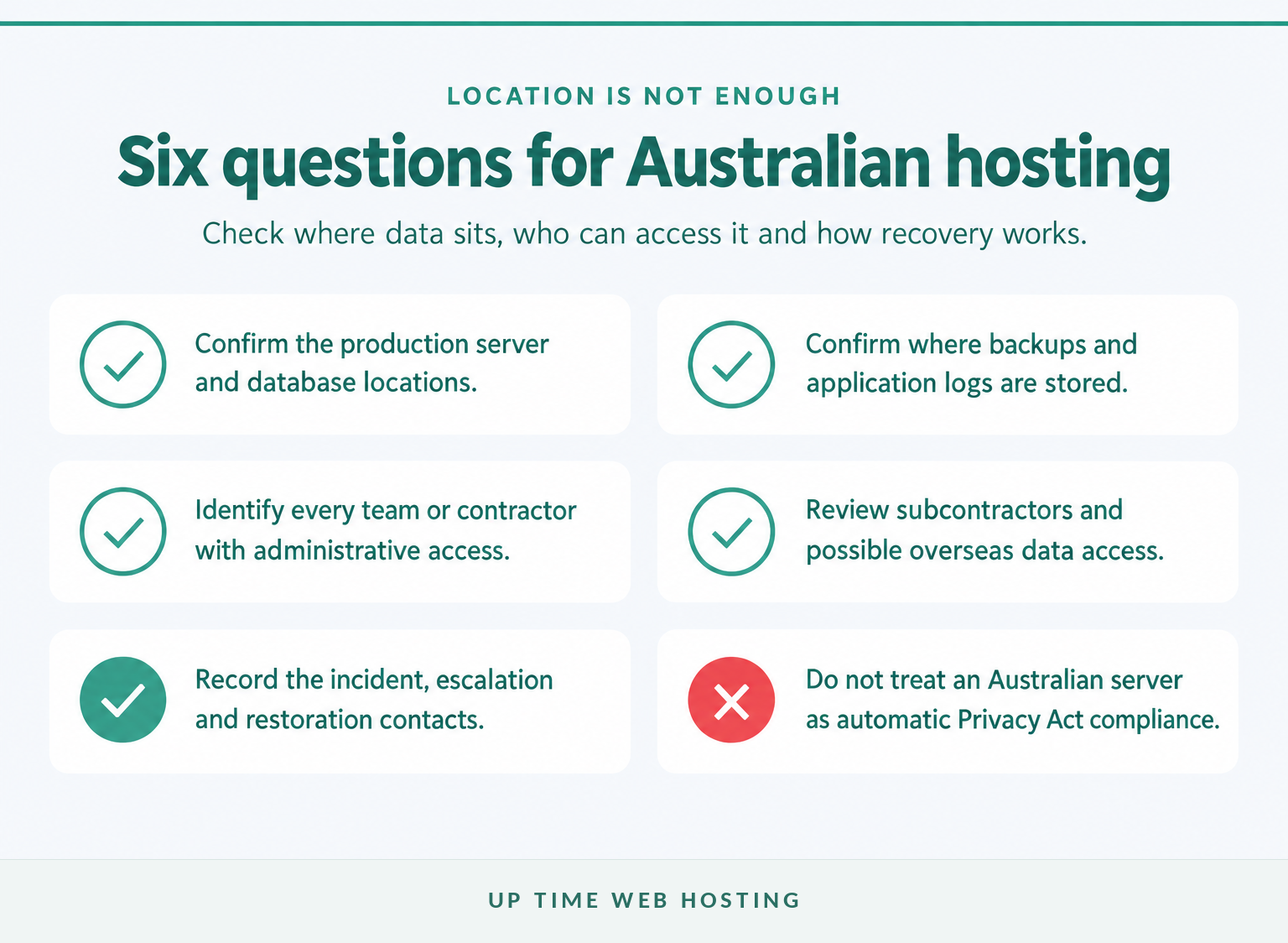
No. An Australian server can reduce network distance for Australian users and may simplify support or data-location requirements, but location alone does not prove performance, security or Privacy Act compliance.
Ask where the production server, database, backups and logs are stored. Then ask where the people who can administer those systems are located, which subcontractors can access them and what contractual controls apply.
The OAIC’s APP 8 guidance explains that routing information through an overseas server is not automatically a disclosure. Providing an overseas contractor with access to personal information will, in most circumstances, be a disclosure that requires the organisation to consider APP 8. (oaic.gov.au)
Local support also needs definition. Confirm support hours, escalation paths, migration responsibilities and whether the person answering can investigate IIS, database and deployment faults rather than only account or billing issues.
Australian hosting location helps, but access, backups and operational control decide the full risk.
When is shared Windows hosting enough?
Shared Windows hosting is often enough for a standard MVC application with a supported runtime, conventional IIS configuration and predictable resource use. A more controlled environment becomes necessary when the application needs server-wide changes, stronger isolation or services the shared platform does not permit.
Shared hosting is a practical starting point when the application:
- uses a runtime and SQL Server configuration already supported by the platform
- can be deployed through Web Deploy, SFTP or another allowed method
- does not require administrator access or custom Windows services
- can operate within published CPU, memory, process and storage limits
- has modest traffic and no unusual isolation requirement
- can use the host’s standard backup, logging and security controls
Consider a managed Windows environment when the application needs dedicated resources, custom software installation, private networking, specialised firewall rules, several related services or more control over maintenance timing.
Managed does not necessarily mean unrestricted. Up Time Web Hosting’s VPS documentation states that root or Administrator access is not provided because server work is performed as part of its management service. An application that requires direct administrator access, unsupported drivers or unrestricted server changes would not fit that model without an alternative arrangement. (uptimewebhosting.com.au)
Shared hosting suits standard applications; custom server requirements need a managed environment that can actually permit them.
How can you test a host before migrating?
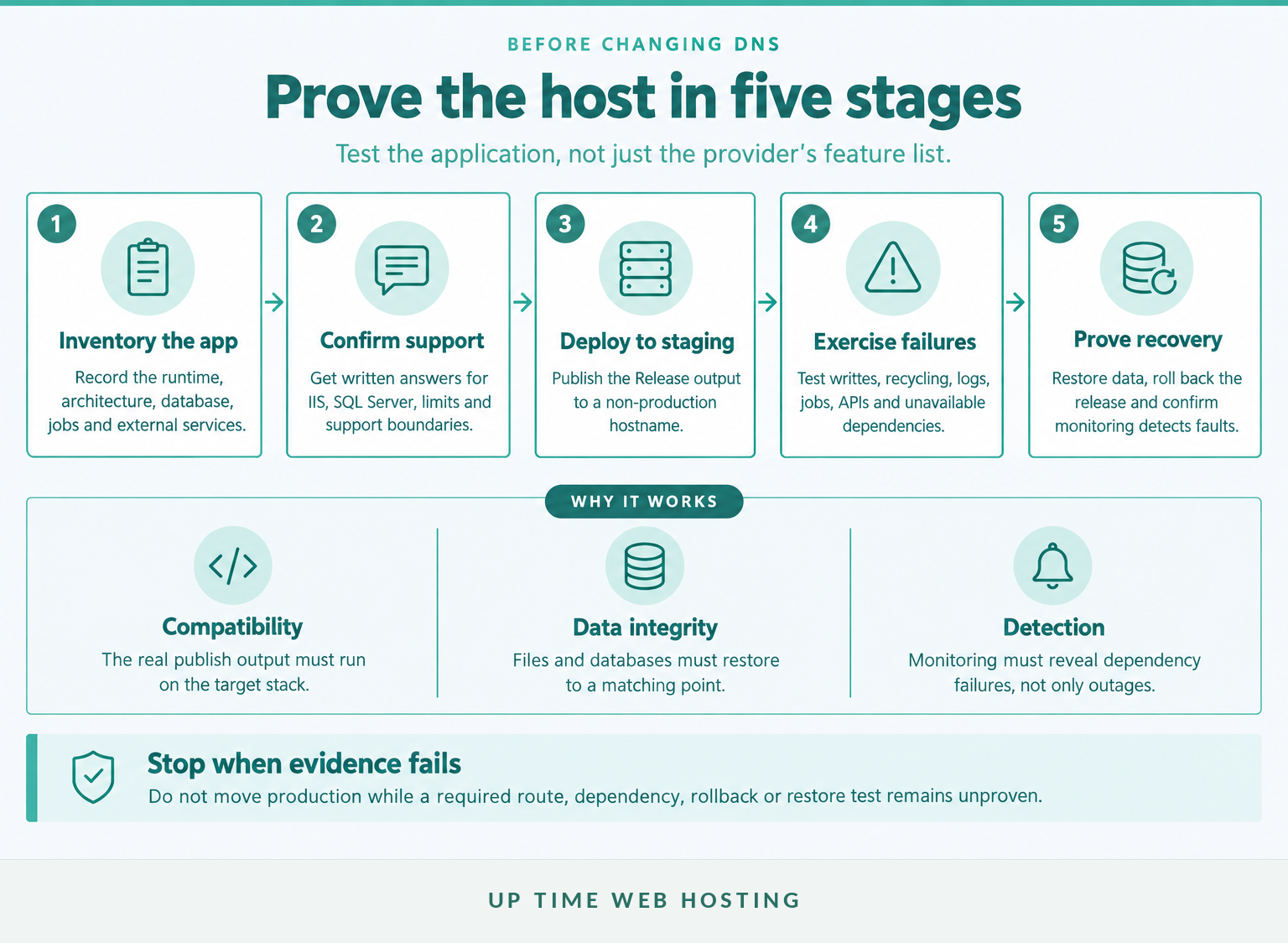
Test the real application in a staging account before changing production DNS. The test should prove runtime compatibility, database access, normal application behaviour, failure detection and recovery.
- Inventory the application. Record the target framework, x64 or x86 architecture, deployment mode, database version, required IIS features, writable folders, scheduled work, email service and external dependencies.
- Request written confirmation. Send the inventory to the provider and ask which requirements are supported, restricted, chargeable or outside support.
- Publish to staging. Deploy Release publish output to a temporary hostname using the intended production method. Microsoft’s publishing documentation distinguishes this output from a normal build folder. (learn.microsoft.com)
- Exercise the whole app. Test authentication, forms, file uploads, database writes, API calls, email, scheduled work and protected administration areas. Recycle the application pool and confirm the app returns without losing required state.
- Test monitoring and diagnosis. Microsoft’s ASP.NET Core health check guidance supports endpoints that report application and dependency health. Confirm logs and alerts reveal a failed database connection or unavailable external service rather than merely reporting that the home page responds. (learn.microsoft.com)
- Prove rollback and restoration. Keep the previous release, restore a staged file and database backup, and record how long the process takes. Do not assume an advertised backup includes application-consistent recovery.
Keep the answers, test results and agreed support boundaries with the deployment documentation. They become the baseline for later upgrades and incident response.
Do not migrate until staging, rollback and restore tests have all produced evidence.
Register your new domain name at competitive market prices including free domain add-ons like privacy, DNS Hosting, Custom Nameservers and Forwarding.
Always the best price and no nasty renewal price hikes.
Register A Domain Name
What else do people ask about ASP.NET MVC hosting?
The common questions usually come back to compatibility, control and cost. The ASP.NET label alone is not enough to answer any of them.
Can ASP.NET MVC run on shared hosting?
Yes, if the shared plan supports the exact framework, IIS settings, database and deployment method the application needs. Shared hosting becomes a poor fit when the app needs administrator access, custom Windows services, unusual ports, dedicated resource guarantees or server-wide software changes. Test the real app in staging before moving production.
Does ASP.NET Core MVC need Windows hosting?
No. ASP.NET Core is cross-platform, so it can run on Windows, Linux or containers when the application and dependencies support that choice. Windows hosting is often simpler for teams using IIS, Web Deploy, Plesk, SQL Server or Windows-only libraries. The application’s dependencies, not the MVC pattern, should decide.
What database is best for ASP.NET MVC hosting?
Use the database the application was designed and tested to use. SQL Server is common for ASP.NET applications, but MySQL, PostgreSQL and other systems can also work when the code and libraries support them. Confirm the exact version, edition, features, connection method and restoration process before selecting the hosting plan.
Is free ASP.NET hosting suitable for production?
Free ASP.NET hosting can be useful for learning, prototypes and temporary developer testing. Production use requires clear resource limits, current security patches, SSL, backups, monitoring, support and a stable service policy. A free plan that can be suspended, reset or withdrawn without a workable recovery path is not a safe business platform.
The right answer depends on the application’s exact stack, not the ASP.NET label alone.
Which hosting option should you choose?
Choose the lowest-cost plan that passes the application, deployment and recovery checks, not simply the lowest advertised price. If a provider cannot confirm the exact runtime, database features, resource limits and support boundaries, keep looking.
Choose the hosting model only after the provider has confirmed the application matrix in writing; if the app fits a Plesk and IIS shared setup, compare Windows ASP.NET hosting with that matrix beside you.