In short
Windows Server backup protects files, system state, applications and the volumes needed to rebuild the machine. Keep at least one recovery copy separated from production, set backup frequency from the acceptable data-loss window, retain enough versions to survive delayed discovery, and test file, application and full-system recovery on a documented schedule.
Key takeaways
- Microsoft’s native backup tools can protect selected data, system state and the critical volumes required for full-system recovery. (learn.microsoft.com)
- The recovery point objective sets the acceptable data-loss window, while the recovery time objective sets the acceptable service outage. (csrc.nist.gov)
- At least one backup copy should be isolated from production workloads and ordinary administrator access. (cyber.gov.au)
- Reusing the same remote shared folder with Windows Server Backup can overwrite the previous backup from that server. (learn.microsoft.com)
- A successful backup job does not prove that files, applications or the complete server can be recovered.
Table of contents
- What does a dependable Windows Server backup look like?
- What must a Windows Server backup protect?
- Which backup approach fits: local, cloud or managed?
- How do you set up Microsoft Windows Server Backup?
- How should backup frequency and retention be set?
- How do you recover a file, system state or the whole server?
- How do you prove recovery works before a real incident?
- When should a business use managed backup instead?
- What else do businesses ask about Windows Server backup?
- What should you do next?
What does a dependable Windows Server backup look like?
A dependable design starts with recovery outcomes, not a product list. Decide how much data may be lost, how long each service may be unavailable and which level of recovery each server requires.
A search for a ‘backup server for Windows’ can refer to a Windows machine storing backup files, software protecting Windows Server or a managed backup service. The label matters less than whether the design can complete the required recovery.
NIST defines the recovery point objective as the point in time to which data must be recovered after an outage. Its contingency planning guidance defines the recovery time objective as the maximum acceptable time a system resource can remain unavailable before the business impact becomes unacceptable. See the NIST definition of RPO and the NIST contingency planning guide. (csrc.nist.gov)
RPO determines backup frequency. RTO affects where backups are stored, how quickly they can be transferred, whether spare infrastructure is available and how much manual rebuilding is acceptable. Those targets belong in the wider business continuity plan, with an owner and an agreed recovery order.
Choose the recovery target first, then select the backup method that can meet it.

Performance you can feel, backed by clients who depend on it. Read how our support and uptime create long‑term customer success.Power Your Business with Better Hosting
What must a Windows Server backup protect?
Protect more than user files. A useful Windows Server plan covers data, operating-system state, application-consistent components and the critical volumes needed for the recoveries the business expects.
Which recovery job needs which backup?
| If you need to recover | Protect | Typical backup scope | Minimum useful test |
|---|---|---|---|
| A deleted or damaged file | Relevant data volumes and permissions | File, folder or volume backup | Restore to an alternate folder and check access |
| Windows configuration or supported server roles | System state and role-specific data | System-state backup | Restore in an isolated test environment |
| A server that will not boot | All critical volumes plus required data volumes | Image or bare-metal recovery backup | Start recovery media and locate the recovery point |
| A database or line-of-business application | Application data, configuration and required logs | Application-aware or native application backup | Open the restored application and validate transactions |
Microsoft’s wbadmin backup command supports selected files, folders and volumes, as well as system state and all critical volumes. The critical-volume option is intended for bare-metal recovery, but additional data volumes must still be included if the restored service depends on them. (learn.microsoft.com)
Microsoft’s Volume Shadow Copy Service coordinates point-in-time snapshots between the backup requester and application writers. The writer is what helps produce a consistent data set while an application remains active. (learn.microsoft.com)
For SQL Server, the SQL Writer service must be running when a VSS backup requests access to active database files. Microsoft’s SQL Server VSS backup guide also notes that VSS does not provide transaction-log backup, so database recovery may require native SQL backup jobs as well as server images. (learn.microsoft.com)
The right backup scope is the smallest scope that can still complete the required recovery.
Which backup approach fits: local, cloud or managed?
Local, cloud and managed backup solve different parts of the problem, and many businesses need a combination. Local copies favour fast restores, off-site copies reduce shared-site risk, and managed services add agreed monitoring, policy and recovery assistance.
How do local, cloud and managed backup differ?
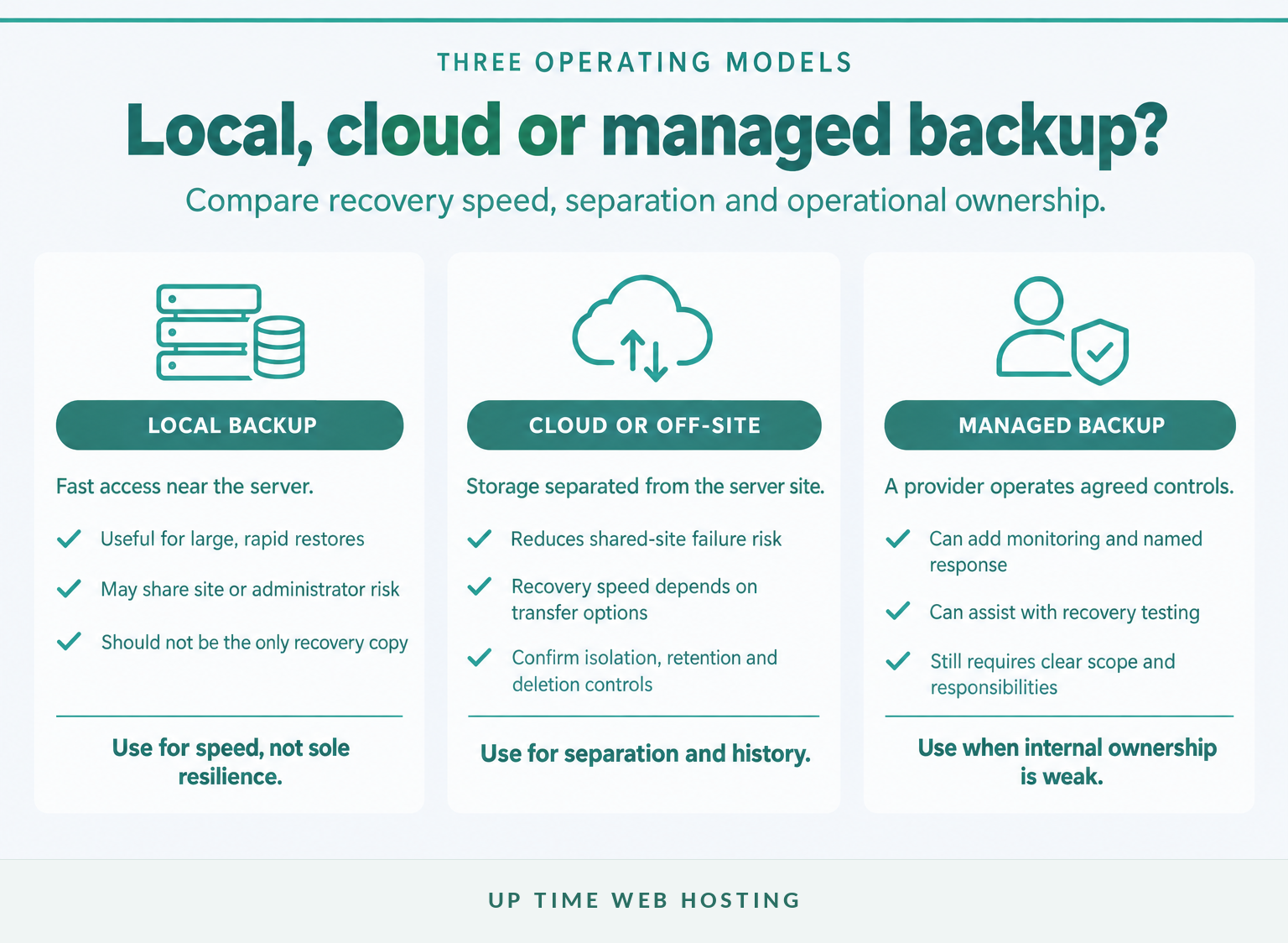
A local disk, backup appliance or network repository can shorten a large restore because data does not need to cross the internet. It can still fail with the production environment if it shares the same building, administrator credentials, storage platform or ransomware exposure.
Cloud or off-site storage separates the recovery copy from the server location. Cloud storage is not automatically immutable, isolated or correctly retained, so confirm who can delete backups, how accounts are protected, where data is stored and how a large recovery would be delivered.
A managed service can operate backup jobs, investigate failures and help run recovery tests. The customer still needs to define which systems matter, approve RPO and RTO targets, understand contractual responsibilities and keep an accessible copy of the recovery procedure.
ASD’s transition guidance for regular and proven backups recommends secure, resilient storage protected through encryption and immutable, offline, logically isolated or equivalent controls. It also says repositories should be separated from production and restoration tests should demonstrate that defined RTO and RPO targets can be met. (cyber.gov.au)
Use local storage for recovery speed, separated storage for resilience and managed operations when nobody internally can own the complete process.
Host your website with our 5-star rated, cPanel website hosting plans.
Super fast servers, with security included and hosted in your choice of Australian Data Center.
View cPanel Plans
How do you set up Microsoft Windows Server Backup?
Windows Server Backup is suitable for basic native protection on a single server, but it should sit inside a wider recovery design. Install the feature, choose the correct scope, use a separate destination, schedule the jobs and prove that restoration works.
What order should setup follow?
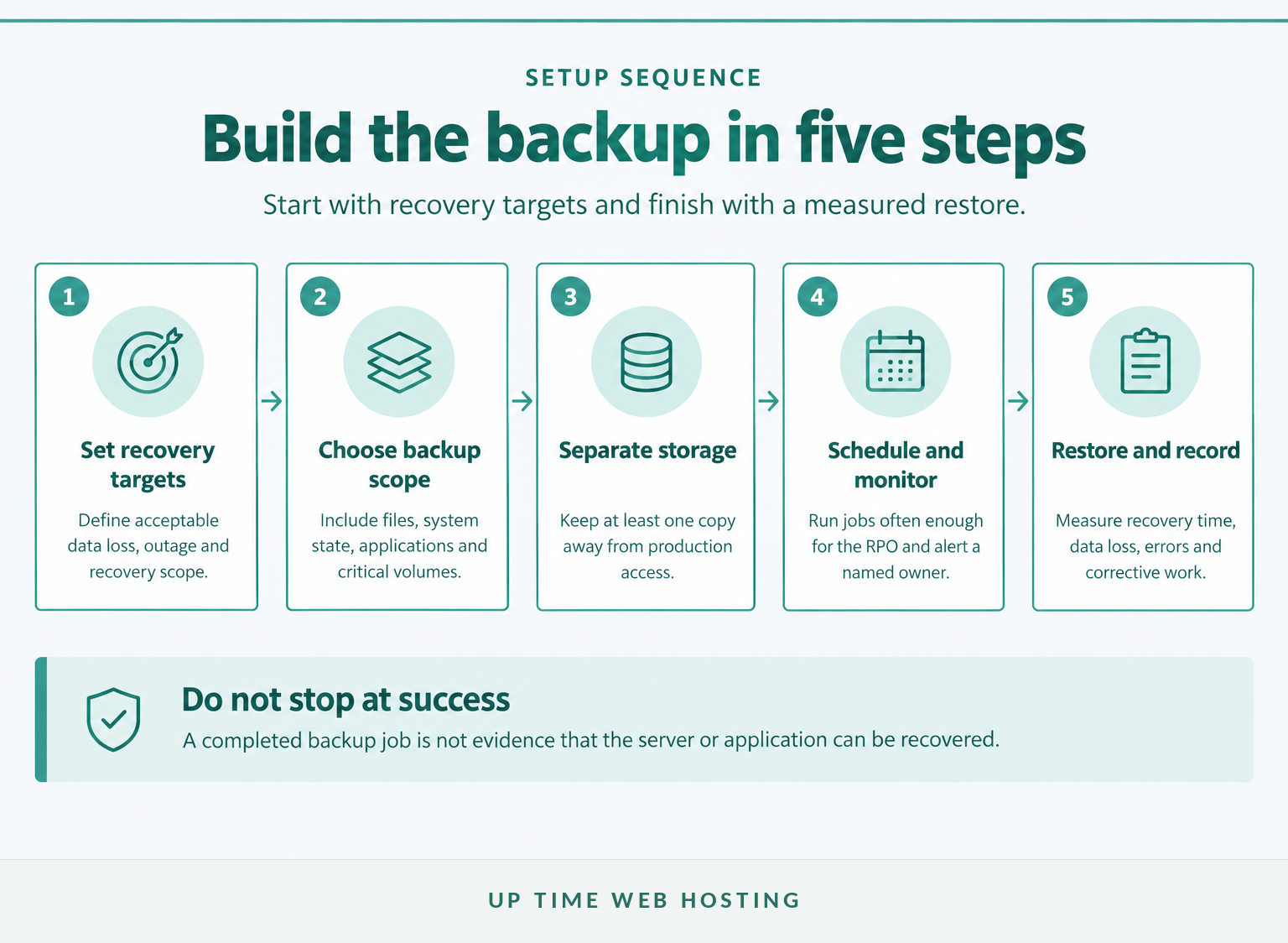
- Install the feature. Use Server Manager, or run the following command from an elevated PowerShell session. Microsoft’s Windows Server Backup installation guidance documents both methods. (learn.microsoft.com)
“powershell Install-WindowsFeature -Name Windows-Server-Backup “
- Choose the recovery scope. Select full-server protection when the aim is rebuilding the machine. Use a custom selection when only defined volumes, files or system state are required, but check every application dependency before excluding a volume.
- Choose a separate target. A dedicated local backup disk can provide a fast recovery copy, but it should not be the only copy. Do not use a destination volume that is included in the backup.
- Configure the schedule. The graphical console is suitable for straightforward schedules. The wbadmin scheduling reference supports scheduled backups through an elevated command prompt and requires Backup Operators or administrator rights. (learn.microsoft.com)
- Run and verify an initial backup. This example creates a one-time VSS copy backup of two volumes, system state and all critical volumes to a dedicated target. Replace every value with the tested scope for the actual server.
“powershell wbadmin start backup -backupTarget:F: -include:C:,D: -allCritical -systemState -vssCopy -quiet “
A remote share needs particular care. Microsoft warns that another backup from the same computer to the same remote shared folder overwrites the previous backup, and a failed replacement job can leave no usable version. Separate folders, versioned storage or backup software with explicit retention controls are safer than assuming a shared folder maintains history. (learn.microsoft.com)
A configured job is only the start; the setup is complete when a recovery test succeeds.
How should backup frequency and retention be set?
Backup frequency should be set by the RPO, while retention should cover both recent mistakes and problems discovered much later. A single daily copy may suit a low-change file server and be inadequate for a busy database or line-of-business system.
Common backup types include:
- Full backup: captures the complete selected scope and provides a new recovery baseline.
- Incremental backup: captures changes since the last qualifying full or incremental backup, usually reducing backup time but increasing the number of recovery points needed for restoration.
- Differential backup: captures changes since the last full backup, normally requiring the full backup and the selected differential for restoration.
- Copy backup: captures selected data without updating the normal backup history, which can be useful for an ad hoc copy that should not disturb another backup sequence.
Microsoft’s VSS backup type definitions recognise full, copy, incremental, differential and log backup types, although individual writers and products may not support every method. (learn.microsoft.com)
A practical retention design normally contains several recent recovery points, separated off-site copies and older historical points. Set the exact periods from business continuity needs, contractual obligations, applicable Australian record-retention requirements, cyber insurance conditions and available storage rather than copying a generic schedule.
If the RPO is four hours, the backup, replication and failure-alert process must protect changes at least that often. Retention must also extend beyond the time it may take to discover corruption, unauthorised changes or dormant ransomware.
Frequency limits data loss, while retention determines how far back the business can safely recover.
How do you recover a file, system state or the whole server?
Recovery method depends on what failed. Restore files to an alternate path when possible, use system state for supported operating-system components, and use bare-metal recovery when the server cannot boot or critical volumes must be rebuilt.
- Classify the incident before restoring. If ransomware or unauthorised access is suspected, isolate affected systems and establish a trusted recovery environment first. The ransomware data recovery process should begin before any backup is reconnected to a potentially compromised server.
- Choose a recovery point. Use the Windows Server Backup console or
wbadmin get versionsto identify available versions. For a security incident, select a point that predates the earliest suspected compromise rather than merely choosing the latest backup.
- Restore files to an alternate path first. Microsoft’s wbadmin recovery reference supports file, volume and application recovery, with options to create a copy, skip or overwrite an existing file. An alternate location reduces the chance of replacing good data before validation. (learn.microsoft.com)
- Use system-state recovery for supported components. System-state recovery may require a restart and should follow role-specific procedures, particularly for domain controllers, certificate services and clustered systems.
- Use recovery media for bare-metal recovery. Microsoft’s system state and bare-metal recovery guidance describes starting Windows Recovery Environment, locating the backup and restoring the system image. Confirm storage drivers, network access, credentials and the location of the
WindowsImageBackupfolder before an emergency. (learn.microsoft.com)
Recovery is finished only after applications, permissions, scheduled tasks, certificates, integrations and user access have been checked.
The safest recovery restores the smallest necessary scope into a controlled environment before production is changed.
Register your new domain name at competitive market prices including free domain add-ons like privacy, DNS Hosting, Custom Nameservers and Forwarding.
Always the best price and no nasty renewal price hikes.
Register A Domain Name
How do you prove recovery works before a real incident?
Treat backup jobs as unproven until restores succeed. Testing should show that the chosen recovery point is readable, the restored system is trustworthy and the business service returns within its RTO and RPO.
What should a recovery test prove?
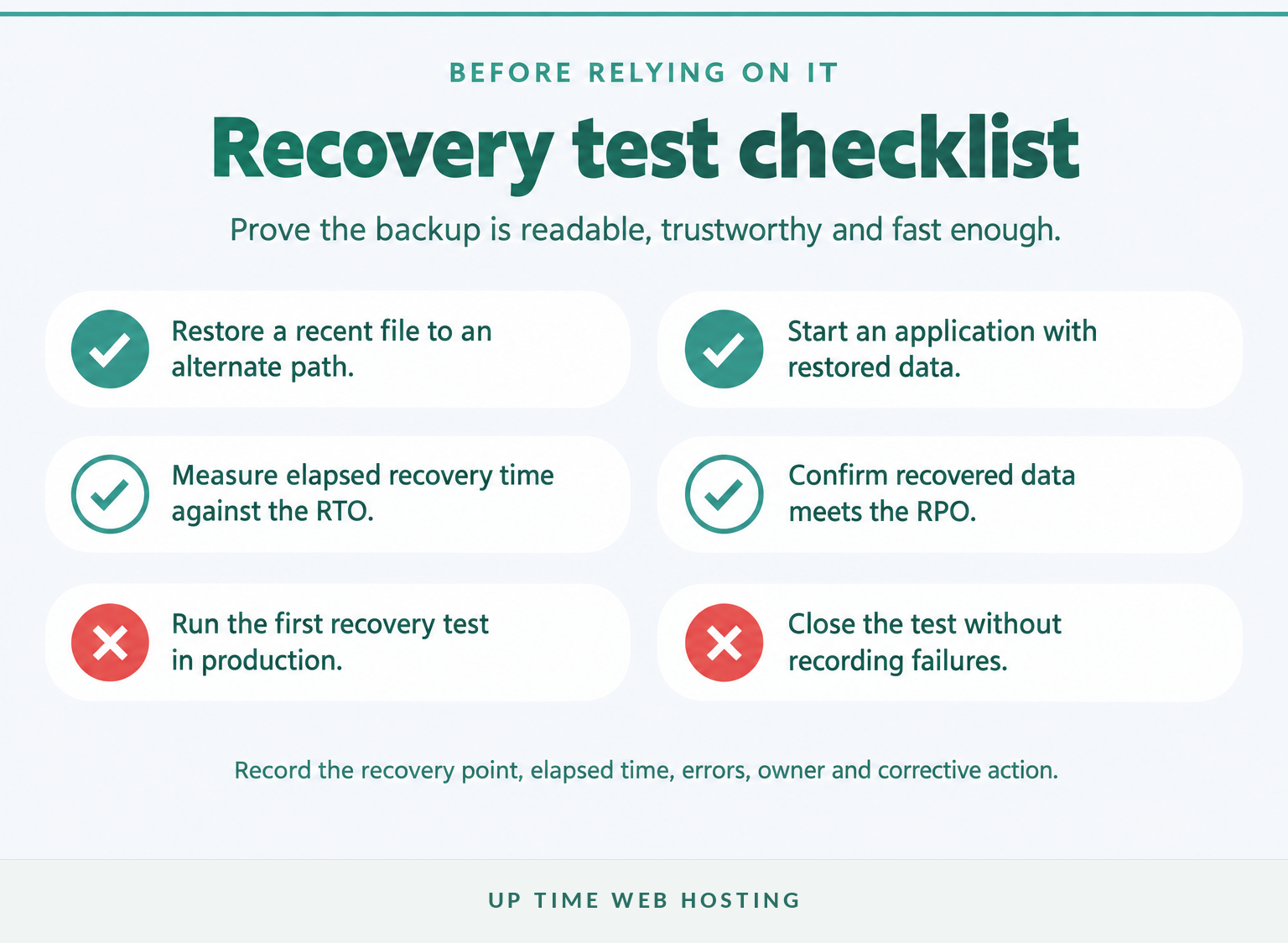
Use several levels of testing:
- File test: restore a recent file to another location and confirm its content, permissions and owner access.
- Application test: recover the application data into an isolated environment, start the service and validate a normal business transaction.
- System test: confirm recovery media starts, the repository is reachable and the required system image can be selected.
- Scenario exercise: test the people, credentials, communications, dependencies and approval process as well as the technology.
Record the recovery point, elapsed time, estimated data loss, errors, manual steps, test owner and corrective actions. Repeat testing after major server, application, authentication or storage changes, not only on a fixed calendar.
Backup failures, VSS writer errors, repository capacity and missed schedules should feed into Windows Server monitoring so an alert reaches a named responder. A failure message that nobody owns is not a control.
ASD’s current transition guidance says restoration testing should demonstrate that recovery procedures can meet defined recovery time and recovery point objectives. (cyber.gov.au)
A recovery test is successful only when the restored business service works within the agreed targets.
When should a business use managed backup instead?
A managed service is worth considering when the business cannot reliably operate backup software, protect repositories, investigate failures and run recovery tests internally. The decision is less about server count than about ownership, response requirements and available skills.
Managed backup may be appropriate when:
- nobody checks failed jobs and storage capacity each day
- the environment includes several physical servers, virtual machines, databases or remote sites
- recovery must be available outside normal business hours
- backup administrator access cannot be separated from normal server administration
- the organisation lacks a safe environment for application or full-system recovery tests
- internal staff understand the application but not VSS, recovery media or repository security
Backup also depends on patching, permissions, storage health and role ownership. Those broader responsibilities should be assigned through a documented Windows Server management process.
Ask a provider what is protected, where copies are held, who can delete them, how retention works, which applications are handled consistently, how failures are escalated, how often restoration is tested and how data can be recovered or exported if the service ends.
Use managed backup when the business needs accountable backup operations, not merely another place to store files.
Experience Microsoft 365 Business Standard for free for 30 days.
Up to 25 users with full access to email, OneDrive and Teams. Includes full versions of desktop apps of Outlook, Word, Excel, PowerPoint and more.
Try Microsoft 365
What else do businesses ask about Windows Server backup?
These questions cover common software, setup, support-lifecycle and backup-type concerns. Each answer should still be checked against the server roles, applications and recovery objectives in the actual environment.
What are the top 10 server backup software solutions?
There is no universal top 10 because the best choice depends on server roles, virtualisation, storage targets, recovery objectives, security controls and available administrators. Compare application-aware backup, image and file recovery, off-site isolation, protected retention, monitoring, documented restore procedures, licensing and support rather than relying on a generic ranking.
How to use Microsoft Windows backup?
Install the Windows Server Backup feature, open Windows Server Backup from Server Manager, choose Backup Schedule, select full-server or custom protection, choose a separate destination and set the schedule. After the first successful job, restore a file to an alternate folder and document the result before relying on the backup. (learn.microsoft.com)
Is Windows Server 2019 discontinued?
Windows Server 2019 is not discontinued as of November 2026. Microsoft’s Windows Server release information lists extended support to 9 January 2029, while its Windows Server 2019 lifecycle page displays 10 January 2029 in Pacific Time; plan replacement before January 2029. (learn.microsoft.com)
What are four types of backups?
Common backup types are full, incremental, differential and copy backups. A full backup captures the selected scope; an incremental captures changes since the last qualifying backup; a differential captures changes since the last full; and a copy backup captures selected data without updating normal backup history. Product terminology can vary. (learn.microsoft.com)
Software matters, but recoverable scope, protected storage and tested procedures determine whether the backup plan works.
What should you do next?
Write down one server’s RPO, RTO, required recovery levels and current backup locations, then run a restore that proves those targets. If the business needs managed backup and recovery, start with UpTime’s off-site backup solutions and ask for a plan based on the actual Windows Server workload.
The next useful step is a measured restore, not another unchecked backup job.